
MusicDisplay
2.5 版本现已发布,支持 Minecraft 26.1.x!请在此处查看更新日志 here。
无需退出游戏即可完全掌控你的音乐!此模组将 Spotify 无缝集成至你的 Minecraft 客户端,提供简洁的叠加层和便捷的回放控制。
功能特性
- 完整回放控制:直接在游戏中的暂停、继续、跳过或回退音轨。
- 实时叠加层:显示当前歌曲标题、艺术家、专辑封面以及实时进度条。
- 搜索 Spotify:你可以直接从 GUI 中搜索歌曲或播放列表!
- 音量管理:无需切换窗口(Alt-Tabbing)即可即时调整 Spotify 音量。
- 交互控件:
- 播放/暂停
- 上一曲 / 下一曲
- 随机播放切换
- 循环模式切换
- 喜欢/保存歌曲
- 状态同步:自动同步在其他设备上进行的更改(例如你的手机)。
- 自定义 API 密钥:使用你自己的 Spotify Client ID 和 Secret,实现完全的隐私与控制。
使用方法
1. 初始设置
要将模组连接到你的 Spotify 账户:
- 在游戏中打开客户端 GUI(默认按键:右 Shift)。
- 点击面板底部的 Setup Spotify 按钮。这将启动一个本地设置服务器,并自动在你的网页浏览器中打开设置页面(
http://127.0.0.1:8888/setup)。 - 按照网页上的说明操作:
- 登录 Spotify Developer Dashboard。
- 创建一个新的应用程序。
- 编辑应用设置并将
http://127.0.0.1:8888/callback添加为 重定向 URI (Redirect URI)。 - 复制你的 Client ID 和 Client Secret。
- 在网页表单中输入你的 Client ID 和 Client Secret,然后点击 Connect Spotify Account。
- 在浏览器中批准授权。完成后,你可以关闭浏览器标签页并返回游戏!
2. 状态与控制
在客户端 GUI 中启用 Spotify 模块。你的音乐将立即开始同步!
配置
配置文件存储在本地路径:.minecraft/config/spotify-config.json
按键绑定
- 右 Shift - 打开客户端 GUI
要求
- Spotify 账户(需要 Premium 会员)。
- Minecraft Java Edition (Fabric)。
- Java 25 或更高版本。
预览

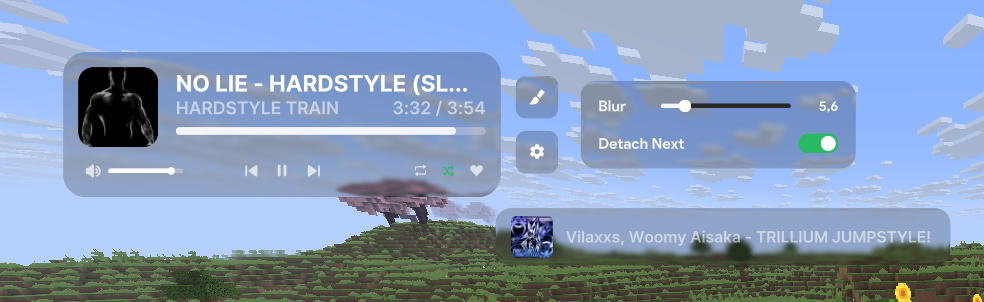
展示
MusicDisplay
Version 2.5 is now available, supporting Minecraft version 26.1.x! Check the changelog here.
Take full control of your music without ever leaving the game! This mod seamlessly integrates Spotify into your Minecraft client, offering a sleek overlay and easy access to playback controls.
Features
- Full Playback Control: Pause, resume, skip, or rewind tracks directly from the game.
- Live Overlay: Displays the current song title, artist, album art, and a real-time progress bar.
- Search Spotify: You can search for your song or playlist directly from the GUI!
- Volume Management: Adjust Spotify volume instantly without Alt-Tabbing.
- Interactive Controls:
- Play/Pause
- Previous / Next Track
- Shuffle Toggle
- Loop Toggle
- Like/Save Songs
- State Synchronization: Automatically syncs with changes made on other devices (e.g., your phone).
- Custom API Keys: Use your own Spotify Client ID and Secret for full privacy and control.
How to Use
1. Initial Setup
To connect the mod to your Spotify account:
- Open the client GUI in the game (default key: Right Shift).
- Click the Setup Spotify button at the bottom of the panel. This will launch a local setup server and automatically open the setup page in your web browser (
http://127.0.0.1:8888/setup). - Follow the instructions on the web page:
- Log in to the Spotify Developer Dashboard.
- Create a new application.
- Edit the app settings and add
http://127.0.0.1:8888/callbackas a Redirect URI. - Copy your Client ID and Client Secret.
- Enter your Client ID and Client Secret in the web form and click Connect Spotify Account.
- Approve the authorization in your browser. Once completed, you can close the browser tab and return to the game!
2. State & Control
Enable the Spotify module in your client's GUI. Your music will start syncing instantly!
Configuration
Configuration files are stored locally at: .minecraft/config/spotify-config.json
Keybinds
- Right Shift - Opens the Client GUI
Requirements
- Spotify Account (Premium is required).
- Minecraft Java Edition (Fabric).
- Java 25 or higher.
Preview
Showcase

下载 MusicDisplay
下载 MusicDisplay
下载 MusicDisplay
下载 MusicDisplay
下载 MusicDisplay
下载 MusicDisplay
下载 MusicDisplay
下载 MusicDisplay
下载 MusicDisplay
下载 MusicDisplay
由 Roland882 移植至 26.2
关于这个资源的讨论、问题反馈与使用心得
还没有讨论,来发第一帖吧
你是这个资源的作者?登录后可认领此资源。
相似资源
 模组

显示你正在注视的方块的信息。(适用于 Minecraft 1.16+ 的 Hwyla/Waila 分支)
 模组
在游戏画面角落显示附近世界地形、玩家、生物和实体的地图。可创建路径点,帮助你找到标记过的位置。
 模组

查看物品与配方
 模组
使用 JavaScript 编辑配方、添加自定义物品、编写世界事件!
 模组
AE2:一款流行的自动化与存储模组
 模组
那是什么?一个 Waila/Hwyla 的分支。
评论 0
登录后参与评分
还没有评论,来抢沙发吧