? MWHud — Minecraft 可自定义 HUD
一款功能丰富、高度可定制的 Fabric HUD 模组,将服务器的关键统计数据实时、美观且完全可拖拽地展示在你的屏幕上。
? 简介
MWHud 是一款面向 Fabric 的客户端模组,可与 MWHudPlugin(Paper/Spigot)配合使用,直接将实时的服务器统计数据推送到你的 HUD —— 无需指令、无需菜单、无需记分板杂乱信息。
你的服务器统计数据直接显示在屏幕上——金钱、飞行时间、PvP 状态等。随意拖动它们到你想要的位置,按你的方式自定义样式,并保存布局以便随时切换。
? 预览
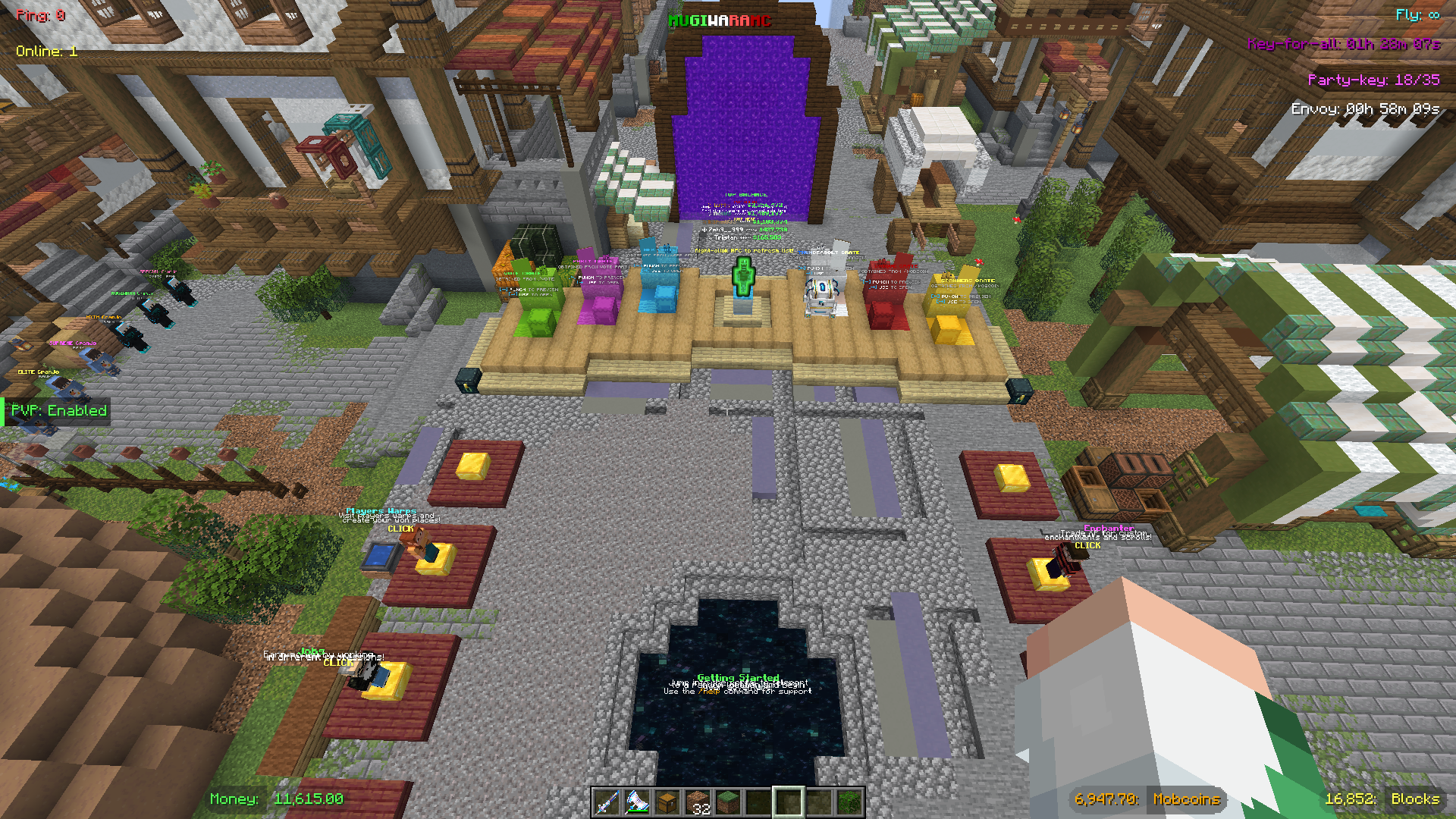
默认的 Mugiwara 预设 —— 完全可定制的布局,显示所有 HUD 元素。
✨ 特性
?️ HUD 显示元素
| 元素 |
描述 |
需要插件 |
| ? Money |
当前余额 |
✅ |
| ? Mobcoins |
Mobcoin 余额 |
✅ |
| ?️ Fly Time |
剩余飞行倒计时 |
✅ |
| ? Claim Blocks |
GriefPrevention 剩余的领地块数 |
✅ |
| ⚔️ PvP Status |
PvP 启用或禁用状态 |
✅ |
| ? Envoy Timer |
下一次 Envoy 活动倒计时 |
✅ |
| ? Key-for-all Timer |
下一次 Key-for-all 掉落倒计时 |
✅ |
| ? Party Key |
Vote Party 当前的/所需的票数 |
✅ |
| ? Ping |
实时连接延迟 |
❌ |
| ? Online Players |
当前服务器玩家数量 |
✅ |
| ?️ Server Title |
屏幕上显示的自定义服务器名称 |
✅ |
Ping 直接从 Minecraft 客户端读取 —— 无需插件。
⚙️ 自定义选项
| 选项 |
详情 |
| 16 种盒子形状 |
普通方框、药丸形、强调条、仅文本、底线、角括号、标签/旗帜、轮廓文本 —— 以及 8 种带幽灵/药丸模式的变体 |
| 15 种颜色 |
白色、浅灰、灰色、黑色、绿色、深绿、金色、黄色、青色、蓝色、浅蓝、紫色、红色、橙色、粉色 |
| 服务器颜色同步 |
自动匹配盒子颜色以符合服务器发送的颜色;一键重置 |
| 单盒控制 |
针对每个元素独立循环数值颜色、盒子形状和标签颜色 |
| 拖放操作 |
自由重新定位任何盒子;智能吸附到边缘、对齐线和中心点 |
| 群组拖放 |
按住 Shift 并拖动可同时移动附近的一组盒子 |
| 隐藏盒子 |
关闭单个盒子的显示而不丢失其位置 |
| 预设系统 |
3 个内置预设 + 保存无限数量的自定义布局(位置、颜色、形状、可见性) |
| HUD 缩放 |
循环切换 5 种缩放预设 —— 极小、小、正常、大、巨大 —— 独立于 Minecraft 的 UI 缩放 |
| 智能锚定 |
盒子自动检测边缘位置并相应锚定 —— 左、中或右 —— 保持所有缩放下的布局一致性 |
编辑模式控件
| 控件 |
操作 |
| 左键点击 (拖拽模式) |
拖动单个盒子 |
| Shift + 左键点击 (拖拽模式) |
群组拖动附近的盒子 |
| 左键点击 (编辑模式) |
循环数值颜色 |
| 右键点击 (编辑模式) |
循环盒子形状 |
| Shift + 右键点击 (编辑模式) |
循环标签颜色 (仅限分割形状) |
| 左键点击 (隐藏模式) |
切换盒子可见性 |
⌨️ 快捷键
| 按键 |
操作 |
| F6 |
开启/关闭整个 HUD |
| F7 |
开启/关闭记分板 |
| F8 |
打开 HUD 配置界面 |
| F9 |
打开密码管理器 |
| Esc |
退出当前编辑模式 |
? 密码管理器 (附加功能)
MWHud 包含一个内置的 按服务器密码管理器,独立于 HUD 本身。
| 特性 |
详情 |
| 自动登录 |
加入已保存的服务器时自动执行 /login <password> |
| 按账户存储 |
密码按“服务器 + 玩家名称”对存储 |
| 加密存储 |
密码在写入磁盘前进行 AES 加密 |
| 游戏内 UI |
从 F9 屏幕添加、查看(掩码处理)和删除已保存的条目 |
此功能完全是可选的,与 HUD 数据系统无关。
? 安装
- 为 Minecraft 1.21.x 安装 Fabric Loader
- 从发布页面下载最新的
mwhud-*.jar
- 将其放入
.minecraft/mods/ 目录
- 使用 Fabric 配置文件启动 Minecraft
该模组可以独立工作 —— 默认布局下 Ping 会立即显示。完整的 HUD 数据(金钱、飞行时间等)需要在服务器端安装 MWHudPlugin。
? 服务器管理员:请参阅 MWHudPlugin 页面以获取设置说明。
? Explorer's Mugiwara SMP
加入 Mugiwara SMP —— 我们充满活力的 Minecraft 生存多人服务器!?
在一个由社区驱动的友好世界中展开史诗般的冒险,特色包括:
- ? 商店 —— 在玩家驱动的经济体系中买卖物品
- ? 自定义龙 —— 面对拥有特殊奖励的独特龙类战斗
- ⚾ 精灵球 —— 捕捉生物并建立你的收藏
- ?️ 自定义物品/盔甲 —— 装备具有特殊能力的独家装备
- ? 防破坏保护 —— 认领你的土地,安心建造
- ⚔️ PvP 竞技场 / PvP 训练场 —— 在平衡的战斗区域测试你的技能
扬帆起航去冒险吧 —— 伟大航路正在等待! ?☠️
? MWHud — Customizable HUD for Minecraft
A feature-rich, highly customizable HUD mod for Fabric that brings your server's essential stats right onto your screen — in real-time, beautifully styled, and fully draggable.
? About
MWHud is a Fabric client-side mod that pairs with the MWHudPlugin (Paper/Spigot) to push real-time server statistics directly to your HUD — no commands, no menus, no scoreboard clutter.
Your server stats appear right on your screen — money, fly time, PvP status, and more. Drag them where you want, style them your way, and save layouts to switch between anytime.
? Preview
The default Mugiwara preset — fully customizable layout with all HUD elements displayed.
✨ Features
?️ HUD Display Elements
| Element |
Description |
Requires Plugin |
| ? Money |
Your current balance |
✅ |
| ? Mobcoins |
Your mobcoin balance |
✅ |
| ?️ Fly Time |
Remaining flight duration countdown |
✅ |
| ? Claim Blocks |
Remaining GriefPrevention claim blocks |
✅ |
| ⚔️ PvP Status |
Whether PvP is enabled or disabled |
✅ |
| ? Envoy Timer |
Countdown to the next Envoy event |
✅ |
| ? Key-for-all Timer |
Countdown to the next Key-for-all drop |
✅ |
| ? Party Key |
Current / required votes for a Vote Party |
✅ |
| ? Ping |
Your live connection latency |
❌ |
| ? Online Players |
Current server player count |
✅ |
| ?️ Server Title |
A custom server name shown on-screen |
✅ |
Ping is read directly from the Minecraft client — no plugin needed.
⚙️ Customization
| Option |
Details |
| 16 Box Shapes |
Plain Box, Pill, Accent Bar, Text Only, Bottom Line, Corner Brackets, Tag/Flag, Outline Text — plus 8 split variants with ghost/pill modes |
| 15 Colors |
White, Light Grey, Grey, Black, Green, Dark Green, Gold, Yellow, Cyan, Blue, Light Blue, Purple, Red, Orange, Pink |
| Server Color Sync |
Auto-matches box colors to whatever the server sends; one-click reset |
| Per-box Control |
Cycle value color, box shape, and label color independently per element |
| Drag & Drop |
Freely reposition any box; smart snapping to edges, alignments, and midpoints |
| Group Drag |
Hold Shift and drag to move a cluster of nearby boxes together |
| Hide Boxes |
Toggle individual boxes off without losing their position |
| Preset System |
3 built-in presets + save unlimited custom layouts (positions, colors, shapes, visibility) |
| HUD Scale |
Cycle through 5 scale presets — Tiny, Small, Normal, Large, Huge — independent of Minecraft's UI Scale |
| Smart Anchoring |
Boxes auto-detect edge positions and anchor accordingly — left, center, or right — keeping layouts consistent across all scales |
Edit Mode Controls
| Control |
Action |
| Left-click (Drag Mode) |
Drag a single box |
| Shift + Left-click (Drag Mode) |
Group-drag nearby boxes |
| Left-click (Edit Mode) |
Cycle value color |
| Right-click (Edit Mode) |
Cycle box shape |
| Shift + Right-click (Edit Mode) |
Cycle label color (split shapes only) |
| Left-click (Hide Mode) |
Toggle box visibility |
⌨️ Hotkeys
| Key |
Action |
| F6 |
Toggle the entire HUD on / off |
| F7 |
Toggle the scoreboard on / off |
| F8 |
Open HUD Configuration |
| F9 |
Open Password Manager |
| Esc |
Exit the current edit mode |
? Password Manager (bonus feature)
MWHud includes a built-in per-server password manager, independent of the HUD itself.
| Feature |
Details |
| Auto-login |
Automatically runs /login <password> when you join a saved server |
| Per-account storage |
Passwords are stored per server + player name pair |
| Encrypted storage |
Passwords are AES-encrypted before being written to disk |
| In-game UI |
Add, view (masked), and delete saved entries from the F9 screen |
This is entirely optional and unrelated to the HUD data system.
? Installation
- Install Fabric Loader for Minecraft 1.21.x
- Download the latest
mwhud-*.jar from the releases page
- Drop it into
.minecraft/mods/
- Launch Minecraft with the Fabric profile
The mod works standalone — ping shows immediately with a default layout. Full HUD data (money, fly time, etc.) requires the MWHudPlugin installed on the server side.
? Server admins: see the MWHudPlugin page for setup instructions.
? Explorer's Mugiwara SMP
Join Mugiwara SMP — our thriving Minecraft Survival Multiplayer server! ?
Embark on an epic adventure in a friendly community-driven world featuring:
- ? Shop — Buy and sell items in the player-driven economy
- ? Custom Dragon — Face unique dragon battles with special rewards
- ⚾ Pokéballs — Catch mobs and build your collection
- ?️ Custom Items/Armors — Equip exclusive gear with special abilities
- ? Grief Protection — Claim your land and build with peace of mind
- ⚔️ PvP Arena / PvP Training Arena — Test your skills in balanced combat zones
Set sail for adventure — the Grand Line awaits! ?☠️


 模组
 模组

 模组

 模组
 模组

 模组
评论 0
登录后参与评分
还没有评论,来抢沙发吧