
你是否曾觉得 Minecraft 的世界太过……荒凉?缺乏吸引力?又或者,只是不够刺激?无需再担忧!MyWorldGen 彻底革新了 Minecraft 的世界生成机制。它并非引入新的生物群系,或试图创建那些看起来怪异的硬编码结构,而是依靠你来填充你的世界。你只需将一些结构文件(schematic files)放入 .minecraft/worldgen 文件夹,它们就会开始在你的单人世界中生成。你也可以将其安装到服务器上,为你的社区提供自定义的世界生成内容!
源代码与问题追踪器
论坛帖子
CurseForge 模组页面
CurseForge 项目页面
截图
以下是随模组附带的一些示例在世界中生成的截图。
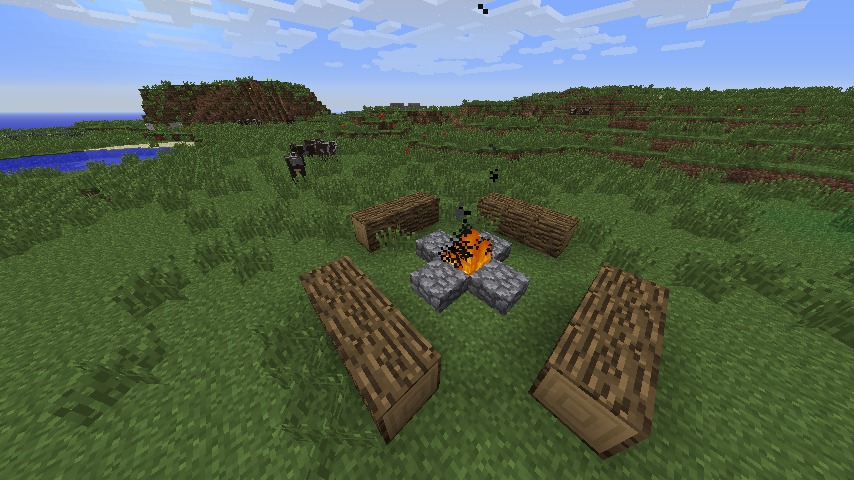
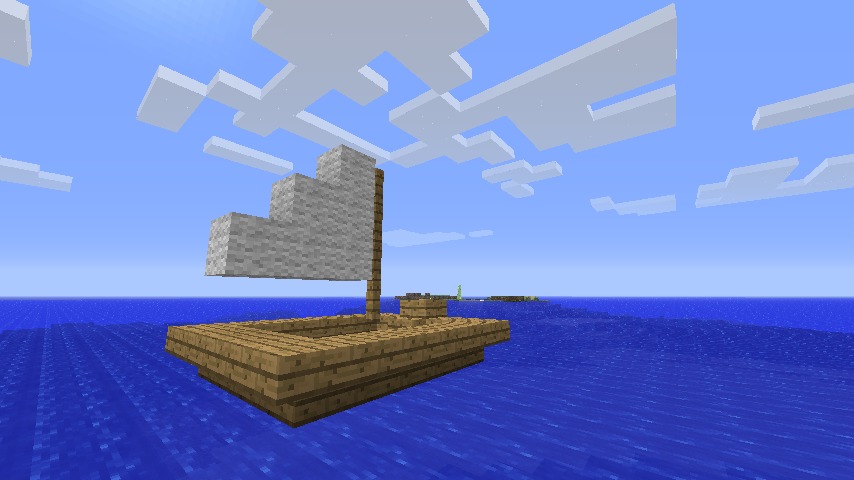
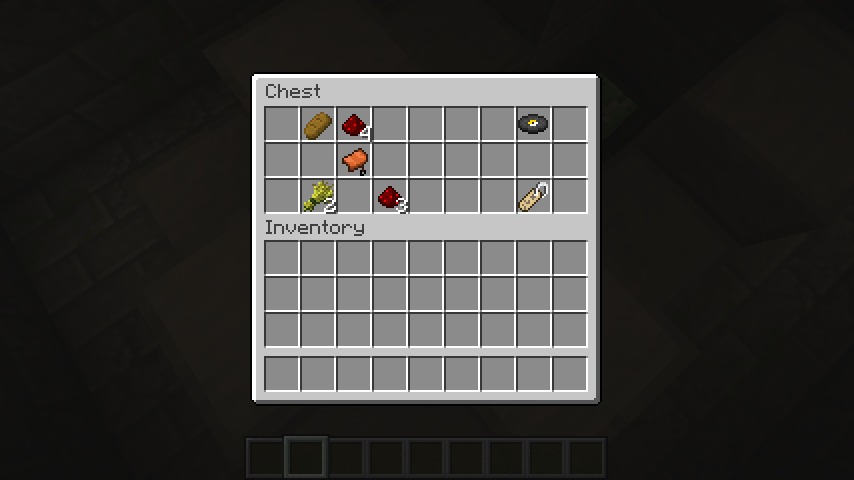
一个藏有宝藏的地下墓穴。
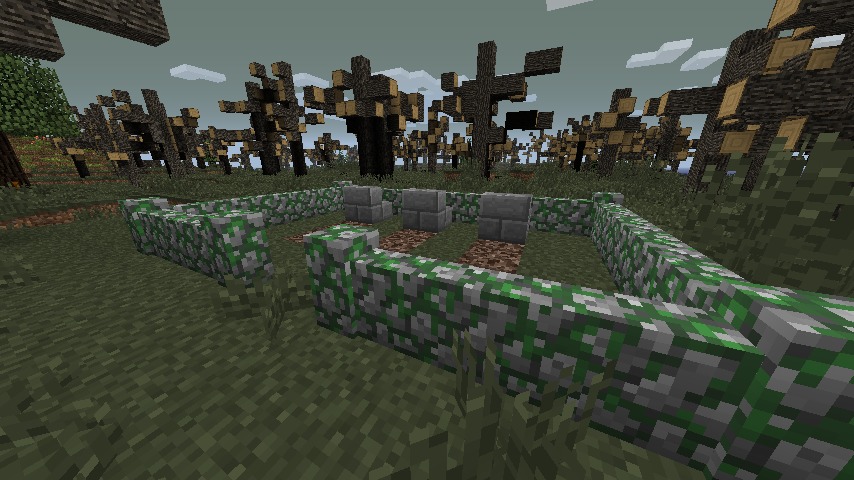
完全兼容其他模组!这里展示了一个墓地,它出现在 Biomes O' Plenty 的森林中。
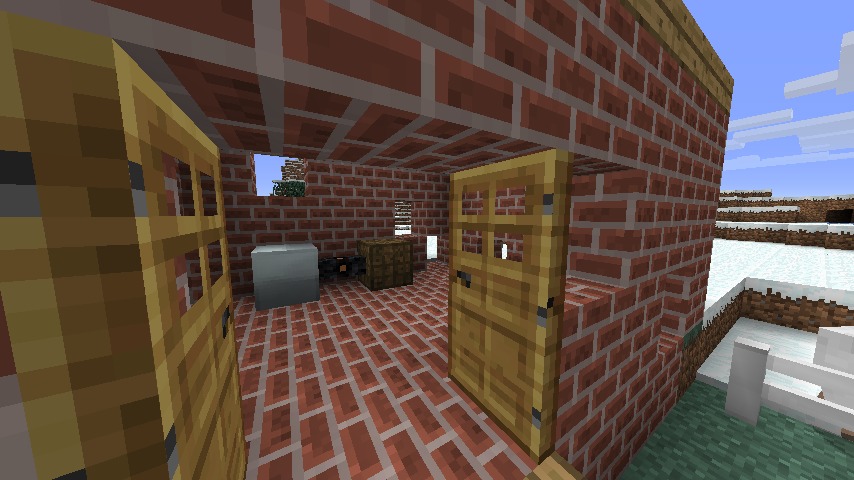
我似乎偶然发现了一座废弃的发电厂。电池箱里还残留着一些电力。
更多截图
使用说明
那么,你想制作自己的世界生成内容吗?这很简单!如果你已经有现成的结构文件,可以直接将其放入 .minecraft/worldgen 文件夹。否则,你只需在一个创造模式的世界中建造一些东西,然后使用“MyWorldGen”创造模式标签页中的“保存结构法杖”将结构保存到正确的目录中。
保存法杖
保存法杖使用矩形选择方法,如果你曾经使用过 WorldEdit 或 MCEdit,你应该对此很熟悉。右键点击第一个角上的方块进行激活,法杖会发光以提示它已锁定一个选定点,并在选择区域周围显示一个蓝色框。激活对角的另一个方块,将会弹出保存对话框。有关所有按钮的解释请参阅下方的“高级选项”,但你只需输入名称并保留所有默认设置即可。
加载法杖
为了验证你是否正确保存了结构,你可以使用加载法杖将结构放置到世界中。只需右键点击一个方块并选择一个要加载的文件。
锚点方块
有两种特殊类型的方块用于决定结构如何放置到世界中,它们都位于“MyWorldGen”创造模式标签页中。第一种是锚点方块。只有当锚点方块与世界中的现有方块匹配时,结构才会被放置到世界中。
地面锚点:匹配当前生物群系的“表层方块”。通常是草方块,但在沙漠生物群系中是沙块,在蘑菇岛生物群系中是菌丝块。
空气锚点:匹配任何“可替换”方块,除了液体。包括空气、高草、蕨类植物、枯死的灌木和掉落的雪。
石头锚点:匹配任何具有“岩石”材质的方块。包括石头、矿石、下界岩和末地石——基本上就是用镐开采的任何东西。
熔岩和水锚点:匹配流动或静止的方块。
木头、泥土、沙子及树叶锚点:匹配其各自的材质类型。
物品栏锚点:这种特殊的锚点只会匹配你放入其物品栏中的任意 9 个方块。例如,一个包含石头方块和草方块的物品栏锚点,只允许该位置出现石头方块或草方块。
请尽量在所有建筑中使用至少一个锚点方块,否则模组可能会随意将其放置在表面上,这可能不是你想要的结果。但也不要使用过多的锚点方块,因为这会增加找到合适放置位置的难度。
一旦放置到世界中,锚点方块将表现得像忽略方块一样。
忽略方块
当将结构放置到世界中时,矩形区域内的所有世界方块都将被替换,即使它们是空气方块。如果你想保留结构中某部分的现有方块,请使用忽略方块。不过,通常来说这对于形状奇特的地下结构才有意义。
外部工具
现在,当我提到结构文件时,我确实是指结构文件。它与 MCEdit、WorldEdit 等使用的文件格式相同!这意味着你甚至不需要使用 Minecraft 就能制作自己的世界生成内容!事实上,还有整个数据库的结构文件供你免费下载:
Minecraft Schematics.com
Minecraft-Schematics.net
Planet Minecraft
此外,配合这些法杖使用,此模组也可仅用于创造模式建筑的简易复制与粘贴。
高级选项
除了标准的 Schematic NBT 格式(描述见 此处)之外,MyWorldGen 还添加了一些专有的可选 NBT 标签。你可以使用任何 NBT 编辑器添加或编辑这些标签;我一直使用 NBTExplorer 配合 Mono。
- randomWeight(整数,默认值 10):数值越大,生成的可能性越高,其他结构生成的可能性则越低。
- chestType(字符串,默认值 dungeonChest):标识用于宝箱的箱子战利品类型。如果该字段存在且为空,宝箱将保留其原有内容。可能的值包括 mineshaftCorridor、pyramidDesertyChest、pyramidJungleChest、pyramidJungleDispenser、strongholdCorridor、strongholdLibrary、strongholdCrossing、villageBlacksmith 和 bonusChest。
- excludeBiomes(字符串列表,无默认值):此结构不会在此生物群系中生成的生物群系列表。此标签不能与 onlyIncludeBiomes 同时使用。
- onlyIncludeBiomes(字符串列表,无默认值):此结构仅在此生物群系中生成的生物群系列表。此标签不能与 excludeBiomes 同时使用。
- lockRotation(布尔值,默认值 false):在 Minecraft 中旋转方块并不可靠,因此如果你非常在意结构的朝向完美一致,启用此标志将使其始终面向同一方向。
- generateSpawners(布尔值,默认值 true):开启时,所有刷怪笼方块放置在世界中时会随机分配一个地牢怪物。关闭时,它将保留方块中指定的怪物。
- fuzzyMatching(模糊匹配,布尔值,默认值 false):这启用了寻找结构生成位置的另一方法。它不再尝试寻找匹配所有锚点的位置,而是随机选择一个锚点,然后为该锚点寻找合适的位置。这种方法速度更快,能确保更多的生成,但结果可能会显得不太美观。
- terrainSmoothing(地形平滑,布尔值,默认值 false):此选项仅在 fuzzyMatching 也开启时才有意义。当锚点方块放置在世界中时,无论是否匹配该位置,它都会填充周围空间以进行匹配。例如,不匹配的地面锚点会用泥土填充其下方的任何空气方块。
- MWGIDMap:由于方块 ID 可以重新配置,此标签允许跨安装版本兼容。除非你了解其工作原理,否则请勿修改!
如果你不确定这些标签的工作原理,请查看包含的或生成的示例 Schematic 文件。
问题 (我确信有人会问)
- “这不是以前就有人做过了吗?”是的(很多次),但我想要自己实现。我想制作一款易于访问、可扩展且兼容的工具。
- “整合包?”这个模组是开源的,所以我无法阻止你对它做任何事情。不过,如果你能链接回这里,我将不胜感激。另外,如果你真的这么做了,请告诉我!
- “为什么模组方块的旋转不正常?”请模组作者像 Forge 处理原版方块那样实现 rotateBlock 方法。
- “火把被弹开了!”这是 Forge 方块旋转的一个限制。它会强制更新方块,使无效的方块配置自行解决。也许有一天我会实现自定义旋转。
更新日志
1.4.1
- [1.9] 修复了在副手持有物品时的崩溃
- 修复 MWG 方块在水中破坏的问题(将材质类型更改为“iron”)
- 改进了 Schematic 世界放置(方块更新一次性完成,以确保只执行必要的更新。此外,加载法杖现在会朝远离你的方向放置)。
- 添加了简单的无限递归防护
- 改进对不含锚点的 Schematic 的支持
- [1.9] 修复忽略方块碰撞的异常行为
1.4
- 实现模糊匹配和地形平滑
- 更详细的保存向导 GUI
- 重构资源包处理(需要 json 索引;允许在 json 中设置/覆盖生成参数)
- 为保存法杖添加了选择框
- 更新了一些包含的 Schematic 以使用新的模糊匹配系统(照例,删除或移动你的 worldgen 文件夹即可看到它们)
1.3.4
1.3.3
- 基于 1.7.10 构建,但它应该仍然适用于 1.7.2
- 旋转锁定(NBT 标签 "lockRotation")
- 尊重世界的“生成结构”设置
- 加载锚点支持无损/按原样切换
- 各种小修复,详见
1.3.2
1.3.1
- 修复实体保存
- 修复在某些情况下锚点方块不被识别的问题
- 修复法杖堆叠大小为 0 的问题(导致一些库存故障)
- 将部分法杖逻辑移至服务器端(某些功能可能缺失,但可靠性大大提高)
- 修复矿洞入口 Schematic
1.3
- 支持 1.7!
- 修复在专用服务器上加载模组的问题。注意:现在有一个配置选项 enableItemsAndBlocks,如果你想让安装了 Forge 但未安装此模组的客户端能够连接,必须将其关闭。)
- 针对 MC 1.7 进行了大量内部更改和修复。部分 MWG v1.2 的 Schematic 可能不兼容。
- 添加了对 OpenBlocks 捐赠站的支持 ;-)
1.2
- 更新至最新版的 Forge
- 更改部分内容以准备 1.7
- 添加了库存锚点:匹配 9 个槽位中的任何方块
1.1
- 已更新至 1.6.3(预发布版)
- 添加了木板、泥土、沙子和树叶的锚点
- 添加了专属创意模式标签页
1.0
- 改进了世界生成算法,并使其可配置
- 添加了资源包支持;它会在所有资源包的 assets/myworldgen/worldgen 目录中查找结构文件(schematics)。
- 添加了一些额外的示例结构文件;如果你正在升级,请删除或移动你的 worldgen 目录,或者自行从 jar 文件中解压它们。
- 略微改善了没有锚点时结构文件的放置效果
- 添加了 mcmod.info 文件
捐赠
任何帮助都将不胜感激,以推动开发继续进行!
签名档
[url=http://www.minecraftforum.net/topic/1902599-][img]https://media.forgecdn.net/attachments/10/373/pack.png[/img][/url]
计划中的功能包括不忽略锚点方块以及用于复杂结构的锚点到锚点方块。虽然该模组在 Forge 服务器上应该能正常运行,但我未来可能会考虑制作一个 Bukkit 版本,不过其功能将受到限制。
请在下方分享你的结构文件和资源包!我也希望听到关于任何错误、崩溃或反馈的意见。
Have you ever felt that Minecraft's world was too… desolate? Uninviting? Or perhaps, is it just not exciting? Worry no longer! MyWorldGen revolutionizes Minecraft world generation. Rather than introducing new biomes, or trying to make up strange-looking hard-coded structures, MyWorldGen relies on you to populate your world. All you have to do is put some schematic files into your .minecraft/worldgen folder, and they'll start showing up in your single-player worlds. You can also install it onto a server, and have custom worldgen for your own community!
Source & issue tracker
Forum thread
CurseForge mod page
CurseForge project page
Screenshots
These are screens of some examples that come with the mod, generating in the world.
An underground crypt, with loot!
Fully mod compatible! Here's a graveyard I made showing up in a Biomes O' Plenty forest.
It appears I've stumbled upon an abandoned power plant. The batbox still has some power left in it.
More screenshots
Instructions
So, you want to make your own world generation? Well, that's easy! If you already have a schematic ready, you can go ahead and drop it into your .minecraft/worldgen folder. Otherwise, all you have to do is build something in a creative world, and use the "Schematic save wand" in the "MyWorldGen" creative tab to save the schematic to the correct directory.
Save wand
The save wand uses a rectangular selection method, which you should be familiar with if you've ever used WorldEdit or MCEdit. Right click (activate) the first corner block, and the wand will glow to let you know that it's holding a selection point, as well as show a blue box around the selection area. Activate the opposite corner block, and a save dialog will show up. See "advanced" below for an explanation of all of the buttons, but you can just type in a name and leave everything at defaults.
Load wand
To verify that you've saved it correctly, you can use the load wand to place a schematic into the world. Just right-click on a block and choose a file to load.
Anchor blocks
There are two types of special blocks that determine how a structure is placed into the world, both found in the "MyWorldGen" creative tab. The first are anchor blocks. Anchor blocks will only allow a structure to be placed into the world if they all match blocks already in the world.
Ground anchor: Matches the "top block" of the current biome. That's usually grass, but is sand for desert biomes and mycelium for mushroom biomes.
Air anchor: Matches any "replaceable" block, except for liquid. That includes air, tall grass, ferns, dead shrubs, and fallen snow.
Stone anchor: Matches any block with the "rock" material. That includes stone, ores, netherrack, and end stone — basically anything that is mined with a pickaxe.
Lava and water anchors: Matches either flowing or still blocks.
Wood, dirt, sand, and leaves anchors: Matches their respective material types.
Inventory anchor: This special anchor will only match any of the 9 blocks that you place in its inventory. For example, an inventory anchor containing a stone block and a grass block will only allow the structure to appear with either a stone block or a grass block in that place.
Try to use at least one anchor block for all of your builds, otherwise the mod will just put it down somewhere on the surface, which may not be what you want. Don't use too many anchor blocks either though, because that will make it harder to find a place for!
Once placed in the world, anchor blocks will act like ignore blocks.
Ignore blocks
When placing a schematic into the world, all world blocks within the rectangular region will be replaced, even if they are air blocks. If you want to preserve the existing block in a part of your structure, use an ignore block. Generally though it will only really matter for oddly-shaped underground structures.
External tools
Now, when I say schematic file, I actually mean schematic file. It's the same kind used by MCEdit, WorldEdit, and many others! That means you don't even have to use Minecraft to make your own world generation! In fact, there are whole databases of schematic files for you to download for free:
Minecraft Schematics.com
Minecraft-Schematics.net
Planet Minecraft
Plus, with the wands, this mod could be used just for a rudimentary copy & paste for your creative builds.
Advanced
In addition to the standard schematic NBT format (described here), MyWorldGen adds a few optional NBT tags for itself. You can add or edit these with any NBT editor; I've been using NBTExplorer with Mono.
- randomWeight (integer, default 10): The bigger, the more likely it will show up, and the less likely others will.
- chestType (string, default dungeonChest): Identifies what type of chest loot to use for chests. If the field exists and is blank, chests will retain their contents. Possible values include mineshaftCorridor, pyramidDesertyChest, pyramidJungleChest, pyramidJungleDispenser, strongholdCorridor, strongholdLibrary, strongholdCrossing, villageBlacksmith, and bonusChest.
- excludeBiomes (list of strings, no default): A list of biomes that this structure will not generate in. This tag is not allowed alongside onlyIncludeBiomes.
- onlyIncludeBiomes (list of strings, no default): A list of biomes that this structure will only generate in. This tag is not allowed alongside excludeBiomes.
- lockRotation (boolean, default false): Rotating blocks isn't very reliable in Minecraft, so if you really care that your structure looks perfect, this flag will make it always face the same direction.
- generateSpawners (boolean, default true): When this is on, all spawner blocks will get a random dungeon mob when placed in the world. When off, it keeps the mob specified in the tile.
- fuzzyMatching (boolean, default false): This enables an alternate method for finding structure spawn locations. Instead of trying to find locations that match all anchors, it will choose a single anchor at random and then find an appropriate spot for that. It's much faster and ensures more guaranteed spawns, but it's gets somewhat uglier results.
- terrainSmoothing (boolean, default false): This option really only makes sense with fuzzyMatching also turned on. When an anchor block is placed in the world, regardless of whether it matches that spot, it will fill the space around it to match. For example, mismatching ground anchors will fill any air beneath it with dirt.
- MWGIDMap: Because the block IDs can be reconfigured, this allows for compatibility across installs. Don't touch unless you know what you're doing!
If you're unsure about how these work, take a look at the included or generated schematics for examples.
Questions that I'm sure somebody will ask
- "Hasn't this been done before?" Yes (many times), but I wanted to do it myself. I wanted to make something that was accessible, extendable, and compatible.
- "Mod packs?" This mod is open source, so I can't really stop you from doing anything with it. I'd appreciate it if you linked back here, though. Also, let me know if you do!
- "Why aren't modded blocks rotating properly?" Ask the mod author to implement rotateBlock the same way Forge does with vanilla blocks.
- "Torches are popping off!" That's a limitation of Forge's block rotation. It forces a block update, making invalid block configurations resolve themselves. I might implement custom rotation some day.
Changelog
1.4.1
- [1.9] Fixed crash when holding something in off-hand
- Fix MWG blocks breaking in water (changed material type to "iron")
- Improved schematic world placement (Block updates are all done at once so that no more updates are done than are necessary. Also, the load wand places facing away from you now.)
- Added a simple guard against infinite recursion
- Improve support for schematics without anchors
- [1.9] Fix ignore block collision weirdness
1.4
- Implement fuzzy matching and terrain smoothing
- More detailed save want GUI
- Revamped resource pack handling (requires json index; allows setting/overriding spawn parameters in the json)
- Added a selection box for the save wand
- Updated some of the included schematics to use the new fuzzy matching system (as usual, delete or move your worldgen folder to see them)
1.3.4
1.3.3
- Built on 1.7.10, but it should still work with 1.7.2
- Rotation lock (NBT tag "lockRotation")
- Respect a world's "generate structures" setting
- Lossless/as generated switch for the load anchor
- Various small fixes, see
1.3.2
- Fixed dedicated server crash
- Fixed issue with saving & loading metadata
1.3.1
- Fixed entity saving
- Fixed anchor blocks not being recognized in some circumstances
- Fixed wands having a stack size of 0 (resulted in some inventory glitches)
- Moved some wand logic server-side (some functionality may be missing, though it's much more reliable)
- Fixed mineshaft entrance schematic
1.3
- 1.7 support!
- Fixed loading the mod on a dedicated server. Note: There is now a config option enableItemsAndBlocks that MUST be turned off if you want Forge clients without the mod installed to be able to connect.)
- Lots of internal changes and fixes for MC 1.7. Some MWG v1.2 schematics might not be compatible.
- Added support for OpenBlocks donation station ;-)
1.2
- Updated to latest Forge
- Changed some things to prepare for 1.7
- Added an inventory anchor: matches any blocks in any of the 9 slots
1.1
- Updated to 1.6.3 (pre-release)
- Added wood, dirt, sand, and leaves anchors
- Added dedicated creative tab
1.0
- Improved world generation algorithm, and made it configurable
- Added support for resource packs; it looks for schematics in assets/myworldgen/worldgen inside all packs.
- Added some more example schematics; if you're upgrading, either delete/move your worldgen directory, or extract them yourself from the jar.
- Slightly improved placement of schematics without anchors
- Added an mcmod.info file
Donate
Any and all help is appreciated to keep development going!
Signature
[url=http://www.minecraftforum.net/topic/1902599-][img]https://media.forgecdn.net/attachments/10/373/pack.png[/img][/url]
Planned features include non-ignoring anchor blocks and anchor-to-anchor blocks for complex structures. While this mod should work fine on a Forge server, I might want to make a version for Bukkit someday, though it will be limited.
Share your schematics and resource packs below! I'd also like to hear about any bugs, crashes, or feedback.


 模组

 模组

 模组

 模组

 模组

 模组

评论 0
登录后参与评分
还没有评论,来抢沙发吧