
NeoProtect
NeoProtect 会记录你的 Minecraft 服务器中发生的一切,以便你通过清晰的历史记录来调查破坏、物品丢失和纠纷。它为工作人员提供世界检查、可搜索的日志以及受控的回滚工具。NeoForge、Fabric 和 Forge 均有对应的构建版本。
它记录了什么?
NeoProtect 会记录方块放置、破坏、容器内物品的添加或移除、告示牌编辑、爆炸以及火灾蔓延。记录内容包括时间和位置,并在游戏提供相关信息时标注玩家或原因。历史记录持久存储,并在管理员手动删除之前,在服务器重启后依然可用。
支持原版容器,并为 Sophisticated Storage、Functional Storage 和 Tom's Simple Storage 提供了测试版的库存适配器。其他模组可以通过库存适配器 API 进行集成。
查明发生了什么
使用 /np inspect 并与方块或容器交互,即可查看你当前所在位置的该对象历史记录。结果包含分页控件,因此在繁忙地点也能方便地查阅更早的事件。
为了进行更广泛的调查,可以使用 /np search 跨维度搜索记录的活动。/np player 显示单个玩家的活动,而 /np signs 查找告示牌编辑记录。搜索结果支持时间范围和针对玩家、动作、目标、位置的分页筛选。点击结果的坐标即可传送至该位置。
所有 /np 命令也可以使用 /neoprotect 前缀,且常见命令参数支持 Tab 补全。
预览后修复损害
/np rollback 会在应用任何更改之前显示将要发生的变化,包括受影响的方块和容器内的物品。你可以在聊天栏中确认或取消预览。你可以选择仅回滚方块或容器更改,选择回滚方向,并指定包含或排除特定的方块或物品 ID。例如,blocks,e:water 表示在方块回滚中排除水。管理员可以使用 /np undo 撤销自己最近执行的回滚操作。
存储与设置
NeoProtect 默认使用内置 H2 数据库并异步写入日志。使用 MariaDB 或 MySQL 的服务器可以配置远程数据库并迁移现有的 H2 历史数据。管理员还可以使用 CSV 导出和保留控制功能。
将与你 Minecraft 版本和加载器 匹配的 jar 文件安装到服务器中。Fabric 版本需要 Fabric API。玩家无需在客户端安装 NeoProtect。
截图
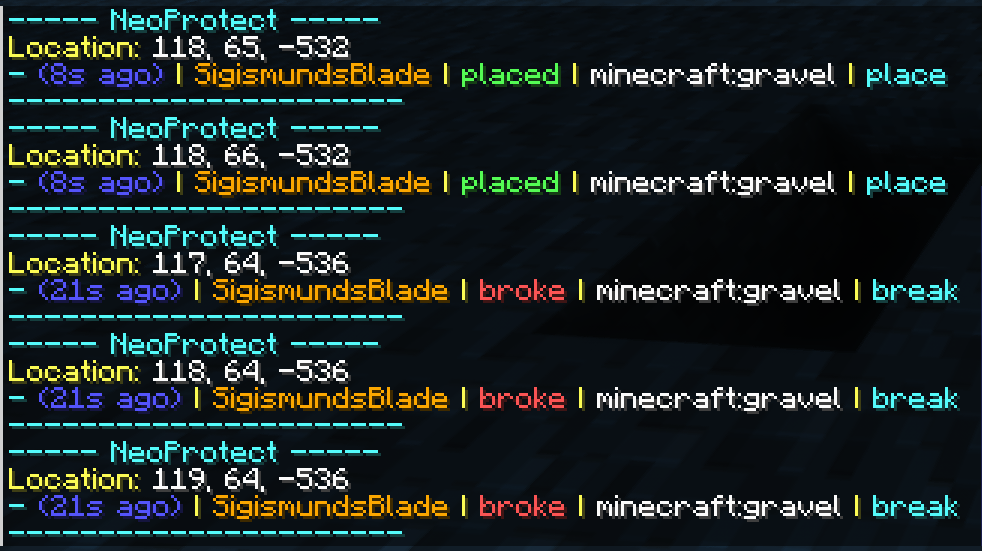
方块历史记录
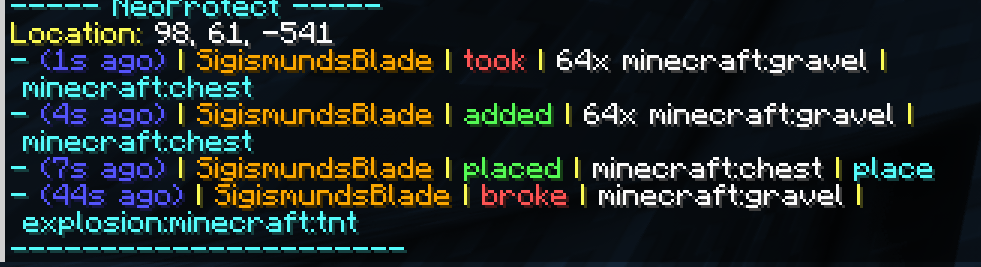
容器历史记录
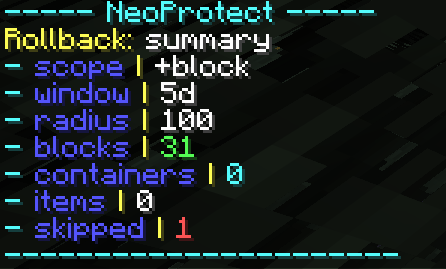
回滚记录
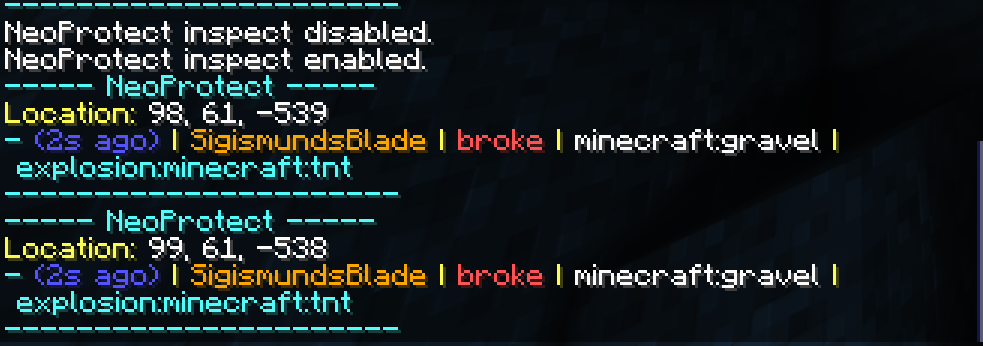
爆炸历史记录
需要帮助?
加入 NeoProtect Discord 获取设置帮助、提问和提交错误报告。如果某些内容未被记录或服务器无法启动,请提供你的 Minecraft 版本、加载器及加载器版本、NeoProtect 版本以及相关服务器日志。对于库存问题,请同时提供存储模组的名称和版本。
NeoProtect
NeoProtect records what happens on your Minecraft server so you can investigate damage, missing items, and disputes with a clear history. It gives staff in world inspection, searchable logs, and controlled rollback tools. Builds are available for NeoForge, Fabric, and Forge.
What does it record?
NeoProtect logs block placements, breaks, Items added to or removed from containers, sign edits, explosions, and fire spread. Records include the time and location, with player or cause attribution where the game provides it. History is stored persistently and remains available across restarts until an administrator removes it.
Vanilla containers are supported, along with beta inventory adapters for Sophisticated Storage, Functional Storage, and Tom's Simple Storage. Other mods can integrate through the inventory adapter API.
Find out what happened
Use /np inspect and interact with a block or container to see its history where you are standing. Results have page controls, so older events remain accessible at busy locations.
For a wider investigation, /np search looks through recorded activity across dimensions. /np player shows one player's activity, and /np signs finds sign edits. Search results support time ranges and filters for players, actions, targets, locations, and pages. Click a result's coordinates to teleport to it.
Every /np command also works with /neoprotect, and common command arguments have tab completion.
Repair damage with a preview
/np rollback shows what would change before anything is applied, including affected blocks and container items. Confirm or cancel the preview in chat. You can choose block or container changes, select the direction of a rollback, and include or exclude particular block or item IDs. For example, blocks,e:water leaves water out of a block rollback. Administrators can undo their own recent rollbacks with /np undo.
Storage and setup
NeoProtect uses an embedded H2 database by default and writes logs asynchronously. Servers that use MariaDB or MySQL can configure a remote database and migrate existing H2 history. CSV export and retention controls are also available to administrators.
Install the jar that matches your Minecraft version and loader on the server. Fabric builds require Fabric API. Players do not need to install NeoProtect on their clients.
Screenshots
Block history
Container history
Rollback records
Explosion history
Need help?
Join the NeoProtect Discord for setup help, questions, and bug reports. If something is not being logged or a server fails to start, include your Minecraft version, loader and loader version, NeoProtect version, and the relevant server log. For inventory issues, include the name and version of the storage mod too.

下载 NeoProtect
下载 NeoProtect
下载 NeoProtect
下载 NeoProtect
下载 NeoProtect
下载 NeoProtect
下载 NeoProtect
下载 NeoProtect
下载 NeoProtect
下载 NeoProtect
暂无更新日志
关于这个资源的讨论、问题反馈与使用心得
还没有讨论,来发第一帖吧
你是这个资源的作者?登录后可认领此资源。
相似资源
 模组

显示你正在注视的方块的信息。(适用于 Minecraft 1.16+ 的 Hwyla/Waila 分支)
 模组
使用 JavaScript 编辑配方、添加自定义物品、编写世界事件!
 模组

查看物品与配方
 模组
在游戏画面角落显示附近世界地形、玩家、生物和实体的地图。可创建路径点,帮助你找到标记过的位置。
 模组
AE2:一款流行的自动化与存储模组
 模组
那是什么?一个 Waila/Hwyla 的分支。
评论 0
登录后参与评分
还没有评论,来抢沙发吧