

Nether Chest
我倾向于将 Minecraft 中的存储方块类比为我们在日常生活中遇到的不同类型的数据存储:
- 普通箱子就像硬盘:它(基本上)是固定的,你只能通过直接接触来访问其中存储的物品。
- 潜影盒类似于 U 盘:它是便携的,其中存储的物品也只能通过直接接触来访问。
- 末影箱则更像是远程个人存储:将你的物品上传到“云端”,你就可以随时随地从世界任何地方访问它们。
你不觉得缺少了什么吗?我们有个人云存储,但缺乏一种可以充当文件共享服务的共享存储。而且,我们有过世间的箱子和末影箱,却还没有下界箱,这难道不奇怪吗?好吧,看这里!
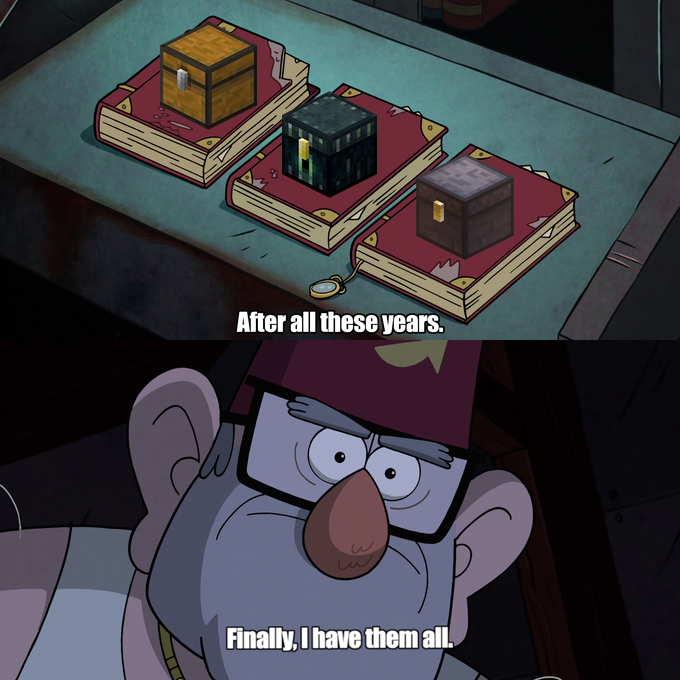
本模组向游戏中添加了一个方块——下界箱。它的功能与末影箱几乎相同,区别在于它为服务器上的所有玩家提供了一个共享的库存空间。
合成配方
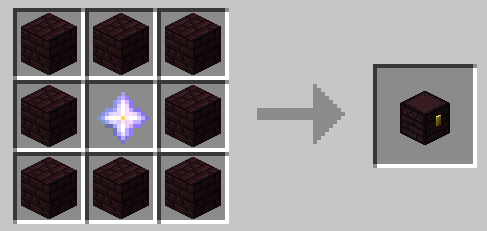
这个合成配方看起来可能有点昂贵,但从平衡性的角度来看,这一切都是完全合理的:
- 凋灵是一个相当弱的敌人,即使在最高难度级别上也是如此。因此,获得几个额外的下界之星应该不会太困难。
- 下界箱是一个“后期游戏”方块。如果你有能力花费一个下界之星来合成箱子,那么节省一点时间并不被视为作弊。然而,在游戏早期阶段,让相隔数千格的玩家之间交换物品可能会过于强大。
注意: 如果你不想失去你的下界之星,请使用精准采集工具开采下界箱。:)
如果你处于和平模式 (或者只是不想去挑战凋灵),你可以使用 此数据包 (它将合成配方中的下界之星替换为末影之眼)。如果你不熟悉安装数据包的过程,请参阅 本文。
多通道模式
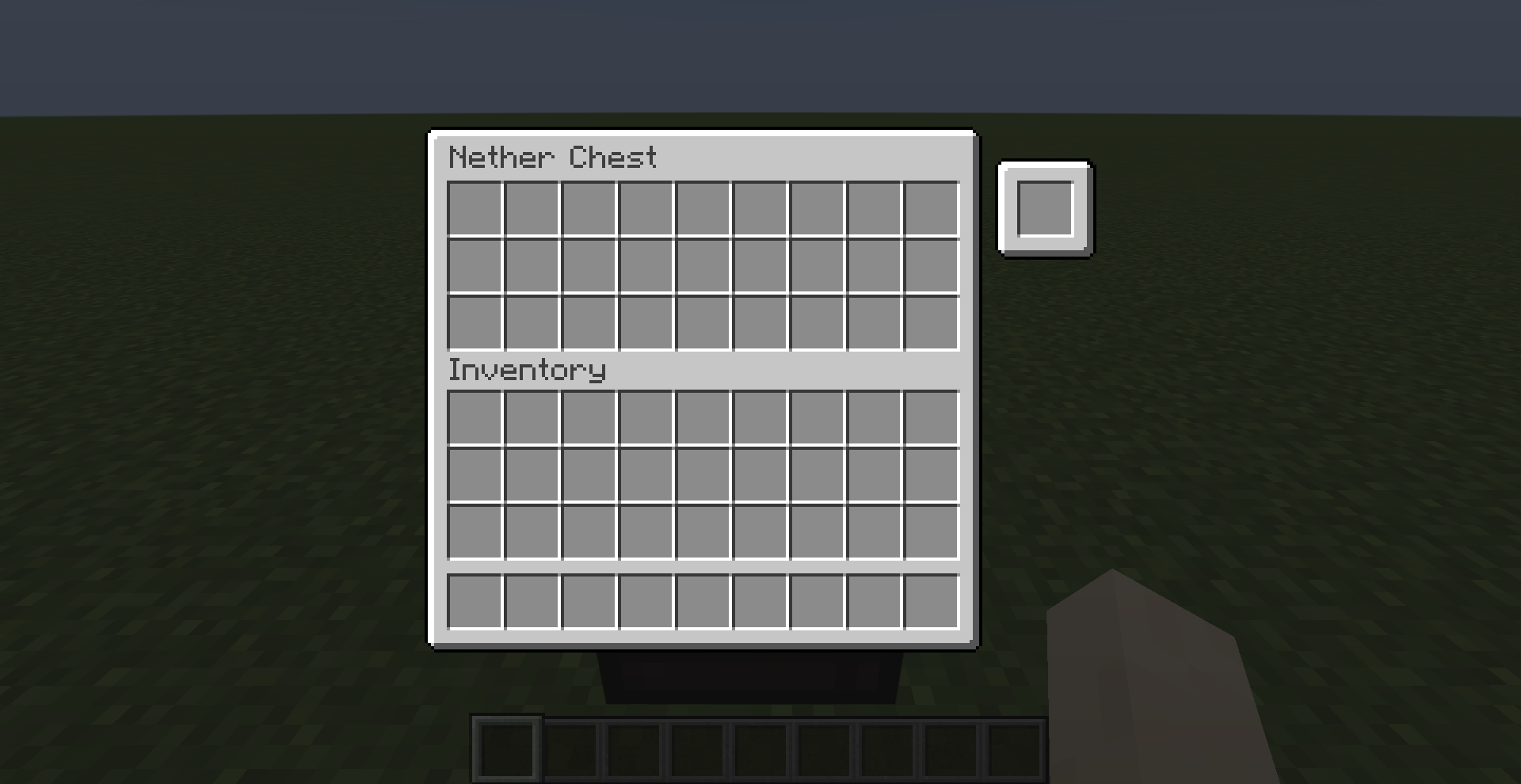
启用多通道模式后,每个下界箱都会增加一个额外槽位,可用于将箱子锁定到特定通道,从而拥有独立的库存。
红石集成
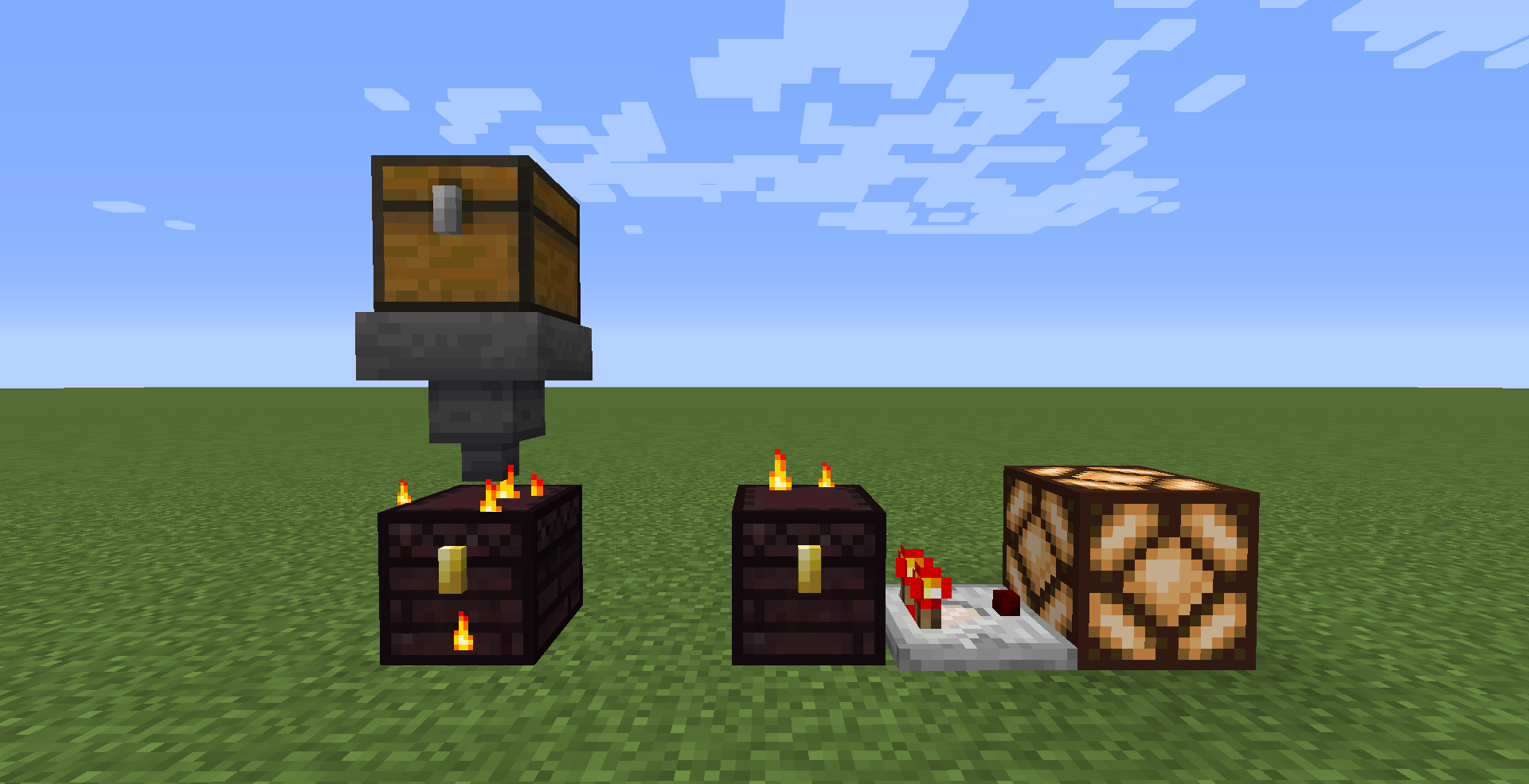
下界箱兼容漏斗和比较器。
配置
如果你安装了 Cloth Config,你可以自定义模组的行为。配置文件通常位于 ./config/nether_chest.json,默认内容如下:
{
  "allowHoppers": true,
  "allowInsertion": true,
  "allowExtraction": true,
  "enableMultichannelMode": true,
  "ignoreNbtInMultichannelMode": false,
  "ignoreCountInMultichannelMode": false,
  "channelBlacklist": [],
  "channelWhitelist": []
}
| 名称 | 描述 | 默认值 |
|---|---|---|
allowHoppers |
启用后,漏斗将能够访问下界箱的库存 | true |
allowInsertion |
启用后,漏斗将能够将物品插入下界箱的库存 | true |
allowExtraction |
启用后,漏斗将能够从下界箱的库存中提取物品 | true |
enableMultichannelMode |
启用后,下界箱可以锁定到特定通道 | true |
ignoreNbtInMultichannelMode |
启用后,通道键不再需要具有相同的 NBT 数据即可被视为相等 | false |
ignoreCountInMultichannelMode |
启用后,通道键不再需要具有相同的堆叠数量即可被视为相等 | false |
channelBlacklist |
ID 列在此字段中的物品禁止用作通道键 | [] |
channelWhitelist |
仅 ID 列在此字段中的物品可用作通道键 | [] |
你可以直接在配置文件中或通过 ModMenu 编辑这些值中的任何一个。
安装
要求:
- Minecraft
>=1.16.x - Fabric Loader
>=0.10.0 - Fabric API
>=0.25.0
你可以从以下位置下载该模组:
- GitHub Releases
- Modrinth
- CurseForge
- GitHub Actions (这些构建版本可能不稳定,但它们代表了开发中的实际状态)
从源代码构建
要求:
- JDK
17
Linux/MacOS
git clone https://github.com/Kir-Antipov/nether-chest.git
cd nether-chest

chmod +x ./gradlew
./gradlew build
cd build/libs
Windows
git clone https://github.com/Kir-Antipov/nether-chest.git
cd nether-chest

gradlew build
cd build/libs
Nether Chest
I like to think of the storage blocks in Minecraft as analogues to different types of data storage we encounter in everyday life:
- An ordinary chest is like a hard drive: it's (basically) stationary, and you can access what it stores only through direct contact.
- A shulker box is similar to a USB flash drive: it's portable, and the things it stores can also be accessed exclusively through direct contact.
- An ender chest, on the other hand, is just like remote personal storage: upload your belongings to the "cloud," and you'll have access to them from anywhere in the world at any time.
Don't you think something's missing? There's personal cloud storage, but there's no shared one that could act as a kind of file sharing service. And isn't it strange that we have an overworld chest, an ender chest, but no nether chest? Well, behold!
This mod adds a single block to the game - the Nether Chest. It functions almost the same way as an ender chest, except it has a shared inventory for all players on a server.
Crafting Recipe
This crafting recipe may seem a bit expensive, but from a balancing perspective, everything is more than justified:
- The Wither is a pretty weak enemy, even at the maximum difficulty level. Thus, obtaining a couple of extra nether stars shouldn't be too challenging.
- The Nether Chest is an "endgame" block. If you can afford to spend a nether star on crafting a chest, then a bit of time-saving isn't considered cheating. However, in the early stages of the game, exchanging items between players who are separated by thousands of blocks might be overpowered.
NOTE: Nether Chests should be handled with Silk Touch if you don't want to lose your nether stars. :)
If you play on Peaceful (or just aren't up for battling the Wither), you can use this datapack (which replaces the nether star with an eye of ender in the crafting recipe). Please refer to this article if you are unfamiliar with the process of installing a datapack.
Multichannel Mode
When multichannel mode is enabled, each Nether Chest gains an extra slot that can be used to lock the chest to a specific channel with its own unique inventory.
Redstone Integration
Nether Chests are compatible with hoppers and comparators.
Config
If you have Cloth Config installed, you can customize the behavior of the mod. A config is usually located at ./config/nether_chest.json and by default looks like this:
{
  "allowHoppers": true,
  "allowInsertion": true,
  "allowExtraction": true,
  "enableMultichannelMode": true,
  "ignoreNbtInMultichannelMode": false,
  "ignoreCountInMultichannelMode": false,
  "channelBlacklist": [],
  "channelWhitelist": []
}
| Name | Description | Default value |
|---|---|---|
allowHoppers |
When enabled, hoppers will be able to access the Nether Chest's inventory | true |
allowInsertion |
When enabled, hoppers will be able to insert items into the Nether Chest's inventory | true |
allowExtraction |
When enabled, hoppers will be able to extract items from the Nether Chest's inventory | true |
enableMultichannelMode |
When enabled, Nether Chests can be locked to a specific channel | true |
ignoreNbtInMultichannelMode |
When enabled, channel keys no longer need to have identical NBT data to be considered equal | false |
ignoreCountInMultichannelMode |
When enabled, channel keys no longer need to have the same stack size to be considered equal | false |
channelBlacklist |
Items whose IDs are listed in this field are banned from being used as channel keys | [] |
channelWhitelist |
Only items whose IDs are listed in this field can be used as channel keys | [] |
You can edit any of these values directly in the config file or via ModMenu.
Installation
Requirements:
- Minecraft
>=1.16.x - Fabric Loader
>=0.10.0 - Fabric API
>=0.25.0
You can download the mod from:
- GitHub Releases
- Modrinth
- CurseForge
- GitHub Actions (these builds may be unstable, but they represent the actual state of the development)
Building from sources
Requirements:
- JDK
17
Linux/MacOS
git clone https://github.com/Kir-Antipov/nether-chest.git
cd nether-chest

chmod +x ./gradlew
./gradlew build
cd build/libs
Windows
git clone https://github.com/Kir-Antipov/nether-chest.git
cd nether-chest

gradlew build
cd build/libs

下载 Nether Chest
下载 Nether Chest
下载 Nether Chest
需要联机服务器吗?
稳定流畅、一键部署,几分钟即可和朋友联机开服
最低仅需 8 元/月 即可畅快联机
下载 Nether Chest
下载 Nether Chest
下载 Nether Chest
下载 Nether Chest
需要联机服务器吗?
稳定流畅、一键部署,几分钟即可和朋友联机开服
最低仅需 8 元/月 即可畅快联机
下载 Nether Chest
下载 Nether Chest
下载 Nether Chest
功能特性:
- 支持 Minecraft
1.20.3
关于这个资源的讨论、问题反馈与使用心得
还没有讨论,来发第一帖吧
你是这个资源的作者?登录后可认领此资源。
相似资源
 模组

显示你正在注视的方块的信息。(适用于 Minecraft 1.16+ 的 Hwyla/Waila 分支)
 模组
在游戏画面角落显示附近世界地形、玩家、生物和实体的地图。可创建路径点,帮助你找到标记过的位置。
 模组

查看物品与配方
 模组
使用 JavaScript 编辑配方、添加自定义物品、编写世界事件!
 模组
AE2:一款流行的自动化与存储模组
 模组
那是什么?一个 Waila/Hwyla 的分支。
评论 0
登录后参与评分
还没有评论,来抢沙发吧