版权所有:NgrokLAN Reyoung 是 Alujjdnd 的 Ngrok-LAN 的分叉版本,专为 1.16.5 打造,其描述信息均源自 Alujjdnd Ngrok-LAN 仓库中的 README.MD。
Ngrok LAN
简介
Ngrok LAN 是一个 Fabric 模组,让你只需点击新的“公开服务器”按钮,即可与全球好友共享你的单人世界!该模组使用 Ngrok(一项免费服务)作为主要服务来“隧道”传输你的连接到互联网,从而简化服务器的创建过程。在你点击“公开服务器”后,它会生成一个链接供你的朋友连接。
更多关于 Ngrok-LAN 的工作原理,请参阅 什么是 Ngrok。
安装/快速开始
依赖项
该模组需要以下模组:
安装 Fabric Loader 和 Ngrok-LAN
- 前往 FabricMC 网站 并下载最新版的安装程序
- 运行 JAR 文件,会弹出一个窗口。选择正确的 Minecraft 版本和加载器(该模组目前需要 Minecraft v1.18.2 和 loader v0.13.3),然后点击“Install”(安装)。
- 启动器的菜单中会创建一个新的游戏版本和配置档案,你现在可以使用它来启动 Fabric。
- 将模组 JAR 文件(可在 Releases 下找到)放入你的 "mods" 文件夹,同时放入 ClothConfig API 和 ModMenu 的 JAR 文件。(Fabric API JAR 应该已经在之前的步骤中存在于你的 mods 文件夹里了)
- 运行第 3 步中新安装的配置档案,Ngrok LAN 应该就能加载了。
配置 Ngrok-LAN
| 字段 |
描述 |
| "Enabled?" |
这将启用/禁用模组,以便你配置是否通过 Ngrok 共享世界 |
| "Ngrok Auth Token" |
在此字段输入你的 Ngrok 身份验证令牌,参见 获取你的身份验证令牌 |
| "Region" |
在这里你可以选择希望使用的 Ngrok 数据中心的区域,请使用离你最近的区域以最小化延迟 |
| "Require Authentication" |
勾选此框将以在线模式启动服务器。如果取消勾选,服务器将以离线模式启动。这主要用于其他玩家使用破解版 Minecraft 账号的情况。 |
| "Spawn Protection Radius" |
防止未获得权限的玩家在出生点周围 X 个方块内破坏或放置方块 |
Ngrok 区域
| 代码 |
区域 |
| US |
美国 |
| EU |
欧洲 |
| AP |
亚太 |
| AU |
澳大利亚 |
| SA |
南美洲 |
| JP |
日本 |
| IN |
印度 |
启动 Ngrok LAN
- 确保 Ngrok LAN 已启用,身份验证令牌有效,且选择了正确的区域
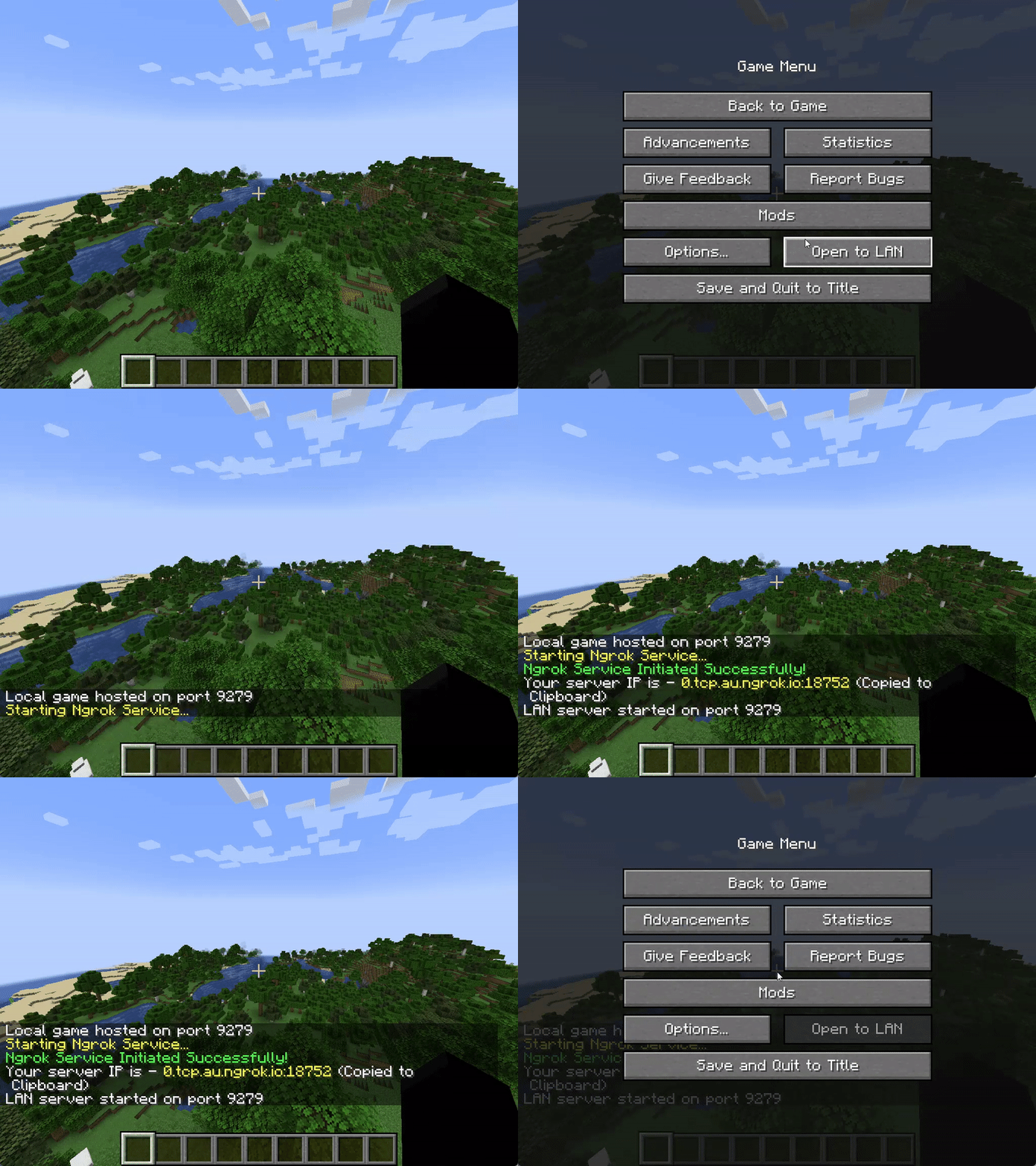
- 打开一个新的单人世界,然后点击“Open to LAN”(开启局域网)
- 配置游戏模式以及是否允许作弊
- 按下“Open Public Server”(公开服务器)按钮
- 聊天栏中应出现消息“Ngrok service initiated successfully”,其中包含一个黄色高亮的链接
- 该链接会自动复制到你的剪贴板,现在可以分享给你的朋友了
- 其他人只需将此链接作为服务器 IP 添加到他们的多人游戏列表中,即可加入世界
在你的 NgrokLAN 中将某人设为管理员 (OP)
我们建议使用 LanOperators 来 /op 或 /deop 某人,该模组已在 Modrinth 和 Curseforge 上发布,或者我会重新制作它:)
获取你的 Ngrok 身份验证令牌
- 前往 ,注册一个新的免费账户
- 在仪表板上,点击左侧菜单栏中的 Getting Started > Your Auth Token
- 复制身份验证令牌,并将其放入 Ngrok LAN 中 (不要将此令牌分享给他人)
常见问题
| 错误信息 |
解决方法 |
| An attempt was made to access a socket in a way forbidden by its access permissions. |
重启“Services”(服务)程序下的“Host Network Service”(主机网络服务) |
| The authtoken you specified does not look like a proper ngrok tunnel (ERR_NGROK_105) |
检查你的身份验证令牌是否有效,并正确输入到模组配置中 |
| Your account is limited to <NUMBER> simultaneous ngrok agent session... |
检查你是否正在使用此身份验证令牌运行其他隧道,如果你仍然遇到此错误,请尝试更改区域 |
其他问题
请在 Issues 中提交新的 Issue。
Ngrok 是什么?
Ngrok 是一项免费服务,无需端口转发即可将您在本地运行的应用程序暴露给互联网。
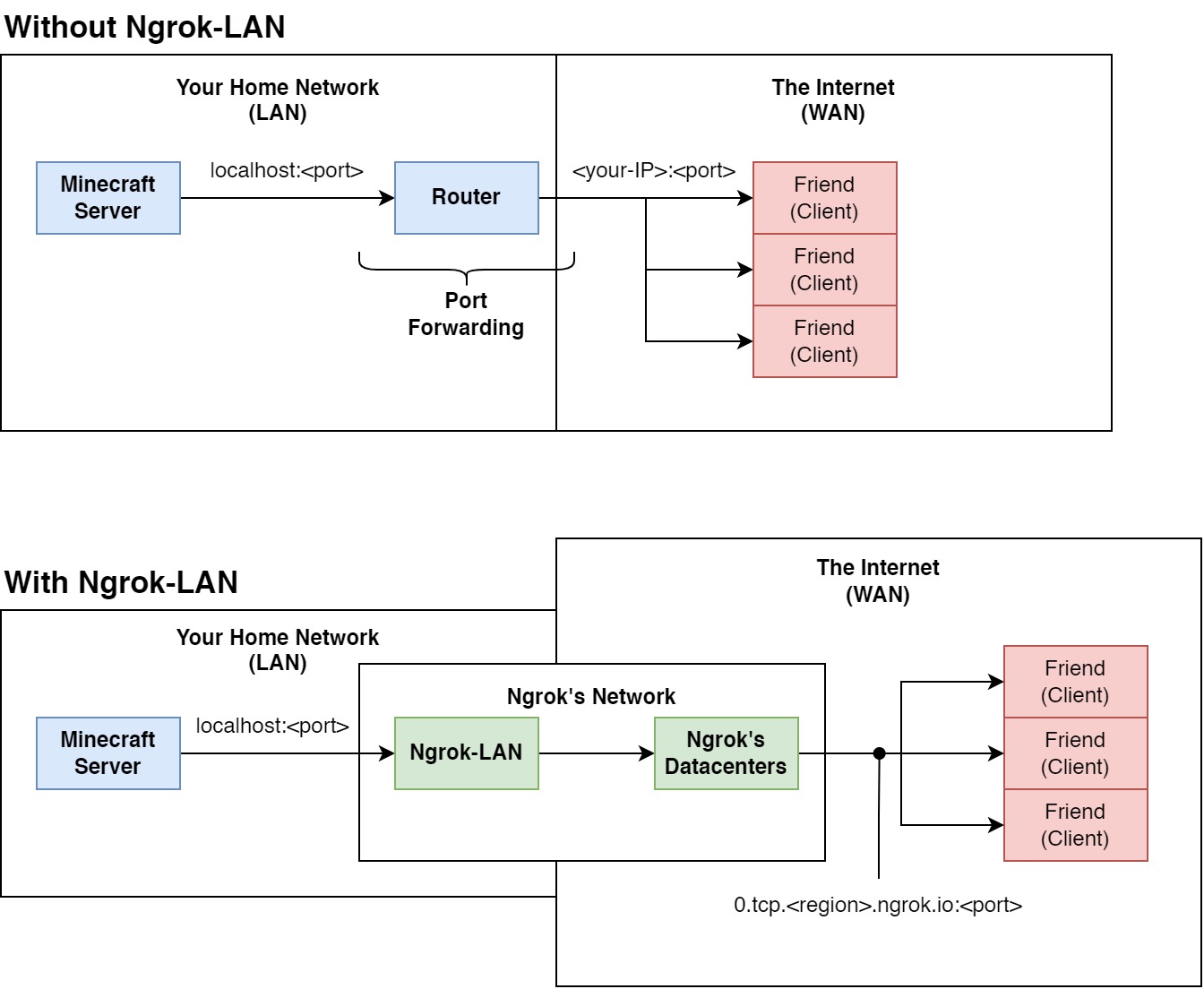
通常,在设置 Minecraft 服务器时,您需要启动服务器并通过路由器“转发”您的端口。端口转发会将您的服务器“发布”到互联网上,这样任何拥有您 IP 的人都可以加入。您可以将其理解为您的路由器将来自您服务器(属于您的本地网络)的网络数据包“转发”给您朋友(属于更广泛的互联网)。
然而,使用 Ngrok 我们不需要进行端口转发。所有互联网流量都会通过一个应用程序(在本例中为 Ngrok-LAN),然后路由至其数据中心。Ngrok 会提供一个链接作为回报,我们可以将此链接提供给朋友以连接到我们的服务器。这不需要您进行任何其他配置——只要您有网络连接和一个 Ngrok 账户,您就可以向全球的朋友托管单人世界。
Ngrok 账户要求
模组仅需一个免费的 Ngrok 账户。Ngrok 的免费套餐允许您同时保持 1 个免费的在线隧道,这意味着使用一个免费的 Ngrok 账户,您只能同时托管 1 个 Ngrok-LAN 服务器。付费套餐允许您使用自定义域名和更多的同时在线隧道,但本模组尚不支持自定义域名。
更多定价信息请参阅 Ngrok 官网。
已知不兼容项
请参阅 Incompatibilities 查看不兼容模组的列表。
目前,仅 Proximity Voice Chat 类模组不兼容。此问题不太可能修复。
许可证
本模组采用 MIT 许可证开源。
COPYRIGHT: NgrokLAN Reyoung is forked of Ngrok-LAN by Alujjdnd but make for 1.16.5 and the description is all in README.MD in Alujjdnd Ngrok-LAN repos
Ngrok LAN
Introduction
Ngrok LAN is a Fabric mod that enables you to share your singleplayer world with your friends across the globe, all via
clicking on the new "Open Public Server" button! This mod uses Ngrok, a free service to ease the creation of servers, as
the main service to "tunnel" your connection to the internet, and will generate a link for your friends to connect to
after you click on "Open Public Server".
For more on how Ngrok-LAN works, check out What is Ngrok.
Installation/Quick Start
Dependencies
The mod requires the following mods:
Install Fabric Loader and Ngrok-LAN
- Go to the FabricMC website and download the latest installer
- Run the JAR, a window will pop up. Choose the correct version of Minecraft and loader (this mod currently requires
Minecraft v1.18.2 and loader v0.13.3), and click on "Install".
- A new game version and profile will be created in the launcher's menu, which you can now use to launch Fabric.
- Put the mod JAR (available under Releases) into your "mods" folder,
along with the ClothConfig API and ModMenu JARs. (The Fabric API JAR should already be in your mods folder from the
previous section)
- Run the newly installed profile from step 3, and Ngrok LAN should load
Configuring Ngrok-LAN
| Field |
Description |
| "Enabled?" |
This will enable/disable the mod, so you can configure whether the world is shared with Ngrok |
| "Ngrok Auth Token" |
This is the field to input your Ngrok auth token, see getting your auth token |
| "Region" |
This is where you can select the region of the Ngrok datacenter that you wish to use, use ones that are closest to you to minimise latency |
| "Require Authentication" |
Ticking this box will start the server in online mode. If this box is unchecked, the server will be started in offline mode. This is mainly for when the other players are using cracked Minecraft accounts. |
| "Spawn Protection Radius" |
Prevents non-opped players from breaking and placing blocks within X blocks of spawn |
Ngrok Regions
| Code |
Region |
| US |
United States |
| EU |
Europe |
| AP |
Asia/Pacific |
| AU |
Australia |
| SA |
South America |
| JP |
Japan |
| IN |
India |
Starting Ngrok LAN
- Make sure that Ngrok LAN is enabled, the auth token is valid, and the correct region is selected
- Open a new singleplayer world, and click on Open to LAN
- Configure the game mode and whether to allow cheats
- Press on "Open Public Server"
- The message "Ngrok service initiated successfully" should appear in chat, with a link highlighted in yellow
- The link is automatically copied to your clipboard, and can now be shared with your friends
- Other people just need to put this as a server IP into their multiplayer list, and join the world
Making someone Operators in your NgrokLAN
We suggest to use LanOperators to /op or /deop someone, which its public at Modrinth and Curseforge
or will be remake by me:)
Getting your Ngrok Auth Token
- Go to , and sign up for a new free account
- On the dashboard, on your left-hand side menu, click on Getting Started > Your Auth Token
- Copy the auth token, and put this into Ngrok LAN (don't share this token with other people)
Common Issues
| Error Message |
Resolution |
| An attempt was made to access a socket in a way forbidden by its access permissions. |
Restart "Host Network Service" under the "Services" program |
| The authtoken you specified does not look like a proper ngrok tunnel (ERR_NGROK_105) |
Check that your auth token is valid, and is correctly inputted into the mod config |
| Your account is limited to <NUMBER> simultaneous ngrok agent session... |
Check that you are not running any other tunnels with this auth token, try change to regions if you are still getting this error |
- For more errors, error codes and their resolution, check the Ngrok docs
Other Issues
Please open a new issue in Issues
What is Ngrok?
Ngrok is a free service that exposes your applications running locally to the internet, without port forwarding.
Usually, when setting up a Minecraft server, you would have to open the server, and "forward" your port through your
router. Port forwarding "publishes" your server to the internet, so anyone with you IP can join. Think of this as your
router "forwarding" the network packets from your server (part of your local network) to your friends (part of the wider
internet).
Using Ngrok, however, we don't need to forward the port. All the internet traffic is routed through an application (
Ngrok-LAN in this case), then their datacentres. Ngrok provides us with a link in return, that we can give to our
friends to connect to our server. This doesn't require any other configuration on your side - as long as you have
internet, and an Ngrok account, you can host your singleplayer world to your friends across the globe.
Ngrok Account Requirements
The mod only requires a free Ngrok account. The free tier for Ngrok allows you to have 1 free online tunnel
simultaenously, which means that, with one Ngrok free account, you can only host 1 Ngrok-LAN server at the same time.
The paid tiers allows you to have custom domains and more simultaenous online tunnels, but custom domains are not yet
supported in this mod.
More pricing info please refer to Ngrok's website
Known Incompatibilities
Please refer to Incompatibilities to find a list of incompatible mods.
Currently, only Proximity Voice Chat mods are incompatible. This is unlikely to be fixed.
License
This mod is available under the MIT license.


 模组

 模组
 模组

 模组
 模组
 模组
评论 0
登录后参与评分
还没有评论,来抢沙发吧