欢迎使用 NoInvalidSessionID!
此模组移除了烦人的“无效会话”错误,让你再也不用为了开始新会话而重新启动游戏了!
当你首次加载此模组时,在多人游戏界面会收到一条提示,要求你前往 微软官方站点 输入由模组生成的代码。这一步的作用仅仅是告知微软:“这是我的当前会话 ID 令牌,请允许访问,以便每次我进入多人游戏界面时刷新该令牌”。
在你 仅输入一次 ID 后,它应该就能永久生效,此后无需再次登录。此模组设计为永久运行,但如果你不幸在 90 天后遇到问题,建议重新登录。如果超过 90 天未活动,代码将会过期;在这种情况下,请按照屏幕上的说明再次输入代码。不过,这仅适用于未活动的情况:只要你在该时间段内任何时间点玩过游戏,你的会话 ID 就不会过期。
在“画廊”选项卡中,展示了你应该看到的所有界面,以便你确认操作是否正确。
3 个简单步骤(每月一次,或永不再次)
1. 打开多人游戏菜单
你需要点击绿色按钮,然后 点击蓝色按钮(第 2 步)。
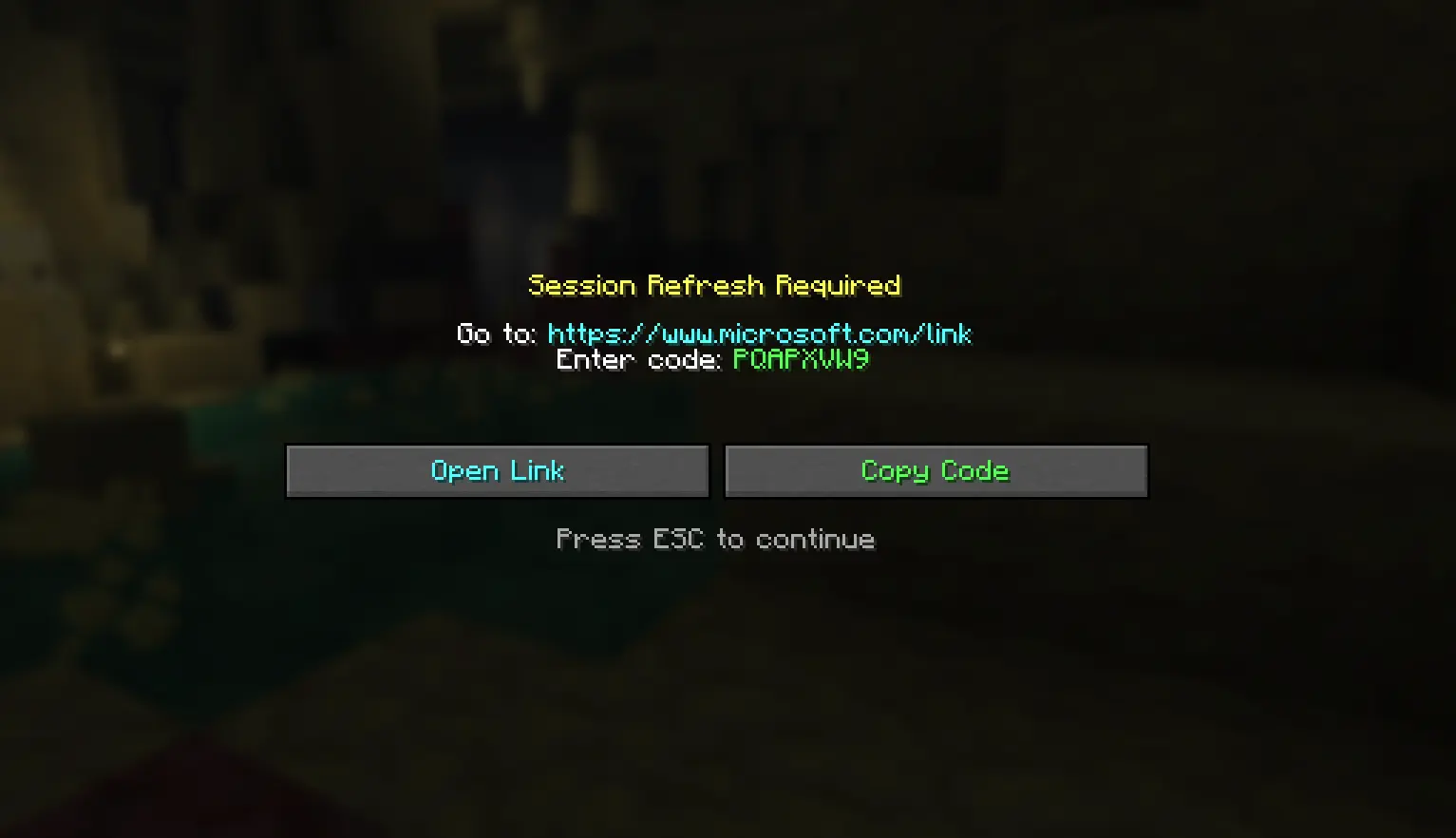
2. 点击蓝色按钮后,你将跳转到一个微软官方网站。
粘贴你在第 1 步中复制的代码,然后按回车键。
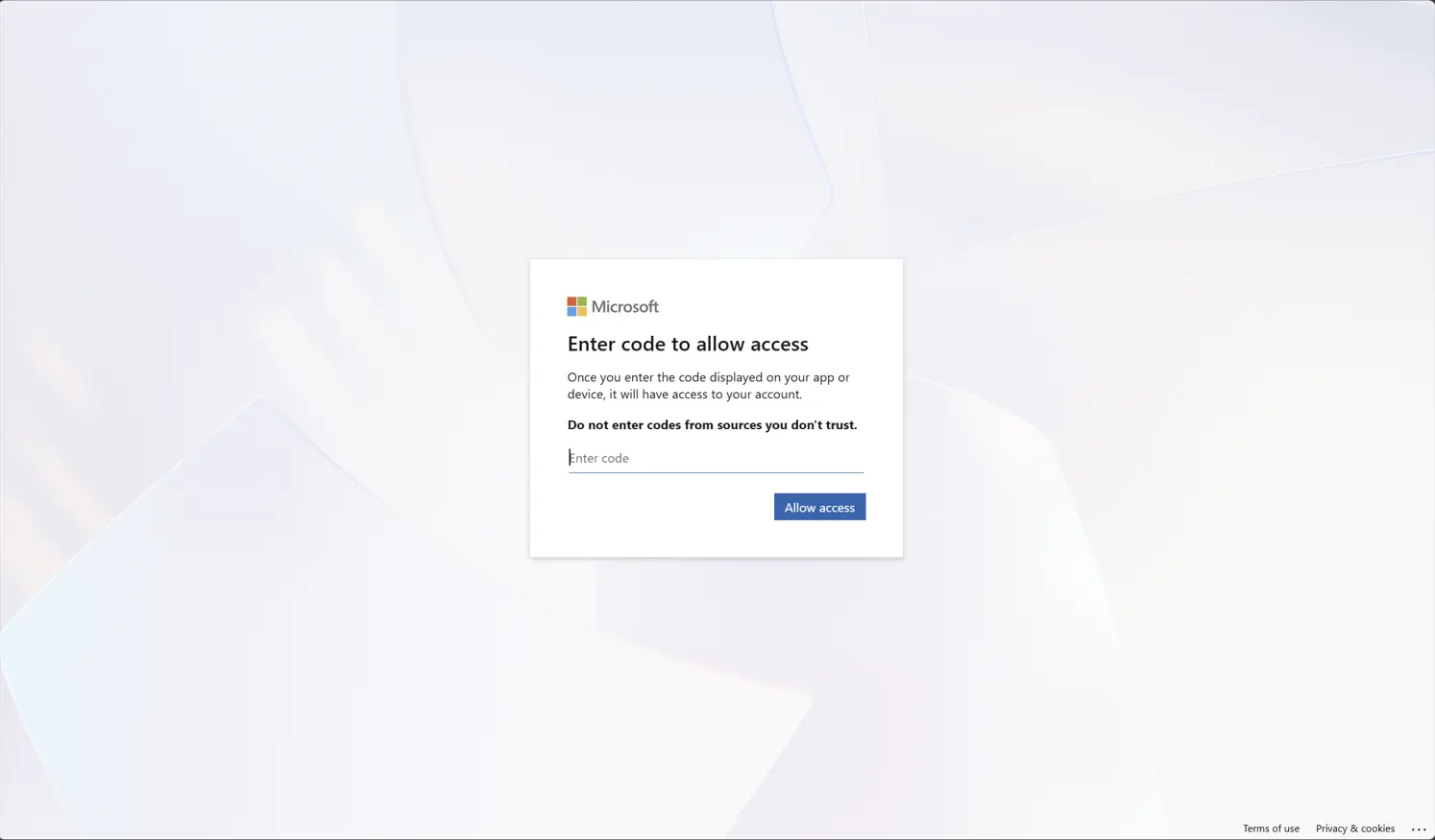
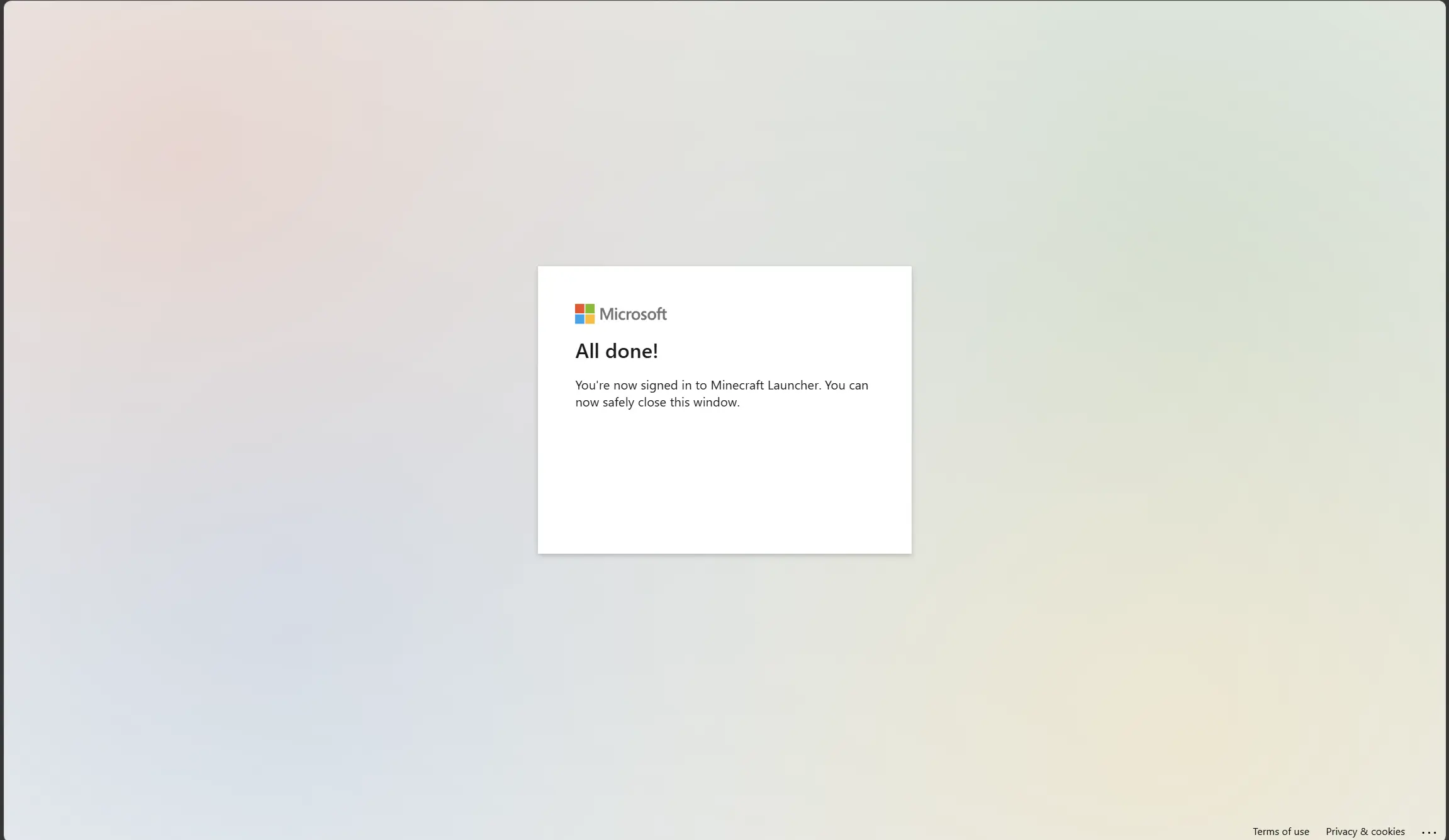
3. 按下回车键后,你将看到此界面。
你已完成操作!现在可以关闭它了 :D
多账号支持(测试版)
此模组现已支持在同一设备上使用多个账号的功能(太棒了!)。它采用了一个简单的修复方案:为每个账号使用不同的 token.enc 文件。
特别感谢 @-------- 发现了这一功能! :D
安全性与隐私
此模组通过 Microsoft OAuth 2.0 登录来刷新你的会话。以下是其确切的工作方式及不做的事情:
它存储的内容: 一个经过 AES-256-GCM 加密的微软刷新令牌,保存于(Windows 系统下)C:/ Users/[你的用户名]/.noinvalidsessionid/token.enc 文件中,位于你的 Minecraft 文件夹之外。在 Mac 和 Linux 上,该文件还仅限你的操作系统用户账户访问(权限设置为 600)。
它绝不做的事情: 模组绝不会存储你的微软密码,绝不会将你的凭证发送到除微软和 Minecraft 官方服务器之外的任何地方,也绝不会与任何第三方服务器通信。
使用的端点:
- login.live.com — 微软身份验证
- user.auth.xboxlive.com — Xbox Live 令牌交换
- xsts.auth.xboxlive.com — Xbox 安全令牌
- api.minecraftservices.com — Minecraft 会话令牌和配置文件验证
开源:完整的源代码可在 GitHub 上获取,你可以核实模组的确切行为。
撤销访问:你可以随时通过访问 account.microsoft.com → 安全 → 连接的应用程序并移除它来撤销访问权限,或者直接删除 ~/.noinvalidsessionid/token.enc。
小提示:建议偶尔重启游戏,这不是因为模组的原因,而是因为随着时间推移,Minecraft 可能会成为系统内存和 CPU 的大量占用者。
问:人工智能披露
答:此模组的核心设计、图标、描述和画廊图片均非 AI 生成。然而,我是一个初级程序员,对于我不懂的任务会使用 AI 辅助完成。这是不可避免的(当然可以避免,我正在学习 Java,别误会,只是没那么快而已。)我也正积极从 AI 中学习,而不是单纯地用它来构建模组。它教会了我很多,但还不够。安全的令牌存储方法(审核员要求的)是通过 AI 实现的。另一方面,所有日志均由人工编写。AI 还用于帮助命名、阻断(我称之为创建代码块的操作)以及代码的其他部分。所有测试均通过大量人类脑细胞和知识完成,所有的修改和改进想法也是如此。
Welcome to NoInvalidSessionID!
This mod removes the pesky "Invalid Session" so you never have to relaunch your game to start a new session ever again!
When you first launch with this mod, you will get a message on your multiplayer screen saying to go to an official Microsoft site to put in a code that the mod will generate. All that this does is tell Microsoft, "This is my Session ID token currently, please allow access so every time I go to the multiplayer screen, I refresh this token".
After you put in the ID ONCE, it should work forever, no additional login required after that point. This mod is designed to work forever, thouh if you unlikely experience problems after 90 days, it's recommended to log in again. The code will expire after 90 days of inactivity, so in that case, follow the on screen instructions to put the code in again. However, that is only in the case of inactivity, so if you play at any point in that time frame, your session ID will never expire.
In the Gallery tab, all screens that you should see are shown, so you know if it's right or not.
3 easy steps (once a month, or never again)
1. Open the multiplayer menu
You're gonna want to click the Green button, then the Blue button (step 2)
2. After clicking the Blue button, you'll be taken to an offical Microsoft website.
Paste the code you copied in step 1, and then hit enter.
3. Once you hit enter, you'll be taken to this screen.
you're done!, you can close it now :D
Multi-Account support (beta)
This mod now supports multi-account functionality on the same device (yay!). It just uses a simple fix: different token.enc files for each account.
Special thanks to @-------- for discovering this functionality! :D
Security & Privacy
This mod performs a Microsoft OAuth 2.0 login to refresh your session. Here is exactly what it does and does not do:
What it stores: A Microsoft refresh token, AES-256-GCM encrypted, saved to (on windows) C:/ Users/ [your username] /.noinvalidsessionid/token.enc outside your Minecraft folder. On Mac and Linux the file is additionally restricted to your OS user account only (permissions set to 600).
What it never does: The mod never stores your Microsoft password, never sends your credentials anywhere except official Microsoft and Minecraft servers, and never communicates with any third-party server.
Endpoints used:
- login.live.com — Microsoft authentication
- user.auth.xboxlive.com — Xbox Live token exchange
- xsts.auth.xboxlive.com — Xbox security token
- api.minecraftservices.com — Minecraft session token and profile verification
Open source: The full source code is available on GitHub so you can verify exactly what the mod does.
Revoking access: You can revoke access at any time by going to account.microsoft.com → Security → Connected apps and removing it, or simply deleting ~/.noinvalidsessionid/token.enc.
Small Note: It's recommended to restart your game every once in a while, not due to the mod, but because Minecraft can become a power user of your system RAM and CPU over time.
Q: Artificial Intelligence disclosure
A: This mod's core design, icon, description, and gallery images are not ai. However, I am a primitive coder, and I do use ai for tasks I do not know how to do. It simply cannot be helped (well it can, and I'm learning java, don't get me wrong, but not that fast.) I am also actively learning from ai, not plainly using it to build mods. It's taught me a lot, but not enough. The secure token storage method (the moderators wanted it) is accomplished using ai. On the other hand, all logs are human made. AI is also used for help with naming, blocking (my term for creating the blocks of code) and other parts of the code. All testing is completed extensively with human brain cells and knowledge, and so are all ideas of modification and changes.


 模组
 模组

 模组

 模组
 模组

 模组
评论 0
登录后参与评分
还没有评论,来抢沙发吧