NoLife Tracker
击杀游戏中每一种生物。
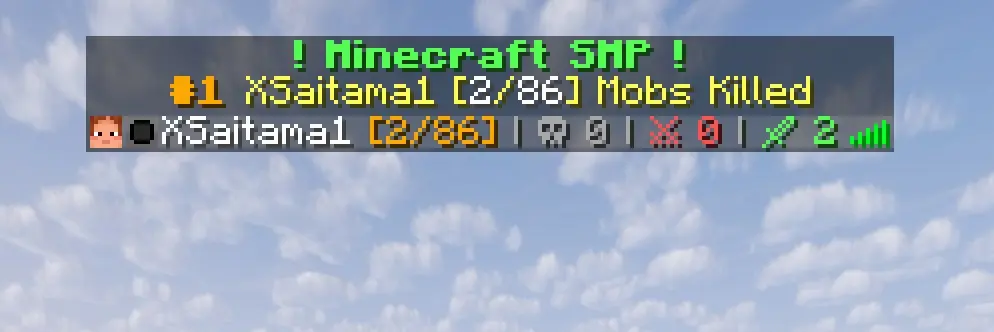
一款服务端 Fabric 挑战追踪器,用于解决 Minecraft 两周倦怠问题。它会监控每一次击杀,为每位玩家维护一份剩余目标清单,并将竞赛进度直接显示在标签页列表中,无需客户端模组、资源包或计分板 Hack。
/nolifetracker
一条命令。一切皆在其中。
玩家无需安装任何内容。 该模组完全在服务端运行,其展示的所有信息均通过原版标签页列表和原版聊天窗口提供。任何使用匹配 Minecraft 版本的原始客户端的玩家均可加入游戏。
挑战
任何可以被击杀的实体都会在你的总计数中恰好被计算一次。在默认设置下,26.2 版本共有 87 种生物。
默认情况下排除了三种生物,因为大多数服务器不希望它们阻碍完成进度:
Ender Dragon · Giant · Illusioner
你可以在游戏中更改这些设置。这里的一切都不是固定不变的。
功能特性
进度追踪
- 每个玩家针对独特生物的独立进度,每种生物类型仅计算一次
- 生物击杀总数、PvP 击杀数以及死亡次数,并附带每位玩家死亡原因的详细分解
- 游戏时长统计
标签页列表集成
- 服务器名称标题,以及实时更新的首位
<player> 领导者横幅
- 每个玩家姓名旁显示其个人统计数据:进度、死亡次数、PvP 击杀数、生物击杀数
- 完全支持模板化,使用
& 颜色代码和占位符;每一行都可以自定义修改或关闭
- 刷新机制基于事件驱动且限制频率,而非通过定时器轮询
维度清单
missing(缺失)将剩余未完成的生物按 主世界 / 下界 / 末地 / 其他 分类- 已完成的生物会显示为灰色,被排除的生物会被删除线标记,让你能一眼看清整体情况
- 如果你的服务器推进顺序不同,任何生物都可以在各组之间移动
排行榜与公告
- 显示最接近完成进度的前 N 名玩家,以及单独的死亡次数排行榜
- 首次击杀公告:"Steve 猎杀了他们的第一个 Warden![61/86]"
- 可向全服广播,或单独向获得该击杀的玩家私发通知
AFK 状态标记
- 基于自动移动检测,支持可配置的阈值
/nolifetracker afk 可以手动固定状态
专为防止数据丢失而设计
- 如果某个文件解析失败,它会被移走并重命名为
<name>.corrupt-<timestamp>,同时使用默认设置,而不是因此导致服务器崩溃
- 进度数据保存在世界存档内部,因此每个世界都有独立的挑战记录,且备份该世界时也会一并携带这些统计信息
安装方法
- 在服务器上安装 Fabric Loader 0.19.3+(Minecraft 26.2,Java 25+)。
- 将 NoLife Tracker 和 Fabric API 放入服务器的
mods/ 文件夹中。
- 启动服务器。
配置文件会在首次启动时自动生成,并带有完整的注释说明。无需进行任何配置。
命令
所有命令均以 /nolifetracker 开头。不带参数运行该命令可查看游戏内的命令列表。
所有玩家
| 命令 |
功能 |
/nolifetracker |
显示命令列表 |
/nolifetracker <player> |
查看指定玩家的进度摘要 |
/nolifetracker <player> missing |
按维度分组列出他们尚未击杀的生物 |
/nolifetracker <player> mobs |
列出他们已击杀的所有生物及其数量 |
/nolifetracker <player> deaths |
查看他们的死亡记录 |
/nolifetracker <player> kills |
查看他们击杀了哪些实体 |
/nolifetracker missing |
快捷查看自己的待完成清单 |
/nolifetracker afk |
切换自身的离线状态标记 |
/nolifetracker leaderboard |
查看谁最接近完成挑战 |
/nolifetracker leaderboard deaths |
按死亡次数排名 |
管理员(权限等级 2)
| 命令 |
功能 |
/nolifetracker audit |
报告可能导致生物列表出现错误的情况 |
超级管理员(权限等级 3)
| 命令 |
功能 |
/nolifetracker exclude <mob> <true|false> |
停止或恢复对某生物的计数 |
/nolifetracker editMob <mob> <dimension> |
将某生物移动到其他维度组 |
/nolifetracker editMob <mob> clear |
移除维度的覆盖设置 |
/nolifetracker config |
显示所有设置及其当前值 |
/nolifetracker config <setting> <value> |
在游戏中更改设置,并直接写入磁盘 |
/nolifetracker reload |
从磁盘重新读取配置文件并重建生物列表 |
配置
所有配置均位于 config/nolifetracker/config.json,且每项设置也可通过 /nolifetracker config 在游戏内进行调整。游戏中所做的更改会立即写回文件,因此两者永远不会不同步。
所有设置、默认值及有效范围
标签页列表
| 设置项 |
默认值 |
含义 |
tabHeader |
&a&l! Minecraft SMP ! |
Tab 列表上方的文本,即你的服务器名称行 |
showTopPlayerInTabList |
true |
在标题下方添加领先者横幅 |
topPlayerLine |
&6&l#1 &e%player% … |
“#1 <玩家>”横幅。当无人击杀任何实体时隐藏 |
| tabFooter | (空) | 标签页列表下方的文本。留空则隐藏 |
| tabNameSuffix | &6[%kills%/%total%] … | 显示在每位玩家名字旁边的统计信息。留空仅显示名字 |
| afkSuffix | &7&o[AFK] | 为 AFK(闲置)玩家添加的标记 |
| tabUpdateSeconds | 5 | 刷新之间的最小间隔(1–3600) |
公告
| 设置项 |
默认值 |
含义 |
announceFirstKills |
true |
宣布玩家首次击杀每种生物的时刻 |
globalMobKillAnnouncement |
false |
true 向全服广播,false 仅通知该玩家 |
announceNonChallengeKills |
true |
也宣布挑战范围外的生物击杀 |
AFK(闲置)
| 设置项 |
默认值 |
含义 |
afkTrackingEnabled |
true |
基于移动检测的自动功能 |
afkThresholdSeconds |
120 |
标记为闲置前的空闲时间(10–86400) |
其他
| 设置项 |
默认值 |
含义 |
leaderboardSize |
10 |
leaderboard 命令显示的排行榜行数(1–100) |
autoSaveMinutes |
5 |
进度写入磁盘的频率(1–1440) |
forceIncludeMobs |
10 mobs |
被计入但 Minecraft 原生判定为非自然生成的生物 |
超出范围的数值会被强制修正(clamp)而非拒绝,因此手动编辑配置文件绝不会导致服务器崩溃。
文本格式与占位符
& 代码用于设置颜色和样式:&a 绿色、&6 金色、&c 红色、&7 灰色、&l 加粗、&o 斜体、
&n 下划线、&m 删除线、&r 重置。JSON 字符串内的换行符写作 \n。
在 tabHeader、topPlayerLine 和 tabFooter 中
| 占位符 |
值 |
%player% |
拥有最多独特生物击杀数的玩家名称 |
%kills% |
该玩家的独特挑战击杀数 |
%total% |
挑战中的生物总数 |
%online% |
当前在线玩家数量 |
%max% |
服务器的玩家槽位上限 |
在 tabNameSuffix 中(针对每位玩家渲染,显示在其名字旁边)
| 占位符 |
值 |
%kills% |
该玩家的独特挑战击杀数 |
%total% |
挑战中的生物总数 |
%deaths% |
死亡次数 |
%pvpkills% |
击杀的玩家数量 |
%mobkills% |
击杀的生物总数(包含重复击杀) |
其他配置文件
| 文件 |
用途 |
excluded_mobs.json |
排除出挑战的生物列表。通过 /nolifetracker exclude 进行编辑 |
dimension_overrides.json |
生物所属的分类组。仅具装饰性——它永远不会将生物从挑战中移除 |
challenge_mobs.json |
生成,非读取。 每次启动时重写为已解析的生物列表,以便你查看实际的挑战配置,而不是猜测 |
生物列表的确定逻辑
这是值得理解的部分。
列表会在每次服务器启动时根据实体注册表重新构建,使用 Minecraft 原生的
SpawnGroup(生成组)分类。所有非活体生物,如箭矢、船、矿车、物品展示框、TNT、显示实体和经验球,都被 vanilla 归类为 MISC;其余所有生物则归入各类活体类别。这是游戏的一个稳定属性,因此新生物会被自动拾取。
少数真正的活体生物也是 MISC,因为它们是通过建造或召唤产生的,而非自然生成:
铁傀儡、Boss、仅限召唤的马匹以及村民。这些生物在 forceIncludeMobs 中被显式列出。
因为很难凭肉眼判断“我是否漏掉了某种生物”,所以有两个安全网:
1. 每次启动都会精确记录变更内容。
[nolifetracker] Challenge set: 86 mobs (2 added, 0 removed since last start).
[nolifetracker]   now counted: minecraft:foo, minecraft:bar
2. /nolifetracker audit 报告会列出分类器无法归类的每个 MISC 实体。
值得了解的事项
击杀归属判定严格。 只有当玩家造成致命一击时,击杀才算数。由你的驯服狼、铁傀儡造成的终结伤害,或因击退导致的摔落伤害不计入。这是有意为之。因此建议提前告知玩家这一规则。
AFK 检测基于位置。 采矿、钓鱼或环顾四周时保持静止最终会被标记为 AFK。使用 /nolifetracker afk 可以固定当前状态,直到你再次切换以取消锁定。
游戏时长源自 vanilla 统计数据,而非独立的计时器,因此它能幸存于崩溃和重启之后。
数据与升级
进度存储在 <world>/nolifetracker/player_stats.json 中,位于世界存档内部,而非服务器目录。每个世界都有自己独立的挑战数据,世界备份也会一并携带这些统计信息。
MIT 许可证。 使用它,分叉它,将其打包进整合包发布,只需保留版权声明即可。
由 xSaitama1 制作
NoLife Tracker
Kill one of every mob in the game.
A server-side Fabric challenge tracker to fix the minecraft 2 week burnout. It watches every kill, keeps a per-player checklist of what's left, and puts the race straight into the tab list, no client mod, no resource pack, no scoreboard hacks.
/nolifetracker
One command. Everything lives under it.
Players do not need to install anything. The mod is entirely server-side, everything it
shows is delivered through the vanilla tab list and vanilla chat. Anyone on a matching
Minecraft version can join with a stock client.
The challenge
Every entity that can be killed counts exactly once toward your total. On 26.2 that's 87 mobs
with the default settings.
Three mobs are excluded out of the box, because most servers don't want them blocking a completion:
Ender Dragon · Giant · Illusioner
Change any of that in-game. nothing here is fixed.
Features
Progress tracking
- Unique-mob progress per player, counted once per mob type
- Total mob kills, PvP kills, and deaths with a breakdown of how each player died
- Play time
Tab list integration
- Server name header, plus a
#1 <player> leader banner that updates live
- Per-player stats beside each name, progress, deaths, PvP kills, mob kills
- Fully templated with
& colour codes and placeholders; every line can be changed or turned off
- Refreshes are event-driven and rate-limited, not polled on a timer
Dimension checklists
missing splits what's left into Overworld / Nether / End / Other- Done mobs are greyed out, excluded mobs are struck through, you can see the whole set at once
- Any mob can be moved between groups if your server's progression differs
Leaderboards & announcements
- Top-N closest to finishing, and a separate deaths board
- First-kill announcements: "Steve hunted their first Warden! [61/86]"
- Announce to the whole server, or privately to the player who got the kill
AFK flagging
- Automatic movement-based detection with a configurable threshold
/nolifetracker afk pins the state manually either way
Built to not lose your data
- A file that fails to parse is moved aside as
<name>.corrupt-<timestamp> and defaults are used,
rather than taking the server down with it
- Progress lives inside the world save, so each world keeps its own challenge and a world
backup carries the stats with it
Installation
- Install Fabric Loader 0.19.3+ on your server (Minecraft 26.2, Java 25+).
- Drop NoLife Tracker and Fabric API into the server's
mods/ folder.
- Start the server.
Config files are generated on first start, fully commented. There is nothing you must configure.
Commands
Everything is under /nolifetracker. Run it with no arguments for the in-game command list.
Everyone
| Command |
What it does |
/nolifetracker |
Show the command list |
/nolifetracker <player> |
Progress summary for that player |
/nolifetracker <player> missing |
Mobs they still need, grouped by dimension |
/nolifetracker <player> mobs |
Every mob they've killed, with counts |
/nolifetracker <player> deaths |
How they've died |
/nolifetracker <player> kills |
Who they've killed |
/nolifetracker missing |
Shortcut for your own checklist |
/nolifetracker afk |
Toggle your own AFK flag |
/nolifetracker leaderboard |
Closest to finishing |
/nolifetracker leaderboard deaths |
Ranked by deaths |
Moderators (permission level 2)
| Command |
What it does |
/nolifetracker audit |
Report anything that could make the mob list wrong |
Admins (permission level 3)
| Command |
What it does |
/nolifetracker exclude <mob> <true|false> |
Stop or resume counting a mob |
/nolifetracker editMob <mob> <dimension> |
Move a mob to another dimension group |
/nolifetracker editMob <mob> clear |
Remove a dimension override |
/nolifetracker config |
Show every setting and its current value |
/nolifetracker config <setting> <value> |
Change a setting in-game, written straight to disk |
/nolifetracker reload |
Re-read config from disk and rebuild the mob list |
Configuration
Everything lives in config/nolifetracker/config.json, and every setting is also reachable
through /nolifetracker config changes made in-game are written back to the file immediately, so
the two can never drift apart.
All settings, defaults and valid ranges
Tab list
| Setting |
Default |
Meaning |
tabHeader |
&a&l! Minecraft SMP ! |
Text above the tab list, your server name line |
showTopPlayerInTabList |
true |
Add the leader banner underneath the header |
topPlayerLine |
&6&l#1 &e%player% … |
The #1 <player> banner. Hidden while nobody has killed anything |
tabFooter |
(empty) |
Text below the tab list. Empty hides it |
tabNameSuffix |
&6[%kills%/%total%] … |
Stats beside each player's name. Empty shows names alone |
afkSuffix |
&7&o[AFK] |
Marker added for an AFK player |
tabUpdateSeconds |
5 |
Smallest gap between refreshes (1–3600) |
Announcements
| Setting |
Default |
Meaning |
announceFirstKills |
true |
Announce the first time a player kills each mob |
globalMobKillAnnouncement |
false |
true tells the whole server, false only the player |
announceNonChallengeKills |
true |
Also announce mobs outside the challenge |
AFK
| Setting |
Default |
Meaning |
afkTrackingEnabled |
true |
Automatic movement-based detection |
afkThresholdSeconds |
120 |
Idle time before flagging (10–86400) |
Other
| Setting |
Default |
Meaning |
leaderboardSize |
10 |
Rows shown by leaderboard (1–100) |
autoSaveMinutes |
5 |
How often progress is flushed to disk (1–1440) |
forceIncludeMobs |
10 mobs |
Mobs to count that Minecraft files as non-spawning |
Out-of-range values are clamped rather than rejected, so a hand-edited config can never wedge
the server.
Text formatting and placeholders
& codes set colour and style: &a green, &6 gold, &c red, &7 grey, &l bold, &o italic,
&n underline, &m strikethrough, &r reset. A line break inside a JSON string is written \n.
In tabHeader, topPlayerLine and tabFooter
| Placeholder |
Value |
%player% |
Name of the player with the most unique mob kills |
%kills% |
That player's unique challenge kills |
%total% |
Number of mobs in the challenge |
%online% |
Players currently online |
%max% |
Player slots on the server |
In tabNameSuffix rendered per player, beside their own name
| Placeholder |
Value |
%kills% |
That player's unique challenge kills |
%total% |
Number of mobs in the challenge |
%deaths% |
Times they have died |
%pvpkills% |
Players they have killed |
%mobkills% |
Mobs they have killed in total, repeats included |
The other config files
| File |
Purpose |
excluded_mobs.json |
Mobs left out of the challenge. Edit with /nolifetracker exclude |
dimension_overrides.json |
Which group a mob is listed under. Cosmetic only — it never removes a mob from the challenge |
challenge_mobs.json |
Generated, not read. Rewritten every start with the resolved mob list, so you can see the challenge set instead of guessing at it |
How the mob list is decided
This is the part worth understanding,
The list is rebuilt from the entity registry at every server start, using Minecraft's own
SpawnGroup classification. Everything that isn't a living mob like arrows, boats, minecarts, item
frames, TNT, displays, experience orbs. is filed by vanilla under MISC; everything else falls
into one of the living categories. That's a stable property of the game, so new mobs are picked up
on their own.
A handful of genuine mobs are also MISC, because they're built or summoned rather than spawned:
the golems, bosses, the summon-only horses, and villagers. Those are listed explicitly in forceIncludeMobs.
Because "did I miss a mob?" is nearly impossible to answer by eye, there are two safety nets:
1. Every start logs exactly what changed.
[nolifetracker] Challenge set: 86 mobs (2 added, 0 removed since last start).
[nolifetracker]   now counted: minecraft:foo, minecraft:bar
2. /nolifetracker audit reports every MISC entity the classifier couldn't place.
Things worth knowing
Kill attribution is strict. A kill counts when the player deals the killing blow. A mob
finished off by your tamed wolf, an iron golem, or fall damage after a knockback does not
count. This is deliberate. So it's worth telling your players up front.
AFK detection is position-based. Standing still while mining, fishing, or looking around will
eventually flag you as AFK. /nolifetracker afk pins the state either way until you toggle it back.
Play time comes from vanilla statistics, not a separate timer, so it survives crashes and restarts.
Data and upgrading
Progress is stored in <world>/nolifetracker/player_stats.json inside the world save, not the
server directory. Each world keeps its own challenge, and a world backup carries the stats with it.
MIT licensed. Use it, fork it, ship it in a modpack, just keep the copyright notice attached.
Made by xSaitama1


 模组

 模组
 模组

 模组
 模组
 模组
评论 0
登录后参与评分
还没有评论,来抢沙发吧