🧮 Not Enough Calculator
一款 NEU 风格的计算器,可独立运行或嵌入 Roughly Enough Items (REI) 和 Skyblock Item List 的搜索栏中。直接在搜索栏中输入计算式即可获取即时结果。
灵感来源于 NotEnoughUpdates 计算器。为 NEU 不可用的新版 Minecraft 重新制作。

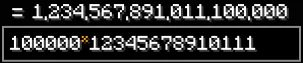
这个模组有什么功能?
直接在搜索栏中输入计算式并获取即时结果!支持在 Roughly Enough Items (REI) 的搜索栏、Skyblock Item List 的搜索栏中使用,或者完全以 独立模式 运行(在物品栏界面底部提供专用输入框)。如果你曾在旧版本中使用过 NEU,你应该已经熟悉其用法。
示例: 在搜索栏中输入 100m - 50m → 立即显示 = 50,000,000
功能特性
基础数学与运算符
| 类别 |
符号 / 关键字 |
描述 |
输入示例 |
输出结果 |
| 加法 |
+ |
数字和单位项相加 |
100m + 50m |
150,000,000 |
| 减法 |
- |
数字和单位项相减 |
1b - 250m |
750,000,000 |
| 乘法 |
*, x, X |
数字相乘 (* 或 x/X 作为乘数) |
10x5, 10k * 5 |
50, 50,000 |
| 除法 |
/ |
数字相除 |
100m / 4 |
25,000,000 |
| 幂运算 |
^ |
次方 / 指数计算 |
2^10 |
1,024 |
| 取模 |
% |
除法余数 |
10 % 3 |
1 |
| 阶乘 |
! |
整数阶乘 ($n!$) |
5! |
120 |
| 百分比 |
% |
百分比缩放 (100 + 10% = 110) |
100 + 10% |
110 |
| 括号 |
( ) |
分组与隐式乘法 |
2(3+4), (3)(4) |
14, 12 |
| 按位与 |
& |
按位与操作 |
0b1010 & 0b1100 |
0b1000 |
| 按位或 |
| |
按位或操作 |
0b1010 | 0b0101 |
0b1111 |
| 按位非 |
~ |
按位非操作 |
~0, ~5 |
-1, -6 |
| 左移 |
<< |
按位左移 |
1 << 4 |
16 |
| 右移 |
>> |
按位右移 |
16 >> 2 |
4 |
| 二进制字面量 |
0b |
二进制数字字面量 |
0b1010 |
0b1010 |
| 十六进制字面量 |
0x |
十六进制数字字面量 |
0xFF |
0xFF |
| 八进制字面量 |
0o |
八进制数字字面量 |
0o77 |
0o77 |
数学与逻辑函数
| 类别 |
函数语法 |
描述 |
输入示例 |
输出结果 |
| 开方与绝对值 |
sqrt(x) |
$x$ 的平方根 |
sqrt(144) |
12 |
|
abs(x) |
$x$ 的绝对值 |
abs(-50) |
50 |
| 舍入 |
floor(x) |
向下取整至最接近的整数 |
floor(3.9) |
3 |
|
ceil(x) |
向上取整至最接近的整数 |
ceil(3.1) |
4 |
|
round(x) |
四舍五入至最接近的整数 |
round(3.5) |
4 |
| 对数 |
log(x) |
以 10 为底的对数 |
log(100) |
2 |
|
ln(x) |
自然对数 (底数为 $e$) |
ln(e) |
1 |
| 三角函数 |
sin(x) |
角度(度)的正弦值 |
sin(90) |
1 |
|
cos(x) |
角度(度)的余弦值 |
cos(0) |
1 |
|
tan(x) |
角度(度)的正切值 |
tan(45) |
1 |
| 角度转换 |
rad(x) |
将角度转换为弧度 |
rad(180) |
3.14159... |
|
deg(x) |
将弧度转换为角度 |
deg(pi) |
180 |
| 边界限制 |
min(a, b) |
两个值中的较小值 |
min(10, 5) |
5 |
|
max(a, b) |
两个值中的较大值 |
max(10, 5) |
10 |
|
clamp(v, min, max) |
将数值限制在最小/最大值范围内 |
clamp(15, 0, 10) |
10 |
| 统计 |
avg(a, b, ...) |
任意数量输入值的平均值 |
avg(10, 20, 30) |
20 |
|
pct(a, b) |
比率百分比 ($a$ 占 $b$ 的百分比) |
pct(50, 200) |
25 |
| 数论 |
gcd(a, b) |
最大公约数 |
gcd(12, 18) |
6 |
|
lcm(a, b) |
最小公倍数 |
lcm(12, 18) |
36 |
| 进制转换 |
hex(x) |
将十进制转换为十六进制 |
hex(255) |
0xFF |
|
bin(x) |
将十进制转换为二进制 |
bin(10) |
0b1010 |
|
oct(x) |
将十进制转换为八进制 |
oct(63) |
0o77 |
| 按位运算 |
xor(a, b) |
按位异或函数 |
xor(10, 12) |
6 |
| 格式化 |
fmt(x) |
将数字格式化为 SkyBlock 简写形式 |
fmt(1500000) |
1.5m |
SkyBlock 单位与存储
| 单位代码 |
精确值 |
描述 / 等价含义 |
示例输入 |
结果输出 |
k |
1,000 |
千位乘数 |
10k |
10,000 |
m |
1,000,000 |
百万位乘数 |
5m |
5,000,000 |
b |
1,000,000,000 |
十亿位乘数 |
2b |
2,000,000,000 |
t |
1,000,000,000,000 |
万亿位乘数 |
1t |
1,000,000,000,000 |
s, st, stack, stacks |
64 |
堆叠乘数 |
3s, 2st, 5stacks |
192 |
e |
160 |
附魔物品乘数 |
2e |
320 |
h |
1,728 |
潜影盒容量 |
1h |
1,728 |
sc |
1,728 |
小箱子容量 |
1sc |
1,728 |
dc |
3,456 |
大箱子容量 |
2dc |
6,912 |
eb |
2,880 |
末影箱容量 |
1eb |
2,880 |
经验值表
| 类别 |
函数语法 |
替代别名 |
描述 |
示例输入 |
结果输出 |
| 技能经验 |
skillxp(lvl, [toLvl]) |
skill_xp, skilltable |
技能经验里程碑与等级差值(1–60) |
skillxp(40, 50) |
29,650,000 |
| 狩猎经验 |
huntingxp(lvl, [toLvl]) |
hunting_xp, huntingtable |
狩猎经验里程碑与等级差值(1–50) |
huntingxp(50) |
55,172,425 |
| 符文制作经验 |
runecraftingxp(lvl, [toLvl]) |
runecrafting_xp, runetable |
符文制作经验里程碑与差值(1–25) |
runecraftingxp(25) |
94,450 |
| 社交经验 |
socialxp(lvl, [toLvl]) |
social_xp, socialtable |
社交经验里程碑与差值(1–25) |
socialxp(25) |
272,800 |
| 地牢经验 |
cataxp(lvl, [toLvl]) |
cata_xp, catatable, cxp_table |
地牢经验里程碑与等级差值(1–50+) |
cataxp(50) |
569,809,640 |
| 猎杀者经验 |
slayerxp([boss], lvl, [toLvl]) |
slayer_xp, slayertable |
通用猎杀者经验里程碑(僵尸、蜘蛛、狼、末影人、烈焰人、吸血鬼) |
slayerxp(spider, 2) |
25 |
| 僵尸/狼猎杀者 |
zombiexp(lvl, [toLvl]) |
revxp, revenantxp, wolfxp, svenxp |
僵尸(Revenant)与狼(Sven)猎杀者经验里程碑 |
zombiexp(4) |
1,500 |
| 蜘蛛猎杀者 |
spiderxp(lvl, [toLvl]) |
spider_xp, tarantulaxp, tarantula_xp, spidertable |
蜘蛛/Tarantula 猎杀者经验 |
spiderxp(2) |
25 |
| 末影人/烈焰人 |
emanxp(lvl, [toLvl]) |
voidgloomxp, endermanxp, blazexp, infernoxp |
末影人(Voidgloom)与烈焰人(Inferno)猎杀者经验 |
emanxp(4) |
1,500 |
| 吸血鬼猎杀者 |
vampirexp(lvl, [toLvl]) |
vampire_xp, vampiretable, vampslayerxp, riftstalkerxp |
吸血鬼猎杀者经验里程碑与差值(1–5) |
vampirexp(5) |
2,400 |
拍卖行与集市税费
| 类别 |
函数语法 |
替代别名 |
描述 |
示例输入 |
结果输出 |
| 集市净收益 |
bz(price) |
N/A |
扣除集市税费后的净收益(随 Flipper 增益变化) |
bz(100m) |
98,750,000 |
| 拍卖行售出收益 |
ah(price, [hrs]) |
N/A |
扣除拍卖行 5% 手续费及上架税后的净收益 |
ah(50m) |
46,999,955 |
| 拍卖行一口价净收益 |
ahbin(price, [hrs]) |
N/A |
扣除拍卖行一口价上架费及收藏税后的净收益 |
ahbin(50m, 24) |
48,499,650 |
变量与常量
| 变量 |
完整标识符 |
类型 |
描述 |
示例输入 |
| 上次结果 |
ans |
内置 |
保存上一次计算的结果 |
ans * 2 |
| 圆周率常量 |
pi |
内置 |
数学常数 $\pi \approx 3.14159265$ |
2 * pi |
| 自然对数底数 |
e |
内置 |
常数 $e \approx 2.71828182$(单独使用时) |
ln(e) |
| 自定义变量 |
$name |
用户定义 |
通过 /calcset 或 GUI 管理器创建的持久化变量 |
$profit * 2 |
语法高亮与颜色
| 语法类别 |
Minecraft 颜色代码 |
示例元素 |
| 数字与小数 |
§3 (青色 / 暗水蓝) |
42, 100.5, 3.14159 |
| 数量与后缀单位 |
§b (水蓝色) |
k, m, b, t, st, stack, dc, eb |
| 数学函数 |
§e (黄色) |
sqrt(), abs(), floor(), sin(), min(), max(), avg(), clamp(), gcd(), lcm() |
| 进度系统与猎杀者 |
§6 (金色) |
skillxp(), huntingxp(), cataxp(), slayerxp(), emanxp(), vampirexp() |
| 税费 |
§9 (宝蓝色) |
bz(), ah(), ahbin() |
| 进制字面量与函数 |
§d (淡紫色 / 品红) |
0xFF, 0b1010, 0o77, hex(), bin(), oct(), pct() |
| 内置变量与常量 |
§b (水蓝色) |
ans, pi, e |
| 自定义变量 |
§3 (青色 / 暗水蓝) |
$myset, $tax, $profit, $goal |
| 变量前缀 ($) |
§6 (金色) |
任何变量前的 $ 前缀 |
| 引号字符串 |
§d (淡紫色 / 粉色) |
"ITEM", 'TEXT' |
| 数学运算符 |
§c (浅红色) |
+, -, *, /, ^, %, x, !, &, |, ~, <<, >> |
| 分隔符与括号 |
§7 (灰色) |
(, ), , |
| 结果等号 (=) |
§6 (金色) |
计算输出前的 = 分隔符 |
| 计算结果数值 |
§a (绿色) |
50,000,000 |
快捷键与搜索栏控制
| 操作 / 快捷键 |
按键组合 / 输入 |
说明 |
| 撤销计算历史 |
Ctrl+Z / Cmd+Z |
在搜索栏中向后回溯以回忆之前的计算 |
| 重做计算历史 |
Ctrl+Y / Cmd+Y |
在搜索栏中向前浏览计算历史 |
| 复制完整公式 |
Ctrl+C / Cmd+C |
当未选中任何文本时,将完整公式(如 1+1 = 2)复制到剪贴板 |
| 剪切完整公式 |
Ctrl+X / Cmd+X |
将完整公式剪切到剪贴板并清空搜索栏 |
| 部分选区复制/剪切 |
Ctrl+C / Ctrl+X |
当选中文本时,仅复制或剪切高亮的文本片段 |
| 全选文本 |
Ctrl+A / Cmd+A |
选中搜索栏中的所有文本 |
| 按单词跳转光标 |
Ctrl+左箭头 / 右箭头 |
按单词边界移动搜索栏中的光标 |
| 删除单词 |
Ctrl+Backspace / Delete |
删除光标左侧或右侧的整个单词 |
| 跳转到行首 / 行尾 |
Home / End |
将光标移动到文本的开头或结尾 |
| 提交计算 |
Enter / 小键盘 Enter |
将计算结果提交到历史记录,同时保持输入焦点 |
| 拖拽 & 重新定位栏位 |
Shift+拖拽 / 右键拖拽 |
自由移动并将独立搜索栏放置在屏幕上的任意位置 |
| 点击复制结果 |
聊天窗口内鼠标点击 |
点击聊天中打印的任何 /calc 结果,将其复制到剪贴板 |
命令与游戏内帮助
命令
| 分类 |
命令 |
语法 |
描述 |
示例 |
| 核心计算 |
/calc |
/calc <表达式> |
在聊天栏直接进行计算,结果可点击复制 |
/calc 100m - 25m |
| 计算历史 |
/calchist |
/calchist |
显示最近最多 15 次会话中的计算记录 |
/calchist |
| 清除历史记录 | /calcclear | /calcclear | 清除当前会话的计算历史 | /calcclear |
| 自定义变量 |
/calcset |
/calcset <名称> <表达式> |
从聊天设置或更新持久化的自定义变量 |
/calcset profit 100m-50m |
| 设置界面 |
/calcconfig |
/calcconfig |
打开设置和自定义变量管理器屏幕 |
/calcconfig |
| 位置编辑器 | /calcconfig position / /calcpos | /calcconfig position(或 /calcpos) | 打开交互式搜索栏重定位屏幕 | /calcpos |
| 帮助系统 | /calchelp | /calchelp [主题] | 打开涵盖所有主题的交互式游戏内指南 | /calchelp 函数 |
帮助菜单页面 (/calchelp [主题])
| 主题 |
命令 |
描述 |
| 主菜单 |
/calchelp |
包含快速开始、命令列表和快捷键的主菜单 |
| 运算符 |
/calchelp operators |
算术运算(+、-、*、/、^、%、!)、位运算(&、|、~、<<、>>)以及进制字面量(0b、0x、0o) |
| 函数 |
/calchelp functions |
数学函数、对数、三角函数、最小值/最大值、钳制、平均值、百分比、最大公约数、最小公倍数、进制转换及经验值表 |
| 单位 |
/calchelp units |
货币乘数(k、m、b、t)和容器存储容量(s、e、h、sc、dc、eb) |
| 变量 |
/calchelp variables |
内置常量(ans、pi、e)、自定义变量($name)以及变量使用指南 |
| 税收公式 |
/calchelp tax |
集市分红与拍卖行一口价上架/领取的税收公式 |
| 示例 |
/calchelp examples |
实用的倒卖、制作、挖掘和库存计算示例 |
| 配置指南 |
/calchelp config |
模组配置设置及配置文件详情 |
配置与设置 GUI
| 设置名称 |
配置键 |
默认值 |
行为(开启 vs 关闭) |
| 打开设置界面 |
命令 /calcconfig |
不适用 |
打开设置和自定义变量管理器界面(也可在 Mod Menu 中访问) |
| 自定义变量 |
customVariables |
{} |
通过 /calcset 或 GUI 管理器创建的已保存变量 |
| 自定义变量管理器 |
GUI 标签页 Custom Variables |
不适用 |
用于添加、编辑、删除和浏览自定义变量的菜单标签页 |
| 内联结果 |
showInlineResults |
true |
开启: 在搜索栏中实时显示计算结果(= 50m),随输入动态更新。
关闭: 隐藏实时结果。 |
| 单位建议 |
showUnitSuggestions |
true |
开启: 在搜索栏下方显示物品转换建议,如 (1 double chest)。
关闭: 隐藏单位建议。 |
| 逗号格式 |
enableCommaFormatting |
true |
开启: 使用逗号格式化大数字(1,000,000)。
关闭: 显示不带逗号的纯数字(1000000)。 |
| 简写结果 |
enableShorthandResults |
false |
开启: 使用 SkyBlock 符号缩短答案(1.5m, 2.5b)。
关闭: 显示带逗号的完整数字。 |
| 语法高亮 |
enableSyntaxHighlighting |
true |
开启: 对数字、单位、函数、进度、税费、变量、运算符和结果进行着色。
关闭: 显示纯白色文本。 |
| 小数精度 |
decimalPrecision |
10 |
输出的最大小数位数(1 到 50)。使用 HALF_UP 规则进行四舍五入。 |
| Bazaar 翻转者增益 |
bazaarFlipperLevel |
0 |
你的社区中心增益等级:Lvl 0(1.25% 税费)、Lvl 1(1.125% 税费)或 Lvl 2(1.0% 税费)。 |
| 历史记录快捷键 |
enableHistoryNavigation |
true |
开启: 在搜索栏中使用 Ctrl+Z 和 Ctrl+Y 逐步浏览最近的计算记录。
关闭: 禁用 Ctrl+Z/Ctrl+Y 历史记录快捷键。 |
| 复制完整公式 |
enableFullEquationCopy |
true |
开启: 未选中任何内容时按下 Ctrl+C 将复制完整公式(100m - 25m = 75m)。
关闭: 仅复制结果(75m)。 |
| 强制独立模式 |
forceStandaloneMode |
false |
开启: 即使安装了 REI 或 Skyblock Item List,也使用我们的独立搜索栏。
关闭: 当存在 REI 或 Skyblock Item List 时,使用其搜索栏。 |
| 编辑 GUI |
GUI 按钮 Edit GUI |
不适用 |
打开屏幕以拖拽并定位搜索栏到任意位置。 |
| 重置位置 |
GUI 按钮 §f§l⟲ / 编辑 GUI |
不适用 |
将搜索栏位置重置为默认值。 |
| 物品列表集成 |
enableItemListIntegration |
true |
开启: 启用 SkyBlock Item List 搜索栏内的计算器功能。
关闭: 禁用对 SkyBlock Item List 的钩子。 |
依赖项
重要提示
- 这些依赖版本适用于最新版本(v3.0.3+)。如果您使用的是旧版本构建,请查阅该特定版本的依赖要求,或者在安装模组后首次启动游戏,此时会弹出窗口显示所有必需的依赖项。
- 独立模式是在 v2.7.0 中添加的。v2.7.0 之前的版本需要安装 REI。此外,版本 3.0.0、3.0.1、3.0.2 和 3.1.0 需要安装 Fabric Language Kotlin。
必需
可选 / 推荐
安装方法
- 下载所需的模组并将它们放入 Minecraft 的
mods/ 文件夹中:
- 使用 Fabric 加载器启动 Minecraft
- 打开任何物品栏界面(箱子、工作台等)
- 开始在搜索栏中输入计算公式(如果安装了 REI,则在 REI 的搜索栏中;如果安装了 Item List,则在 Skyblock Item List 的搜索栏中;否则使用屏幕底部的独立计算器栏)
支持
重要版本通知:
- 跟随 Hypixel SkyBlock 的现代更新,仅支持最新的两个主要 Minecraft 版本。此模组不会为旧版本接收更新。请确保您使用的是受支持的版本以避免问题。
需要帮助或发现错误?
请在 GitHub 上报告问题:Issues
或加入我们的 Discord 获取支持:Discord
常见问题与故障排除
计算器搜索栏未显示?
- 独立模式(未安装搜索模组):打开任何物品栏界面(箱子、工作台、玩家物品栏)。独立搜索栏会自动渲染在屏幕底部。
- REI 集成(已安装 REI):点击 REI 的搜索栏即可直接开始计算。
- Skyblock Item List 集成(已安装 Item List):点击 Skyblock Item List 的搜索栏即可开始计算。
搜索栏位置偏离屏幕或错位?
- 打开
/calcconfig 并点击“编辑 GUI”按钮旁边的重置按钮(§f§l⟲)。
- 或者,运行
/calcpos(或 /calcconfig position)并点击重置为默认值,将搜索栏 snap 回默认位置。
如何将搜索栏移动到或拖拽到任意位置?
- 游戏内快速拖拽:在查看物品栏界面时,按住
Shift 键并用鼠标左键拖动该栏位,或直接使用 右键拖拽。
如何禁用 REI 或 SkyBlock Item List 搜索栏挂钩?
- 如果你希望拥有一个独立的专用计算器栏位,而不是在 REI / Skyblock Item List 中输入内容,请打开
/calcconfig 并开启 强制独立模式 (Force Standalone Mode)。
- 若要专门禁用 Item List 集成,请在
/calcconfig 中将 Item List Integration(物品列表集成) 切换为关闭状态。
计算器无响应或不显示结果?
- 确保搜索栏(REI、Skyblock Item List 或独立模式)处于活动焦点状态(即已点击选中)。如果点击屏幕其他位置,焦点将会丢失。
- 检查
/calcconfig 中是否已启用 行内结果 (Inline Results)。
Euler 常数 `e` 与附魔物品堆叠 (`2e`) 有何区别?
- 独立的
e(例如 ln(e)、e^2 或 2 * e)会被计算为 Euler 数学常数($e \approx 2.71828$)。
- 当
e 直接附加在数字后面且中间没有空格时(如 2e、10e),它会被计算为 SkyBlock 附魔物品乘数($160$)。如果你想要表示两个倍的 Euler 数,请使用 2 * e。
Bazaar / 拍卖行税率计算不准确?
- 打开设置界面(
/calcconfig)。在 Bazaar Flipper Perk 下,选择你账号的社区中心加成等级(Lvl 0 = 1.25%,Lvl 1 = 1.125%,Lvl 2 = 1.0%),以便 bz() 的计算结果与你的个人资料中的精确税率一致。
为什么除法或数学运算输出会四舍五入小数?
- 打开
/calcconfig 并检查你的 Decimal Precision(小数精度)设置(默认为 10 位小数)。你可以根据需要将精度从 1 调整到最多 50 位小数。
按下 Enter 键时聊天栏显示计算结果?
- 运行
/calc <表达式> 会将计算结果打印到聊天窗口,点击结果即可立即复制。在搜索栏模式下,结果会直接显示在搜索栏内。
如何复制结果或完整方程?
- 在搜索栏中按
Ctrl+C,将完整等式(1+1 = 2)复制到系统剪贴板(如果已选中文本,则复制选中的文本)。
- 你也可以点击聊天中打印的任意
/calc 结果,以即时聊天确认的方式复制完整等式。
历史记录导航(`Ctrl+Z` / `Ctrl+Y`)无法恢复计算结果?
- 确保在
/calcconfig 中将 enableHistoryNavigation 设置为 true。请注意,计算历史记录是基于会话的,在加入新世界或服务器以重新开始时会重置。
如何在会话期间清除计算历史?
- 在聊天栏中输入
/calcclear 可立即清除当前会话的计算历史记录,或者输入 /calchist 查看最近的记录。
重启游戏后自定义变量消失了?
- 通过
/calcconfig GUI 或 /calcset var expr 定义的自定义变量会永久保存到 config/notenoughcalculator.json 文件中。确保在 /calcconfig 中编辑变量时点击 保存。
我可以在复杂表达式或其他变量中使用自定义变量吗?
- 可以!你可以在方程的任何地方引用自定义变量,包括在函数调用中(例如
sqrt($mysize))、与其他自定义变量结合使用(例如 $profit - $cost),或者相互组合(例如 $profit * $tax)。
如何重置自定义变量或配置?
- 你可以在
/calcconfig GUI 的 Custom Variables(自定义变量)选项卡下单独管理或删除变量。若要恢复所有默认设置,请在游戏关闭时删除 .minecraft 文件夹中的 config/notenoughcalculator.json 文件。
位运算或进制输出未按预期工作?
- 十六进制 (
hex())、二进制 (bin()) 和八进制 (oct()) 函数仅对整数值生效。在执行位运算(&、|、~、<<、>>、xor)时,浮点数会被四舍五入为最接近的整数。
为什么输入单个数字(如 64 或 6912)不会在搜索栏中显示计算器结果?
- 没有运算符或单位的纯数字在 REI 和 SkyBlock Item List 中被视为物品数量或物品 ID 搜索,以免干扰正常的物品搜索功能。若要计算原始数字或查看其单位换算值,请输入一个表达式(例如
6912+0、2dc、1sc),或在聊天栏中运行 /calc 6912。
进制字面量格式是如何工作的(0xFF, 0b1010, 0o77)?
- 当完全使用进制字面量进行计算时,计算器会在输出中保留原始的基数格式(
0xFF = 0xFF,0b1010 = 0b1010,0o77 = 0o77)。若要转换为十进制,请使用标准数学运算(例如 0xFF + 0 = 255,0b1010 + 0 = 10)。若要将任意十进制数转换为进制格式,请使用 hex(255)、bin(10) 或 oct(63)。
为什么选择这个模组?
NEU (NotEnoughUpdates) 在其搜索栏中内置了一个优秀的计算器。然而 NEU 并不支持较新的 Minecraft 版本,因此本模组填补了这一空白。它可与 Roughly Enough Items (REI)、Skyblock Item List 配合使用,也可以完全独立运行。
致谢
整合包
欢迎随意将此模组加入任何整合包,无需任何限制!添加回链接到该模组的页面并非强制要求,但我们将非常感激。
贡献指南
想要帮助改进 Not Enough Calculator?请查看我们的 贡献指南。
许可证
阅读 许可通知与过渡声明。
完整许可证文本请参阅 查看 LICENSE。
由 Laze & Rijz 维护
类型化。计算。获利。
最后更新:2026年11月9日
🧮 Not Enough Calculator
A NEU-style calculator that works standalone or inside Roughly Enough Items (REI) & Skyblock Item List search bars. Type calculations directly in the search bar and get instant results.
Inspired by NotEnoughUpdates calculator. Recreated for newer Minecraft versions where NEU isn't available.
What does this mod do?
Type calculations directly in the search bar and get instant results! Works inside Roughly Enough Items (REI)'s search bar, Skyblock Item List's search bar, or completely Standalone with its own bar at the bottom of inventory screens. If you played with NEU on older versions, you already know how this works.
Example: Type 100m - 50m in the search bar → See = 50,000,000 instantly
Features
Basic Math & Operators
| Category |
Symbol / Keyword |
Description |
Example Input |
Result Output |
| Addition |
+ |
Add numbers and unit terms |
100m + 50m |
150,000,000 |
| Subtraction |
- |
Subtract numbers and unit terms |
1b - 250m |
750,000,000 |
| Multiplication |
*, x, X |
Multiply numbers (* or x/X multiplier) |
10x5, 10k * 5 |
50, 50,000 |
| Division |
/ |
Divide numbers |
100m / 4 |
25,000,000 |
| Exponents |
^ |
Power / Exponent calculation |
2^10 |
1,024 |
| Modulo |
% |
Remainder of division |
10 % 3 |
1 |
| Factorial |
! |
Integer Factorial ($n!$) |
5! |
120 |
| Percentage |
% |
Percentage scaling (100 + 10% = 110) |
100 + 10% |
110 |
| Parentheses |
( ) |
Grouping & implicit multiplication |
2(3+4), (3)(4) |
14, 12 |
| Bitwise AND |
& |
Bitwise AND operation |
0b1010 & 0b1100 |
0b1000 |
| Bitwise OR |
| |
Bitwise OR operation |
0b1010 | 0b0101 |
0b1111 |
| Bitwise NOT |
~ |
Bitwise NOT operation |
~0, ~5 |
-1, -6 |
| Left Shift |
<< |
Bitwise left shift |
1 << 4 |
16 |
| Right Shift |
>> |
Bitwise right shift |
16 >> 2 |
4 |
| Binary Literal |
0b |
Binary number literal |
0b1010 |
0b1010 |
| Hex Literal |
0x |
Hexadecimal number literal |
0xFF |
0xFF |
| Octal Literal |
0o |
Octal number literal |
0o77 |
0o77 |
Math & Logic Functions
| Category |
Function Syntax |
Description |
Example Input |
Result Output |
| Roots & Abs |
sqrt(x) |
Square root of $x$ |
sqrt(144) |
12 |
|
abs(x) |
Absolute value of $x$ |
abs(-50) |
50 |
| Rounding |
floor(x) |
Round down to nearest integer |
floor(3.9) |
3 |
|
ceil(x) |
Round up to nearest integer |
ceil(3.1) |
4 |
|
round(x) |
Round to nearest integer |
round(3.5) |
4 |
| Logarithms |
log(x) |
Base-10 logarithm |
log(100) |
2 |
|
ln(x) |
Natural logarithm (base $e$) |
ln(e) |
1 |
| Trigonometry |
sin(x) |
Sine of angle in degrees |
sin(90) |
1 |
|
cos(x) |
Cosine of angle in degrees |
cos(0) |
1 |
|
tan(x) |
Tangent of angle in degrees |
tan(45) |
1 |
| Angles |
rad(x) |
Convert degrees to radians |
rad(180) |
3.14159... |
|
deg(x) |
Convert radians to degrees |
deg(pi) |
180 |
| Bounds |
min(a, b) |
Smaller of two values |
min(10, 5) |
5 |
|
max(a, b) |
Larger of two values |
max(10, 5) |
10 |
|
clamp(v, min, max) |
Clamp value to min/max range |
clamp(15, 0, 10) |
10 |
| Statistics |
avg(a, b, ...) |
Average of any number of inputs |
avg(10, 20, 30) |
20 |
|
pct(a, b) |
Ratio percentage ($a$ as % of $b$) |
pct(50, 200) |
25 |
| Number Theory |
gcd(a, b) |
Greatest common divisor |
gcd(12, 18) |
6 |
|
lcm(a, b) |
Least common multiple |
lcm(12, 18) |
36 |
| Base Conversions |
hex(x) |
Convert decimal to Hexadecimal |
hex(255) |
0xFF |
|
bin(x) |
Convert decimal to Binary |
bin(10) |
0b1010 |
|
oct(x) |
Convert decimal to Octal |
oct(63) |
0o77 |
| Bitwise |
xor(a, b) |
Bitwise XOR function |
xor(10, 12) |
6 |
| Formatter |
fmt(x) |
Format number to SkyBlock shorthand |
fmt(1500000) |
1.5m |
SkyBlock Units & Storage
| Unit Code |
Exact Value |
Description / Equivalent |
Example Input |
Result Output |
k |
1,000 |
Thousand multiplier |
10k |
10,000 |
m |
1,000,000 |
Million multiplier |
5m |
5,000,000 |
b |
1,000,000,000 |
Billion multiplier |
2b |
2,000,000,000 |
t |
1,000,000,000,000 |
Trillion multiplier |
1t |
1,000,000,000,000 |
s, st, stack, stacks |
64 |
Stack multiplier |
3s, 2st, 5stacks |
192 |
e |
160 |
Enchanted item multiplier |
2e |
320 |
h |
1,728 |
Shulker Box capacity |
1h |
1,728 |
sc |
1,728 |
Small Chest capacity |
1sc |
1,728 |
dc |
3,456 |
Double Chest capacity |
2dc |
6,912 |
eb |
2,880 |
Ender Chest capacity |
1eb |
2,880 |
XP Tables
| Category |
Function Syntax |
Alternative Aliases |
Description |
Example Input |
Result Output |
| Skill XP |
skillxp(lvl, [toLvl]) |
skill_xp, skilltable |
Skill XP milestones & level deltas (1–60) |
skillxp(40, 50) |
29,650,000 |
| Hunting XP |
huntingxp(lvl, [toLvl]) |
hunting_xp, huntingtable |
Hunting XP milestones & level deltas (1–50) |
huntingxp(50) |
55,172,425 |
| Runecrafting XP |
runecraftingxp(lvl, [toLvl]) |
runecrafting_xp, runetable |
Runecrafting XP milestones & deltas (1–25) |
runecraftingxp(25) |
94,450 |
| Social XP |
socialxp(lvl, [toLvl]) |
social_xp, socialtable |
Social XP milestones & deltas (1–25) |
socialxp(25) |
272,800 |
| Catacombs XP |
cataxp(lvl, [toLvl]) |
cata_xp, catatable, cxp_table |
Catacombs XP milestones & level deltas (1–50+) |
cataxp(50) |
569,809,640 |
| Slayer XP |
slayerxp([boss], lvl, [toLvl]) |
slayer_xp, slayertable |
Universal Slayer XP milestones (Zombie, Spider, Wolf, Enderman, Blaze, Vampire) |
slayerxp(spider, 2) |
25 |
| Zombie / Wolf Slayer |
zombiexp(lvl, [toLvl]) |
revxp, revenantxp, wolfxp, svenxp |
Zombie (Revenant) & Wolf (Sven) Slayer XP milestones |
zombiexp(4) |
1,500 |
| Spider Slayer |
spiderxp(lvl, [toLvl]) |
spider_xp, tarantulaxp, tarantula_xp, spidertable |
Spider / Tarantula Slayer XP |
spiderxp(2) |
25 |
| Enderman / Blaze |
emanxp(lvl, [toLvl]) |
voidgloomxp, endermanxp, blazexp, infernoxp |
Enderman (Voidgloom) & Blaze (Inferno) Slayer XP |
emanxp(4) |
1,500 |
| Vampire Slayer |
vampirexp(lvl, [toLvl]) |
vampire_xp, vampiretable, vampslayerxp, riftstalkerxp |
Vampire Slayer XP milestones & deltas (1–5) |
vampirexp(5) |
2,400 |
Bazaar & Auction House Taxes
| Category |
Function Syntax |
Alternative Alias |
Description |
Example Input |
Result Output |
| Bazaar Net Payout |
bz(price) |
N/A |
Net payout after Bazaar tax (scales with Flipper perk) |
bz(100m) |
98,750,000 |
| AH Auction Payout |
ah(price, [hrs]) |
N/A |
Net payout after AH auction 5% fee + listing tax |
ah(50m) |
46,999,955 |
| AH BIN Net Payout |
ahbin(price, [hrs]) |
N/A |
Net payout after AH BIN listing fee + collection tax |
ahbin(50m, 24) |
48,499,650 |
Variables & Constants
| Variable |
Full Identifier |
Type |
Description |
Example Input |
| Last Result |
ans |
Built-in |
Holds the last calculation result |
ans * 2 |
| Pi Constant |
pi |
Built-in |
Mathematical constant $\pi \approx 3.14159265$ |
2 * pi |
| Euler's Number |
e |
Built-in |
Constant $e \approx 2.71828182$ (when standalone) |
ln(e) |
| Custom Variable |
$name |
User-defined |
Persistent variable created via /calcset or GUI manager |
$profit * 2 |
Syntax Highlighting & Colors
| Syntax Category |
Minecraft Color Code |
Example Elements |
| Numbers & Decimals |
§3 (Cyan / Dark Aqua) |
42, 100.5, 3.14159 |
| Quantities & Suffix Units |
§b (Aqua) |
k, m, b, t, st, stack, dc, eb |
| Mathematical Functions |
§e (Yellow) |
sqrt(), abs(), floor(), sin(), min(), max(), avg(), clamp(), gcd(), lcm() |
| Progression & Slayers |
§6 (Gold) |
skillxp(), huntingxp(), cataxp(), slayerxp(), emanxp(), vampirexp() |
| Taxes |
§9 (Royal Blue) |
bz(), ah(), ahbin() |
| Radix Literals & Functions |
§d (Light Purple / Magenta) |
0xFF, 0b1010, 0o77, hex(), bin(), oct(), pct() |
| Built-in Variables & Constants |
§b (Aqua) |
ans, pi, e |
| Custom Variables |
§3 (Cyan / Dark Aqua) |
$myset, $tax, $profit, $goal |
| Variable Prefix ($) |
§6 (Gold) |
$ prefix preceding any variable |
| Quoted Strings |
§d (Light Purple / Pink) |
"ITEM", 'TEXT' |
| Mathematical Operators |
§c (Light Red) |
+, -, *, /, ^, %, x, !, &, |, ~, <<, >> |
| Delimiters & Parentheses |
§7 (Gray) |
(, ), , |
| Result Equals Sign (=) |
§6 (Gold) |
= separator preceding calculated output |
| Calculated Result Value |
§a (Green) |
50,000,000 |
Shortcuts & Search Bar Controls
| Action / Shortcut |
Key Combination / Input |
Description |
| Undo Calculation History |
Ctrl+Z / Cmd+Z |
Recall previous calculations backward in search bar |
| Redo Calculation History |
Ctrl+Y / Cmd+Y |
Go forward in calculation history in search bar |
| Copy Full Equation |
Ctrl+C / Cmd+C |
Copies full equation (1+1 = 2) to clipboard when no text is selected |
| Cut Full Equation |
Ctrl+X / Cmd+X |
Cuts full equation to clipboard and clears search bar |
| Partial Selection Copy/Cut |
Ctrl+C / Ctrl+X |
Copies or cuts only highlighted text snippet when text is selected |
| Select All Text |
Ctrl+A / Cmd+A |
Selects all text in search bar |
| Jump Cursor by Word |
Ctrl+Left / Right |
Moves search bar cursor by word boundaries |
| Delete Word |
Ctrl+Backspace / Delete |
Deletes entire word to left or right of cursor |
| Jump to Line Start / End |
Home / End |
Moves cursor to start or end of text |
| Commit Calculation |
Enter / Numpad Enter |
Commits calculation into history while keeping input focus |
| Drag & Reposition Bar |
Shift+Drag / Right-Click Drag |
Freely move and position the standalone search bar anywhere on screen |
| Click-to-Copy Result |
Mouse Click in Chat |
Clicking any /calc result printed in chat copies result to clipboard |
Commands & In-Game Help
Commands
| Category |
Command |
Syntax |
Description |
Example |
| Core Calculation |
/calc |
/calc <expression> |
Calculate directly in chat with click-to-copy result |
/calc 100m - 25m |
| Calculation History |
/calchist |
/calchist |
Show up to 15 recent session calculations |
/calchist |
| Clear History |
/calcclear |
/calcclear |
Clear current session calculation history |
/calcclear |
| Custom Variables |
/calcset |
/calcset <name> <expression> |
Set or update a persistent custom variable from chat |
/calcset profit 100m-50m |
| Settings GUI |
/calcconfig |
/calcconfig |
Open settings and custom variables manager screen |
/calcconfig |
| Position Editor |
/calcconfig position / /calcpos |
/calcconfig position (or /calcpos) |
Open interactive search bar repositioning screen |
/calcpos |
| Help System |
/calchelp |
/calchelp [topic] |
Open interactive in-game guide covering all topics |
/calchelp functions |
Help Menu Pages (/calchelp [topic])
| Topic |
Command |
Description |
| Main Menu |
/calchelp |
Main menu with quick start, commands list, and shortcuts |
| Operators |
/calchelp operators |
Arithmetic (+, -, *, /, ^, %, !), bitwise (&, |, ~, <<, >>), and radix literals (0b, 0x, 0o) |
| Functions |
/calchelp functions |
Math, logarithms, trigonometry, min/max, clamp, avg, pct, gcd, lcm, radix conversions, and XP tables |
| Units |
/calchelp units |
Coin multipliers (k, m, b, t) and container storage amounts (s, e, h, sc, dc, eb) |
| Variables |
/calchelp variables |
Built-in constants (ans, pi, e), custom variables ($name), and variable usage guide |
| Tax Formulas |
/calchelp tax |
Bazaar payout and Auction House BIN listing/claim tax formulas |
| Examples |
/calchelp examples |
Practical flipping, crafting, mining, and inventory calculation examples |
| Config Guide |
/calchelp config |
Mod configuration settings and config file details |
Config & Settings GUI
| Setting Name |
Config Key |
Default |
Behavior (ON vs OFF) |
| Open Settings Screen |
Command /calcconfig |
N/A |
Opens settings and custom variables manager screen (also available in Mod Menu) |
| Custom Variables |
customVariables |
{} |
Saved variables created via /calcset or the GUI manager |
| Custom Variables Manager |
GUI Tab Custom Variables |
N/A |
Menu tab to add, edit, delete, and browse custom variables |
| Inline Results |
showInlineResults |
true |
ON: Shows live results (= 50m) directly in the search bar as you type.
OFF: Hides live results. |
| Unit Suggestions |
showUnitSuggestions |
true |
ON: Shows item conversions like (1 double chest) below the search bar.
OFF: Hides unit suggestions. |
| Comma Formatting |
enableCommaFormatting |
true |
ON: Formats large numbers with commas (1,000,000).
OFF: Shows plain numbers without commas (1000000). |
| Shorthand Results |
enableShorthandResults |
false |
ON: Shortens answers using SkyBlock notation (1.5m, 2.5b).
OFF: Shows the full number with commas. |
| Syntax Highlighting |
enableSyntaxHighlighting |
true |
ON: Colors numbers, units, functions, progression, taxes, variables, operators, and results.
OFF: Shows plain white text. |
| Decimal Precision |
decimalPrecision |
10 |
Maximum decimal places for outputs (1 to 50). Rounds using HALF_UP. |
| Bazaar Flipper Perk |
bazaarFlipperLevel |
0 |
Your Community Center perk level: Lvl 0 (1.25% tax), Lvl 1 (1.125% tax), or Lvl 2 (1.0% tax). |
| History Shortcuts |
enableHistoryNavigation |
true |
ON: Step through recent calculations in the search bar with Ctrl+Z and Ctrl+Y.
OFF: Disables Ctrl+Z/Ctrl+Y history shortcuts. |
| Full Equation Copy |
enableFullEquationCopy |
true |
ON: Pressing Ctrl+C with nothing selected copies the full equation (100m - 25m = 75m).
OFF: Copies only the result (75m). |
| Force Standalone Mode |
forceStandaloneMode |
false |
ON: Uses our standalone bar even if REI or Skyblock Item List is installed.
OFF: Uses the REI or Skyblock Item List search bar when present. |
| Edit GUI |
GUI Button Edit GUI |
N/A |
Opens the screen to drag and position the search bar anywhere. |
| Reset Position |
GUI Button §f§l⟲ / Edit GUI |
N/A |
Resets search bar position back to default. |
| Item List Integration |
enableItemListIntegration |
true |
ON: Enables the calculator inside SkyBlock Item List search bar.
OFF: Disables hooks into SkyBlock Item List. |
Dependencies
Important Note
- These dependency versions are for the latest releases (v3.0.3+). If you are using an older build, please check that specific release for its dependency requirements or launch the game once with the mod installed and a popup window will display all required dependencies.
- Standalone mode was added in v2.7.0. Versions before v2.7.0 need REI installed. Also versions 3.0.0, 3.0.1, 3.0.2, and 3.1.0 require Fabric Language Kotlin to be installed.
Required
Optional / Recommended
How to Install
- Download the required mods and place them into your Minecraft
mods/ folder:
- Launch Minecraft using the Fabric loader
- Open any inventory screen (chest, crafting table, etc.)
- Start typing calculations into the search bar (REI's search bar if REI is installed, Skyblock Item List's search bar if Item List is installed, or the standalone calculator bar at the bottom of the screen)
Support
Important Version Notice:
- Following Hypixel SkyBlock's Modern Update, only the latest two major Minecraft versions are supported. This mod will not receive updates for older versions. Please ensure you are using a supported version to avoid issues.
Need help or found a bug?
Please report issues on GitHub: Issues
Or join our Discord for support: Discord
Common Issues & Troubleshooting
Calculator search bar not showing up?
- Standalone Mode (No Search Mods Installed): Open any inventory screen (chest, crafting table, player inventory). The standalone search bar renders automatically at the bottom of your screen.
- REI Integration (REI Installed): Click inside REI's search bar to start calculating directly.
- Skyblock Item List Integration (Item List Installed): Click inside Skyblock Item List's search bar to start calculating.
Search bar position is off-screen or misplaced?
- Open
/calcconfig and click the Reset button (§f§l⟲) next to the Edit GUI button.
- Alternatively, run
/calcpos (or /calcconfig position) and click Reset to Default to snap the search bar back to its default position.
How do I move or drag the search bar anywhere?
- Quick In-Game Dragging: While viewing an inventory screen, hold
Shift and drag the bar with Left-Click, or drag directly using Right-Click Drag.
- Interactive Editor: Run
/calcpos or click Edit GUI in /calcconfig to enter the visual positioning screen with alignment guides and drag preview.
How do I disable REI or SkyBlock Item List search bar hooks?
- If you prefer having a dedicated separate calculator bar rather than typing in REI / Skyblock Item List, open
/calcconfig and turn ON Force Standalone Mode.
- To disable Item List integration specifically, toggle Item List Integration to OFF in
/calcconfig.
Calculator is unresponsive or not showing results?
- Make sure the search bar (REI, Skyblock Item List, or Standalone) is actively in focus (clicked into). If you click elsewhere on the screen, focus is lost.
- Check that Inline Results is enabled in
/calcconfig.
How does Euler's constant `e` differ from enchanted item stacks (`2e`)?
- Standalone
e (like ln(e), e^2, or 2 * e) is evaluated as Euler's mathematical constant ($e \approx 2.71828$).
- When attached directly to a number without spaces (like
2e, 10e), it evaluates as the SkyBlock enchanted item multiplier ($160$). Use 2 * e if you want two times Euler's number.
Bazaar / AH tax calculation rate is inaccurate?
- Open the settings screen (
/calcconfig). Under Bazaar Flipper Perk, select your account's Community Center perk level (Lvl 0 = 1.25%, Lvl 1 = 1.125%, Lvl 2 = 1.0%) so bz() calculations match your profile's exact tax rate.
Why is division or math output rounding off decimals?
- Open
/calcconfig and check your Decimal Precision setting (default is 10 decimal places). You can adjust the precision from 1 up to 50 decimal places as needed.
Calculations showing up in chat when pressing Enter?
- Running
/calc <expression> prints the calculation result to your chat window, where you can click the result to instantly copy it. In search bar mode, results show directly inside the search bar.
How to copy the result or full equation?
- Press
Ctrl+C inside the search bar to copy the full equation (1+1 = 2) to your system clipboard (or highlighted text if selected).
- You can also click any
/calc result printed in chat to copy the full equation with instant chat confirmation.
History navigation (`Ctrl+Z` / `Ctrl+Y`) not recalling calculations?
- Make sure
enableHistoryNavigation is set to true in /calcconfig. Note that calculation history is session-based and resets when joining a new world or server for a fresh start.
How do I clear my calculation history during a session?
- Run
/calcclear in chat to immediately wipe your active session calculation history, or run /calchist to view recent entries.
Custom variables disappeared after restarting the game?
- Custom variables defined via
/calcconfig GUI or /calcset var expr are saved permanently to config/notenoughcalculator.json. Make sure you click Save when editing variables in /calcconfig.
Can I use custom variables inside complex expressions or other variables?
- Yes! You can reference custom variables anywhere in equations, including inside function calls (e.g.
sqrt($mysize)), with custom variables (e.g. $profit - $cost), or combined together (e.g. $profit * $tax).
How do I reset my custom variables or config?
- You can manage or delete variables individually in the
/calcconfig GUI under the Custom Variables tab. To reset everything to default, delete config/notenoughcalculator.json in your .minecraft folder while the game is closed.
Bitwise operations or radix outputs not behaving as expected?
- Hexadecimal (
hex()), Binary (bin()), and Octal (oct()) functions operate on integer values. Floating-point numbers are rounded to nearest integers when performing bitwise operations (&, |, ~, <<, >>, xor).
Why does typing a single number like 64 or 6912 not show calculator results in the search bar?
- Standalone plain numbers without operators or units are treated as item count or item ID searches in REI and SkyBlock Item List so normal item searching is not interrupted. To calculate or view unit equivalents for raw numbers, type an expression (e.g.
6912+0, 2dc, 1sc) or run /calc 6912 in chat.
How does radix literal formatting work (0xFF, 0b1010, 0o77)?
- When calculating purely with radix literals, the calculator preserves the original base format on output (
0xFF = 0xFF, 0b1010 = 0b1010, 0o77 = 0o77). To convert to decimal, use standard math (e.g. 0xFF + 0 = 255, 0b1010 + 0 = 10). To convert any decimal into a radix format, use hex(255), bin(10), or oct(63).
Why This Mod?
NEU (NotEnoughUpdates) had a great calculator built into its search bar. NEU doesn't exist for newer Minecraft versions though, so this mod fills that gap. Works with Roughly Enough Items (REI), Skyblock Item List, or runs completely standalone.
Credits
Modpacks
Feel free to include this mod in any modpack without restriction! Adding a link back to the mod page is also not mandatory, but is greatly appreciated.
Contributing
Want to help improve Not Enough Calculator? Check out our Contributing Guide.
License
Read Licensing Notice and Transition Statement.
See the full license text in View LICENSE.
Maintained by Laze & Rijz
Type. Calculate. Profit.
Last updated: 09-11-2026
 模组

 模组
 模组
 模组

 模组
 模组
评论 0
登录后参与评分
还没有评论,来抢沙发吧