
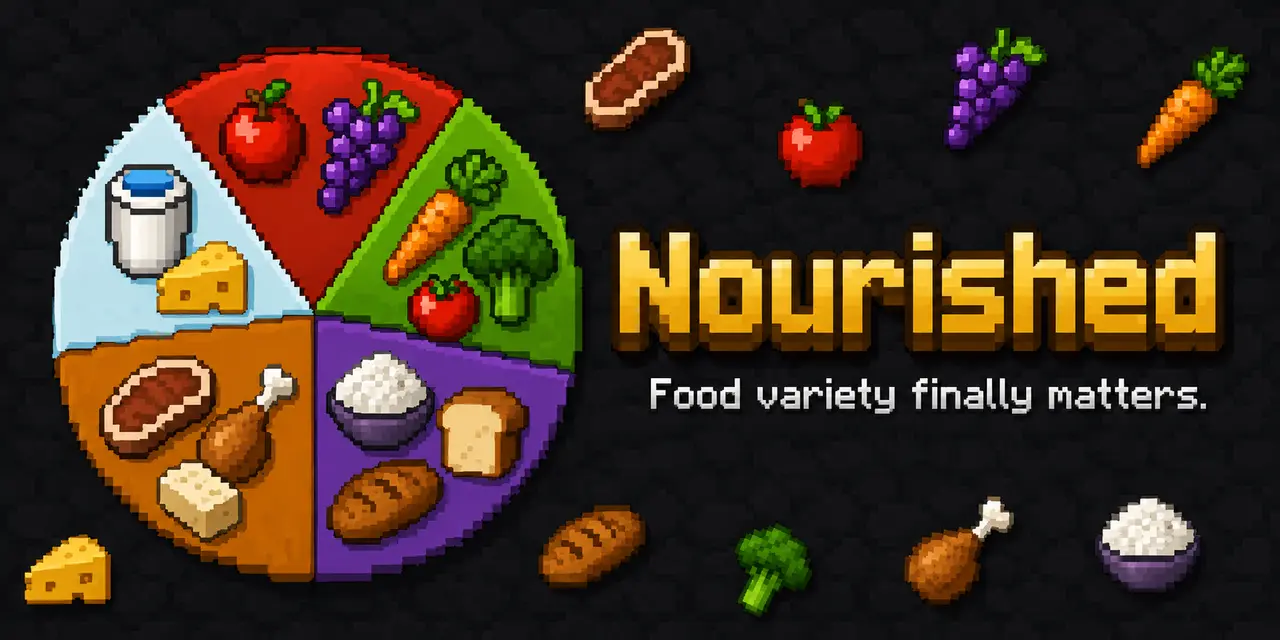
Minecraft 的食物系统一直很简单:吃饱为止。
Nourished 为 NeoForge 1.21.1 将食物转变为可配置的营养系统。追踪六大食物组,构建多样化的饮食,管理卡路里摄入量,并应对忽视营养的后果。
所有内容都是模块化且可配置的,因此 Nourished 可以适应你的整合包或服务器,而不是强制单一玩法。 这适用于配置、数据包、KubeJS、自定义营养素、自定义里程碑、食物覆盖、兼容性、模块开关以及游戏内外观编辑器。
? 推荐版本
始终使用 Nourished 的最新版本。 较新的版本可能包含相对于之前版本的主要功能、用户界面、兼容性和错误修复改进。旧版本主要用于与现有整合包的兼容性。
⚠️ 即将变更:移除经典 UI
Nourished 0.2.8-beta 中将移除经典 UI。
更新的 动态 UI 现在是推荐的界面,并将成为未来的标准。如果你仍在使用经典 UI,我们建议在升级到 0.2.8 之前切换到动态 UI。
✨ 动态 UI
饮食屏幕

迷你 HUD

动态 UI 是 Nourished 的模块化界面系统,旨在使 HUD 和饮食屏幕高度可配置,而不依赖硬编码布局。
UI 元素被组织成独立的模块,可以单独自定义,包括其位置、大小、颜色和其他视觉属性。这使得界面能够调整以适应不同的屏幕分辨率、UI 布局和玩家偏好。
该系统设计为可扩展,使得在不重建整个界面的情况下添加新的 UI 模块和自定义选项成为可能。
特性:
- 模块化 UI 组件
- 可移动的 UI 元素
- 可调的模块大小
- 可配置的颜色
- 独立的模块配置
- 可复用的 UI 架构
- 专为未来的自定义选项设计
- 由 Nourished HUD 和饮食屏幕共同使用
- 逐行拖拽:在 HUD 框内独立重新定位各个营养素行
- 细粒度可见性规则:自动隐藏零值条,或在自定义阈值之上显示/隐藏条
- 营养素 HUD、卡路里日志和活动日志面板共享编辑模式标签页,因此一次只打开一个
动态 UI 用真正的模块化编辑系统取代了 Nourished 较旧的基于交互的 UI 控件,为随时间扩展 UI 自定义提供了更清洁的基础。
? 截图使用了 PureBDCraft 资源包及自定义编辑拍摄。该 UI 可与原版纹理配合使用,但将以默认 Minecraft 风格显示。
饮食屏幕
| 你看到的内容 |
含义 |
| 趋势箭头 |
每个组别是在上升还是下降 |
| 平衡分数 |
你的营养分布是否均匀 |
| 活跃效果 |
当前饮食对你的影响 |
| 卡路里追踪 |
每日卡路里摄入一目了然 |
| 最近食用 |
你最近吃了什么 |
| 忽视的类别 |
你可能接下来应该吃的东西 |
? 游戏内外观编辑器
每个面板都有自己的外观窗口,在编辑模式下打开,用于在不触碰配置文件的情况下进行样式设置。
按面板样式设置
- 背景:不透明度和色调
- 边框:不透明度和色调
- 文本和图标亮度
- 垂直布局切换(改为垂直堆叠条形图而非水平排列)
按营养素条形图颜色
每个营养素条形图都有自己独立于其他的颜色槽。你可以单独重新着色谷物、蔬菜、蛋白质、水果、糖类和乳制品,以匹配你的整合包或个人喜好。
发光效果
每个营养素条形图都有自己独立的发光效果,可单独切换和调整:
脉冲/闪烁
处于危急状态或低水平的条形图可以进行脉冲动画以吸引你的注意力,这与自动隐藏或在自定义阈值下显示条形图的可见性系统相关联。
此处的所有设置都会直接写入后台配置,因此通过游戏内编辑器设置的任何内容都会自动保存,并且如果你稍后想手动编辑,也会出现在 config/nourished/ 中。
? 里程碑与成就
持续健康的饮食会随着时间带来回报。Nourished 会追踪每种食物组的累积摄入量,并在你养成健康习惯时授予里程碑奖励。
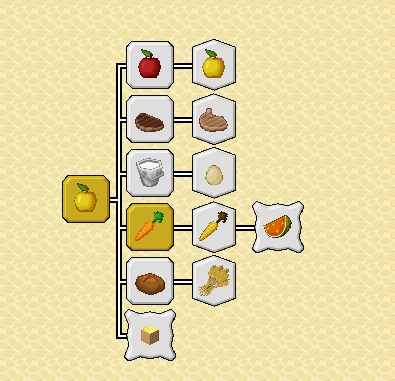
每种食物组都有其自己的三级进度:
还有一个隐藏的 完美平衡 里程碑,要求你同时维持所有五个参与平衡追踪的食物组(谷物、蔬菜、蛋白质、水果和乳制品——糖分不参与平衡系统)处于活跃状态。
里程碑会提供临时增益效果,并解锁你进度表中的条目。
里程碑目标、奖励效果及持续时间均可完全自定义。整合包作者还可以通过数据包注册完全自定义的里程碑。
❤️ 你将获得什么
当所有五个参与平衡追踪的食物组——谷物、蔬菜、蛋白质、水果和乳制品——均高于 75% 时,你将获得:
- 生命提升 I:在保持平衡期间被动生效
- 再生 I:在保持平衡期间被动生效
若任意单个食物组降至 25% 以下,则会触发忽视惩罚:
| 食物组 |
忽视惩罚 |
| ? 谷物 |
虚弱 I |
| ? 蔬菜 |
迟缓 I |
| ? 蛋白质 |
挖掘疲劳 I |
| ? 水果 |
不幸 I |
| ? 糖分 |
— |
| ? 乳制品 |
— |
默认情况下,糖分和乳制品没有惩罚效果。尽管糖分不参与上述的生命提升/再生增益,但它仍会被追踪并计入你的整体平衡评分中。
此行为可配置。
? 基于活动的营养需求
你的身体不仅因饥饿消耗能量,还会因当前进行的活动消耗能量。
Nourished 会追踪你的实际活动情况,并将其纳入你的营养需求计算中。
活动消耗
- 冲刺与游泳:持续时间越长,消耗的养分越快。
- 挖矿:每破坏一个方块会消耗少量养分。
- 战斗:每次击杀会消耗养分。
- 饥饿:当某项养分降至危险范围时,会施加一次性惩罚。
每个活动模块均可独立开关。你可以关闭战斗消耗、禁用饥饿惩罚,或启用整个系统;一切由你决定。
每个模块的消耗量和小地图颜色均可自定义。
所有内容均基于实时的单人玩家追踪数据:
活动数据是按日记录的,而非简单估算。
活动日志小地图
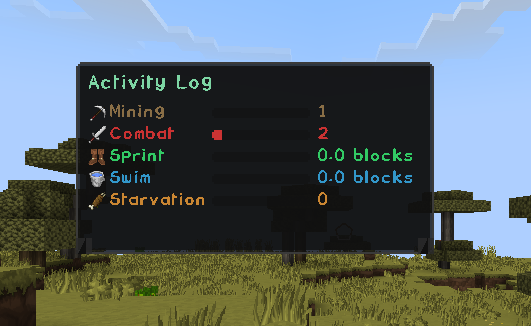
活动日志小地图 是可选功能,可以重新定位、调整大小或完全隐藏。每项统计信息都包含一个相对于你个人最佳成绩的实时进度条。
通过数据包或 KubeJS,还可以为活动追踪器设置里程碑,使整合包作者能够奖励以下目标:
- 冲刺 10,000 个方块
- 游泳 5,000 个方块
- 挖掘 10,000 个方块
- 完成 500 次击杀
此选项可以在配置文件中关闭。
? 卡路里
卡路里是 Nourished 营养系统的核心。
你吃的每样食物都会增加或减少你的每日卡路里总量,而在达成营养目标的同时,将卡路里控制在合理范围内同样重要。
实时追踪
你的卡路里总量会实时更新,并在不同游戏会话间保留,同时完整保留过往几天的历史记录。
卡路里小地图面板
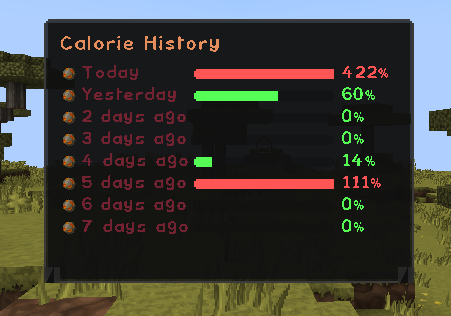
卡路里日志小地图 是可选功能,可以重新定位、调整大小或完全隐藏。
一个紧凑且可拖动的叠加层显示以下内容:
每天的数据均以占你卡路里目标百分比的形式展示,一旦超出目标,显示内容会发生变化。
进食通知
食用会改变你卡路里总量的食物时,屏幕上会快速弹出通知,显示食物名称及卡路里变化值。
无需打开菜单即可清楚了解刚刚发生了什么。
饮食界面集成
饮食界面将所有内容整合在一起,包括:
- 完整的卡路里分解
- 最近餐食
- 每日卡路里平衡
- 你可能想要食用的食物以完善饮食结构
每个面板都可以独立重新定位、调整大小和缩放。
与 Nourished 中的其他功能一样,卡路里目标和阈值均可自定义,且该系统兼容数据包和 KubeJS,方便希望进一步调整它的整合包作者使用。此选项也可以在配置文件中关闭。
?️ 多样性始终受到奖励
重复食用同一种食物的效果会随着时间推移而减弱,因此轮换食谱总是值得的。
Nourished 使用一种随时间自然衰减的记忆系统。当你避免食用某些食物时,随着食物记忆的消退,这些食物会恢复其全部营养价值。
结果很简单:
你的饮食越多样化,其效果就越显著。
?️ 饱和度高时继续进食
原版 Minecraft 会在你的饥饿度和饱和度已满时阻止你进食。
Nourished 允许你在饱和度条已满的情况下继续进食,以满足营养需求。
浆果和零食等轻量食物可以为了获取营养而食用,且不会恢复饱和度;而重型餐食则默认遵循原版的进食规则。
这两种行为均可通过以下配置项进行调整:
enableBlockHeavySourcesenableBlockLightSource
服务器管理员可以完全控制这些进食限制的行为方式。
? 生食与肠道健康
食用生食或未煮熟的食物会带来后果。
Nourished 会为每位玩家追踪一项 肠道健康 数值。食用生食会降低肠道健康,而通过熟食和饮食多样性可以随时间逐渐恢复。
生食等级
生食被分为四个等级:
| 等级 |
效果 |
| 精良 |
无惩罚 |
| 轻微 |
轻微负面效果,持续时间短 |
| 中等 |
中度负面效果,持续时间较长 |
| 严重 |
强烈负面效果,持续时间延长 |
在记忆窗口期内反复食用同一种生食会增加你的敏感度。你重复吃同一种生食的次数越多,惩罚就越严重。
肠道健康会自然恢复,并且在以下情况下恢复得更快:
随着时间的推移还可以建立抗性,从而减少生食带来的惩罚幅度。
所有内容均可配置,包括:
- 生食物品等级
- 效果持续时间
- 营养惩罚
- 恢复速率
- 抗性
- 模块行为
配置文件通过以下方式处理:
config/nourished/raw_food.json
? 模组兼容性
Nourished 支持与原版 FoodProperties 兼容的模组化食物物品。
你不需要为基本的营养追踪编写集成代码。
内置的兼容数据帮助来自流行农业和烹饪模组的食物开箱即用,直接显示在你的营养条上。
对于边缘情况,服务器所有者可以通过配置文件和标签调整行为。
| Mod |
Status |
| Farmer's Delight |
✅ 支持 |
| Pam's HarvestCraft 2 |
✅ 支持 |
| Croptopia |
✅ 支持 |
| Farm & Charm |
✅ 支持 |
| Butchery |
✅ 支持 |
| Herbs & Harvest |
✅ 支持 |
| Spice of Life: Onion |
✅ 支持 |
| KubeJS |
✅ 脚本挂钩 |
| JEI / REI / EMI |
✅ 配方查看器中的工具提示 |
| 其他带有可食用物品的模组 |
✅ 与标准食物物品兼容 |
? 为你的服务器定制配置
所有功能都附带合理的默认值。
服务器所有者和整合包作者无需触碰 Java 即可调整 Nourished。
模块控制
- 开启或关闭各个模块
- 启用或禁用 HUD
- 配置营养衰减
- 配置基于活动的消耗
- 启用或禁用效果
- 启用或禁用肠道健康
营养配置
- 调整衰减速率
- 调整阈值
- 配置临界值
- 配置低值和过量阈值
效果
通过以下方式添加、移除或替换效果:
config/nourished/effects.json
进食规则
配置:
enableBlockHeavySourcesenableBlockLightSource
数据与覆盖
自定义:
- 食物数值
- 食物覆盖
- 营养颜色
- 扫描仪规格
- 兼容设置
- 预设
- 模块锁定
所有配置均位于:
config/nourished/
配置共享
使用单个分享代码保存并共享完整的配置快照。
? 食物扫描仪
使用:
/nourished scan_analysis
分析所有已加载的食物物品,并在以下位置生成分类报告:
config/nourished/scanner_analysis/
扫描仪输出
扫描仪生成:
multi_value_recommendations.json: 明确分配到一个或多个营养组的食物unassigned_sources.txt: 无法自动分类且需要手动审查的食物scanner_metrics.txt: 整个物品注册表的汇总统计信息
推荐的标签条目可以复制到你的数据包中,使分类永久生效。
未分配的项目可以使用下面的示例进行手动标记。
? 数据与覆盖
大多数自定义操作发生在首次启动后的:
config/nourished/
其中包括:
- 效果
- 食物数值
- 食物覆盖
- 颜色
- 预设
- 模块锁定
- 扫描仪配置
- 兼容设置
Nourished 还随附捆绑的默认值,位于:
data/nourished/
这些包括营养标签、兼容条目和预设。
高级整合包作者可以在适用时通过数据包覆盖支持的数据。配置文件仍然是服务器端调优的主要方法。
游戏内的食物扫描仪可以帮助在单人游戏中检查和分配食物,并将生成的标签文件写入世界的数据包文件夹以供手动审查。
示例:将食物添加到营养标签
在你的数据包中创建以下文件:
your_datapack/
└── data/
    └── nourished/
        └── tags/
            └── item/
                └── nutrients/
                    └── vegetables.json
{
  "replace": false,
  "values": [
    {
      "id": "pamhc2foodextended:honeyglazedcarrotsitem",
      "required": false
    }
  ]
}
"replace": false 表示你的条目将与 Nourished 的默认值合并,而不是替换它们。
? KubeJS 支持
Nourished 为整合包作者提供可选的 KubeJS 集成。
必须单独安装 KubeJS。
脚本放在:
kubejs/server_scripts/
kubejs/startup_scripts/
KubeJS 支持分为两层:
- MariesLib 通过
MarieEvents.* 提供通用的值跟踪事件。
- Nourished 通过
NourishedEvents.* 提供营养特定的别名。
服务器脚本:营养事件
NourishedEvents.nutrientChanged(event => {
    if (event.nutrientKey === 'proteins' && event.newValue < 0.25) {
        event.player.tell('Eat some protein!')
    }
})

NourishedEvents.nutrientModifier(event => {
    if (event.nutrientKey === 'vegetables') {
        event.amount *= 2
    }
})

NourishedEvents.foodEaten(event => {
    event.nutrientDeltas.forEach((value, key) => {
        console.log(key + ': ' + value)
    })
})
此外还提供:
nutrientCriticalnutrientExcessrawFoodPenaltygutHealthChanged
重要提示: sourceConsumed 是 MariesLib 的一个通用事件,并不暴露 nutrientKey 或 newValue。如需获取营养相关的信息,请使用 nutrientChanged。
MariesLib 通用事件
MariesLib 自身的值追踪事件(valueChanged、valueDeltaModifier、valueCritical、valueExcess、sourceConsumed、decayTick、playerSynced)在内部支撑着该框架的运行。目前这些事件并未作为独立的 KubeJS 绑定对外暴露 —— 对于 KubeJS 脚本编写,请使用上述 NourishedEvents.* 别名,它们为营养目的提供了相同的数据。
启动脚本:注册自定义营养素
NourishedAPI.registerNutrient({
    id: 'omega3',
    displayName: 'Omega-3',
    color: 0x4AA3FF,
    decayRate: 0.0012,
    critical: 0.12,
    low: 0.30,
    excess: 0.90
})
完整的事件与绑定参考请参阅 GitHub 上的 API.md。
? 旧版 UI(遗留界面)
旧版 UI 是 Nourished 的遗留界面 —— 即 Dynamic UI 出现之前的原始 HUD 和饮食屏幕布局。它被保留以兼容较旧的配置,且不再接收新的 UI 功能。
仅用于向后兼容。计划于 0.2.8-beta 版本中移除。
⚙️ 依赖要求
| 要求 |
版本 |
| Minecraft |
1.21.1 |
| NeoForge |
21.1.x |
| Marie's Lib |
v0.1.2-beta+ |
| Cloth Config |
运行时必需 |
| Modonomicon |
必需 —— 游戏内指南 |
| Java |
21 |
重要提示: Marie's Lib 是必需的依赖项。Patchouli 已被 Modonomicon 完全取代,后者现已成为必需依赖。
?️ 支持与反馈
发现 bug、有建议或需要帮助?
- GitHub Issues:报告 bug 和功能请求
- Discord:支持与开发更新
提交问题报告时,请附上日志、截图或复现步骤。
? 许可证
MIT 许可证
Nourished 可自由用于整合包、分支项目以及附加模组中。
Minecraft's food system has always been simple: eat until you're full.
Nourished turns food into a configurable nutrition system for NeoForge 1.21.1. Track six food groups, build a varied diet, manage your calorie intake, and deal with the consequences of neglecting your nutrition.
Everything is modular and configurable, so Nourished can be adapted to your modpack or server rather than forcing a single way of playing. This applies across config, datapacks, KubeJS, custom nutrients, custom milestones, food overrides, compatibility, module toggles, and the in-game appearance editor.
🟢 Recommended Version
Always use the newest version of Nourished. Newer releases may include major feature, UI, compatibility, and bug-fix improvements over previous versions. Older versions are primarily intended for compatibility with existing modpacks.
⚠️ Upcoming Change: Classic UI Removal
The Classic UI will be removed in Nourished 0.2.8-beta.
The newer Dynamic UI is now the recommended interface and will become the standard going forward. If you are still using the Classic UI, we recommend switching to the Dynamic UI before upgrading to 0.2.8.
✨ Dynamic UI
diet screen
Mini HUD

Dynamic UI is Nourished's modular interface system, designed to make the HUD and diet screen highly configurable without relying on hardcoded layouts.
UI elements are organized into independent modules that can be customized individually, including their position, size, colors, and other visual properties. This allows the interface to be adjusted to fit different screen resolutions, UI layouts, and player preferences.
The system is designed to be extensible, making it possible to add new UI modules and customization options without rebuilding the entire interface.
Features:
- Modular UI components
- Movable UI elements
- Adjustable module sizes
- Configurable colors
- Independent module configuration
- Reusable UI architecture
- Designed for future customization options
- Used by both the Nourished HUD and Diet Screen
- Per-row dragging: reposition individual nutrient rows independently within the HUD box
- Fine-grained visibility rules: auto-hide zero-value bars, or hide/show bars above custom thresholds
- Shared edit-mode tabs for the Nutrient HUD, Calorie Log, and Activity Log panels, so only one is ever open at a time
Dynamic UI replaces Nourished's older interaction-based UI controls with a proper modular editing system, providing a cleaner foundation for expanding UI customization over time.
📸 Screenshots were taken with the PureBDCraft resource pack & custom edits. The UI works with vanilla textures, but will appear in the default Minecraft style.
Diet Screen
| What you see |
What it means |
| Trend arrows |
Whether each group is rising or falling |
| Balance score |
How evenly distributed your nutrition is |
| Active effects |
What your current diet is doing to you |
| Calorie tracking |
Daily calorie intake at a glance |
| Recently eaten |
What you've eaten recently |
| Neglected categories |
What you should probably eat next |
🎨 In-Game Appearance Editor
Every panel has its own Appearance window, opened alongside edit mode, for styling it without ever touching a config file.
Per-panel styling
- Background: opacity and shade
- Border: opacity and shade
- Text & icon brightness
- Vertical layout toggle (stack bars vertically instead of horizontally)
Per-nutrient bar colors
Every nutrient bar gets its own color slot, independent of the others. Recolor Grains, Vegetables, Proteins, Fruits, Sugars, and Dairy individually to match your pack or taste.
Glow
Each nutrient bar has its own glow, independently toggleable and tunable:
Pulse / flash
Bars that are critical or low can pulse to draw your eye, tied into the same visibility system that auto-hides or reveals bars at custom thresholds.
Every setting here writes straight to config in the background, so anything you set through the in-game editor is saved automatically and shows up the same way in config/nourished/ if you'd rather hand-edit it later.
🏆 Milestones & Achievements
Eating consistently pays off over time. Nourished tracks cumulative intake for each food group and grants milestone rewards as you build healthy habits.
Each food group has its own three-tier progression:
- Beginner
- Journeyman
- Master
There is also a hidden Perfectly Balanced milestone for maintaining all five balance-tracked food groups (Grains, Vegetables, Proteins, Fruits, and Dairy — Sugars sits outside the balance system) at once.
Milestones grant temporary buffs and unlock entries in your Advancements tab.
Milestone goals, reward effects, and durations are fully configurable. Modpack authors can also register entirely custom milestones through datapacks.
❤️ What You Gain
When all five balance-tracked food groups — Grains, Vegetables, Proteins, Fruits, and Dairy — are above 75%, you receive:
- Health Boost I: passively while balanced
- Regeneration I: passively while balanced
Let any single group drop below 25%, and a neglect penalty kicks in:
| Group |
Neglect Penalty |
| 🌾 Grains |
Weakness I |
| 🥦 Vegetables |
Slowness I |
| 🥩 Proteins |
Mining Fatigue I |
| 🍎 Fruits |
Unluck I |
| 🍬 Sugars |
— |
| 🥛 Dairy |
— |
Sugars and Dairy have no penalty effect by default. The Sugars group is still tracked and factored into your overall balance score, even though it sits outside the Health Boost/Regeneration buff above.
This behavior is configurable.
🏃 Activity-Driven Nutrients
Your body doesn't just burn energy from being hungry; it burns energy from doing things now.
Nourished tracks your actual activity and factors it into your nutrient needs.
Activity Costs
- Sprinting & swimming drain nutrients faster the longer you keep them up.
- Mining costs a small amount of nutrients per block broken.
- Combat costs nutrients per kill.
- Starvation applies a one-time penalty when a nutrient drops into a critical range.
Every activity module is independently toggleable. Turn off combat costs, disable starvation penalties, or run the entire system; it's up to you.
Each module's cost and HUD color are configurable.
Everything is backed by real per-player tracking:
- Distance sprinted
- Distance swum
- Blocks mined
- Kills
- Starvation events
Activity data is recorded day-by-day rather than simply estimated.
Activity Log HUD
The Activity Log HUD is optional and can be repositioned, resized, or hidden entirely. Each statistic includes a live bar relative to your own personal best.
Milestones can also be set on activity trackers through datapacks or KubeJS, allowing modpack authors to reward goals such as the following:
- Sprint 10,000 blocks
- Swim 5,000 blocks
- Mine 10,000 blocks
- Land 500 kills
This option can be turned off in the configs.
🔥 Calories
Calories are the backbone of Nourished's nutrition system.
Every food you eat adds to or subtracts from your daily calorie total, and staying within your calorie goal matters alongside hitting your nutrient targets.
Live Tracking
Your calorie total updates in real time and persists across sessions, with complete history retained for previous days.
Calorie HUD Panel
The Calorie Log HUD is optional and can be repositioned, resized, or hidden entirely.
A compact, draggable overlay displays the following:
- Today
- Yesterday
- Previous days
Each day is shown as a percentage of your calorie goal, with the display changing once you go over your target.
Eat-Food Notifications
Eating something that changes your calorie total now produces a quick on-screen notification showing the food's name and calorie change.
You can see exactly what just happened without opening a menu.
Diet Screen Integration
The diet screen ties everything together with:
- Full calorie breakdown
- Recent meals
- Daily calorie balance
- Foods you may want to eat to round out your diet
Every panel can be independently repositioned, resized, and scaled.
Like everything else in Nourished, calorie goals and thresholds are configurable, and the system is datapack- and KubeJS-friendly for modpack authors who want to tune it further. This option can also be turned off in the configs.
🍽️ Variety Is Always Rewarded
Eating the same food repeatedly becomes less effective over time, so rotating what you eat always pays off.
Nourished uses a memory system that naturally fades over time. Foods you've avoided recover their full nutritional value as your food memory fades.
The result is simple:
The more varied your diet, the more effective it becomes.
🍽️ Eating at Full Saturation
Vanilla Minecraft prevents you from eating when your hunger and saturation are already full.
Nourished allows you to continue eating for nutritional purposes even when your saturation bar is full.
Light foods such as berries and snacks can be eaten for their nutrients without restoring saturation, while heavier meals follow vanilla eating rules by default.
Both behaviors are configurable through:
enableBlockHeavySourcesenableBlockLightSource
Server administrators have full control over how these eating restrictions behave.
🥩 Raw Food & Gut Health
Eating raw or undercooked food has consequences.
Nourished tracks a gut health value for every player. Gut health degrades when you eat raw food and recovers over time through cooked food and dietary variety.
Raw Food Tiers
Raw foods are classified into four tiers:
| Tier |
Effect |
| Fine |
No penalty |
| Mild |
Minor debuff, short duration |
| Medium |
Moderate debuff, longer duration |
| Severe |
Strong debuff, extended duration |
Eating the same raw food repeatedly within its memory window increases your sensitivity to it. The more you repeatedly eat the same raw food, the worse the penalty becomes.
Gut health recovers passively and recovers faster when you:
- Eat cooked food
- Maintain dietary diversity
Resistance can also be built over time, reducing the scale of raw-food penalties.
Everything is configurable, including:
- Raw-food tiers
- Effect durations
- Nutrient penalties
- Recovery rates
- Resistance
- Module behavior
Configuration is handled through:
config/nourished/raw_food.json
🤝 Mod Compatibility
Nourished works with modded food items that use vanilla FoodProperties.
You do not need to write integration code for basic nutrition tracking.
Bundled compatibility data helps foods from popular farming and cooking mods appear on your nutrient bars out of the box.
For edge cases, server owners can adjust behavior through configuration files and tags.
| Mod |
Status |
| Farmer's Delight |
✅ Supported |
| Pam's HarvestCraft 2 |
✅ Supported |
| Croptopia |
✅ Supported |
| Farm & Charm |
✅ Supported |
| Butchery |
✅ Supported |
| Herbs & Harvest |
✅ Supported |
| Spice of Life: Onion |
✅ Supported |
| KubeJS |
✅ Scripting hooks |
| JEI / REI / EMI |
✅ Tooltips in recipe viewers |
| Other mods with edible food items |
✅ Works with standard food items |
🔧 Configurable for Your Server
Everything ships with sensible defaults.
Server owners and modpack authors can tune Nourished without touching Java.
Module Controls
- Toggle individual modules on or off
- Enable or disable the HUD
- Configure nutrient decay
- Configure activity-driven costs
- Enable or disable effects
- Enable or disable gut health
Nutrient Configuration
- Adjust decay rates
- Adjust thresholds
- Configure critical values
- Configure low and excess thresholds
Effects
Add, remove, or replace effects through:
config/nourished/effects.json
Eating Rules
Configure:
enableBlockHeavySourcesenableBlockLightSource
Data & Overrides
Customize:
- Food values
- Food overrides
- Nutrient colors
- Scanner specifications
- Compatibility settings
- Presets
- Module locks
All configuration lives under:
config/nourished/
Config Sharing
Save and share complete configuration snapshots using a single share code.
🔍 The Food Scanner
Use:
/nourished scan_analysis
to analyze all loaded food items and generate classification reports under the following:
config/nourished/scanner_analysis/
Scanner Output
The scanner produces:
multi_value_recommendations.json: foods confidently assigned to one or more nutrient groupsunassigned_sources.txt: foods that could not be classified automatically and need manual reviewscanner_metrics.txt: summary statistics across the full item registry
Recommended tag entries can be copied into your datapack to make classifications permanent.
Unassigned items can be manually tagged using the example below.
📁 Data & Overrides
Most customization happens inside:
config/nourished/
after the first launch.
This includes:
- Effects
- Food values
- Food overrides
- Colors
- Presets
- Module locks
- Scanner configuration
- Compatibility settings
Nourished also ships bundled defaults under:
data/nourished/
These include nutrient tags, compatibility entries, and presets.
Advanced pack authors can override supported data through datapacks where applicable. Configuration files remain the primary method for server-side tuning.
The in-game food scanner can help inspect and assign foods in singleplayer and write generated tag files into the world's datapack folder for manual review.
Example: Adding a Food to a Nutrient Tag
Create the following file inside your datapack:
your_datapack/
└── data/
    └── nourished/
        └── tags/
            └── item/
                └── nutrients/
                    └── vegetables.json
{
  "replace": false,
  "values": [
    {
      "id": "pamhc2foodextended:honeyglazedcarrotsitem",
      "required": false
    }
  ]
}
"replace": false means your entries are merged with Nourished's defaults rather than replacing them.
📜 KubeJS Support
Nourished provides optional KubeJS integration for modpack authors.
KubeJS must be installed separately.
Scripts go in:
kubejs/server_scripts/
kubejs/startup_scripts/
KubeJS support is split across two layers:
- MariesLib provides generic value-tracking events through
MarieEvents.*.
- Nourished provides nutrition-specific aliases through
NourishedEvents.*.
Server Scripts: Nutrition Events
NourishedEvents.nutrientChanged(event => {
    if (event.nutrientKey === 'proteins' && event.newValue < 0.25) {
        event.player.tell('Eat some protein!')
    }
})

NourishedEvents.nutrientModifier(event => {
    if (event.nutrientKey === 'vegetables') {
        event.amount *= 2
    }
})

NourishedEvents.foodEaten(event => {
    event.nutrientDeltas.forEach((value, key) => {
        console.log(key + ': ' + value)
    })
})
Also available:
nutrientCriticalnutrientExcessrawFoodPenaltygutHealthChanged
Important: sourceConsumed is a generic MariesLib event and does not expose nutrientKey or newValue. Use nutrientChanged when you need nutrition-specific information.
Generic MariesLib Events
MariesLib's own value-tracking events (valueChanged, valueDeltaModifier, valueCritical, valueExcess, sourceConsumed, decayTick, playerSynced) power the framework internally. They are not currently exposed as standalone KubeJS bindings — for KubeJS scripting, use the NourishedEvents.* aliases above, which cover the same data for nutrition purposes.
Startup Scripts: Register Custom Nutrients
NourishedAPI.registerNutrient({
    id: 'omega3',
    displayName: 'Omega-3',
    color: 0x4AA3FF,
    decayRate: 0.0012,
    critical: 0.12,
    low: 0.30,
    excess: 0.90
})
See API.md on GitHub for the full event and binding reference.
💾 Old UI (Legacy)
The Old UI is Nourished's legacy interface — the original HUD and diet screen layout from before Dynamic UI existed. It's retained for compatibility with older setups and is no longer receiving new UI features.
Maintained for backward compatibility only. Planned for removal in 0.2.8-beta.
⚙️ Requirements
| Requirement |
Version |
| Minecraft |
1.21.1 |
| NeoForge |
21.1.x |
| Marie's Lib |
v0.1.2-beta+ |
| Cloth Config |
Required at runtime |
| Modonomicon |
Required — in-game guide |
| Java |
21 |
Important: Marie's Lib is a required dependency. Patchouli has been fully replaced by Modonomicon, which is now a required dependency.
🛠️ Support & Feedback
Found a bug, have a suggestion, or need help?
- GitHub Issues: report bugs and feature requests
- Discord: support and development updates
Please include logs, screenshots, or reproduction steps when reporting an issue.
📜 License
MIT License
Nourished is free to use in modpacks, forks, and addons.


 模组

 模组

 模组

 模组

 模组
 模组

评论 0
登录后参与评分
还没有评论,来抢沙发吧