Numismatics Calculator
功能简介
这是一个客户端运行的 Forge 模组,为 "Create: Numismatics" by IThundxr 中的货币物品添加了计算器功能。
这非常有用,因为这些硬币的面值(如 1、8、16、64、512)在进行诸如“75”这类随机总和计算时极其难以手动计算,尤其是在多人服务器(SMP)中将这些硬币作为主要经济体系,且所有交易都使用这些硬币的情况下。
有了这个计算器,你就不需要再依赖外部系统计算器了,因为它内置于游戏中,并拥有专为这一目的设计的大量功能。
用法与功能
视频展示:
总槽位价值

按住 SHIFT 键(可配置),你可以查看持有硬币的每个槽位的总价值。
记住,你可以使用 主覆盖层 (Main Overlay) 中 求和标签页 (Summation Tab) 的 选择 (Selection) 功能,来检查是否有足够的总额支付给某人。
控制面板
打开背包时,你会看到模组的控制面板。

它可以让你切换主覆盖层 (Main Overlay) 的可见性,并打开模组的设置。
你甚至可以直接禁用 控制面板,因为这两个操作也都可以通过快捷键实现:

通过这些快捷键,即使在没有显示 控制面板 的情况下,你也可以直接从背包界面通过按键切换 主覆盖层 (Main Overlay)。
此外,你还可以通过按键直接打开模组的 配置屏幕 (Config Screen)。
主覆盖层顶部包含两个标签页:
求和标签页 (Summation Tab)

在第一个标签页中,你可以看到文本显示你背包内的硬币总数,以及选中区域内的硬币数量。
你可以点击“选择按钮”来切换选择模式。
它甚至在箱子和其他容器中也有效:

转换标签页 (Conversion Tab)

在第二个标签页中,你可以输入 ¤ 的数量以转换为实际的硬币组合。默认情况下,它会告诉你如果拥有无限硬币时的通用硬币构成方案。
由于原版模组中有面值为 1 ¤ 的硬币类型,因此通常不会出现找零的情况。
还有一个可通过 仅可用 (Only available) 复选框访问的第二种模式:

此模式将仅基于你背包中的硬币进行计算,并在余额不足时提示你。
“仅可用”模式会考虑以下情况:必须多付 (OVERPAY) 或 余额不足 (DON'T HAVE ENOUGH):


模组配置屏幕 (Mod's Config Screen)
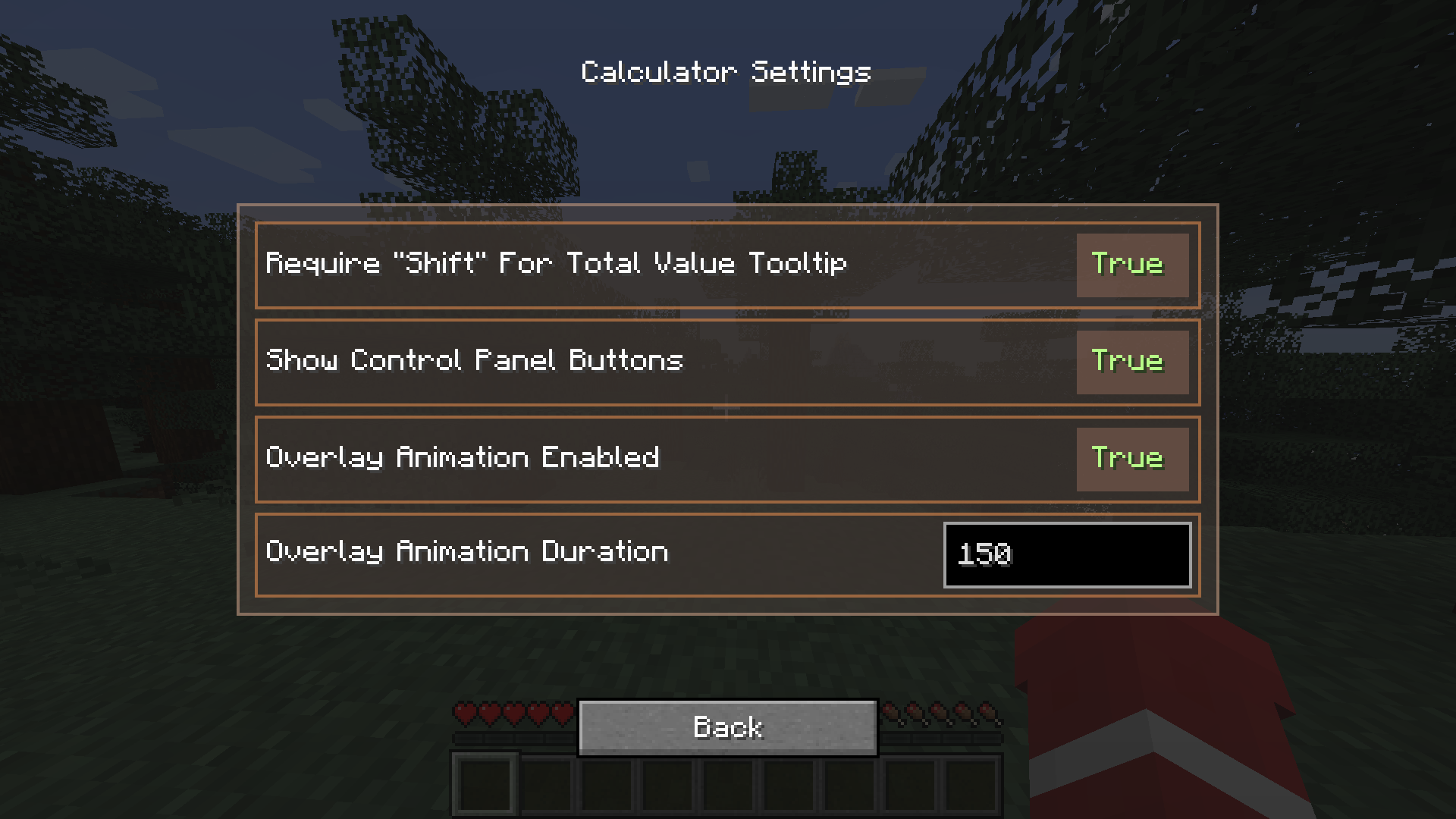
按下 控制面板 中的第二个按钮,或者直接按下配置的快捷键,即可打开模组的 配置屏幕 (Config Screen)。在这里,你可以开启或关闭各项功能。
备注
当前已知问题:
支持版本
- 1.20.1: Forge, Fabric (+Quilt)
- 1.21.1: NeoForge
注意事项:
目前仅 Fabric 1.20.1 有修复版 1.2.1,因为只有 Fabric 遇到了核心问题。
从源代码构建
请查阅 GitHub 仓库以获取相关说明 :D
Numismatics Calculator
What This Does
This is a client-side forge mod that adds some calculator functionality to coin items from the mod "Create: Numismatics" by IThundxr.
This is useful because those coins have values like 1, 8, 16, 64, 512 and those are VERY hard to calculate for random sums like "75" if you have those coins as the main economy on an SMP and you trade everything for those.
With the calculator you won't need to struggle with your system calculator, since this one is built into your game and has a lot of functionality specifically for this purpose.
Usage And Functionality
Video Showcase:
Total Slot Value
By holding down SHIFT (can be configured) you can see the total value of every single slot with a coin.
Remember, that you can check if you have the right sum available to pay someone with the Selection feature from the Summation Tab in the Main Overlay.
Control Panel
When opening your inventory, you'll see the mod's Control Panel.
It lets you toggle the visibility of the Main Overlay and open mod's settings
You can even disable the Control Panel, because both actions are available as keybindings too:
With those you can always toggle the Main Overlay with a key right from your inventory, even without the Control Panel visible.
Additionally you can open the mod's Config Screen with a key too.
The Main Overlay contains two tabs visible on the top:
Summation Tab
In the first tab you have a text displaying your total coins in the inventory, and coins in the selected area.
You can toggle selection mode with the "Select button".
It even works in CHESTS and all other containers:
Conversion Tab
In the second tab you can enter an amount of ¤ to actual coins. By default, it'll tell you a general coin composition as if you had infinite coins.
Since the original mod has a coin type for 1 ¤, there is never expected any sum in return.
And there is a second mode accessible with the Only available checkbox:
This mode will only work with coins in your inventory and tell you if you don't have enough.
"Only Available" mode will take into account the cases when you have to OVERPAY or you DON'T HAVE ENOUGH:
Mod's Config Screen
By pressing the second button in your Control Panel or just by pressing a configured keybind, you can open the mod's Config Screen. Here you can toggle features on and off.
Notes
Current known bugs:
Supported Versions
- 1.20.1: Forge, Fabric (+Quilt)
- 1.21.1: NeoForge
Notes:
Currently only Fabric 1.20.1 has patch version 1.2.1 with some fixes, becuase only fabric had the core issue
Building From Source Code
Check the Github repository for these instructions :D


 模组

 模组
 模组

 模组
 模组
 模组
评论 0
登录后参与评分
还没有评论,来抢沙发吧