一个用于添加海洋生物群系、水体颜色和实体水桶的模组库!
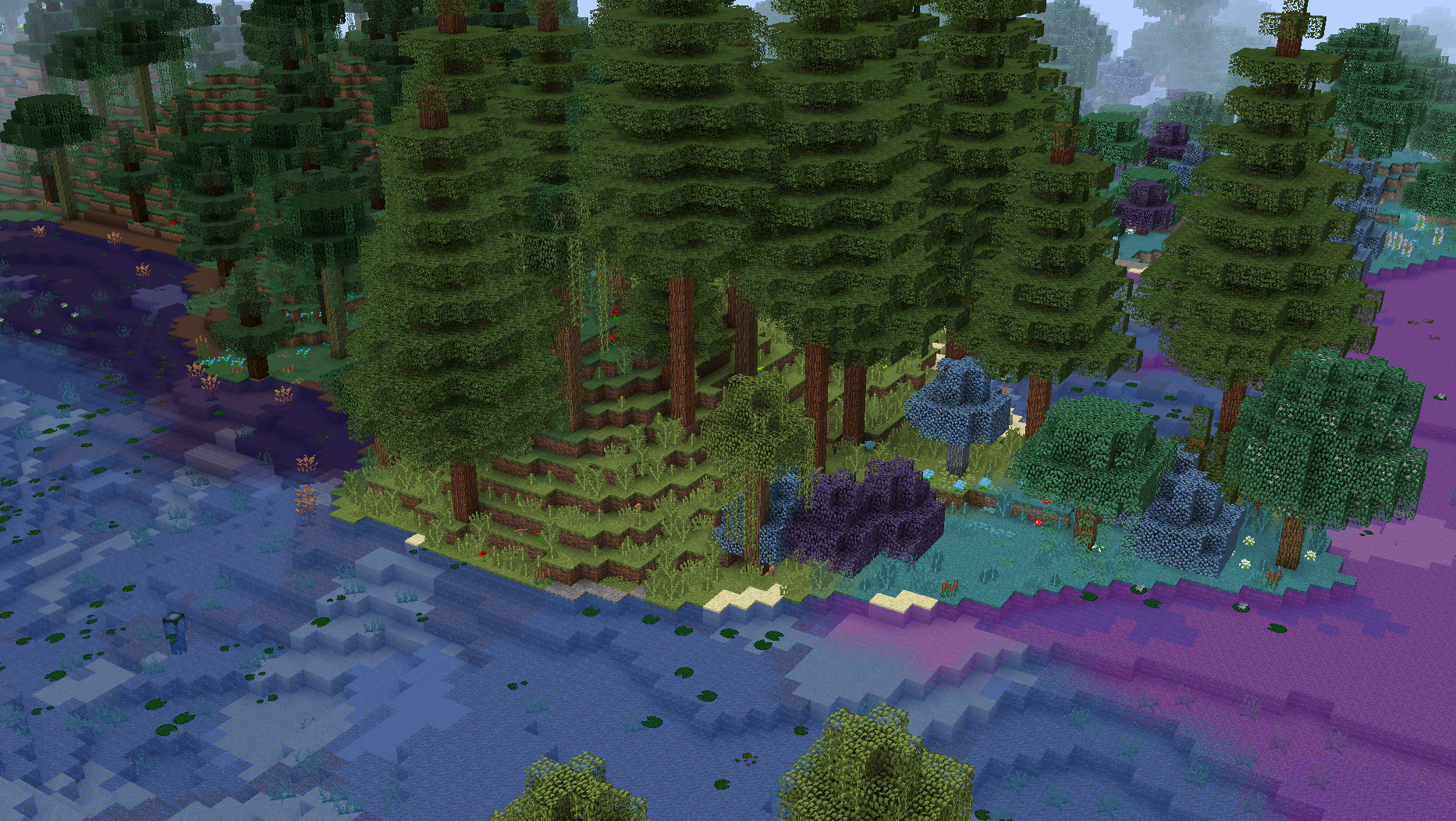
如果您是想将 Ocean API 添加到 CurseForge 或 Modrinth 之外分发的整合包的整合包开发者,请使用 File Director 以避免重新上传 Ocean API 的文件。
Ocean API 使用的新灰度水体纹理是在运行时动态生成的,并根据您使用的资源包而变化!下方截图使用的是 Faithful 32x 和 Tropical Waters 资源包。
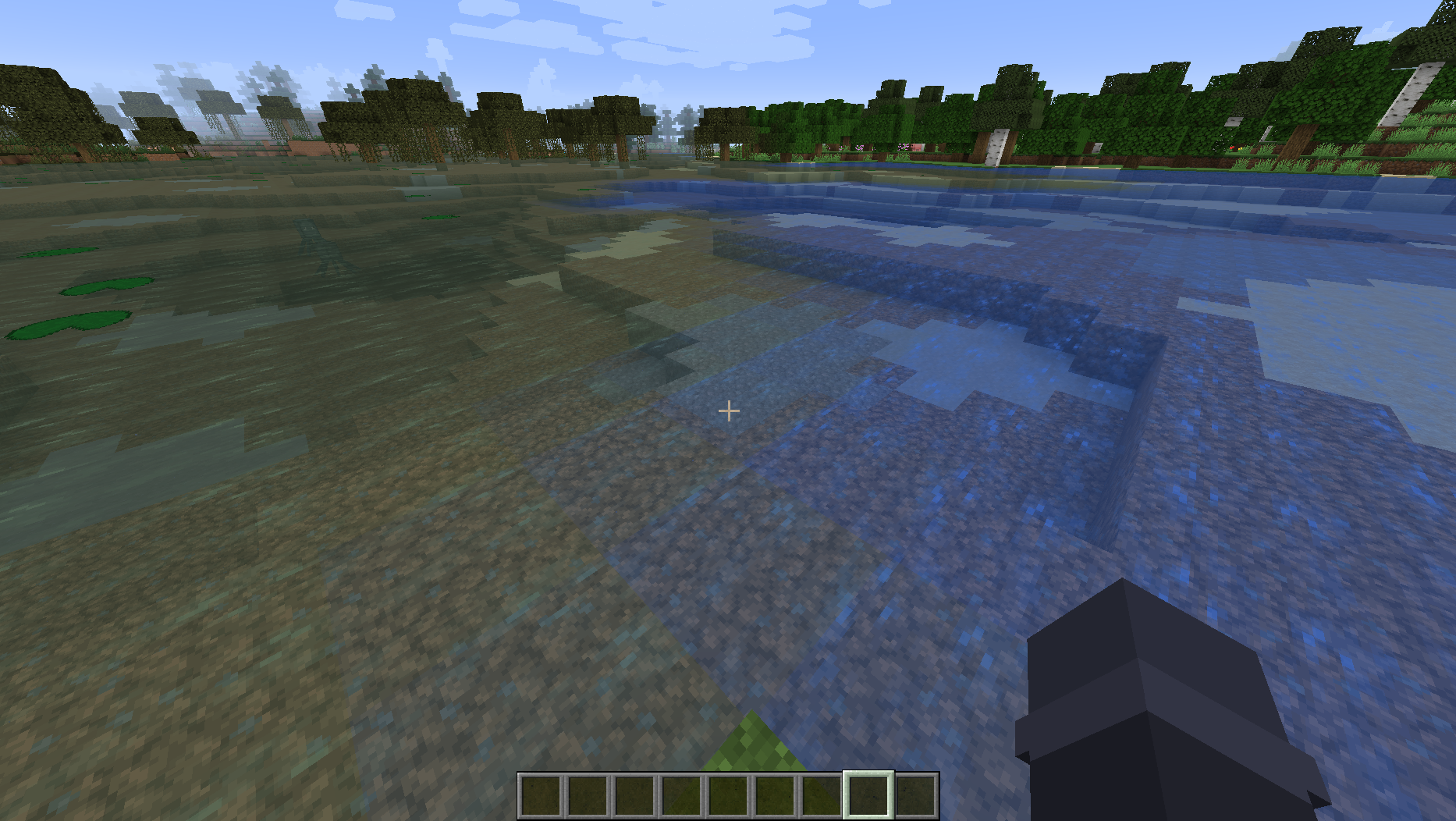
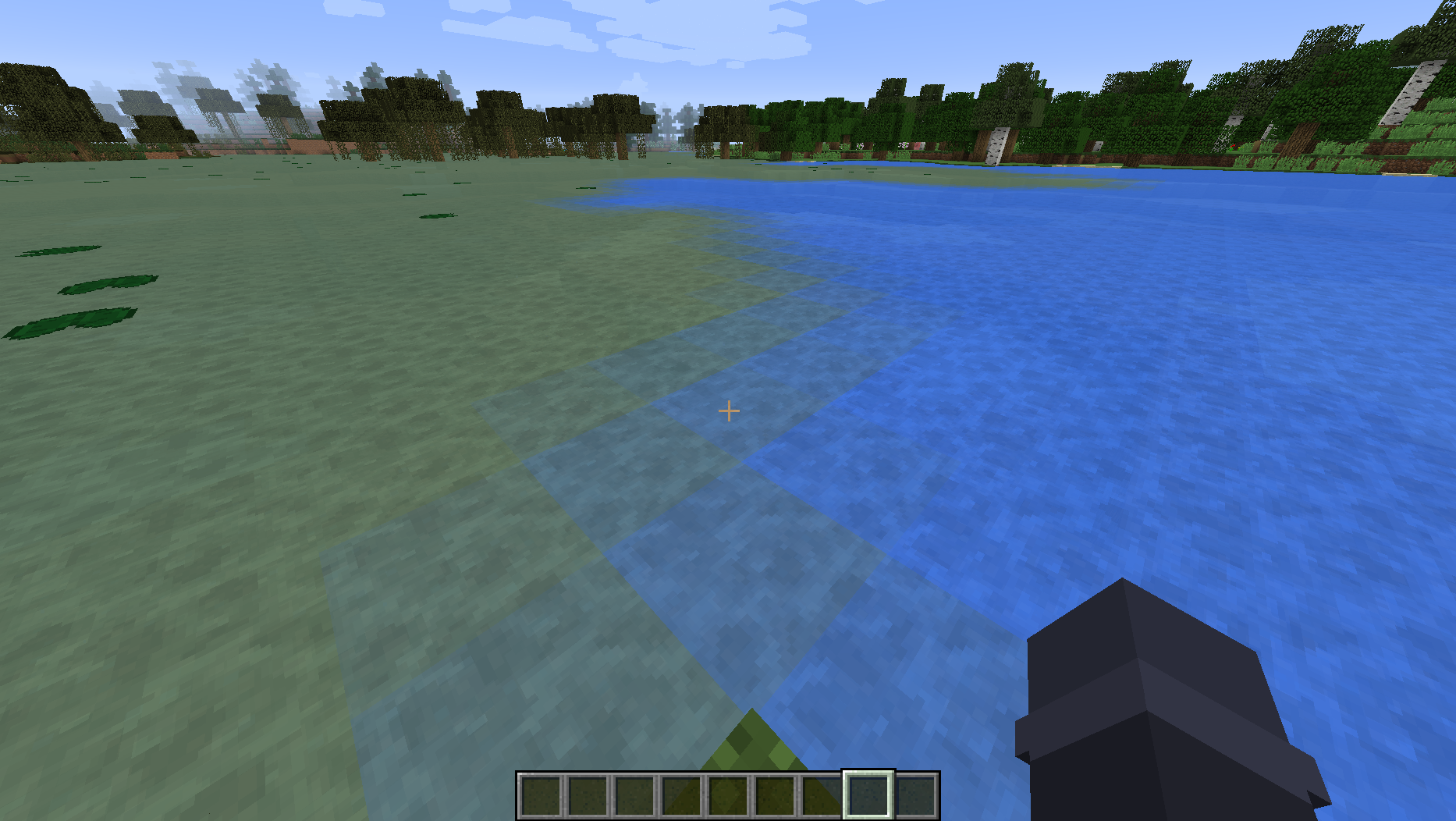
如果您希望使用显式纹理而不是自动生成的灰度纹理,请将您的纹理放置在以下路径:assets/ocean_api/textures/minecraft/blocks/water_still、assets/ocean_api/textures/minecraft/blocks/water_flow 和 assets/ocean_api/textures/minecraft/blocks/water_overlay。
Ocean API 还提供了一个配置选项(默认禁用),以启用新版 Minecraft 中使用的水体纹理!注意:此配置选项需要安装 AssetMover 或 Aqua Acrobatics,因为这些模组提供了让 Ocean API 获取新版水体纹理的方法。
水体流体引用了新纹理和颜色,因此任何具有渲染任意流体系统的模组都能与新纹理正常工作。新水体纹理注册到了新的精灵图上,并且不会替换原版水体精灵图。这意味着任何直接引用旧纹理的模组仍能正确运行。如果您发现任何模组渲染出未着色的灰度水体纹理,请向 Ocean API 的 问题追踪器 报告,以便我为其添加特殊支持!
可以通过直接编辑 config/ocean_api/fog_colors.cfg 和 config/ocean_api/surface_colors.cfg 文件或使用配置 GUI 来添加生物群系水体颜色。以下是带有默认条目的样子:
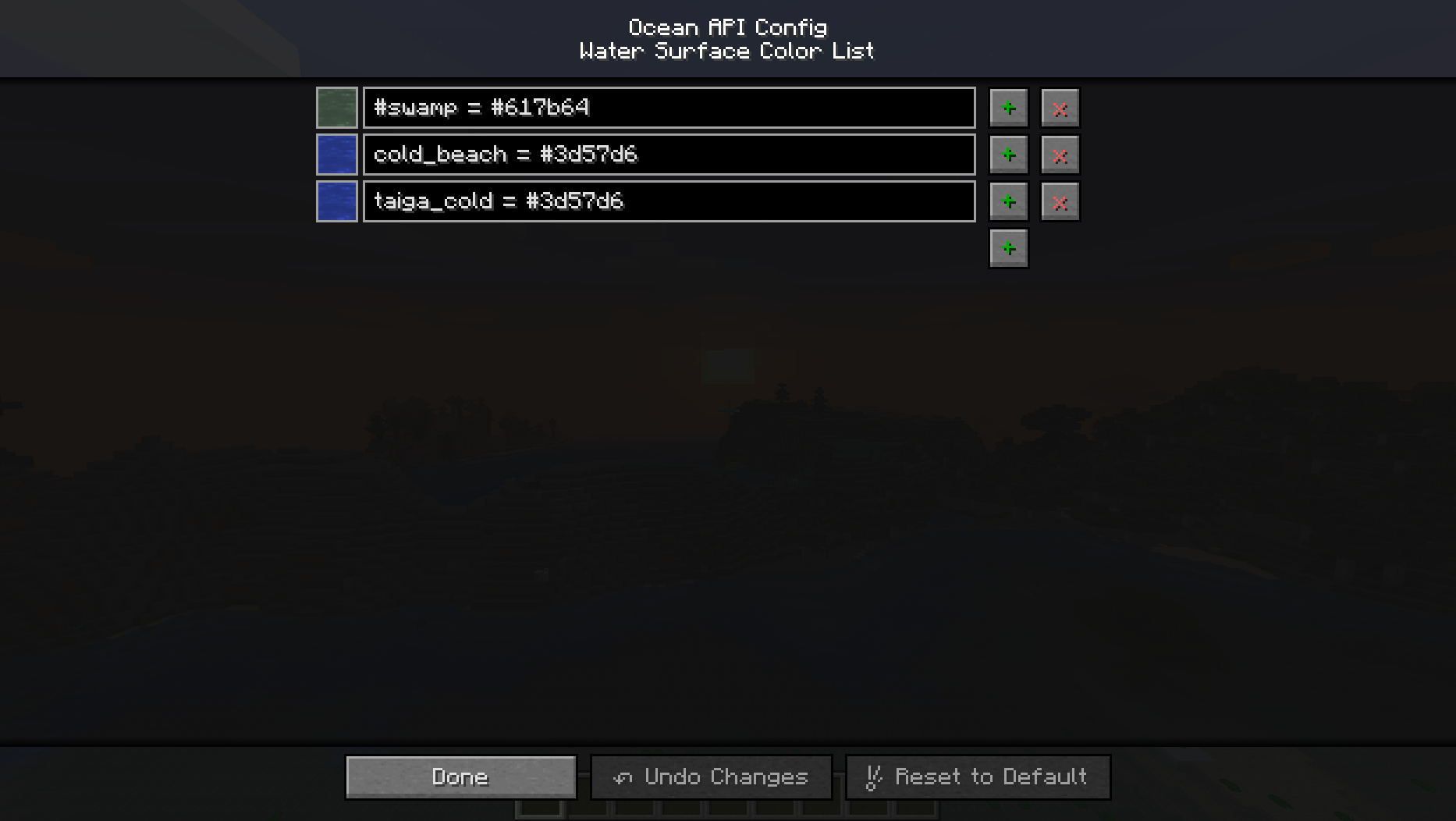
这会显示您新水体颜色的精美渲染效果,并使用 biomeId = color 或 #biomeTag = color 格式,其中生物群系标签必须以井号 (#) 字符开头。
如果您有不完整或格式错误的条目(错误的生物群系 ID、无法识别的颜色等),渲染器将显示缺失纹理以表示该条目将被跳过。这是为了方便排查错误条目!
本模组完全支持 Aqua Acrobatics 的生物群系水体颜色,如果启用了它们,会自动注册!同时也支持来自 Simple Difficulty 和 SimpleDifficulty for Underdog 的水体流体。
Ocean API 添加了两种让其他模组为他们的生物群系注册自定义水体颜色的方法:
- 第一种是通过代码,在
FMLPreInitializationEvent 或 FMLInitializationEvent 之前或期间调用 OceanAPI.registerWaterFogColor(biome, color) 和 OceanAPI.registerWaterSurfaceColor(biome, color)。或者,您可以使用新的 GetWaterFogColorEvent 事件来获取水体雾气颜色,以及 Forge 现有的 BiomeEvent.GetWaterColor 事件来获取水体表面颜色,但这些事件应仅作为最后手段使用,因为它们会覆盖用户配置。
- 第二种方法是通过在您的模组中创建新的
assets/ocean_api/fog_colors.txt 和 assets/ocean_api/surface_colors.txt 文件,这些文件的格式与配置文件相同(biomeId = color 或 #biomeTag = color)。这些文件支持双斜杠 (//) 注释,并且永远不会覆盖或与其他模组可能添加的文件冲突!
请注意,原版 Minecraft 允许生物群系拥有自定义水体颜色。由于使用该系统的不期望灰度水体纹理,这些水体颜色会通过 Ocean API 自动进行色彩校正,并添加额外的蓝色色调,以模拟它们在原版水体纹理上渲染时的外观!
Ocean API 通过“掩膜”的方式在其最终确定前的层中应用其海洋生物群系生成,使用 Forge 的 WorldTypeEvent.InitBiomeGens 事件注入一个新的 GenLayer。这意味着任何使用该事件的模组化世界类型都将自动得到支持!
在 FMLPostInitializationEvent 期间或之前调用 OceanAPI.registerOceanBiome(type, entry, deepOcean, shoreOcean) 可以注册用于生成的海洋生物群系,其中:
type = 海洋温度类型。具有相同温度类型的海洋生物群系在生成时会被归为一组。例如,暖水和冷水海洋生物群系永远不会相邻生成。entry = 一个包含浅海海洋生物群系及其生成权重的 BiomeManager.BiomeEntry,用于海洋生物群系的生成。deepOcean = 将与浅海海洋生物群系配对的深海海洋生物群系。如果该位置通常会生成深海海洋生物群系,则深海海洋生物群系将取代浅海海洋生物群系生成。任何深海海洋生物群系只能与一个浅海海洋生物群系配对,反之亦然。shoreOcean = 海岸海洋生物群系(如果存在),当它非常接近陆地生物群系生成时,将取代浅海海洋生物群系生成。可以为 null。
这还将把浅海、深海和海岸海洋生物群系添加到 Forge 的内部海洋生物群系列表以及“ocean”生物群系字典条目中。
Ocean API 还提供了其他用于更改你的海洋生物群系其他属性的杂项方法,包括:
OceanAPI.registerOceanMonumentSpawnBiome(biome)OceanAPI.registerOceanMonumentWaterBiome(biome)OceanAPI.setOceanFloorBlock(biome, blockState)
如果安装了 Biomes O' Plenty 并启用了其海洋生物群系,Ocean API 将自动为其注册以进行海洋生物群系生成,并为它们提供新的深海海洋生物群系!
由 Ocean API 添加的实体桶系统完全通过 NBT 控制,称为“Bucketable Entity Behavior”,不会添加任何新物品!这意味着可以支持盛装任何流体(甚至无流体)的桶!
Bucketable Entity Behaviors 控制与给定实体相关的桶的所有内容,包括有效流体、物品覆盖层的渲染方式、创造模式标签页变体等。每个行为在创建时都与一个实体类配对,并附带一个新的 Forge 注册表。无需对实体本身进行任何更改即可支持 Bucketable Entity Behavior。有关更多信息,请参阅 api.BucketableEntityBehavior 类。
默认情况下,Ocean API 为以下物品添加了 Buckettable Entity Behaviors 支持:
- minecraft:bucket
- minecraft:lava_bucket
- minecraft:water_bucket
- forge:bucketfilled
- ceramics:clay_bucket
- erebus:bambucket
如果你发现其他应该支持 Bucketable Entity Behaviors 的模组桶物品,请在 Ocean API 的 问题跟踪器 上请求支持!
如果你有自定义桶物品,并希望添加 Bucketable Entity Behavior 支持,请在你的模组中创建一个新文件 assets/ocean_api/bucketable_info.jsonc。可以参考 Ocean API 中的文件作为示例(在此链接)。然后只需确保该物品使用 Forge 的 FluidUtil 类来放置其包含的流体,并正确管理流体能力即可。
Ocean API 还带来了许多与鱼类实体相关的实体类!(参见 api.entity 包)。
Ocean API 添加的一般配置设置列表:
Cauldron Fluid Collision(默认禁用)= 坩埚内的流体会与实体正确交互。这允许实体在装满水的坩埚中游泳,让实体在着火时自我熄灭等。Cauldron Nether Vaporize(默认禁用)= 如果放置在当前维度会导致流体正常汽化,那么放入坩埚的任何流体都会汽化。例如:在末地放置在水坩埚中的水。Fix Bucket Models(默认禁用)= 用 Forge 自己的动态桶模型替换原版桶模型。统一桶的视觉效果。Fix Water Potion Color(默认禁用)= 水瓶药水的颜色与水流体的颜色匹配。Modern Water Textures(默认禁用)= 搜索或尝试从较新版本 Minecraft 下载水纹理。需要重新加载资源包(F3 + T)才能视觉应用对此设置的任何更改。Ocean Biome Size(默认为 6)= 此数字代表由 Ocean API 生成的海洋生物群系的大小。增大此数字将使生成的海洋生物群系更大。将此数字设为 0 将阻止海洋生物群系生成。此数字不会改变海洋的大小,只会改变在海洋内生成的生物群系的大小。Water Fog Color Fallback(默认禁用)= 如果生物群系没有水体雾颜色,则生物群系的水体雾颜色将使用生物群系的水面颜色。
本模组不会被移植
A library mod for adding ocean biomes, water colors, and entity buckets!
If you're a modpack developer wanting to add Ocean API to a modpack distributed outside of CurseForge or Modrinth, use File Director to avoid reuploading Ocean API's files.
The new grayscale water textures used by Ocean API are generated dynamically at runtime and change depending on your resource packs! Screenshots shown below are using the Faithful 32x and Tropical Waters resource packs.
If you want to use explicit textures instead of auto-generated grayscale ones, place your textures at the following paths: assets/ocean_api/textures/minecraft/blocks/water_still, assets/ocean_api/textures/minecraft/blocks/water_flow, and assets/ocean_api/textures/minecraft/blocks/water_overlay.
Ocean API also provides a config setting (disabled by default) to enable the modern water textures used by newer Minecraft versions! Note: This config setting requires AssetMover or Aqua Acrobatics to be installed, because those mods provide a way for Ocean API to grab the modern water textures.
The water fluid references the new textures and colors, so any mods that have a system for rendering any fluid will work properly with the new textures. The new water textures are registered to new sprites, and do not replace the Vanilla water sprites. This means that any mods referencing the old textures outright will correctly continue to do so. If you find any mods that render an uncolored grayscale water texture, report it to Ocean API's bug tracker so I can add special support for it!
Biome water colors can be added by editing the config/ocean_api/fog_colors.cfg and config/ocean_api/surface_colors.cfg files directly, or by using the config gui. Here's what that looks like with the default entries:
This has a cool render of your new water colors, and uses the format biomeId = color or #biomeTag = color, where biome tags must be prefixed with the pound (#) character.
If you have an entry that isn't complete or improperly formatted (bad biome id, unrecognized color, etc), the renderer will show a missing texture to signify that the entry will be skipped. This is in the hopes of making it easy to troubleshoot bad entries!
This mod has full support for Aqua Acrobatics's biome water colors, and will automatically register them if they're enabled! Support also exists for the water fluids from Simple Difficulty and SimpleDifficulty for Underdog.
Ocean API adds a couple of ways for other mods to register custom water colors for their biomes:
- The first way is through code, by invoking
OceanAPI.registerWaterFogColor(biome, color) and OceanAPI.registerWaterSurfaceColor(biome, color) before or during FMLPreInitializationEvent or FMLInitializationEvent. Alternatively, you can use the new GetWaterFogColorEvent event for water fog color and Forge's existing BiomeEvent.GetWaterColor event for water surface color, but those events should only be used as a last resort because they override user configs.
- The second way is by creating new
assets/ocean_api/fog_colors.txt and assets/ocean_api/surface_colors.txt files in your mod, which have the same format as the config files (biomeId = color or #biomeTag = color). These support double-slash (//) comments, and will never override or conflict with files that other mods may add!
Note that Vanilla allows biomes to have custom water colors. Since mods using that system don't expect grayscale water textures, those water colors are automatically color-corrected by Ocean API with an additional blue tint to simulate how they would appear when rendered onto the Vanilla water textures!
Ocean API applies its ocean biome generation by "masking" over Vanilla ocean biomes in the layer before its finalized, using Forge's WorldTypeEvent.InitBiomeGens event to inject a new GenLayer. This means that any modded world types using the event will be supported automatically!
Registering ocean biomes for generation through Ocean API can be done by invoking OceanAPI.registerOceanBiome(type, entry, deepOcean, shoreOcean) during or before FMLPostInitializationEvent, where:
type = The ocean temperature type. Ocean biomes with the same temperature type will be grouped together when they generate. For example, warm and cold ocean biomes will never generate next to each other.entry = A BiomeManager.BiomeEntry containing the shallow ocean biome for ocean biome generation along with its generation weight.deepOcean = The deep ocean biome to be paired with the shallow ocean biome. The deep ocean biome will generate in-place of the shallow ocean biome if a deep ocean biome would normally generate there. Any deep ocean biome may only be paired with one shallow ocean biome and vice versa.shoreOcean = The shore ocean biome, if present, will generate in-place of the shallow ocean biome if it's generating very close to a land biome. May be null.
This will also add the shallow ocean, deep ocean, and shore ocean to Forge's internal ocean biome list and to the "ocean" biome dictionary entry.
Ocean API provides other miscellaneous methods for changing other properties of your ocean biomes, which are:
OceanAPI.registerOceanMonumentSpawnBiome(biome)OceanAPI.registerOceanMonumentWaterBiome(biome)OceanAPI.setOceanFloorBlock(biome, blockState)
If Biomes O' Plenty is installed and its ocean biomes are enabled, Ocean API will automatically register them for ocean biome generation and give them new deep ocean biomes!
The entity bucket system added by Ocean API is controlled entirely through nbt and is called "Bucketable Entity Behavior", which does not add any new items! This means that buckets containing any fluid (or even no fluid) can be supported!
Bucketable Entity Behaviors control everything related to entity buckets for any given entity, including valid fluids, how the item overlay renders, creative tab variants, etc. Each one is paired to an entity class when created, and comes with a new Forge registry. No changes need to be made to entities themselves to support a Bucketable Entity Behavior. See the api.BucketableEntityBehavior class for more information.
By default, Ocean API adds support for Buckettable Entity Behaviors to the following items:
- minecraft:bucket
- minecraft:lava_bucket
- minecraft:water_bucket
- forge:bucketfilled
- ceramics:clay_bucket
- erebus:bambucket
If you find other modded bucket items that should support Bucketable Entity Behaviors, request it on Ocean API's bug tracker!
If you have a custom bucket item, and want to add Bucketable Entity Behavior support, create a new assets/ocean_api/bucketable_info.jsonc file in your mod. See the file in Ocean API as an example (linked here). Then just make sure the item uses Forge's FluidUtil class to place its contained fluid, and that it manages fluid capabilities correctly.
Ocean API also comes with many entity classes related to fish entities! (see the api.entity package).
List of general config settings added by Ocean API:
Cauldron Fluid Collision (disabled by default) = Fluids inside of cauldrons interact with entities properly. This allows entities to swim inside of filled cauldrons, lets entities extinguish themselves if they're on fire, etc.Cauldron Nether Vaporize (disabled by default) = Any fluid placed inside of a cauldron will vaporize if placing it in the current dimension would normally cause it to vaporize. For example: Water placed in a cauldron while in the nether.Fix Bucket Models (disabled by default) = Replaces the vanilla bucket models with Forge's own dynamic bucket model. Unifies bucket visuals.Fix Water Potion Color (disabled by default) = The water potion type color matches the water fluid color.Modern Water Textures (disabled by default) = Searches for, or attempts to download, the water textures from newer Minecraft versions. Reloading the resource packs (F3 + T) is required to visually apply any changes made to this setting.Ocean Biome Size (6 by default) = This number represents the size of the ocean biomes generated by Ocean API. Making this number bigger will result in larger ocean biomes. Making this number 0 will prevent ocean biomes from generating. This number does not change the size of oceans, only the size of the biomes that generate inside oceans.Water Fog Color Fallback (disabled by default) = Biome water fog color will use the biome water surface color if the biome does not have a water fog color.
This mod will not be ported


 模组

 模组

 模组

 模组

 模组
 模组

评论 0
登录后参与评分
还没有评论,来抢沙发吧