
Omni Upgrades
(通用机器升级 / 体验改善与批量操作)
请向下滑动查看中文介绍。
英文介绍
背景与动机
在模组化 Minecraft 中,建造庞大的处理阵列是不可避免的。然而,手动打开来自不同科技模组的数十台机器的 GUI 以插入升级或增强插件是一项极其繁琐且重复的工作。
Omni Upgrades 是一款通用的体验改善(QoL)模组,旨在彻底消除这种麻烦。通过引入智能的批量操作机制和视觉预览,它允许你只需点击一次即可升级整个工厂设置,无论你使用的是哪款科技模组。
核心特性
1. 批量安装升级插件
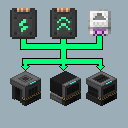
- 只需手持受支持的升级插件,按住 Shift + 右键 点击一台机器,模组就会自动分发并将升级插件安装到所有相连且兼容的机器中。
- 它会智能地尊重每台机器的最大升级限制和特定逻辑,确保不会浪费任何物品。
2. 批量等级升级
- 厌倦了逐个升级机器吗?此模组还支持等级安装器(例如 Mekanism 的等级安装器)。
- 按住 Shift + 右键即可将整个机器生产线瞬间升级到下一个等级。
3. 智能视觉高亮
- 当手持受支持的升级插件或安装器时,模组会在所有将受到批量操作影响的机器周围渲染一个简洁的透明边界框。
- 动态颜色: 高亮颜色会自动适应你手中的物品或特定模组的主题。
4. 广泛的模组兼容性 Omni Upgrades 开箱即用地原生支持各种流行的科技模组。目前支持的模组包括:
- Mekanism(以及 Mekanism Extras)
- Industrial Foregoing
- PneumaticCraft: Repressurized *(未来将添加更多模组支持!)
许可与整合包政策
- 版权所有 (c) Saku_rain - 保留所有权利
- 整合包政策: 你可以完全自由地将此模组包含在你的整合包中,并且我们热烈欢迎这种行为,前提是你的整合包托管在官方平台上(如 CurseForge/Modrinth)。
中文介绍
开发背景与初衷
在游玩科技模组时,铺设庞大的机器阵列是不可避免的。然而,手动打开几十台不同模组机器的 GUI,为每一台机器分别塞入升级插件,是一项极其枯燥且折磨的工作。
Omni Upgrades(全能升级) 是一款通用的体验改善(QoL)模组。它引入了智能的批量操作机制与视觉预览功能,让你只需一次点击,即可完成整条生产线的升级工作,无论你使用的是哪款科技模组,都能彻底解放双手。
模组核心特性
1. 批量安装升级插件
- 手持受支持的升级插件,按住 Shift + 右键 点击机器,模组会自动将你手中的插件批量安装到相连的所有同类兼容机器中。
- 智能计算并严格遵守各个模组机器的插件上限与安装逻辑,绝不浪费你背包里的任何一个物品。
2. 批量升级机器等级
- 厌倦了逐个点击机器来升级?本模组同样完美支持等级安装器(例如通用机械的工厂安装器)。
- 按住 Shift + 右键,即可一键将整排机器瞬间升级至下一等级。
3. 智能视觉高亮预览
- 当你手持受支持的插件或安装器时,模组会在所有即将受批量操作影响的机器外围,渲染一层极具科技感的透明高亮边框。
- 动态色彩自适应: 高亮框的颜色会智能匹配你手中的物品或对应模组的主题色。
4. 多模组广泛兼容 全能升级原生支持多种主流科技模组的批量操作,目前包括:
- 通用机械 (Mekanism) 及其附属 Mekanism Extras
- 工业先锋 (Industrial Foregoing)
- 气动工艺 (PneumaticCraft: Repressurized) *(未来还将加入更多模组支持!)
版权声明与整合包政策
- 版权所有 (c) Saku_rain - 保留所有权利 (ALL RIGHTS RESERVED)
- 整合包政策: 只要通过合规的官方平台(如 CurseForge 或 Modrinth)发布,非常欢迎各位作者将本模组加入到你们的整合包中。
Omni Upgrades
(Universal Machine Upgrades / QoL & Batch Operations)
Please scroll down for the Chinese Description. / 中文介绍请向下滑动查看。
English Description
Background & Motivation
Building massive processing arrays is inevitable in modded Minecraft. However, manually opening the GUI of dozens of machines across different tech mods to insert upgrades or augments is an incredibly tedious and repetitive task.
Omni Upgrades is a universal Quality of Life (QoL) mod designed to completely eliminate this hassle. By introducing smart, batch-operation mechanics and visual previews, it allows you to upgrade your entire factory setup in a single click, regardless of which tech mod you are using.
Core Features
1. Batch Upgrade Installation
- Simply hold a supported upgrade item, Sneak + Right-Click on a machine, and the mod will automatically distribute and install the upgrades to all connected, compatible machines.
- It intelligently respects the maximum upgrade limits and specific logic of each machine, ensuring no items are wasted.
2. Batch Tier Upgrading
- Tired of upgrading machines one by one? This mod also supports tier installers (such as Mekanism's Tier Installers).
- Sneak + Right-Click to instantly upgrade an entire line of machines to the next tier.
3. Smart Visual Highlights
- When holding a supported upgrade or installer, the mod renders a sleek, transparent bounding box around all machines that will be affected by the batch operation.
- Dynamic Colors: The highlight color automatically adapts to the item you are holding or the specific mod's theme.
4. Broad Mod Compatibility Omni Upgrades natively supports a variety of popular tech mods out of the box. Currently supported mods include:
- Mekanism (and Mekanism Extras)
- Industrial Foregoing
- PneumaticCraft: Repressurized (More mod support will be added in the future!)
License & Modpack Policy
- Copyright (c) Saku_rain - ALL RIGHTS RESERVED
- Modpack Policy: You are completely free and warmly welcome to include this mod in your modpacks, provided they are hosted on official platforms (like CurseForge/Modrinth).
中文介绍
开发背景与初衷
在游玩科技模组时,铺设庞大的机器阵列是不可避免的。然而,手动打开几十台不同模组机器的 GUI,为每一台机器分别塞入升级插件,是一项极其枯燥且折磨的工作。
Omni Upgrades(全能升级) 是一款通用的体验改善(QoL)模组。它引入了智能的批量操作机制与视觉预览功能,让你只需一次点击,即可完成整条生产线的升级工作,无论你使用的是哪款科技模组,都能彻底解放双手。
模组核心特性
1. 批量安装升级插件
- 手持受支持的升级插件,按住 Shift + 右键 点击机器,模组会自动将你手中的插件批量安装到相连的所有同类兼容机器中。
- 智能计算并严格遵守各个模组机器的插件上限与安装逻辑,绝不浪费你背包里的任何一个物品。
2. 批量升级机器等级
- 厌倦了逐个点击机器来升级?本模组同样完美支持等级安装器(例如通用机械的工厂安装器)。
- 按住 Shift + 右键,即可一键将整排机器瞬间升级至下一等级。
3. 智能视觉高亮预览
- 当你手持受支持的插件或安装器时,模组会在所有即将受批量操作影响的机器外围,渲染一层极具科技感的透明高亮边框。
- 动态色彩自适应: 高亮框的颜色会智能匹配你手中的物品或对应模组的主题色。
4. 多模组广泛兼容 全能升级原生支持多种主流科技模组的批量操作,目前包括:
- 通用机械 (Mekanism) 及其附属 Mekanism Extras
- 工业先锋 (Industrial Foregoing)
- 气动工艺 (PneumaticCraft: Repressurized) *(未来还将加入更多模组支持!)
版权声明与整合包政策
- 版权所有 (c) Saku_rain - 保留所有权利 (ALL RIGHTS RESERVED)
- 整合包政策: 只要通过合规的官方平台(如 CurseForge 或 Modrinth)发布,非常欢迎各位作者将本模组加入到你们的整合包中。
下载 Omni Upgrades
下载 Omni Upgrades
下载 Omni Upgrades
下载 Omni Upgrades
下载 Omni Upgrades
下载 Omni Upgrades
下载 Omni Upgrades
下载 Omni Upgrades
下载 Omni Upgrades
? Omni Upgrades 更新日志
English
New Features
- Master Switch Hotkey: Added a Shift+O hotkey to enable or disable Omni Upgrades entirely. When disabled, batch install, highlights and right-click interception are all turned off, giving control back to vanilla or other mods — a quick remedy when something is incompatible. The state is saved in the client config (omni_upgrades-client.toml, General.enabled) and can be edited there directly; it is synced to the server automatically so it also takes effect in multiplayer.
- Item Blacklist: Added a per-player item blacklist in the client config (omni_upgrades-client.toml, [Blacklist] > blacklist: item registry ids, "#tag" supported). Blacklisted items never trigger batch install or highlights. Server owners can also set a server-wide blacklist (server config, [Blacklist] > globalBlacklist) that is synced to all clients on login.
Bug Fixes
- Fixed Augment Replacement Item Loss: Replacing a lower-tier Industrial Foregoing augment with a higher-tier one (for example upgrading a Tier 2 speed augment to Tier 4) previously could consume your entire hand-held stack while only upgrading a single machine. It now consumes exactly one augment per machine, and the remaining augments stay safely in your inventory.
- Toggles Now Apply Immediately: The Sequential Fill (Shift+N) and Diagonal Detection (Shift+M) toggles previously only took effect after restarting the game. They now apply immediately when pressed.
- No Longer Intercepts Non-Installable AE2 Cards: Cards that inherit AE2's UpgradeCardItem type but aren't registered as installable machine upgrades (e.g. AE2 Lightning Tech's Overloaded Frequency Card) are no longer treated as upgrade cards. Previously, right-clicking an AE2 machine while holding such a card would cancel the click and report no installable target, blocking the card's own action (such as binding to a controller).
- Functional Cards Now Pass Through: When an AE2-family card has no installable machine in range (for example an AE2 Lightning Tech Overloaded Frequency Card), the right-click is now handed back to the card itself instead of being cancelled with the no-machine-in-range message. This also covers cards registered through AE2WTLib's terminal upgrade bridge, which the previous registration check could still recognize.
中文
新增功能
- 总开关快捷键: 新增了 Shift+O 快捷键,可一键启用或禁用 Omni Upgrades。禁用后,批量安装、高亮预览和右键拦截功能均会关闭,将控制权交还给原版或其他模组——在遇到不兼容情况时提供快速补救方案。该状态保存在客户端配置文件中(omni_upgrades-client.toml 的 General.enabled),也可以直接编辑该文件进行修改;状态会自动同步至服务器,因此在多人游戏中同样生效。
- 物品黑名单: 客户端配置中新增了按玩家独立的物品黑名单(omni_upgrades-client.toml 的 [Blacklist] > blacklist:填写物品注册 ID,支持“#标签”)。列入黑名单的物品绝不会触发批量安装或高亮预览。服务端管理员也可以设置全局黑名单(服务端配置中的 [Blacklist] > globalBlacklist),并在玩家登录时同步给所有客户端。
错误修复
- 修复了替换升级件时的物品丢失问题: 此前,使用更高级别的工业先锋(Industrial Foregoing)升级件替换机器上低级别的同类升级件时(例如将二级速度升级件升级为四级),可能会消耗掉你手中持有的整组升级件,却只升级了一台机器。现在每台机器仅消耗一个升级件,剩余的升级件会安全地保留在你的背包中。
- 切换选项现即时生效: 之前按下 Shift+N(顺序填充)和 Shift+M(对角线检测)进行切换后,需要重启游戏才会真正生效。现在按下后立即生效。
- 不再拦截不可安装的 AE2 卡片: 继承 AE2 的 UpgradeCardItem 类型但未注册为可安装机器升级的卡片(例如 AE2 Lightning Tech 的过载频率卡)不再被视为升级卡。此前,手持此类卡片右键点击 AE2 机器会取消点击操作并提示没有可安装的目标,从而阻止卡片自身的动作(如绑定到控制器)。
- 功能型卡片现允许穿透: 当范围内的 AE2 系列卡片没有可安装的机器时(例如 AE2 Lightning Tech 的过载频率卡),右键操作现在会交还给卡片自身处理,而不是被“范围内无可用机器”的消息取消。这也涵盖了通过 AE2WTLib 的终端升级桥注册的卡片,之前的注册检查仍会识别到这些卡片。
关于这个资源的讨论、问题反馈与使用心得
还没有讨论,来发第一帖吧
你是这个资源的作者?登录后可认领此资源。
相似资源
 模组

显示你正在注视的方块的信息。(适用于 Minecraft 1.16+ 的 Hwyla/Waila 分支)
 模组
在游戏画面角落显示附近世界地形、玩家、生物和实体的地图。可创建路径点,帮助你找到标记过的位置。
 模组

查看物品与配方
 模组
使用 JavaScript 编辑配方、添加自定义物品、编写世界事件!
 模组
AE2:一款流行的自动化与存储模组
 模组
那是什么?一个 Waila/Hwyla 的分支。
评论 0
登录后参与评分
还没有评论,来抢沙发吧