PackBranding
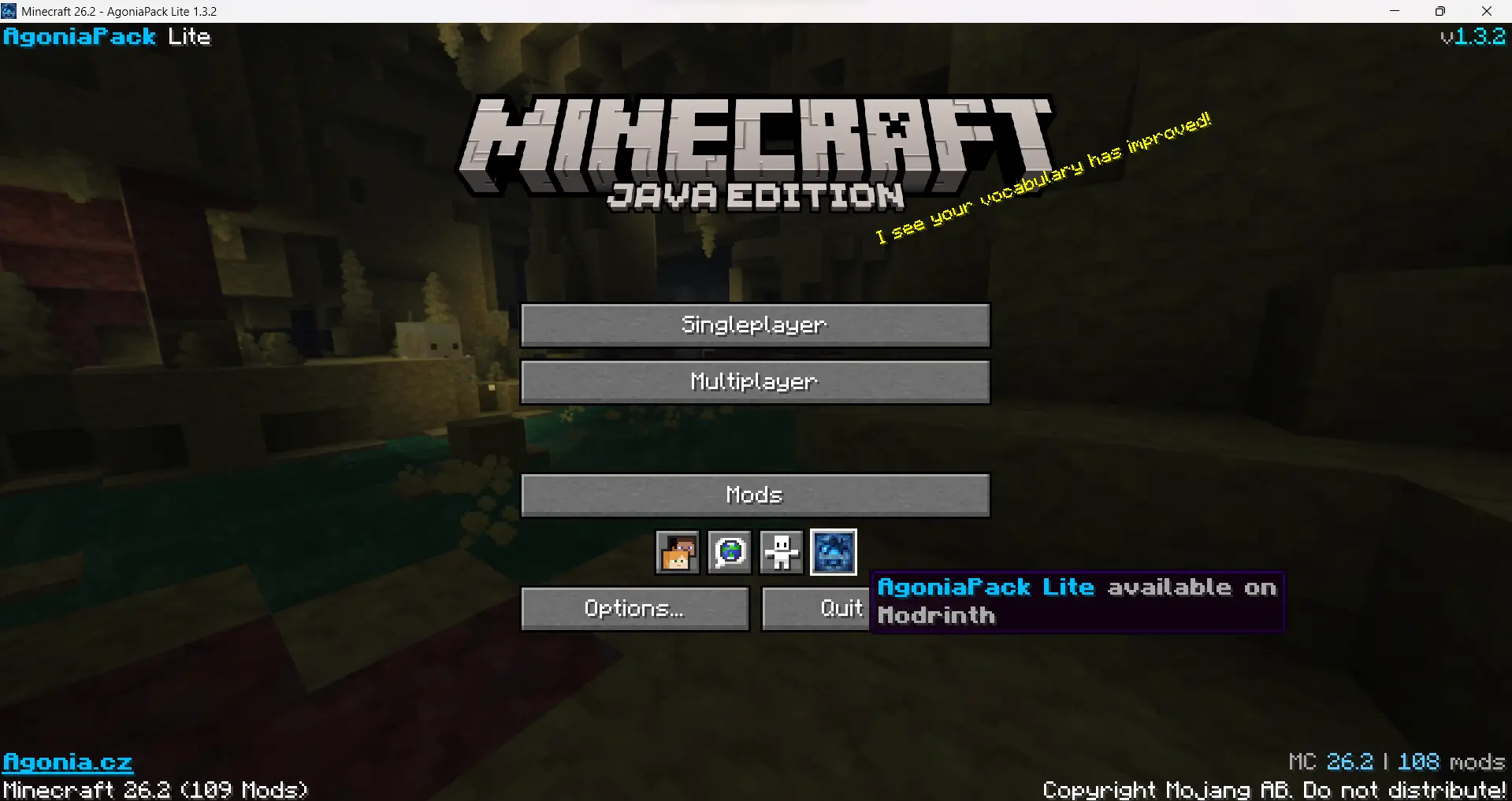
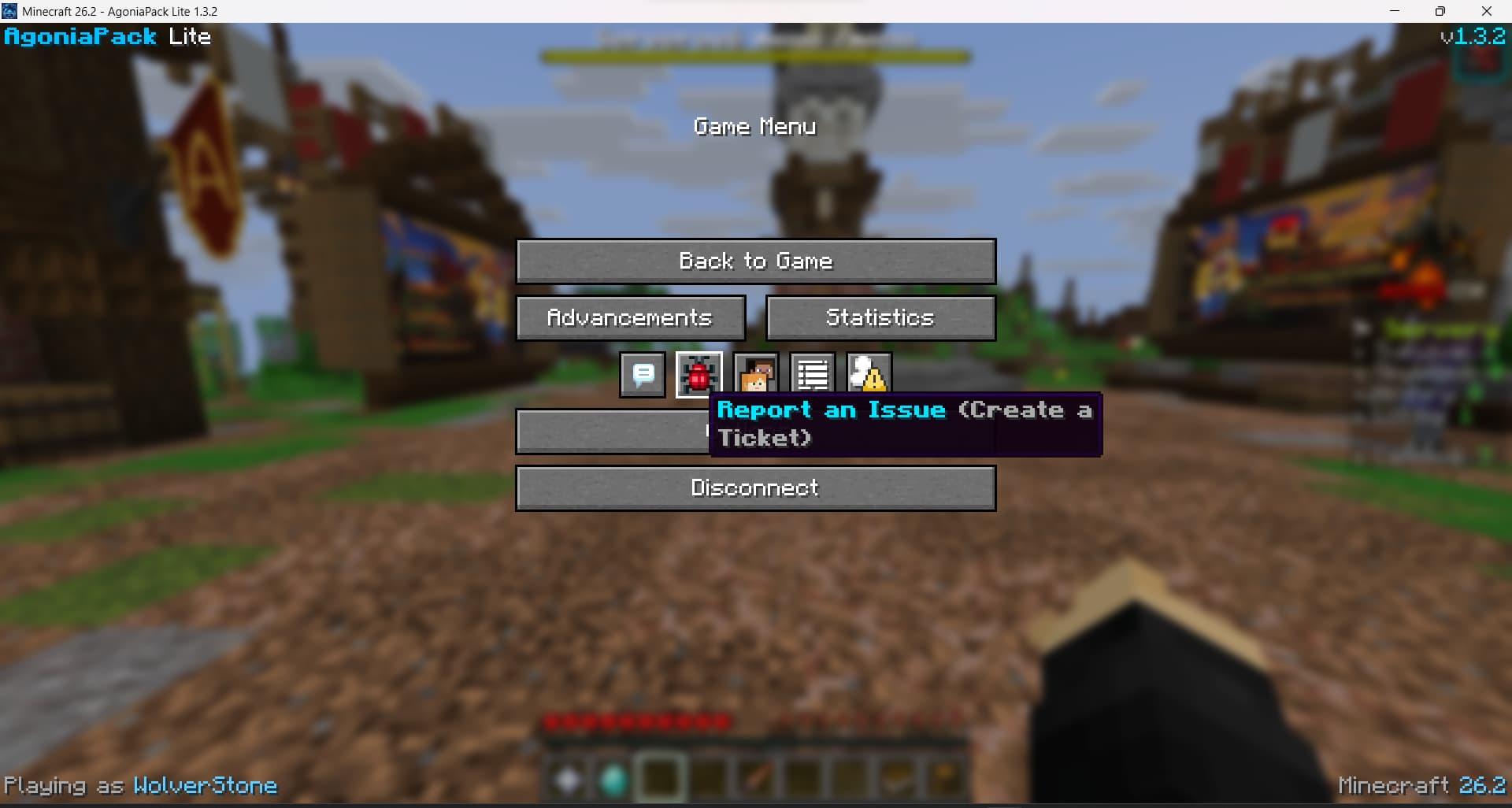
让 Minecraft 感觉像是 你的 整合包。 PackBranding 是一个轻量级的客户端 Fabric 模组,它允许整合包制作者重新定义游戏窗口、主菜单和暂停菜单的品牌标识——无需编写代码,只需几个配置文件即可。
所有功能都是可选且可配置的,因此你只更改你想要修改的部分。
⚠️ 1.2.0 之前的版本已不再支持。 请更新到最新版本。
✨ 它能做什么
- ? 自定义窗口标题 — 用你整合包的名字替换掉无聊的 "Minecraft 26.2" 标题栏,支持动态令牌。
- ? 菜单文本 — 在 主菜单 和 暂停菜单 的 四个角落中的任意一个 显示自定义品牌文本,每个角落可以设置独立的文本。
- ? 可点击链接 — 将任何菜单文本的一部分转换为链接
[label](https://…), 通过原版的确认提示打开。
- ? 图标按钮 — 在暂停菜单和标题屏幕添加你自己的可点击图标按钮(Discord、网站等),将它们定位在行的任意位置,并使用 PNG 图片或内置精灵。
- ? 隐藏原版图标 — 从暂停菜单中移除错误报告/反馈/玩家举报/好友图标,并替换为你自己的图标。
- ? 全色彩支持 — 十六进制颜色 (
#RRGGBB) 和经典的 Minecraft 颜色代码 (&c, &a, &l, …)。
- ? 动态令牌 — 自动插入 Minecraft 版本、你的整合包版本、玩家名称、模组数量或任何模组的版本。
- ?️ 隐藏 Realms — 从主菜单中移除 Realms 按钮及其通知,以获得更整洁的外观。
- ?️ 自定义窗口图标 — 将窗口/任务栏图标替换为你自己的图标。
⚙️ 工作原理
首次启动时,PackBranding 会在以下位置创建单个配置文件:
.minecraft/config/packbranding/config.json
编辑它,重启游戏,你的品牌标识就会生效。首次运行时会自动生成一个工作示例。每个部分都包含一个 _comment 字段进行解释(模组会忽略所有以 _ 开头的键,它们仅作为文件内的文档)。
config.json
{
  "packVersion": "1.0",
  "windowTitle": {
    "enabled": true,
    "title": "Minecraft {mcversion}"
  },
  "icon": {
    "enabled": false
  },
  "hideRealms": true,
  "mainMenu": {
    "enabled": true,
    "aboveCopyright": true,
    "topLeft": "&6&lMyPack",
    "topRight": "&7v{packversion}",
    "bottomLeft": "[Website](https://example.com)",
    "bottomRight": "&8| &fMC {mcversion}"
  },
  "pauseMenu": {
    "enabled": true,
    "topLeft": "&6&lMyPack",
    "topRight": "&7v{packversion}",
    "bottomLeft": "&7Playing as &f{username}",
    "bottomRight": "&8| &fMC {mcversion}"
  },
  "menuButtons": {
    "enabled": true,
    "title": [
      { "icon": "example.png", "url": "https://example.com", "tooltip": "&9Visit our website" }
    ],
    "pause": [
      { "icon": "example.png", "url": "https://example.com", "tooltip": "&9Visit our website" }
    ],
    "hidePauseIcons": []
  }
}
每个菜单都有四个独立的角落(topLeft、topRight、bottomLeft、bottomRight)——留空其中一个则不在该处渲染任何内容。在标题屏幕上,aboveCopyright: true 会将底部角落保留在原版版权/版本行之上。
? 格式参考
这些适用于所有菜单文本字段和工具提示。
令牌
| 令牌 |
替换为 |
{mcversion} |
当前 Minecraft 版本 |
{packversion} |
config.json 中的 packVersion |
{username} |
当前玩家名称 |
{modcount} |
已加载模组的数量 |
{modversion:modid} |
特定模组的版本 (仅限窗口标题) |
颜色与样式
| 代码 |
含义 |
|
代码 |
含义 |
&0–&9, &a–&f |
标准颜色 |
|
&l |
粗体 |
#RRGGBB |
任意十六进制颜色 |
|
&o |
斜体 |
&r |
重置 |
|
&n |
下划线 |
|
|
|
&m |
删除线 |
链接
将文本的一部分转换为可点击链接:
[Website](https://example.com)
点击后,在原版“打开此链接?”确认后打开 URL。
?️ 自定义图标
- 在
config.json 中设置 "icon": { "enabled": true }。
- 提供 以下之一:
- 位于
config/packbranding/icon.png 的单张正方形 PNG 图片(256×256 效果良好),或者
- 一对分割图标:
config/packbranding/icon/icon_16x16.png 以及 icon_32x32.png(两者均需存在)。
- 重启游戏。
? 图标按钮
在暂停菜单和标题屏幕添加可点击的图标按钮——非常适合 Discord 邀请链接、你的网站、Wiki 等。
- 将图标 PNG 图片(推荐 16×16)放入
config/packbranding/buttons/。
- 在
config.json 的 menuButtons 下列出它们——针对 title(标题)屏幕和 pause(暂停/ESC)菜单分别列出:
"menuButtons": {
  "enabled": true,
  "title": [
    { "icon": "discord.png", "url": "https://discord.gg/example", "tooltip": "&9Join our Discord" }
  ],
  "pause": [
    { "icon": "website.png", "url": "https://example.com", "tooltip": "Visit our website" }
  ],
  "hidePauseIcons": ["menu.reportBugs"]
}
- 重启游戏。点击按钮会在原版“打开此链接?”确认后打开其链接。缺少图标或链接无效的按钮将被跳过。
使用内置(原版)图标
除了 PNG 文件外,icon 还可以通过前缀 sprite: 引用原版/Atlas 精灵:
{ "icon": "sprite:icon/language", "url": "https://example.com", "tooltip": "Language-style icon" }
有用的精灵包括:icon/language、icon/accessibility、pause_menu/bug、pause_menu/social_interactions、pause_menu/player_reporting。其他模组的精灵也可以使用(例如 modid:path)。
按钮位置
每个按钮都可以设置一个 index 以将其放置在图标行的确切位置(0 = 第一个,位于原版图标之前)。省略该值(或使用 -1)则将其追加到末尾。此功能在标题屏幕和暂停菜单中均有效,且该行会自动重新居中,因此不会出现空隙。
{ "icon": "example.png", "url": "https://example.com", "tooltip": "First!", "index": 0 }
隐藏原版暂停菜单图标
hidePauseIcons 会根据名称从 ESC 菜单的图标行中移除原版图标,从而允许你用自定义图标替换它们。可用的键如下:
| Key |
Icon |
menu.reportBugs |
Report bugs |
menu.sendFeedback |
Give feedback |
menu.playerReporting |
Player reporting |
menu.online |
Friends |
(由其他模组添加的图标,例如 ModMenu,无法通过此方式隐藏。)
? 安装
- 安装 Fabric Loader。
- 安装 Fabric API。
- 将
packbranding-x.x.x.jar 放入你的 mods 文件夹。
- 启动一次游戏以生成
config.json,然后对其进行编辑。
PackBranding 仅适用于客户端 —— 服务器端无需安装,且可安全地整合到任何整合包中。
✅ 依赖项
- Minecraft 26.2
- Fabric Loader 0.19.3+
- Fabric API
? 许可证
Apache 2.0 — 欢迎将其包含在任何整合包中。
PackBranding
Make Minecraft feel like your modpack. PackBranding is a lightweight, client-side Fabric mod that lets modpack creators rebrand the game window, the main menu and the pause menu — no coding required, just a couple of config files.
Everything is optional and configurable, so you only change what you want.
⚠️ Versions older than 1.2.0 are no longer supported. Please update to the latest release.
✨ What it can do
- ? Custom window title — replace the boring "Minecraft 26.2" title bar with your pack's name, using dynamic tokens.
- ? Menu text — show custom branded text in any of the four corners of the main menu and the pause menu, a separate text per corner.
- ? Clickable links — turn part of any menu text into a link with
[label](https://…), opened via the vanilla confirmation prompt.
- ? Icon buttons — add your own clickable icon buttons (Discord, website, …) to the pause menu and title screen, position them anywhere in the row, and use a PNG or a built-in sprite.
- ? Hide vanilla icons — remove the bug-report / feedback / player-reporting / friends icons from the pause menu and replace them with your own.
- ? Full color support — hex colors (
#RRGGBB) and classic Minecraft color codes (&c, &a, &l, …).
- ? Dynamic tokens — automatically insert the Minecraft version, your pack version, the player name, the mod count, or any mod's version.
- ?️ Hide Realms — remove the Realms button and its notifications from the main menu for a cleaner look.
- ?️ Custom window icon — swap the window/taskbar icon for your own.
⚙️ How it works
On first launch, PackBranding creates a single config file at:
.minecraft/config/packbranding/config.json
Edit it, restart the game, and your branding is applied. A working example is
generated on first run. Every section includes a _comment field explaining it
(the mod ignores all _-prefixed keys, they're just in-file documentation).
config.json
{
  "packVersion": "1.0",
  "windowTitle": {
    "enabled": true,
    "title": "Minecraft {mcversion}"
  },
  "icon": {
    "enabled": false
  },
  "hideRealms": true,
  "mainMenu": {
    "enabled": true,
    "aboveCopyright": true,
    "topLeft": "&6&lMyPack",
    "topRight": "&7v{packversion}",
    "bottomLeft": "[Website](https://example.com)",
    "bottomRight": "&8| &fMC {mcversion}"
  },
  "pauseMenu": {
    "enabled": true,
    "topLeft": "&6&lMyPack",
    "topRight": "&7v{packversion}",
    "bottomLeft": "&7Playing as &f{username}",
    "bottomRight": "&8| &fMC {mcversion}"
  },
  "menuButtons": {
    "enabled": true,
    "title": [
      { "icon": "example.png", "url": "https://example.com", "tooltip": "&9Visit our website" }
    ],
    "pause": [
      { "icon": "example.png", "url": "https://example.com", "tooltip": "&9Visit our website" }
    ],
    "hidePauseIcons": []
  }
}
Each menu has four independent corners (topLeft, topRight, bottomLeft,
bottomRight) — leave one empty to render nothing there. On the title screen,
aboveCopyright: true keeps the bottom corners above the vanilla
copyright/version line.
? Formatting reference
These apply to every menu text field and tooltip.
Tokens
| Token |
Replaced with |
{mcversion} |
Current Minecraft version |
{packversion} |
packVersion from config.json |
{username} |
Current player name |
{modcount} |
Number of loaded mods |
{modversion:modid} |
Version of a specific mod (window title only) |
Colors & styles
| Code |
Meaning |
|
Code |
Meaning |
&0–&9, &a–&f |
Standard colors |
|
&l |
Bold |
#RRGGBB |
Any hex color |
|
&o |
Italic |
&r |
Reset |
|
&n |
Underline |
|
|
|
&m |
Strikethrough |
Links
Turn part of any text into a clickable link:
[Website](https://example.com)
Clicking it opens the URL after the vanilla "Open this link?" confirmation.
?️ Custom icon
- Set
"icon": { "enabled": true } in config.json.
- Provide either:
- a single square PNG at
config/packbranding/icon.png (256×256 works well), or
- a split pair:
config/packbranding/icon/icon_16x16.png and icon_32x32.png (both required).
- Restart the game.
? Icon buttons
Add clickable icon buttons to the pause menu and title screen — great for a
Discord invite, your website, a wiki, etc.
- Drop icon PNGs (16×16 recommended) into
config/packbranding/buttons/.
- List them under
menuButtons in config.json — separately for the
title screen and the pause (ESC) menu:
"menuButtons": {
  "enabled": true,
  "title": [
    { "icon": "discord.png", "url": "https://discord.gg/example", "tooltip": "&9Join our Discord" }
  ],
  "pause": [
    { "icon": "website.png", "url": "https://example.com", "tooltip": "Visit our website" }
  ],
  "hidePauseIcons": ["menu.reportBugs"]
}
- Restart. Clicking a button opens its link after the vanilla "Open this link?"
confirmation. Buttons with a missing icon or invalid link are skipped.
Using a built-in (vanilla) icon
Instead of a PNG file, an icon can reference a vanilla/atlas sprite by
prefixing it with sprite::
{ "icon": "sprite:icon/language", "url": "https://example.com", "tooltip": "Language-style icon" }
Useful sprites: icon/language, icon/accessibility, pause_menu/bug,
pause_menu/social_interactions, pause_menu/player_reporting. Sprites from
other mods work too (e.g. modid:path).
Button position
Each button may set an index to place it at an exact spot in the icon row
(0 = first, before the vanilla icons). Omit it (or use -1) to append at
the end. This works on both the title screen and the pause menu, and the row is
re-centered automatically so there are no gaps.
{ "icon": "example.png", "url": "https://example.com", "tooltip": "First!", "index": 0 }
Hiding vanilla pause icons
hidePauseIcons removes vanilla icons from the ESC menu icon row by name, so you
can replace them with your own. Available keys:
| Key |
Icon |
menu.reportBugs |
Report bugs |
menu.sendFeedback |
Give feedback |
menu.playerReporting |
Player reporting |
menu.online |
Friends |
(Icons added by other mods, like ModMenu, can't be hidden this way.)
? Installation
- Install Fabric Loader.
- Install Fabric API.
- Drop
packbranding-x.x.x.jar into your mods folder.
- Launch once to generate
config.json, then edit it.
PackBranding is client-side only — players don't need it on the server, and it's safe to bundle in any modpack.
✅ Requirements
- Minecraft 26.2
- Fabric Loader 0.19.3+
- Fabric API
? License
Apache 2.0 — feel free to include it in any modpack.


 模组

 模组
 模组

 模组
 模组
 模组
评论 0
登录后参与评分
还没有评论,来抢沙发吧