
Pack Gate
一款用于 Forge 的简易整合包更新提示模组。
简介
Pack Gate 的诞生源于对一种简易整合包版本检查器的需求,它不需要各种花哨的功能。
这是一款只做一件事的简单模组:检查整合包更新。
这不是服务端模组,仅适用于客户端!如果安装在服务器上会导致崩溃。
工作原理
Pack Gate 通过调用由整合包作者创建的远程托管文件,并将该文件中的版本号与 Pack Gate 配置文件中指定的版本号进行比较来工作。
如果 Pack Gate 发现远程版本号高于配置中提供的版本号,它将阻止访问游戏并向用户展示以下界面:
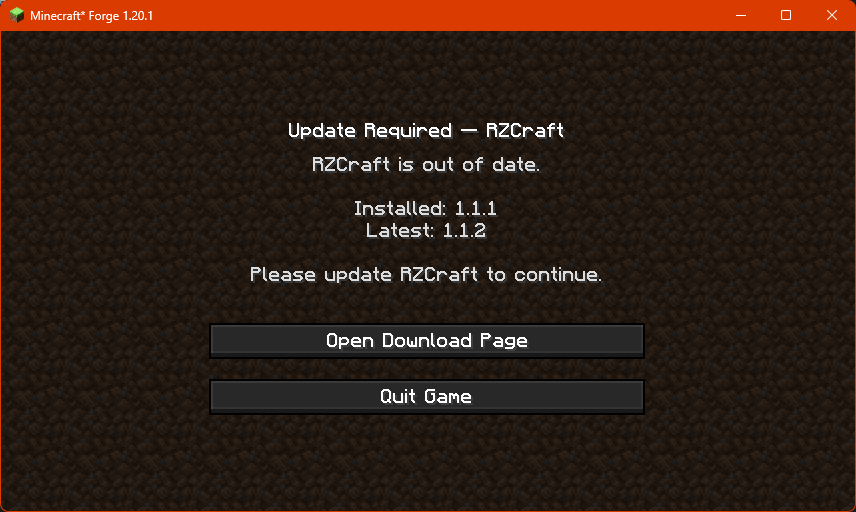
配置 Pack Gate
为了在你的整合包中使用 Pack Gate,你需要修改模组的配置文件。
Pack Gate 的配置文件位于 config/packgate-client.toml。
首次打开配置文件时你会看到的内容。
#PackGate 客户端配置。留空字段以使用内置的默认值。
[general]
	modpackName = ""
	modpackVersion = ""
	remoteURL = ""
	downloadURL = ""
	#使用 'auto' 进行检测;或强制指定为 'json' 或 'text'。
	format = "auto"
定义
| 变量 |
输入类型 |
必填 |
说明 |
modpackName |
String |
✅ |
你的整合包的友好名称。例如:Create+ |
modpackVersion |
String |
✅ |
你当前整合包的版本号。 |
remoteURL |
String |
✅ |
你版本文件的网址。 |
downloadURL |
String |
✅ |
用户可以下载你整合包最新版本的网址。 |
format |
String |
✅ |
告诉 Pack Gate 如何解析你的远程版本文件。
auto 是默认值,它让模组将你的远程文件解释为纯文本 (txt) 或 JSON 文件。
text 强制 Pack Gate 仅将你的远程文件解释为纯文本文件。
json 强制 Pack Gate 仅将你的远程文件解释为 JSON 文件。 |
关于远程版本文件
为了在你的整合包中使用 Pack Gate,你需要具备在线托管文本文件或 JSON 文件的能力。
纯文本文件示例:
1.0.0
JSON 文件示例:
{
  "latest": "1.0.1",
  "downloadURL": "https://github.com/RavenholmZombie/RZCraft-Modpack/releases/latest"
}
重要提示:你托管远程版本文件的地方必须能够提供直接 URL。
这意味着像 MediaFire 或 MEGA 这样的文件共享平台无法正常工作。
一个有效的 URL 应以文件名及其扩展名结尾,例如:
https://example.com/my_awesome_modpack_version.txt
Google Drive 和 Dropbox 等平台可以使用,但你需要修改它们提供的 URL 才能访问原始的直接文件。
如果你无法自行在远程托管文件,可以考虑使用 PasteBin 甚至 GitHub 等网站。
只要 URL 指向的是原始文本或 JSON,Pack Gate 就会接受。
类似 https://pastebin.com/raw/sNBDt7u5 的有效 PasteBin URL 可以正常工作。
Pack Gate
A simple modpack update alerter mod for Forge.
Introduction
Pack Gate was born out of the need for a simple modpack version checker that didn't have all kinds of fancy bells and whistles.
A simple mod that just does one thing: Checks for modpack updates.
This is NOT a server mod, it is client-sided only! It WILL crash servers.
How does it work?
Pack Gate works by calling out to a remotely-hosted file the modpack author created and compares the version in that file with the version specified in Pack Gate's config file.
If Pack Gate finds that the remote version is higher than what's been provided in the config, it'll block access to the game and
present the user with this screen:
Configuring Pack Gate
In order to use Pack Gate for your own modpack, you will need to make changes to the mod's config file.
Pack Gate's config is located at config/packgate-client.toml.
What you'll see when you first open the config.
#PackGate client config. Leave fields empty to use built-in fallbacks.
[general]
	modpackName = ""
	modpackVersion = ""
	remoteURL = ""
	downloadURL = ""
	#Use 'auto' to detect; or force 'json' or 'text'.
	format = "auto"
Definitions
| Variable |
Input |
Required |
Information |
modpackName |
String |
✅ |
The friendly name of your modpack. Example: Create+ |
modpackVersion |
String |
✅ |
The current version of your modpack. |
remoteURL |
String |
✅ |
The web address for your version file. |
downloadURL |
String |
✅ |
The web address where users can download the latest version of your modpack. |
format |
String |
✅ |
Tells Pack Gate how to interpret your remote version file.
auto is the default, it lets the mod interpret your remote file as plain text (txt) or as a JSON file.
text forces Pack Gate to only interpret your remote file as a plain text file.
json forces Pack Gate to only interpret your remote file as a JSON file. |
About the remote version file
In order to utilize Pack Gate with your modpack, you will need to have the ability to host a text file or JSON file online.
Example plain text file:
1.0.0
Example JSON file:
{
  "latest": "1.0.1",
  "downloadURL": "https://github.com/RavenholmZombie/RZCraft-Modpack/releases/latest"
}
It is important that wherever you host your remote version file has the ability to provide you with a direct URL.
This means that file sharing platforms like MediaFire or MEGA won't work.
A working URL would end with the file and its extension, for example:
https://example.com/my_awesome_modpack_version.txt
Platforms like Google Drive and Dropbox can work, but you have to modify the URLs they provide in order to
get access to the direct, raw file.
If you can't host a file remotely on your own, consider sites like PasteBin or even GitHub.
As long as the URL points to the raw text or JSON, Pack Gate will accept it.
A working PasteBin URL like https://pastebin.com/raw/sNBDt7u5 would work.


 模组

 模组
 模组

 模组
 模组

 模组

评论 0
登录后参与评分
还没有评论,来抢沙发吧