

Particle Core 专注于一点:优化粒子效果。原版 Minecraft 在多种方面对粒子的处理效率低下。Particle Core 旨在改善这一状况。
它做了什么?
剔除(Culling)
这是整体性能提升最大的部分。Particle Core 不会渲染你看不见的粒子。这很合理!在标准视野角度下,光箱中只有约十二分之一是可见的,为什么要渲染那十一分之二你根本看不见的粒子呢?
渲染优化
已渲染的粒子会经过优化。顶点变换和光照贴图轮询均得到优化。顶点优化依赖于 Sodium。
按类型减少或禁用
提供了三种方法来完全禁用或减少特定类型粒子的生成。任何可以通过 /particle 命令添加的粒子都适用。
particle_type标签。将粒子类型添加到particle_core:excluded_particles中以完全禁用这些粒子类型。服务器所有者:这将禁用加入该服务器的所有客户端上的这些粒子,请谨慎使用!- 基于配置的按类型减少映射。在 particle core 配置文件中(见下文),用户可以添加从“粒子类型标识符”到“概率倍增”的映射。
- 完全关闭药水粒子。如果你觉得屏幕上的药水粒子很烦人,可以去配置文件中将它们关闭!
与 invis-particle 资源包不同,这实际上阻止了粒子的生成,从而提高了性能。
调整原版设置
提供了两个配置选项,可以对标准的原版选项 ALL(全部)、DECREASED(减少)和 MINIMAL(最小)进行微调。其中一个相当于在 ALL 和 DECREASED 之间的调节旋钮,第二个则是在 DECREASED 和 MINIMAL 之间的调节旋钮。如果你只想稍微调整粒子生成量,例如你的电脑运行 DECREASED 设置没问题,但你个人不喜欢屏幕上仍然有这么多粒子,你可以将 DECREASED 调低,而无需一直调到 MINIMAL。
配置文件
Particle Core 提供了一个涵盖所有新增功能的配置文件。请在标准的 .minecraft config 文件夹中找到该配置文件。配置文件名为 particle_core_config_v[x].json,其中 [x] 是当前版本号。
配置文件顶部有一个全面的“注释”部分。请阅读它以获取有关配置使用的指导。
turnOffPotionParticles
对某些人来说,药水粒子非常令人讨厌。使用此设置将其关闭。
reduceParticlesAllChance
一个用于在 ALL 和 DECREASED Minecraft 设置之间微调粒子生成的旋钮。
reduceParticlesDecreasedChance
一个用于在 DECREASED 和 MINIMAL Minecraft 设置之间微调粒子生成的旋钮。
disableParticles
完全禁用所有客户端粒子生成。
reduceParticlesByType
用于减少特定粒子生成的映射。
- 键:粒子类型的标识符,例如
minecraft:smoke。 - 值:0.0 到 1.0 之间的双精度数。0.0 将完全禁用该粒子,1.0 为正常生成。介于两者之间的值表示粒子成功生成的分数概率。
disableOptimizations
如果 Particle Core 中的任何功能导致冲突或单纯不想要,可以通过将其字符串键添加到此列表中来单独禁用每个功能。请参阅注释以获取说明。
之前
在没有 Particle Core 的情况下,世界渲染占用 CPU 时间的 41%,其中 renderParticles 占了大部分,即 CPU 时间的 25%。
之后
使用 Particle Core 后,渲染现在仅占用 CPU 时间的 16%,粒子渲染几乎可以忽略不计。
配合 Sodium
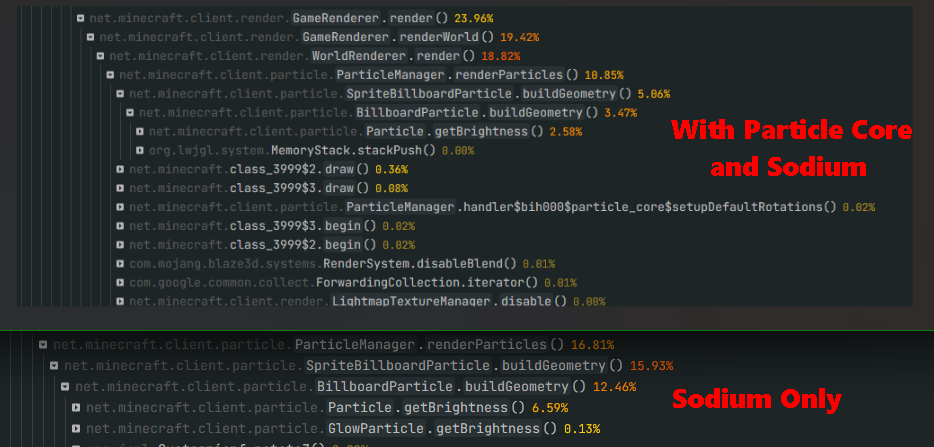
相比单独使用 Sodium,性能有所提升。截图的上半部分显示了 Particle Core,下半部分没有。CPU 时间改善了约 5%,或者说相对提升了 50%。
Particle Core focuses on one thing: Optimizing particles. Vanilla Minecraft is quite inefficient with particles in a variety of ways. Particle Core aims to improve this.
What Does It Do?
Culling
The biggest performance improvement overall, Particle Core doesn't render particles you can't see. Makes sense! Only about a 12th of the lightbox is visible at standard FOVs, why render the 11/12 of particles you can't even see?
Rendering Optimizations
Particles that are rendered are optimized. Vertex transformations and lightmap polling are optimized. Vertex optimizations defer to Sodium.
By-Type Reduction or Disabling
Three methods are provided to either completely disable or reduce spawning of specific particle types. Any particle you can add via the /particle command is eligible.
- A particle_type tag. Add particle types to
particle_core:excluded_particlesto completely disable those particle types. Server Owners: this will disable those particles for every client that joins the server, use with caution! - Config-based by-type reduction map. In the particle core config (see below), a user can add mappings of
particle type identifiertochance double. - Turn of Potion Particles entirely. If you find potion particles on your screen annoying, head over to the config and turn them off!
Unlike invis-particle resource packs, this actually prevents the particles from spawning at all, improving performance.
Tweaking Vanilla settings
Two config options are provided that can fine-tune the standard vanilla options of ALL, DECREASED, and MINIMAL. One is effectively a dial between ALL and DECREASED, the second a dial between DECREASED and MINIMAL. If you simply want to tweak particle spawning a bit, for example if your computer runs fine with DECREASED but you personally don't like how many particles are still on screen, you can dial DECREASED back without going all the way to MINIMAL.
Config
Particle Core provides a config covering every feature added. locate the config in the standard .mincraft config folder. Config name is particle_core_config_v[x].json, where [x] is the current version number.
The config has a comprehensive "comment" section at the top of the file. Please read it for guidance on config usage.
turnOffPotionParticles
To some, potion particles are extremely annoying. Use this setting to turn them off.
reduceParticlesAllChance
A dial to tweak particle spawning between the ALL and DECREASED Minecraft setting.
reduceParticlesDecreasedChance
A dial to tweak particle spawning between the DECREASED and MINIMAL Minecraft setting.
disableParticles
Completely disable all client-side particle spawning.
reduceParticlesByType
Map to reduce specific particle spawning.
- key: identifier of the particle type, ex.
minecraft:smoke. - value: double between 0.0 and 1.0. 0.0 will completely disable the particle, 1.0 is normal spawning. Anything in between will be that fractional chance a particle succeeds at spawning.
disableOptimizations
If any feature in Particle Core is causing a conflict or it is simply undesired, every feature can be individually disabled by adding it's string key to this list. See comment for instructions.
Before
Without Particle Core, world rendering is at 41% of CPU time, with renderParticles the lions share of that at 25% of CPU time.
After
With Particle Core, rendering is now at only 16% of CPU time, particle rendering basically a non-item.
With Sodium
Improves performance over Sodium by itself. Top section of the screenshot with Particle Core, the bottom section is without it. About 5% CPU time improvement, or 50% relative improvement.

下载 Particle Core
下载 Particle Core
需要联机服务器吗?
稳定流畅、一键部署,几分钟即可和朋友联机开服
最低仅需 8 元/月 即可畅快联机
下载 Particle Core
下载 Particle Core
需要联机服务器吗?
稳定流畅、一键部署,几分钟即可和朋友联机开服
最低仅需 8 元/月 即可畅快联机
下载 Particle Core
需要联机服务器吗?
稳定流畅、一键部署,几分钟即可和朋友联机开服
最低仅需 8 元/月 即可畅快联机
下载 Particle Core
需要联机服务器吗?
稳定流畅、一键部署,几分钟即可和朋友联机开服
最低仅需 8 元/月 即可畅快联机
下载 Particle Core
需要联机服务器吗?
稳定流畅、一键部署,几分钟即可和朋友联机开服
最低仅需 8 元/月 即可畅快联机
下载 Particle Core
需要联机服务器吗?
稳定流畅、一键部署,几分钟即可和朋友联机开服
最低仅需 8 元/月 即可畅快联机
下载 Particle Core
需要联机服务器吗?
稳定流畅、一键部署,几分钟即可和朋友联机开服
最低仅需 8 元/月 即可畅快联机
下载 Particle Core
修复开放空气碰撞优化的 mixin 并支持 26.3
关于这个资源的讨论、问题反馈与使用心得
还没有讨论,来发第一帖吧
你是这个资源的作者?登录后可认领此资源。
相似资源
 模组
缓冲的原始输入和线程化的事件轮询
 模组

显示你正在注视的方块的信息。(适用于 Minecraft 1.16+ 的 Hwyla/Waila 分支)
 模组

原版世界生成优化模组
 模组
使用 JavaScript 编辑配方、添加自定义物品、编写世界事件!
 模组

查看物品与配方
 模组
在游戏画面角落显示附近世界地形、玩家、生物和实体的地图。可创建路径点,帮助你找到标记过的位置。
评论 0
登录后参与评分
还没有评论,来抢沙发吧