召集你的小队,一起征服世界!Parties 通过模块化的小队界面、深度的配置选项、原生模组支持以及可自定义和分享的 HUD 布局,全面升级团队协作体验。你可以与朋友共同构建这些布局,或将其打包进整合包中。继续阅读以了解更多详情!
核心亮点:
- 完全可自定义的 HUD:移动、缩放、切换并自定义玩家和小队界面。
- 模板分享:通过文件或字符序列导出和导入自定义模板。
- 小队动态机制:增加经验值共享、友军伤害保护、法术标记、位置追踪等功能。
- 模组兼容性:已集成对多款热门模组的原生支持,未来还将支持更多!

无论你是独自游玩还是与朋友联机,Parties 都能让你根据喜好自定义界面。从各种 HUD 设置到内置的小队机制,以下是该模组目前已包含的所有功能:
| 预览 |
详情 |
|
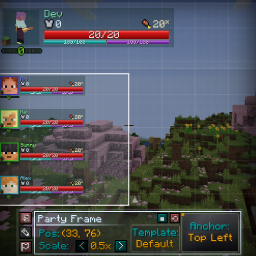
HUD 编辑器
实时移动、缩放、锚定和切换小队或玩家界面。内置网格吸附、对齐辅助线以及编辑时的实时预览功能。
|
|
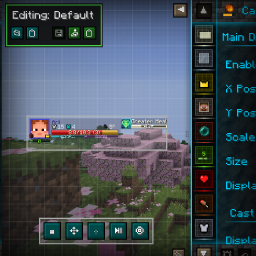
模板创建器
从零开始构建你自己的 UI 模板。可将配置直接导出为可分享的字符序列或 JSON 文件,方便放入整合包或发送给好友。
|
|
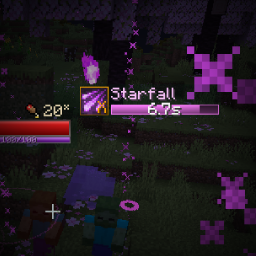
模组元素支持
自动显示其他魔法类模组中的资源条,包括 Iron's Spells 的施法条和法力条、Ars Nouveau 的法力值等,且均可进行深度自定义。
|
|
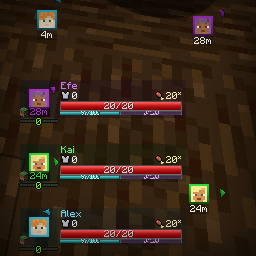
玩家追踪
在长距离或跨维度时也能掌握队友位置。小队头像还可充当内置的指南针雷达,或者使用屏幕边缘标记来查看周围盟友的位置。
|
|
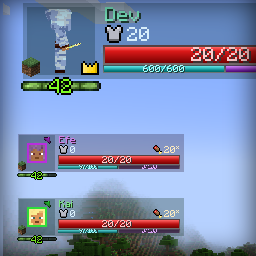
经验值共享
将击杀怪物获得的经验值分给附近的小队成员。在刷怪塔或地牢探索期间保持升级进度公平,避免辅助和远程角色落后。
|
|
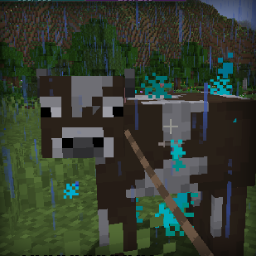
友军伤害保护
彻底杜绝误伤友军!保护队友、宠物、召唤物、拴绳生物以及其他受攻击目标免受流弹伤害。
|
|
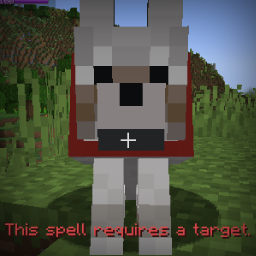
特殊法术标记
在关闭友军伤害的情况下,法术会自动绕过队友,使攻击性法术无法锁定盟友。带有“支援法术”标签的治疗和增益效果仍可对盟友生效。而攻击、投射物和敌意状态效果则不会波及盟友。
|
|
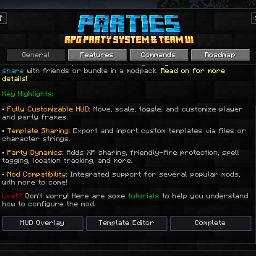
游戏内教程
/party 帮助菜单已全面重构,新增了一个信息窗口。其中包含清晰的模板、框架与队伍设置指南,以及视觉化教程序列,助你快速上手。
|
|
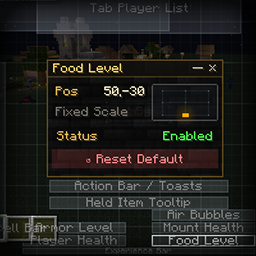
覆盖层管理器
可移动、缩放、锚定或隐藏原版覆盖层(如快捷栏、生命值、Boss血条),以及其他模组支持的覆盖层。在 HUD 编辑器的覆盖层列表中可按模组分类查找它们(按 Home 键可直接打开)。
|

以下是自 2.0.0 版本以来计划中、开发中和已实现的所有集成:
状态: ✅ 已实现 • ⏳ 进行中 • 📋 计划中
| 模组集成 |
功能与详情 |
🔄 |
Iron's Spells
v1.20.1-3.4.0.9+ |
施法条、法力条,以及友军伤害法术和召唤物支持。 |
✅ |
| Ars Nouveau |
法力条,友军伤害召唤物和使魔支持。 |
✅ |
| Xaero's Minimap |
小地图 UI 集成(已完成)、队伍追踪、地图同步(?) |
⏳ |
| Epic Fight |
耐力条元素,正在考虑施法/技能条集成。 |
⏳ |
| Voice Chat |
Voice Chat 状态边框、队伍同步及自动组队创建。 |
📋 |
| Tough as Nails |
口渴度追踪器、温度追踪器。 |
📋 |
| Thirst was Taken |
口渴度追踪器 |
📋 |
| Yet Another Thirst |
口渴度追踪器 |
📋 |
| Cold Sweat |
体温追踪器 |
📋 |
| Homeostatic |
体温追踪器 |
📋 |
| FTB Teams |
队伍同步(已完成),任务进度同步 |
⏳ |
| Open Parties and Claims |
队伍同步 |
📋 |
| Game Stages |
游戏阶段同步 |
📋 |
| Just Enough Effect Descriptions |
状态效果信息提示框 |
📋 |
平台与版本说明
- 移植计划:暂无移植计划;开发首先针对现代版本。在支持进行中的模组后,将发布 1.21.1 的移植版本。

以下是 Parties 模组目前可用的所有命令。请注意,/parties 前缀可以替换为 /p 或 /party。
| 命令 |
描述 |
| /parties invite 'player' |
向玩家发送队伍邀请。邀请在 60 秒后过期。 |
| /parties accept |
接受来自玩家的队伍邀请。如果收到邀请,您也可以点击相应的聊天链接。 |
| /parties decline |
拒绝来自玩家的最后一个队伍邀请。点击相应的聊天链接也可以让您拒绝特定的邀请。 |
| /parties disband |
解散您当前所在的队伍。只能由队伍队长执行。 |
| /parties kick 'player' |
将一名玩家从您当前的队伍中移除。如果没有其他玩家留下,则改为解散队伍。只能由队伍队长执行。 |
| /parties leave |
离开您当前的队伍。如果是队长,则将领导权转让给其他人。如果队伍只剩下一名玩家,则改为解散队伍。 |
| /parties promote 'player' |
将领导权转让给另一名玩家。如果队长离线,根据 parties-common.toml 中的设置,领导权可能会自动转让。 |
| /parties friendlyfire |
切换队友伤害开关,或通过 on/off 直接设置。仅限队长使用,且服务器必须允许开启。 |
| /parties help |
提供有关队伍系统和 HUD 编辑器工作原理的详细信息。会打开一个窗口,显示多个信息选项卡,并启动多个教程序列。 |
| /pclient reload |
重载客户端配置,例如 config/dimensions/active.json。 |
| /pclient import 'frame' 'template_code' |
从剪贴板导入预设(自动命名),并将其附加到所选框架上。 |

Parties 附带多个配置文件,涵盖 HUD 和模组支持开关以及用于提升兼容性的挂钩开关。所有配置选项均位于 /config/parties 目录中:
| 目录 / 文件名 |
描述 |
| core-common.toml |
提供核心的团队联盟提供程序以及所有权/伤害解析器。同时定义“邻近”的范围。该邻近范围在其他多个设置中使用。 |
| dynamics-common.toml |
包含队伍配置选项,包括最大队伍人数、自动队长转移计时器、队友伤害和经验共享。 |
| ui-client.toml |
包含多个客户端渲染选项,从雷达箭头修改、UI 渲染选项、玩家着色设置到主菜单按钮位置。 |
| /dimensions/active.json & known_cache.json |
包含 UI 获取维度数据的活跃列表,以及游戏中发现的所有维度的转储数据。 |
| /templates/ |
自定义模板文件的根目录。这些文件允许你存储和分享自己独特的框架模板。 |
| active_layouts.json |
包含当前环境下的活跃框架位置和模板附加信息。 |
| modules.properties |
包含 Parties 模组中使用的兼容性模块和其他挂钩列表。这允许你切换 Parties 模组中存在的任何功能和兼容性。 |

我可以在整合包或通关流程中使用此模组吗?
当然可以!欢迎将此模组包含在任何公开或私有的整合包、服务器、视频或直播中。
如何自定义或隐藏 UI?
请查看上方的配置部分以获取完整详情。
主要有两种编辑模式:
- 布局:调整位置、锚点和缩放比例。
- HUD:切换元素的开/关状态并调整行为。
你可以随时在 Minecraft 的设置 → 控制菜单中重新绑定两个菜单的按键。
队友伤害保护具体涵盖哪些内容?
当关闭队友伤害时,队伍成员(加上原版记分板队友和 FTB Teams 盟友)受到的保护远不止近战攻击:
- 近战攻击和横扫之刃攻击。
- 投射物,如箭矢、三叉戟和火球,追溯至发射者。
- 驯服宠物(狼、猫)不会攻击或锁定盟友,盟友也无法伤害你的宠物。
- 坐骑和被拴住的生物与其骑乘者或拴绳持有者共享保护。
- 魔法实体,如唤魔者尖牙和恼鬼,追溯至其施法者。
- 使用引雷三叉戟召唤的闪电追溯至投掷者。
- 爆炸和其他间接伤害,如 TNT 或重生锚,追溯至触发者。
- 溅射药水、滞留云和其他来源产生的负面效果不会作用于盟友,但有益效果仍然生效。
- Iron's Spells:攻击性法术无法命中或锁定盟友,召唤物被视为其施法者。支援性法术仍可针对队友。
- Ars Nouveau:使魔被视为其所有者。
队友伤害设置本身位于 dynamics-common.toml 中。特殊情况(投射物、宠物、坐骑、拴绳、魔法实体、闪电和间接伤害)均可在 core-common.toml 中单独切换,而效果和特定模组的保护可在 modules.properties 中切换。
模组与其他模组冲突或导致崩溃!
请在问题追踪器上提交 Issue,并附上你的崩溃日志(crash-reports 或 latest.log)。
一旦提供日志和复现步骤,模组交互和渲染怪癖通常能很快修复。
你能添加对其他模组的支持吗?
在问题追踪器上提交建议!告诉我你想让哪个模组与你一起工作,以及你希望它们如何协作,我会看看能做些什么。
有 Fabric 版本吗?
目前没有。Fabric 版本即将推出。
可以向后移植到较旧的 Minecraft 版本吗?
目前不进行向后移植。当前的重点是保持更新,并优先适配现代 Minecraft 版本。
有问题?给我发消息!你可以在 CurseForge 上找到我 :)
Gather your party and conquer your world together! Parties upgrades team play with modular party frames, deep config options, native mod support, and custom HUD layouts you can build and share with friends or bundle in a modpack. Read on for more details!
Key Highlights:
- Fully Customizable HUD: Move, scale, toggle, and customize player and party frames.
- Template Sharing: Export and import custom templates via files or character strings.
- Party Dynamics: Adds XP sharing, friendly-fire protection, spell tagging, location tracking, and more.
- Mod Compatibility: Integrated support for several popular mods, with more to come!
Whether you play alone or with friends, Parties lets you customize your interface to match your style. From various HUD settings to built-in party mechanics, here is everything included in the mod so far:
| Preview |
Details |
|
|
HUD Editor
Move, scale, anchor, and toggle party or player frames on the fly. Includes grid snapping, alignment guides, and a live preview while you edit.
|
|
|
Template Creator
Build your own UI templates from scratch. Export setups directly into shareable strings or JSON files to drop into modpacks or send to friends.
|
|
|
Modded Elements
Shows resource bars from other magic mods automatically, including Iron's Spells cast and mana bars, Ars Nouveau mana, and more, all of which can be customized extensively.
|
|
|
Player Tracking
Keep tabs on teammates across long distances and dimensions. Party avatars also function as a built-in compass radar, or you can use on-screen edge markers to see where allies are around you.
|
|
|
XP Sharing
Splits mob XP with nearby party members. Keeps leveling fair during mob farms or dungeon crawls, so supportive and ranged roles don't fall behind.
|
|
|
Friendly Fire Protection
Stops accidental friendly fire from happening ever again! Protects teammates, pets, summons, leashed mobs, and other damage hits from stray swings.
|
|
|
Special Spell Tagging
Spells aim past teammates while friendly fire is turned off, so offensive spells can't lock onto allies. Heals and buffs in the Support Spell tag still can. Attacks, projectiles, and hostile status effects won't affect allies either.
|
|
|
In-Game Tutorial
The /party help menu has been completely overhauled with a new informational window. It features clear guides on templates, frame and party settings, plus visual tutorial sequences to help you get started.
|
|
|
Overlay Manager
Move, scale, anchor, or hide vanilla overlays like the hotbar, health, and boss bar, plus supported overlays from other mods. Find them sorted by mod in the HUD editor's overlay list (press Home to open it directly).
|
These are all the integrations planned, being worked on, and implemented since 2.0.0:
Status: ✅ Implemented • ⏳ In Progress • 📋 Planned
| Mod Integration |
Features & Details |
🔄 |
Iron's Spells
v1.20.1-3.4.0.9+ |
Cast Bar, Mana Bar and friendly-fire spell and summon support. |
✅ |
| Ars Nouveau |
Mana Bar, friendly-fire summon and familiar support. |
✅ |
| Xaero's Minimap |
Minimap UI integration (done), party tracking, map syncing(?) |
⏳ |
| Epic Fight |
Stamina bar element, considering cast/skill bar integration. |
⏳ |
| Voice Chat |
Voice Chat status border, party synchronization, and automatic group creation. |
📋 |
| Tough as Nails |
Thirst tracker, temperature tracker. |
📋 |
| Thirst was Taken |
Thirst tracker |
📋 |
| Yet Another Thirst |
Thirst tracker |
📋 |
| Cold Sweat |
Temperature tracker |
📋 |
| Homeostatic |
Temperature tracker |
📋 |
| FTB Teams |
Team Syncing (done), quest progress syncing |
⏳ |
| Open Parties and Claims |
Team Syncing |
📋 |
| Game Stages |
Game Stage syncing |
📋 |
| Just Enough Effect Descriptions |
Status effect informational tooltips |
📋 |
Platform & Version Notes
- Backports: No backports planned; development targets modern releases first. After the in-progress mod support is added, a port to 1.21.1 will be released.
These are all the commands currently available for the Parties mod. Do note that the /parties prefix can be replaced with /p and /party.
| Command |
Description |
| /parties invite 'player' |
Sends a party invite to a player. Invites expire after 60 seconds. |
| /parties accept |
Accepts a party invite from a player. If receiving an invitation, you can also click on the respective chat link. |
| /parties decline |
Declines the last party invite from a player. Clicking on the respective chat link also allows you to decline a specific invitation as well. |
| /parties disband |
Disbands the party you're currently in. Can only be done by the party leader. |
| /parties kick 'player' |
Removes a player from your current party. If no other players were to remain, it disbands the party instead. Can only be done by the party leader. |
| /parties leave |
Leaves your current party. If leader, it passes leadership to someone else. If party would be left with one player, the party disbands instead. |
| /parties promote 'player' |
Transfers leadership to another player. If the leader is offline, leadership may automatically be transferred depending on settings in parties-common.toml. |
| /parties friendlyfire |
Toggles friendly fire for your party, or sets it directly with on/off. Can only be done by the party leader, and can only be turned on if the server allows it. |
| /parties help |
Provides very detailed information on how the party system and hud editor works. Brings up a window that shows several informational tabs along with launching several tutorial sequences. |
| /pclient reload |
Reloads client-side configuration, like from config/dimensions/active.json. |
| /pclient import 'frame' 'template_code' |
Imports a preset from your clipboard with an automatic name and attaches it to the chosen frame. |
Parties comes bundled with several configuration files ranging from hud and mod support toggles to hook toggles for better compatibility. All the configuration options are located within the /config/parties directory:
| Directory / File Name |
Description |
| core-common.toml |
Provides the core Team alliance providers and ownership/damage resolvers. Also dictates the meter range that "vicinity" means. Vicinity range is used in several other settings. |
| dynamics-common.toml |
Contains party configuration options which include max party size, automatic leader transfer timers, friendly-fire, and xp sharing. |
| ui-client.toml |
Contains several client-side rendering options, ranging from radar arrow modifications, UI rendering options, player colorizing settings, and the main menu button position. |
| /dimensions/active.json & known_cache.json |
Contains the active list that the UI grabs dimension data from along with a dump of all dimensions found in the game. |
| /templates/ |
The root directory of custom template files. These files allow you to store and share your own unique frame templates. |
| active_layouts.json |
Contains the active frame positioning and template attachment for the current environment. |
| modules.properties |
Contains a list of compatibility modules and other hooks that are used in the Parties mod. This allows you to toggle any features and compatibilities present in the Parties mod. |
Can I use this mod in a modpack or playthrough?
Of course! Feel free to include this mod in any public or private modpack, server, video, or stream.
How do I customize or hide the UI?
Check out the Configuration section above for full details.
There are two main editor modes:
- Layout: Tweak positions, anchors, and scale.
- HUD: Toggle elements on/off and adjust behaviors.
You can rebind keys for both menus anytime in Minecraft's Options → Controls menu.
What exactly does Friendly-Fire Protection cover?
When friendly fire is turned off, party members (plus vanilla scoreboard teammates and FTB Teams allies) are protected from far more than just direct melee hits:
- Melee attacks and sweeping edge hits.
- Projectiles like arrows, tridents, and fireballs, traced back to whoever fired them.
- Tamed pets (wolves, cats) won't attack or target allies, and allies can't hurt your pets.
- Mounts and leashed mobs share the protection of their rider or leash holder.
- Magic entities like Evoker Fangs and Vexes are traced back to their caster.
- Lightning summoned with a Channeling trident is traced back to the thrower.
- Explosions and other indirect damage, such as TNT or Respawn Anchors, are traced back to whoever set them off.
- Negative effects from splash potions, lingering clouds, and other sources won't apply to allies, while beneficial effects still do.
- Iron's Spells: offensive spells can't hit or lock onto allies, and summons are treated as their caster. Support spells can still target teammates.
- Ars Nouveau: familiars are treated as their owner.
The friendly-fire setting itself lives in dynamics-common.toml. The special cases (projectiles, pets, mounts, leashes, magic entities, lightning, and indirect damage) can each be toggled in core-common.toml, and the effect and mod-specific protections can be toggled in modules.properties.
The mod is conflicting with another mod or causing a crash!
Please open an issue on the Issue Tracker and attach your crash log (crash-reports or latest.log).
Mod interactions and rendering quirks are usually pretty quick to fix once there's a log and steps to reproduce it.
Can you add support for another mod?
Drop a suggestion on the Issue Tracker! Let me know which mod you have in mind and how you’d like the two to work together, and I'll see what can be done.
Is there a Fabric version?
Not at the moment. A Fabric version would be coming very soon.
Can you backport to older Minecraft versions?
No backports for now. The focus is on keeping things updated and moving forward with modern Minecraft releases first.
Questions? Send me a message! I am reachable on CurseForge :)
 模组

 模组
 模组

 模组
 模组
 模组
评论 0
登录后参与评分
还没有评论,来抢沙发吧