
Party HUD
Party HUD 是一款模组,它通过将派对系统与完全可自定义的 HUD 相结合,改善了 Minecraft 中的多人游戏体验。使用该模组后,玩家可以组织团队,并实时显示队友的关键信息:生命值、负面效果、距离、方向以及基于兼容性的状态指示器。该 HUD 设计灵活,能够适应任何整合包,并提供动态样式和自定义选项。
工作原理
按 H 键打开 Party HUD 菜单。
界面左侧包含 4 个标签页,每个标签页都有各自的功能,用于管理你的派对、邀请、成员和设置。
邀请
要邀请玩家,请打开 邀请 (Invitations) 标签页,右键点击某位玩家,然后选择 邀请加入派对 (Invite to Party)。
成员与收藏
要在 HUD 中显示队友,你首先必须将他们添加到 收藏 (Favorites) 列表中。
这可以通过 成员 (Members) 标签页完成:右键点击一名派对成员,然后选择 添加到收藏 (Add to Favorites)。
每位玩家最多可以在 HUD 中同时显示 8 个收藏对象,而派对本身则 没有成员数量限制。
选项面板
右键点击玩家或派对成员可根据当前标签页和你的派对角色提供上下文选项。
这些选项包括邀请玩家、添加或移除收藏对象、踢出成员、委托领导权,以及在服务器配置允许的情况下进行传送。
原版队伍集成
Party HUD 的派对系统与 Minecraft 的 原版队伍 (vanilla team) 系统相集成,使派对成员资格能够与内置的队伍结构保持同步。
兼容性 OK
 |
## Hardcore Revival |
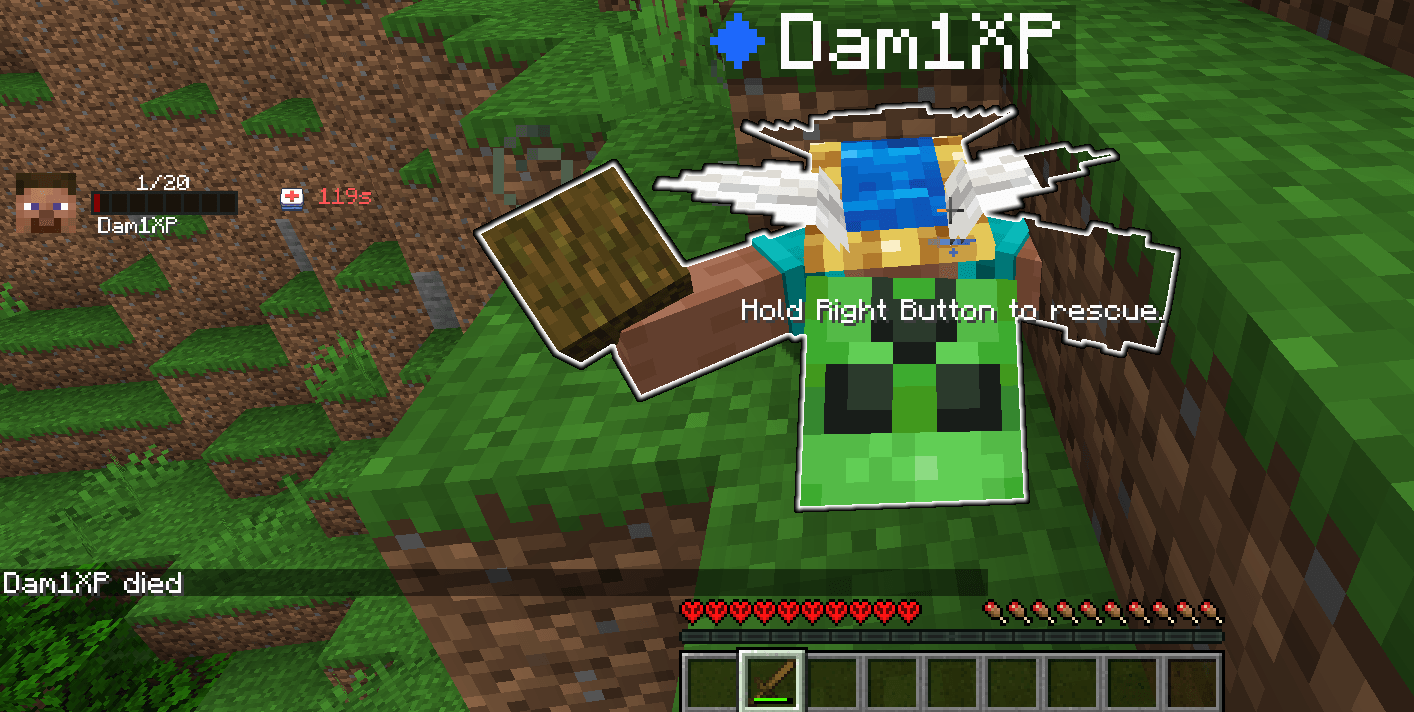
当一名派对成员被击倒且仍可被救援时,会显示一个图标及剩余秒数。
 |
## PlayerRevive |
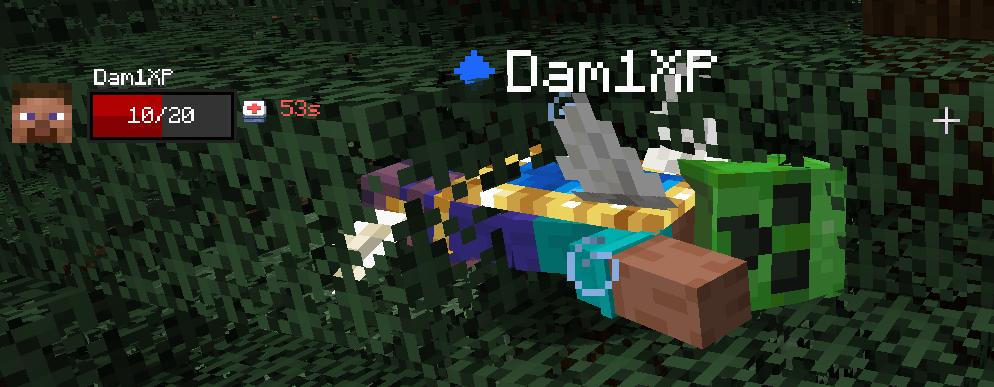
当一名派对成员倒地且仍可被复活时,会显示一个图标及剩余秒数。
 |
## Xaero's Minimap |
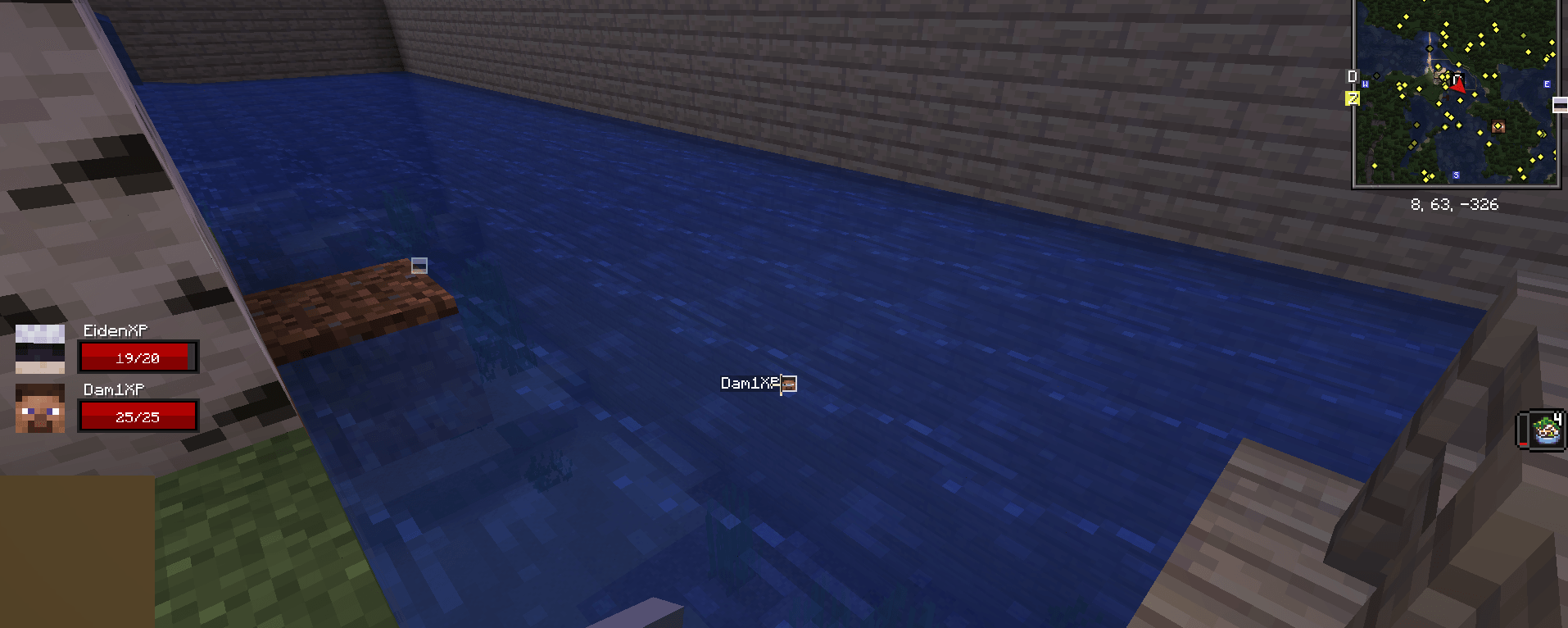
安装后,Party HUD 启用了一项集成选项,允许在远处通过标记跟踪队友,使其方向始终易于追踪。
 |
## FTB Teams |
默认情况下已禁用,但可通过配置选项启用,以将 Party HUD 的派对与 FTB Teams 同步。
? 加入我们的 Discord 社区
你有新的想法、对模组的改进建议,或者发现了 bug?这里是分享它们的完美场所!
在我们的 Discord 社区中,你可以:
? 提交关于改进模组的提案和建议。
?️ 报告问题和 bug,以便我们一起修复它们。
? 展示你的创造力:你可以自由地将我的模组用于你自己的整合包中。
? 在服务器上分享你的整合包,并向社区展示你独特的风格。
这个空间旨在让我们共同成长,怀着尊重和对制作模组及整合包的热情。你的贡献永远受欢迎!

Party HUD
Party HUD is a mod that improves the multiplayer experience in Minecraft by integrating a Party system with a fully customizable HUD. With this mod, players can organize groups and display key information about their teammates: health, negative effects, distance, direction, and compatibility-based status indicators in real time. The HUD is designed to be flexible and adapt to any modpack, with dynamic styles and customization options.
How it works
Press H to open the Party HUD menu.
The interface includes 4 tabs on the left side, each with its own function for managing your Party, invitations, members, and settings.
Invitations
To invite a player, open the Invitations tab, right-click on a player, and select Invite to Party.
Members and favorites
To display a teammate in the HUD, you must first add them to Favorites.
This is done from the Members tab by right-clicking a party member and selecting Add to Favorites.
Each player can have up to 8 favorites displayed in the HUD at the same time, while Parties themselves have no member limit.
Options panel
Right-clicking players or party members gives access to context options depending on the tab and your role in the Party.
These options include inviting players, adding or removing favorites, kicking members, delegating leadership, and teleporting when the server configuration allows it.
Vanilla team integration
Party HUD Parties are integrated with Minecraft's vanilla team system, allowing Party membership to stay synchronized with the built-in team structure.
Compatibility OK
|
## Hardcore Revival |
Shows an icon and the remaining seconds when a party member is knocked out and can still be rescued.
|
## PlayerRevive |
Shows an icon and the remaining seconds when a party member is downed and can still be revived.
|
## Xaero's Minimap |
When installed, Party HUD enables an integration option so teammates can be tracked at long distance with a marker under them, making their direction easier to follow at all times.
|
## FTB Teams |
Disabled by default, but can be enabled through a config option to synchronize Party HUD parties with FTB Teams.
🌐 Join Our Discord Community
Do you have new ideas, improvements for my mods, or have you found a bug? This is the perfect place to share them!
In our Discord community you can:
💡 Submit proposals and suggestions for improving the mods.
🛠️ Report problems and bugs so we can fix them together.
🎮 Show your creativity: you're free to use my mods in your own modpacks.
📢 Share your modpack on the server and show the community your unique style.
This space is designed for us to grow together, with respect and enthusiasm for creating mods and modpacks. Your contribution is always welcome!

下载 Epic RPG: Party Hud
下载 Epic RPG: Party Hud
下载 Epic RPG: Party Hud
下载 Epic RPG: Party Hud
下载 Epic RPG: Party Hud
下载 Epic RPG: Party Hud
下载 Epic RPG: Party Hud
下载 Epic RPG: Party Hud
下载 Epic RPG: Party Hud
下载 Epic RPG: Party Hud
收藏夹系统与队伍 HUD 更新
- 您不再需要将队友标记为收藏才能查看他们的生命值:他们现在会自动显示在 HUD 上。
- 成员按字母顺序排列,收藏的成员排在前面。
- 在“成员”标签页中添加了星标按钮,用于将玩家标记或取消标记为收藏。
- 当可见玩家数量达到上限时,收藏的玩家优先显示在 HUD 上。
- 添加了 − 和 + 按钮,可调整最大可见玩家数量,范围为 1 到 8。
- 新增选项,仅显示收藏的玩家。
收藏夹系统与队伍 HUD 的更新
- 你不再需要将队伍成员标记为收藏即可查看他们的生命值:他们现在会自动显示在 HUD 上。
- 成员按字母顺序排列,收藏的成员排在前面。
- 在“成员”选项卡中添加了星号按钮,用于将玩家标记或取消标记为收藏。
- 当可见玩家数量达到上限时,收藏的玩家优先显示在 HUD 上。
- 添加了 − 和 + 按钮,可调整最大可见玩家数量,范围从 1 到 8。
- 添加了仅显示收藏成员的选项。
我们仍在优化该系统,使其更清晰、直观且精致。 团队欢迎你的想法和建议!
- HUD 设计合集新增了 DIABLO 风格。
- 新增“展示我”选项,允许你在队伍 HUD 中查看自己的角色。
- 修复了叠加层设置保存的问题;现在重启游戏时这些设置将被保留。
- HUD 设计合集新增了 DIABLO 风格。
- 新增“展示我”选项,允许你在队伍 HUD 中查看自己的角色。
- 修复了叠加层设置保存的问题;现在重启游戏时这些设置将被保留。
所有来自最新版本的更改已移植到 26.x
关于这个资源的讨论、问题反馈与使用心得
还没有讨论,来发第一帖吧
你是这个资源的作者?登录后可认领此资源。
相似资源
 模组

显示你正在注视的方块的信息。(适用于 Minecraft 1.16+ 的 Hwyla/Waila 分支)
 模组
在游戏画面角落显示附近世界地形、玩家、生物和实体的地图。可创建路径点,帮助你找到标记过的位置。
 模组

查看物品与配方
 模组
使用 JavaScript 编辑配方、添加自定义物品、编写世界事件!
 模组
AE2:一款流行的自动化与存储模组
 模组
那是什么?一个 Waila/Hwyla 的分支。
评论 0
登录后参与评分
还没有评论,来抢沙发吧