MCPVP Party Inviter
通过输入数字举办派对——所有回复该数字的人只需点击一次即可被邀请。
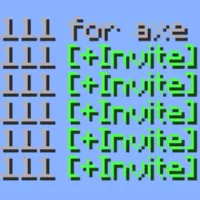
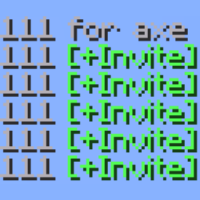
输入 222 for axe,随后在聊天栏中输入 222 的玩家的消息旁边会出现一个可点击的 [+Invite]。点击它(或让它自动邀请),他们就会加入。再也不用眯着眼睛看聊天栏并重新输入名字了。
工作原理
- 你作为主持人 —— 发送一条包含数字和
for的消息(例如222 for axe)。 - 参与者高亮显示 —— 之后输入
222的任何玩家,其消息会被高亮并附带一个可点击的 [+Invite]。 - 一键邀请他们 —— 执行你的邀请命令(默认为
/p invite {player})。 - 有人抢先认领? 如果另一位玩家使用相同的数字并加上
for发布消息,你的派对将移交控制权,且你的邀请功能停止。
功能特性
- 一键邀请 —— 参与者的消息变为可点击;整行文字或整洁的
[+Invite]按钮均可点击。 - 自动邀请模式 —— 完全跳过点击操作。第一位参与者会立即被邀请,其余参与者则按队列等待,并按设定的间隔(默认 700 毫秒)逐一释放邀请,以避免因刷屏而被静音。
- 移交检测 —— 如果另一位主持人认领了你的数字,你的邀请功能会自动关闭。
- 智能自动停止 —— 当你进入比赛或切换子服务器时,派对自动结束。
- 反垃圾信息感知 —— 如果服务器阻止了你的主持消息(提示“发送过快”、“内容过于相似”等),派对将不会启动。
- 完全可配置 —— 颜色、下划线、邀请命令、关键词、音效等更多选项均可自定义。
配置文件
从 Mod Menu → MCPVP Party Inviter 打开,或使用 /pinv config 命令。每个选项也可以通过命令设置,并保存至 config/partyinviter.json。
| 设置项 | 默认值 | 说明 |
|---|---|---|
inviteCommand |
/p invite {player} |
邀请时执行的命令({player} = 玩家名称) |
autoInvite |
false |
是否自动邀请,无需点击 |
autoInviteCooldownMs |
700 |
队列中连续邀请之间的间隔时间(毫秒) |
requireForToHost |
true |
仅当消息中包含 for 时才允许主持 |
stopPartyOnServerChange |
true |
进入比赛时结束派对 |
cancelPartyOnDeniedMessage |
true |
如果服务器阻止了你的消息,则不启动派对 |
命令
| 命令 | 描述 |
|---|---|
/pinv status |
显示当前派对状态和设置 |
/pinv host <number> |
手动开始主持某个数字 |
/pinv clear |
停止主持 |
/pinv set <key> <value> |
更改某项设置 |
/pinv config |
打开配置图形界面 |
/pinv test <text> |
预览某条聊天信息的解析结果 |
顺便说一句,这是用 AI 辅助编码完成的
MCPVP Party Inviter
Host a party by typing a number — everyone who replies with it becomes one click to invite.
Type 222 for axe, and the next players who type 222 in chat get a clickable [+Invite] on their message. Click it (or let it auto-invite) and they're in. No more squinting at chat and re-typing names.
How it works
- You host — send a message with a number and
for(e.g.222 for axe). - Joiners light up — anyone who then types
222gets their message highlighted with a clickable [+Invite]. - One click invites them — runs your invite command (
/p invite {player}by default). - Someone else claims it? If another player posts the same number with
for, your party hands off and your invites stop.
Features
- One-click invites — joiner messages become clickable; the whole line or a tidy
[+Invite]button. - Auto-invite mode — skip the click entirely. The first joiner is invited instantly, the rest are queued and released one per interval (default 700 ms) so you don't get muted for spam.
- Hand-off detection — if another host claims your number, your invites switch off automatically.
- Smart auto-stop — the party ends when you enter a match or switch sub-servers.
- Anti-spam aware — if the server blocks your host message ("sending too quickly", "too similar"), the party simply never starts.
- Fully configurable — color, underline, invite command, keywords, sounds, and more.
Config
Open it from Mod Menu → MCPVP Party Inviter, or with /pinv config. Every option is also settable via command and saved to config/partyinviter.json.
| Setting | Default | What it does |
|---|---|---|
inviteCommand |
/p invite {player} |
Command run on invite ({player} = name) |
autoInvite |
false |
Invite automatically, no click |
autoInviteCooldownMs |
700 |
Spacing between queued invites |
requireForToHost |
true |
Only host when your message has for |
stopPartyOnServerChange |
true |
End the party when you enter a match |
cancelPartyOnDeniedMessage |
true |
Don't start if the server blocks your message |
Commands
| Command | Description |
|---|---|
/pinv status |
Show current party and settings |
/pinv host <number> |
Start hosting a number manually |
/pinv clear |
Stop hosting |
/pinv set <key> <value> |
Change a setting |
/pinv config |
Open the config GUI |
/pinv test <text> |
Preview how a chat line is parsed |
it's vibe coded btw
下载 Party Inviter (mcpvp.club)
下载 Party Inviter (mcpvp.club)
下载 Party Inviter (mcpvp.club)
下载 Party Inviter (mcpvp.club)
下载 Party Inviter (mcpvp.club)
下载 Party Inviter (mcpvp.club)
下载 Party Inviter (mcpvp.club)
下载 Party Inviter (mcpvp.club)
下载 Party Inviter (mcpvp.club)
下载 Party Inviter (mcpvp.club)
暂无更新日志
关于这个资源的讨论、问题反馈与使用心得
还没有讨论,来发第一帖吧
你是这个资源的作者?登录后可认领此资源。
相似资源
 模组

显示你正在注视的方块的信息。(适用于 Minecraft 1.16+ 的 Hwyla/Waila 分支)
 模组
在游戏画面角落显示附近世界地形、玩家、生物和实体的地图。可创建路径点,帮助你找到标记过的位置。
 模组

查看物品与配方
 模组
使用 JavaScript 编辑配方、添加自定义物品、编写世界事件!
 模组
AE2:一款流行的自动化与存储模组
 模组
那是什么?一个 Waila/Hwyla 的分支。
评论 0
登录后参与评分
还没有评论,来抢沙发吧