
Perfect Messages (PM) — Minecraft 中便捷的消息管理
你是否厌倦了 /title?想要制作带有彩色通知并保留在消息日志中的效果、发送电影般的对话,或创建沉浸式的 NPC 交流体验吗?
使用 Perfect Messages (PM),你可以轻松且美观地实现所有这些功能。Discord 频道 请访问模组的页面。
功能特性
-
? 弹出式消息 显示平滑淡入淡出的通知,支持自定义文本、颜色和持续时间。 支持所有 Minecraft 颜色代码和 HEX 格式。
-
? HEX 颜色支持 通过以下语法使用任何自定义颜色:
&#RRGGBB示例:
&#FF5733Hello! -
? 动态占位符
%player_name%— 玩家名称%player_health%— 当前生命值%player_xp%— 经验等级%item_in_hand%— 主手物品
-
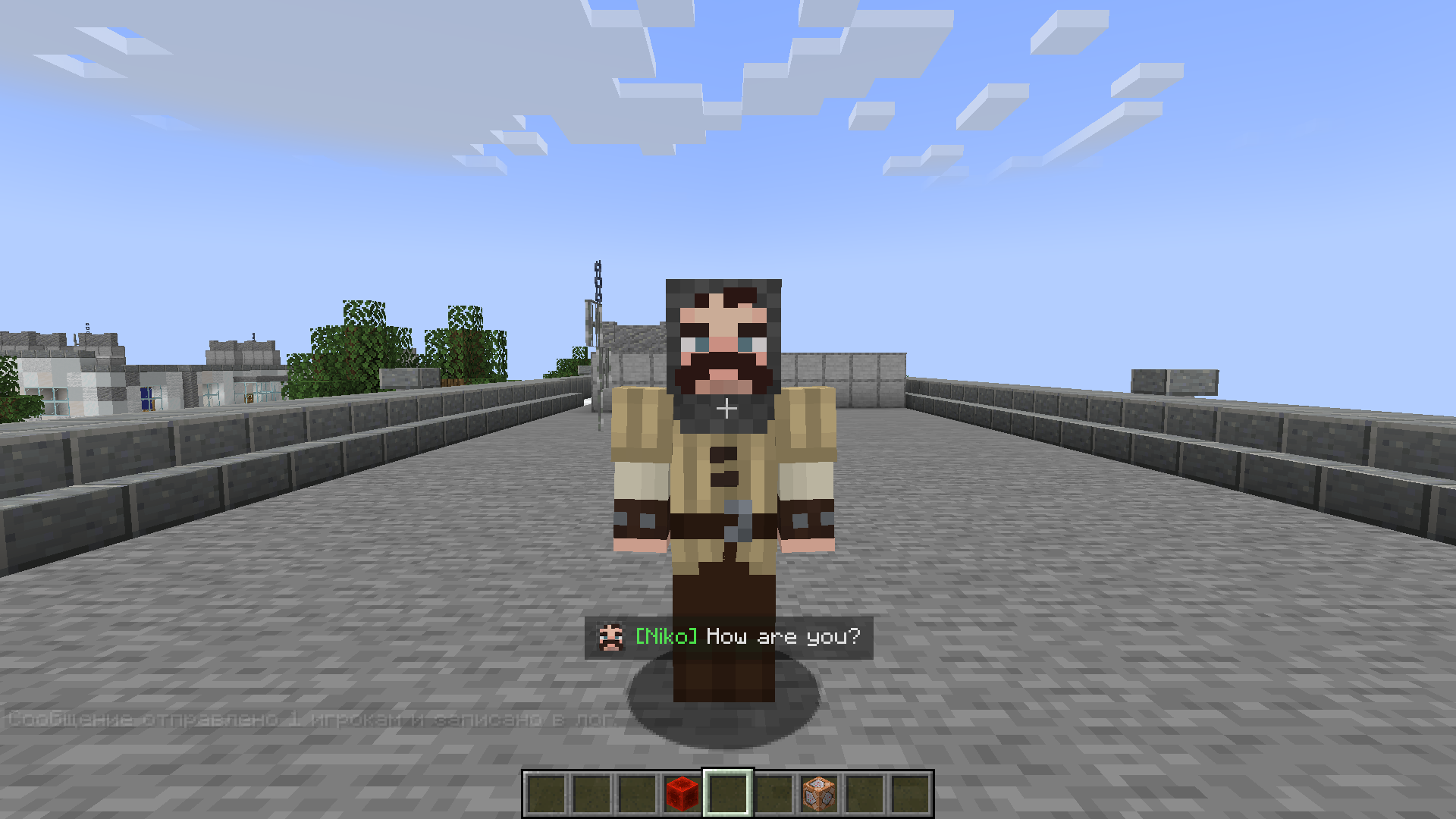
?️ 图片支持 为消息添加图标或头像:
/perfectmessage @a "pic.png Hello, %player_name%!" 5 true所有图片存储在
mods/pm/images/目录中(会自动创建)。 图片会出现在消息开头,并与多行文本正确对齐。 -
? 消息日志 在一个平滑可滚动的消息窗口中查看之前的所有消息。 非常适合任务系统、剧情模组或类似聊天的对话。
-
? 命令
/perfectmessage— 发送一条自定义消息,可调整持续时间和是否记录日志/clearmessages— 清除日志中的所有消息
示例:
/perfectmessage @a "b50d4Welcome, %player_name%!" 10 true -
⌨️ 自定义按键绑定 直接从游戏中打开或关闭消息日志(默认按键:
N)。 可在 选项 → 控制设置 → PM: 切换消息日志 中更改按键。 -
? 文字特效
&k— 乱码(故障风)文本&r— 重置格式**text**— 抖动文字特效
使用方法
-
发送消息
/perfectmessage @a "&#FF5733Hello, %player_name%!" -
添加图片
/perfectmessage @a "pic.png &aYou found a treasure!" 5 true -
打开消息日志 按 N(或你设置的按键)查看历史消息。
-
清除日志
/clearmessages
配置说明
你可以调整以下内容:
- 是否启用日志记录
- 淡入淡出持续时间和透明度
- 最大存储消息数量
- 视觉特效,如抖动或渐变
配置文件会自动生成在你的 Forge 配置目录中。
安装方法
- 安装 Forge(Minecraft 1.19.2 或 1.20.1)。
- 将模组文件放入
mods文件夹。 - 启动 Minecraft ——
mods/pm/images/文件夹将自动创建。 - 配置你的按键并享受精美的消息效果!
兼容性
- Minecraft 版本: 1.19.2, 1.20.1
- 加载器: Forge
- 语言: 英文, 俄文
给整合包制作者
Perfect Messages 非常适合用于 电影叙事、任务系统 或 交互式过场动画。 你可以使用命令方块、脚本或数据包轻松编写对话序列。
? 示例:NPC 对话链
/perfectmessage @a "npc.png &#ffc107Villager: &rHello, traveler!" 5 true
/perfectmessage @a "npc.png &#ffffffVillager: &rThe forest ahead is dangerous..." 5 true
/perfectmessage @a "npc.png &#ff0000Villager: &rBeware of the shadows!" 5 true
? 示例:任务奖励消息
/perfectmessage @a "chest.png �ff00You received 50 gold and a new sword!" 5 true
? 提示
将其与 KubeJS、Custom NPCs 或 Quest Frameworks 等模组结合使用,可以创建具有定时动画对话的沉浸式故事。
支持与反馈
如果遇到任何问题或有想法分享,请加入我们的 Discord 频道 或访问模组的页面。
Perfect Messages — 你的消息,你的故事。
轻松在 Minecraft 中创建电影级通知、沉浸式叙事和富有表现力的交流。
Perfect Messages (PM) — Convenient Message Management in Minecraft
Are you tired of /title? Want to make colorful notifications that stay in a message log, send cinematic dialogues, or create immersive NPC conversations?
With Perfect Messages (PM), you can do it all — easily and beautifully. Discord Channel visit the mod’s project page.
Features
-
? Pop-Up Messages Display smooth, fading notifications with customizable text, colors, and duration. Supports all Minecraft color codes and HEX formatting.
-
? HEX Color Support Use any custom color via:
&#RRGGBBExample:
&#FF5733Hello! -
? Dynamic Placeholders
%player_name%— Player’s name%player_health%— Current health%player_xp%— XP level%item_in_hand%— Item in main hand
-
?️ Image Support Add icons or portraits to messages:
/perfectmessage @a "pic.png Hello, %player_name%!" 5 trueAll images are stored in
mods/pm/images/(created automatically). Images appear at the start of messages and align properly with multiline text. -
? Message Log View all previous messages in a smooth, scrollable message window. Perfect for quests, story mods, or chat-style dialogues.
-
? Commands
/perfectmessage— Send a custom message with adjustable duration and optional logging/clearmessages— Clear all messages from the log
Example:
/perfectmessage @a "b50d4Welcome, %player_name%!" 10 true -
⌨️ Customizable Key Bindings Open or close the message log directly from in-game (default key:
N). The key can be changed in Options → Controls → PM: Toggle Message Log. -
? Text Effects
&k— Obfuscated (glitched) text&r— Reset formatting**text**— Shaking text effect
How to Use
-
Send a Message
/perfectmessage @a "&#FF5733Hello, %player_name%!" -
Add an Image
/perfectmessage @a "pic.png &aYou found a treasure!" 5 true -
Open the Message Log Press N (or your chosen key) to view past messages.
-
Clear the Log
/clearmessages
Configuration
You can adjust:
- Whether logging is enabled
- Fade duration and transparency
- Maximum stored messages
- Visual effects like shaking or gradients
The config file is automatically created in your Forge config directory.
Installation
- Install Forge (Minecraft 1.19.2 or 1.20.1).
- Place the mod file into the
modsfolder. - Launch Minecraft — the folder
mods/pm/images/will be created automatically. - Configure your controls and enjoy stylish messages!
Compatibility
- Minecraft Versions: 1.19.2, 1.20.1
- Mod Loader: Forge
- Languages: English, Russian
For Modpack Creators
Perfect Messages is ideal for cinematic storytelling, quest systems, or interactive cutscenes. You can easily script dialogue sequences using command blocks, scripts, or datapacks.
? Example: NPC Dialogue Chain
/perfectmessage @a "npc.png &#ffc107Villager: &rHello, traveler!" 5 true
/perfectmessage @a "npc.png &#ffffffVillager: &rThe forest ahead is dangerous..." 5 true
/perfectmessage @a "npc.png &#ff0000Villager: &rBeware of the shadows!" 5 true
? Example: Quest Reward Message
/perfectmessage @a "chest.png �ff00You received 50 gold and a new sword!" 5 true
? Tip
Combine it with mods like KubeJS, Custom NPCs, or Quest Frameworks to create immersive stories with timed, animated dialogue.
Support & Feedback
If you encounter any issues or want to share ideas, join our Discord Channel or visit the mod’s project page.
Perfect Messages — Your Messages, Your Story.
Create cinematic notifications, immersive storytelling, and expressive communication in Minecraft with ease.

下载 PerfectMessages
下载 PerfectMessages
下载 PerfectMessages
下载 PerfectMessages
下载 PerfectMessages
下载 PerfectMessages
下载 PerfectMessages
下载 PerfectMessages
下载 PerfectMessages
下载 PerfectMessages
仅修复了一个小错误
关于这个资源的讨论、问题反馈与使用心得
还没有讨论,来发第一帖吧
你是这个资源的作者?登录后可认领此资源。
相似资源
 模组

显示你正在注视的方块的信息。(适用于 Minecraft 1.16+ 的 Hwyla/Waila 分支)
 模组
使用 JavaScript 编辑配方、添加自定义物品、编写世界事件!
 模组

查看物品与配方
 模组
在游戏画面角落显示附近世界地形、玩家、生物和实体的地图。可创建路径点,帮助你找到标记过的位置。
 模组
AE2:一款流行的自动化与存储模组
 模组
那是什么?一个 Waila/Hwyla 的分支。
评论 0
登录后参与评分
还没有评论,来抢沙发吧