
Philter 模组为你提供了一个具有过滤功能的超级漏斗,它可以与原版 Minecraft 或任何模组配合使用。 任何类型的物品都可以被引导至不同的输出容器中。否则,它会像普通漏斗一样将物品传递下去。
以下是其运行时的样子:
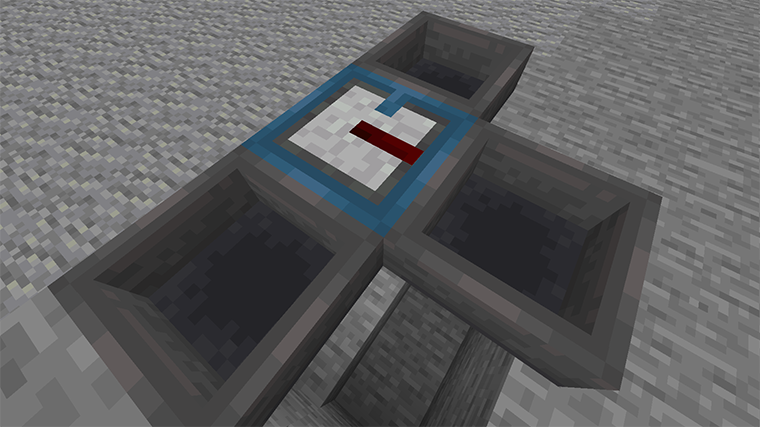
总体而言,过滤器是一个钢蓝色的漏斗,它有一个用于执行过滤的红石插入部分。 过滤器顶部的蓝色标签显示了正常物品的流向。当物品被过滤到右侧的漏斗时,红石条纹会闪烁。
你可以使用其界面来设置过滤器:
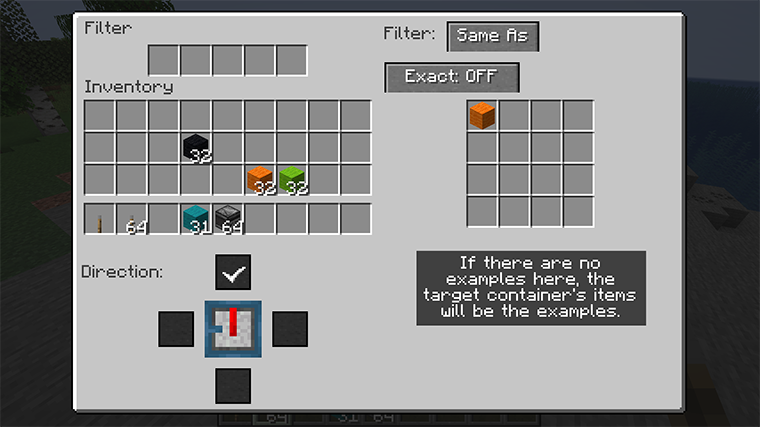
左上角区域是基本的漏斗界面,功能与普通漏斗完全相同。右侧是 过滤器配置区域。这里处于“相同内容”(Same As)模式,这意味着它只会将与示例匹配的物品放入 过滤器中。这些示例可以通过在过滤器本身中放置物品来设置。 或者,也可以使用对象容器中的现有物品作为示例。 因此,如果过滤器拥有所有类型的木板,或者如果没有且目标容器中有它们, 那么木板将被分流,其他物品将继续向前移动。
“精确”(Exact)按钮未开启,因此修改将被忽略。如果示例中包含铁胸甲,这将允许 损坏或附魔的铁胸甲也被放入目标容器。如果“精确”开启,则只有 具有相同耐久度和附魔的胸甲才会被分流。
另一种主要模式是“匹配”(Match),你可以在其中指定标签和正则表达式来告诉过滤器该做什么:
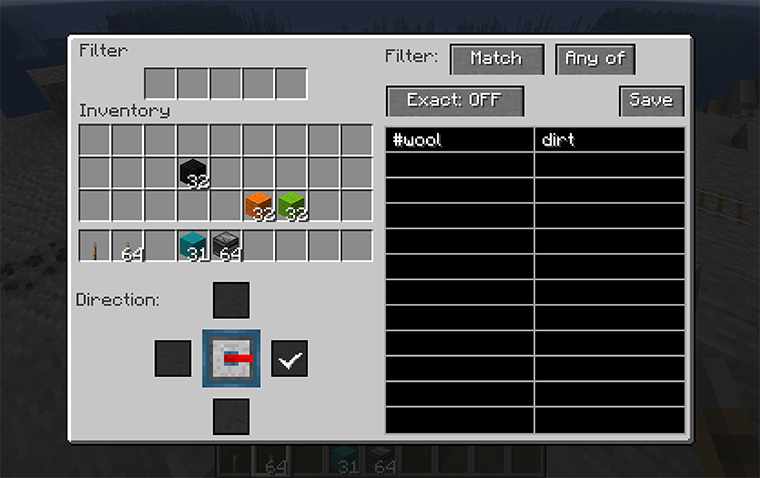
在这里,我们告诉过滤器匹配由标签 "#wool"(所有种类的羊毛)覆盖的方块,以及名称中包含 "dirt" 的任何东西。可以将“任一”(Any of)切换为“全部”(All of),这意味着物品必须同时 匹配 "#wool" 并在名称中包含 "dirt"(实际上没有任何东西符合这种情况,所以……)。
在“匹配”模式下,“精确”意味着在进行字符串匹配时将包含 NBT 值。因此,你可以匹配任何带有 附魔模式的物品,因为该字符串出现在附魔物品的 NBT 中。
标准标签列表 可能会很有帮助。至于正则表达式,网上有许多教程。通常,文本除了特殊符号外会与自身匹配。 最重要的是:
.匹配任意单个字符,因此 "d.rt" 既匹配 "dirt" 也匹配 "dart"。*表示“零次或多次重复”,因此 ".*" 表示“零个或多个任意字符”。^匹配文本的开头,因此你可以使用模式 "^blue.*" 来表示“任何名称以 blue 开头的东西”,这将不会匹配浅蓝色的东西。$匹配文本的结尾。
除非你将锚点固定在文本的开头和/或结尾,否则过滤器会在字符串中的任意位置找到匹配项。它还忽略 文本的大小写,因此 "enchantments" 将同时匹配 "enchantments" 和 "Enchantments"。
最后,模式“无”(None)会完全关闭过滤功能。
界面的第三部分,即你的物品栏下方的部分,允许你更改过滤器的方向。就像 漏斗一样,过滤器可以指向除向上以外的任何方向,但它也不能指向与常规 漏斗输出相同的方向。当你放置一个过滤器时,过滤后的输出由你指向的方向定义,但你可以在之后使用此界面部分进行更改。
The Philter mod gives you a filter super-hopper that works with vanilla Minecraft or any mod. Any kind of items can be diverted into a different output container. Otherwise, it just passes them along like any other hopper.
Here's what it looks like in action:
Overall the filter is a steel-blue hopper, and it has a redstone insert that does the filtering. The blue tab on the filter's top shows where normal items are directed. The redstone stripe flashes when an item is instead filtered to the hopper on the right.
You can set up the filter using its UI:
The area in the upper left is the basic hopper UI, and works just the same. On the right is the filter configuration. Here it is in "Same As" mode, which means it will only put items into the filter that match examples. These examples can be set by putting objects in the filter itself. Or the items already in the object container can be used as the examples instead. So if the filter has planks of every type, or if it has nothing and the target container has them, then planks will be diverted, and other items will continue onward.
The "Exact" button is off, so modifications will be ignored. If the examples included iron chestplate, this would allow damaged or enchanted iron chestplates to also be put in the target. If "Exact" were on, only chestplate that had the same damage and enchantment would be diverted.
The other primary mode is "Match", where you specify tags and regular expressions to tell the
filter what to do:
Here we've told the filter to match blocks that are covered by the tag "#wool" (all kinds of wool) plus anything that has "dirt" in the name. "Any of" can be switched to "All of", which would mean the item would have to both match "#wool" and have "dirt" in the name (which nothing does, so ...).
In "Match" mode, "Exact" means that NBT value will be included when string matching. So you could match any item that was enchanted with the pattern ".*Enchantments.*" because that string appears in the NBT of enchanted items.
The list of standard tags will probably be helpful. As for regular expressions, there are many tutorials on the web. Generally, text matches the same text except for special symbols. The most important are:
.matches any single character, so "d.rt" matches both "dirt" and "dart".*means "zero or more repetitions", so ".*" means "zero or more of any characters".^matches the start of the text, so you could say "anything whose name starts with blue" with the pattern "^blue.*", which would not match light blue things.$matches the end of the text.
The filter finds a match anywhere in the string unless you anchor it to the start and/or end of the text. It also ignores the case of the text, so "enchantments" would match both "enchantments" and "Enchantments".
Finally, the mode "None" just turns off the filtering entirely.
The third part of the UI, the part below your inventory, allows you to change the direction of the filter. Like a hopper, a filter can point in any direction but up, but also it cannot point in the same direction as the regular hopper output. When you place a filter, the filtered output is defined by how you're pointing, but you can change it afterwards using this part of the UI.

下载 philter
需要联机服务器吗?
稳定流畅、一键部署,几分钟即可和朋友联机开服
最低仅需 8 元/月 即可畅快联机
下载 philter
需要联机服务器吗?
稳定流畅、一键部署,几分钟即可和朋友联机开服
最低仅需 8 元/月 即可畅快联机
下载 philter
需要联机服务器吗?
稳定流畅、一键部署,几分钟即可和朋友联机开服
最低仅需 8 元/月 即可畅快联机
下载 philter
需要联机服务器吗?
稳定流畅、一键部署,几分钟即可和朋友联机开服
最低仅需 8 元/月 即可畅快联机
下载 philter
需要联机服务器吗?
稳定流畅、一键部署,几分钟即可和朋友联机开服
最低仅需 8 元/月 即可畅快联机
下载 philter
需要联机服务器吗?
稳定流畅、一键部署,几分钟即可和朋友联机开服
最低仅需 8 元/月 即可畅快联机
下载 philter
需要联机服务器吗?
稳定流畅、一键部署,几分钟即可和朋友联机开服
最低仅需 8 元/月 即可畅快联机
下载 philter
需要联机服务器吗?
稳定流畅、一键部署,几分钟即可和朋友联机开服
最低仅需 8 元/月 即可畅快联机
下载 philter
需要联机服务器吗?
稳定流畅、一键部署,几分钟即可和朋友联机开服
最低仅需 8 元/月 即可畅快联机
下载 philter
需要联机服务器吗?
稳定流畅、一键部署,几分钟即可和朋友联机开服
最低仅需 8 元/月 即可畅快联机
1.3.5
修复客户端-服务器崩溃(重复 ID)
1.3.4
修复配方相关问题
1.3.3
修复模型问题
1.3.1
- 按槽位评估内容:对于第一个槽位,进行过滤或移动;若无结果,则对第二个槽位进行过滤或移动
- 允许在匹配框中使用 'e'
- 修复与 Lithium 兼容性问题
1.3
- 不从上方的过滤器或漏斗中抽取物品
- 修复若干缺失文本项
1.2.2
优化界面,改进“顶部”图示的布局
1.2
在过滤器本身中添加用于示例的槽位
1.1
使用 accessWidener 获取访问权限,而非反射
关于这个资源的讨论、问题反馈与使用心得
还没有讨论,来发第一帖吧
你是这个资源的作者?登录后可认领此资源。
相似资源
 模组

一个用于收集生物掉落物的多区块模组。
 模组

显示你正在注视的方块的信息。(适用于 Minecraft 1.16+ 的 Hwyla/Waila 分支)
 模组
使用 JavaScript 编辑配方、添加自定义物品、编写世界事件!
 模组

查看物品与配方
 模组
在游戏画面角落显示附近世界地形、玩家、生物和实体的地图。可创建路径点,帮助你找到标记过的位置。
 模组
AE2:一款流行的自动化与存储模组
评论 0
登录后参与评分
还没有评论,来抢沙发吧