
Pick Block Pro
拾取方块:在创造模式下获取你正注视着的方块/物品,或在生存模式下切换到该方块/物品。
本模组是该功能的进阶版本,并添加了大量额外功能(见下文)。
重要提示: 本模组会替换默认的拾取方块功能,但 ID 选择器和工具选择器使用独立的按键绑定。
功能特性
以下大部分功能均可通过配置文件或 Mod Menu 在配置设置中进行自定义。
- 在生存模式下,方块选择器现在还会搜索你背包内物品容器(如潜影盒)中的物品。
- 拾取时按住 ALT 键,会将 方块状态数据 作为 NBT 添加到方块/物品上。 (与 CTRL 配合可实现 方块实体数据 的叠加)
- 拾取实体时按住 CTRL 键,会将 实体数据 作为 NBT 添加到物品上:
- 复制生物数据并将其添加到刷怪蛋中
- 复制盔甲架及其物品和姿势
- 复制物品展示框及其展示的物品
- 复制画作变体
- 拾取方块的额外功能:
- 拾取火焰并获得打火石(1.16+)
- 拾取太阳或月亮并获得光源方块(1.17+) 按住光源方块拾取太阳或月亮可循环切换光照等级
- 拾取玩家并获得该玩家的头颅
- 拾取掉落物方块
- 拾取流体并获得一桶该流体(默认禁用)
- 或者自行决定在使用拾取方块时从方块或实体中获得哪种物品
- 扩展拾取范围,决定选择器能触及的最大距离
- 锁定物品栏槽位,防止选择器切换或替换该槽位中的物品
- 使用工具选择器,获取破坏该方块或击杀该实体的最佳可用工具
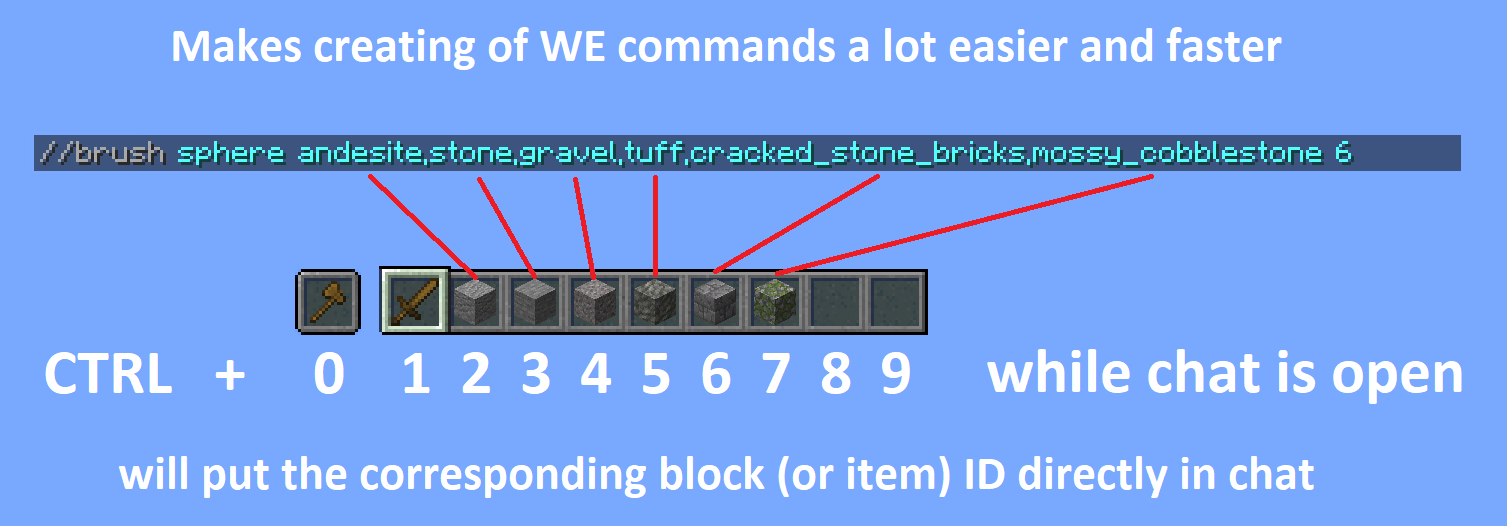
- 将快捷栏中方块/物品的 ID 直接复制到聊天栏,方便创建 WorldEdit 命令 (打开聊天栏后,按住 CTRL 并按 0 到 9 进行选择,0 对应副手槽位)
- 使用 ID 选择器拾取世界中方块的 ID,并直接复制到剪贴板
详细说明
带有物品容器的方块拾取(潜影盒 / 包裹)
在生存模式下拾取方块时,模组会首先搜索你背包中的所有物品。如果找不到该物品,它会搜索背包内的容器(如潜影盒和包裹)。如果找到,模组会将包含该物品数量最多的容器移动到玩家的主手。此功能应适用于所有以潜影盒或包裹方式工作的物品容器。
按住 ALT 以复制方块状态
你可能已经知道,在拾取方块时按住 CTRL 可以复制 方块实体数据,例如玩家头颅和带有图案的战旗。本模组在此基础上允许你在按住 ALT 时复制 方块状态数据,这包括例如营火/蜡烛是否点燃以及楼梯等方块的旋转方向。(还有很多其他内容可以通过此功能复制,完整列表请参阅 wiki 链接)
此功能灵感来源于 Minenash 的 Pick-BlockState 模组。
按住 CTRL 以复制实体数据
就像你可以拾取 方块实体数据 一样,现在你也可以拾取 实体数据。这将例如复制生物的大部分数据并将其作为 NBT 数据放入刷怪蛋中。这也适用于盔甲架、物品展示框(复制其中的内容)和画作(复制画作的精确变体)等对象。
扩展拾取范围
默认情况下,Minecraft 仅允许拾取处于可触及范围内的方块(3 格)。然而,本模组允许拾取距离达 100 格的方块,并且如果需要,甚至可以设置得更高(或更低)。不再需要飞到你想拾取的方块上方了。
配置从方块/实体获得的物品
Pick Block Pro 附带一个 overrides.json 配置文件。在此文件中,你可以配置拾取方块或实体时应获得的物品。此功能完全支持 NBT 数据。
文件已包含一些针对原本没有拾取堆栈的方块和实体的覆盖配置。
可以在游戏中使用命令重新加载覆盖配置:/pbp reload
默认覆盖配置:
{
    "Block to ItemStack": {
        "minecraft:fire": "minecraft:flint_and_steel",
        "minecraft:soul_fire": "minecraft:flint_and_steel",
        "minecraft:frosted_ice": "minecraft:ice"
    },
    "Entity to ItemStack": {
        "minecraft:tnt": "minecraft:tnt",
        "minecraft:fireball": "minecraft:fire_charge",
        "minecraft:wither": "minecraft:wither_spawn_egg",
        "minecraft:ender_dragon": "minecraft:ender_dragon_spawn_egg",
        "minecraft:giant": "minecraft:zombie_spawn_egg{EntityTag:{id:giant,CustomName:''},display:{Name:'{\"text\":\"Giant Spawn Egg\",\"color\":\"light_purple\",\"italic\":\"false\"}'}}",
        "minecraft:illusioner": "minecraft:evoker_spawn_egg{EntityTag:{id:illusioner,CustomName:''},display:{Name:'{\"text\":\"Illusioner Spawn Egg\",\"color\":\"light_purple\",\"italic\":\"false\"}'}}"
    }
}
锁定物品栏槽位
默认情况下,Minecraft 在使用“拾取方块”(pick block)时会优先填满快捷栏中所有空槽位;但当快捷栏已满时,它会替换你当前选中的槽位中的物品。而这个物品可能正是你希望保留的。此模组允许你在配置文件中锁定任意槽位。当槽位被锁定时,如果该槽位为空,模组仍会将物品放入其中;但如果该槽位已有物品/方块,模组会跳过该槽位(保护其中的物品/方块),转而使用下一个可用的槽位。
工具拾取
使用工具选择器时,此模组会为你提供最适合当前工作的工具。在创造模式下,你会获得一个完全附魔的工具(可配置);而在生存模式下,它会在你的背包中搜索最佳工具。如果能找到合适的工具,它会自动将其切换到当前选中的槽位。
快捷栏方块/物品 ID 复制
在聊天窗口打开时,直接从快捷栏复制方块/物品的 ID 到聊天框中,从而更便捷、快速地创建 WorldEdit (WE) 命令。尤其适用于制作包含大量不同方块的画笔。在聊天窗口打开的状态下,按住 CTRL 键并按 0~9 数字键即可复制对应槽位的 ID,其中 0 代表副手槽位。
拾取 ID
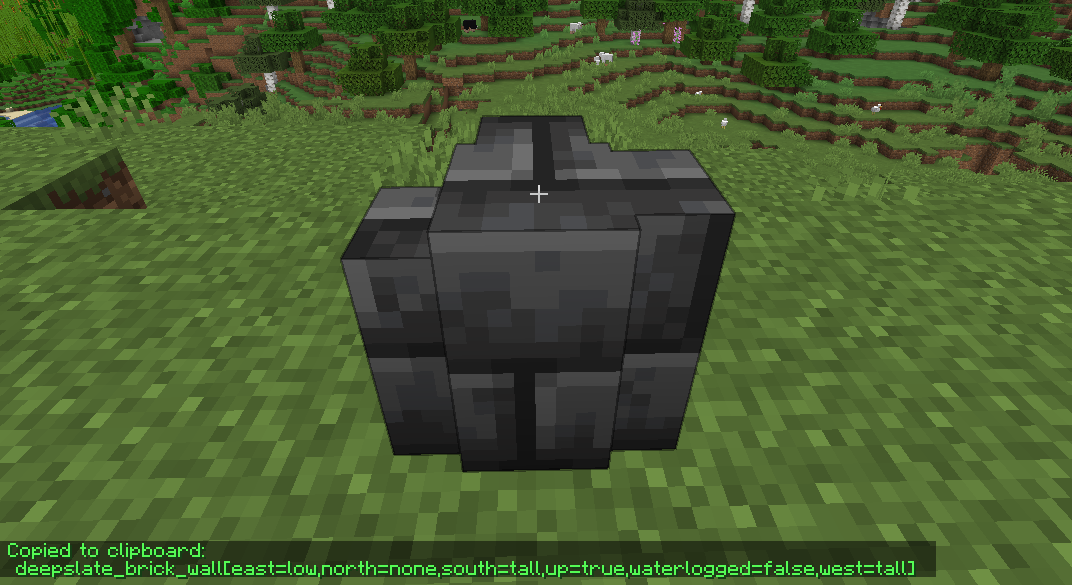
是否曾需要编写带有大量属性参数的方块 ID 的 WorldEdit 命令?此模组可通过直接拾取你当前注视方块的完整 ID(含属性参数)并将其复制到剪贴板,使这一过程变得轻松许多。拾取后,你可以在编写命令时直接粘贴该 ID。
在使用 ID 拾取器时,按住 CTRL 键还可以复制(方块)实体数据到剪贴板。
版本与依赖项
1.16 - 1.18
必需依赖:
Fabric API(0.31.0 或更高版本)
可选依赖:
Mod Menu(此模组允许你在游戏中编辑配置文件)
已内置/嵌入:
Cloth Config API(用于使配置文件正常工作)
1.14 - 1.15
必需依赖:
Fabric API(0.14.0 或更高版本)
可选依赖:
Mod Menu(此模组允许你在游戏中编辑配置文件)
已内置/嵌入:
Auto Config Updated API(用于使配置文件正常工作)
Cloth Config API(Auto Config 所必需)
Pick Block Pro
Pick Block: Get the block/item of what you're looking at in creative or switch to that block/item in survival.
This mod is an advanced version of this and adds a lot of extra features (see below)
Important:
This mod replaces the default Pick Block, however the ID and Tool picker use their own keybindings.
Features
Most things below are configurable in the config settings using the config file or Mod Menu
- In survival the block picker will now also search through item-containers like shulkers that are inside your inventory
- Holding ALT while picking will add block-state data as NBT to the block/item
(stacks with CTRL for block-entity data) - Holding CTRL while Entity picking will add entity data as NBT to the item:
- Copies mob data and adds it to the spawn egg
- Copies armor stands with their items and pose
- Copies item frames including the framed item
- Copies painting variants
- Pick block extra things:
- Pick fire and get a flint & steel (1.16+)
- Pick the sun or moon and get a light block (1.17+)
Cycle through the light levels by picking the sun or moon while holding the light block - Pick a player and get the head of that player
- Pick falling blocks
- Pick fluids and get a bucket of the fluid (disabled by default)
- Or even decide yourself which item you get from a block or entity when using pick block
- Extended Pick Block range, decide how far the picker should be able to reach
- Lock inventory slots to prevent the picker from switching or replacing the item in that slot
- Use the Tool Picker and get the best available tool to break the block or kill the entity
- Copy ID's of hotbar blocks/items directly into your chat, for easy WorldEdit command creation
(Use CTRL + 0 through 9 while your chat is open, 0 is for the off hand slot) - Pick ID's of blocks in the world with the ID Picker and copy them directly to your clipboard
Detailed explanations
Block Picking with item-containers (shulkers / bundles)
When picking a block in survival the mod will first search through all the items in your inventory. If it can't find the item, it'll search containers like shulkers and bundles that are inside the inventory. If found, the mod will move the container with the highest amount of that item to the player's main hand. This should work with all item-containers that work in the same way as the shulker or bundle do.
Hold ALT for block state copying
You might already know it's possible to hold CTRL while block picking to copy block-entity data, such as player skulls and banners with patterns. This mod allows on top of that to also copy block-state data when holding ALT, this includes for example if a campfire/candle is lit or not and also the rotation of blocks like stairs. (There are many more things you can copy with this, see wiki link for the full list)
This feature was inspired by the Pick-BlockState mod by Minenash.
Hold CTRL for entity data copying
Just like how you can pick block-entity data, now you can also pick entity data. This will for example copy most data of the mob and put it inside the spawn egg as NBT data. This will also work for things like armor stands, item frames (copying what's inside of them) and paintings (copying the exact variant of the painting).
Extended pick block range
By default Minecraft only allows to pick blocks that are within reaching distance (3 blocks). This mod however allows to pick blocks at a distance of 100 blocks away and this can even be set way higher (or lower) if so desired. No need anymore to fly all the way over to a block you'd like to pick.
Configure which item you should get from a block/entity
Pick Block Pro comes with an overrides.json config file. Within this file you can configure which item you should get when picking a block or entity. This also has full support for NBT data.
The file already includes some overrides for blocks and entities that didn't have any pick stack.
The overrides can be reloaded in game with the command: /pbp reload
Default overrides:
{
    "Block to ItemStack": {
        "minecraft:fire": "minecraft:flint_and_steel",
        "minecraft:soul_fire": "minecraft:flint_and_steel",
        "minecraft:frosted_ice": "minecraft:ice"
    },
    "Entity to ItemStack": {
        "minecraft:tnt": "minecraft:tnt",
        "minecraft:fireball": "minecraft:fire_charge",
        "minecraft:wither": "minecraft:wither_spawn_egg",
        "minecraft:ender_dragon": "minecraft:ender_dragon_spawn_egg",
        "minecraft:giant": "minecraft:zombie_spawn_egg{EntityTag:{id:giant,CustomName:''},display:{Name:'{\"text\":\"Giant Spawn Egg\",\"color\":\"light_purple\",\"italic\":\"false\"}'}}",
        "minecraft:illusioner": "minecraft:evoker_spawn_egg{EntityTag:{id:illusioner,CustomName:''},display:{Name:'{\"text\":\"Illusioner Spawn Egg\",\"color\":\"light_purple\",\"italic\":\"false\"}'}}"
    }
}
Lock inventory slots
By default Minecraft will first fill in all empty slots in the hotbar when using pick block, however once the hotbar is completely full it'll replace the item in your current selected slot. This item might actually be something you'd prefer to keep. This mod lets you lock any slots you'd like in the config settings. When locked, this mod will still place an item inside that slot if it's empty. However once an item/block is located in a locked slot, this mod will skip that slot (keeping the item/block safe) and use the next available slot instead.
Tool Picking
When using the Tool Picker this mod will provide you with the best tool for the job. In creative you'll get a fully enchanted tool (configurable), but in survival it'll go through your inventory and search for the best tool instead. If it's able to find a suitable tool it'll switch it to your current selected slot.
Hotbar block/item ID copy
Copy the ID's of blocks/items from your hotbar directly in the chat when it's open. Making it a lot easier and faster to create WE commands. Especially great for making brushes with a lot of different blocks. Hold CTRL + 0 through 9 while your chat is open, 0 is for the off hand slot.
Pick ID's
Ever wrote a WE command using block ID's with a lot of properties? This mod will make that a lot easier by allowing you to pick the ID including properties of the block you're looking at directly into your clipboard. Once picked you can then paste this ID when writing out your command.
When using the ID picker it's also possible to copy (block)entity data to the clipboard by holding CTRL.
Versions & Dependencies
1.19+
Required:
Fabric API
Cloth Config API (Is needed to make the config work)
Optional:
Mod Menu (This mod allows you to edit the configs in game)
1.16 - 1.18
Required:
Fabric API (0.31.0 or later)
Optional:
Mod Menu (This mod allows you to edit the configs in game)
Already included/embedded:
Cloth Config API (Is needed to make the config work)
1.14 - 1.15
Required:
Fabric API (0.14.0 or later)
Optional:
Mod Menu (This mod allows you to edit the configs in game)
Already included/embedded:
Auto Config Updated API (Is needed to make the config work)
Cloth Config API (Required for Auto Config)

下载 Pick Block Pro
需要联机服务器吗?
稳定流畅、一键部署,几分钟即可和朋友联机开服
最低仅需 8 元/月 即可畅快联机
下载 Pick Block Pro
下载 Pick Block Pro
需要联机服务器吗?
稳定流畅、一键部署,几分钟即可和朋友联机开服
最低仅需 8 元/月 即可畅快联机
下载 Pick Block Pro
下载 Pick Block Pro
需要联机服务器吗?
稳定流畅、一键部署,几分钟即可和朋友联机开服
最低仅需 8 元/月 即可畅快联机
下载 Pick Block Pro
下载 Pick Block Pro
下载 Pick Block Pro
需要联机服务器吗?
稳定流畅、一键部署,几分钟即可和朋友联机开服
最低仅需 8 元/月 即可畅快联机
下载 Pick Block Pro
需要联机服务器吗?
稳定流畅、一键部署,几分钟即可和朋友联机开服
最低仅需 8 元/月 即可畅快联机
下载 Pick Block Pro
需要联机服务器吗?
稳定流畅、一键部署,几分钟即可和朋友联机开服
最低仅需 8 元/月 即可畅快联机
- 防止 Pick Block Pro 在另一个模组引发注册表问题时崩溃。发生此情况时,Pick Block 覆盖将不再生效,但 Pick Block Pro 的其他功能应仍可正常使用。
关于这个资源的讨论、问题反馈与使用心得
还没有讨论,来发第一帖吧
你是这个资源的作者?登录后可认领此资源。
相似资源
 模组

显示你正在注视的方块的信息。(适用于 Minecraft 1.16+ 的 Hwyla/Waila 分支)
 模组
使用 JavaScript 编辑配方、添加自定义物品、编写世界事件!
 模组

查看物品与配方
 模组
在游戏画面角落显示附近世界地形、玩家、生物和实体的地图。可创建路径点,帮助你找到标记过的位置。
 模组
AE2:一款流行的自动化与存储模组
 模组
那是什么?一个 Waila/Hwyla 的分支。
评论 0
登录后参与评分
还没有评论,来抢沙发吧