

在拾取物品时显示弹出式通知。通知中会去除物品的所有独特数据(附魔、名称、耐久度),并仅显示原始的物品图标和名称。从 2.0.0 版本开始,经验球拾取也会显示通知!
从 1.1.0 版本起,对于多人服务器,该模组需要在服务端和客户端都安装才能生效。
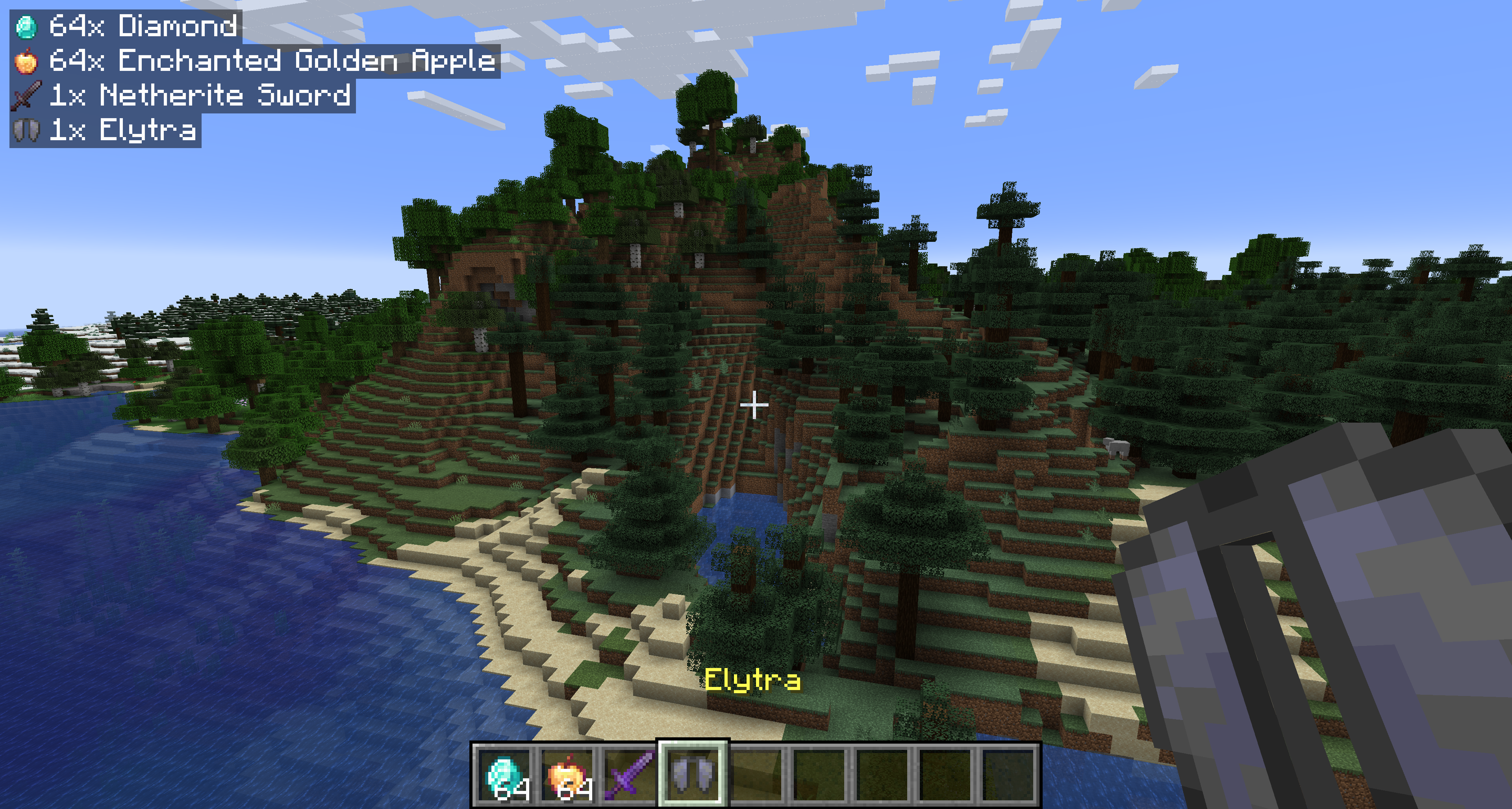
配置 — pickupnotifications.toml
你可以通过配置文件文件夹中的 pickupnotifications.toml 文件来配置模组的行为。如果你安装了 ModMenu,也可以通过 ModMenu 模组列表中的 UI 访问配置界面!
modEnabled: true|false - 模组的简单开关!设置为 false 以禁用模组。
trackExperience: true|false - 是否显示经验球拾取的通知。设置为 false 以禁用。(仅限 2.0.0+ 版本)
guiAlignment: "top_left"|"top_right"|"bottom_left"|"bottom_right" - 通知的位置。
guiOffset: "(<Integer>,<Integer>)" - 通知距离屏幕边缘的偏移量。
guiScale: Decimal - 渲染通知的比例缩放系数。
maxNotifications: Integer - 屏幕上同时显示的最大通知数量。超出数量的通知将被排队,并在有空位时显示。
iconAlignment: "outside"|"inside"|"left"|"right" - 物品图标应出现在通知的“左侧”还是“右侧”,始终位于“外侧”(左对齐时靠左,右对齐时靠右),或始终位于通知的“内侧”。
showUniqueInfo: true|false - 是否在通知中显示自定义名称、稀有度和附魔信息。
renderBackground: true|false - 是否渲染通知背景。
backgroundOpacity: Decimal - 通知背景颜色的不透明度。
renderShadow: true|false - 是否在通知文本中渲染阴影。
1.2.4 版本
guiOffsetX: Integer - 通知距离屏幕侧边的水平偏移量。
guiOffsetY: Integer - 通知距离屏幕顶部或底部的垂直偏移量。
链接
同样可在 CurseForge 获取 · GitHub 源代码 · 报告问题
Show popup notifications when you pick up items. Shows the items stripped of all unique data (enchantments, name, condition) and shows the raw item icon and name. As of 2.0.0, notifications will also be shown for experience orbs!
Starting with 1.1.0, the mod is required on both the server and client for multiplayer servers.
Configuration — pickupnotifications.toml
You can configure the behavior of the mod from the pickupnotifications.toml file within your config folder. If you have ModMenu installed, you can also access the configuration through the UI in ModMenu's mod list!
modEnabled: true|false - Simple toggle for the mod! Set to false to disable.
trackExperience: true|false - Whether to show notifications for experience orb pickups. Set to false to disable. (2.0.0+ only)
guiAlignment: "top_left"|"top_right"|"bottom_left"|"bottom_right" - Where to position the notifications.
guiOffset: "(<Integer>,<Integer>)" - The amount to offset the notifications from the edge of the screen.
guiScale: Decimal - Scale to render notifications at.
maxNotifications: Integer - How many notifications can be on the screen at a time. Additional notifications will be queued up and shown once there is room.
iconAlignment: "outside"|"inside"|"left"|"right" - Whether the item icons should appear on the 'left' or 'right' of notifications, always on the 'outside' (left for left-aligned, right for right-aligned), or always on the 'inside' of notifications.
showUniqueInfo: true|false - Whether to show custom names, rarity, and enchantments in the notifications.
renderBackground: true|false - Whether to render the background behind notifications.
backgroundOpacity: Decimal - Opacity of the notification background color.
renderShadow: true|false - Whether to render text shadow in notifications.
Version 1.2.4
guiOffsetX: Integer - The amount to offset the notifications from the side of the screen.
guiOffsetY: Integer - The amount to offset the notifications from the top or bottom of the screen.
Links
Also on CurseForge · Source on GitHub · Report an issue

下载 Pickup Notifications
下载 Pickup Notifications
需要联机服务器吗?
稳定流畅、一键部署,几分钟即可和朋友联机开服
最低仅需 8 元/月 即可畅快联机
下载 Pickup Notifications
需要联机服务器吗?
稳定流畅、一键部署,几分钟即可和朋友联机开服
最低仅需 8 元/月 即可畅快联机
下载 Pickup Notifications
需要联机服务器吗?
稳定流畅、一键部署,几分钟即可和朋友联机开服
最低仅需 8 元/月 即可畅快联机
下载 Pickup Notifications
需要联机服务器吗?
稳定流畅、一键部署,几分钟即可和朋友联机开服
最低仅需 8 元/月 即可畅快联机
下载 Pickup Notifications
下载 Pickup Notifications
需要联机服务器吗?
稳定流畅、一键部署,几分钟即可和朋友联机开服
最低仅需 8 元/月 即可畅快联机
下载 Pickup Notifications
需要联机服务器吗?
稳定流畅、一键部署,几分钟即可和朋友联机开服
最低仅需 8 元/月 即可畅快联机
下载 Pickup Notifications
需要联机服务器吗?
稳定流畅、一键部署,几分钟即可和朋友联机开服
最低仅需 8 元/月 即可畅快联机
下载 Pickup Notifications
需要联机服务器吗?
稳定流畅、一键部署,几分钟即可和朋友联机开服
最低仅需 8 元/月 即可畅快联机
- 更新至 26.3
关于这个资源的讨论、问题反馈与使用心得
还没有讨论,来发第一帖吧
你是这个资源的作者?登录后可认领此资源。
相似资源
 模组

显示你正在注视的方块的信息。(适用于 Minecraft 1.16+ 的 Hwyla/Waila 分支)
 模组
使用 JavaScript 编辑配方、添加自定义物品、编写世界事件!
 模组

查看物品与配方
 模组
在游戏画面角落显示附近世界地形、玩家、生物和实体的地图。可创建路径点,帮助你找到标记过的位置。
 模组
AE2:一款流行的自动化与存储模组
 模组
那是什么?一个 Waila/Hwyla 的分支。
评论 0
登录后参与评分
还没有评论,来抢沙发吧