PingDisplay
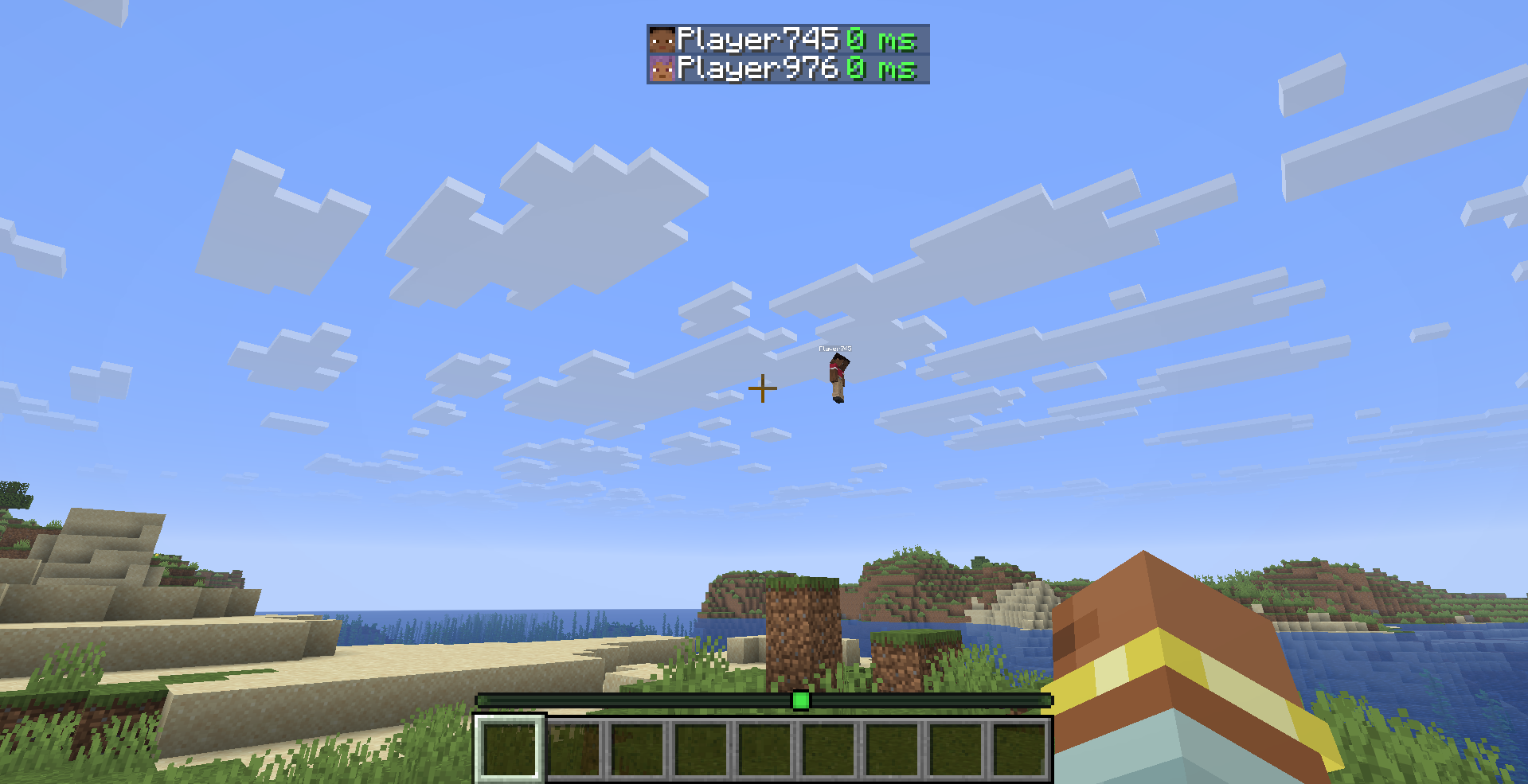
在标签页列表中直接查看每位玩家的精确延迟——不再通过信号条猜测。
功能说明
PingDisplay 让 Minecraft 的玩家列表变得更加实用,它会将每位玩家的真实延迟以数值形式显示出来。
你可以自由选择延迟的显示方式:
- ? 仅数字 — 用
42 ms 之类的数值替换原版信号条
- ? 信号条 + 数字 — 保留原版连接信号条,并添加精确延迟值
- ? 原版模式 — 立即恢复为正常的 Minecraft 延迟显示
特性
- ⚡ 精确数值延迟 — 查看每位玩家的真实延迟
- ? 5 种颜色编码的延迟等级 — 优秀、良好、中等、较差和极差
- ?️ 自定义阈值 — 精确决定每个延迟质量等级的适用条件
- ? 自定义颜色 — 每个延迟等级都可以拥有独立的颜色
- ? 3 种显示模式 — 仅数字、信号条 + 数字 和 原版
- ?️ 切换
ms 后缀
- ⏻ 即时启用或禁用 PingDisplay
- ⚙️ 内置配置界面
- ?? 英文本地化
- ?? 土耳其文本地化
- ? 自动从 PingDisplay 1.0.0 配置文件迁移
- ? 轻量级且仅限客户端
- ?️ 无需安装服务端
默认延迟等级
| 质量 |
延迟 |
| ? 优秀 |
低于 50 ms |
| ? 良好 |
低于 100 ms |
| ? 中等 |
低于 150 ms |
| ? 较差 |
低于 250 ms |
| ? 极差 |
250 ms 及以上 |
所有阈值和颜色均可在游戏内配置界面中更改。
配置
PingDisplay 将设置存储在以下位置:
.minecraft/config/pingdisplay.json
当安装了 Mod Menu 时,只需打开:
Mods → PingDisplay → Configure
Mod Menu 是可选的。即使没有它,PingDisplay 也能完美运行。
支持版本
- Minecraft 26.1.2 — Fabric
- Minecraft 26.2 — Fabric
依赖项
可选
不再需要 Cloth Config。
仅限客户端
PingDisplay 只需安装在你的客户端上即可。
你可以在多人服务器上使用它,而无需要求服务器或其他玩家安装该模组。
从 1.0.0 升级
已经在使用 PingDisplay 1.0.0?
你现有的配置会自动迁移到新的 1.1.0 系统。你无需删除旧的配置文件。
许可证
MIT — 详见 LICENSE
PingDisplay
See every player's exact ping directly in the Tab list — no more guessing from signal bars.

What it does
PingDisplay makes Minecraft's Tab player list much more useful by showing each player's real latency as a numerical value.
Choose exactly how you want ping to appear:
- ? Number Only — replaces the vanilla signal bars with values like
42 ms
- ? Bars + Number — keeps the vanilla connection bars and adds the exact ping
- ? Vanilla Mode — restores the normal Minecraft ping display instantly
Features
- ⚡ Exact numerical ping — see the real latency of every player
- ? 5 color-coded ping levels — Excellent, Good, Medium, Bad and Terrible
- ?️ Custom thresholds — decide exactly when each ping quality level applies
- ? Custom colors — every ping level can have its own color
- ? 3 display modes — Number Only, Bars + Number and Vanilla
- ?️ Toggle the
ms suffix
- ⏻ Enable or disable PingDisplay instantly
- ⚙️ Built-in configuration screen
- ?? English localization
- ?? Turkish localization
- ? Automatic migration from PingDisplay 1.0.0 configs
- ? Lightweight and client-side only
- ?️ No server installation required
Default Ping Levels
| Quality |
Ping |
| ? Excellent |
Below 50 ms |
| ? Good |
Below 100 ms |
| ? Medium |
Below 150 ms |
| ? Bad |
Below 250 ms |
| ? Terrible |
250 ms and above |
All thresholds and colors can be changed from the in-game configuration screen.
Configuration
PingDisplay stores its settings in:
.minecraft/config/pingdisplay.json
When Mod Menu is installed, simply open:
Mods → PingDisplay → Configure
Mod Menu is optional. PingDisplay works perfectly without it.
Supported Versions
- Minecraft 26.1.2 — Fabric
- Minecraft 26.2 — Fabric
Requirements
Optional
- Mod Menu — quick access to the PingDisplay configuration screen
Cloth Config is no longer required.
Client-Side Only
PingDisplay only needs to be installed on your client.
You can use it on multiplayer servers without requiring the server or other players to install the mod.
Upgrading from 1.0.0
Already using PingDisplay 1.0.0?
Your existing configuration is automatically migrated to the new 1.1.0 system. You don't need to delete your old config.
License
MIT — see LICENSE
评论 0
登录后参与评分
还没有评论,来抢沙发吧