
本模组添加了简单且高度可配置的管道,旨在尽可能减少卡顿。
管道类型
- 物品管道
- 流体管道
- 能量管道
- 气体管道(Mekanism)
- 通用管道(集四种管道于一体!)
特性
- 高度可配置的过滤系统
- 黑名单/白名单
- 三种红石模式(忽略/通电时启用/断电时禁用)
- 四种分配模式(轮询/最近优先/最远优先/随机)
- 标签过滤
- 物品/流体/气体过滤
- 同时使用多个过滤器
- 每个过滤器可配置目标位置
- 单个过滤器的黑名单/取反
- 可复制的过滤器
- 自定义 NBT 数据
- 三种 NBT 匹配模式(精确匹配/匹配已有/不匹配任何)
- 五种升级层级
- 基础
- 改进
- 高级
- 终极
- 无限(默认不可合成)
- 完全可定制的传输速度
- 可使用扳手断开连接
- 极度友好于性能
- 仅提取端管道拥有方块实体
- 管道不会加载不必要的区块
- 对服务器友好
- 渲染高效
配置管道
如果管道未设置为提取状态,则不会传输任何内容。 你可以手持扳手右键点击已连接管道的末端,将其设置为提取状态。
点击管道的提取部分以更改模式、添加过滤器或添加升级组件。
可以通过手持扳手右键点击来断开/重新连接管道。
默认情况下,管道的速度较慢。只能通过添加升级组件来提高速度。 更高层级的升级组件意味着更高的传输速率。
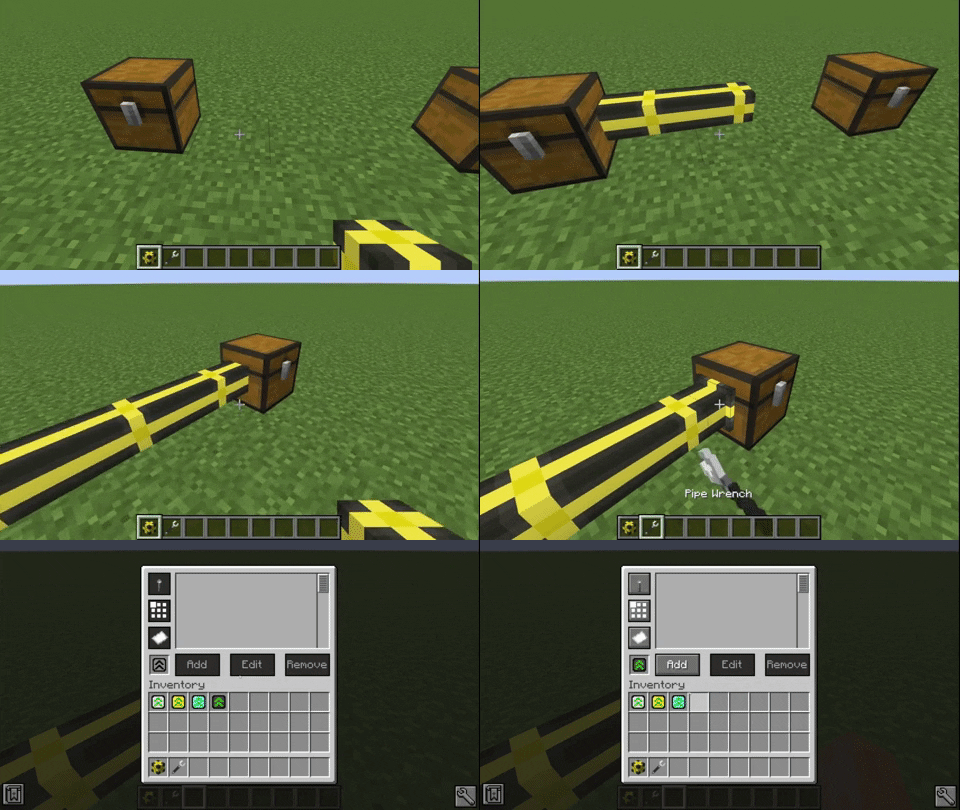
某些管道功能只有在添加足够高级的升级组件后才能使用:
- 基础升级组件
- 红石模式
- 改进升级组件
- 分配模式
- 高级升级组件
- 过滤器模式
- 过滤器
你更改的每项配置和添加的每个过滤器都存储在升级组件中。 你可以通过将它们一起合成来将数据复制到其他升级组件上。
过滤器
过滤器可用于物品管道、流体管道和气体管道。
要添加特定物品,只需在过滤器 GUI 的槽位中点击该物品即可。 或者,你可以在旁边的文本字段中输入物品 ID。
如果你插入的对象具有 NBT 数据,NBT 字符串将显示在第二个文本区域中。 如果你不想匹配 NBT 标签,可以移除 NBT 文本。
还有一个选项用于仅匹配提供的 NBT 数据(带有 NBT 字样的按钮)。 这可以设置为“精确”模式。 这将导致只有与该标签完全匹配的物品才会被过滤器接受。
可以通过按下带有纸张图标的按钮来反转过滤器。 这将导致过滤器应用于所提供数据的完全相反面(目标位置除外)。
你还可以设置过滤器仅适用于特定目标位置。 为此你需要一个过滤器目标工具。 使用该工具点击管道插入到的方块,以存储该方块的位置和面。 注意,如果你点击的是电缆未连接的方块侧面,则此操作无效。
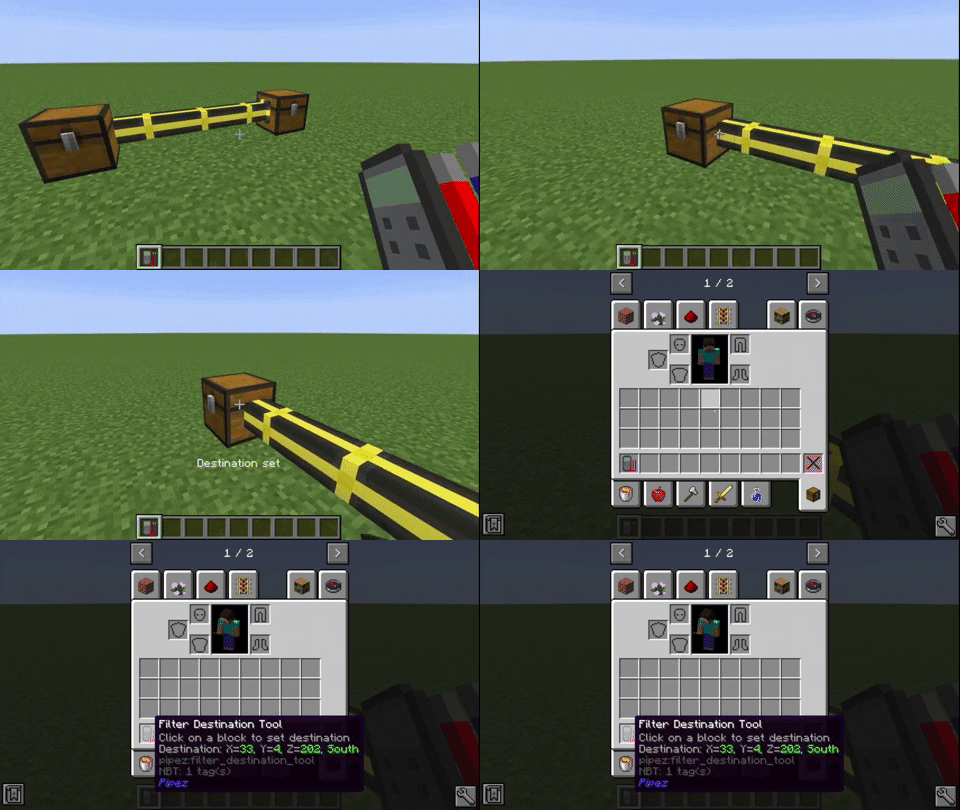
要将位置设置到过滤器,请将其放入过滤器 GUI 的目标槽位中。 这也会在过滤器列表中显示目标方块。
通用管道结合了所有其他管道的全部功能。 你可以通过 GUI 左侧的选项卡选择要配置的管道类型。
性能对比
Pipez 的物品管道与 Mekanism 的物流运输机之间进行了对比,涉及约 4200 根管道。
Pipez 的物品管道与 Mekanism 的物流运输机之间进行了对比,涉及约 7200 根管道。由于 Mekanism 使用递归算法计算其管道连接,因此导致了栈溢出并崩溃。
This mod adds simple and highly configurable pipes that are designed to create as little lag as possible.
Pipe Types
- Item Pipes
- Fluid Pipes
- Energy Pipes
- Gas Pipes (Mekanism)
- Universal Pipes (All 4 Pipes in one!)
Features
- Highly configurable filter system
- Black-/Whitelisting
- Three redstone modes (ignore/on when powered/off when powered)
- Four distribution modes (round robin/nearest first/furthest first/random)
- Tag filtering
- Item/Fluid/Gas filtering
- Multiple filters at once
- Configurable destinations for each filter
- Blacklisting/Inverting of individual filters
- Copyable filters
- Custom NBT data
- Three NBT matching modes (match exact/match existing/match none)
- Five upgrade tiers
- Basic
- Improved
- Advanced
- Ultimate
- Infinity (Not craftable by default)
- Fully customizable transfer speeds
- Disconnectable with wrenches
- Extremely lag friendly
- Only extracting pipes have block entities
- Pipes don't load unnecessary chunks
- Server friendly
- Efficient rendering
Configuring Pipes
Pipes don't transfer anything if they are not set to extract. You can sneak-click onto the end of a connected pipe with a wrench to set it to extract.
Click the extracting part of the pipe to change modes, add filters or add upgrades.
Pipes can be disconnected/reconnected by sneak-clicking with a wrench.
By default pipes are relatively slow. The speed can only be increased by adding an upgrade. Higher tiers of upgrades mean a higher transfer rate.
Certain features of pipes can only be used by adding a high enough upgrade:
- Basic Upgrade
- Redstone modes
- Improved Upgrade
- Distribution modes
- Advanced Upgrade
- Filter modes
- Filters
Every configuration you change and every filter you add is stored in the upgrade. You can copy the data to other upgrades by crafting them together.
Filters
Filters can be used with item pipes, fluid pipes and gas pipes.
To add a specific item, just click it on the slot in the filter GUI. Alternatively you can type the item ID in the text field next to it.
If the object you inserted had NBT data, the NBT string will be displayed in the second text area. You can remove the NBT text if you don't want to match NBT tags.
There is also an option to only match the provided NBT data (Button with NBT on it). This can be set to exact mode. This causes only items that match that tag exactly to be accepted by the filter.
Filters can be inverted by pressing the button with the paper on it. This causes the filter to apply for the exact opposite of the provided data (except the destination).
You can also set the filter to only apply for a certain destination. For this you need a filter destination tool. Just click the block your pipe inserts into with it so store the location and face of the block. Note that this doesn't work if you clicked a side of the block that the cable isn't connected to.
To set the location to a filter, put it into the destination slot of the filter GUI. This will also display the destination block in the filter list.
The Universal Pipe has every feature of all other pipes combined. You can choose which pipe type you want to configure with the tabs on the left of the GUI.
Performance Comparison
Comparison between Pipez' item pipes and Mekanism's logistical transporters with about 4200 pipes.
Comparison between Pipez' item pipes and Mekanism's logistical transporters with about 7200 pipes. Since Mekanism calculates its pipe connections with a recursive algorithm it just crashes, due to a stack overflow.

下载 Pipez
需要联机服务器吗?
稳定流畅、一键部署,几分钟即可和朋友联机开服
最低仅需 8 元/月 即可畅快联机
下载 Pipez
需要联机服务器吗?
稳定流畅、一键部署,几分钟即可和朋友联机开服
最低仅需 8 元/月 即可畅快联机
下载 Pipez
需要联机服务器吗?
稳定流畅、一键部署,几分钟即可和朋友联机开服
最低仅需 8 元/月 即可畅快联机
下载 Pipez
需要联机服务器吗?
稳定流畅、一键部署,几分钟即可和朋友联机开服
最低仅需 8 元/月 即可畅快联机
下载 Pipez
需要联机服务器吗?
稳定流畅、一键部署,几分钟即可和朋友联机开服
最低仅需 8 元/月 即可畅快联机
下载 Pipez
需要联机服务器吗?
稳定流畅、一键部署,几分钟即可和朋友联机开服
最低仅需 8 元/月 即可畅快联机
下载 Pipez
需要联机服务器吗?
稳定流畅、一键部署,几分钟即可和朋友联机开服
最低仅需 8 元/月 即可畅快联机
下载 Pipez
需要联机服务器吗?
稳定流畅、一键部署,几分钟即可和朋友联机开服
最低仅需 8 元/月 即可畅快联机
下载 Pipez
需要联机服务器吗?
稳定流畅、一键部署,几分钟即可和朋友联机开服
最低仅需 8 元/月 即可畅快联机
下载 Pipez
需要联机服务器吗?
稳定流畅、一键部署,几分钟即可和朋友联机开服
最低仅需 8 元/月 即可畅快联机
- 更新了 NeoForge
关于这个资源的讨论、问题反馈与使用心得
还没有讨论,来发第一帖吧
你是这个资源的作者?登录后可认领此资源。
相似资源
 模组

一个用于收集生物掉落物的多区块模组。
 模组

显示你正在注视的方块的信息。(适用于 Minecraft 1.16+ 的 Hwyla/Waila 分支)
 模组

查看物品与配方
 模组
在游戏画面角落显示附近世界地形、玩家、生物和实体的地图。可创建路径点,帮助你找到标记过的位置。
 模组
使用 JavaScript 编辑配方、添加自定义物品、编写世界事件!
 模组
添加区块认领和玩家组队功能,并与 Xaero's Minimap 和 World Map 集成
评论 0
登录后参与评分
还没有评论,来抢沙发吧