
2.0 已发布,这几乎是一个全新的模组 :D
我完全重写了所有代码。它不再需要第三方库,支持 NeoForge,并且兼容版本最高可达 26.3。
新增了带有 3D 预览的表情轮盘、双人互动表情,以及大量新增的表情,你还能够自定义表情,且拥有比之前更多的功能选项。快来试试吧!
让玩家通过表情动作来表达自我!
这是一个为 Minecraft 添加表情动作的模组,旨在让表情动作看起来更像是游戏原生的一部分,而不是生硬地移动模型。
我们都有过这样的时刻:当无话可说时,只能对着朋友上下蹲来打招呼。现在你可以真正地挥手、鞠躬、坐下或击掌,而对方也能看到这些动作。

本节仅展示主要功能,并非模组的所有内容。其余功能请参阅 Wiki 页面。
表情轮盘
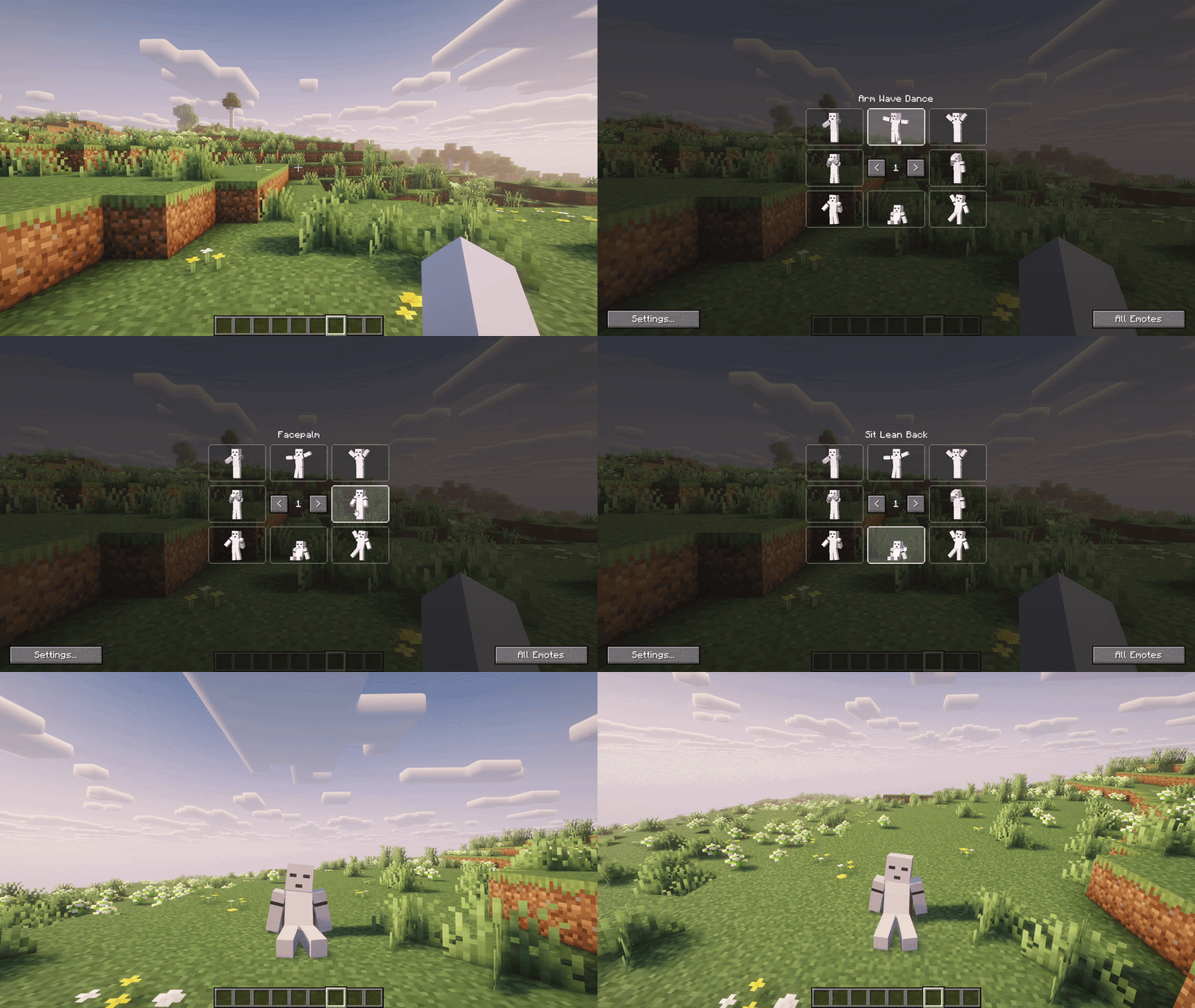
按下 B 键并选择一个。每个槽位都会显示带有你自身皮肤的小 3D 预览,当你将鼠标悬停时,角色会开始演示动作。你可以将喜欢的表情放在任意槽位,共有 10 页可供选择。
如果你更倾向于按住按键并在目标表情上松开,这一功能也在设置中提供。
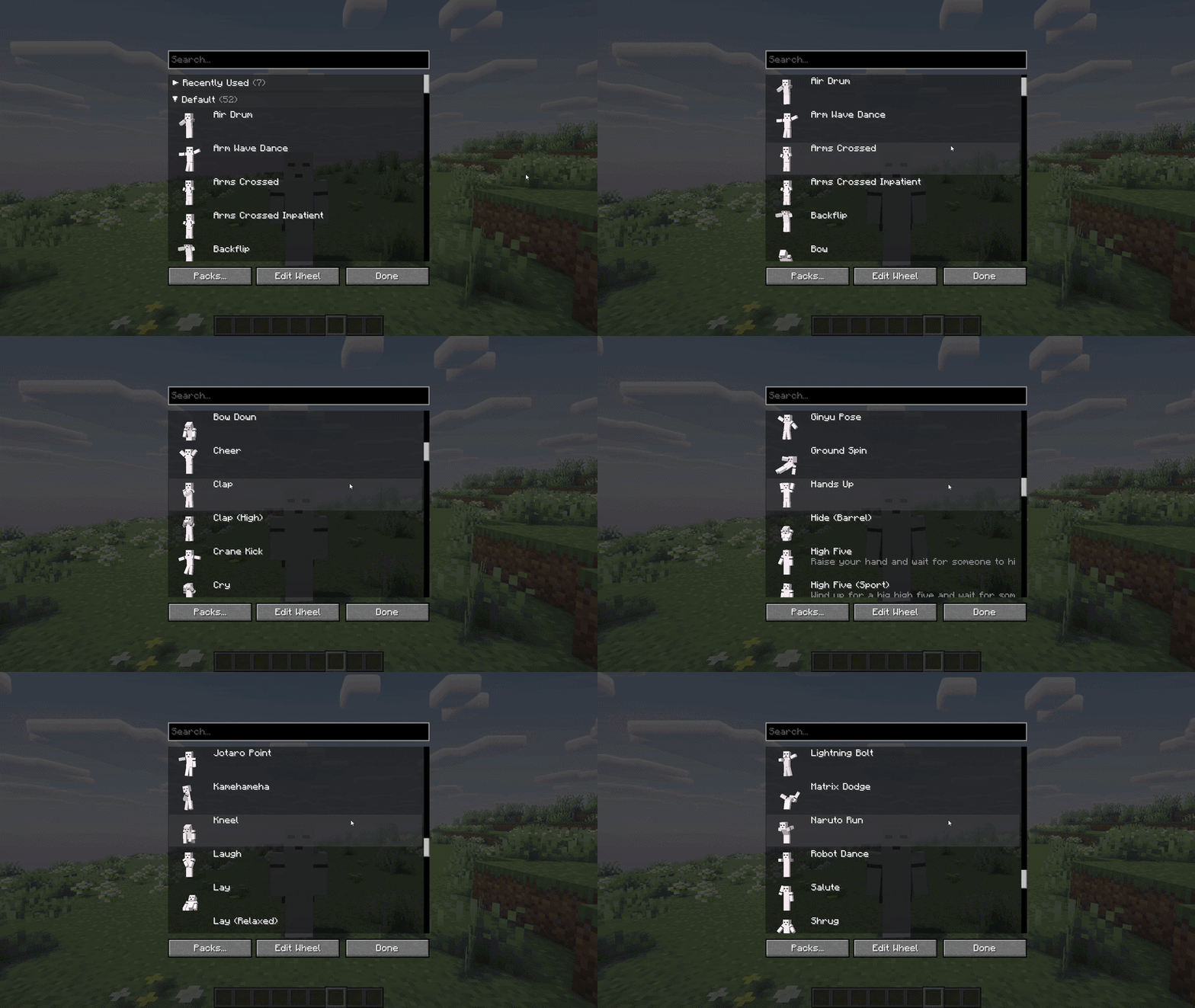
超过 50 种表情
包括挥手、鞠躬、鼓掌、坐下和躺下、舞蹈,以及一些你可能熟悉的动作,比如龟派气功、火影跑等 :>
当你做出表情动作时,视角会自动切换到第三人称,让你能看清自己;动作结束后视角恢复原状。行走、跳跃或攻击会中断表情动作,因此它绝不会妨碍你的正常操作。
双人互动表情
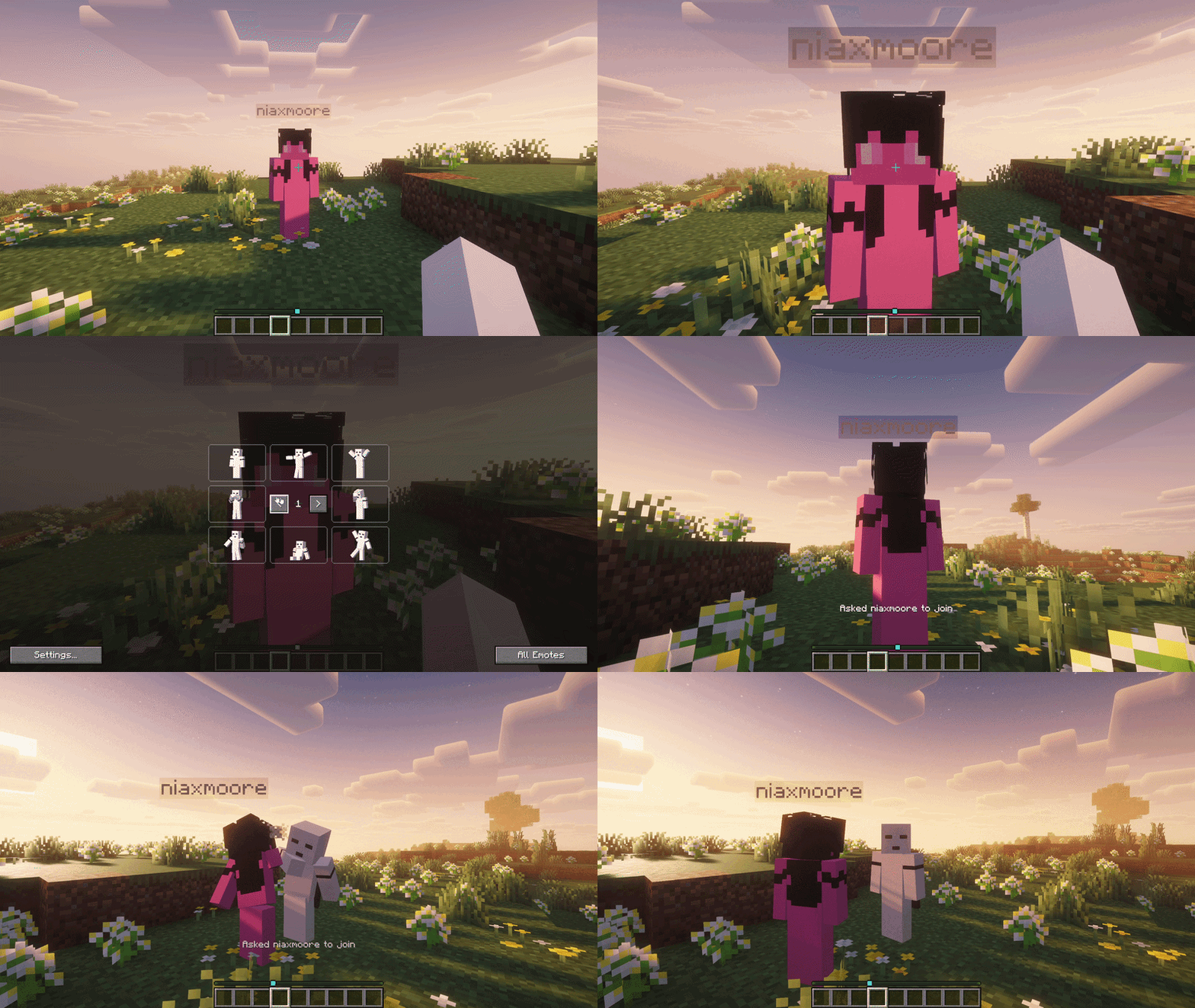
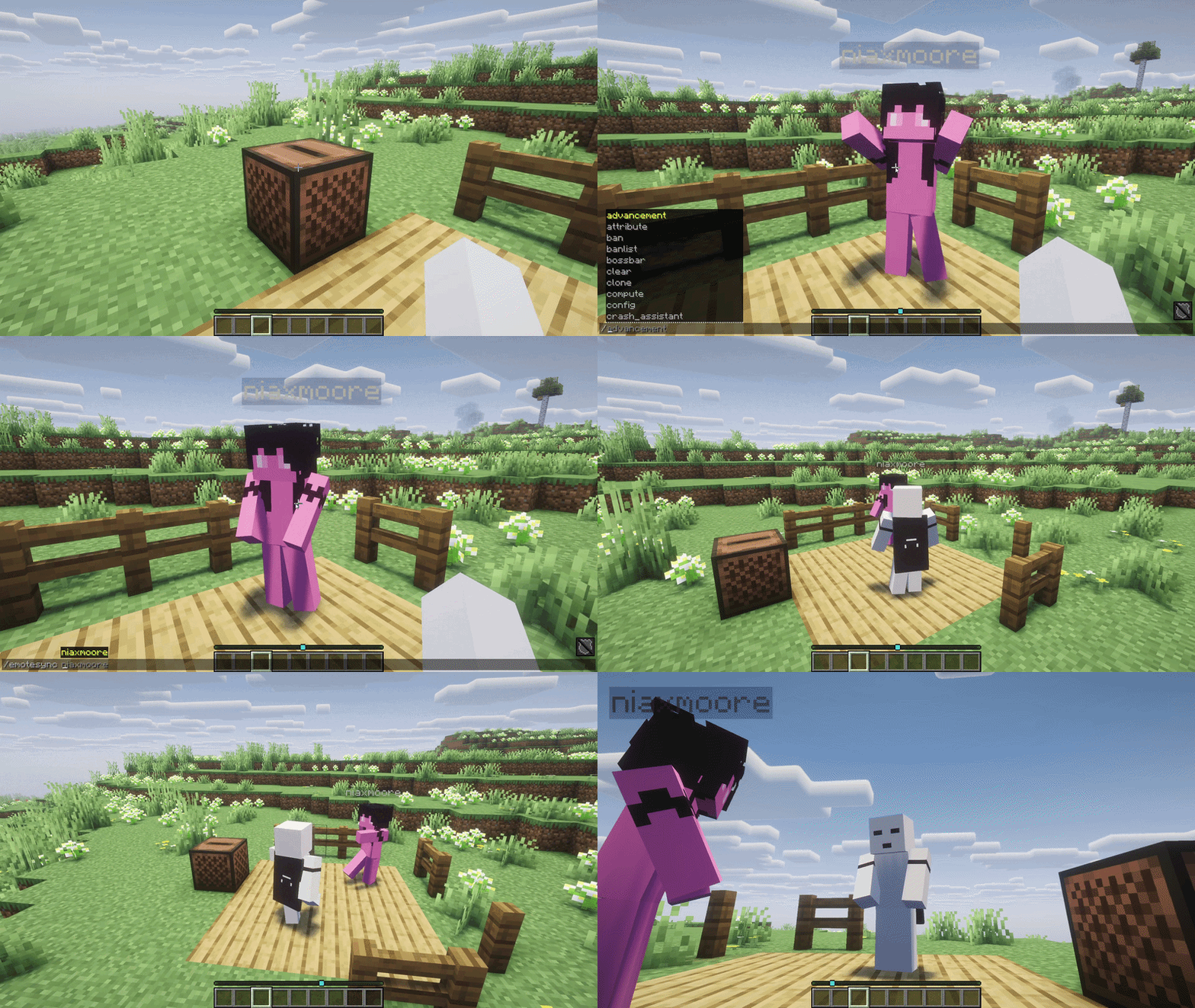
部分表情需要两个人配合。看着你的朋友并尝试击掌,聊天栏会向对方发送请求,一旦对方接受,你们双方就会按照正确的顺序完成各自的动作。
如果面前没有人,只需站在那里等待,任何走近的人都可以加入互动。
加入同步
看到有人在跳舞?输入 /emotesync <玩家名称> 即可与他们同步舞蹈。
其他功能
音效与粒子效果 - 部分表情动作会发出声音或生成粒子,你可以关闭音效
动画物品 - 表情动作可以移动你手中的物品,就像塞尔达那样
肘部与膝盖 - 表情动作可以弯曲你的手臂和腿部,主要用于表情动作包。如果你更喜欢经典外观,请将其设置为“关闭”
热键 - 4个按键,可绑定以直接播放轮盘中的前几个表情动作
控制器 - 通过 Controlify,轮盘支持手柄操作
回放 - 如果使用 Replay Mod 或 Flashback 录制视频,表情动作也会出现在回放中,包括你自己的

每个表情都只是一个资源,因此你可以通过资源包制作自己的表情。维基上的 Template 包包含了 Blockbench 模板。对玩家模型进行动画制作,将其导出到你的资源包中,在游戏中按下重载键即可生效。
记得在按键绑定中设置重载键。默认情况下该按键未分配。
自定义包还可以添加音效、粒子效果、随机变体、动画物品以及专属搭档表情。所有关于制作表情的信息都可以在 Wiki 上找到。
服务器
仅在多人游戏的情况下,模组需要安装在服务器上,或者主机必须拥有该模组,这样其他玩家才能看到彼此的表情。如果没有它,你仍然可以加入任何服务器,但只有你自己能看到自己的表情。
服务器表情包 - 将表情包放入数据包中,玩家在加入时一次性下载即可
规则 - 冷却时间、禁用或限制表情、关闭搭档表情或 /emotesync
权限 - 支持 LuckPerms 和其他权限模组
整合包与开发者
你可以将该模组放入任何整合包中,无需事先征得我的同意。同样地,在制作表情包、附加组件、视频或使用它进行其他创作时,也请随意进行 :) 我们非常欢迎你在页面上留下链接,并且我很乐意看到你制作的成果,因此随时可以在 Discord 上展示你的作品。
兼容性
Fabric 需要 Fabric API。
如果另一个模组导致你在做表情时肢体看起来奇怪,请在表情设置中将“肘部”和“膝盖”设置为关闭,并请告知我。

如果您能尝试这个模组并告诉我您的想法和建议,我将不胜感激,尤其是您希望接下来添加哪些表情动作。
如果您喜欢这个模组,不妨关注一下它。这样的反馈同样令人感激,也能激励我继续制作!
2.0 is out, and it's pretty much a new mod :D
I rewrote everything from scratch. It doesn't need third party libraries anymore, it runs on NeoForge too and goes all the way up to 26.3.
There's a new emote wheel with 3D previews, emotes you do together with a friend, a lot more emotes, and you can make your own but with more features than before. Check it out!
Lets players express themselves using emotes!
A mod that adds emotes to Minecraft, and tries to make them feel like they belong in the game instead of looking like a stiff model being moved around.
We all did it at some point, crouching up and down at a friend because there is nothing else to say hi with. Now you can actually wave, bow, sit down or high five them, and they see it too.
This section only shows the main things, not everything the mod has. For the rest, please refer to the wiki page.
The Emote Wheel
Press B and pick one. Every slot shows a small 3D preview of the emote with your own skin, and it starts moving when you hover it. You can put your favorites in whatever slot you want, there are 10 pages of them.
If you'd rather hold the key and let go over an emote, that's in the settings too.
Over 50 Emotes
Waves, bows, claps, sitting and laying around, dances, and a few you might recognize, like the Kamehameha, the Naruto run, etc :>
The camera goes to third person while you emote so you can actually see yourself, and back once you're done. Walking, jumping or attacking stops the emote, so it never gets in your way.
Partner Emotes
Some emotes need two people. Look at your friend and try to high five, they get a request in chat and once they accept, you both play your part lined up properly.
If nobody is in front of you, just wait there and whoever walks up can join.
Joining In
See someone dancing? Type /emotesync <player name> and you join them, in step with them.
Smaller Things
Sounds and Particles - a few emotes make a sound or spawn particles, you can turn the sounds off
Animated Items - emotes can move the item in your hand, like the Zelda one does
Elbows and Knees - emotes can bend your arms and legs, mostly for emote packs. Set it to Off if you like the classic look more
Hotkeys - 4 keys you can bind to play your first wheel slots directly
Controllers - the wheel works with a controller through Controlify
Replays - if you record with Replay Mod or Flashback, the emotes show up in the replay too, yours included
Every emote is just a resource, so you can make your own with a resource pack. The Template package on the wiki comes with Blockbench templates. Animate the player, export it into your pack, press the reload key in game and it's there.
Remeber to set the reload key in your keybinds. It's unassigned by default.
Custom packs can also add sounds, particles, random variants, animated items and their own partner emotes. Everything about making emotes is on the wiki.
Servers
Only in the case of multiplayer, the mod needs to be on the server or the person hosting needs to have it so other players can see each other's emotes. Without it you can still join any server, only you will see your emotes.
Server Emote Packs - put emote packs in a data pack and players download them when joining, only once
Rules - cooldown, disable or restrict emotes, turn off partner emotes or /emotesync
Permissions - works with LuckPerms and other permission mods
Modpacks & Developers
You can put the mod in any modpack, no need to ask me first. Same for making emote packs, addons, videos or anything else with it, go ahead :) A link back to this page is always appreciated, and I'd love to see what you made, so feel free to show it on the Discord.
Compatiblity
Fabric needs Fabric API.
If another mod makes your limbs look weird while emoting, set Elbows and Knees to Off in the emote settings, and please let me know about it.
I would appreciate it if you try out the mod and tell me your thoughts and suggestions, especially which emotes you want next.
If you liked the mod, why not give it a follow, feedback that way is also appreciated and helps motivating me!

下载 Player Emotes
需要联机服务器吗?
稳定流畅、一键部署,几分钟即可和朋友联机开服
最低仅需 8 元/月 即可畅快联机
下载 Player Emotes
需要联机服务器吗?
稳定流畅、一键部署,几分钟即可和朋友联机开服
最低仅需 8 元/月 即可畅快联机
下载 Player Emotes
需要联机服务器吗?
稳定流畅、一键部署,几分钟即可和朋友联机开服
最低仅需 8 元/月 即可畅快联机
下载 Player Emotes
需要联机服务器吗?
稳定流畅、一键部署,几分钟即可和朋友联机开服
最低仅需 8 元/月 即可畅快联机
下载 Player Emotes
下载 Player Emotes
下载 Player Emotes
需要联机服务器吗?
稳定流畅、一键部署,几分钟即可和朋友联机开服
最低仅需 8 元/月 即可畅快联机
下载 Player Emotes
需要联机服务器吗?
稳定流畅、一键部署,几分钟即可和朋友联机开服
最低仅需 8 元/月 即可畅快联机
下载 Player Emotes
需要联机服务器吗?
稳定流畅、一键部署,几分钟即可和朋友联机开服
最低仅需 8 元/月 即可畅快联机
下载 Player Emotes
需要联机服务器吗?
稳定流畅、一键部署,几分钟即可和朋友联机开服
最低仅需 8 元/月 即可畅快联机
修复
- 添加了与 Not Enough Animations 及其兼容模组的兼容性,以防止其允许 FA 覆盖表情动画。
修复
- 在使用 Entity Model Features 模组(如 Fresh Animations: Player Extension 和 Just Expressions)时,表情预览会播放资源包的动画,而非实际的表情动画。
仅限 Fabric 1.21.1。
修复
- 修复了 2.0.0 和 2.0.1 版本启动时崩溃的问题。其他所有改动均包含在 2.0.1 中。
关于这个资源的讨论、问题反馈与使用心得
还没有讨论,来发第一帖吧
你是这个资源的作者?登录后可认领此资源。
相似资源
 模组

让你能够在世界中的任何位置定位结构。
 模组

TerraFirmaCraft (TFC) 是一个全面转换模组,对生存模式进行了彻底的改造与重新设计。
 模组

Minecraft 中的表情符号
 模组
一堆修复
 模组

如果游戏能告知重要的刷新点,会怎样?
 模组
一款适用于你选择的加载器的 Minecraft VR 模组!
评论 0
登录后参与评分
还没有评论,来抢沙发吧