(旧版 MC) 命令
这是一个 jarmod,允许你在 Minecraft Alpha 和 Infdev 中使用命令(单人模式)。
适用于 Minecraft inf-20100630-1、a1.0.9、a1.1.2_01 和 a1.2.6 (见下载)
在修复各种错误和建议后,将扩展支持从 inf-227 到 a1.2.6 的版本
功能
本模组灵感来源于 Mojang 和 Simo_415。 SPC 由 Simo_415 首先在 a1.2.6 中开始开发,因此我的目标是在此之前的版本中添加命令。
由于旧版本的性质,界面更倾向于 SPC。这些差异旨在使模组对新老玩家都更容易使用。
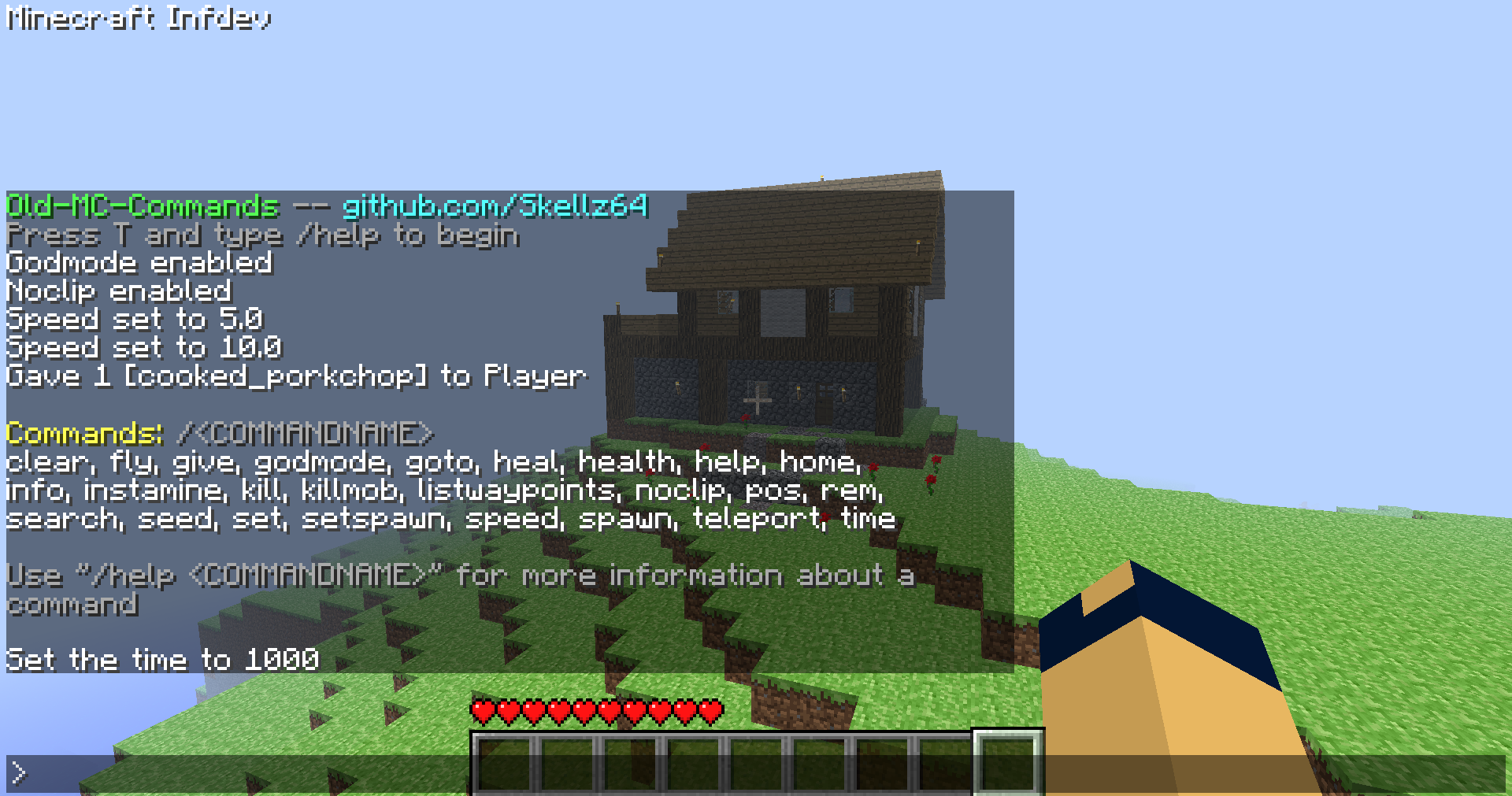
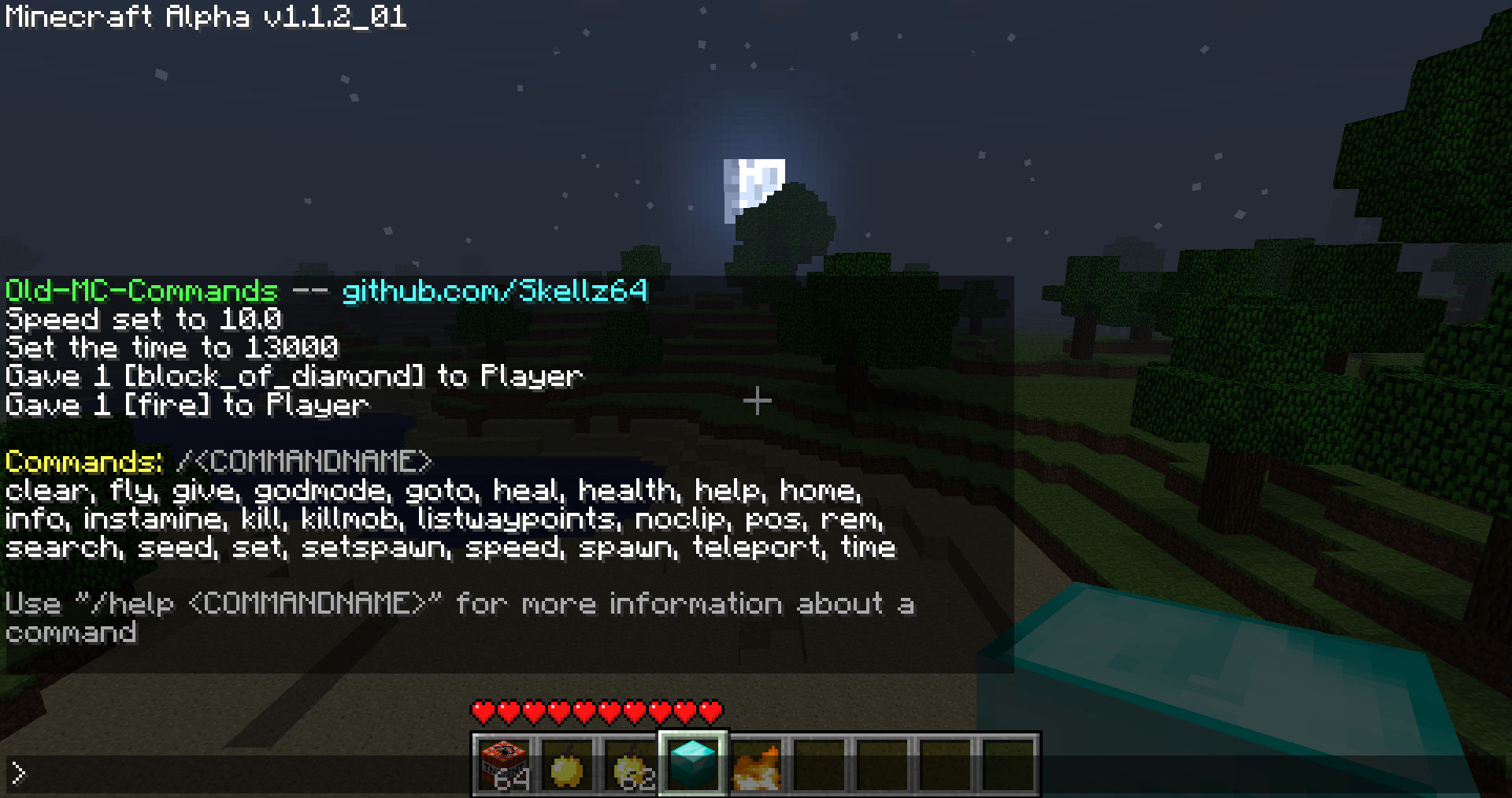
命令:clear, fly, give, godmode, goto, heal, health, help, home, info, instamine, kill, killmob, listwaypoints, noclip, pos, rem, search, seed, set, setspawn, speed, spawn, teleport, time
展示该模组的完整视频:
[模组验证后将公开视频]
你可以通过按 T 并输入 / 后跟一个命令名称来激活界面。 使用 /help 可以帮助你入门。从这里,/help "COMMANDNAME" 会提供命令的描述、语法和示例。UI 应该能够引导你,无需再寻找其他方法来了解如何使用该模组。特别是对于那些过去曾使用过任何类型的 MC 命令行的人来说。
话虽如此,我知道许多高度具体的细节/问题我无法以合理的方式总结。我会根据反馈逐一解决这些问题,因此请在 github 页面 报告问题...
如果你需要 a1.2.6 之后的命令,请使用 SPC,其存档下载可在 MCArchive 找到
兼容性
模组的兼容性因不同版本而异。
a1.0.17_04 至 a1.2.6: 在单人模式中启用带有命令功能的聊天 (Minecraft.java, EntityPlayerSP.java, NEW CommandClass.java)
pre-a1.0.17_04: 世界生成中的一个错误会导致传送命令失效,nbt 保存是一个私有变量且缺少功能 (Add World.java, and NBTTagCompound.java)
pre-a1.0.10: 多人游戏功能如聊天、字体和 GUI 要么不存在,要么处于早期开发阶段 (Add Gui.java, GuiChat.java, GuiIngame.java, and FontRenderer.java)
最老版本 inf-630 中的类总数为 9。我建议用户除非你知道自己在做什么,否则不要使用多个模组。
下载
当前选定的 4 个版本是因为它们的流行度、稳定性以及与整个模组的关联性。
下载文件名为 "Commands_v1.0_" 后跟 "(版本号)",请确保你下载的是正确的版本
注意:仅读取我的 zip 文件名以确定版本。 为了上传模组,Modrinth 要求填写默认的 MC 启动器版本和模组加载器字段。(例如:inf-630 显示支持 inf-618 和 risugami 的 modloader,这是错误的)
安装方法
安装 Java 8,大多数旧版模组都使用 Java 8。所以拥有它总是一个好主意。
这是一个 jarmod,所以我建议使用 MultiMC、PrismLauncher 或 Betacraft v2.0。这些启动器可以轻松设置旧版模组的 jarmod。它们添加 jarmod 的方式相似……在所述启动器中编辑你的实例,找到 add to Minecraft.jar 按钮,然后打开下载的 commands.zip。
对于 Betacraft v1.0,过程更为复杂,因为你需要自行对版本进行 jarmod。你还需要一个 zip 解压工具(我推荐使用 Windows 上的 WinRAR)
- 下载首选版本的 commands.zip 后,搜索并打开隐藏的
%appdata% 文件夹
- 打开
.betacraft 文件夹
- 打开
versions 文件夹
- 高亮选中并使用右键点击你正在使用的 version.jar(例如:
a1.1.2_01.jar)
- 右键后,你可以选择
Open with WinRAR
- 打开 jar 后,同时打开下载的 commands.zip
- 将 commands.zip 中的
.class 文件(及文件夹)移动到已打开的 version.jar 中。
- 按下
OK,完成!你已成功用我的模组替换了游戏文件!
- 重新启动 Betacraft v1.0 并开始游玩
附加内容
任何问题都可以在 Github 上提出。
你也可以加入 Modification Station Discord 服务器,这是一个致力于旧版 Minecraft 模组开发的社区!
一旦加入服务器,你可以通过点击 mods 标签并搜索 commands 找到我的模组帖子。你可以在这里直接联系我提出问题(即不需要在 Github 上创建工单)
感谢下载我的模组!
(Old MC) Commands
This is a jarmod that allows you to use commands (single player) for Minecraft Alpha and Infdev.
Works for Minecraft inf-20100630-1, a1.0.9, a1.1.2_01, and a1.2.6 (see downloads)
will expand to versions ranging from inf-227 to a1.2.6, after addressing various bugs and recommendations
Features
This mod is inspired by Mojang and Simo_415. SPC by Simo_415 first begins development in a1.2.6, so my goal was to add commands in versions prior to this.
The interface leans more towards SPC, due to the nature of older versions. The differences are intended to make the mod easier to use for both old and new players.
Commands: clear, fly, give, godmode, goto, heal, health, help, home, info, instamine, kill, killmob, listwaypoints, noclip, pos, rem, search, seed, set, setspawn, speed, spawn, teleport, time
A full video showcasing the mod:
[video will go public after mod verification]
You can activate the interface by pressing T and typing / followed by a command name. Using /help will help you to get started. From there, /help "COMMANDNAME" will give you a command's description, syntax, and an example. The UI should be able to guide you, without needing to look elsewhere for how to use the mod. Especially for players that have used any kind of MC command-line in the past.
That being said, I know of many highly specific details/problems I can't summarize in a reasonable manner. I will address these as they are presented to me, so please report to my github page for issues...
If you need commands past a1.2.6 use SPC, archived downloads for it are on MCArchive
Compatibility
The compatibility of the mod varies with different versions.
a1.0.17_04 to a1.2.6: Activate the chat in single player with command functionality (Minecraft.java, EntityPlayerSP.java, NEW CommandClass.java)
pre-a1.0.17_04: A bug in world generation breaks the teleport command, nbt saving is a private variable and missing features (Add World.java, and NBTTagCompound.java)
pre-a1.0.10: Multiplayer features like chat, fonts, and gui either don't exist or are early in development (Add Gui.java, GuiChat.java, GuiIngame.java, and FontRenderer.java)
The total class count is 9 in the oldest version, inf-630. My advice for users is to not use multiple mods unless you know what you are doing.
Downloads
The current 4 versions were picked due to their popularity, stability, and relevance to my mod as a whole.
The downloads are named "Commands_v1.0_" followed by "(version name)" ensure that you are downloading the correct version
Note: ONLY read my zip file names for versions. To upload mods, Modrinth requires default MC launcher versions and mod loader fields to be filled out. (ex: inf-630 is shown to support inf-618 and risugami's modloader, which is false)
How to install
Install Java 8, most mods for older versions use Java 8. So it's always a good idea to have it.
This is a jarmod so I recommend using MultiMC, PrismLauncher, or Betacraft v2.0. These launchers allow for jarmods to be easily setup older versions. They all have similar ways of adding jarmods... Edit your instance in said launcher, locate the add to Minecraft.jar button, and open the downloaded commands.zip.
For Betacraft v1.0, it's more complex as you will need to jarmod the version yourself. You will also need a zip explorer (I like WinRAR for Windows)
- after downloading commands.zip for prefered version, search and open your hidden
%appdata% folder
- open the
.betacraft folder
- open the
versions folder
- highlight and right click on the version.jar you are using (ex:
a1.1.2_01.jar)
- after right click, you can choose
Open with WinRAR
- with the jar open, also open the downloaded commands.zip
- move the
.class files (and folders) from the commands.zip to the opened version.jar.
- Press
OK , done! You successfully replaced game files with my modded game files!
- Relaunch Betacraft v1.0 and play
Extras
Any issues can be addressed on Github.
You can also join the Modification Station discord server, a community dedicated to modding old minecraft!
Once you join the server, you can find my mod post by clicking on the mods tab and searching commands. This is where you can contact me directly with questions (i.e. doesn't warrant a ticket on Github)
Thanks for downloading my mod!


 模组

 模组
 模组

 模组
 模组
 模组
评论 0
登录后参与评分
还没有评论,来抢沙发吧