
Potion Blender
概览
Potion Blender 是一款小型模组,用于将药水效果合并到单个物品中,从而创造出有趣的组合。
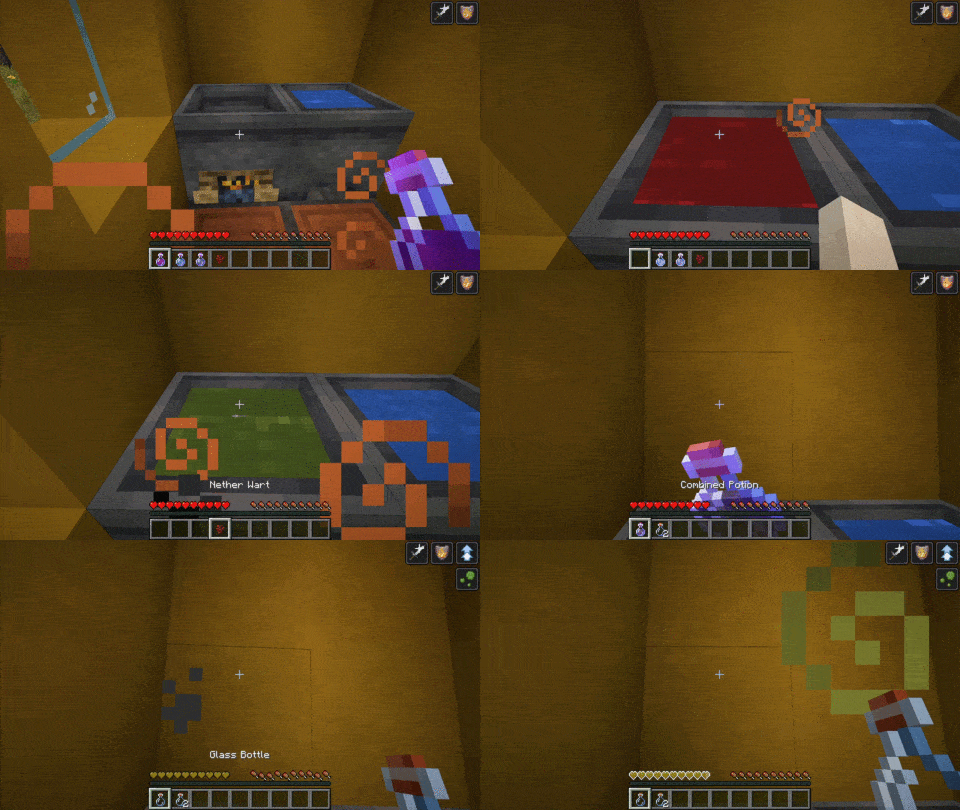
使用方法
1 - 坩埚
首先,你需要制作一个特殊的坩埚。方法是用原版坩埚右键点击营火。
2 - 开始混合
然后,将一瓶药水投入坩埚。可以是任何非喷溅型或滞留型的原版药水。药水效果将成为你混合药剂的基础。随后,你可以再添加最多两瓶药水(同样不能是喷溅型或滞留型),以将其效果加入最终产物。
注意:强烈不建议将任何已经混合过的药水投入坩埚
3 - 最后的原料
是时候完成酿造并选择你想要的药水类型了。你可以从以下三种原料中选择一种:
- 下界疣 -> 普通药水
- 火药 -> 喷溅药水
- 龙息 -> 滞留药水
请耐心等待酿造坩埚施展魔法,然后取出你的混合药剂!
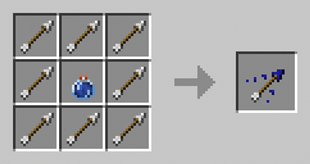
4 - 使用箭矢
你可以使用滞留型混合药水制作带有多种效果的 tipped arrows(附魔箭)。其合成方式遵循原版模式:
5 - 取消混合
你可以随时通过右键点击坩埚来重置它,从而收回你的原料。
效果叠加
多次向药水中添加相同的效果会导致效果叠加。但这需要付出代价,因为每增加一个额外效果都会减少所添加的时间。第一个叠加的效果增加其持续时间的 50%,第二个叠加效果增加 25%。
瞬时效果无法叠加,因为重复的效果会丢失。
配置说明
请参阅 wiki 获取最新信息
自版本 2.0.0 起
配置文件位于 .minecraft/config/potionblender/potion_blender_config.json
- configVersion: 请勿修改。此值由模组管理
- maxNbOfEffects : 单次酿造中可以合并的药水的最大数量
- brewbrewingTime: 酿造药水前的延迟时间(以刻为单位)(默认为 140 刻或 7 秒)
- normalPotionIngredient, splashPotionIngredient, lingeringPotionIngredient 定义每种药水对应的原料。请确保输入正确的名称,否则会收到警告,且物品将无法被识别。
以下是默认配置:
{
  "configVersion": 1,
  "maxNbOfEffects": 3,
  "brewingTime": 140,
  "normalPotionIngredient": "minecraft:nether_wart",
  "splashPotionIngredient": "minecraft:gunpowder",
  "lingeringPotionIngredient": "minecraft:dragon_breath"
}
2.0.0 版本之前:
配置文件位于 .minecraft/potionblender/potion_blender_config.json
可配置的选项包括:
- max_effects: 坩埚中药水的最大数量。在现有世界中更新此值时请小心,因为这可能导致已放置的坩埚出现不同步问题。
常见问题
这个模组能配合 X 药水模组使用吗?
任何通过原版系统添加药水的模组都兼容。通常这些药水使用原版的玻璃瓶或出现在原版的药水标签页中。 然而,有些模组实现了自己的药水系统,例如 Botania。这些药水不兼容,也无法正常工作。 自版本 2.0.0 起,已与 Dave's Potioneering 进行了兼容性测试。
已知问题
- Sodium 会破坏坩埚的渲染,导致其显示为水而不是药水的颜色。将生物群系混合(biome blend)设置为 0 可以修复此问题。这是 Sodium 端长期存在的 bug。
- 1.0.3 之前的版本会破坏原版的滞留药水。请使用最新版本!
许可证
本模组采用 GPLv3 许可证发布。
======
如果你遇到错误或有任何建议,欢迎在 GitHub 上留下评论或提交 Issue
Potion Blender
Overview
Potion Blender is a small mod to merge potion effects into one item, allowing for interesting combinations.
How to use
1 - Cauldron
First, you need to make a special cauldron. Do so by right-clicking a campfire with a vanilla cauldron.
2 - Starting to blend
Then, throw a potion into the cauldron. It can be any vanilla potion that is not Splash or Lingering. The potion effects will be the base of your combined brew. You can then add up to two more potions (neither splash nor lingering) to add their effects to the final product.
Note that throwing any combined potion into the cauldron is strongly discouraged
3 - The final ingredient
It is time to finish the brewing and choose your desired potion. You may choose one of these three ingredients :
- Nether wart -> Normal potion
- Gunpowder -> Splash potion
- Dragon Breath -> Lingering potion
Please wait for the brewing cauldron to perform its magic and grab your combined brew!
4 - Using arrows
You can craft tipped arrows with multiple effects using a combined lingering potion. It follow the same pattern as the vanilla craft:
5 - Cancelling the blend
You can reset the cauldron anytime by right-clicking on the cauldron to get back your ingredients.
Effect stacking
Adding the same effect to a potion multiple times results in effects adding. It, however, comes with a price as each additional effect decreases the added time. The first stacked effect adds 50% of its duration, and the 2nd one 25%.
Instant Effects does not stack as duplicated effects are lost.
Configuration
See the wiki for the most up to date information
Since version 2.0.0
The config is in .minecraft/config/potionblender/potion_blender_config.json
- configVersion: DO NOT TOUCH. This value is managed by the mod
- maxNbOfEffects : the maximum number of potions you can combine in a single brew
- brewbrewingTime: the delay in tick before brewing the potion (default to 140 ticks or 7s)
- normalPotionIngredient, splashPotionIngredient, lingeringPotionIngredient define the ingredient corresponding to each potion. Make sure to type the name right, or you will get a warning, and the item will not be recognized.
Here is the default configuration:
{
  "configVersion": 1,
  "maxNbOfEffects": 3,
  "brewingTime": 140,
  "normalPotionIngredient": "minecraft:nether_wart",
  "splashPotionIngredient": "minecraft:gunpowder",
  "lingeringPotionIngredient": "minecraft:dragon_breath"
}
Prior to version 2.0.0:
The configuration file is in your .minecraft/potionblender/potion_blender_config.json
The configurable options are:
- max_effects: The maximum number of potions in a cauldron. Be careful when updating this value in an existing world, as it may cause desync on an already placed cauldron.
FAQ
Will this work with X potion mod?
Any mod that adds potion via the vanilla system is compatible. Typically these potions use the vanilla flask or appear in the vanilla potion tab. However, some mod implements their own potion system, such as Botania. These potions are incompatible and will not work. Compatibility has been tested with Dave's Potioneering since version 2.0.0
Known issues
- Sodium breaks the cauldron rendering, causing it to appear with water instead of the potion's colors. Setting biome blend to 0 fixes the issues. This is a long-standing bug on sodium end.
- Versions before 1.0.3 break vanilla lingering potion. Please use the latest version!
License
This mod is available under the GPLv3 license.
======
If you encounter a bug or have a suggestion, feel free to leave a comment or open an issue on GitHub

下载 Potion Blender
下载 Potion Blender
下载 Potion Blender
下载 Potion Blender
下载 Potion Blender
下载 Potion Blender
下载 Potion Blender
下载 Potion Blender
下载 Potion Blender
下载 Potion Blender
暂无更新日志
关于这个资源的讨论、问题反馈与使用心得
还没有讨论,来发第一帖吧
你是这个资源的作者?登录后可认领此资源。
相似资源
 模组

显示你正在注视的方块的信息。(适用于 Minecraft 1.16+ 的 Hwyla/Waila 分支)
 模组
使用 JavaScript 编辑配方、添加自定义物品、编写世界事件!
 模组

查看物品与配方
 模组
在游戏画面角落显示附近世界地形、玩家、生物和实体的地图。可创建路径点,帮助你找到标记过的位置。
 模组
AE2:一款流行的自动化与存储模组
 模组
那是什么?一个 Waila/Hwyla 的分支。
评论 0
登录后参与评分
还没有评论,来抢沙发吧