

Progression 是什么?
Progression 是一个模组,它允许你在基础层面上控制玩家如何与世界互动,或者他们可以合成哪些物品。在更复杂的层面上,它允许你构建和设计科技树,即玩家必须完成某项前置条件(例如合成某个物品、收集掉落物等)后,才能解锁并完成后续内容。如果你愿意,你也可以奖励玩家完成特定任务,而不是限制他们的行为。Progression 还允许你构建职业系统,限制某些玩家群体的行为,或根据他们的职业赋予特殊能力。例如,你可以禁止某一类玩家永远无法合成熔炉,而另一类玩家可以合成熔炉,但移动速度会大幅降低。你还可以创建自定义商店或任务线。以上只是 Progression 功能的基本概述。凭借其需求、条件和结果机制,你可以创建比此处列出的更多样化的系统,使其成为整合包制作者非常强大的工具。
开始编辑
要开始编辑,你需要获取 Progression 编辑器书(Progression Editor book),所有编辑操作都将在这本书中进行。大部分情况下,你需要做什么应该是很直观的,但有很多提示框可以帮助你。如果遇到问题,欢迎随时提问。你也可以查看 CurseForge 上 Progression 页面的一些示例。
编辑模式
显示模式
Enchiridion 支持(需要 3.1.0+ 版本)
Progression 内置了对 Enchiridion 的支持,添加了特殊功能和操作,以便你制作外观更好的编辑器。除了可以单独放置功能外,它还提供了一个简单的书籍模式模板,主要用于任务系统,你可以在其中编写图片和文本以展示,从而为你的进度系统增添故事性。只需在编辑模式下插入 HQM Clone 模板。进入编辑模式后,右键点击“打开”按钮,它将自动生成标签页列表;打开这些标签页会自动生成标准(criteria);再打开它们则会生成信息页面。你可以添加或删除这些元素,这仅是为了简化操作的自动生成功能。
模板
我强烈鼓励大家分享并创建自己的模板,这非常简单:若要共享标签页模板,请在点击标签页时按住 S 键;对于标准(criteria),你可以在其顶部的保存按钮中找到保存选项。我建议将你的模板上传至 CurseForge 的 Progression 部分,链接 在此处。我已经创建了一些示例供你起步。
Progression 1.7.10
Progression 是什么?
Progression 是一个模组,它允许你在基础层面上控制玩家如何与世界互动,或者他们可以合成哪些物品。在更复杂的层面上,它允许你构建和设计科技树,即玩家必须完成某项前置条件(例如合成某个物品、收集掉落物等)后,才能解锁并完成后续内容。如果你愿意,你也可以奖励玩家完成特定任务,而不是限制他们的行为。Progression 还允许你构建职业系统,限制某些玩家群体的行为,或根据他们的职业赋予特殊能力。例如,你可以禁止某一类玩家永远无法合成熔炉,而另一类玩家可以合成熔炉,但移动速度会大幅降低。以上只是 Progression 功能的基本概述。凭借其需求、条件和结果机制,你可以创建比此处列出的更多样化的系统,使其成为整合包制作者非常强大的工具。
开始编辑
有两种方式可以访问编辑器。你必须处于创造模式才能进行编辑。你可以右键点击一本原版书,或者输入命令 /progression edit。请注意,在编辑时,为了正确测试,你需要切换回生存模式。因为在创造模式下你可以随时合成物品,所以你应该在生存模式下进行测试。若要重置玩家数据,请使用命令 /progression reset。
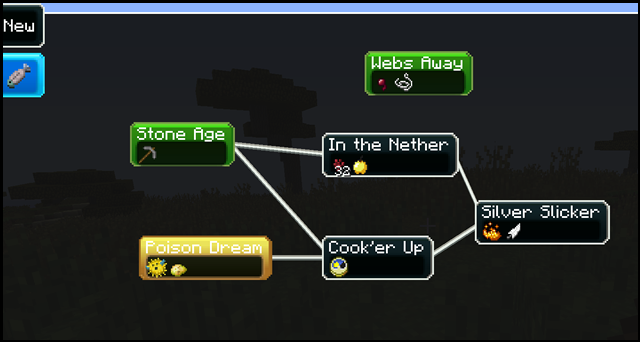
科技树编辑器视图
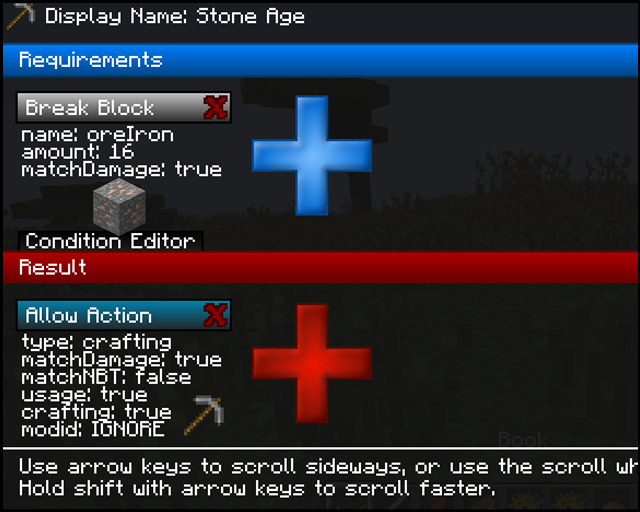
标准编辑器视图
What is progression?
Progression is a mod that allows you to control how a player can interact with the world, or the things they can craft, at the basic level. At the more involved level, it allows you to build and design tech trees, where a player cannot complete something until, something else is done. Be this action crafting an item, or collecting drops or more. You can also reward them for completing specific tasks, instead of restricting what they can do, if you so desire. Progression would also allow you to build class systems, restricting what certain groups of players can do, or give them abilities based upon their class. You could for example, forbid a group of people from ever being able to craft a furnace. While another group can build furnaces, but they walk much slower. You could also make custom shops, or a quest line. This is just a basic overview of the things you can do with progression. With it's requirements, conditions and results, you can create many more different systems than I have listed here, making it a very powerful tool for modpack makers.
How to get Started editing
To get started editing you will need to grab yourself the Progression Editor book, this book is where all the editing is done. For the most part it should be fairly obvious what you need to do, but there are a lot of tooltips that can help you out. If you have any issues feel free to ask. You can also take a look at the Progression section on curseforge, for some examples.
Edit Mode
Display Mode
Enchiridion Support (Requires 3.1.0+)
Progression also comes with some built in support for Enchiridion adding special features and actions, so that you can make better looking editors. As well as being able to place features individually it also comes with a template for a simple book mode, more for quests, where you can write out images and text to display if you wish to have more of a story to go along with your progression. Simply while in edit mode insert the HQM Clone template. While in edit mode you can then right click the open button, which will automatically generate the list of tabs, and opening them will automatically generate criteria, and opening them will generate the information pages. You can add and remove these elements, this is just the autogeneration to make things easier.
Templates
I'd strongly encourage to share and create your own templates, this is very simple, just for sharing tab templates press s while clicking the tab and for criteria you can find the save button in the criteria itself at the top. I'd recommend uploading your templates to the Progression section of curseforge which can be found here. I've created a few examples to get started.
Progression 1.7.10
What is progression?
Progression is a mod that allows you to control how a player can interact with the world, or the things they can craft, at the basic level. At the more involved level, it allows you to build and design tech trees, where a player cannot complete something until, something else is done. Be this action crafting an item, or collecting drops or more. You can also reward them for completing specific tasks, instead of restricting what they can do, if you so desire. Progression would also allow you to build class systems, restricting what certain groups of players can do, or give them abilities based upon their class. You could for example, forbid a group of people from ever being able to craft a furnace. While another group can build furnaces, but they walk much slower. This is just a basic overview of the things you can do with progression. With it's requirements, conditions and results, you can create many more different systems than I have listed here, making it a very powerful tool for modpack makers.
How to get Started editing
There are two ways to access the editor. You must be in creative to edit. You can either right click a vanilla book, or type the command /progression edit. Please keep in mind when editing, that in order to test properly you are going to want to switch back to survival. You can always craft items, when you are in creative, which is why you should test in survival. To reset player data just use the command /progression reset.
Tree Editor View
Criteria Editor View

下载 Progression
下载 Progression
下载 Progression
下载 Progression
下载 Progression
下载 Progression
下载 Progression
下载 Progression
下载 Progression
下载 Progression
Progression 0.6.9
  允许间接伤害触发实体击杀任务
关于这个资源的讨论、问题反馈与使用心得
还没有讨论,来发第一帖吧
你是这个资源的作者?登录后可认领此资源。
相似资源
 模组
? 使用命令保存和加载玩家或他人的背包/套装。
 模组

一个基于构建器的 Minecraft 配置库!
 模组

一款轻量级模组,允许服务器管理员对抗透视作弊者。
 模组

通过图形界面控制模组加载。适用于需要可选功能的整合包和服务器,也适合不想手动操作文件而希望直接管理模组的极客用户。
 模组

一个完整经济模组:玩家余额、动态定价商店、玩家市场、买入订单、货币物品以及网页仪表盘。
 模组
? 这是 Serilum 发布的一个自定义模组整合包,请设置你的模组包实例!
评论 0
登录后参与评分
还没有评论,来抢沙发吧