
QuadHotbar
为建造腾出更多空间。熟悉的快捷栏,现已扩展。
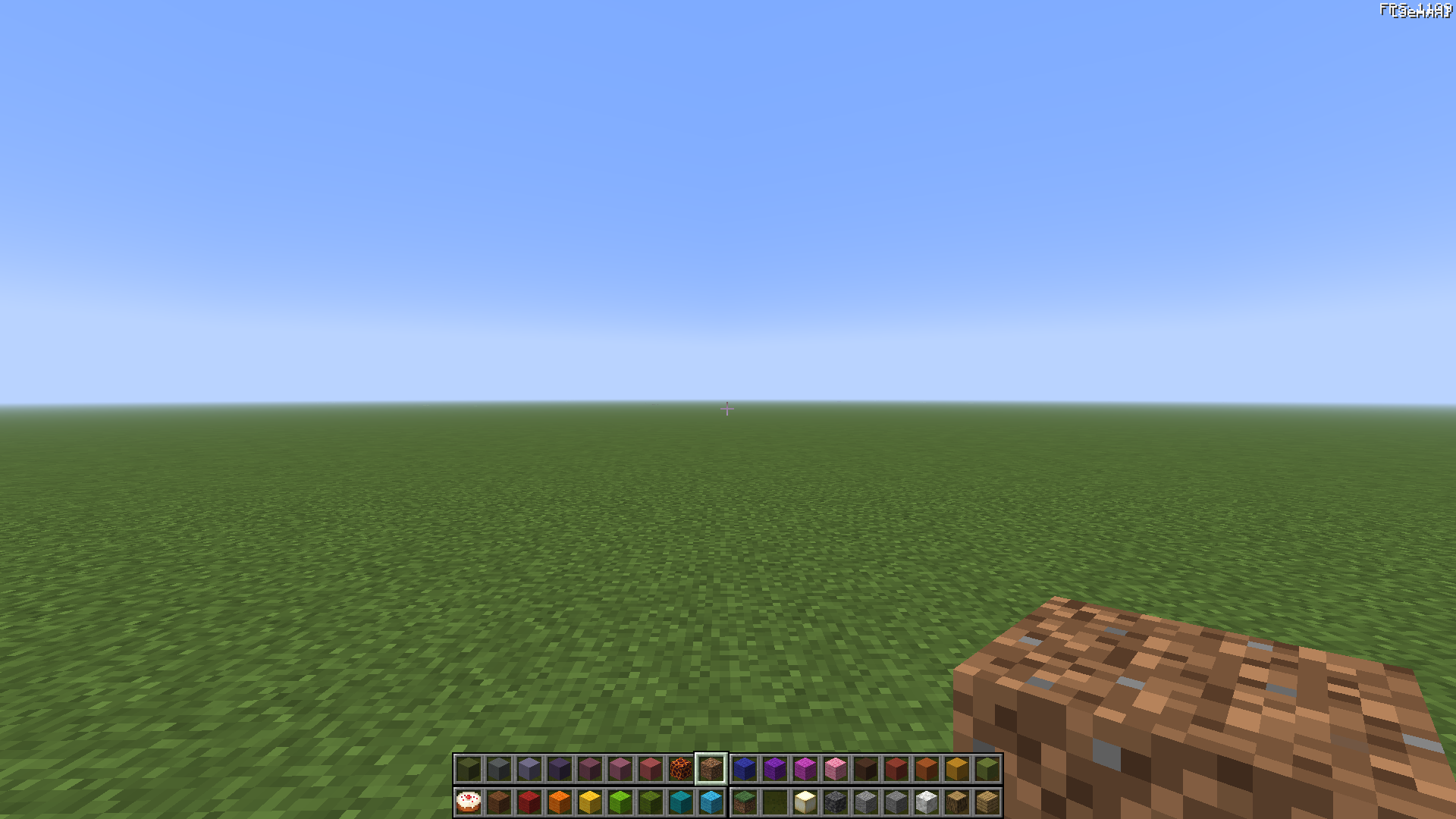
QuadHotbar 允许在屏幕上同时显示最多四个快捷栏,支持 NeoForge 1.21.1 和 Forge 1.20.1。切换快捷栏,让常用物品触手可及,无需频繁打开背包。
实验性的 Freedom 模式将这一功能扩展至八个快捷栏以及多达 100 页的背包页面。
本模组最初是为 KharkivTiles 1:1 项目开发的,该项目旨在 Minecraft 中重建哈尔科夫市。当你正在建造一座完整城市时,通过标准快捷栏不断切换方块会变得十分繁琐。QuadHotbar 正是为了满足这一实际需求而诞生的。
状态
QuadHotbar 1.1.0-beta1 是重大更新的一个测试版发布。
核心机制和设置已在 Forge 1.20.1 和 NeoForge 1.21.1 的单人和多人游戏环境中经过测试。Freedom 模式及其相关功能仍在开发和测试中,因此可能会出现错误或与其他模组的兼容性问题。
如果您遇到问题,请通过 GitHub Issues 或在模组的 CurseForge 页面进行反馈。
功能
- 标准模式下最多支持四个快捷栏和36个物品栏位。
- 实验性 Freedom 模式支持最多八个快捷栏和100页背包页面。
- 使用鼠标滚轮或再次按下相同的数字键来切换快捷栏。
- 切换快捷栏组 — Freedom 模式允许您在整个可见快捷栏组之间切换,而不是逐个更改它们。每个组使用的背包页面数量根据可见快捷栏的数量自动计算。例如,拥有 8 个快捷栏和 8 页背包页面时,第一组使用前两页,下一组使用接下来的两页,依此类推。
- 自定义按键绑定,可直接选择快捷栏和物品栏位。
- 丰富的客户端和服务器端设置选项。
- 采用原版风格的窗口,用于查看所有背包页面。
- 在不切换当前活动背包页面的情况下,在不同页面间移动物品。
- 支持兼容的容器界面。
- 额外页面按世界和服务器分别存储。
- 在使用 Corpse 或 GraveStone 模组时,死亡后可恢复额外的背包页面。
- 提供英文和俄文界面文本。
配置
所有按键绑定均可在 Minecraft 的标准“控制”菜单中找到。
从“模组”菜单或通过分配的按键绑定打开 QuadHotbar 设置屏幕。主要选项位于常规设置下。
常规设置
-
使用扩展快捷栏 — 启用或禁用 QuadHotbar。禁用后,将使用正常的原版快捷栏。
-
快捷栏数量 — 在标准模式下可选择两个到四个,或在 Freedom 模式下最多选择八个。
切换快捷栏组 — Freedom 模式允许您在整个可见快捷栏组之间切换,而不是逐个更改它们。每个组从其所属的一部分背包页面中获取内容,该部分数量根据可见快捷栏的数量自动计算。例如,对于8 个快捷栏和 8 页背包页面,第一组使用前两页,下一组使用接下来的两页,依此类推。
-
滚动切换快捷栏 — 允许使用鼠标滚轮切换快捷栏。禁用后,滚动操作将在选定的快捷栏内部进行。
-
显示所有按键绑定 — 在“控制”菜单中显示所有 QuadHotbar 的按键绑定,包括那些在当前设置中未使用的绑定。
-
背包行顺序 — 确定每个页面额外背包行的使用顺序。
-
主快捷栏位置 — 选择主快捷栏的位置。其他快捷栏相对于所选角落排列。
Freedom
如果您的项目如此宏大且雄心勃勃,以至于通常的四个快捷栏根本不够用,那么真正的 Freedom 模式就是为您量身定制的。
它为您提供最多八个可见快捷栏以及大量的额外页面,您可以通过专用按键在这些页面间循环浏览,从而彻底告别方块空间不足的问题。
此模式处于实验阶段:其功能仍在开发和测试中。

背包页面
每个页面包含36个物品栏位:主快捷栏加上三行额外物品栏。
快捷栏直接从此类页面中取用物品,因此不会创建物品的重复副本。
模组会自动确定每个完整快捷栏组所需的背包页面数量。
例如:
- 4 个快捷栏使用一页背包页面。
- 6 个快捷栏每组使用一点五页背包页面,因此两组完整的快捷栏需要三页背包页面。
- 8 个快捷栏使用两整页背包页面。
减少页面数量不会删除物品。当增加该设置时,隐藏的页面将重新变为可用。
额外页面按世界或服务器分别存储,不会在其中间传输。它们也遵循世界的死亡规则和 keepInventory 游戏规则。

页面窗口
该窗口允许您浏览所有可用的背包页面,并在不频繁切换当前活动背包页面的情况下在页面间移动物品。
默认情况下,它出现在原版背包的右侧。通过网格按钮或其专用按键绑定打开它。
该窗口需要启用 Freedom 模式、至少有两个可用的背包页面,并获得服务器的许可。
主要设置:
- 启用总览窗口 — 启用对该窗口的访问。
- 全部页面按钮 — 显示或隐藏用于打开该窗口的按钮。
- 随物品栏打开窗口 — 当你打开物品栏时自动打开该窗口。
- 宽度(以格子为单位) — 按九个格子的增量调整窗口的宽度。
- 起始页码 — 选择从哪一侧开始对侧边页面进行编号。
- 页面排列顺序 — 按行或列排列页面。
- 高度(以格子为单位) — 设置可见区域的高度。
- 拖拽总览窗口 — 允许通过拖动标题栏来移动窗口。
- 滚动步长 — 设置鼠标滚轮每滚动一步的距离。
- 窗口位置 — 在自动放置和自定义放置之间切换。
- 位置 X / Y — 允许输入窗口的精确坐标。

服务器设置
服务器可以限制自由模式、物品栏页面数量和快捷栏数量,以及页面窗口的访问权限和大小。
主要选项:
allowFreedom— 允许自由模式。maxInventoryPages— 最大物品栏页面数,范围为 1 到 100。maxHotbarRows— 最大可见快捷栏行数,范围为 2 到 8。allowPageOverview— 允许使用全部页面窗口。showOverviewButton— 显示用于打开窗口的按钮。allowContainerOverview— 允许在使用容器界面时同时查看该窗口。maxOverviewWidth/maxOverviewHeight— 限制窗口的尺寸。exemptOperators— 豁免管理员的全局限制。unrestrictedPlayers/playerOverrides— 为特定玩家定义豁免情况和个体限制。
例如,将所有玩家限制为两个物品栏页面和四个快捷栏:
maxInventoryPages = 2
maxHotbarRows = 4
exemptOperators = false
这些限制不会删除隐藏页面上的物品,也不会覆盖个人客户端设置。
链接
- KharkivTiles 1:1
- GitHub
- CurseForge
QuadHotbar
More room for building. The familiar hotbar, expanded.
QuadHotbar adds up to four hotbars on screen at once for NeoForge 1.21.1 and Forge 1.20.1. Switch between hotbars and keep more items within reach without constantly opening your inventory.
The experimental Freedom mode expands this to eight hotbars and up to 100 inventory pages.
Created for KharkivTiles 1:1, a large-scale project to recreate Kharkiv in Minecraft. When you're building an entire city, constantly swapping blocks through the standard hotbar quickly becomes a chore. QuadHotbar grew out of the need for a practical solution.
Status
QuadHotbar 1.1.0-beta1 is the beta release of a major update.
The core mechanics and settings have been tested on Forge 1.20.1 and NeoForge 1.21.1, in both singleplayer and multiplayer. Freedom mode and its related features are still being developed and tested, so bugs and compatibility issues with other mods may occur.
If you encounter a problem, please report it through GitHub Issues or on the mod's CurseForge page.
Features
- Up to four hotbars and 36 slots in standard mode.
- Experimental Freedom mode with up to eight hotbars and 100 inventory pages.
- Switch hotbars with the mouse wheel or by pressing the same number key again.
- Switching hotbar sets — Freedom mode lets you switch between entire sets of visible hotbars rather than changing them one at a time. Each set uses a number of inventory pages calculated automatically from the number of visible hotbars. For example, with 8 hotbars and 8 inventory pages, the first set uses the first two pages, the next set uses the following two, and so on.
- Custom keybindings for selecting hotbars and slots directly.
- Extensive client and server settings.
- A vanilla-style window for viewing all inventory pages.
- Move items between pages without switching your active inventory page.
- Support for compatible container screens.
- Additional pages stored separately for each world and server.
- Recovery of additional inventory pages after death when used with Corpse or GraveStone.
- English and Russian interface text.
Configuration
All keybindings are available in Minecraft's standard Controls menu.
Open the QuadHotbar settings screen from the Mods menu or through its assigned keybinding. The main options are under General settings.
General settings
-
Use the extended hotbar — enables or disables QuadHotbar. When disabled, the normal vanilla hotbar is used.
-
Number of hotbars — choose from two to four in standard mode, or up to eight in Freedom mode.
Switching hotbar sets — Freedom mode lets you switch between entire sets of visible hotbars rather than changing them one at a time. Each set draws from a portion of your inventory pages, calculated automatically from the number of visible hotbars. For example, with 8 hotbars and 8 inventory pages, the first set uses the first two pages, the next set uses the following two, and so on.
-
Scroll between hotbars — allows the mouse wheel to switch hotbars. When disabled, scrolling stays within the selected hotbar.
-
Show all keybinds — displays all QuadHotbar keybindings in the Controls menu, including those not used by your current settings.
-
Inventory row order — determines the order in which each page's additional inventory rows are used.
-
Main hotbar — selects the main hotbar's position. Additional hotbars are arranged relative to the chosen corner.
Freedom
If your projects are so grand and ambitious that the usual four hotbars just aren't enough, true Freedom mode was made especially for you.
It gives you up to eight visible hotbars and a ridiculous number of extra pages that you can cycle through with dedicated keybindings, so you can forget what it's like to run out of room for blocks.
This mode is experimental: its features are still being developed and tested.
Inventory pages
Each page contains 36 slots: the main hotbar and three additional rows.
Hotbars use items directly from these pages, so no duplicate copies of items are created.
The mod automatically determines how many inventory pages are needed for each complete hotbar set.
For example:
- 4 hotbars use one inventory page.
- 6 hotbars use one and a half inventory pages per set, so two complete sets require three inventory pages.
- 8 hotbars use two full inventory pages.
Reducing the number of pages does not delete items. Hidden pages become accessible again when you increase the setting.
Additional pages are stored separately for each world or server and are not transferred between them. They also follow the world's death rules and the keepInventory game rule.
Pages window
The window lets you browse all available inventory pages and move items between them without constantly switching your active inventory page.
By default, it appears to the right of the vanilla inventory. Open it with the grid button or its dedicated keybinding.
The window requires Freedom mode, at least two available inventory pages, and permission from the server.
Main settings:
- Enable overview window — enables access to the window.
- All-pages button — shows or hides the button used to open it.
- Open window with inventory — automatically opens the window when you open your inventory.
- Width in slots — adjusts the window's width in increments of nine slots.
- First page — chooses which side page numbering starts from.
- Page order — arranges pages by rows or columns.
- Height in slots — sets the height of the visible area.
- Drag overview window — lets you move the window by dragging its title bar.
- Scroll step — sets the distance scrolled per mouse-wheel step.
- Window position — switches between automatic and custom placement.
- Position X / Y — lets you enter the window's exact coordinates.
Server settings
Servers can restrict Freedom mode, the number of inventory pages and hotbars, and access to and the size of the pages window.
Main options:
allowFreedom— allow Freedom mode.maxInventoryPages— maximum inventory pages, from 1 to 100.maxHotbarRows— maximum visible hotbars, from 2 to 8.allowPageOverview— allow the all-pages window.showOverviewButton— show the button used to open the window.allowContainerOverview— allow the window alongside container screens.maxOverviewWidth/maxOverviewHeight— limit the window's dimensions.exemptOperators— exempt operators from global restrictions.unrestrictedPlayers/playerOverrides— define exemptions and individual restrictions for specific players.
For example, to limit all players to two inventory pages and four hotbars:
maxInventoryPages = 2
maxHotbarRows = 4
exemptOperators = false
Restrictions do not delete items on hidden pages or overwrite personal client settings.
Links
- KharkivTiles 1:1
- GitHub
- CurseForge

下载 QuadHotbar (MultiHotbar)
需要联机服务器吗?
稳定流畅、一键部署,几分钟即可和朋友联机开服
最低仅需 8 元/月 即可畅快联机
下载 QuadHotbar (MultiHotbar)
下载 QuadHotbar (MultiHotbar)
下载 QuadHotbar (MultiHotbar)
下载 QuadHotbar (MultiHotbar)
下载 QuadHotbar (MultiHotbar)
下载 QuadHotbar (MultiHotbar)
下载 QuadHotbar (MultiHotbar)
下载 QuadHotbar (MultiHotbar)
下载 QuadHotbar (MultiHotbar)
- 添加了自由模式,支持额外快捷栏、物品栏页面和全页窗口。
- 更新了模组设置,并添加了服务器端限制。
- 添加了与 Corpse 和 GraveStone 的兼容支持。
- 修复了鼠标滚轮冲突和快捷栏切换问题。
- 修复了死亡后及拾取物品后的同步问题。
- 进行了小幅稳定性和可靠性修复。
关于这个资源的讨论、问题反馈与使用心得
还没有讨论,来发第一帖吧
你是这个资源的作者?登录后可认领此资源。
相似资源
 模组

显示你正在注视的方块的信息。(适用于 Minecraft 1.16+ 的 Hwyla/Waila 分支)
 模组
使用 JavaScript 编辑配方、添加自定义物品、编写世界事件!
 模组

查看物品与配方
 模组
在游戏画面角落显示附近世界地形、玩家、生物和实体的地图。可创建路径点,帮助你找到标记过的位置。
 模组
AE2:一款流行的自动化与存储模组
 模组
那是什么?一个 Waila/Hwyla 的分支。
评论 0
登录后参与评分
还没有评论,来抢沙发吧