
RandomMOTD ~ 让你的服务器在多人游戏列表中脱颖而出!
服务端模组:无需在客户端安装;兼容原版客户端!
Minecraft 服务器有几个珍贵的选项可用于在多人游戏屏幕上显示信息——其中最重要的是服务器图标和 MOTD(即“每日消息”,位于服务器名称下方的两行文本,用于提供描述)。问题在于,由于 MOTD 是静态的,玩家可能根本不在乎显示的内容是什么,因为它通常只是服务器名称加上一个平庸的公告。
使用 RandomMOTD,每次刷新多人游戏屏幕时,都可以从列表中随机选择一个新的 MOTD 发送给玩家。这可以用于多种用途:你可以在每次刷新时更改服务器名称的样式,在服务器名称下方添加彩蛋,或者循环播放各种服务器公告。在配置文件中,MOTDs 是一个字符串列表的列表:每个发送给客户端的 MOTD 会从每个子列表中随机选择一个 MOTD 并将它们连接起来。这使得服务器可以同时包含静态信息和随机化信息,例如在第一行显示服务器名称,在第二行显示彩蛋。
此外,RandomMOTD 使用了 Patbox 的 PlaceholderAPI 库,该库允许更好的自定义样式,包括自定义颜色代码和渐变,并且在未来的更新中将能够访问服务器的信息,如玩家数量和 TPS。
最后,RandomMOTD 还有一个可选功能:随机化的服务器图标。默认情况下此功能是关闭的,但它可以让你拥有多个服务器图标,并在每次刷新时进行更新。这些可以用来创建服务器图标的变体,或者直接完全随机化的图片。可以添加的 MOTD 和图标数量没有限制。
配置文件
配置文件位于 `./config/random_motd.json`,包含 4 个选项。可以通过在游戏中运行 `/reload` 命令来重新加载配置文件。(它不会修改原版的 `/reload` 命令,而是钩接到该命令上)。
-
"motds": 一个可能的 MOTD 列表的列表。模组将从列表的每个部分中随机选择一个 MOTD 并将它们连接起来,生成完整的 MOTD。这个功能主要是为了让你可以将独立于随机部分的静态信息包含在内。
-
"use_randomized_icons": 一个布尔值,用于启用或禁用随机化图标功能。默认为 false。
-
"icons": 指向服务器图标的路径列表。与默认服务器图标一样,它们必须是 64x64 的 PNG 图像。
-
"log_when_loaded": 一个布尔值,表示是否在每次重新加载时记录日志。默认开启。
-
"CONFIG_VERSION_DO_NOT_TOUCH_PLS": 模组版本——请勿触碰。
示例
两次刷新服务器后的随机化 MOTD 和服务器图标
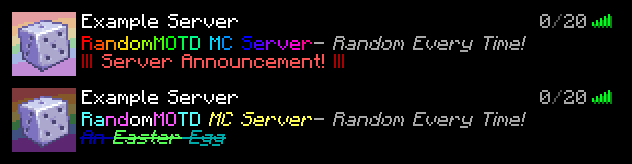
最初是为我的私人 SMP 创建的,但我认为更多人可能会想要使用它
RandomMOTD ~ Make your server pop from the multiplayer window!
Server Side Mod: Does not need installation on client; compatible with vanilla clients!
Minecraft Servers have a few precious options available to them to display information on the multiplayer screen--the most important of which are the Server icon and the MOTD, or 'Message of the Day', the two lines of text underneath the server's name giving a descriptor. The problem is, with the MOTD being static, a player may simply not care about what is being displayed as it's typically just the server's name plus a mediocre announcement.
With RandomMOTD, a new MOTD picked randomly from a list can be sent to the player upon each refresh of the multiplayer screen. This can be used in a variety of ways: you could change the styling of the server's name on every refresh, add easter eggs below the server's name, or cycle through various server announcements. In the config MOTDs are a list of lists of strings: each MOTD sent to the client picks a random MOTD from each sublist and concatenates them together. This enables servers to include both static information and randomized information, such as having the server name on the top line and an easter egg on the bottom line.
In addition, RandomMOTD uses the PlaceholderAPI library by Patbox which allows better custom styling including custom color codes and gradients, and in a future update access to information on the server such as Player Count and TPS.
Finally, RandomMOTD also has one more optional feature: randomized server icons. These are off by default, but allow for multiple server icons that are updated with every refresh. These can be used to create variants of the server icon, or just full-on randomized pictures. There is no limit to the amount of MOTDs and icons one can add.
Config
The Config file, found in `./config/random_motd.json`, includes 4 options. The config can be reloaded by running the `/reload` command ingame. (Does not modify the vanilla `/reload` command, just hooks on to it).
-
"motds": A list of lists of possible MOTDs. The mod will pick a random MOTD from every part of the list and concatenate them, producing a full MOTD. This feature is mainly so, if you would like to contain a static part of information independent from a random one, you can.
-
"use_randomized_icons": A boolean either enabling or disabling the randomized icon feature. Defaults to false.
-
"icons": A list of paths to server icons. Much like default server icons, they must be 64x64 PNG images.
-
"log_when_loaded": A boolean telling whether or not to log for every reload. On by default.
-
"CONFIG_VERSION_DO_NOT_TOUCH_PLS": Mod version--please do not touch it.
Example
Two refreshes of the server with a randomized MOTD and Server Icon
Originally created for my private SMP, but I figured more people may want to use it

 模组

 模组
 模组

 模组
 模组
 模组
评论 0
登录后参与评分
还没有评论,来抢沙发吧