
Ratatouille
用于 doctor4t 的模组和支持者外观的工具库
功能
库 (Library)
- 源自 Lodestone(由 Sammy 开发;以及 Lodestar,在 1.21.1 版本中移除)的渲染工具
- 外观自定义工具:专为我的支持者外观设计,但也可开箱即用,供需要简单自定义功能的更通用外观模组使用
- 物品自定义命中音效和粒子工具
- 第一人称特性渲染工具:允许通过在特性渲染器中实现
RendersArmInFirstPerson接口,添加在第一人称下显示于玩家手上的特性。 - 自定义模型护甲工具:允许通过单次方法调用(以及自定义模型)添加具有自定义模型的护甲,从而绕过制作模型层、特性渲染器、将上述特性渲染器注入玩家和盔甲架渲染的混入代码(mixins)、编写显示条件等需求;同时自动在第一人称下显示该自定义护甲于玩家手上。使用方法指南见下文。
其他附加内容
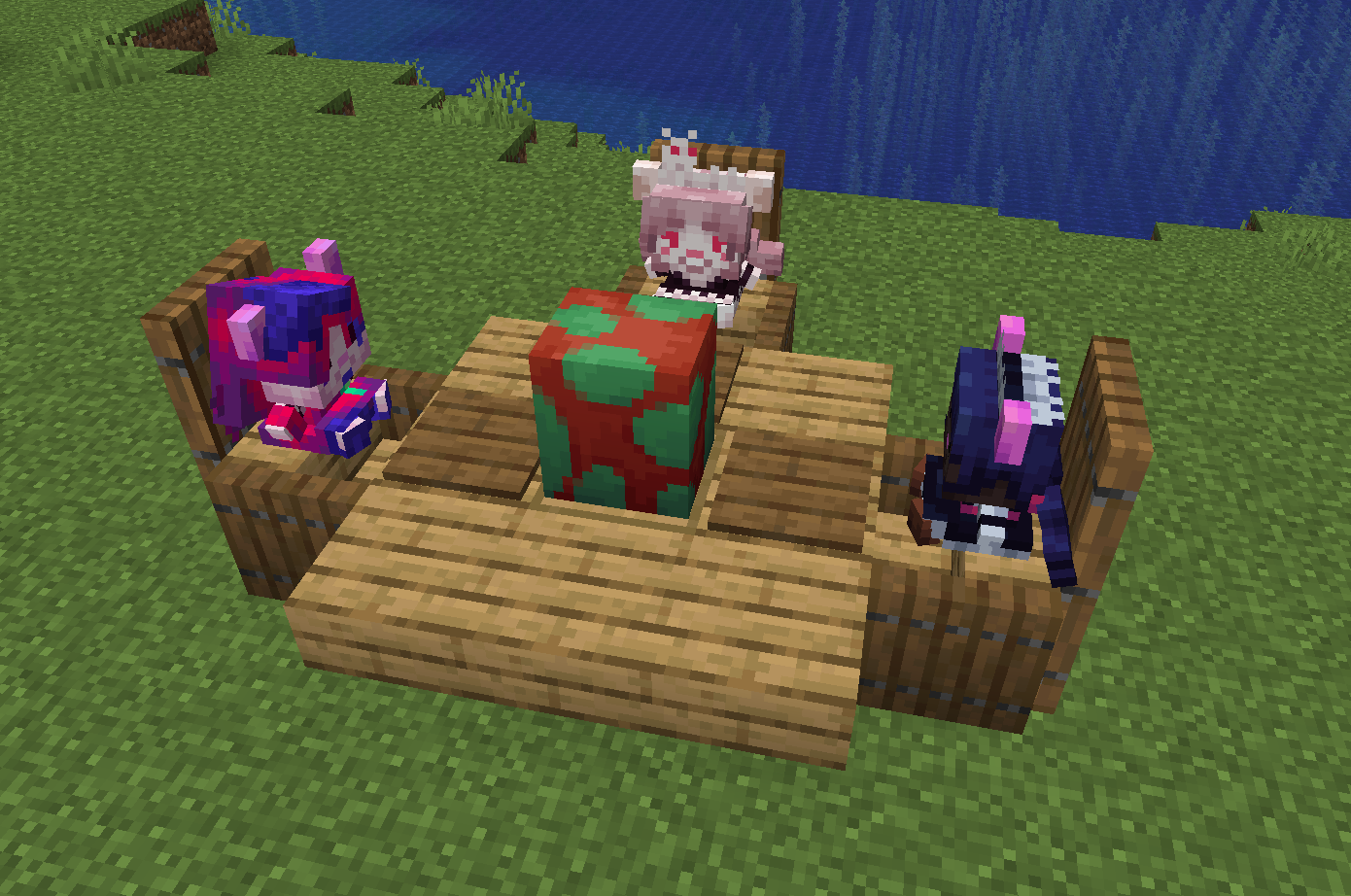
- RAT 毛绒玩具(Rat Maid、Folly 和 Mauve)
- 可以发出叫声
- 音符盒可以放置在顶部,作为乐器播放毛绒玩具的叫声
- 在创造模式下手持物品并潜行时与生物交互,可给予它们物品和护甲。在创造模式下手持空手并潜行时击打它们,会使它们掉落所有已装备的物品。
支持者外观
- 适用于 Ko-Fi 或 YouTube 会员
- 名字旁边有图标以及彩色名字
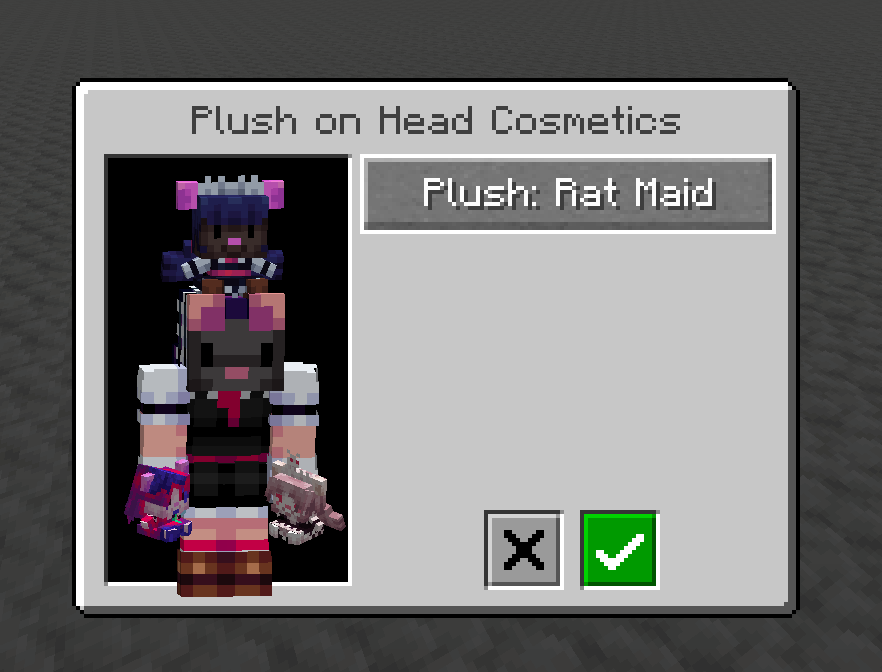
- 头部毛绒玩具:在未瞄准方块的情况下潜行使用任何毛绒玩具物品以打开外观界面
画廊
展开画廊
文档
展开文档
设置 (build.gradle)
展开 Gradle 详情
repositories {
    maven {
        name = 'Ladysnake Mods'
        url = 'https://maven.ladysnake.org/releases'
}

dependencies {
    modImplementation "dev.doctor4t:ratatouille:${project.ratatouille_version}"
}
自定义模型护甲工具
展开自定义模型护甲工具详情
此工具允许你通过单次方法调用轻松注册使用自定义模型的新护甲套装(游戏确实需要知道你要渲染什么,因此需要提供该自定义模型)。
步骤 1:定义模型
在添加自定义护甲之前,我们需要一个符合某些规则的模型。你可以在仓库的 RESOURCES 文件夹中找到护甲模板模型(Blockbench 模型文件)和纹理。虽然你可以自由编辑此模型和纹理以塑造你梦想的护甲,但请注意现有的组非常重要,尽管你可以向它们添加新的子组,但你不能也不应该删除任何现有组,因为它们允许库知道当玩家(或盔甲架或生物)穿戴护甲部件时应显示哪些内容:
helmet在配备头盔物品时显示body_chestplate、right_arm_chestplate和left_arm_chestplate在配备胸甲物品时显示body_leggings、right_leg_leggings和left_leg_leggings在配备护腿物品时显示right_leg_boot和left_leg_boot在配备靴子物品时显示
完成模型后,你可以使用 Blockbench 导出它:File -> Export -> Export Java Entity。打开生成的 Java 类,并将 ModelPartData modelPartData = modelData.getRoot(); 这一行与 getTexturedModelData() 中返回之前的那一行(包含该行)之间的代码复制出来。Ratatouille 添加了一种新的模型类类型,称为 CustomArmorModelDefinition,简化了护甲模型的定义;扩展该类并通过粘贴从生成的模型类中复制的代码片段来实现 addModelParts 方法。然后实现 getTexture();最简单的方法是在你的模型定义类中为你的护甲纹理设置一个静态 Identifier 并返回它,但如果你希望执行变化的逻辑来返回不同的纹理,你也可以自然地这样做。
步骤 2:使用 Ratatouille 注册自定义护甲
第二步——也是最后一步——是在客户端初始化中注册自定义盔甲渲染。调用 CustomModelArmorUtil.registerCustomArmor 并传入所需的参数:
Identifier id:自定义盔甲的 ID。此 ID 用于自动生成并注册盔甲的模型层,因此它必须是唯一的。ArmorDisplayConditions displayConditions:需要满足的条件,以便渲染你的盔甲部件。如果你想要一个简单的盔甲,在装备每个物品时显示其部件,可以使用ItemSetDisplayConditions,它允许你定义头盔、胸甲、护腿和靴子物品,并将自动检查哪些盔甲物品已装备且需要渲染,同时防止渲染带有缺失纹理的原版盔甲模型。如果你希望拥有自定义逻辑来显示不同的部件(而不仅仅是检查物品是否被穿戴),你可以实现ArmorDisplayConditions接口及其四个shouldDisplay方法。CustomArmorModelDefinition armorModelDefinition:我们在第一步中创建的模型定义,只需创建其实例即可。int textureWidth, int textureHeight:盔甲的纹理宽度和高度。
通过此方法调用注册盔甲将为你处理所有事情,例如创建带纹理的模型数据、模型层,并将功能添加到玩家 / 盔甲架 / 生物渲染器中。如果需要访问盔甲的模型数据或模型层,可以通过使用盔甲的 displayConditions 作为键,在 CustomModelArmorUtil.CUSTOM_ARMOR_MODELS HashMap 中找到它们。
环境音效工具 (Ambience util)
展开环境音效工具详情
此工具允许你轻松地将环境循环音频注册为通用背景音频或方块实体依赖音频。注册背景环境音效
要注册背景环境音效,只需在你的客户端初始化类中调用 AmbienceUtil.registerBackgroundAmbience 方法,并向其传递一个具有所需参数的新 BackgroundAmbience 对象:
SoundEvent soundEvent:要播放的环境循环声音。SoundCategory soundCategory:播放该声音的音频类别。PlayPredicate predicate:决定声音是否允许播放的谓词。接收一个ClientPlayerEntity并必须返回一个布尔值。int fadeIn:环境循环开始播放时的淡入时间(以刻为单位)。int fadeOut:环境循环停止播放时的淡出时间(以刻为单位)。
注册方块实体环境音效
要注册方块实体环境音效,只需在你的客户端初始化类中调用 AmbienceUtil.registerBlockEntityAmbience 方法,并向其传递应播放该环境音效的 BlockEntityType<? extends BlockEntity> 以及一个具有所需参数的新 BlockEntityAmbience 对象:
SoundEvent soundEvent:要播放的环境循环声音。SoundCategory soundCategory:播放该声音的音频类别。PlayPredicate predicate:决定声音是否允许播放的谓词。接收一个BlockEntity并必须返回一个布尔值。int fadeIn:环境循环开始播放时的淡入时间(以刻为单位)。int fadeOut:环境循环停止播放时的淡出时间(以刻为单位)。
Ratatouille
A library for doctor4t's mods and supporter cosmetics
Features
Library
- Rendering utils derived from Lodestone (by Sammy; and Lodestar, removed with 1.21.1)
- Cosmetics customization util: Made for my supporter cosmetics but can also be used out of the box for more general cosmetic mods who need simple customization
- Item custom hit sound and particle utils
- First person feature rendering util: Allows adding features that render on the player's hand in first person by implementing the
RendersArmInFirstPersoninterface in your feature renderer. - Custom model armor util: Allows adding armor with custom models with a single method call (and custom model), bypassing the requirements of making a model layer, feature renderer, mixins to inject said feature renderer into player and armor stand rendering, coding display conditions, etc... as well as automatically display said custom armor on a player's hands in first person. A usage guide can be found further down.
Additional Goodies
- RAT Plushies (Rat Maid, Folly and Mauve)
- Can be honked
- Noteblocks can be placed on top to play the plush's honk sound as the instrument
- Mobs can be given items and armor by interacting with them while in creative and sneaking with an item in hand. Hitting them in creative while sneaking with an empty hand will make them drop all their equipped items.
Supporter Cosmetics
- For Ko-Fi or YouTube members
- Icon next to your name as well as colored name
- Head plushies: Sneak-use any plush item while not aiming at a block to open the cosmetics screen
Gallery
Expand gallery
Documentation
Expand documentation
Setup (build.gradle)
Expand Gradle details
repositories {
    maven {
        name = 'Ladysnake Mods'
        url = 'https://maven.ladysnake.org/releases'
}

dependencies {
    modImplementation "dev.doctor4t:ratatouille:${project.ratatouille_version}"
}
Custom model armor util
Expand Custom model armor util details
This util allows you to easily register new armor sets that use a custom model with a single method call (and that custom model as the game does need to know what you wish to render).
Step 1: Defining the model
Before we can add our custom armor, we need a model that respects a few rules. You can find an armor template model (Blockbench model file) and texture in the RESOURCES folder of the repository. While you can edit this model and texture freely in order to shape up the armor of your dreams, please note that the existing groups are very important and while you can add new sub-groups to them, you cannot and should not delete any existing group as they allow the library to know what should be displayed when a player (or armor stand or mob) dons armor pieces:
helmetdisplays when the helmet item is equippedbody_chestplate,right_arm_chestplateandleft_arm_chestplatedisplay when the chestplate item is equippedbody_leggings,right_leg_leggingsandleft_leg_leggingsdisplay when the leggings item is equippedright_leg_bootandleft_leg_bootdisplay when the boots item is equipped
Once you have finalized your model, you can export it with Blockbench: File -> Export -> Export Java Entity. Open the generated Java class and copy the lines between ModelPartData modelPartData = modelData.getRoot(); and the line right before the return (included) in getTexturedModelData(). Ratatouille adds a new model class type that simplifies armor model definition called CustomArmorModelDefinition; extend that class and implement the addModelParts method by pasting the snippet you copied from the generated model class. Then implement getTexture(); the simplest way to do so is to have a static Identifier for your armor texture in your Model Definition class and return that, but if you wish to do a special logic that varies the returned texture you can naturally do so as well.
Step 2: Registering the custom armor with Ratatouille
The second - and last - step is to register your custom armor rendering in your client initialization. Call CustomModelArmorUtil.registerCustomArmor and give it the required parameters:
Identifier id: The id of the custom armor. This is used in order to automatically generate and register the model layer of your armor, it should therefore be unique.ArmorDisplayConditions displayConditions: The display conditions that need to be met for your armor parts to render. If you want a simple armor that displays its parts for each item you equip, theItemSetDisplayConditionsallows you to define the helmet, chestplate, leggings and boots items and will automatically check which armor items are equipped and need to be displayed, as well as prevent the rendering of the vanilla armor model with a missing texture. If you wish to have a custom logic for displaying different pieces that is not just checking whether the item is being worn, you can implement theArmorDisplayConditionsand its fourshouldDisplaymethods.CustomArmorModelDefinition armorModelDefinition: The model definition we created in Step 1, simply create a new instance of it.int textureWidth, int textureHeight: The armor's texture width and height.
Registering your armor through this method call will take care of everything for you, like creating the textured model data, model layer and appending the feature to the player / armor stand / mob renderers. If you need to access the model data or model layer of the armor, you can find them in the CustomModelArmorUtil.CUSTOM_ARMOR_MODELS HashMap by using the armor's displayConditions as the key.
Ambience util
Expand Ambience util details
This util allows you to easily register ambient loops as general background audio or block entity dependant audio.Registering background ambience
To register a background ambience, all you need to do is call the AmbienceUtil.registerBackgroundAmbience method in your client initializer class and give it a new BackgroundAmbience object with the required parameters:
SoundEvent soundEvent: The ambient loop sound to play.SoundCategory soundCategory: The audio category to play the sound in.PlayPredicate predicate: The predicate determining whether the sound is allowed to play or not. Takes aClientPlayerEntityand must return a boolean.int fadeIn: The fade-in time of the ambient loop when it starts playing (in ticks).int fadeOut: The fade-out time of the ambient loop when it stops playing (in ticks).
Registering Block entity ambience
To register a block entity ambience, all you need to do is call the AmbienceUtil.registerBlockEntityAmbience method in your client initializer class and give it the BlockEntityType<? extends BlockEntity> that should play said ambience and a new BlockEntityAmbience object with the required parameters:
SoundEvent soundEvent: The ambient loop sound to play.SoundCategory soundCategory: The audio category to play the sound in.PlayPredicate predicate: The predicate determining whether the sound is allowed to play or not. Takes aBlockEntityand must return a boolean.int fadeIn: The fade-in time of the ambient loop when it starts playing (in ticks).int fadeOut: The fade-out time of the ambient loop when it stops playing (in ticks).

下载 Ratatouille
下载 Ratatouille
下载 Ratatouille
下载 Ratatouille
下载 Ratatouille
下载 Ratatouille
下载 Ratatouille
下载 Ratatouille
下载 Ratatouille
下载 Ratatouille
关于这个资源的讨论、问题反馈与使用心得
还没有讨论,来发第一帖吧
你是这个资源的作者?登录后可认领此资源。
相似资源
 模组

一个用于收集生物掉落物的多区块模组。
 模组

显示你正在注视的方块的信息。(适用于 Minecraft 1.16+ 的 Hwyla/Waila 分支)
 模组
在游戏画面角落显示附近世界地形、玩家、生物和实体的地图。可创建路径点,帮助你找到标记过的位置。
 模组

查看物品与配方
 模组
使用 JavaScript 编辑配方、添加自定义物品、编写世界事件!
 模组
AE2:一款流行的自动化与存储模组
评论 0
登录后参与评分
还没有评论,来抢沙发吧