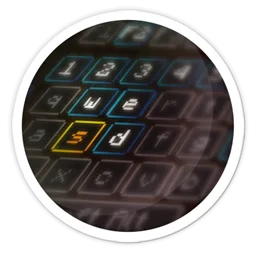
此模组旨在解决大型整合包中按键绑定过多时的问题。
它提供了一种额外的按键绑定管理方式。通过选项菜单中默认编辑“按键绑定按钮”旁边的按钮,可以访问一个额外的屏幕界面。
该屏幕采用类似键盘的布局,并高亮显示所有冲突和已使用的按键。这样玩家可以一目了然地了解哪些按键仍然可用,哪些需要关注。
作为开发此模组的附带效果,您还可以使用鼠标按钮修饰键(例如 Shift+左键单击)。这在某些情况下可能有用,也可能没用。
提供多种布局,并且可以在配置文件中更改或添加布局。
客户端模组。无需在服务器上安装。
请参阅图片以获取截图。
预设
预设可以加载和保存。它们存储在 .minecraft 文件夹下的 'keybinding presets' 目录中。
通过为您的常用预设设置按键绑定,可以快速切换预设。
如何在首次启动时加载预设
使用 'preset_to_load_on_first_startup.txt' 指定应在启动时加载的按键绑定。这些绑定将在游戏启动时加载。
当玩家首次启动游戏后,将创建文件 initialized.dat。如果该文件存在,则不会加载 preset_to_load_on_first_startup.txt 中的预设。
使预设只读
当用记事本打开预设文件时,您可以在第一行添加文本 'readonly',然后保存。
随整合包分发按键绑定
- 确保导出文件夹 keybinding preset
- 不要导出 keybinding presets/initialized.dat
- 在游戏中保存一个预设
- 用记事本编辑生成的文件
- 在文件开头插入一行新文本:readonly
- 不多不少,仅此而已
- 然后在文件 preset_to_load_on_first_startup.txt 的第二行填写您的预设名称,即文件名去掉末尾的 preset.txt 后的部分。
您可以随整合包分发多个预设,但只能在启动时加载一个预设。文件名中可以使用大写字母。
允许在整合包中使用,无需征得同意
-------------------------------------------------------------------
感谢 Radimous 将其移植到 1.18.2!
感谢 Bubin7766 将其移植到 1.21.1 Neoforge!
This mod is a solution for having a big modpack with many keybinds.
It adds an extra way to manage keybinds. It provides an extra screen which will be accessible by the button next to the default edit 'keybind button' in the options menu.
The screen has a layout like a keyboard with all conflicting and used buttons highlighted. This way players have a great overview of which keys are still available and which ones need attention.
As a side effect of making this mod you can also use modifiers with mouse buttons like Shift+left click. This may or may not be usefull for some situations.
Multiple layouts are available and layouts could be changed or added in the config.
Client mod. Does not have to be on a server.
See images for some screenshots.
Presets
Presets can be loaded and saved. They are stored in the .minecraft folder under 'keybinding presets'.
Switch between presets quickly by setting up a keybind for your favorite presets.
How to make a preset load on first start
Use 'preset_to_load_on_first_startup.txt' to specify a keybind that should load on startup. These bindings will then be loaded on startup.
The file initialized.dat will be created when a player has started the game for the first time. When this file is present, the preset in preset_to_load_on_first_startup.txt will not be loaded.
Making a preset readonly
When opening a preset with notepad you can add the text 'readonly' on the first line and then save.
Shipping keybinds with modpack
- make sure you export the folder keybinding preset
- do Not export keybinding presets/initialized.dat
- save a preset in the game
- edit the created file in notepad
- at the start of the file insert a new line with the text: readonly
- nothing more nothing less
- then in the file preset_to_load_on_first_startup.txt, on the second line fill in the name of your preset, which is the filename without the preset.txt which is at the end of the filename.
You can ship your modpack with multiple presets, but only one preset can be loaded on startup. It is possible to use Capital letters in the filename.
Use in modpack is allowed without asking
-------------------------------------------------------------------
Thanks to Radimous for backporting to 1.18.2!
Thanks to Bubin7766 for porting to 1.21.1 Neoforge!
下载 Raw's Visual keybinder
需要联机服务器吗?
稳定流畅、一键部署,几分钟即可和朋友联机开服
最低仅需 8 元/月 即可畅快联机
下载 Raw's Visual keybinder
需要联机服务器吗?
稳定流畅、一键部署,几分钟即可和朋友联机开服
最低仅需 8 元/月 即可畅快联机
下载 Raw's Visual keybinder
需要联机服务器吗?
稳定流畅、一键部署,几分钟即可和朋友联机开服
最低仅需 8 元/月 即可畅快联机
下载 Raw's Visual keybinder
需要联机服务器吗?
稳定流畅、一键部署,几分钟即可和朋友联机开服
最低仅需 8 元/月 即可畅快联机
下载 Raw's Visual keybinder
需要联机服务器吗?
稳定流畅、一键部署,几分钟即可和朋友联机开服
最低仅需 8 元/月 即可畅快联机
下载 Raw's Visual keybinder
需要联机服务器吗?
稳定流畅、一键部署,几分钟即可和朋友联机开服
最低仅需 8 元/月 即可畅快联机
下载 Raw's Visual keybinder
需要联机服务器吗?
稳定流畅、一键部署,几分钟即可和朋友联机开服
最低仅需 8 元/月 即可畅快联机
下载 Raw's Visual keybinder
需要联机服务器吗?
稳定流畅、一键部署,几分钟即可和朋友联机开服
最低仅需 8 元/月 即可畅快联机
下载 Raw's Visual keybinder
需要联机服务器吗?
稳定流畅、一键部署,几分钟即可和朋友联机开服
最低仅需 8 元/月 即可畅快联机
下载 Raw's Visual keybinder
需要联机服务器吗?
稳定流畅、一键部署,几分钟即可和朋友联机开服
最低仅需 8 元/月 即可畅快联机
实现了 1.20 版本的最新更改
关于这个资源的讨论、问题反馈与使用心得
还没有讨论,来发第一帖吧
你是这个资源的作者?登录后可认领此资源。
相似资源
 模组

显示你正在注视的方块的信息。(适用于 Minecraft 1.16+ 的 Hwyla/Waila 分支)
 模组
在游戏画面角落显示附近世界地形、玩家、生物和实体的地图。可创建路径点,帮助你找到标记过的位置。
 模组

查看物品与配方
 模组
使用 JavaScript 编辑配方、添加自定义物品、编写世界事件!
 模组
AE2:一款流行的自动化与存储模组
 模组
那是什么?一个 Waila/Hwyla 的分支。
评论 0
登录后参与评分
还没有评论,来抢沙发吧