
? RC Vehicles
Minecraft 遥控车辆。亲自驾驶、航行和飞行,或使用手持遥控器远距离控制——或者自行用零件组装。升级它们,将它们停入车库,为它们铺设道路,并在它们故障时进行维修。

? 自行组装
放置零件方块——控制器、引擎、轮子、机翼、旋翼、浮筒、座椅、货箱和框架——然后对控制器使用扳手将其组装成可用的车辆。它的朝向由你看向的方向决定。你的组装方式决定了它的行为:
- 旋翼 — 像直升机一样悬停,随视角上下移动
- 机翼 — 像飞机一样飞行:积累空速以获得升力,速度过慢时会失速
- 浮筒 — 漂浮在水面上
- 轮子 — 在陆地上行驶;轮子越多,转向越灵活
- 引擎 — 引擎越多,速度越快
- 座椅 — 用于乘坐,或使用 RC 遥控器控制任何组装的车辆
- 货箱 — 增加一个储物箱,你可以用来运输货物
- 框架 — 提供结构和重量;更大的组装体更重
当你组装好车辆后,它会告诉你如何为其加油,这样你就再也不用担心它为什么不动了。再次对车辆使用扳手即可拆解它,并收回所有零件,保持与你组装时完全相同的形状。
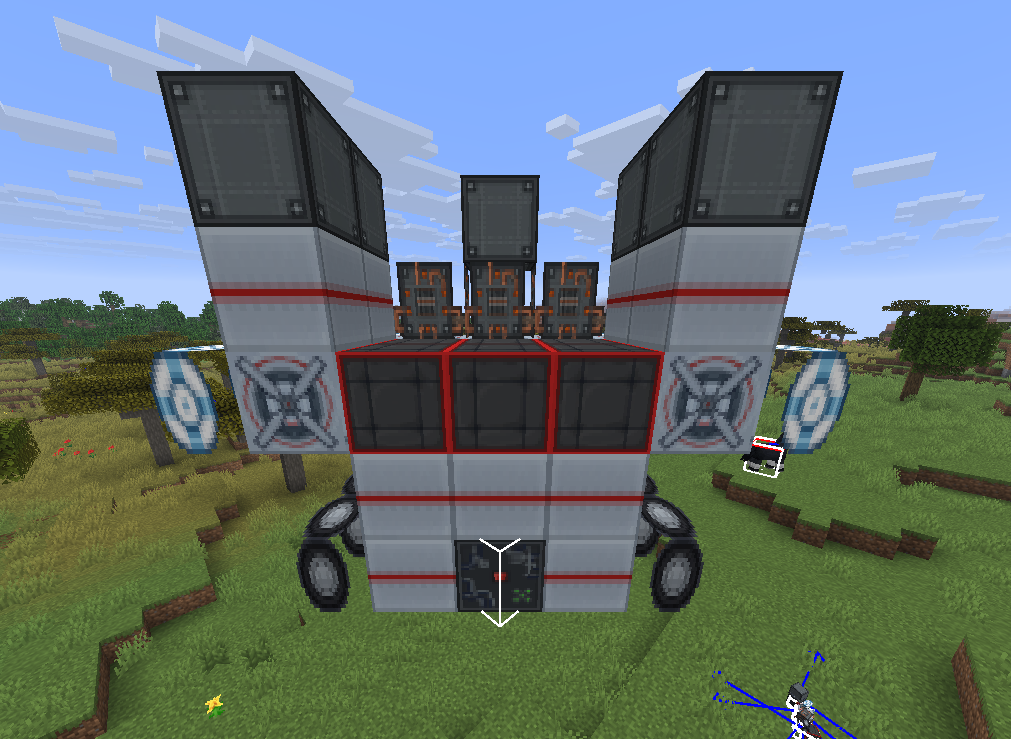
⚡ 升级与助推器
通过升级零件让你的作品更进一步:
- 助推器 — 按住 R 键获得爆发式加速,尾部喷出火焰。更多的助推器意味着更强的动力——但燃料消耗速度会增加 3 倍
- 燃料箱 — 每个燃料箱都会增加车辆的燃油容量
- 钻石与下界合金引擎 — 比普通引擎更快
- 钻石与下界合金轮子 — 速度更快,转向更灵活
- 下界合金零件可在锻造台中从钻石零件升级而来

?️ 四种预置车辆
更喜欢直接驾驶?模组内置了四种现成的车辆:
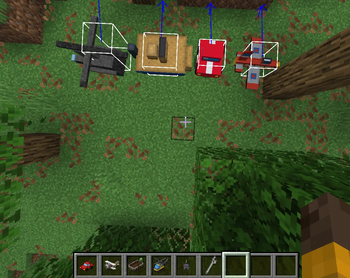
- RC 汽车 — 可以攀爬方块并应对崎岖地形
- RC 船 — 漂浮在水面上并破浪前行,搁浅时也会缓慢爬行
- RC 飞机 — 真实的飞行体验:积累空速以保持空中停留,速度过慢时会失速
- RC 直升机 — 原地悬停,垂直起飞,并可原地旋转。没有失速速度限制
? 后备箱
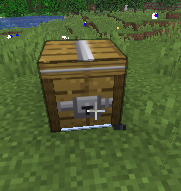
每辆预置车辆都拥有一个27 格的后备箱。潜行 + 右键点击车辆即可打开它。保存并退出游戏后,物品仍会保留在其中。

? 乘客
车辆不仅能载驾驶员。使用多个座椅进行组装,乘客会在各自的位置就座,而由驾驶员操控。带上你的朋友——或者你的动物——一起出行。
? 货运
在你的组装中添加一个货箱方块,它就会变成车辆上的一个货箱,拥有独立的 27 格库存。右键点击货箱以打开它,装入货物,然后将货物运送到任何你想去的地方。货箱固定在车辆上并随其一同转动。
绝不会丢失任何东西:当你拆解车辆时,货箱会变回一个包含原有物品的货箱方块,重新组装时它们会直接放回货箱中。
?️ 车库与胶囊
打包你的车辆并将其停放起来。
- 车辆胶囊 — 潜行 + 对已组装的车辆使用扳手,将整个车辆打包成一个物品:其零件、燃料、货物和名称都会被保存。右键点击地面即可部署它,朝向你看向的方向

- 车库 — 最多可容纳27 个胶囊。将车辆在距离车库 8 格范围内打包,它就会自动停入车库。打开车库,取出一个胶囊,即可准备出发

? 展示架
建造一个展厅。放置在展示架上的任何车辆都会保持停放状态以供展示,右键点击展示架可使其旋转 45°。破坏展示架或打包车辆即可取下它。

?️ 道路
使用路面和道路标线方块铺路。车辆在道路上行驶速度更快,因此可以在你的基地之间修建高速公路。

⛽ 燃料
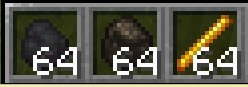
所有车辆均使用煤炭、木炭或烈焰粉作为燃料——使用燃料右键点击车辆即可补充燃油。新组装的车辆会提示你添加燃料,在燃料不足时会发出警告,并在每次加油时显示其燃料水平。在组装中添加燃料箱以增加载油量。
? 车辆生命值
车辆会受到生物、玩家、箭矢、爆炸、火焰和熔岩的伤害。受损的车辆开始冒烟,当生命值为 0 时,车辆会报废——除非修复,否则无法驾驶。
- 使用铁锭右键点击进行修复
- 更大的组装体拥有更高的生命值
- 你自己的乘客不会对其造成伤害
- 可在设置中关闭此功能

? 拖曳
制作牵引绳,然后在两辆载具上使用,将一辆连接到另一辆上。被拖曳的载具会跟在后面,转弯时会摆动。它同样适用于残骸,因此你可以将抛锚的载具拖回家。

? 车灯与喇叭
按 G 开启车头灯。它们会向前射出光束,在夜间照亮周围的地面。按 J 鸣响喇叭——附近的每个人都能听到。

? 涂装与自定义
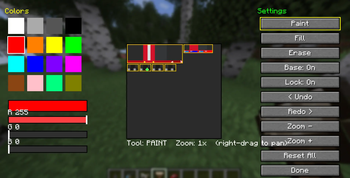
让每辆载具都独一无二。制作画笔,右键点击任意载具,即可在全屏绘图界面中逐像素设计其外观。
- 混合任意颜色:使用 RGB 滑块,或从 16 种预设中选择
- 绘制、填充和擦除:直接在载具纹理上进行操作
- 撤销和重做每次更改,放大查看细节,并右键拖动以平移视角
- 部件轮廓标出车身、驾驶舱、车轮等区域,让你清楚知道正在绘制的部位
- 切换基础纹理:在原设计之上覆盖涂装,或从零开始绘制空白画布
- 复制 & 粘贴:将设计应用到同类型的其他载具上
- 8 个预设槽位:保存你喜爱的设计,随时加载
- 每个设计仅保存至该特定载具,且在多人游戏中对所有人可见
适用于所有五种载具——汽车、飞机、船只、直升机以及你自己组装的建筑。画笔可在生存模式下制作,且初始即可解锁。
? 遥控器
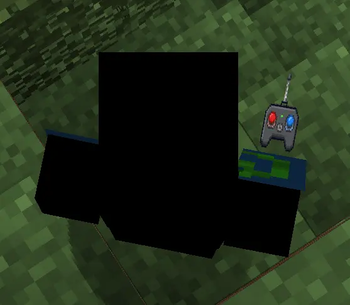
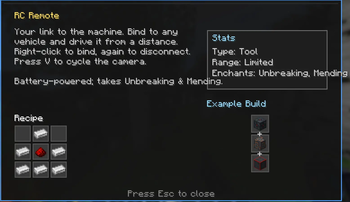
制作RC 遥控器,然后右键点击任意载具进行绑定。再次右键点击可断开连接。绑定后,你可以远程控制该载具。
按 V 切换摄像头视角:载具第一人称视角 → 载具后方第三人称视角 → 回到自身视角。
遥控器由电池供电——驾驶时耐久度会消耗,并且支持无损修复和经验修补。
与现实中的遥控模型一样,遥控器有有限的控制范围。如果将载具发送得太远,信号将会丢失。

? 仪表盘与信息 HUD
驾驶时——无论是坐在载具内还是使用遥控器——仪表盘都会显示你的速度、生命值、燃料、加速状态和车灯状态。你可以选择将其放置在屏幕的哪个角落,并以公里/小时或每秒方块数显示速度。

按 H 调出你所注视载具的屏幕读数——一个快速提示框,一目了然地显示其属性和状态。适用于所有载具,包括预置载具和你自定义组装的载具。
? 指南与驾驶证
初次接触本模组?制作RC 载具指南——一本游戏内的书籍,涵盖从首次组装到车库及升级的所有内容。
然后获取驾驶证。右键点击并用你的名字签名,它将记录你的行驶距离、最高速度和已建造的载具数量。

⚙️ 设置
按 K 打开 RC Vehicles 设置界面:
- 引擎音量
- 物品提示和提示示例的开/关
- 仪表盘的开/关,以及其放置的角落位置
- 速度单位——公里/小时或每秒方块数
- 载具伤害的开/关
- 重置所有设置为默认值
显示设置是个人化的——每位玩家控制自己的设置。

? 控制键
- 右键点击载具(持有遥控器)——绑定或断开连接
- W / S —— 油门与刹车
- A / D —— 转向
- 空格 / Shift —— 爬升与俯冲(飞机、直升机、旋翼建筑)
- R —— 加速(需要加速器)
- G —— 车灯
- J —— 喇叭
- V —— 切换摄像头
- H —— 显示信息 HUD
- K —— 打开设置
- 扳手控制器以组装,或扳手载具以拆解
- 潜行 + 扳手已组装的载具,将其打包进胶囊
- 潜行 + 右键点击预置载具,打开其后备箱
- 铁锭用于修复受损载具
- 牵引绳用于连接两辆载具
- 画笔用于自定义载具外观
- 右键点击载具上的货物箱,打开其存储空间
- 右键点击展示台,启停上面的载具
所有按键均可在 Minecraft 的控制设置菜单中更改。
?️ 合成配方
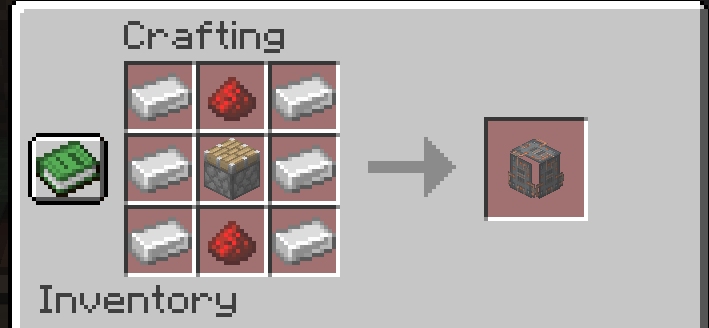
每辆载具、每个部件、每个升级项、遥控器、画笔、车库、道路等,均由常见的生存材料——铁、红石、钻石、下界合金等——合成,且所有配方会自动在你的合成书中解锁。
✅ 前置要求
- Fabric 加载器 + Fabric API
- Minecraft 1.21.4–1.21.11
- 客户端和服务器端均需安装
? 订阅: MC_Infographic
? RC Vehicles
Remote-control vehicles for Minecraft. Drive, sail and fly them yourself, control them from a distance with a handheld remote — or build your own from parts. Upgrade them, park them in garages, pave roads for them, and repair them when they break down.
? Build Your Own
Place part blocks — Controller, Engine, Wheel, Wing, Rotor, Pontoon, Seat, Cargo, and Frame — then use the Wrench on the Controller to assemble them into a working vehicle. It faces whichever way you're looking. How you build it decides how it behaves:
- Rotor — hovers like a helicopter, up and down with your view
- Wing — flies like a plane: build up airspeed for lift, stall if you slow down
- Pontoon — floats on water
- Wheels — drives on land; more wheels turn sharper
- Engines — more engines, more speed
- Seat — required to ride, or control any build with the RC Remote
- Cargo — adds a storage crate you can haul goods in
- Frames — structure and weight; bigger builds are heavier
When you assemble a vehicle it tells you how to fuel it up, so you're never left wondering why it won't move. Wrench the vehicle again to disassemble it and get every part back, in exactly the shape you built it.
⚡ Upgrades & Boosters
Take your builds further with upgrade parts:
- Booster — hold R for a burst of speed with flames out the back. More boosters, more power — but it burns fuel 3x faster
- Fuel Tank — each tank increases how much fuel your vehicle holds
- Diamond & Netherite Engines — faster than the regular engine
- Diamond & Netherite Wheels — more speed and sharper turning
- Netherite parts are upgraded from diamond parts in the Smithing Table
?️ Four Prebuilt Vehicles
Prefer to just drive? Four ready-made vehicles are included:
- RC Car — climbs blocks and handles rough terrain
- RC Boat — floats and cuts through water, and crawls if you beach it
- RC Plane — realistic flight: build up airspeed to stay airborne, and stall if you slow down too much
- RC Helicopter — hovers in place, takes off vertically, and rotates on the spot. No stall speed
? Trunk
Every prebuilt vehicle has a 27-slot trunk. Sneak + right-click the vehicle to open it. Your items stay in it when you save and quit.
? Passengers
Vehicles carry more than just the driver. Build with multiple Seats and passengers ride along at their own spots while the driver steers. Bring your friends — or your animals — along for the ride.
? Cargo
Add a Cargo block to your build and it becomes a crate on the vehicle with its own 27-slot inventory. Right-click the crate to open it, load it up, and haul your goods wherever you drive. The crate rides locked to the vehicle and turns with it.
Nothing gets lost: when you disassemble, the crate turns back into a Cargo block with your items still inside, and they go straight back into the crate when you rebuild.
?️ Garages & Capsules
Pack your vehicles up and park them away.
- Vehicle Capsule — sneak + Wrench a built vehicle to pack the whole thing into one item: its parts, fuel, cargo and name are all saved. Right-click the ground to deploy it again, facing where you look
- Garage — holds up to 27 capsules. Pack a vehicle within 8 blocks of a Garage and it parks straight in. Open the Garage, take a capsule out, and you're ready to go
? Display Stand
Build a showroom. Any vehicle on a Display Stand stays parked for show, and right-clicking the stand turns it 45°. Break the stand or pack the vehicle to take it off.
?️ Roads
Pave the way with Road and Road Line blocks. Vehicles drive faster on roads, so build a highway between your bases.
⛽ Fuel
Every vehicle runs on coal, charcoal, or blaze powder — right-click a vehicle with fuel to top it up. A newly built vehicle tells you to fuel it, warns you when it's running dry, and shows its fuel level each time you refuel. Add Fuel Tanks to your build to carry more.
? Vehicle Health
Vehicles can take damage from mobs, players, arrows, explosions, fire and lava. A damaged vehicle starts smoking, and at 0 HP it's wrecked — it won't drive until you fix it.
- Right-click with iron ingots to repair
- Bigger builds have more health
- Your own passengers can't damage it
- Can be turned off in the settings
? Towing
Craft a Tow Lead, then use it on two vehicles to hitch one to the other. The towed vehicle follows behind, swinging round corners. It works on wrecks too, so you can tow a broken-down vehicle home.
? Headlights & Horn
Press G to switch on the headlights. They shine beams ahead and really light up the ground around you at night. Press J to sound the horn — everyone nearby hears it.
? Paint & Customize
Make every vehicle yours. Craft a Paintbrush, right-click any vehicle, and design its look pixel by pixel in a full painter.
- Mix any color with RGB sliders, or grab one of 16 presets
- Paint, fill, and erase straight onto the vehicle's texture
- Undo and redo every change, zoom in for fine detail, and right-drag to pan around
- Part outlines mark out the body, cabin, wheels, and other sections so you know exactly what you're painting
- Toggle the base texture — paint over the original design, or start from a blank canvas
- Copy & Paste a design onto another vehicle of the same type
- 8 preset slots to save your favourite designs and load them any time
- Every design saves to that specific vehicle and is visible to everyone in multiplayer
Works on all five vehicles — car, plane, boat, helicopter, and your own assembled builds. The Paintbrush is craftable in survival and unlocked from the start.
? The Remote
Craft an RC Remote, then right-click any vehicle to bind to it. Right-click it again to disconnect. Once bound, you control that vehicle from a distance.
Press V to cycle the camera: first-person from the vehicle, third-person behind it, then back to yourself.
The remote runs on a battery — its durability drains while you're driving, and it accepts Unbreaking and Mending.
Like a real RC, the remote has a limited range. Send a vehicle too far and you'll lose the signal.
? Dashboard & Info HUD
While you drive — seated or with the remote — a dashboard shows your speed, HP, fuel, boost and headlights. Pick which corner of the screen it sits in, and show speed in km/h or blocks per second.
Press H to bring up an on-screen readout for the vehicle you're looking at — a quick tooltip showing its stats and status at a glance. Works on every vehicle, both the prebuilt ones and your own custom builds.
? Guide & Driver's License
New to the mod? Craft the RC Vehicles Guide — an in-game book that explains everything, from your first build to garages and upgrades.
Then grab a Driver's License. Right-click to sign it with your name, and it keeps track of your distance driven, top speed and vehicles built.
⚙️ Settings
Press K to open the RC Vehicles settings screen:
- Engine volume
- Item tooltips and tooltip examples on or off
- Dashboard on or off, and which corner it sits in
- Speed units — km/h or blocks per second
- Vehicle damage on or off
- Reset everything to defaults
Display settings are personal — each player controls their own.
? Controls
- Right-click a vehicle with the remote — bind or disconnect
- W / S — throttle and brake
- A / D — turn
- Space / Shift — climb and dive (plane, helicopter, rotor builds)
- R — boost (needs a Booster)
- G — headlights
- J — horn
- V — cycle camera
- H — show the info HUD
- K — open settings
- Wrench a Controller to assemble, or a vehicle to disassemble
- Sneak + Wrench a built vehicle to pack it into a capsule
- Sneak + right-click a prebuilt vehicle to open its trunk
- Iron ingot on a damaged vehicle to repair it
- Tow Lead on two vehicles to hitch them together
- Paintbrush a vehicle to customize its look
- Right-click a Cargo crate on a vehicle to open its storage
- Right-click a Display Stand to turn the vehicle on it
All keys can be changed in Minecraft's Controls menu.
?️ Crafting
Every vehicle, every part, every upgrade, the remote, the paintbrush, the garage, roads and more are crafted from common survival materials — iron, redstone, diamonds, netherite and more — and all recipes unlock in your recipe book automatically.
✅ Requirements
- Fabric Loader + Fabric API
- Minecraft 1.21.4–1.21.11
- Required on both client and server
? Subscribe: MC_Infographic

下载 RC Vehicles
下载 RC Vehicles
下载 RC Vehicles
下载 RC Vehicles
下载 RC Vehicles
下载 RC Vehicles
下载 RC Vehicles
下载 RC Vehicles
下载 RC Vehicles
下载 RC Vehicles
暂无更新日志
关于这个资源的讨论、问题反馈与使用心得
还没有讨论,来发第一帖吧
你是这个资源的作者?登录后可认领此资源。
相似资源
 模组

一个用于收集生物掉落物的多区块模组。
 模组

显示你正在注视的方块的信息。(适用于 Minecraft 1.16+ 的 Hwyla/Waila 分支)
 模组
在游戏画面角落显示附近世界地形、玩家、生物和实体的地图。可创建路径点,帮助你找到标记过的位置。
 模组

查看物品与配方
 模组
使用 JavaScript 编辑配方、添加自定义物品、编写世界事件!
 模组
AE2:一款流行的自动化与存储模组
评论 0
登录后参与评分
还没有评论,来抢沙发吧