
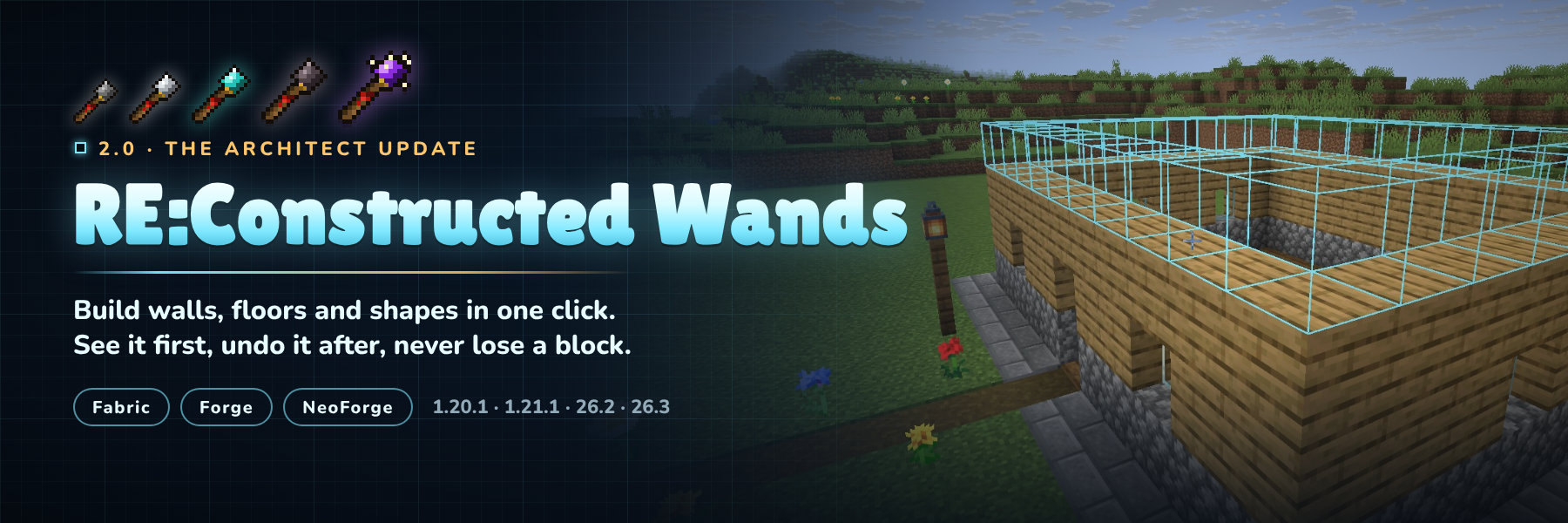
一键搞定那些枯燥的建造工作。 将魔杖指向墙壁,下一层方块就会自动出现。填充地板、削平悬崖、用石砖替换圆石,或者双击即可生成一个圆环、盒子或整面墙。点击前你可以预览每一个即将放置的方块,支持撤销任何操作,并且魔杖会从你的潜影盒、绑带、末影箱或你绑定它的箱子中获取所需方块。
适用于 Fabric 和 NeoForge(1.20.1 版本为 Forge)· Minecraft 1.20.1, 1.21.1, 26.2 和 26.3 · 可安装于服务器和客户端

2.0 版本对模组进行了全面重构。以下是从 1.x 版本以来的变更内容:
- 两个新核心:Exchange(交换) 可将表面方块替换为另一种方块,Architect(建筑师) 可在两个角点之间构建线条、墙壁、地板、盒子和立方体,并在中心周围构建圆形和圆环
- 撤销与重做:支持 Ctrl+Z 和 Ctrl+Y,最多十步深度,且绝不会重复生成方块
- 方块来源包括 潜影盒、绑带、末影箱和已绑定的箱子
- Ctrl + 滚轮 设置每次点击放置的方块数量,潜行 + 滚轮 锁定方向
- 新增 HUD 界面、模式轮盘、全新的设置屏幕以及按颜色编码的预览功能
- 在所有加载器上均尊重领地与保护机制,在移动任何方块前进行检查
- 服务器配置同步至所有玩家,支持拒绝标签(deny tags),并提供
/wands reload命令 - 全新纹理,配方不再与原版冲突,魔杖可修复并附魔
- 你的 1.x 版本魔杖保留其核心和设置

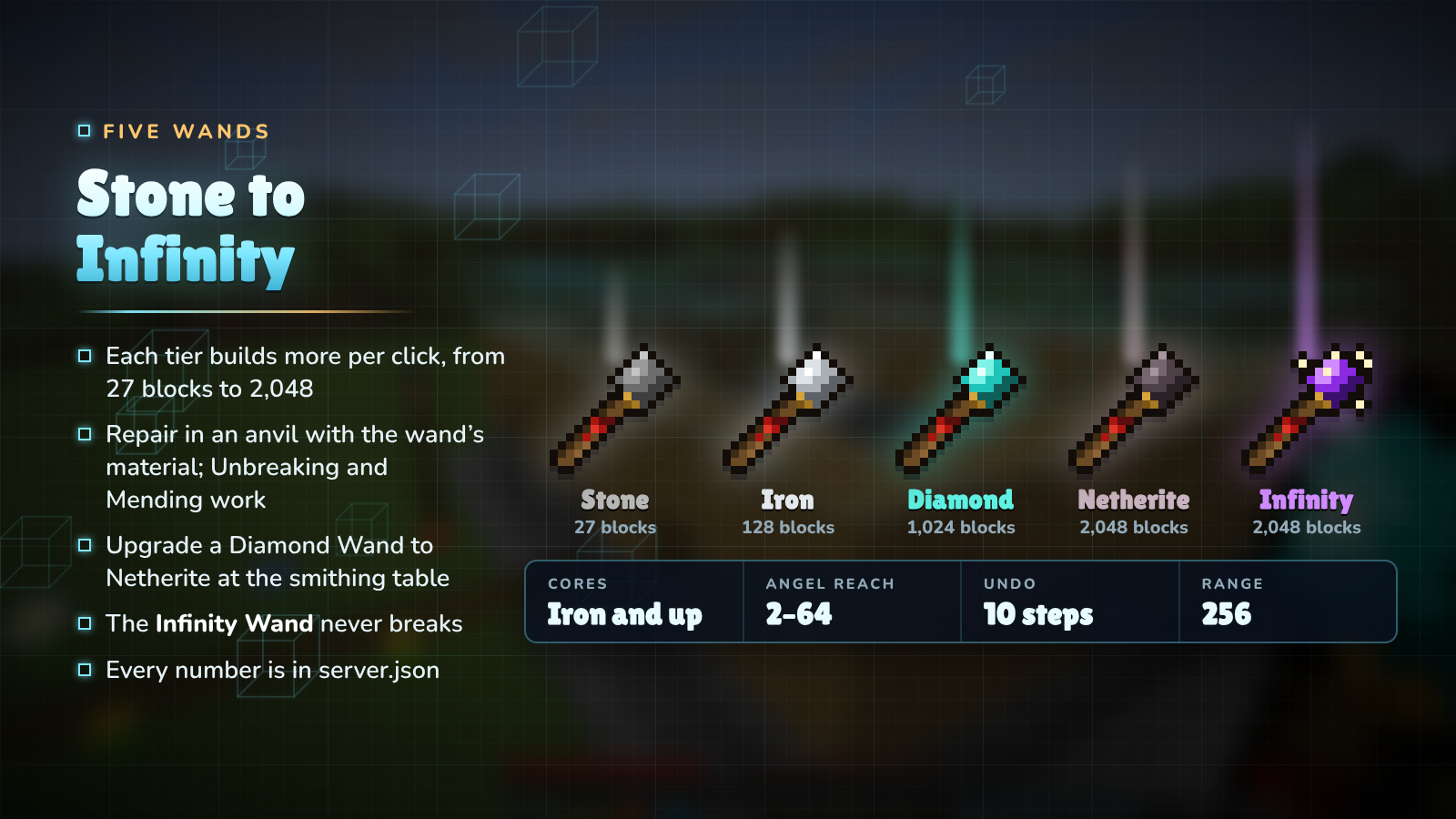
| 魔杖 | 耐久度 | 每次点击方块数 | 天使范围 | 破坏 / 交换 | 核心 |
|---|---|---|---|---|---|
| Stone | 131 | 27 | 2 | 4 | 无 |
| Iron | 250 | 128 | 4 | 9 | 有 |
| Diamond | 1,561 | 1,024 | 16 | 81 | 有 |
| Netherite | 2,031 | 2,048 | 32 | 128 | 有 |
| Infinity | 不可破坏 | 2,048(创造模式下为 8,192) | 64 | 128 | 有 |
魔杖可以在铁砧中使用对应材料进行修复,并可附魔无损附魔和经验修补。下界合金魔杖是钻石魔杖的锻造升级版本。服务器管理员可以修改 server.json 中的每个数值。

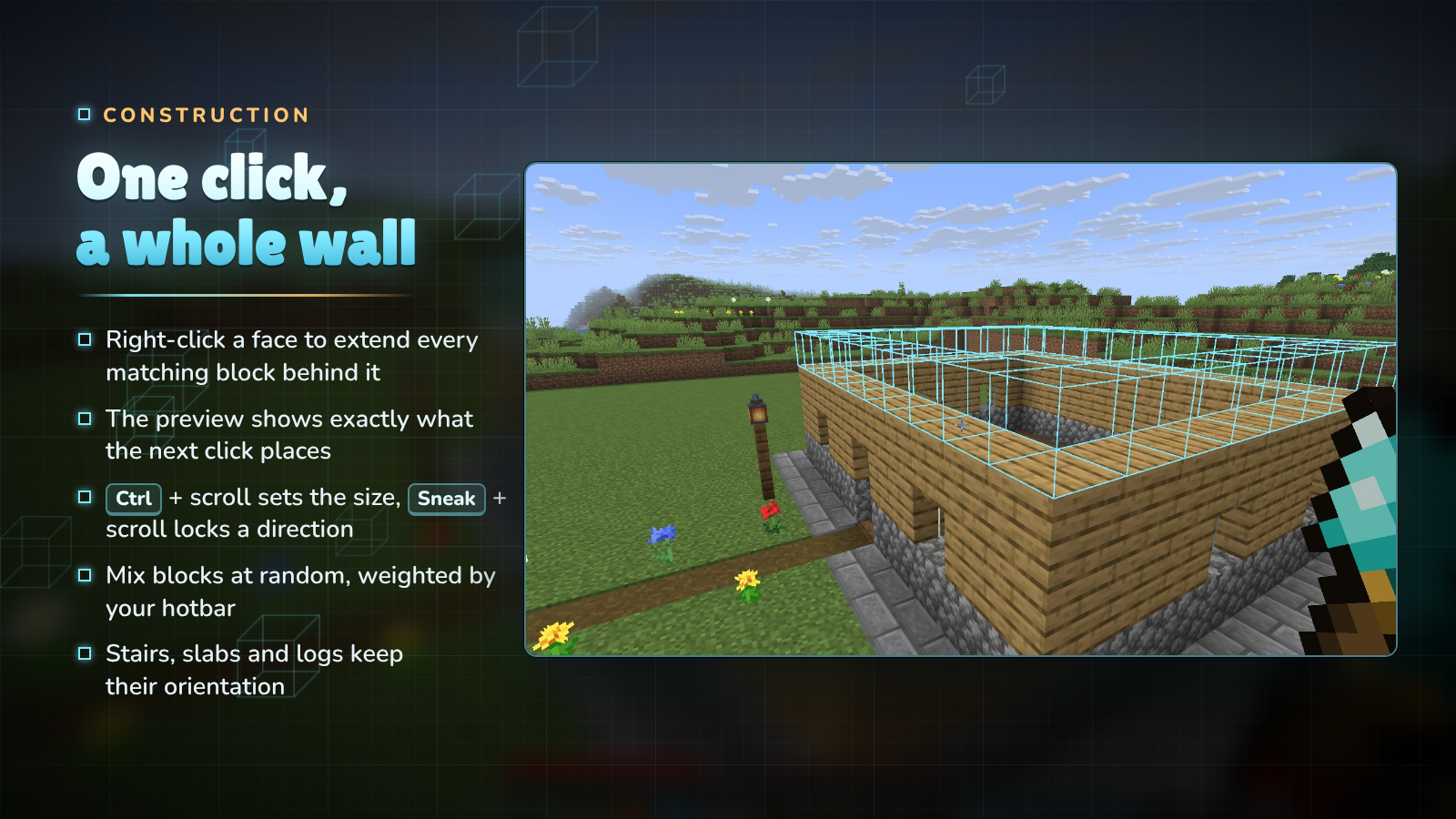
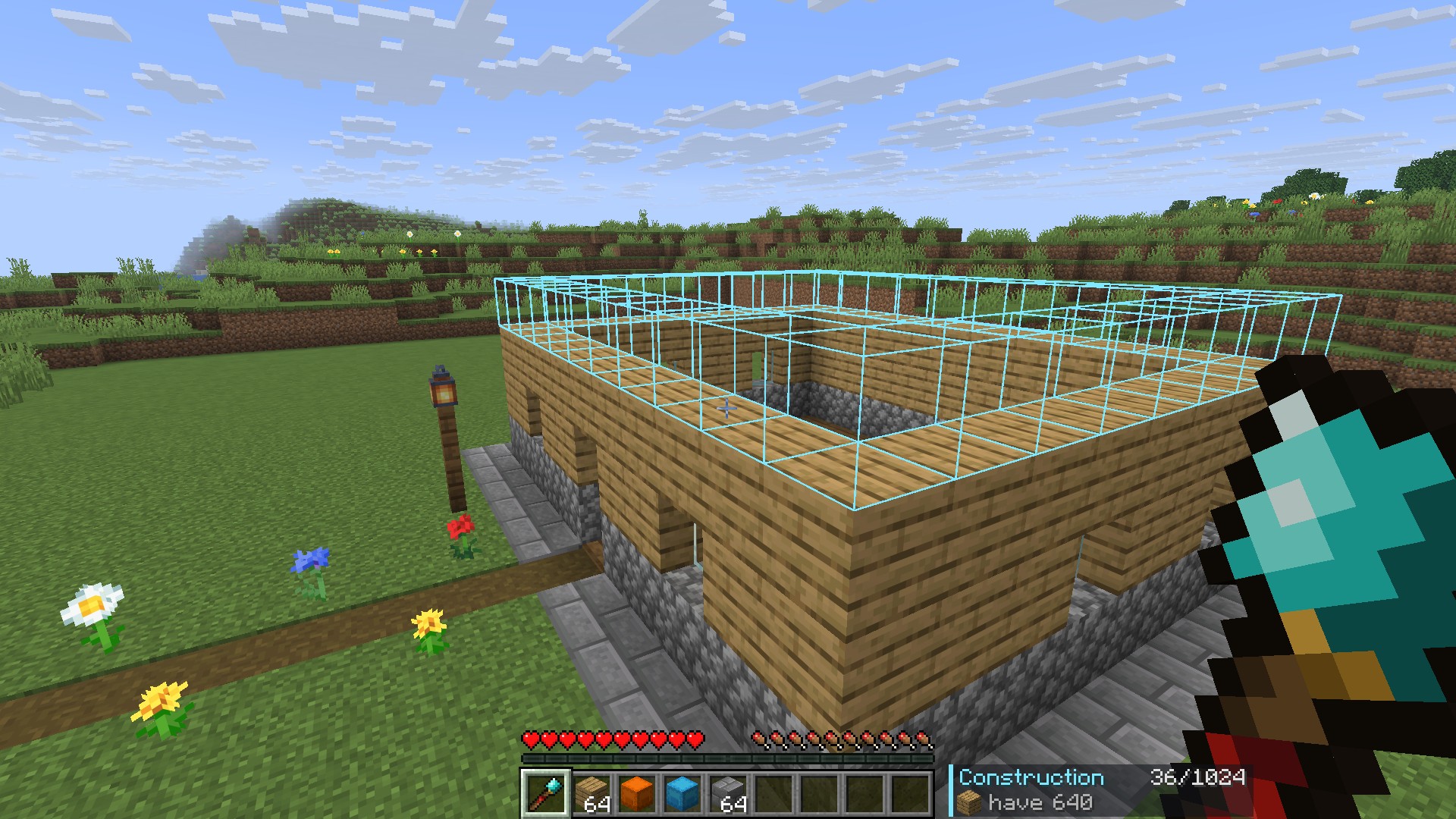
右键点击方块的面,魔杖会将该面复制到后面所有匹配的方块上:在地板顶部添加一层、使墙壁变厚、或拓宽路径边缘。轮廓线精确显示下一次点击将放置的内容,并在方块不足时显示为红色。
- Ctrl + 滚轮 设置大小,范围从单个方块到魔杖的最大限制。
- 潜行 + 滚轮 锁定方向:水平、垂直、南北或东西。
- Match(匹配) 决定何种方块被视为相同:精确匹配、相似(泥土和草方格视为同类)或任意方块。
- Random(随机) 混合快捷栏中的方块,根据每种方块占据的槽位数量加权分配。
- 楼梯、台阶、原木和柱子保持其原有朝向。

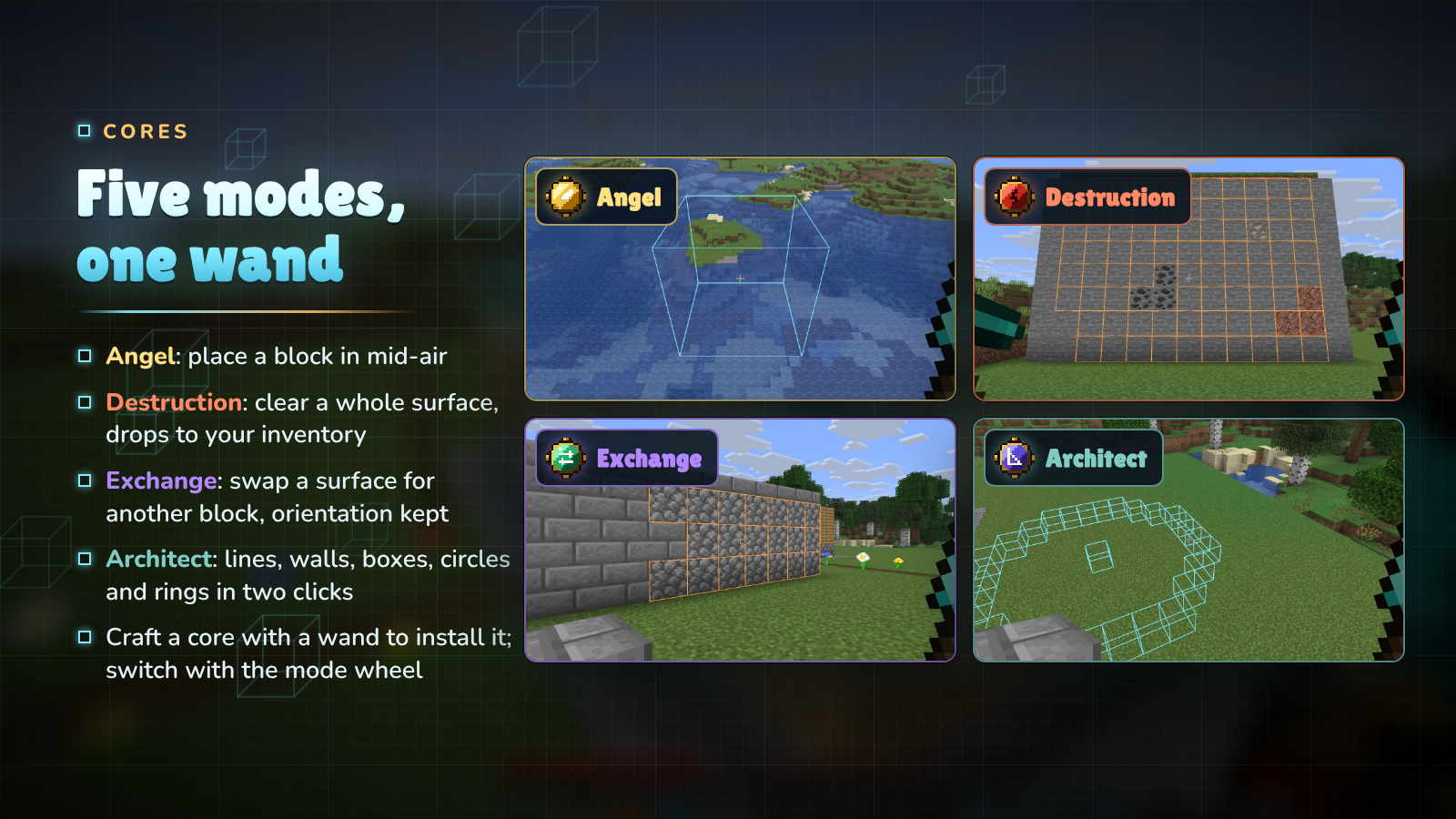
将核心与 Iron、Diamond、Netherite 或 Infinity 魔杖合成以安装它。一把魔杖可同时持有所有核心;通过模式轮盘(按住 R)或设置屏幕切换模式。
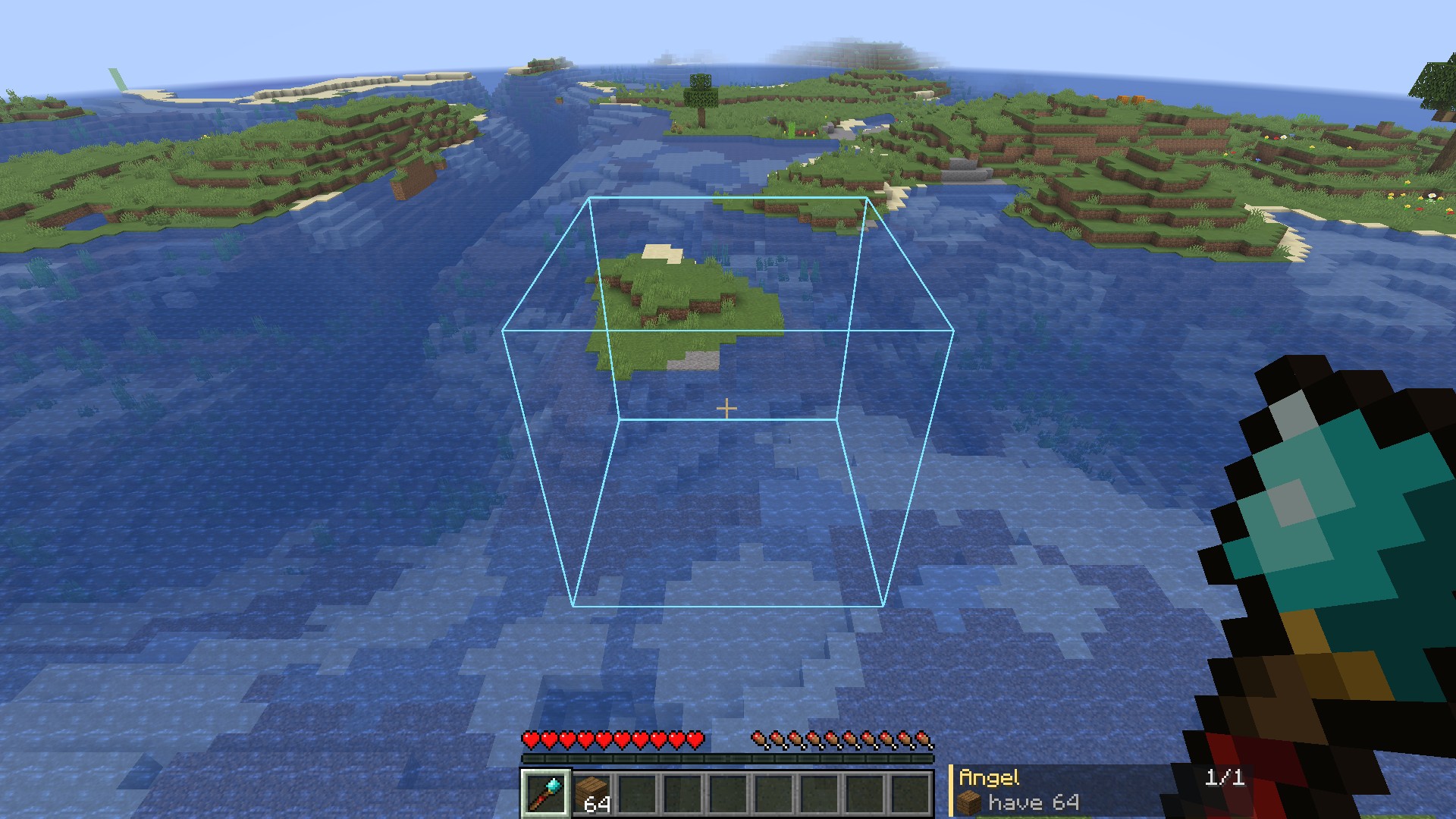
- Angel Core(天使核心):在你面前空中或点击的方块后方放置一个方块。无需脚手架即可搭建桥梁、天空基地和脚手架。
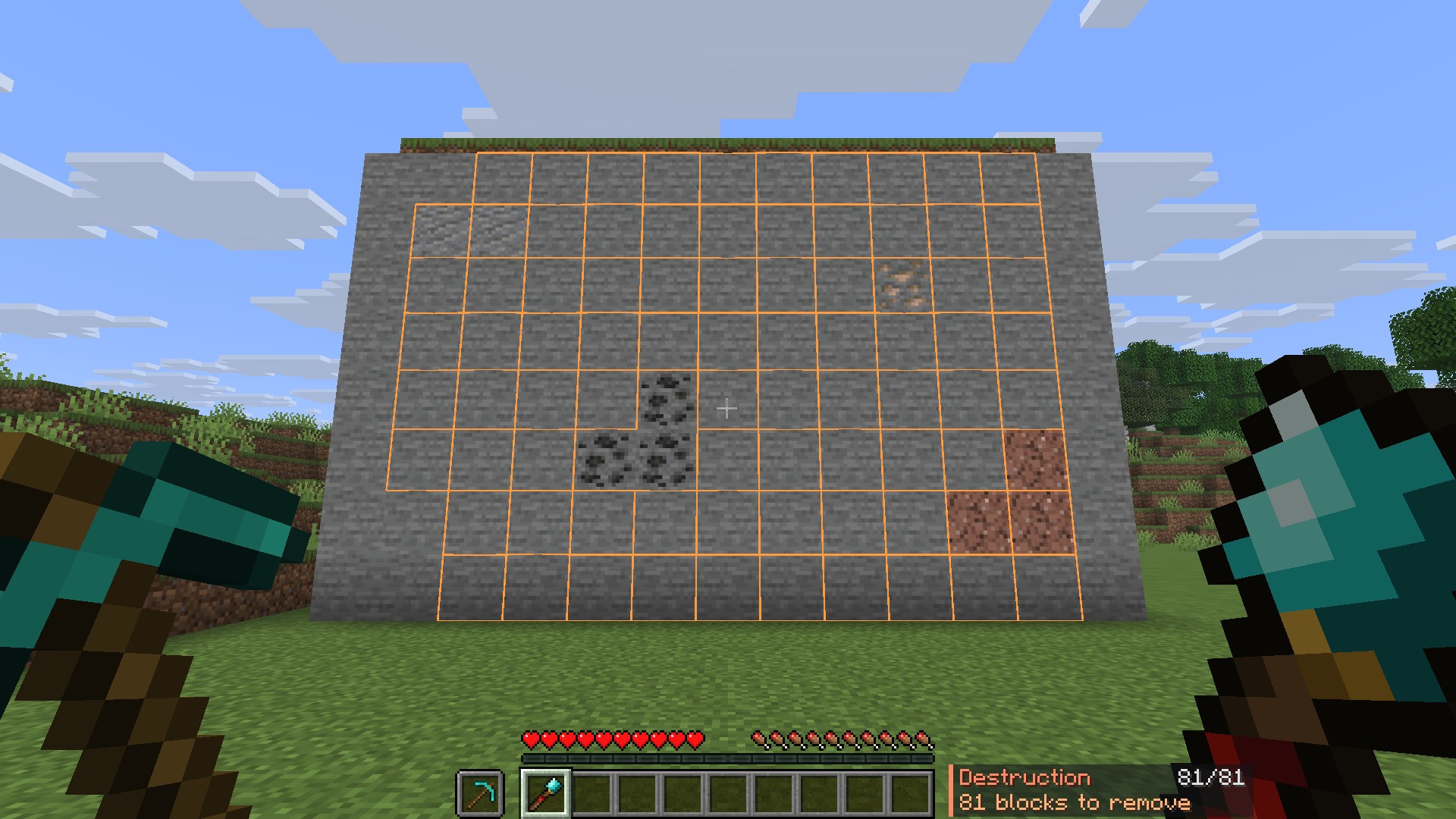
- Destruction Core(破坏核心):移除匹配方块的暴露表面。掉落物直接进入你的背包,就像你用副手工具挖掘一样,因此如果副手持镐子带有精准采集,你将直接获得方块本身。
- Exchange Core(交换核心)(新增):将表面方块替换为你副手中的方块。楼梯和原木保持其朝向,旧方块会返还给你。
- Architect Core(建筑师核心)(新增):通过两次点击构建形状。详见下文。

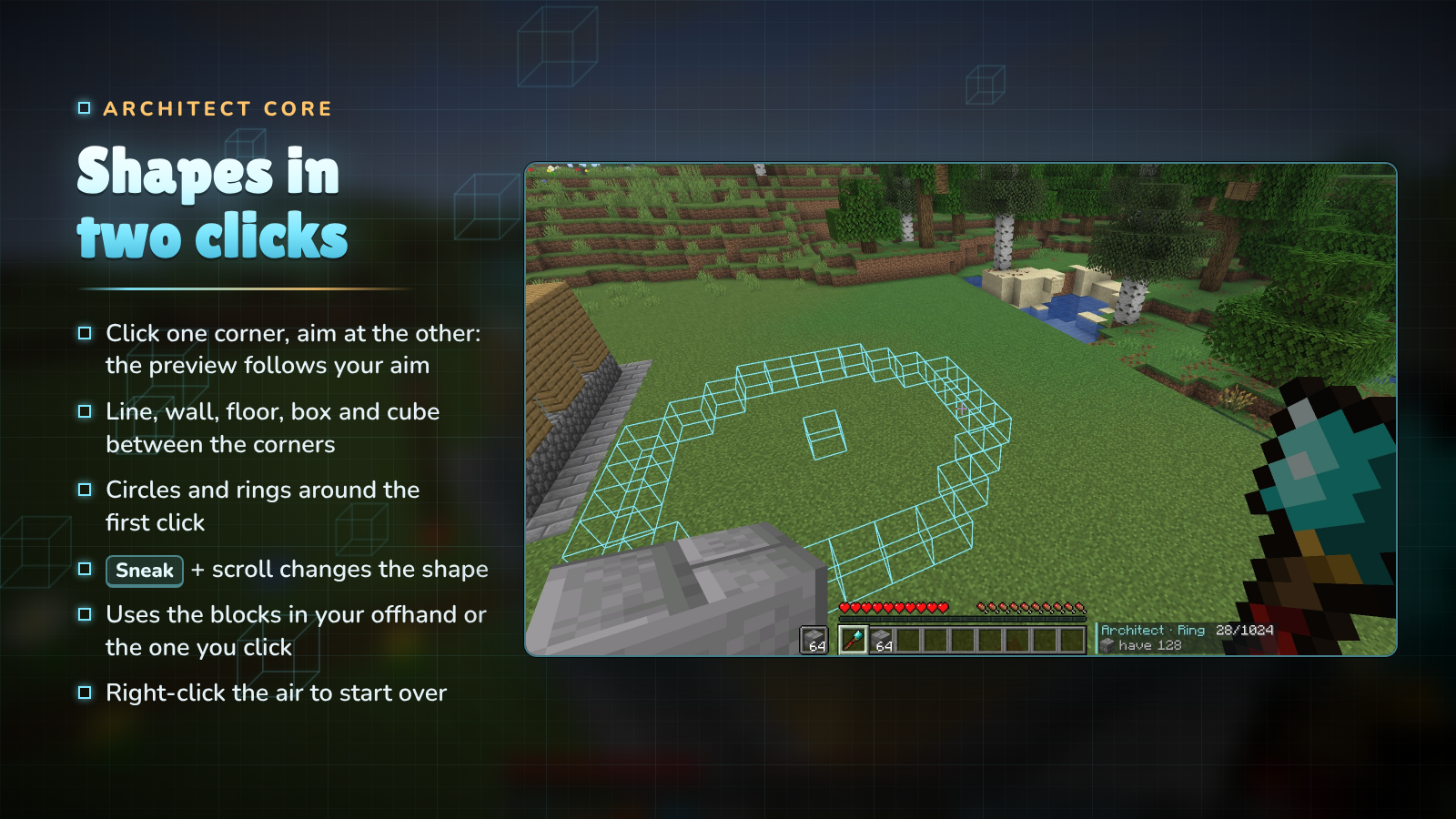
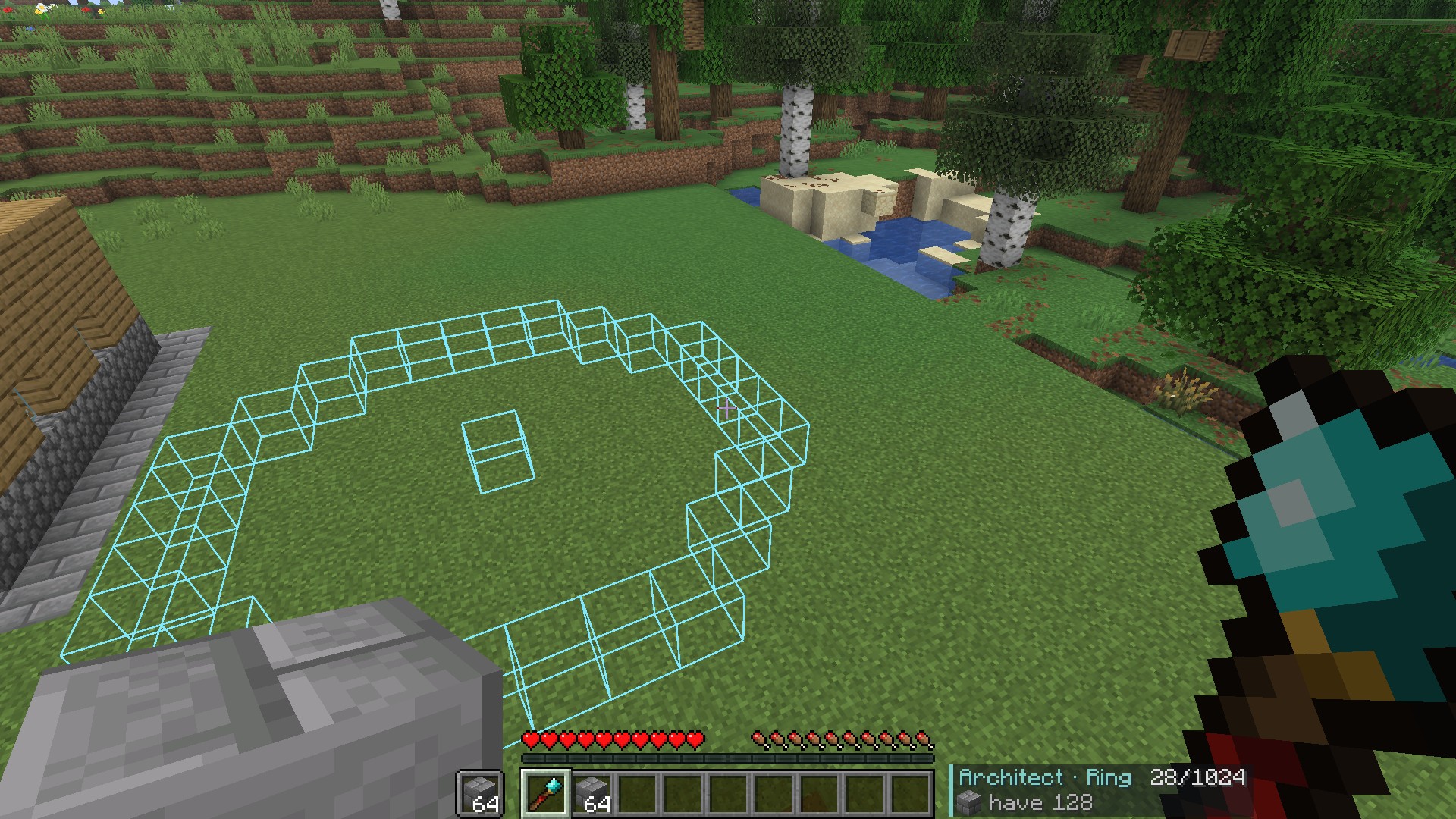
右键点击第一个角点,然后瞄准第二个角点:预览随你的瞄准移动,再次右键点击即可构建。在两个角点之间填充 线条、墙壁、地板、盒子或立方体;圆形或圆环 则以第一次点击为中心,延伸至第二次点击的位置。使用潜行 + 滚轮选择形状,右键点击空气以清除第一次点击并重新开始。

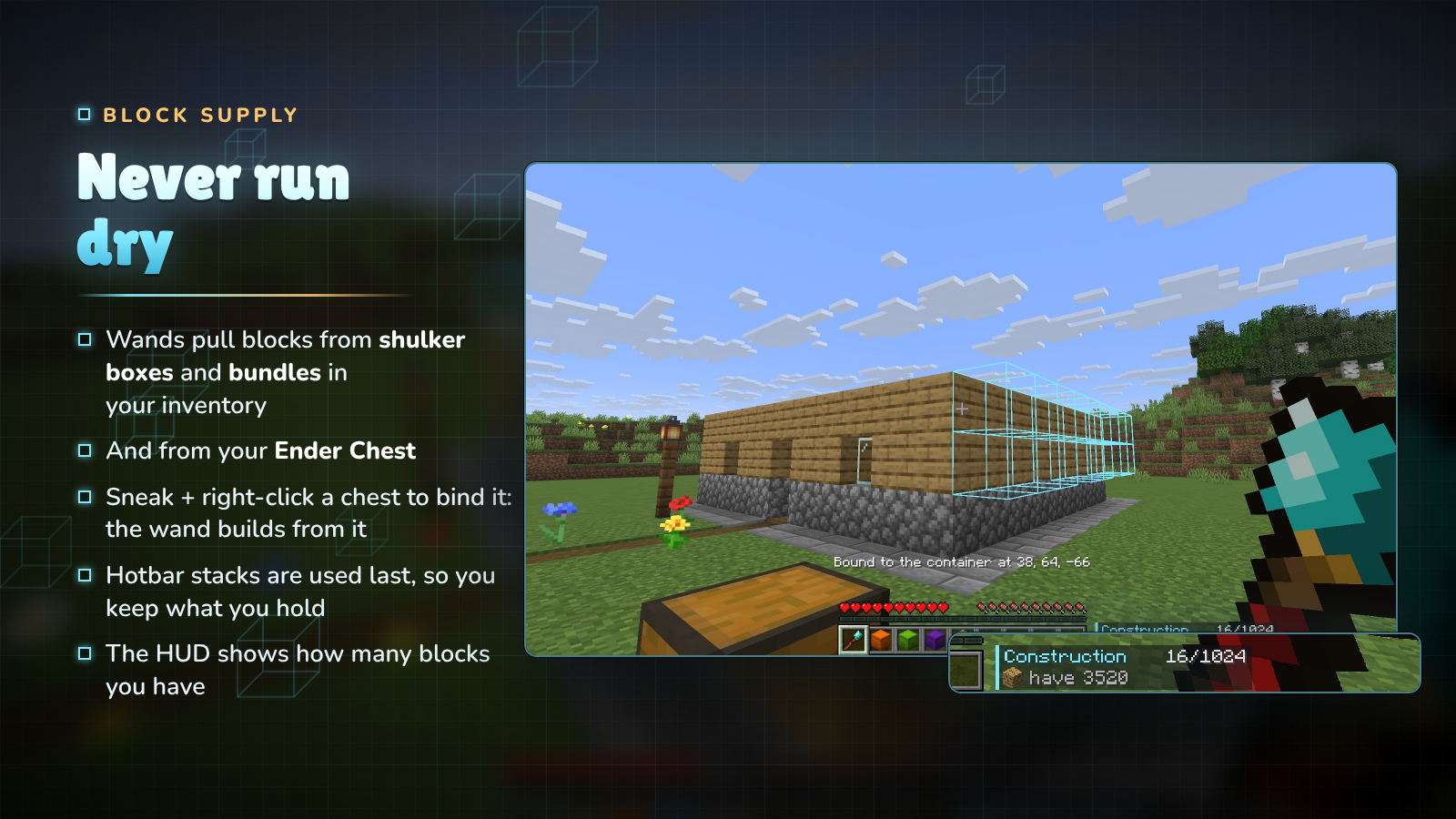
魔杖按以下顺序查找方块:
- 背包中的松散堆叠方块,
- 你携带的 潜影盒和绑带,
- 你 绑定 的箱子(潜行 + 右键点击箱子、桶或潜影盒;再次右键取消绑定),
- 你的 末影箱,
- 最后是快捷栏和副手,以确保你手持的堆叠方块被最后使用。
HUD 显示你在所有这些来源中共有多少方块。仅使用普通方块:改名或附魔过的堆叠方块绝不会误放。

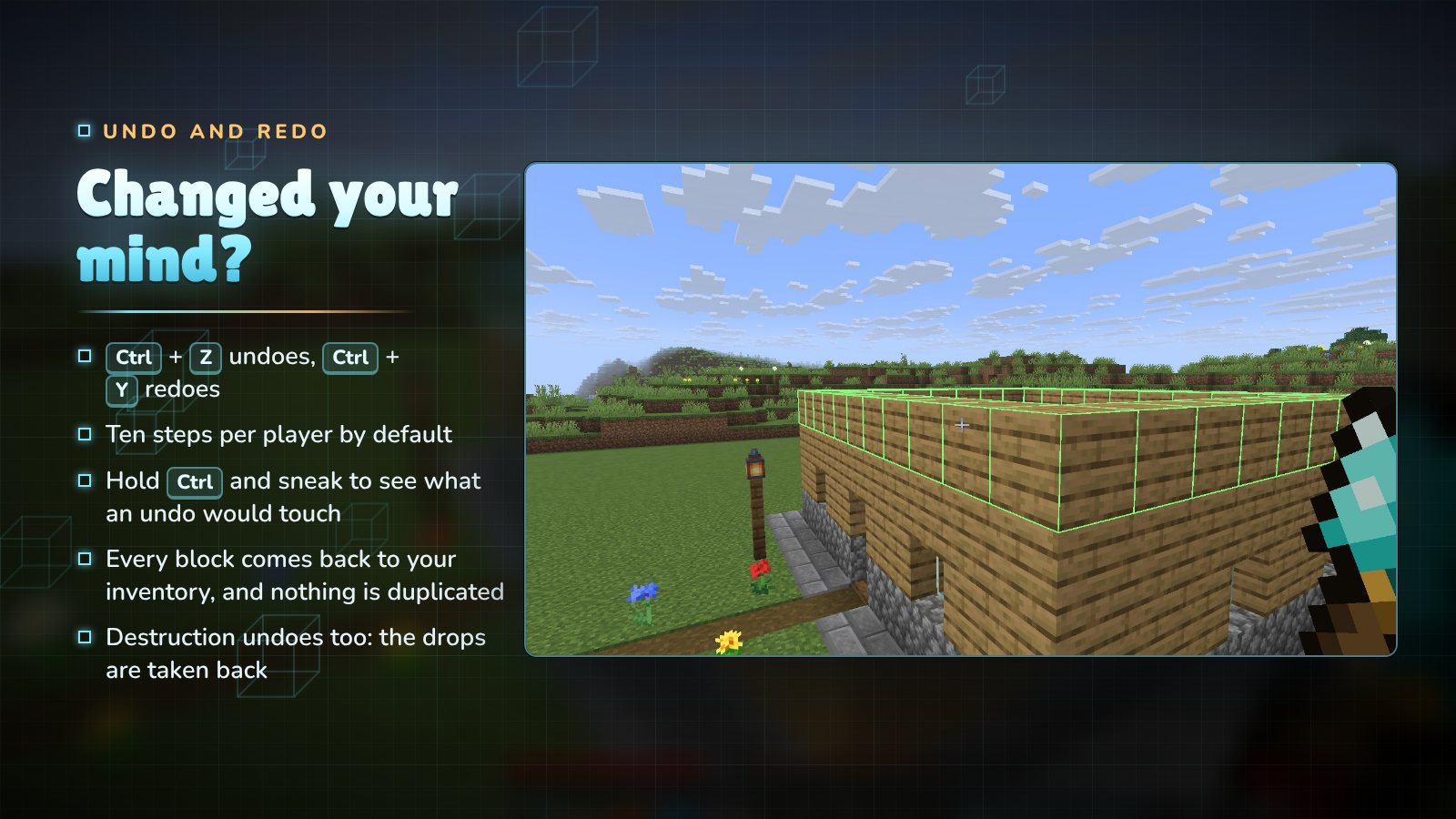
Ctrl + Z 撤销你上一次的法杖操作,Ctrl + Y 重做它,默认支持十步回溯。按住 Ctrl 键并潜行(Shift)可以预览撤销操作影响的范围。撤销功能会精确归还被移除的方块,并收回由“破坏”模式产生的掉落物,因此无法用于复制物品。1.x 版本的旧手势(按住 Ctrl、潜行并右键点击)仍然有效。

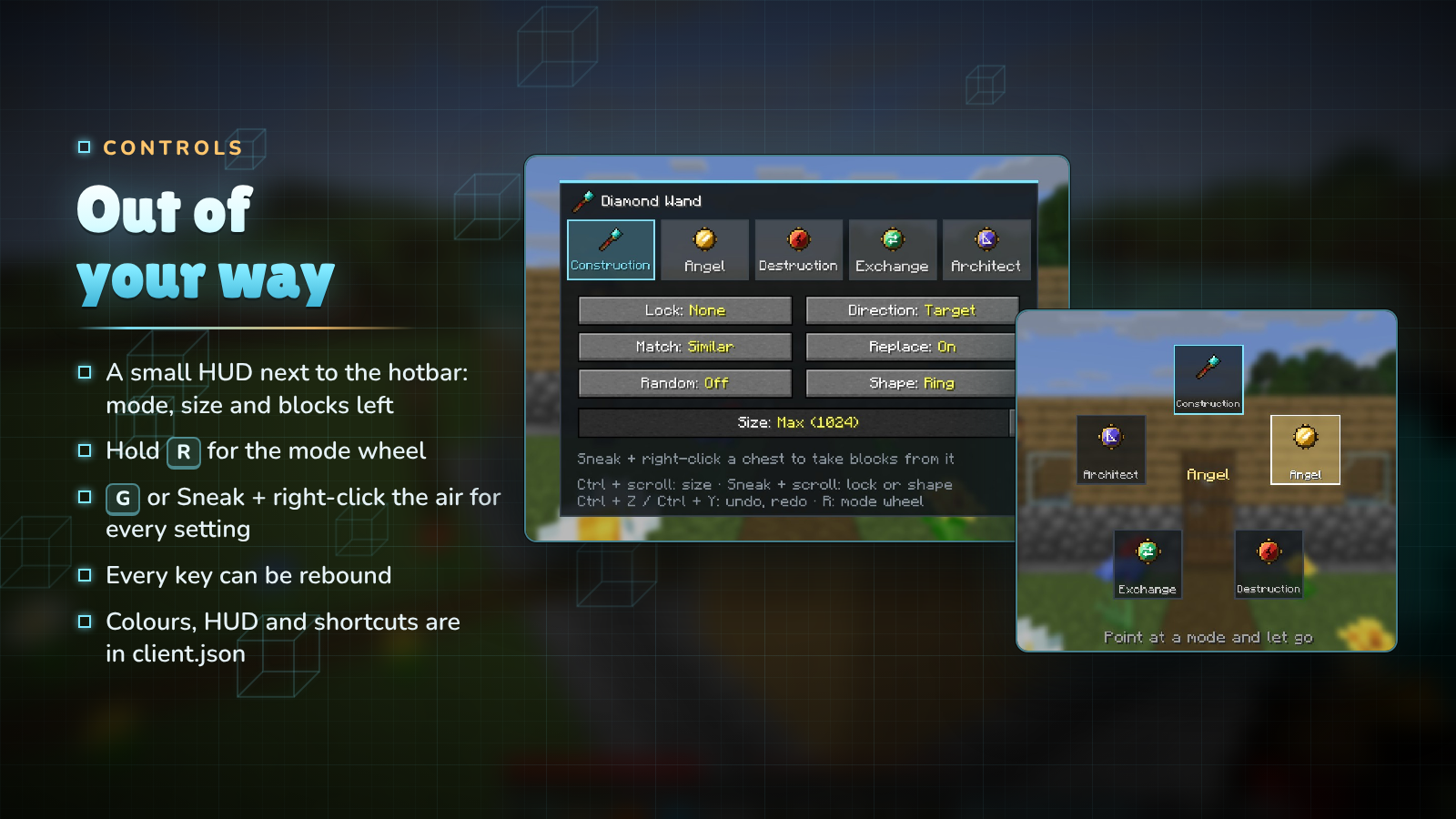
| 输入 | 作用 |
|---|---|
| 右键点击方块 | 使用当前模式 |
| 右键点击空气 | 天使:在空中放置 · 建筑师:清除角落 |
| G,或潜行 + 右键点击空气 | 打开设置界面 |
| 按住 R | 模式轮盘:指向一个模式后松开 |
| Ctrl + 滚轮 | 调整大小 |
| 潜行 + 滚轮 | 方向锁定,或建筑师的形状 |
| Ctrl + Z / Ctrl + Y | 撤销 / 重做 |
| 潜行 + 右键点击容器 | 绑定或解绑为方块来源 |
所有按键均可在控制菜单中重新绑定,client.json 文件可用于关闭 HUD、预览、滚轮手势或快捷键,并更改预览颜色。

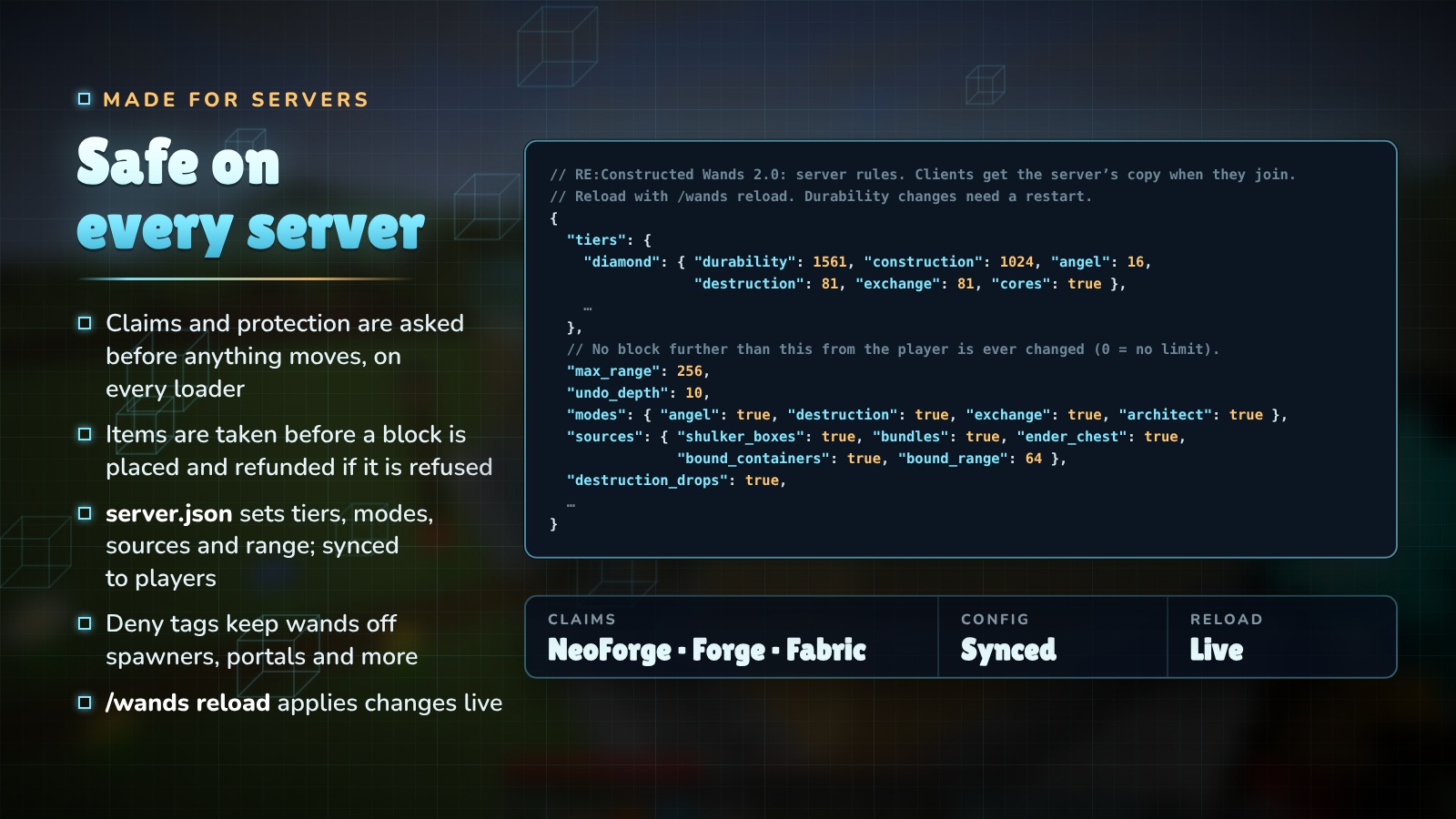
- 领地与保护:任何物品移动前都会检查每个方块。NeoForge 和 Forge 会触发正常的放置和破坏事件(以便领地模组进行拦截),而在 Fabric 上,法杖会调用实现 Common Protection API(已包含)的领地模组,并触发 Fabric 的破坏事件。
- 防止复制:物品会在方块放置前被取走,若放置被拒绝则退还;末影箱通过其物品数据编辑;门和床永远不会半放;撤销操作绝不会生成物品。
config/reconstructedwands/server.json:包含等级限制、耐久度、可用核心、创造模式限制、最大范围、撤销深度、方块来源、破坏模式是否产生掉落物以及相似方块组等配置。该文件会发送给每位玩家,确保预览效果与服务器实际行为一致。使用/wands reload命令可实时应用更改。- 禁止标签:位于
#reconstructedwands:denied中的方块永远不会被法杖放置、移除或交换(默认包括基岩、刷怪笼、传送门、命令方块等);#reconstructedwands:no_dismantle保护矿石和可疑沙子免受破坏和交换模式的影响。

- 法杖:右上角放入材料,中间放入红石,左下角放入木棍(圆石、铁锭、钻石或下界之星用于制作无限法杖)。下界合金法杖:在锻造台上升级钻石法杖获得。
- 核心:中心周围环绕玻璃板,具体配方如下:
- 天使:一根羽毛和两个金锭
- 破坏:一块钻石板和两把钻石镐
- 交换:一颗末影珍珠和两个绿宝石
- 建筑师:一个指南针和两个紫水晶碎片
- 安装核心:将法杖和核心任意放置在合成网格中即可。

| Minecraft | Fabric | NeoForge / Forge | Java |
|---|---|---|---|
| 26.3 | ✔ (Fabric API) | ✔ NeoForge | 25 |
| 26.2 | ✔ (Fabric API) | ✔ NeoForge | 25 |
| 1.21.1 | ✔ (Fabric API) | ✔ NeoForge | 21 |
| 1.20.1 | ✔ (Fabric API) | ✔ Forge | 17 |
选择文件名中包含你的 Minecraft 版本和加载器的文件,例如
reconstructedwands-fabric-1.21.1-2.0.0.jar。

我的 1.x 法杖还能用吗? 可以。物品 ID 未更改,法杖保留了原有的核心和设置。
服务器和客户端都需要安装吗? 是的。它添加了物品,而客户端负责绘制预览和 HUD。
它会允许玩家在领地上搞破坏吗? 不会。任何更改发生前,都会像手动放置方块一样,通过加载器的保护钩子检查每个方块。
我能阻止法杖接触某些方块吗? 可以:通过数据包将它们添加到 #reconstructedwands:denied 标签中。
我能削弱或增强法杖吗? 可以。每个等级的限制和耐久度都在 server.json 中配置,并且可以禁用任何核心。
破坏模式附魔兼容吗? 兼容。掉落物计算基于副手工具的效果。


Discord · [源代码与问题反馈]( Salem/modern-building-wands) · 支持我们 · 由 NightBeam Studio 制作
Build the boring parts in one click. Point a wand at a wall and the next layer appears. Fill a floor, clear a cliff face, swap cobblestone for stone bricks, or click twice and get a ring, a box or a whole wall. You see every block before you click, you can undo anything, and the wand takes its blocks from your shulker boxes, bundles, Ender Chest or a chest you bind it to.
Fabric and NeoForge (Forge on 1.20.1) · Minecraft 1.20.1, 1.21.1, 26.2 and 26.3 · install on server and client
Version 2.0 rebuilds the whole mod. Here's what changed from 1.x:
- Two new cores: Exchange swaps a surface for another block, Architect builds lines, walls, floors, boxes and cubes between two corners, and circles and rings around a centre
- Undo and redo with Ctrl+Z and Ctrl+Y, ten steps deep, and nothing is ever duplicated
- Blocks come from shulker boxes, bundles, your Ender Chest and a bound chest
- Ctrl + scroll sets how many blocks a click places, Sneak + scroll locks a direction
- A HUD, a mode wheel, a new settings screen and colour-coded previews
- Claims and protection are respected on every loader, checked before anything moves
- A server config synced to every player, deny tags, and
/wands reload - New textures, recipes that no longer clash with vanilla, repairable and enchantable wands
- Your 1.x wands keep their cores and settings
| Wand | Durability | Blocks per click | Angel reach | Destruction / Exchange | Cores |
|---|---|---|---|---|---|
| Stone | 131 | 27 | 2 | 4 | no |
| Iron | 250 | 128 | 4 | 9 | yes |
| Diamond | 1,561 | 1,024 | 16 | 81 | yes |
| Netherite | 2,031 | 2,048 | 32 | 128 | yes |
| Infinity | unbreakable | 2,048 (8,192 in creative) | 64 | 128 | yes |
Wands repair in an anvil with their material and take Unbreaking and Mending. The Netherite Wand is a smithing
upgrade of the Diamond Wand. Server owners can change every number in server.json.
Right-click the face of a block and the wand copies that face across every matching block behind it: the top of a floor adds a layer, the side of a wall makes it thicker, the edge of a path makes it wider. The outline shows exactly what the next click will place, and turns red where you are short of blocks.
- Ctrl + scroll sets the size, from one block up to the wand's limit.
- Sneak + scroll locks the direction: horizontal, vertical, north/south or east/west.
- Match decides what counts as the same block: exact, similar (dirt and grass together) or anything.
- Random mixes the blocks in your hotbar, weighted by how many slots hold each one.
- Stairs, slabs, logs and pillars keep their orientation.
Craft a core together with an Iron, Diamond, Netherite or Infinity Wand to install it. A wand holds every core at once; switch modes with the mode wheel (hold R) or the settings screen.
- Angel Core: place a block in mid-air in front of you, or behind the block you click. Bridges, sky bases and scaffolding without scaffolding.
- Destruction Core: remove the exposed surface of matching blocks. The drops go straight to your inventory, as if you broke them with the tool in your offhand, so a Silk Touch pickaxe there gives you the blocks themselves.
- Exchange Core (new): swap a surface for the block in your offhand. Stairs and logs keep their facing, and the old blocks come back to you.
- Architect Core (new): build shapes with two clicks. See below.
Right-click the first corner, then aim at the second: the preview follows your aim and the next right-click builds it. A line, wall, floor, box or cube fills the space between the two corners; a circle or ring is centred on the first click and reaches out to the second. Pick the shape with Sneak + scroll, and right-click the air to clear the first click and start again.
Wands look for blocks in this order:
- loose stacks in your inventory,
- shulker boxes and bundles you carry,
- the chest you bound the wand to (Sneak + right-click a chest, barrel or shulker box; again to unbind),
- your Ender Chest,
- and last your hotbar and offhand, so the stacks you hold are kept longest.
The HUD shows how many blocks you have across all of them. Only plain blocks are used: a renamed or enchanted stack is never placed by mistake.
Ctrl + Z undoes your last wand action and Ctrl + Y redoes it, ten steps back by default. Hold Ctrl and sneak to see what an undo would touch. Undo gives back exactly the blocks it removes and takes back exactly the drops a Destruction gave you, so it can never be used to duplicate items. The 1.x gesture (hold Ctrl, sneak and right-click) still works.
| Input | What it does |
|---|---|
| Right-click a block | use the current mode |
| Right-click the air | Angel: place in mid-air · Architect: clear the corner |
| G, or Sneak + right-click the air | settings screen |
| Hold R | mode wheel: point at a mode and let go |
| Ctrl + scroll | size |
| Sneak + scroll | direction lock, or the Architect's shape |
| Ctrl + Z / Ctrl + Y | undo / redo |
| Sneak + right-click a container | bind or unbind it as a block source |
Every key can be rebound in the controls menu, and client.json turns off the HUD, the previews, the scroll gestures or
the shortcuts and changes the preview colours.
- Claims and protection: every block is checked before any item moves. NeoForge and Forge fire their normal place and break events (so claim mods can cancel them), and on Fabric the wand asks the claim mods that implement the Common Protection API (bundled) and fires Fabric's break events.
- No duplication: the item is taken before the block is placed and refunded if the placement is refused, shulker boxes are edited through their item data, doors and beds are never placed half, and undo never prints items.
config/reconstructedwands/server.json: tier limits and durability, which cores work, the creative limit, the maximum range, undo depth, block sources, whether Destruction gives drops, and groups of similar blocks. It is sent to every player, so previews always match what the server will do./wands reloadapplies changes live.- Deny tags: blocks in
#reconstructedwands:deniedare never placed, removed or swapped by a wand (bedrock, spawners, portals, command blocks and more by default);#reconstructedwands:no_dismantleprotects ores and suspicious sand from Destruction and Exchange.
- Wands: the material in the top-right corner, redstone in the middle and a stick in the bottom-left (cobblestone, iron, diamond, or a nether star for the Infinity Wand). Netherite: upgrade a Diamond Wand at a smithing table.
- Cores: glass panes around the centre, with
- Angel: a feather and two gold ingots
- Destruction: a block of diamond and two diamond pickaxes
- Exchange: an ender pearl and two emeralds
- Architect: a compass and two amethyst shards
- Install a core: put the wand and the core anywhere in a crafting grid.
| Minecraft | Fabric | NeoForge / Forge | Java |
|---|---|---|---|
| 26.3 | ✔ (Fabric API) | ✔ NeoForge | 25 |
| 26.2 | ✔ (Fabric API) | ✔ NeoForge | 25 |
| 1.21.1 | ✔ (Fabric API) | ✔ NeoForge | 21 |
| 1.20.1 | ✔ (Fabric API) | ✔ Forge | 17 |
Pick the file whose name has your Minecraft version and loader, for example
reconstructedwands-fabric-1.21.1-2.0.0.jar.
Do my 1.x wands still work? Yes. Item IDs are unchanged and wands keep their cores and settings.
Is it needed on the server and the client? Both. It adds items, and the client draws the previews and the HUD.
Will it let players grief claimed land? No. Every block is checked with the loader's protection hooks before anything changes, the same way a block placed by hand is.
Can I stop wands from touching certain blocks? Yes: add them to #reconstructedwands:denied with a datapack.
Can I make wands weaker or stronger? Yes. Every tier's limits and durability are in server.json, and any core
can be turned off.
Does Destruction work with Fortune and Silk Touch? Yes. Drops are worked out with the tool in your offhand.
Discord · Source and issues · Support Us · Made by NightBeam Studio

下载 RE:Constructed Wands
需要联机服务器吗?
稳定流畅、一键部署,几分钟即可和朋友联机开服
最低仅需 8 元/月 即可畅快联机
下载 RE:Constructed Wands
需要联机服务器吗?
稳定流畅、一键部署,几分钟即可和朋友联机开服
最低仅需 8 元/月 即可畅快联机
下载 RE:Constructed Wands
下载 RE:Constructed Wands
下载 RE:Constructed Wands
需要联机服务器吗?
稳定流畅、一键部署,几分钟即可和朋友联机开服
最低仅需 8 元/月 即可畅快联机
下载 RE:Constructed Wands
需要联机服务器吗?
稳定流畅、一键部署,几分钟即可和朋友联机开服
最低仅需 8 元/月 即可畅快联机
下载 RE:Constructed Wands
下载 RE:Constructed Wands
需要联机服务器吗?
稳定流畅、一键部署,几分钟即可和朋友联机开服
最低仅需 8 元/月 即可畅快联机
下载 RE:Constructed Wands
需要联机服务器吗?
稳定流畅、一键部署,几分钟即可和朋友联机开服
最低仅需 8 元/月 即可畅快联机
下载 RE:Constructed Wands
需要联机服务器吗?
稳定流畅、一键部署,几分钟即可和朋友联机开服
最低仅需 8 元/月 即可畅快联机
RE:Constructed Wands 2.0.1
变更
- 创造模式下法杖再次对屏障生效。 2.0.0 版本添加了一个法杖永不触碰的方块列表,其中包含了屏障、光方块和结构空洞,导致无法再建造不可见的屏障墙。现在,允许创造模式下的玩家使用这三种方块,因为他们本就可以手动放置它们。在生存模式中,这些方块仍被禁止;而基岩、命令方块、刷怪笼、传送门以及列表中的其余方块则对所有玩家保持禁用状态。服务器所有者可以通过
#reconstructedwands:creative_only方块标签来更改此规则适用的方块。
无需配置文件或存档更改。
RE:Constructed Wands 2.0.0 — The Architect Update
对 RE:Constructed Wands 进行了全面重构。核心理念保持不变(法杖可同时放置或移除大量方块),但代码、纹理、合成表、界面和控制方式均为全新,且该模组现在在所有加载器和版本中行为一致。1.x 版本的法杖仍可正常使用:物品 ID 相同,法杖保留其核心和设置。
适用于 Minecraft 1.20.1、1.21.1、26.2 和 26.3 的 Fabric(需要 Fabric API)和 NeoForge(1.20.1 为 Forge)。
新增
- 交换核心 (Exchange Core):将匹配方块的暴露表面与副手所持方块进行交换。楼梯、台阶和原木保持其朝向,旧方块会以物品形式返还给你。
- 建筑师核心 (Architect Core):右键点击第一个角,瞄准第二个位置(预览会跟随你的瞄准方向),再次右键点击以在两者之间构建直线、墙壁、地板、盒子或立方体,或以第一次点击为中心构建圆形或环形。潜行 + 滚轮可选择形状;右键空气可清除第一次点击。
- 撤销与重做:使用 Ctrl+Z 和 Ctrl+Y,每位玩家支持十步操作(可配置)。按住 Ctrl 并潜行可查看撤销操作影响的范围。撤销会精确归还它移除的方块,并收回破坏核心给予的所有掉落物。1.x 的手势(按住 Ctrl,潜行 + 右键)仍然有效。
- 方块供给:法杖优先从松散堆叠的物品中获取方块,然后是背包中的末影箱和包裹,接着是绑定的容器(潜行 + 右键箱子、 barrels 或末影箱以绑定或解绑),然后是末影箱,最后是快捷栏和副手。
- 数量控制:Ctrl + 滚轮设置每次点击可放置的方块数量,范围从 1 到法杖的最大限制。
- 方向锁定:潜行 + 滚轮可切换水平、垂直、南北、东西或无锁定。
- HUD 显示:位于快捷栏旁,显示当前模式、方块计数及限制、所需方块及其持有数量,或错误提示。
- 模式轮盘:按住 R,指向所需模式后松开。
- 设置界面(按 G,或潜行 + 右键空气),包含所有模式和选项、大小滑块以及绑定的容器。
- 颜色编码预览:区分待放置方块、待移除或交换方块、缺少的方块以及撤销预览。
- 随机调色板:根据快捷栏中每种方块的槽位数量加权分配。
- 服务器配置
config/reconstructedwands/server.json:各阶位的耐久度和限制、核心开关、创造模式限制、三维最大范围、撤销深度、方块来源及绑定范围、破坏核心掉落物、下落时的天使核心功能,以及相似方块组。该配置会发送给每位玩家以确保预览与服务器一致。使用/wands reload(权限等级 2)可实时应用更改。 - 客户端配置
config/reconstructedwands/client.json:预览及其颜色、HUD、撤销快捷键、滚轮手势以及潜行 + 右键屏幕。 - 拒绝标签:
#reconstructedwands:denied(永不放置、移除或交换;默认包括基岩、刷怪笼、传送门、命令方块和结构方块等)和#reconstructedwands:no_dismantle(破坏核心或交换核心永不移除;默认包括矿石、萌芽紫水晶、可疑方块和被感染的方块)。 - 法杖可在铁砧中使用其对应材料进行修复,并支持耐久度和经验修补。下界合金法杖是钻石法杖的锻造升级产物。
- 为每种法杖和核心更新了新纹理,并采用了新的模组图标。
变更
- 破坏核心:无论使用何种加载器,都将掉落物直接存入你的背包,并根据副手中的工具计算效果(因此效率之富和精准采集生效)。1.x 版本在 NeoForge 上掉落物品,而在 Fabric 上则删除了它们。
- 合成表:法杖的合成材料放置在右上角,红石粉在中间,木棍在左下角,从而避免与原版合成表冲突。核心的合成使用玻璃板围绕中心物品排列。
- 天使核心:在你前方两个方块处的空中放置一个方块,或者在你点击方块后的第一个空闲位置放置一个方块,向上延伸至该阶位的射程深度(石头阶位为 2 格,无限阶位为 64 格)。
- 建造遵循与 1.x 相同的规则(你点击的面会被复制到其后匹配的方块上),支持精确、相似和任意匹配。
- Fabric 现在拥有与 NeoForge 相同的控制和界面。
修复
- 领地和保护检查:在任何物品移动之前,针对每个方块进行检查,适用于所有加载器。NeoForge 和 Forge 触发其放置和破坏事件(取消的放置操作会精确回滚)。Fabric 通过捆绑的 Common Protection API 询问领地模组,并触发 Fabric 的破坏事件。1.x 仅在 NeoForge 上进行检查,且在放置后才触发放置事件。
- 防止复制:在放置方块前扣除物品,若放置被拒绝则退还;容器物品通过其物品数据重写;两格高的方块(如门、床、高植物)永远不会被放置;撤销操作无法生成物品。
- 1.x 版本曾宣传末影箱和包裹作为方块来源,但实际上并未使用;现在已修复并可用。
- 法杖尊重世界高度、世界边界、出生点保护和冒险模式,且永远不会改变距离玩家超过
max_range的方块。
针对模组和整合包开发者
- 每个 Minecraft 版本拥有一个代码库,绝大部分逻辑位于
common/目录中;加载器模块仅负责连接事件。 - 设置存储在法杖自定义数据的
wand_options下(包括cores、cores_sel、lock、direction、replace、match、random,以及size、shape、anchor和bound)。 - MIT 许可证声明来自 Construction Wand (ThetaDev),这是 1.x 版本的基础,现已包含在 JAR 文件中。
关于这个资源的讨论、问题反馈与使用心得
还没有讨论,来发第一帖吧
你是这个资源的作者?登录后可认领此资源。
相似资源
 模组

显示你正在注视的方块的信息。(适用于 Minecraft 1.16+ 的 Hwyla/Waila 分支)
 模组

原版世界生成优化模组
 模组
在游戏画面角落显示附近世界地形、玩家、生物和实体的地图。可创建路径点,帮助你找到标记过的位置。
 模组

查看物品与配方
 模组
使用 JavaScript 编辑配方、添加自定义物品、编写世界事件!
 模组
AE2:一款流行的自动化与存储模组
评论 0
登录后参与评分
还没有评论,来抢沙发吧