
Recreative
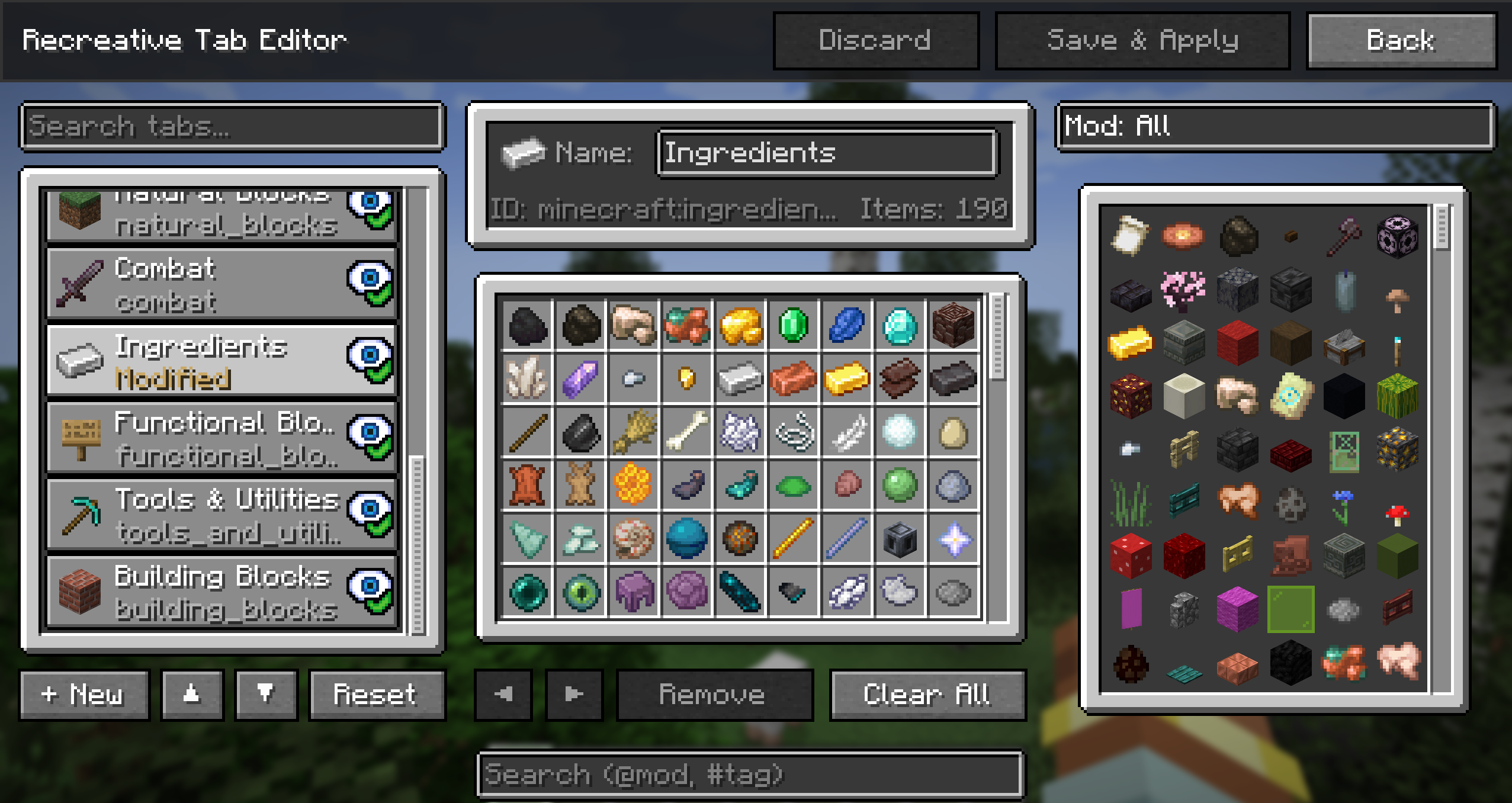
Recreative 是一款强大的数据驱动模组,赋予整合包开发者和玩家对创造模式标签页的完全控制权!使用简单的 JSON 配置文件,你可以在不编写任何代码的情况下,彻底重组、修改、隐藏或创建全新的创造模式标签页。
功能特性
- 在创造菜单中完全隐藏不需要的原版或模组标签页。
- 重命名标签页、更改其图标,或添加和移除特定物品。
- 一个功能完备的游戏内标签页编辑器!
- 从零开始构建全新的标签页,使用您自定义的图标和物品列表。
- 重新排列标签页顺序,并强制它们从左到右按指定顺序显示。
- 除了将物品追加到标签页末尾外,您还可以使用
after(之后)或before(之前)放置规则,将物品精确插入到您想要的位置。 - 使用 Minecraft 标签(例如
#minecraft:logs、#c:ores)一次性添加或移除整组物品。 - 通过热重载即时调整您的 UI,无需重启游戏即可看到更改效果。
用法与配置
Recreative 会监视 Minecraft 实例中的 ./config/recreative/ 文件夹。您可以在该文件夹内创建任意数量的 .json 文件来组织您的规则。
示例规则文件
[
  {
    "action": "remove_tab",
    "tabs": ["minecraft:building_blocks"]
  },
  {
    "action": "custom_tab",
    "tabs": ["my_pack:magic"],
    "name": "Magical Items",
    "icon": "minecraft:amethyst_shard",
    "add_items": [
      "minecraft:enchanted_book",
      "#minecraft:potions"
    ]
  }
]
查看 wiki 以获取所有操作、高级物品放置和语法的文档。
命令
Recreative 提供了一些有用的命令,帮助您管理配置并在游戏中轻松查找 ID。
/recreative reload- 热重载您的recreative_settings.json以及config/recreative/文件夹中的所有规则文件,并立即重建创造菜单。/recreative dump <tabs|items|blocks|all>- 将注册的 ID 导出为位于config/recreative_exports/中的格式良好的 JSON 文件。非常适合查找脚本所需的精确命名空间 ID。
游戏内设置
常规配置选项可以在游戏内访问(需安装 Cloth Config)。这包括全局切换模组的开启/关闭,以及一个调试选项,用于显示内部标签页 ID,该选项会将所有标签页名称替换为其注册表 ID,从而帮助您更快地编写配置文件。
许可
致谢
图标由 Nekomaster 制作!
Recreative
Recreative is a powerful, data-driven mod that gives modpack developers and players complete control over Creative Mode tabs! Using simple JSON configuration files, you can completely reorganize, modify, hide, or create entirely new Creative Tabs without writing a single line of code.
Features
- Completely hide unwanted vanilla or modded tabs from the Creative Menu.
- Rename tabs, change their icons, or add and remove specific items.
- A fully functional in-game tab editor!
- Build brand new tabs from scratch with your own custom icons and item lists.
- Reorder tabs and force them to appear in a specific order from left to right.
- Instead of just appending items to the end of a tab, you can inject them exactly where you want using
afterorbeforeplacement rules. - Add or remove entire groups of items at once using Minecraft tags (e.g.,
#minecraft:logs,#c:ores). - Tweak your UI on the fly with hot reloading, so you can see your changes instantly without restarting the game.
Usage & Configuration
Recreative watches the ./config/recreative/ folder in your Minecraft instance. You can create as many .json files inside this folder as you want to organize your rules.
Example Rule File
[
  {
    "action": "remove_tab",
    "tabs": ["minecraft:building_blocks"]
  },
  {
    "action": "custom_tab",
    "tabs": ["my_pack:magic"],
    "name": "Magical Items",
    "icon": "minecraft:amethyst_shard",
    "add_items": [
      "minecraft:enchanted_book",
      "#minecraft:potions"
    ]
  }
]
Check out the wiki for documentation on all actions, advanced item placement, and syntax.
Commands
Recreative provides a couple useful commands to help you manage your configuration and easily find IDs without leaving the game.
/recreative reload- Hot-reloads yourrecreative_settings.jsonand all rule files in theconfig/recreative/folder and instantly rebuilds the creative menu./recreative dump <tabs|items|blocks|all>- Exports registered IDs into nicely formatted JSON files located inconfig/recreative_exports/. Perfect for finding the exact namespace IDs needed for your scripts.
In-Game Settings
General config options can be accessed in-game (when Cloth Config is installed). This includes toggling the mod on/off globally, and a debug option to show internal tab IDs, which replaces all tab names with their registry ID to help you write your config files faster.
License
Credits
Icon made by Nekomaster!

下载 Recreative
需要联机服务器吗?
稳定流畅、一键部署,几分钟即可和朋友联机开服
最低仅需 8 元/月 即可畅快联机
下载 Recreative
需要联机服务器吗?
稳定流畅、一键部署,几分钟即可和朋友联机开服
最低仅需 8 元/月 即可畅快联机
下载 Recreative
需要联机服务器吗?
稳定流畅、一键部署,几分钟即可和朋友联机开服
最低仅需 8 元/月 即可畅快联机
下载 Recreative
下载 Recreative
下载 Recreative
下载 Recreative
需要联机服务器吗?
稳定流畅、一键部署,几分钟即可和朋友联机开服
最低仅需 8 元/月 即可畅快联机
下载 Recreative
需要联机服务器吗?
稳定流畅、一键部署,几分钟即可和朋友联机开服
最低仅需 8 元/月 即可畅快联机
下载 Recreative
需要联机服务器吗?
稳定流畅、一键部署,几分钟即可和朋友联机开服
最低仅需 8 元/月 即可畅快联机
下载 Recreative
需要联机服务器吗?
稳定流畅、一键部署,几分钟即可和朋友联机开服
最低仅需 8 元/月 即可畅快联机
更改
- Recreative 现在可以再次安装在服务器上(可选)。
- 在服务器端,它会加载相同的标签页文件,因此自定义标签页和标签页修改也能与 Create 的“物品组内”属性过滤器等服务器端功能配合使用。
更改
- 本模组现在仅适用于客户端,因此无需(也不会在)服务器端安装或执行任何操作。
/recreative现在是客户端命令,因此reload、editor和dump可在任何服务器上运行,包括未安装 Recreative 的服务器。- 它也不再需要操作员权限。
新增
- 标签图标现在可以是一个包含物品和组件的对象,类似于原版成就图标。
- 添加和移除条目现在支持正则表达式,写法为
/pattern/,并与完整的物品 ID 进行匹配。 - 添加条目可以在
items下列出多个共享同一个after/before锚点的物品。- 它们将按列出的顺序插入。
修复
- 当游戏默认字符集不是 UTF-8 时,含有非 ASCII 字符的标签名称会出现乱码。
- 编辑器的物品预览现在始终与创造模式物品栏一样宽,为 9 列。
修复
- 修复了在 Forge 1.20 下的崩溃问题。
关于这个资源的讨论、问题反馈与使用心得
还没有讨论,来发第一帖吧
你是这个资源的作者?登录后可认领此资源。
相似资源
 模组

显示你正在注视的方块的信息。(适用于 Minecraft 1.16+ 的 Hwyla/Waila 分支)
 模组
在游戏画面角落显示附近世界地形、玩家、生物和实体的地图。可创建路径点,帮助你找到标记过的位置。
 模组

查看物品与配方
 模组
使用 JavaScript 编辑配方、添加自定义物品、编写世界事件!
 模组
AE2:一款流行的自动化与存储模组
 模组
那是什么?一个 Waila/Hwyla 的分支。
评论 0
登录后参与评分
还没有评论,来抢沙发吧