
Remnants Minimap
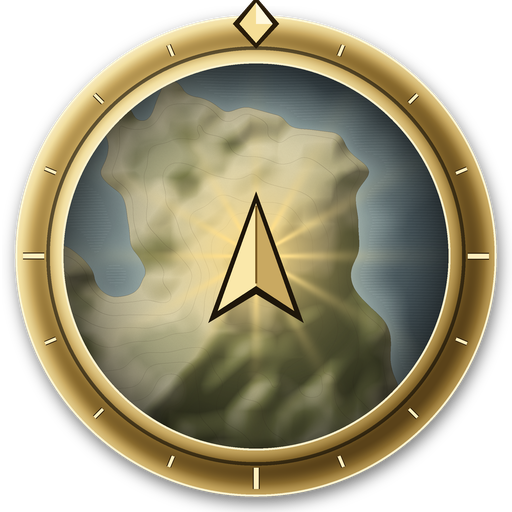
绘制《艾尔登法环》风格的地图……在 Minecraft 中。
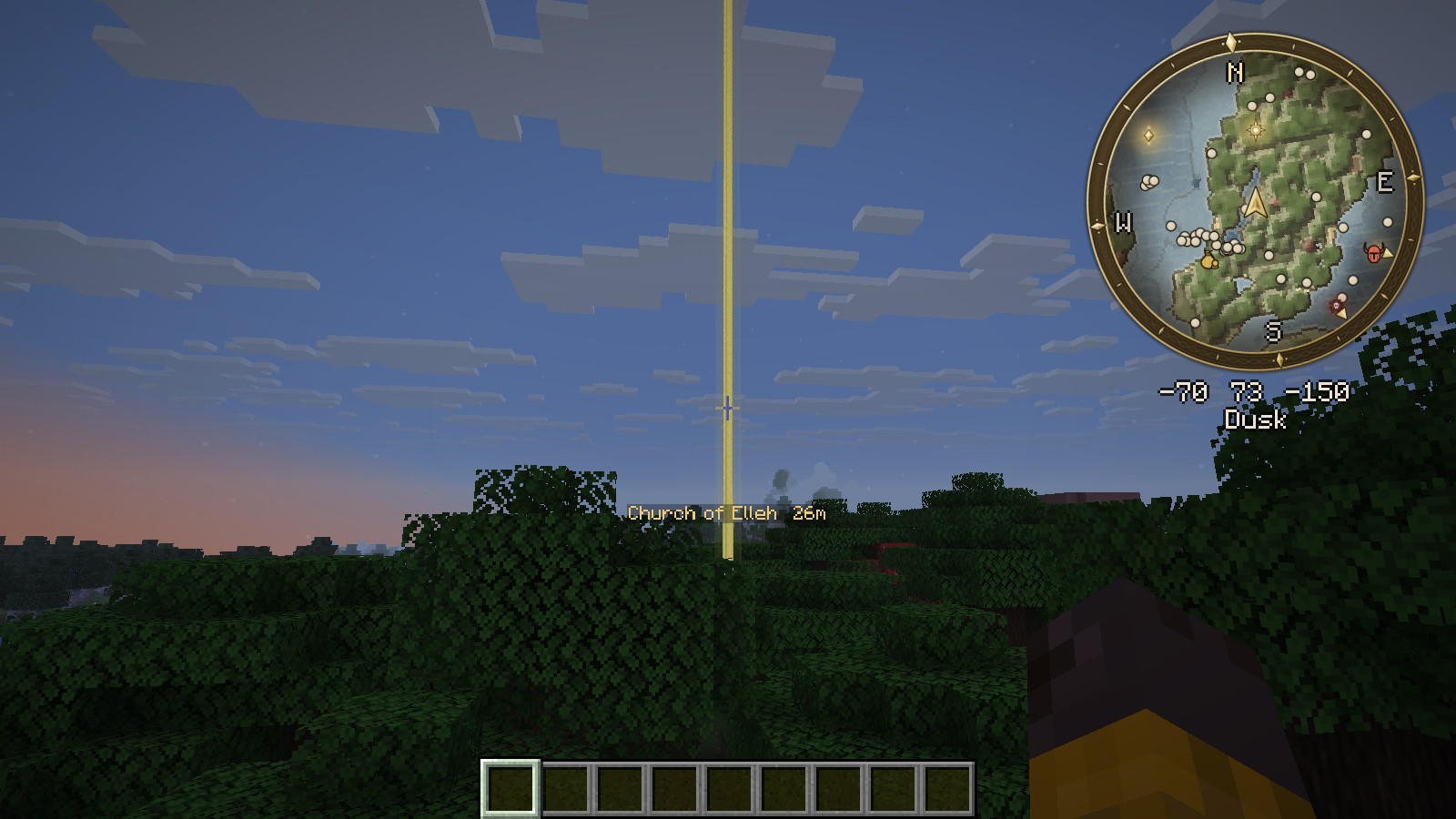
Remnants Minimap 让你的世界变成一张手绘风格的大地图,灵感源自《艾尔登法环》的地图设计。 陆地以泛黄的羊皮纸为底,绘有墨水等高线和蚀刻般的海洋,并由金色边框环绕, 赐福点(Sites of Grace)在地图上闪烁着金光。
仅客户端模组。适用于任何服务器、单人游戏或多人游戏。仅当希望操作员能够通过地图进行传送时,才需要在服务器上安装它。
制图,而非截图
大多数小地图只是显示区块的复制品。Remnants Minimap 则以制图师的方式绘制你的世界。
- 羊皮纸调色板: 柔和的卡其色平原、橄榄绿森林、淡沙色与灰色石头,取代了饱和度极高的方块颜色。
- 地形阴影与等高线: 丘陵和山脉展现出立体形态,每第四条等高线会用更深的墨水描画。
- 蚀刻般的水面: 石板蓝的海域带有细腻的波浪线条,浅滩呈淡色,海岸线旁还有一条额外的离岸线。
- 墨水轮廓: 海岸线、建筑地基和道路均以墨水勾勒。
- 未探索区域的迷雾: 你尚未见过的土地仍隐藏在飘动的灰色迷雾中,地图边缘也柔和地融入其中。
- 偏爱经典外观? 可随时切换至 Vivid Parchment 或 Classic 调色板。
小地图
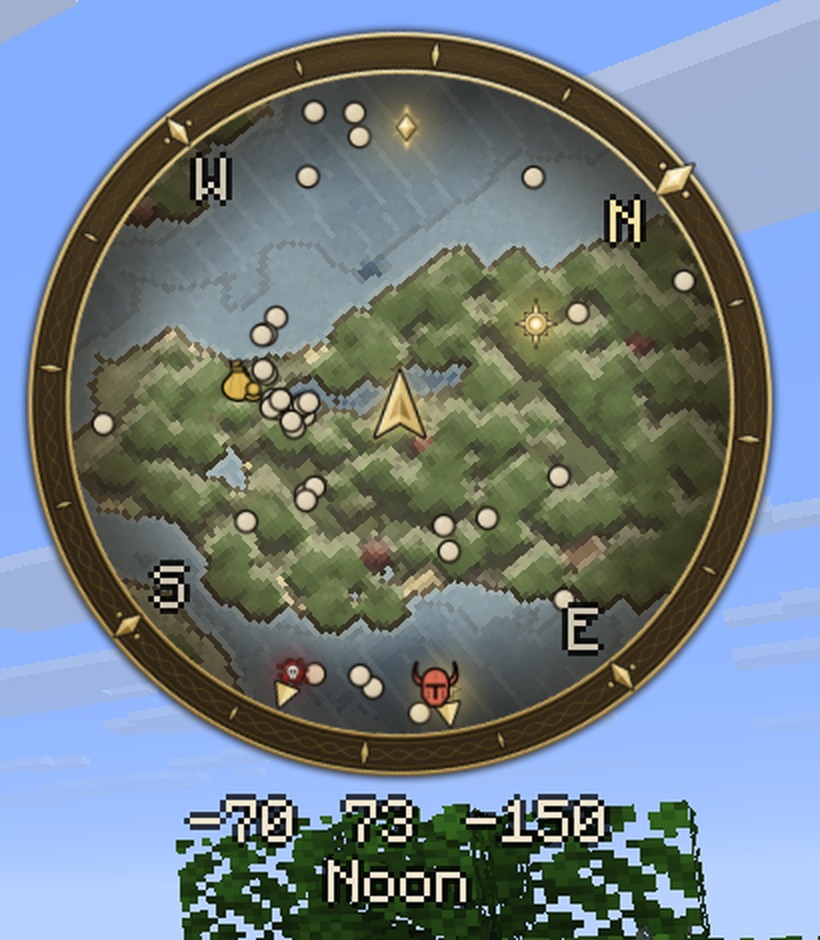
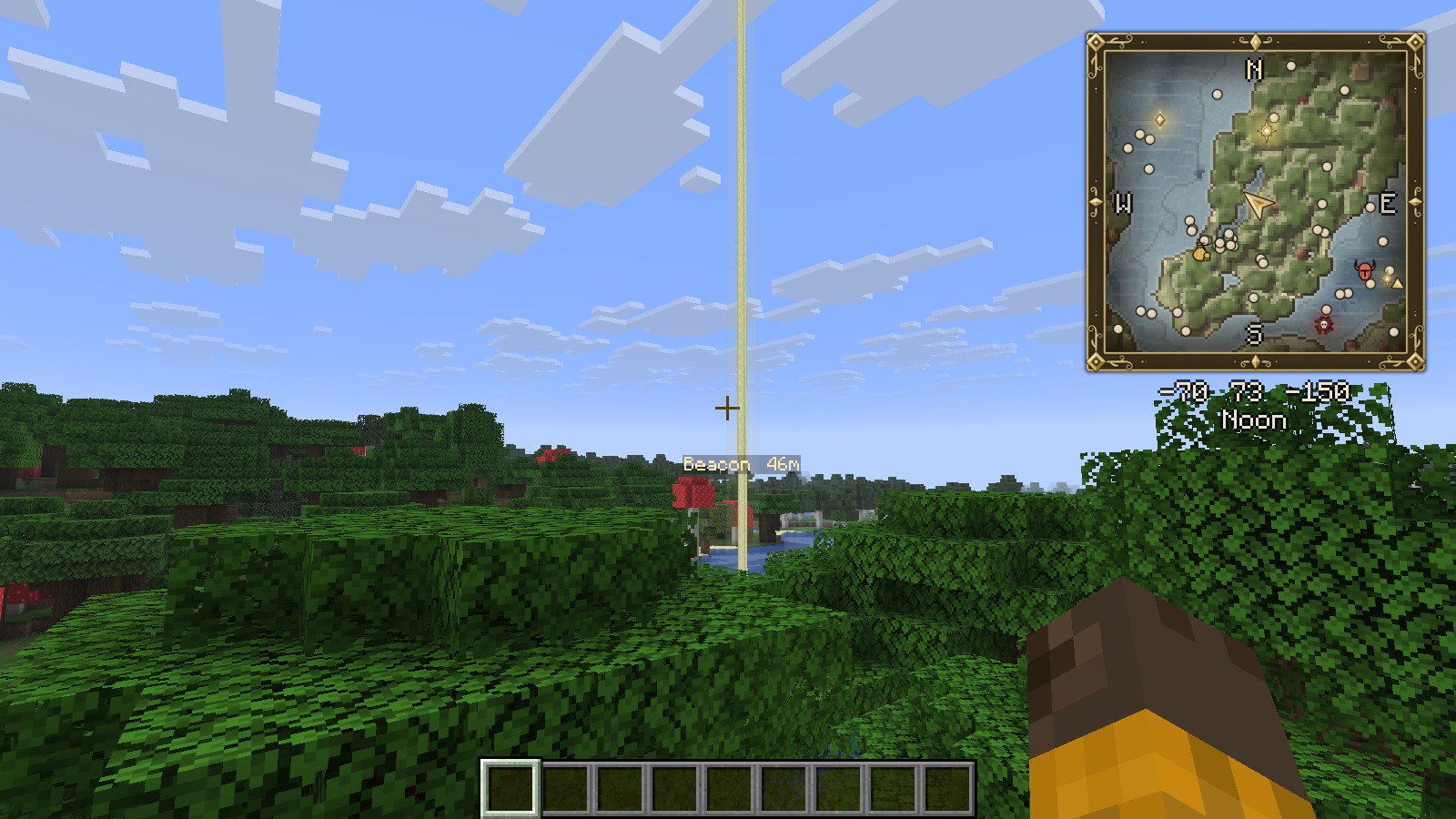
- 金色圆环中的圆形地图,或带方框的方形图表。
- 平滑移动。 地图以亚像素精度旋转和滚动,而非逐块跳跃,缩放过程也是动画化的。
- 跟随视角旋转或保持北方朝上,圆盘边缘标有 N / E / S / W 方向。
- 金色箭头代表玩家,银色箭头代表其他玩家。
- 可选雷达用于显示敌对生物和平行生物。
- 地图下方显示你的坐标、一天中的时间(黎明、上午、正午、黄昏……),以及可选的当前生物群系。
- 赐福点、信标和血迹在超出视野范围时会固定在地图边缘,让你始终知道该往哪个方向走。
- 向下移动,避开状态效果图标的位置。
世界地图
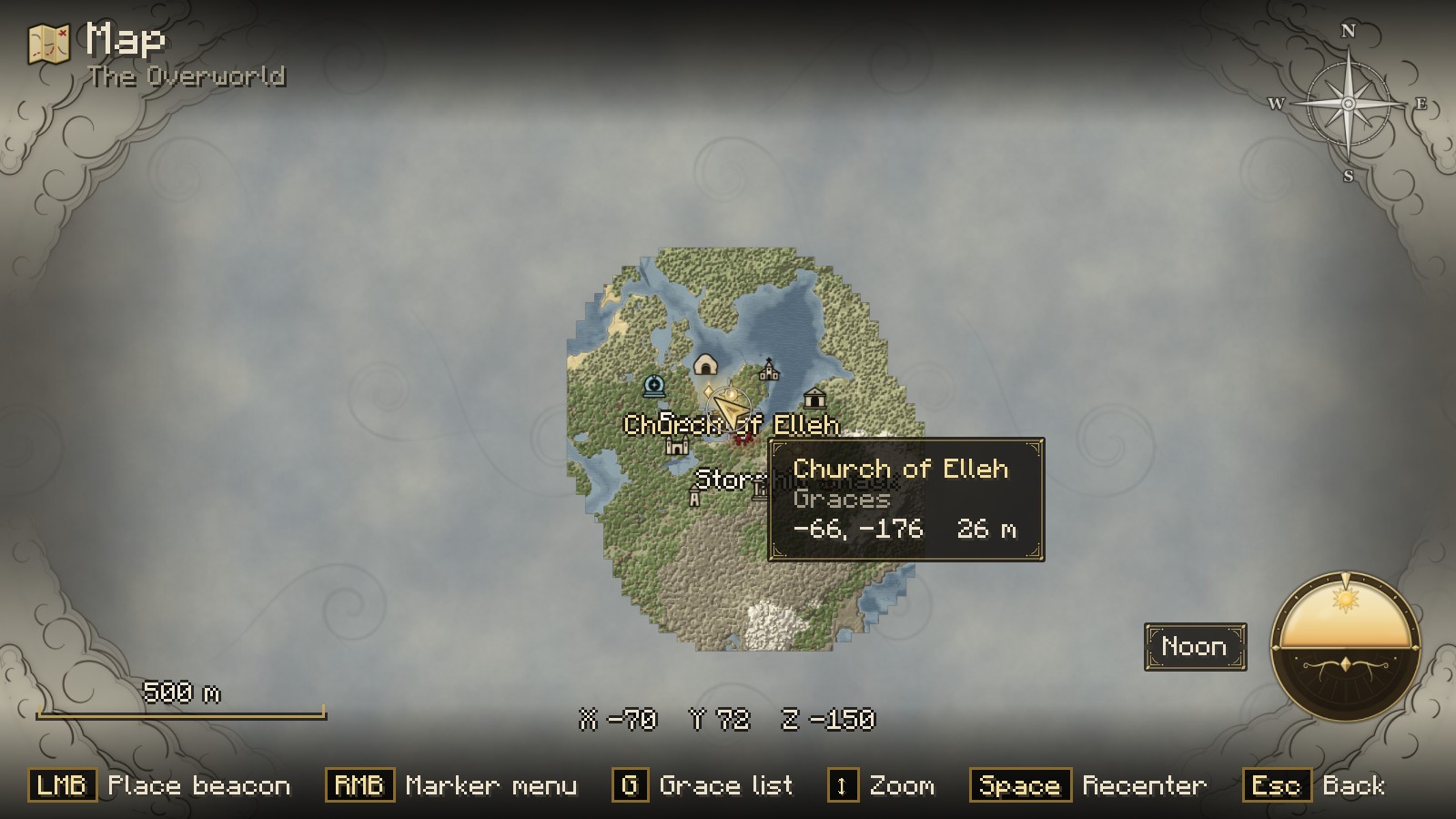
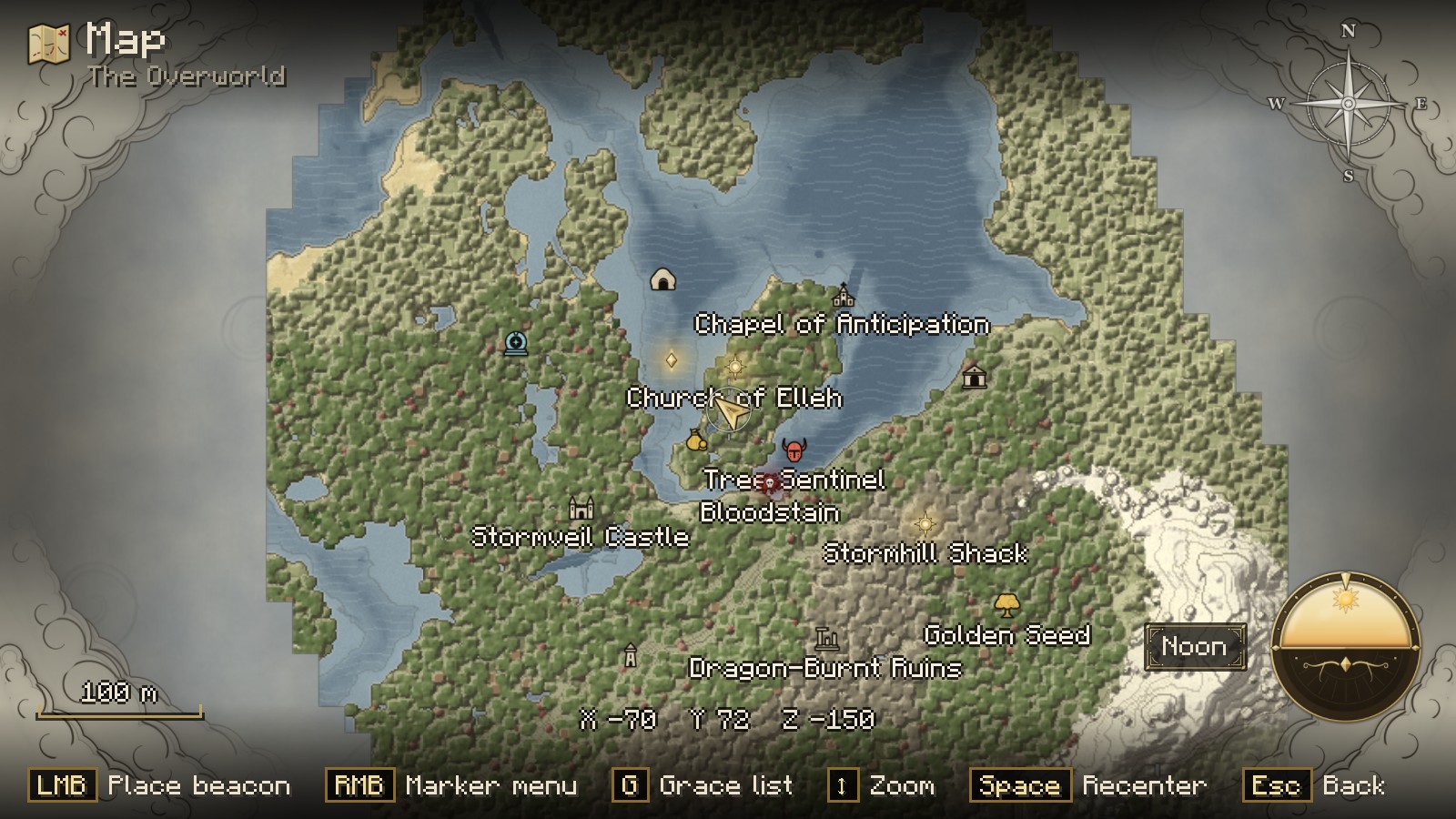
按 M 打开完整地图。
- 拖拽以平移地图。 松开鼠标后,地图仍会持续滑动。你也可以使用 WASD 键进行平移。
- 滚轮滚动可缩放至光标位置,范围从单个方块到你的整个已探索世界。远距离缩放依然保持流畅。
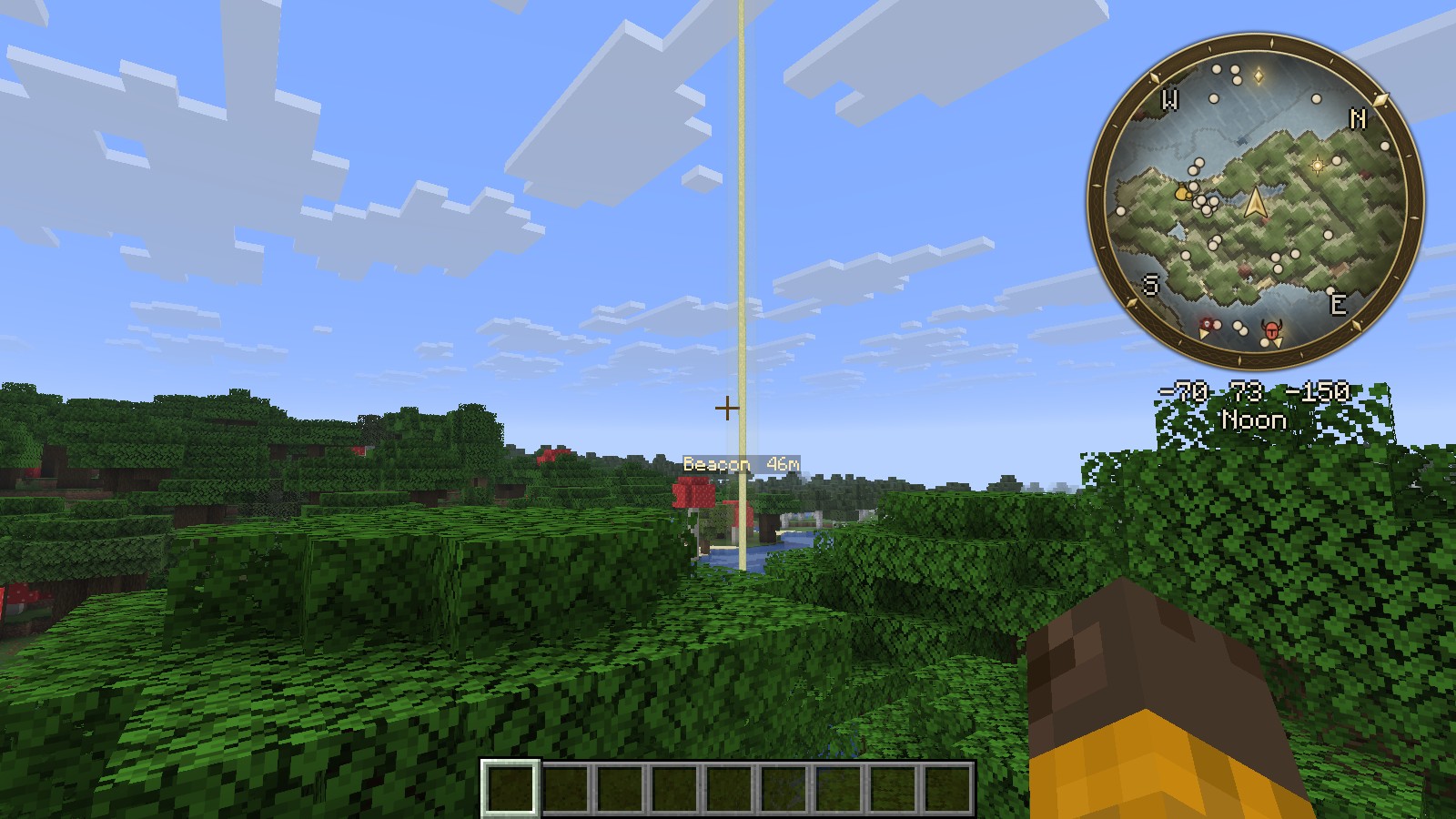
- 左键点击放置一座金色信标,它会在世界中升起一道光柱,就像在《艾尔登法环》(Lands Between)中放置信标一样。
- 右键点击打开标记菜单: 添加标记、放置或移除信标、编辑、删除,或返回你的当前位置。
- 管理员可以通过地图传送: 右键点击,Teleport here(传送至此),确认即可。你将落在安全的地面上,绝不会掉入岩浆或虚空。单人游戏需要开启作弊模式,或在服务器端安装此模组。
- 在单人游戏中预加载地图,使用命令
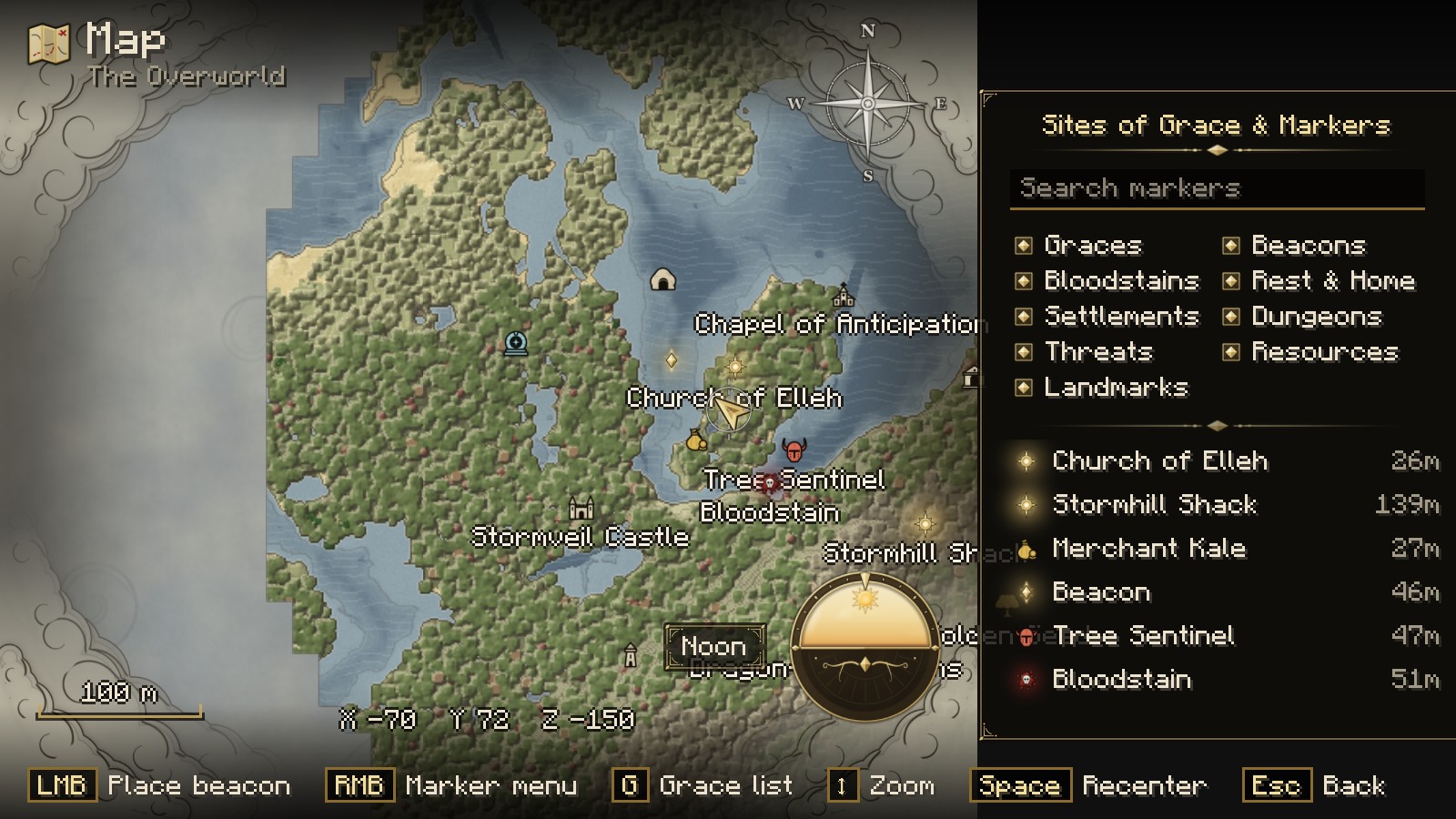
/remnantmap preload <radius>:它会绘制存档中已存在的土地,无需行走前往,也不会生成任何新内容。 - 按 G 键打开 Grace 列表: 显示每个标记及其距离,提供搜索框和分类筛选器(Graces、Beacons、Bloodstains、Rest & Home、Settlements、Dungeons、Threats、Resources、Landmarks)。点击某一项,地图会自动滑动至该位置。
- 界面包含一个罗盘玫瑰、一个昼夜旋转拨盘、一个比例尺、光标坐标和控制提示,四角装饰有漩涡状的云层。
标记与光柱
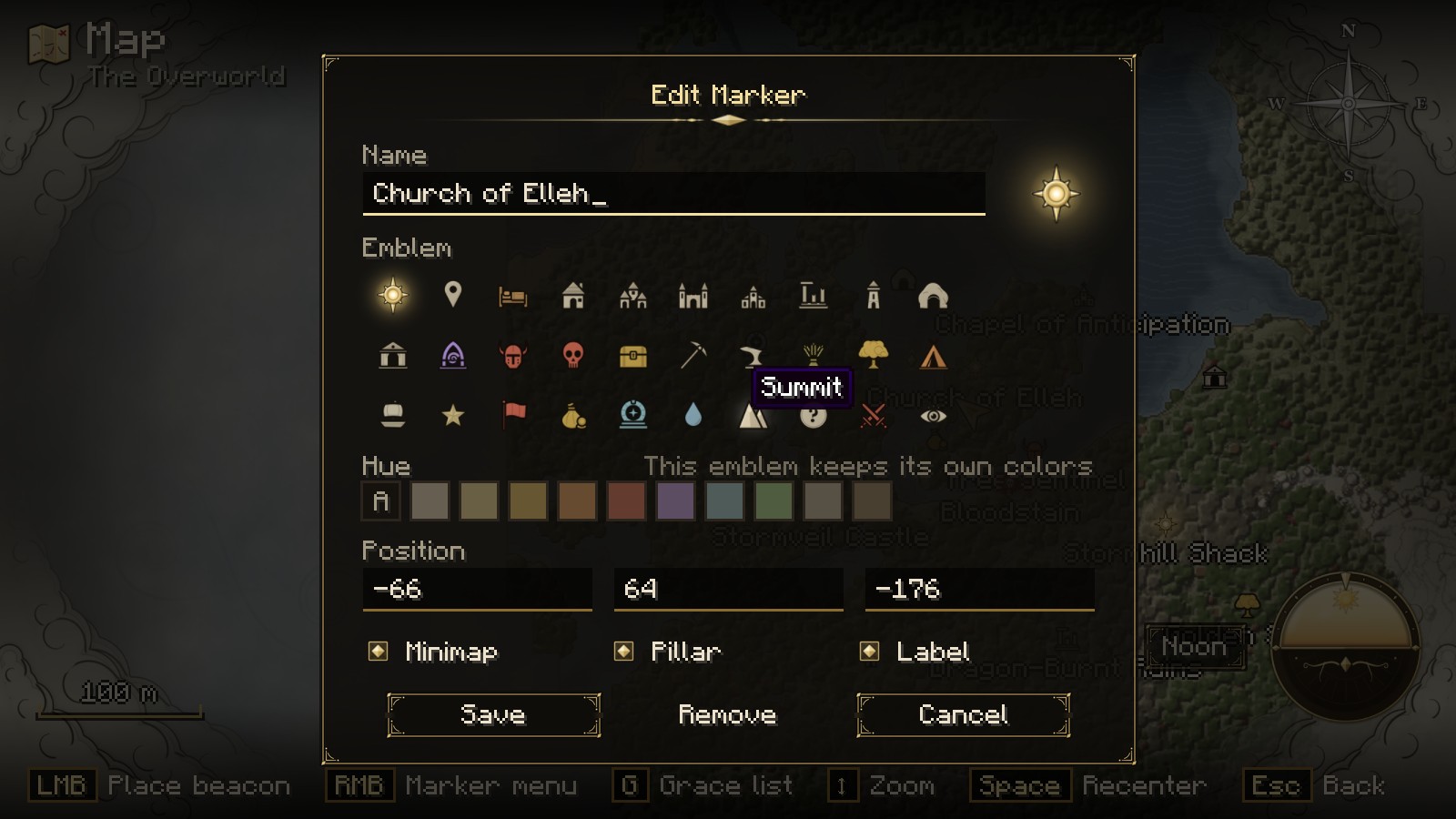
- 30 种图标: Site of Grace、Castle、Church、Ruins、Tower、Village、Cave、Catacombs、Portal、Waygate、Boss、Danger、Battle、Treasure、Mine、Forge、Farm、Merchant、Spring、Great Tree、Summit、Camp、Ship、Banner、Star、Lookout 等。
- 为它们上色: 使用色调调色板进行染色,命名每个标记,并选择其在小地图上是否显示、是否带有标签,或是否升起光柱。
- 光柱会从 Site of Grace、信标和 Bloodstain 升起,其名称和距离会浮现在旁边。远处的光柱会绘制在地平线上,以便你随时可见。
- 当你死亡时会留下一个 Bloodstain,而 Resting Place 会标记你最后使用的床。这两者均为自动设置。
- 来自 Xaero's Minimap? 可从“设置” > “标记” > Import waypoints(导入航点)导入其航点。你可以预览将首先添加的内容,且你的标记会被备份。
设置
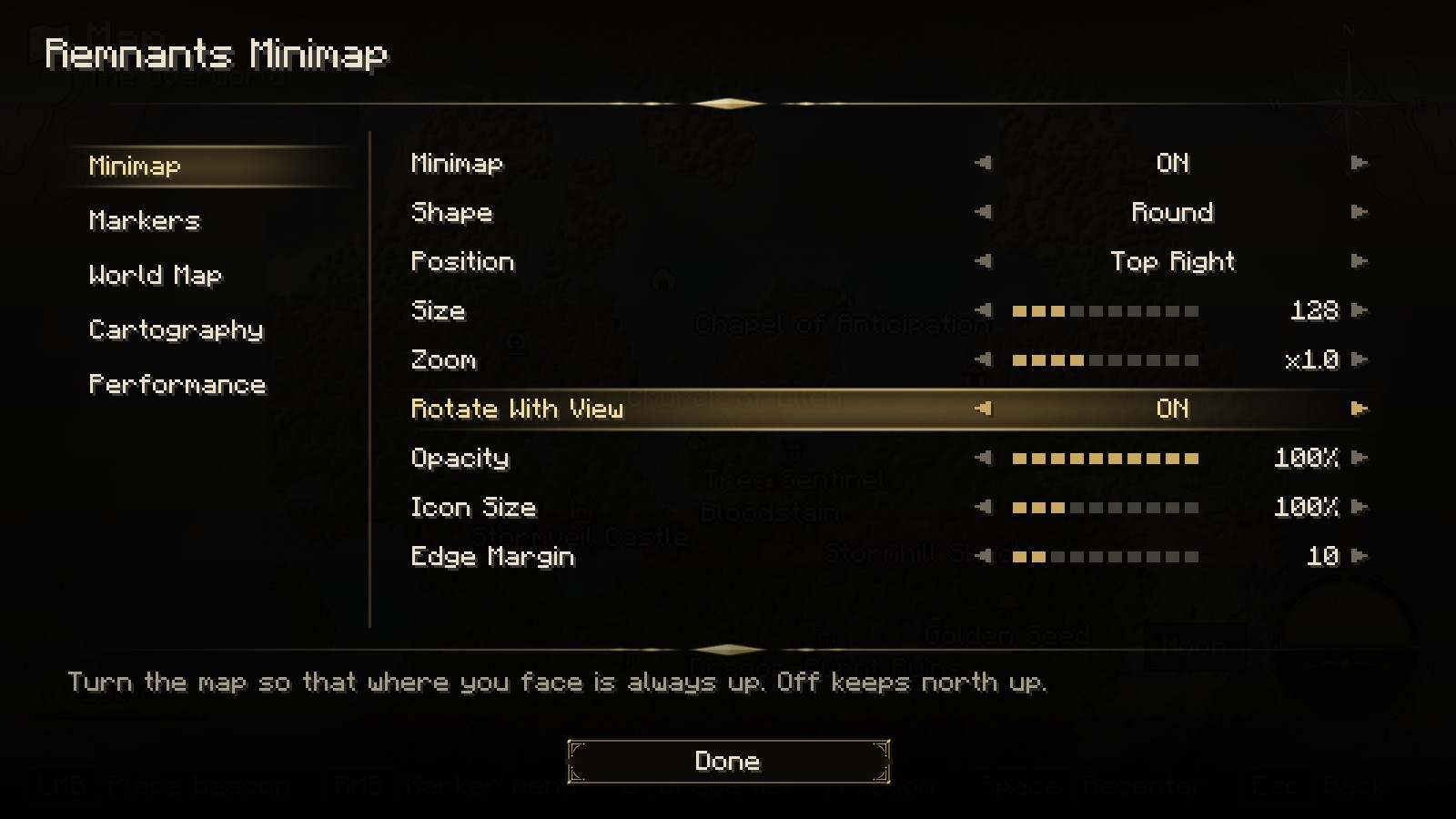
设置界面的布局模仿了《艾尔登法环》(Elden Ring)的选项菜单:左侧为标签页,中间为 ◀ 值 ▶ 行,底部显示每个选项的描述。每项更改都会立即生效。
更改小地图的大小、形状、位置、缩放、透明度、旋转和图标大小。您还可以开启或关闭各个地图细节,例如等高线、地形强度、水纹雕刻、纸张纹理和墨线轮廓,并设置模组用于绘制地形的时间量。
在 NeoForge 上,设置也可以从模组列表打开。在世界地图上,按 O 键。
控制键
| 按键 | 功能 |
|---|---|
| M | 打开 / 关闭世界地图 |
| N | 显示 / 隐藏小地图 |
| = / - | 小地图缩放 |
| B | 在你站立的位置放置标记 |
| 左键点击(世界地图) | 放置或移除信标,选择标记 |
| 右键点击(世界地图) | 标记菜单(对于管理员还包含“传送至此”选项) |
| G(世界地图) | 查看恩典与标记列表 |
| 空格(世界地图) | 返回你的位置 |
| H(世界地图) | 显示 / 隐藏操作提示 |
所有按键均可在“控制键”中重新绑定。
详细信息
- 加载器: Fabric(需要 Fabric API)和 NeoForge;1.20.1 版本支持 Fabric 和 Forge
- Minecraft 版本: 26.3、26.2、26.1.2、1.21.1 和 1.20.1
- 客户端/服务端: 仅限客户端;服务器端可选(仅用于地图传送功能时需要)
- 存档数据: 你的地图和标记按世界和服务器分别存储在游戏文件夹下的
remnantminimaps/目录中,设置保存在config/remnantminimaps.json。 - 性能表现: 地形数据会在每个刻内以极短的时间预算读取,后台保存,并从多细节层次纹理中绘制,因此地图在任何缩放级别下都能保持流畅。
从 Odyssey Map 迁移? Remnants Minimap 是其完全重制版。安装前请移除旧的 odysseymap jar 文件。旧的路径点不会自动迁移;随着你的探索,地图会重新生成。
Remnants Minimap 是一款受《艾尔登法环》视觉风格启发的粉丝自制模组。它未得到 FromSoftware 或 Bandai Namco 的关联或认可。模组中的所有美术资源均为原创。
许可证: Apache 2.0
Remnants Minimap
Chart the Lands Between... in Minecraft.
Remnants Minimap turns your world into a hand-drawn chart in the spirit of the Elden Ring map. The land is drawn on aged parchment with ink contour lines and engraved seas, framed by a gilded ring, and Sites of Grace glow gold across the map.
Client-side. It works on any server, singleplayer or multiplayer. Install it on a server too only if operators should be able to teleport from the map.
Cartography, not screenshots
Most minimaps show a copy of the blocks. Remnants Minimap draws your world the way a cartographer would.
- Parchment palette: soft khaki plains, olive forests, pale sand and grey stone instead of saturated block colours.
- Relief shading and contour lines: hills and mountains show their shape, and every fourth contour is inked darker.
- Engraved water: slate-blue seas with fine wave lines, pale shallows and a second offshore line along the coast.
- Ink outlines: coastlines, building footprints and roads are traced in ink.
- Fog of the unexplored: land you have not seen yet stays hidden in drifting grey fog, and the edge of your map fades softly into it.
- Prefer the classic look? Switch to the Vivid Parchment or Classic palette at any time.
The minimap
- A round map in a gold ring, or a square framed chart.
- Smooth movement. The map rotates and scrolls with sub-pixel precision instead of jumping block by block, and zooming is animated.
- Rotate with your view or keep north up, with N / E / S / W around the rim.
- A gold arrow for you and silver arrows for other players.
- Optional radar for hostile and passive mobs.
- Your coordinates, the time of day (Dawn, Early Day, Noon, Dusk...) and, optionally, the biome below the map.
- Graces, beacons and bloodstains stay pinned to the rim when they are out of view, so you always know which way to go.
- Moves down out of the way of your status effect icons.
The world map
Press M to open the full map.
- Drag to pan. The map keeps gliding when you let go. You can also pan with WASD.
- Scroll to zoom toward the cursor, from single blocks out to your whole explored world. Far zoom levels stay fast.
- Left click places a golden beacon that rises as a pillar of light in the world, just like placing a beacon in the Lands Between.
- Right click opens the marker menu: add a marker, place or remove the beacon, edit, delete, or return to your position.
- Operators can teleport from the map: right click, Teleport here, confirm. You land on safe ground, never in lava or the void. Needs cheats in singleplayer, or the mod on the server.
- Pre-load the map in singleplayer with
/remnantmap preload <radius>: it draws land that already exists in your save, without walking there and without generating anything. - Press G for the Grace list: every marker with its distance, a search box, and category filters (Graces, Beacons, Bloodstains, Rest & Home, Settlements, Dungeons, Threats, Resources, Landmarks). Click an entry and the map glides to it.
- A compass rose, a rotating day-and-night dial, a scale bar, cursor coordinates and control hints, all framed by swirling clouds in the corners.
Markers and pillars of light
- 30 emblems: Site of Grace, Castle, Church, Ruins, Tower, Village, Cave, Catacombs, Portal, Waygate, Boss, Danger, Battle, Treasure, Mine, Forge, Farm, Merchant, Spring, Great Tree, Summit, Camp, Ship, Banner, Star, Lookout and more.
- Tint them with a palette of hues, name them, and choose whether each one shows on the minimap, carries a label, or raises a pillar of light.
- Pillars of light rise from graces, beacons and bloodstains, with their name and distance floating beside them. Distant pillars are drawn on the horizon so you can always see them.
- A Bloodstain is left where you die, and a Resting Place marks your last bed. Both are automatic.
- Coming from Xaero's Minimap? Import its waypoints from Settings, Markers, Import waypoints. You see what will be added first, and your markers are backed up.
Settings
The settings screen is laid out like the Elden Ring options menu: tabs on the left, ◀ value ▶ rows, and a description of each option at the bottom. Every change applies immediately.
Change the minimap's size, shape, position, zoom, opacity, rotation and icon size. You can also turn individual map details on or off, such as contour lines, relief strength, water engraving, paper grain and ink outlines, and set how much time the mod spends mapping terrain.
On NeoForge, the settings also open from the mod list. On the world map, press O.
Controls
| Key | Action |
|---|---|
| M | Open / close the world map |
| N | Show / hide the minimap |
| = / - | Minimap zoom |
| B | Place a marker where you stand |
| Left click (world map) | Place or remove the beacon, select a marker |
| Right click (world map) | Marker menu (and Teleport here for operators) |
| G (world map) | Grace and marker list |
| Space (world map) | Return to your position |
| H (world map) | Show / hide control hints |
All keys can be rebound in Controls.
Details
- Loaders: Fabric (requires Fabric API) and NeoForge; Fabric and Forge on 1.20.1
- Minecraft: 26.3, 26.2, 26.1.2, 1.21.1 and 1.20.1
- Side: client; optional on servers (only needed for map teleport)
- Saved data: your maps and markers are stored per world and per server in
remnantminimaps/in your game folder, and settings inconfig/remnantminimaps.json. - Performance: terrain is read within a small time budget each tick, saved in the background, and drawn from mipmapped textures, so the map stays smooth at every zoom level.
Coming from Odyssey Map? Remnants Minimap is its full rebuild. Remove the old odysseymap jar before installing. Old waypoints are not carried over; the map fills in again as you explore.
Remnants Minimap is a fan-made mod inspired by the look of Elden Ring. It is not affiliated with or endorsed by FromSoftware or Bandai Namco. All art in the mod is original.
License: Apache 2.0

下载 Remnants Minimap
需要联机服务器吗?
稳定流畅、一键部署,几分钟即可和朋友联机开服
最低仅需 8 元/月 即可畅快联机
下载 Remnants Minimap
需要联机服务器吗?
稳定流畅、一键部署,几分钟即可和朋友联机开服
最低仅需 8 元/月 即可畅快联机
下载 Remnants Minimap
需要联机服务器吗?
稳定流畅、一键部署,几分钟即可和朋友联机开服
最低仅需 8 元/月 即可畅快联机
下载 Remnants Minimap
下载 Remnants Minimap
需要联机服务器吗?
稳定流畅、一键部署,几分钟即可和朋友联机开服
最低仅需 8 元/月 即可畅快联机
下载 Remnants Minimap
下载 Remnants Minimap
下载 Remnants Minimap
需要联机服务器吗?
稳定流畅、一键部署,几分钟即可和朋友联机开服
最低仅需 8 元/月 即可畅快联机
下载 Remnants Minimap
需要联机服务器吗?
稳定流畅、一键部署,几分钟即可和朋友联机开服
最低仅需 8 元/月 即可畅快联机
下载 Remnants Minimap
需要联机服务器吗?
稳定流畅、一键部署,几分钟即可和朋友联机开服
最低仅需 8 元/月 即可畅快联机
支持的 MC 版本: 26.3, 26.2, 26.1.2, 1.21.1 (NeoForge/Fabric), 1.20.1 (Forge/Fabric)
新增功能
- 从世界地图传送(需操作员权限)。 在世界地图上右键点击已探索的土地或标记,
选择 Teleport here 并确认。服务器负责执行:需要
/tp的操作员等级(或特定权限节点),检查维度与世界边界,先加载该区域并将你放置在一个安全方块上,绝不会落在岩浆、火或虚空中。在单人游戏中需要开启作弊。操作会像/tp一样被记录到日志中。在服务器上,也需要在服务端安装 Remnants Minimap;否则不会提供此选项。 相关设置位于新的config/remnantminimaps-server.json。详见docs/map-teleport.md。 - 预加载地图(单人游戏)。
/remnantmap preload <radius>会从你的世界存档中填充你周围的地图数据,无需实际行走前往;使用status可查看进度,使用cancel可取消。它仅读取已存在的地形数据,从不生成新地形,也从不将区块加载到世界中。限制参数为性能设置中的 Pre-load Radius(默认 1024 格)和 Pre-load Speed(默认每刻 8 个区块)。 详见docs/map-preload.md。 - 从 Xaero's Minimap 导入航点。 设置 > Markers(标记)> Import waypoints(导入航点)会读取 Xaero's Minimap 保存在你电脑上的航点文件,显示即将导入的内容,备份你的现有标记,然后添加它们。现有的标记永远不会被修改。Xaero's World Map 的瓦片不会被导入。
详见
docs/xaero-import.md。
变更
- Remnants Minimap 现在也可在专用服务器上加载(Fabric 中
environment设为*,NeoForge 和 Forge 注册了双方入口点)。它在两端仍保持可选:原版客户端可以加入安装了该模组的服务器,且在没有安装它的服务器上也能正常工作,与之前相同。 - 其他模组可以通过
io.nightbeam.remnantminimaps.api.MapTeleportGuard拒绝地图传送请求。
升级说明
- 将
remnantminimaps-*-2.0.1.jar(或 2.0.0)替换为对应的 2.1.0 jar 包。无需重置配置。 - 服务器所有者:仅在服务端安装 jar 包即可启用地图传送功能。默认情况下对操作员(等级 2)开启;如需关闭,请在
config/remnantminimaps-server.json中设置"enabled": false。
支持的 MC 版本: 26.3(Fabric/NeoForge)。其他版本与 2.0.0 保持一致。
已修复(Minecraft 26.3)
- 在标记编辑器中点击徽章或颜色现在会正确应用。之前悬停时会高亮显示,但点击会被忽略。
- 世界地图:左键放置信标并再次拖拽地图,右键打开标记菜单(而非左键)。在标记列表中,右键再次打开某个标记的菜单。
- 设置选项再次恢复为左键向前循环、右键向后循环。
Minecraft 26.3 将鼠标按钮编号从 1 开始(左键 1、中键 2、右键 3);而 26.3 移植版仍在使用旧编号(左键 0、右键 1)。26.3 代码现已改用 Minecraft 自身的按钮常量。
支持的 MC 版本: 26.3、26.2、26.1.2、1.21.1(NeoForge/Fabric)、1.20.1(Forge/Fabric)
Odyssey Map 现已更名为 Remnants Minimap(模组 ID remnantminimaps,包名 io.nightbeam.remnantminimaps),
基于《艾尔登法环》风格地图从头重构。
新增
- 羊皮纸制图风格:柔和色调、地形阴影、等高线、雕刻式水域、墨水海岸线、 建筑轮廓与道路。提供经典与鲜明两种调色板可选。
- 已探索的地形按世界和维度单独保存,并在边缘处渐隐为迷雾。
- 圆形镀金小地图(或方形图表),支持平滑亚像素旋转与滚动、动态缩放, 显示方位字母、时间、坐标及可选的生物群系信息。
- 全屏世界地图,支持惯性平移、向光标缩放、远距离缩略概览图, 包含罗盘玫瑰、昼夜循环转盘、比例尺、操作提示与云层角落效果。
- 信标(在世界地图上左键点击)、标记菜单(右键点击)、赐福点及 30 种标记徽章。
- 赐福点与标记列表,支持搜索与分类筛选。
- 世界中为信标、赐福点和血迹生成光柱,在距离较远时自动拉近至地平线附近显示。
- 死亡时自动生成血迹标记,并在最后一次休息的床铺位置生成休息点标记。
- 玩家雷达,并可选显示敌对生物与被动生物。
- 全新设置界面;也可通过 NeoForge 和 Forge 的模组列表进入。
变更
- 使用官方 Fabric、NeoForge 和 Forge 的 HUD、按键映射、区块渲染与层级渲染钩子; 剩余的 mixin 仅在 26.x 版本中保留一个 GUI 访问器,以及在 Fabric 1.21.1 和 1.20.1 聊天栏下方保留一个 HUD 钩子。
- 本版本支持 Minecraft 26.3、26.2、26.1.2、1.21.1 和 1.20.1,功能与数据格式保持一致。
升级说明
- 移除
odysseymap-*.jar并安装对应的remnantminimaps-*.jar。 - Odyssey Map 的设置与航路点不会迁移;地图将在你探索的过程中重新构建。
支持的 MC 版本: 26.2、26.1.2、1.21.1 (NeoForge/Fabric)、1.20.1 (Forge/Fabric)
Odyssey Map 现已更名为 Remnants Minimap(模组 ID remnantminimaps,包名 io.nightbeam.remnantminimaps),
基于《艾尔登法环》风格的地图系统从零重构。
新增内容
- 羊皮纸制图风格:柔和的色调、浮雕阴影、等高线、雕刻式水面、墨水海岸线、 建筑轮廓和道路。提供经典与鲜艳两种调色板。
- 已探索的地形按世界和维度保存,并在边缘处逐渐隐入迷雾。
- 圆形镀金小地图(或方形图表),支持平滑的子像素旋转与滚动、动画缩放、 方位字母、时间显示、坐标以及可选的生物群系信息。
- 全屏世界地图,具备惯性平移、向光标方向缩放、远距离概览图块、 罗盘玫瑰、昼夜循环表盘、比例尺、操作提示和云角效果。
- 信标(在世界地图上左键点击)、标记菜单(右键点击)、赐福点及 30 种标记徽章。
- 赐福点和标记列表,支持搜索和分类筛选。
- 世界中为信标、赐福点和血渍生成光柱,在距离较远时会被拉至地平线。
- 死亡时自动生成血渍标记,并在你最后一次使用的床铺位置放置休息点标记。
- 玩家雷达,并可选择性地显示敌对和被动生物。
- 全新设置界面;也可通过 NeoForge 和 Forge 的模组列表访问。
变更
- 使用官方的 Fabric、NeoForge 和 Forge HUD、按键映射、区块及层级渲染钩子;剩余的 mixins 仅包括: 26.x 版本的 GUI 访问器,以及在 Fabric 1.21.1 和 1.20.1 中聊天栏下方的 HUD 钩子。
- 本版本支持 Minecraft 26.2、26.1.2、1.21.1 和 1.20.1,功能与数据格式保持一致。
升级说明
- 删除
odysseymap-*.jar并安装对应的remnantminimaps-*.jar。 - Odyssey Map 的设置和航点不会迁移;地图将在你探索的过程中逐步重建。
关于这个资源的讨论、问题反馈与使用心得
还没有讨论,来发第一帖吧
你是这个资源的作者?登录后可认领此资源。
相似资源
 模组

显示你正在注视的方块的信息。(适用于 Minecraft 1.16+ 的 Hwyla/Waila 分支)
 模组
在游戏画面角落显示附近世界地形、玩家、生物和实体的地图。可创建路径点,帮助你找到标记过的位置。
 模组

查看物品与配方
 模组
使用 JavaScript 编辑配方、添加自定义物品、编写世界事件!
 模组
AE2:一款流行的自动化与存储模组
 模组
那是什么?一个 Waila/Hwyla 的分支。
评论 0
登录后参与评分
还没有评论,来抢沙发吧