这是一个轻量化的称号和计时模组,弥补了模组服不能装称号和计时插件的痛!仅装服务端即可,目前只支持 1.20.1 Fabric 版本。支持通过指令自定义给玩家分配称号,支持彩字中文。在 TAB 列表中进行了融合显示,计时和称号互不冲突。以下是食用教程,
设置显示位置:
/time position <after|above|below>
after:同一行显示在玩家名后面(推荐;TAB 也生效)
above / below:用隐形盔甲架在玩家名上方/下方显示第二行
/time afkTimeout <秒>
AFK 判定秒数(默认 60)。60 秒无“自主操作”就暂停计时。
/time monthBy30Days <true|false>
是否按 30 天 = 1 月 进位(默认 true)。
/time show <true|false>
全局开关在线时长显示(默认 true)。
判定“自主操作”示例:视角转动、使用/放置/攻击、物品交互、丢弃物品、热键换槽、背包点击等。
不计入:聊天发言、命令、被动移动(例如水流/推挤)。
- 称号(与你之前一致的语法)
/chtitle set <玩家> <称号…>
将称号显示为 <称号>,作为队伍前缀应用(聊天/头顶/TAB 均可见)。
若该玩家已保存颜色/调色板,则按其上色;否则用默认色 defaultColor。
/chtitle color <玩家> <颜色名 …>
一个颜色名 → 单色;多个颜色名 → 按字符轮换(非渐变)。
分隔符支持:中文/英文逗号、空格(含全角)、加号(+/+)。
颜色名可用 中文/英文/别名;也可直接写 #RRGGBB、0xRRGGBB、十进制。
/chtitle clear <玩家>
清除称号(只清前缀,不影响在线时长的后缀)。
/chtitle reload-config
重载 config/ch-mod.json(不会清玩家称号/颜色数据)。
权限:默认仅 OP 等级 ≥ 3 可用(可在 config/ch-mod.json 的 requiredOpLevel 修改)。
<玩家> 支持玩家名和能解析为单一目标的选择器(如 @s/最近的 @p),不支持多目标(如 @a)。
显示规则(避免冲突的关键点)
同一支队伍:
前缀 prefix = 称号 <…>(带颜色/轮换);
后缀 suffix = 在线时长(分→时→天→月自动进位)。
因为前后缀都落在同一个队伍,所以玩家名与 TAB 列表会同时显示称号+时长,不会互相顶掉。
above/below 仅在名牌二层显示,不影响 TAB。
配置与数据文件
第一次启动会自动生成;手改后可用 /chtitle reload-config 或重启生效(仅 ch-mod.json 需重载)。
配置文件
config/ch-mod.json(主配置,JSON)
requiredOpLevel(int)—— /chtitle 所需 OP 等级(默认 3)
useScoreboard(bool)—— 是否启用队伍前缀(默认 true,一般保持开启)
defaultColor(int)—— 未保存颜色时的默认色(十进制,默认白色 16777215)
namedColors(map<string,int>)—— 颜色名映射,可扩展中文/英文/别名
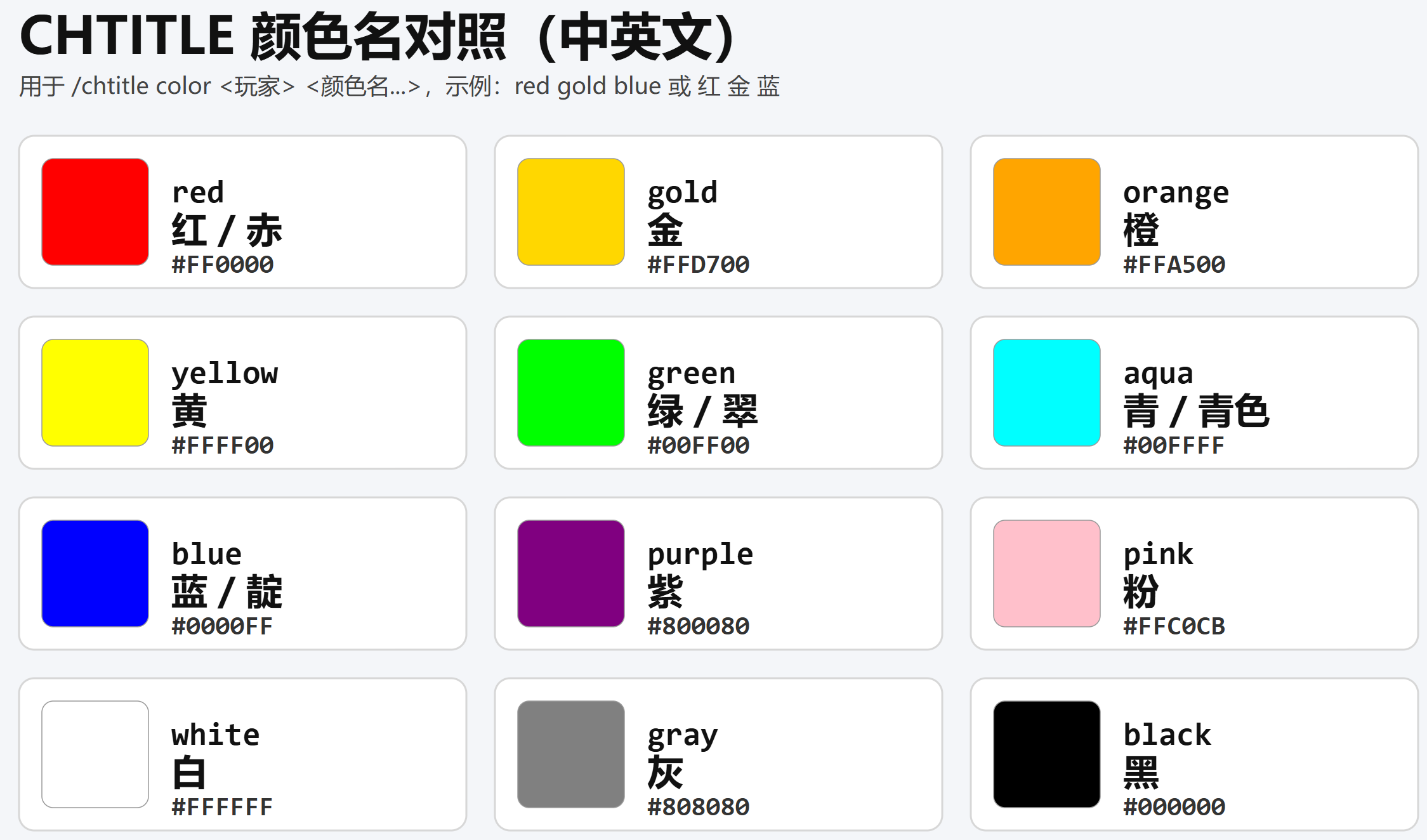
内置示例:红/紅、金、橙、黄/黃、绿/綠、青、蓝/藍、紫、白、灰/grey、黑、粉;red、gold、orange、yellow、green、aqua、blue、purple、white、gray、black、pink
config/ch-mod-time.json(时长显示/逻辑;若未见也会按默认值运行)
position:"after"|"above"|"below"(默认 "after")
afkTimeout:AFK 秒数(默认 60)
monthBy30Days:是否 30 天进 1 月(默认 true)
show:是否显示时长(默认 true)
strongRefreshSeconds:进服/改称号/进位后 TAB “增压刷新”秒数(默认 5)
以上时长项也都能用 /time … 动态修改(保存并实时生效)。
希望各位服主用的满意~(我也是个小服主)
这是一个轻量级的标题与在线时长追踪模组,解决了在整合包服务器上无法使用标题和计时插件的痛点!只需在服务端安装即可。目前仅支持 1.20.1 Fabric。支持通过命令自定义玩家的标题,包括彩色文本和中文字符。完美集成到 TAB 列表中,标题与在线时长追踪互不冲突。
以下是使用教程:
- 设置显示位置:
/time position <after|above|below>
after: 显示在玩家名称同行的后面(推荐;TAB 列表中也适用)。
above / below:使用不可见的盔甲架在玩家名称的上方/下方显示第二行文字。
/time afkTimeout <秒数>
设置 AFK(空闲)检测超时时间,单位为秒(默认值为 60)。在连续 60 秒没有“自愿行为”后计时器将暂停。
/time monthBy30Days <true|false>
是否使用 30 天 = 1 个月来计算进度(默认值为 true)。
/time show <true|false>
全局开关,用于显示在线游戏时长(默认 true)。
“自愿行为”示例:相机移动、使用/放置/攻击方块、物品交互、丢弃物品、快捷栏切换、背包点击等。
不计算在内:聊天消息、命令、被动移动(例如水流、被推动)。
- 标题(语法与之前保持一致)
/chtitle set <player> <title...>
设置显示的标题为 <title>,应用为队伍前缀(在聊天、头顶和 TAB 列表中可见)。
如果玩家有保存的颜色/调色板,则使用该颜色;否则应用 defaultColor。
/chtitle color <player> <color name ...>
一个颜色名称 → 纯色;多个颜色名称 → 按字符循环颜色(非渐变)。
支持的分隔符:中文/英文逗号、空格(包括全角)、加号(+/+)。
颜色名称可以使用中文/英文/别名;也支持直接输入十六进制(#RRGGBB)、0xRRGGBB 或十进制值。
/chtitle clear <player>
清除标题(仅清除前缀,不影响在线游戏时长后缀)。
/chtitle reload-config
重新加载 config/ch-mod.json(不会清除玩家的标题/颜色数据)。
权限:默认需要 OP 等级 ≥ 3(可通过 config/ch-mod.json 中的 requiredOpLevel 配置)。
<player> 支持玩家名称和解析为单个目标的选择器(例如 @s、最近的 @p),不支持多个目标(例如 @a)。
显示规则(避免冲突的关键点)
在同一队伍内:
前缀 = 标题 <...>(包含颜色/循环效果)。
后缀 = 在线游戏时长(自动将分钟转换为小时→天→月)。
由于前缀和后缀属于同一队伍,TAB 列表中的玩家名称会同时显示标题和游戏时长,而不会相互覆盖。
头顶上方/下方的显示仅在名牌的第二行,不影响 TAB 列表。
配置文件与数据文件
首次运行时自动生成。手动编辑后请使用 /chtitle reload-config 或重启服务器(仅需重新加载 ch-mod.json)。
配置文件:
config/ch-mod.json(主配置文件,JSON 格式)
requiredOpLevel (int) – 执行 /chtitle 命令所需的 OP 等级(默认 3)。
useScoreboard (bool) – 是否启用队伍前缀(默认 true,建议保持开启)。
defaultColor (int) – 若无保存颜色时的默认颜色(十进制,默认白色 16777215)。
namedColors (map<string,int>) – 颜色名称映射表,可扩展中文/英文/别名。
内置示例:红/紅, 金, 橙, 黄/黃, 绿/綠, 青, 蓝/藍, 紫, 白, 灰/grey, 黑, 粉; red, gold, orange, yellow, green, aqua, blue, purple, white, gray, black, pink.
config/ch-mod-time.json(游戏时长显示/逻辑;若未找到则使用默认值运行)
position: "after"|"above"|"below"(默认 "after")。
afkTimeout: AFK 超时时间,单位为秒(默认 60)。
monthBy30Days: 是否将 30 天视为 1 个月(默认 true)。
show: 是否显示游戏时长(默认 true)。
strongRefreshSeconds:加入/更改标题或单位进度后,“加速刷新”持续的时间(默认值为 5)。
所有这些游戏时间设置也可以通过 /time ... 命令动态修改(保存并立即生效)。
希望所有服务器管理员都能满意~(我自己也是一名服务器管理员)。
这是一个轻量化的称号和计时模组,弥补了模组服不能装称号和计时插件的痛!仅装服务端即可,目前只支持1.20.1fabric版本。支持称号通过指令自定义给玩家,支持彩字中文。在TAB列表做了融合显示,计时和称号互不冲突。以下是食用教程,
设置显示位置:
/time position <after|above|below>
after:同一行显示在玩家名后面(推荐;TAB 也生效)
above / below:用隐形盔甲架在玩家名上方/下方显示第二行
/time afkTimeout <秒>
AFK 判定秒数(默认 60)。60 秒无“自主操作”就暂停计时。
/time monthBy30Days <true|false>
是否按 30 天 = 1 月 进位(默认 true)。
/time show <true|false>
全局开关在线时长显示(默认 true)。
判定“自主操作”示例:视角转动、使用/放置/攻击、物品交互、丢弃物品、热键换槽、背包点击等。
不计入:聊天发言、命令、被动移动(例如水流/推挤)。
- 称号(与你之前一致的语法)
/chtitle set <玩家> <称号…>
将称号显示为 <称号>,作为队伍前缀应用(聊天/头顶/TAB 均可见)。
若该玩家已保存颜色/调色板,则按其上色;否则用默认色 defaultColor。
/chtitle color <玩家> <颜色名 …>
一个颜色名 → 单色;多个颜色名 → 按字符轮换(非渐变)。
分隔符支持:中文/英文逗号、空格(含全角)、加号(+/+)。
颜色名可用 中文/英文/别名;也可直接写 #RRGGBB、0xRRGGBB、十进制。
/chtitle clear <玩家>
清除称号(只清前缀,不影响在线时长的后缀)。
/chtitle reload-config
重载 config/ch-mod.json(不会清玩家称号/颜色数据)。
权限:默认仅 OP 等级 ≥ 3 可用(可在 config/ch-mod.json 的 requiredOpLevel 修改)。
<玩家> 支持玩家名和能解析为单一目标的选择器(如 @s/最近的 @p),不支持多目标(如 @a)。
显示规则(避免冲突的关键点)
同一支队伍:
前缀 prefix = 称号 <…>(带颜色/轮换);
后缀 suffix = 在线时长(分→时→天→月自动进位)。
因为前后缀都落在同一个队伍,所以玩家名与 TAB 列表会同时显示称号+时长,不会互相顶掉。
above/below 仅在名牌二层显示,不影响 TAB。
配置与数据文件
第一次启动会自动生成;手改后可用 /chtitle reload-config 或重启生效(仅 ch-mod.json 需重载)。
配置文件
config/ch-mod.json(主配置,JSON)
requiredOpLevel(int)—— /chtitle 所需 OP 等级(默认 3)
useScoreboard(bool)—— 是否启用队伍前缀(默认 true,一般保持开启)
defaultColor(int)—— 未保存颜色时的默认色(十进制,默认白色 16777215)
namedColors(map<string,int>)—— 颜色名映射,可扩展中文/英文/别名
内置示例:红/紅、金、橙、黄/黃、绿/綠、青、蓝/藍、紫、白、灰/grey、黑、粉;red、gold、orange、yellow、green、aqua、blue、purple、white、gray、black、pink
config/ch-mod-time.json(时长显示/逻辑;若未见也会按默认值运行)
position:"after"|"above"|"below"(默认 "after")
afkTimeout:AFK 秒数(默认 60)
monthBy30Days:是否 30 天进 1 月(默认 true)
show:是否显示时长(默认 true)
strongRefreshSeconds:进服/改称号/进位后 TAB “增压刷新”秒数(默认 5)
以上时长项也都能用 /time … 动态修改(保存并实时生效)。
希望各位服主用的满意~(我也是个小服主)
Translate the following content without altering the layout. Provide a correctly formatted version that can be directly copied for use on a Modrinth mod release page.
This is a lightweight titles and playtime tracking mod, addressing the pain point of not being able to use title and timing plugins on modded servers! Only needs to be installed on the server side. Currently only supports 1.20.1 Fabric. Supports customizing titles for players via commands, including colored text and Chinese characters. Integrates seamlessly into the TAB list, with titles and playtime tracking not conflicting with each other.
Here's the usage tutorial:
- Setting Display Position:
/time position <after|above|below>
after: Displays on the same line after the player's name (Recommended; also works in TAB).
above / below: Uses invisible armor stands to display a second line above/below the player's name.
/time afkTimeout <seconds>
Sets the AFK detection timeout in seconds (default 60). Timers pause after 60 seconds of no "voluntary actions".
/time monthBy30Days <true|false>
Whether to use 30 days = 1 month for progression (default true).
/time show <true|false>
Global toggle for displaying online playtime (default true).
Examples of "Voluntary Actions": Camera movement, using/placing/attacking blocks, item interaction, dropping items, hotbar slot switching, inventory clicks, etc.
Not Counted: Chat messages, commands, passive movement (e.g., water flow, pushing).
- Titles (Syntax consistent with before)
/chtitle set <player> <title...>
Sets the title displayed as <title>, applied as a team prefix (visible in chat, above head, and TAB).
If the player has a saved color/palette, it is used; otherwise, the defaultColor is applied.
/chtitle color <player> <color name ...>
One color name → solid color; Multiple color names → cycles colors per character (not gradient).
Supported separators: Chinese/English commas, spaces (including full-width), plus signs (+/+).
Color names can be in Chinese/English/aliases; Direct hex (#RRGGBB), 0xRRGGBB, or decimal values are also supported.
/chtitle clear <player>
Clears the title (only clears the prefix, does not affect the online playtime suffix).
/chtitle reload-config
Reloads config/ch-mod.json (does not clear player title/color data).
Permissions: Default requires OP level ≥ 3 (configurable via requiredOpLevel in config/ch-mod.json).
<player> supports player names and selectors resolving to a single target (e.g., @s, nearest @p), not multiple targets (e.g., @a).
Display Rules (Key points to avoid conflicts)
Within the same team:
Prefix = Title <...> (with colors/cycling).
Suffix = Online playtime (auto-converts minutes → hours → days → months).
Because both prefix and suffix belong to the same team, the player's name in the TAB list displays both the title and playtime simultaneously without overriding each other.
above/below display only on the nameplate's second line and do not affect TAB.
Configuration & Data Files
Generated automatically on first run. Use /chtitle reload-config or restart after manual edits (only ch-mod.json requires reloading).
Configuration Files:
config/ch-mod.json (Main config, JSON)
requiredOpLevel (int) – Required OP level for /chtitle commands (default 3).
useScoreboard (bool) – Whether to enable team prefix (default true, generally keep enabled).
defaultColor (int) – Default color if no saved color exists (decimal, default white 16777215).
namedColors (map<string,int>) – Color name mappings, extensible with Chinese/English/aliases.
Built-in examples: 红/紅, 金, 橙, 黄/黃, 绿/綠, 青, 蓝/藍, 紫, 白, 灰/grey, 黑, 粉; red, gold, orange, yellow, green, aqua, blue, purple, white, gray, black, pink.
config/ch-mod-time.json (Playtime display/logic; runs with defaults if not found)
position: "after"|"above"|"below" (default "after").
afkTimeout: AFK timeout in seconds (default 60).
monthBy30Days: Whether 30 days = 1 month (default true).
show: Whether to display playtime (default true).
strongRefreshSeconds: TAB "boosted refresh" duration after joining/changing title/unit progression (default 5).
All these playtime settings can also be modified dynamically using /time ... (saved and applied immediately).
Hope all server owners find it satisfactory~ (I'm a server owner myself too).


 模组

 模组
 模组

 模组
 模组

 模组

评论 0
登录后参与评分
还没有评论,来抢沙发吧