
Reroll Trades
保留你想要的交易,重新刷新其余的交易。
Reroll Trades 让你可以直接在交易界面中刷新村民的交易报价,锁定匹配的交易,并撤销上一次刷新操作。
一键刷新
打开村民的交易界面,点击 ↻,或按下 R 键。刷新不消耗绿宝石、物品或经验值,且交易界面保持打开状态。
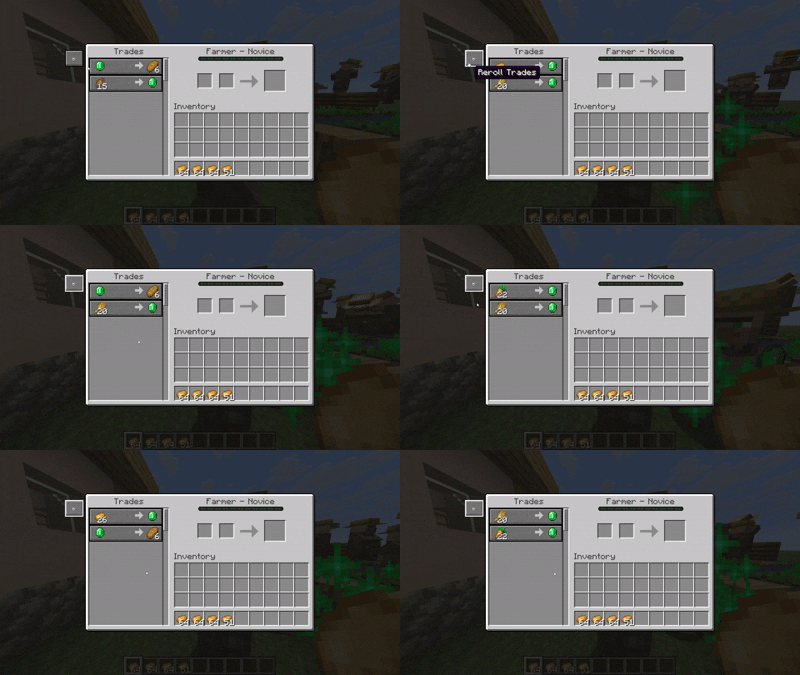
一旦有人与该村民完成任意一次交易,所有玩家(包括补货后或世界重载后)都将无法再使用该功能进行刷新。
保留优质交易
3.2.0 新增: 设置目标条件,在手动刷新其他槽位时,自动锁定匹配的交易。
在交易界面点击 L 按钮,然后:
- 选择物品、物品类型或附魔,并在需要时指定等级。
- 设置最低或最高价格,也可以留空不设限制。
- 保存目标,继续刷新直到出现匹配的交易。
例如,寻找“以不超过 10 颗绿宝石的价格提供修补术”。屏幕上已有的匹配交易可以立即锁定,后续刷新中发现的匹配交易也会自动锁定。

图标选择器支持全部 13 种村民职业,并显示当前村民职业和等级下的候选交易。它也包含村民收购物品的交易(如纸张)。对于这些交易,条件使用的是你给予村民的物品数量。

可将显示的基准价格范围作为参考。即使交易已被锁定,折扣和需求仍会影响最终价格。
已保存 选项卡显示你的目标及其锁定状态。移除某个目标即可释放其占用的槽位。目标与村民绑定,并在玩家之间共享。
撤销与设置
在同一个交易界面保持打开的状态下,使用 ↶ 可恢复上一次刷新前的状态。默认撤销窗口为 30 秒,且锁定的交易会被保留。
服务器管理员可在 config/reroll-trades-server.json 中配置冷却时间、刷新次数限制、潜行要求以及撤销功能。
按钮、按键提示、音效和粒子效果可通过 Fabric 上的 Mod Menu、NeoForge 模组设置 或 config/reroll-trades-client.json 进行调整。如需更改 R 键绑定,请在 Minecraft 的控制设置中修改。
用户界面遵循 Minecraft 的语言设置,提供英文和日文翻译。可使用页面按钮或鼠标滚轮浏览选择器。
安装
- 根据你的 Minecraft 版本选择 Fabric 或 NeoForge 的下载链接。
- 在 Fabric 上,需安装 Fabric API。Mod Menu 为可选安装。
- 对于多人游戏,需在服务器和每位玩家的客户端上安装匹配的 3.2.0 版本。
仅适用于普通村民。流浪商人不受支持。
Reroll Trades
Keep the trades you want. Reroll the rest.
Reroll Trades lets you refresh a villager’s offers right from the trading screen, keep matching offers, and undo your last roll.
Reroll with a click
Open a villager’s trading screen and click ↻, or press R. Rerolling costs no emeralds, items or XP, and the screen stays open.
Once anyone completes a trade with that villager, rerolling is disabled for everyone, including after restocks or world reloads.
Keep the good offers
New in 3.2.0: set targets that automatically lock matching offers while you manually reroll the remaining slots.
Click the L button in the trading screen, then:
- Choose an item, its type or enchantment, and a level when needed.
- Set a minimum or maximum price, or leave either bound blank.
- Save the target and keep rerolling until it matches.
For example, look for Mending for 10 emeralds or less. Matching offers already on screen can lock immediately, and offers found in later rerolls lock automatically.
The icon picker supports all 13 villager professions and shows candidates for the villager’s current profession and level. It also includes trades where villagers buy items, such as paper. For these trades, the condition uses the number of items you give the villager.
Use the displayed base price range as a guide. Discounts and demand still affect prices, even after an offer is locked.
The Saved tab shows your targets and their lock status. Remove a target to release its slot. Targets are saved with the villager and shared between players.
Undo and settings
Use ↶ to restore your last roll while the same trading screen is open. The default Undo window is 30 seconds, and locked offers are kept.
Server owners can configure cooldowns, reroll limits, sneak requirements and Undo in config/reroll-trades-server.json.
Buttons, key hints, sounds and particles can be adjusted through Mod Menu on Fabric, the NeoForge mod settings, or config/reroll-trades-client.json. Change the R keybind in Minecraft’s Controls settings.
The UI follows Minecraft’s language setting, with English and Japanese translations. Browse the picker using page buttons or the scroll wheel.
Installation
- Choose the Fabric or NeoForge download for your Minecraft version.
- On Fabric, install Fabric API. Mod Menu is optional.
- For multiplayer, install matching 3.2.0 versions on the server and every player’s client.
Works with villagers. Wandering traders are not supported.

下载 Reroll-Trades
下载 Reroll-Trades
下载 Reroll-Trades
下载 Reroll-Trades
需要联机服务器吗?
稳定流畅、一键部署,几分钟即可和朋友联机开服
最低仅需 8 元/月 即可畅快联机
下载 Reroll-Trades
下载 Reroll-Trades
下载 Reroll-Trades
下载 Reroll-Trades
下载 Reroll-Trades
下载 Reroll-Trades
暂无更新日志
关于这个资源的讨论、问题反馈与使用心得
还没有讨论,来发第一帖吧
你是这个资源的作者?登录后可认领此资源。
相似资源
 模组

显示你正在注视的方块的信息。(适用于 Minecraft 1.16+ 的 Hwyla/Waila 分支)
 模组
在游戏画面角落显示附近世界地形、玩家、生物和实体的地图。可创建路径点,帮助你找到标记过的位置。
 模组

查看物品与配方
 模组
使用 JavaScript 编辑配方、添加自定义物品、编写世界事件!
 模组
AE2:一款流行的自动化与存储模组
 模组
那是什么?一个 Waila/Hwyla 的分支。
评论 0
登录后参与评分
还没有评论,来抢沙发吧