
资源包配置
一款客户端侧 Fabric 模组,用于保存、管理和分享具有名称的资源包加载顺序配置。从资源包界面切换不同的资源包组合。
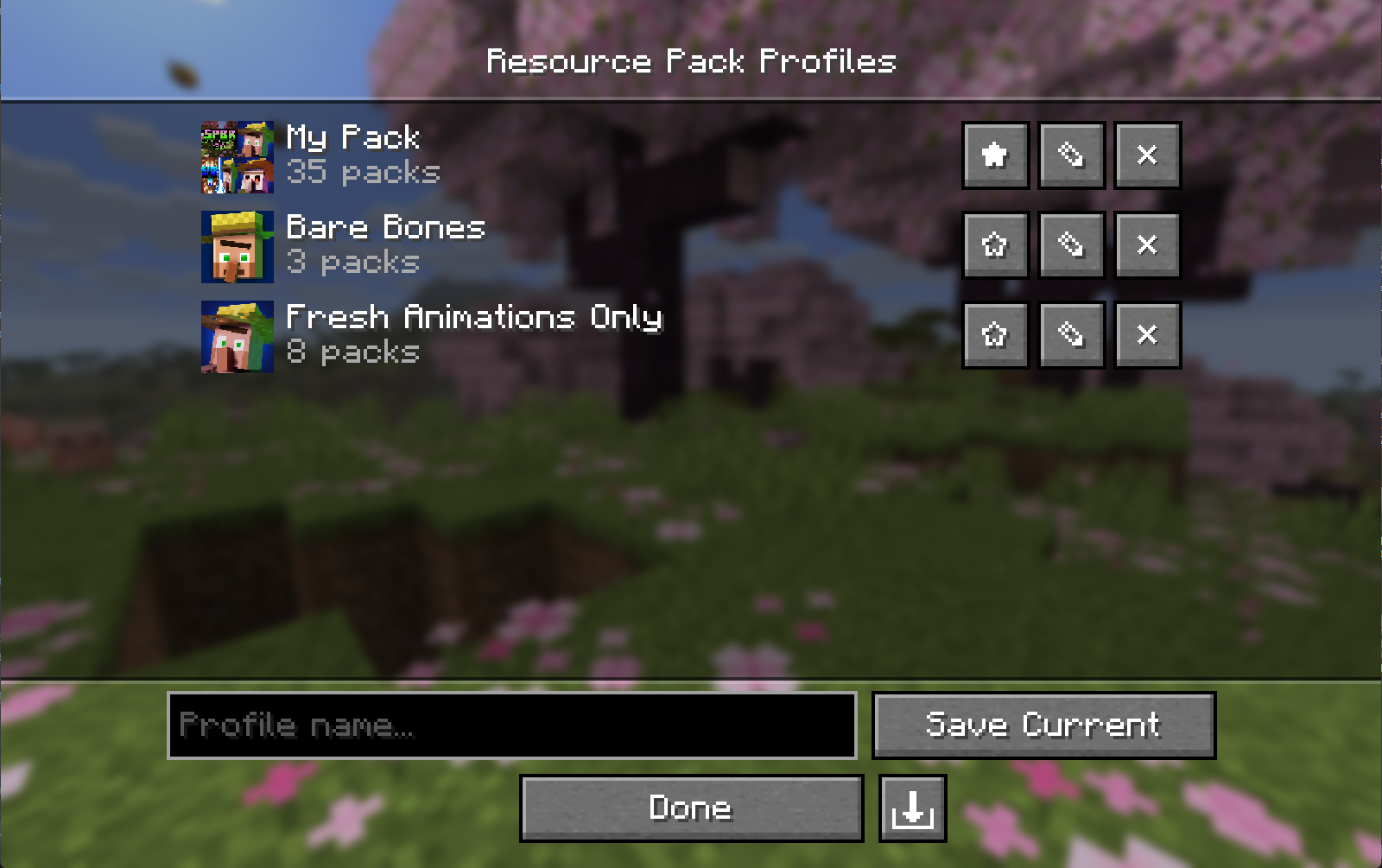
功能
- 保存配置: 将当前的资源包加载顺序保存为命名配置。
- 加载配置: 应用已保存的配置,无需重启即可重新加载资源包。
- 编辑配置: 在不更改主加载顺序的情况下,向配置中添加、移除或重新排列资源包。编辑活动配置会自动重新应用它。
- 收藏: 星标配置以将其固定在列表顶部。
- 自定义图标: 为任意配置设置图片。没有图标的配置会根据其资源包的艺术风格自动生成图标。
- 导入和导出: 将配置共享为
.rpprofile文件(包含资源包列表和自定义图标的单个 JSON 文件)。 - 缺失的资源包: 引用了你未拥有的资源包的配置会被标记,但仍可在缺少这些资源包的情况下应用。
- 无障碍支持: 配置和资源包列表使用 Minecraft 原生小部件,因此支持键盘导航和屏幕阅读器。
下载
安装
- 为你的 Minecraft 版本安装 Fabric Loader。
- 安装 Fabric API。
- 安装 Fabric Language Kotlin。
- 将模组
.jar文件放入.minecraft/mods文件夹。 - (可选)安装 Mod Menu 以便从模组列表打开配置界面。
仅限客户端。无需服务器端安装。
兼容性
| Minecraft | Fabric Loader | Fabric API | Fabric Language Kotlin | Mod Menu (可选) |
|---|---|---|---|---|
26.3 |
0.19.5+ |
0.161.0+26.3 |
1.14.1+kotlin.2.4.20 |
21.0.0-beta.1 |
26.2 |
0.19.3+ |
0.152.2+26.2 |
1.13.12+kotlin.2.4.0 |
20.0.0-beta.3 |
26.1 to 26.1.2 |
0.19.3+ |
0.145.1+26.1 |
1.13.12+kotlin.2.4.0 |
18.0.0-beta.1 |
使用方法
通过原版资源包界面上的 Profiles 按钮(位于 Open Pack Folder 左侧)或 Mod Menu 打开 Resource Pack Profiles 界面。
| 操作 | 方法 |
|---|---|
| 保存当前加载顺序 | 输入名称后点击 Save Current |
| 加载配置 | 点击配置行的任意位置 |
| 编辑配置中的资源包 | 点击 ✎ |
| 删除配置 | 点击 ✕ |
| 收藏配置 | 点击 ★ / ☆ |
| 设置/更改配置图标 | 打开编辑 (✎) 然后点击 Icon… |
| 移除自定义图标 | 打开编辑 (✎) 然后点击图标旁边的 ✕ |
| 导出配置 | 打开编辑 (✎) 然后点击导出按钮(右下角) |
| 导入配置 | 点击导入按钮(配置列表的右下角) |
在编辑器中,点击 Available 列中的资源包可将其添加到 Selected 列的顶部。使用选定资源包图标上的箭头叠加层可移除或重新排列它们。使用键盘焦点时,按 Enter 添加/移除,按 Shift+Up/Down 重新排列。
配置文件格式
配置保存到:
config/resourcepackprofiles.json
自定义图标存储在:
config/resourcepackprofiles/icons/
导出的 .rpprofile 文件为标准 JSON:
{
  "name": "My Profile",
  "packIds": ["file/Pack1", "file/Pack2"],
  "favorite": false,
  "customIcon": "<base64 encoded PNG, or null>"
}
从源码构建
git clone https://github.com/ZephByte/ResourcePackProfiles.git
cd ResourcePackProfiles
./gradlew build
许可证
MIT - 可免费使用、修改和再分发。请参阅 LICENSE。
作者
由 ZephByte 制作。
Resource Pack Profiles
A client-side Fabric mod for saving, managing, and sharing named resource pack load order profiles. Switch between different pack setups from the resource pack screen.
Features
- Save profiles: save your current resource pack load order as a named profile.
- Load profiles: apply a saved profile and your packs reload without a restart.
- Edit profiles: add, remove, and reorder packs in a profile without changing your main load order. Editing the active profile re-applies it.
- Favorites: star profiles to pin them to the top of the list.
- Custom icons: set an image for any profile. Profiles without one get an icon built from their packs' art.
- Import and export: share profiles as
.rpprofilefiles, a single JSON file with the pack list and custom icon. - Missing packs: profiles that reference packs you don't have are flagged, and can still be applied without them.
- Accessibility: the profile and pack lists use Minecraft's native widgets, so they support keyboard navigation and screen readers.
Download
- Modrinth (recommended)
- GitHub Releases
Installation
- Install Fabric Loader for your Minecraft version.
- Install Fabric API.
- Install Fabric Language Kotlin.
- Drop the mod
.jarinto your.minecraft/modsfolder. - (Optional) Install Mod Menu to open the profiles screen from the mods list.
Client-side only. No server installation is needed.
Compatibility
| Minecraft | Fabric Loader | Fabric API | Fabric Language Kotlin | Mod Menu (optional) |
|---|---|---|---|---|
26.3 |
0.19.5+ |
0.161.0+26.3 |
1.14.1+kotlin.2.4.20 |
21.0.0-beta.1 |
26.2 |
0.19.3+ |
0.152.2+26.2 |
1.13.12+kotlin.2.4.0 |
20.0.0-beta.3 |
26.1 to 26.1.2 |
0.19.3+ |
0.145.1+26.1 |
1.13.12+kotlin.2.4.0 |
18.0.0-beta.1 |
Usage
Open the Resource Pack Profiles screen via the Profiles button on the vanilla resource pack screen (left of Open Pack Folder), or via Mod Menu.
| Action | How |
|---|---|
| Save current load order | Type a name then click Save Current |
| Load a profile | Click anywhere on the profile's row |
| Edit packs in a profile | Click ✎ |
| Delete a profile | Click ✕ |
| Favorite a profile | Click ★ / ☆ |
| Set / change a profile icon | Open Edit (✎) then click Icon… |
| Remove a custom icon | Open Edit (✎) then click ✕ next to the icon |
| Export a profile | Open Edit (✎) then click the export button (bottom right) |
| Import a profile | Click the import button (bottom right of the profile list) |
In the editor, click a pack in the Available column to add it to the top of Selected. Use the arrow overlay on a selected pack's icon to remove it or reorder it. With keyboard focus, use Enter to add/remove and Shift+Up/Down to reorder.
Profile File Format
Profiles are saved to:
config/resourcepackprofiles.json
Custom icons are stored in:
config/resourcepackprofiles/icons/
Exported .rpprofile files are standard JSON:
{
  "name": "My Profile",
  "packIds": ["file/Pack1", "file/Pack2"],
  "favorite": false,
  "customIcon": "<base64 encoded PNG, or null>"
}
Building from Source
git clone https://github.com/ZephByte/ResourcePackProfiles.git
cd ResourcePackProfiles
./gradlew build
License
MIT - free to use, modify, and redistribute. See LICENSE.
Author
Made by ZephByte.

下载 Resource Pack Profiles
下载 Resource Pack Profiles
下载 Resource Pack Profiles
需要联机服务器吗?
稳定流畅、一键部署,几分钟即可和朋友联机开服
最低仅需 8 元/月 即可畅快联机
下载 Resource Pack Profiles
下载 Resource Pack Profiles
下载 Resource Pack Profiles
需要联机服务器吗?
稳定流畅、一键部署,几分钟即可和朋友联机开服
最低仅需 8 元/月 即可畅快联机
下载 Resource Pack Profiles
下载 Resource Pack Profiles
下载 Resource Pack Profiles
需要联机服务器吗?
稳定流畅、一键部署,几分钟即可和朋友联机开服
最低仅需 8 元/月 即可畅快联机
下载 Resource Pack Profiles
需要联机服务器吗?
稳定流畅、一键部署,几分钟即可和朋友联机开服
最低仅需 8 元/月 即可畅快联机
Minecraft 26.1、26.2 和 26.3 的修复版本发布。
修复内容
- 所有整合包更新计数 - 在“所有整合包”中检查更新时,不再将已下载较新版本内容的整合包计入更新数量,因此显示的可更新数量与“下载”按钮一致。按更新排序也遵循相同规则。
依赖要求
| Minecraft | Fabric Loader | Fabric API | Fabric Language Kotlin | Mod Menu (可选) |
|---|---|---|---|---|
| 26.3 | 0.19.5+ | 0.161.0+26.3 | 1.14.1+kotlin.2.4.20 | 21.0.0-beta.1 |
| 26.2 | 0.19.3+ | 0.152.2+26.2 | 1.13.12+kotlin.2.4.0 | 20.0.0-beta.3 |
| 26.1 - 26.1.2 | 0.19.3+ | 0.145.1+26.1 | 1.13.12+kotlin.2.4.0 | 18.0.0-beta.1 |
Resource Pack Profiles 针对 Minecraft 26.3 的兼容版本。
更新内容
- 为 Minecraft 26.3 更新了 Fabric Loader、Fabric API、Fabric Language Kotlin 和 Mod Menu 的开发依赖项
- 将资源包图标加载和本地文件对话框迁移至 Minecraft 26.3 的客户端 API
需求
| Minecraft | 26.3 |
| Fabric Loader | 0.19.5+ |
| Fabric API | 0.161.0+26.3 |
| Fabric Language Kotlin | 1.14.1+kotlin.2.4.20 |
| Mod Menu | 21.0.0-beta.1 (可选) |
关于这个资源的讨论、问题反馈与使用心得
还没有讨论,来发第一帖吧
你是这个资源的作者?登录后可认领此资源。
相似资源
 模组

显示你正在注视的方块的信息。(适用于 Minecraft 1.16+ 的 Hwyla/Waila 分支)
 模组
使用 JavaScript 编辑配方、添加自定义物品、编写世界事件!
 模组

查看物品与配方
 模组
在游戏画面角落显示附近世界地形、玩家、生物和实体的地图。可创建路径点,帮助你找到标记过的位置。
 模组
AE2:一款流行的自动化与存储模组
 模组
那是什么?一个 Waila/Hwyla 的分支。
评论 0
登录后参与评分
还没有评论,来抢沙发吧