
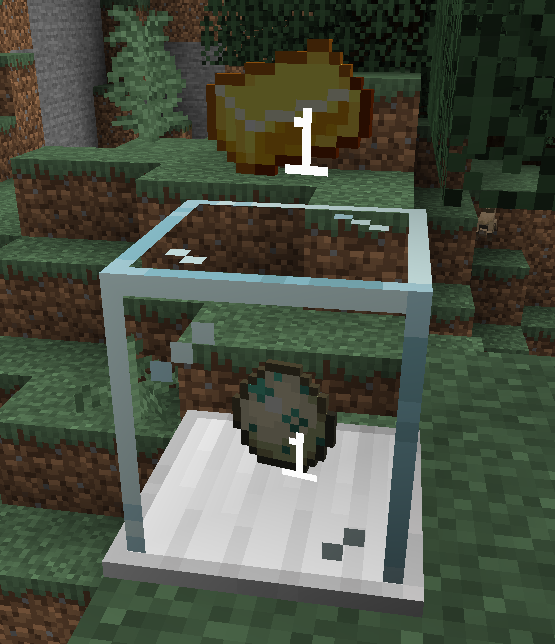
自动售货方块允许玩家轻松接受物品交易。
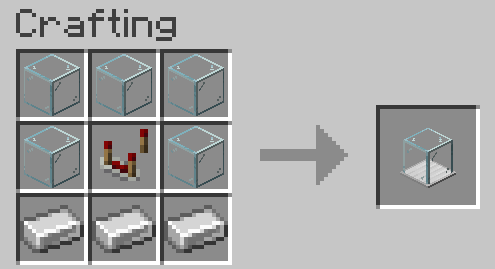
合成
使用方法
要设置自动售货方块,将其放置在地面上并右键点击以打开菜单。只有放置该方块的玩家可以打开配置/库存界面。
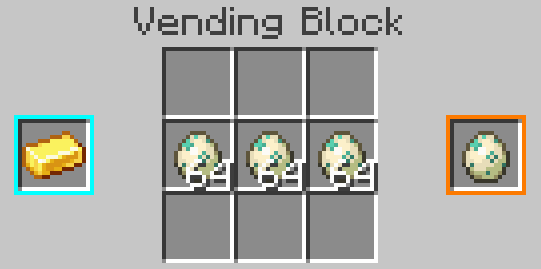
左侧的蓝色槽位是用于交易的输入堆叠,右侧的橙色槽位是返回给顾客的输出堆叠。这些槽位不会消耗物品,但可以用一个物品堆叠点击来设置它们。
中间是方块的库存区域,应包含待分发的物品库存。用户支付的物品也会出现在这里,因此请确保为它们留出空间。
配置完成后,玩家只需手持所需物品右键点击该方块即可进行物品交换。
The Vending Block allows players to easily accept item trades.
Crafting
How to Use
To set up a Vending Block, place it on the ground and right-click to open a menu. The player that placed it is the only player that can open the configuration/inventory.
The blue slot on the left is the stack accepted for trade, and the orange slot on the right is the stack that will be returned to the customer. These slots don't consume items, but can be clicked with a stack to set them.
In the center is the inventory of the block, which should contain the stock of items to distribute. Items paid by users will also appear here, so make sure to leave space for them.
Once configured, players can exchange items by right-clicking on the block with the required item in hand.

下载 Retail
下载 Retail
下载 Retail
下载 Retail
下载 Retail
下载 Retail
下载 Retail
下载 Retail
下载 Retail
下载 Retail
暂无更新日志
关于这个资源的讨论、问题反馈与使用心得
还没有讨论,来发第一帖吧
你是这个资源的作者?登录后可认领此资源。
相似资源
 模组

显示你正在注视的方块的信息。(适用于 Minecraft 1.16+ 的 Hwyla/Waila 分支)
 模组
使用 JavaScript 编辑配方、添加自定义物品、编写世界事件!
 模组

查看物品与配方
 模组
在游戏画面角落显示附近世界地形、玩家、生物和实体的地图。可创建路径点,帮助你找到标记过的位置。
 模组
AE2:一款流行的自动化与存储模组
 模组

一个基于构建器的 Minecraft 配置库!
评论 0
登录后参与评分
还没有评论,来抢沙发吧