
前言
我在和朋友玩一个大型整合包时突然有了灵感,于是设计了这款模组。 这是一个允许房主连接至玩家以实现在线共同游玩的模组。
没错,你没听错!房主无需设置内网穿透——让客端去搞定!然后房主使用此模组连接到客端,客端即可加入房主的 world!
注意:本模组适用于客户端/整合包多人游戏,切勿用于专用服务器!!!
建议将此模组与 [LSP] Lan Server Properties 等调整多人游戏参数的模组配合使用。本模组不具备切换在线模式等功能。
对于 1.16.x 版本,非正版玩家需要 [MOF] Offline Multiplayer 来修复以启用多人游戏。 1.12.x 版本需要以下前置模组:MixinBooter
有什么用?
双人联机:
你不想当房主开图,但你拥有公网 IP / 内网穿透。这种情况下,你可以让你的朋友当房主开图,使用此模组连接到你的客户端,然后你就可以加入朋友的 world!而且,你的朋友(房主)不需要任何公网 IP 或内网穿透。
三人及以上多人联机:
在大型整合包中(例如科技类整合包、ic2 ...),机器更新会产生大量数据,随着每增加一名玩家,带宽消耗也会随之增加。因此,房主需要更高带宽的内网穿透以确保客端的流畅游戏体验。 本模组允许每位客端建立自己的内网穿透进行多人游戏,从而降低房主对内网穿透的依赖,并降低单条内网穿透的带宽要求。谁连接谁就消耗自己的公网带宽:)
配置文件
无。(配置通过 JSON 处理,无换行或缩进 ><,保存于 config 目录下。通常无需手动编辑配置文件,因为游戏内提供了调整页面。)
使用方法
第一步
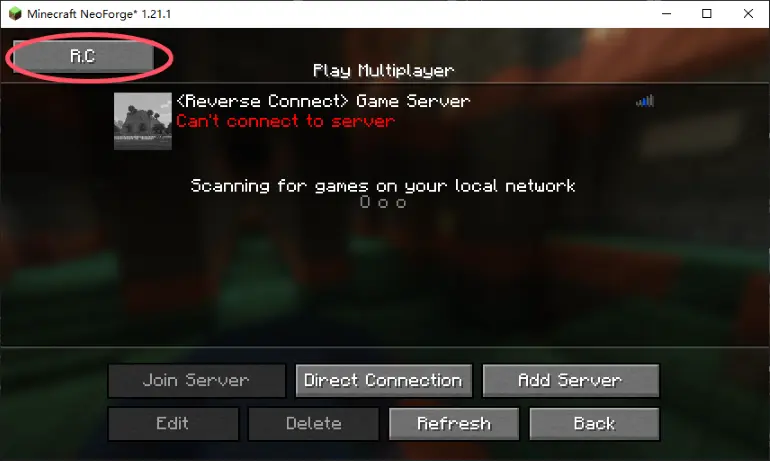
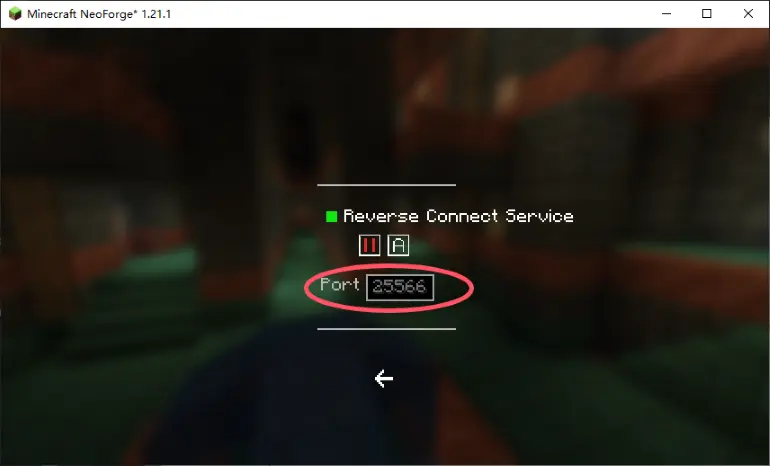
客端启动游戏并进入多人游戏界面。左上角会出现一个“R.C”按钮。点击它以打开配置页面。(反向连接服务默认设置为自动启动;你也可以将其更改为手动模式。如果设置为手动,下次你需要手动启动它,否则房主将无法连接)。 端口号(默认:25566)是需要通过内网穿透转发的端口。设置你的内网穿透转发该端口,并等待房主连接。
第二步
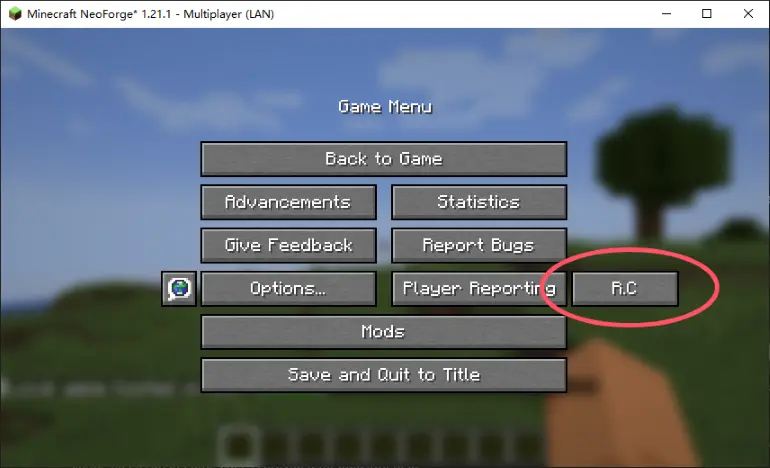
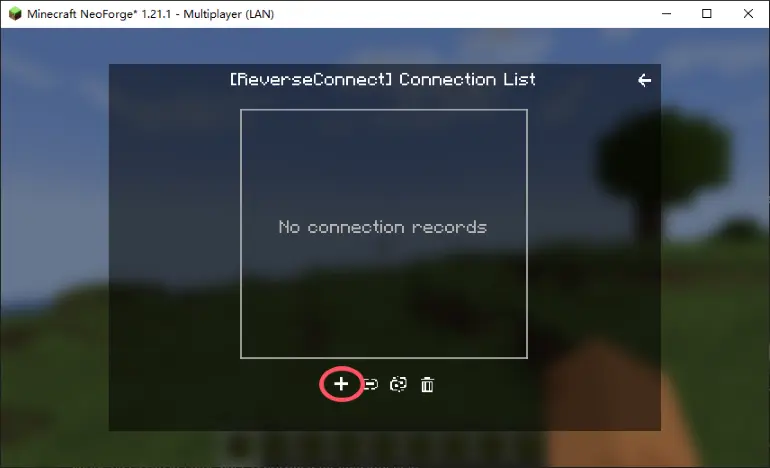
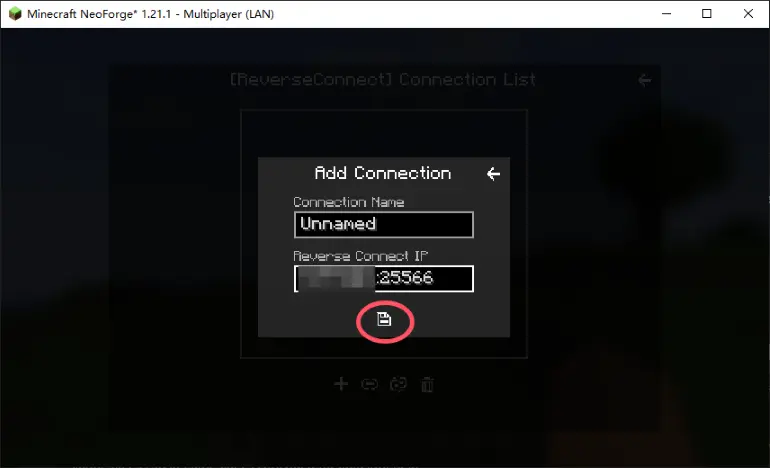
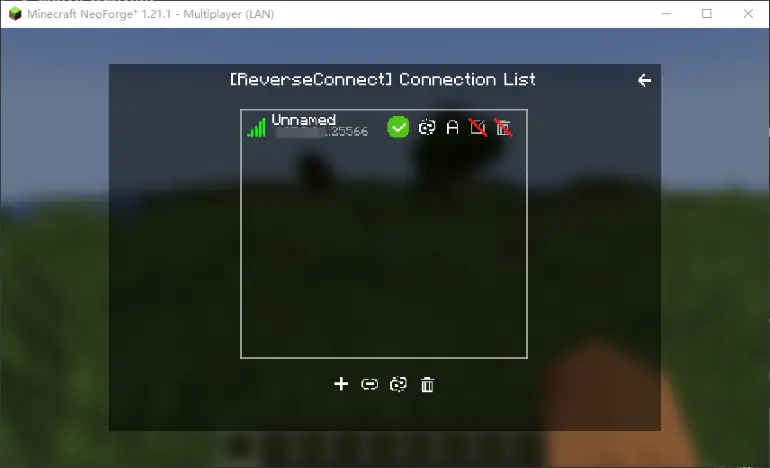
房主进入他们的 world 并将其开启为局域网。然后,当你打开 ESC 菜单时,你会看到一个额外的“R.C”按钮。点击它以打开反向连接页面。点击左下角的“+”添加新连接,输入客端的 IP(内网穿透 IP / 公网 IP),保存后,模组将自动连接到客端。
第三步
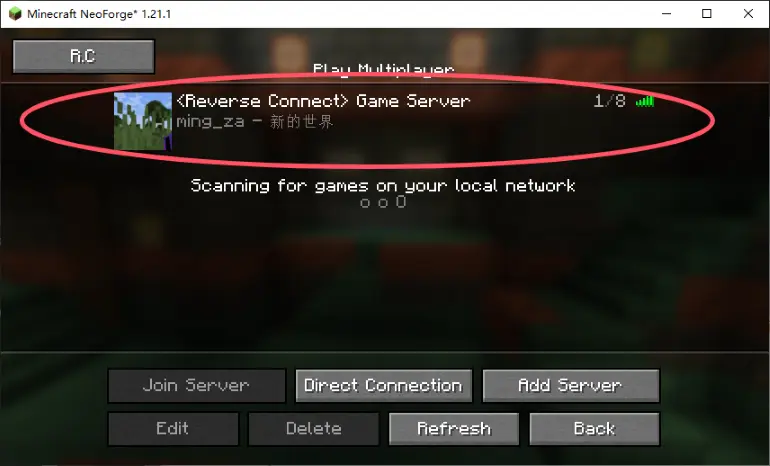
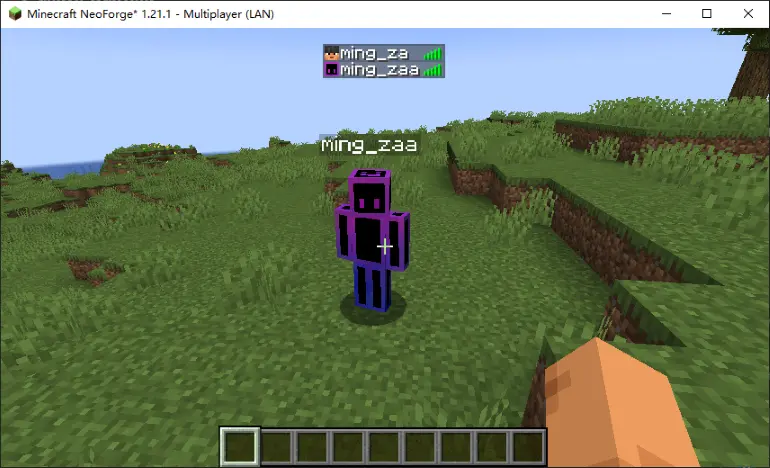
房主成功连接后,客端可以在多人游戏界面点击“刷新”,看到反向连接内置的服务器,现在应该可以加入了!该服务器无法删除,但其端口可以修改。 更改端口会导致连接断开,除非必要请不要更改 :).
常见问题解答
房主也可以同时设置内网穿透吗?
当然可以!房主也可以设置内网穿透,允许部分玩家通过房主的穿透加入 world;这与本模组不冲突。
房主和客端使用内网穿透有什么区别?
对于双人联机,带宽没有区别。
对于多人联机(三人及以上),每位玩家都可以帮助分担房主的公网带宽。
据我所知,单个玩家仅接收自己的数据,且这些数据量不会随玩家数量增加而显著增加(尽管仍会有微小增加)。 只要客端的内网穿透足以传输其自身数据,游戏体验就会流畅! (我不确定是否还有其他特殊情况)。
注意事项
使用本模组进行多人游戏时,建议玩家人数不超过十人。 本模组使用的技术类似于 P2P;每位客端将在房主系统上占用两个端口。 即使使用本模组,它仍然会消耗房主的上传带宽,就像直接连接一样。它只是将消耗从公网带宽转移到了家庭带宽。通常,家庭上传带宽约为 30-50 Mbps;如果达到上限,将会出现卡顿。
备注
欢迎提出更新需求!目前,我只发布了我认为相对受欢迎的版本。 如果你觉得这个模组还不错,请留言表示支持!我会致力于使其兼容所有版本和所有加载器!
Preface
I had a sudden inspiration while playing a large modpack with friends, and designed this mod. This is a mod that allows the host to connect to the guests for the purpose of playing together online.
Yes, you heard that right! The host doesn't need to set up intranet penetration — let the guest do it! Then the host uses this mod to connect to the guest, and the guest can enter the host's world!
Note: This is meant for client/modpack multiplayer, do NOT use it on a dedicated server!!!
It is recommended to use this mod together with mods like [LSP] Lan Server Properties that adjust multiplayer parameters. This mod does not have features like toggling online mode.
For version 1.16.x, non-premium players will need [MOF] Offline Multiplayer Fix to enable multiplayer. 1.12.x requires the following prerequisite: MixinBooter
What's the use?
For two-player multiplayer:
You don't want to be the host and open a map, but you do have a public IP / intranet penetration. In this case, you can let your friend be the host and open the map, use this mod to connect to your client, and then you can join your friend's world! Plus, your friend (the host) doesn't need any public IP or intranet penetration.
For multiplayer with more than two players:
In large modpacks (e.g., tech modpacks,ic2 ...), machines updating generate a lot of data, and bandwidth consumption increases with each additional player. Therefore, the host needs intranet penetration with higher bandwidth to ensure smooth gameplay for guests. This mod allows each guest to set up their own intranet penetration for multiplayer, thus reducing the host's reliance on intranet penetration and lowering the bandwidth requirement for a single intranet penetration._ Whoever connects consumes their own public bandwidth:)_
Configuration File
None. (Configuration is handled with JSON, no line breaks or indentation ><, saved under config. Normally there's no need to manually edit the config file, as an in-game page is provided for adjustments.)
How to Use
Step 1
The guest starts the game and enters the Multiplayer screen. A "R.C" button will appear in the top-left corner. Click it to open the configuration page. (the reverse connection service is set to auto-start by default; you can also change it to manual mode. If set to manual, you'll need to start it manually next time, otherwise the host won't be able to connect). The port number (default: 25566) is the port that needs to be forwarded via intranet penetration. Set up your intranet penetration to forward this port and wait for the host to connect.
Step 2
The host enters their world and opens it to LAN. Then, when you open the ESC menu, you'll see an additional "R.C" button. Click it to open the Reverse Connection page. Click the "+" at the bottom left to add a new connection, enter the guest's IP (intranet penetration IP / public IP), save it, and the mod will automatically connect to the guest.
Step 3
After the host successfully connects, the guest can click "Refresh" on the Multiplayer screen to see the reverse connection's built-in server, which should now appear as joinable! This server cannot be deleted, but its port can be modified. Changing the port will break the connection, so please don't change it unless necessary:) .
Q&A
Can the host also set up intranet penetration at the same time?
Of course! The host can also set up intranet penetration to allow some players to join the world through the host's penetration; it does not conflict with this mod.
What's the difference between the host and the guest using intranet penetration?
For two-player multiplayer, there's no difference in bandwidth.
For multiplayer (three or more players), each player can help share the host's public bandwidth.
To my knowledge, a single player only receives their own data, and this amount of data does not increase significantly with more players (though a tiny increase is still there). As long as the guest's intranet penetration is sufficient to transmit their own data, gameplay will be smooth! (I'm not sure if there are any other special cases).
Precautions
When using this mod for multiplayer, it is recommended not to exceed ten players. The technology used by this mod is similar to P2P; each guest will occupy two ports on the host's system. Even when using this mod, it still consumes the host's upload bandwidth, just like direct connection. It only shifts the consumption from public bandwidth to home bandwidth. Generally, household upload bandwidth is around 30-50 Mbps; if it gets maxed out, lag will occur.
Remarks
Feel free to request updates! Currently, I've only released versions that I think are relatively popular. If you think this mod is pretty good, please leave a comment to show your support! I will work on making it compatible with all versions and all mod loaders!

下载 ReverseConnect
下载 ReverseConnect
下载 ReverseConnect
下载 ReverseConnect
下载 ReverseConnect
下载 ReverseConnect
下载 ReverseConnect
下载 ReverseConnect
下载 ReverseConnect
添加了服务器端命令支持
调整了部分错误提示
修复了已知问题
优化了日志显示
新增了帮助页面重定向
关于这个资源的讨论、问题反馈与使用心得
还没有讨论,来发第一帖吧
你是这个资源的作者?登录后可认领此资源。
相似资源
 模组

显示你正在注视的方块的信息。(适用于 Minecraft 1.16+ 的 Hwyla/Waila 分支)
 模组
使用 JavaScript 编辑配方、添加自定义物品、编写世界事件!
 模组

查看物品与配方
 模组
在游戏画面角落显示附近世界地形、玩家、生物和实体的地图。可创建路径点,帮助你找到标记过的位置。
 模组
AE2:一款流行的自动化与存储模组
 模组
那是什么?一个 Waila/Hwyla 的分支。
评论 0
登录后参与评分
还没有评论,来抢沙发吧