
Minecraft 1.21.1 · Fabric & NeoForge · Java 21 · Client & Server
Source ·
Issues ·
Configuration ·
Discord
Roleplay Status
告知其他玩家你是否处于角色扮演状态、是否愿意进行角色扮演,或是正在休息。选择你的状态,自定义其外观,并与附近的玩家掷骰子。
由 pokesmells / Bare Minimum Studios 制作。曾名为 Andromeda Status。
Version 2 是独立版本。不再需要 Status by Max Henkel。
选择你的状态
默认按下 U(可重新绑定)打开状态屏幕。你的选择将显示在 Tab 玩家列表中你的名字旁边。
| 状态 | 默认指示器 |
|---|---|
| In Character (角色内) | 绿色方块 |
| Out of Character (角色外) | 红色方块 |
| Open to RP (欢迎 RP) | 金色方块 |
| Busy / AFK (忙碌 / 暂离) | 灰色方块 |
| Event (活动) | 紫色方块 |
| New (新加入) | 青色方块 |
| Recording (录制中) | 橙色半方块 |
| Streaming (直播中) | 蓝色半方块 |
选择会在服务器重启后保留。默认状态为 Out of Character,直到你选择其他状态。加入提醒会以绿色高亮显示你绑定的状态按键。
**No Sleep(不睡觉)**开关会将你排除在需要跳过夜晚的玩家之外,同时尊重服务器的睡眠比例规则。
附近掷骰子
直接在聊天框中掷骰子,并可选地附带理由:
| 命令 | 作用 |
|---|---|
/roll 或 /roll d20 |
投掷二十面骰 |
/roll 2d6 |
投掷两个六面骰 |
/roll 1d20+3 Stealth check |
添加修正值和理由 |
支持的骰子类型:d2, d4, d6, d8, d10, d12, d20, 和 d100。一次最多可投掷 20 个骰子,修正值范围为 −1000 到 +1000。
服务器会生成所有结果,并在聊天中分享总和、单次投掷结果、修正值以及可选的理由。结果会发送给 同一维度内 25 格范围内的玩家(包括投掷者)。操作员可以通过 Fzzy Config 更改范围。
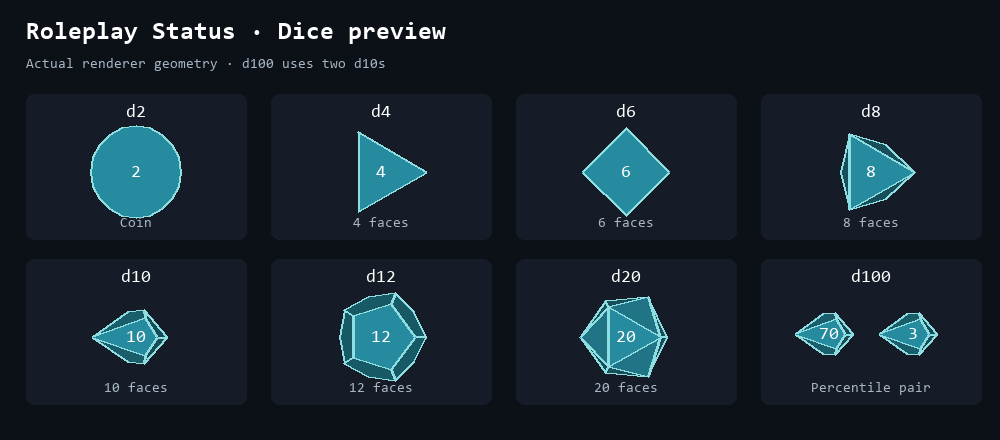
渲染器预览,非游戏内截图。d2 是一枚硬币;d100 使用两个百分位 d10 骰。
可选的骰子动画
附近的掷骰动作可以在你的 HUD 上显示一个简短的动画骰子面板,使用匹配的多面体形状。
通过 U → Configure(配置)→ Accessibility(辅助功能)→ Dice animations(骰子动画) 禁用它。动画默认启用,不会影响结果,并且可以在不隐藏聊天结果的情况下关闭。
对于较大数量的掷骰,叠加层会预览有限数量的骰子;聊天框中会包含每一个单独的结果。
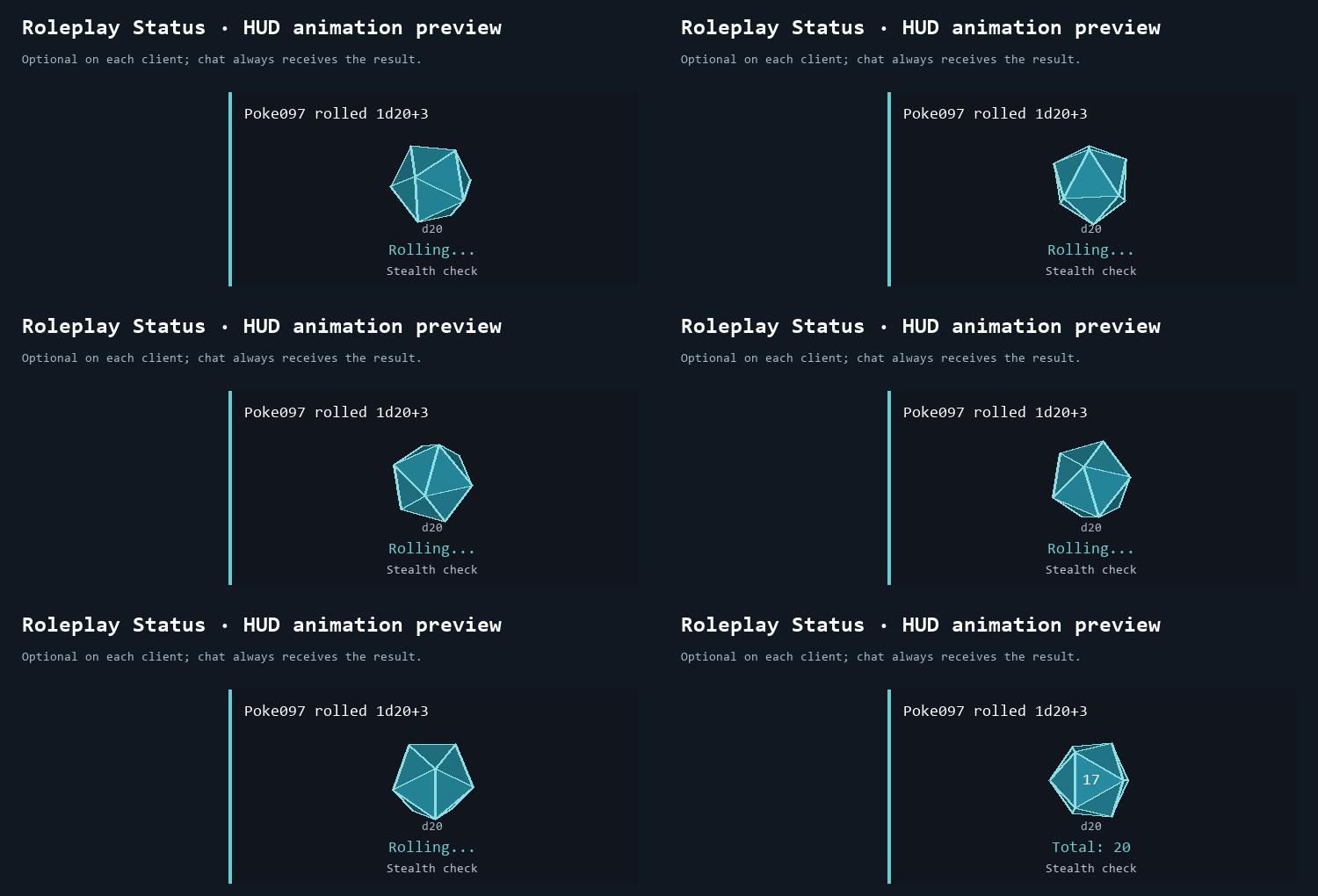
动画预览由渲染器几何图形生成,并非 Minecraft 录屏。位置和大小均可自定义。
移动和调整骰子面板大小
让骰子面板远离你的小地图和其他 HUD 元素:
- 打开 U → Position dice(定位骰子)。
- 拖动预览图到你想要的位置。
- 调整 Dice size(骰子大小) 滑块,范围从 50% 到 150%。
- 选择 Save(保存)。
**Cancel(取消)**或按 Escape 将丢弃你的编辑。**Reset(重置)**会将预览图恢复至左上角且大小为 100%;选择 Save 以保留该设置。
位置和大小是个人设置,也可在 Configure(配置)→ Accessibility(辅助功能) 中找到。它们本地保存,并适应分辨率和 GUI 缩放的变化。面板会自动适应你的屏幕大小。
默认位置是 左上角,以避免常见的右上角小地图。移动或调整面板大小不会改变聊天结果或其他玩家的 HUD。
色盲友好型指示器
在 U 屏幕上或通过 Configure(配置)→ Accessibility(辅助功能) 启用 Colorblind mode(色盲模式)。每种状态都有独特的形状,因此颜色不是识别它的唯一方式。
| 状态 | 色盲模式下的形状 |
|---|---|
| In Character (角色内) | 实心方块 |
| Out of Character (角色外) | 空心方块 |
| Open to RP (欢迎 RP) | 加号 |
| Busy / AFK (忙碌 / 暂离) | 减号 |
| Event (活动) | 菱形 |
| New (新加入) | 三角形 |
| Recording (录制中) | 右半方块 |
| Streaming (直播中) | 左半方块 |
**Show status labels(显示状态标签)**会在 Tab 列表中玩家名字旁添加灰色的状态名称。它独立于色盲模式工作,默认关闭。
这些显示偏好会立即生效,本地保存,并且对所有玩家可用。它们不会改变其他玩家的设置。
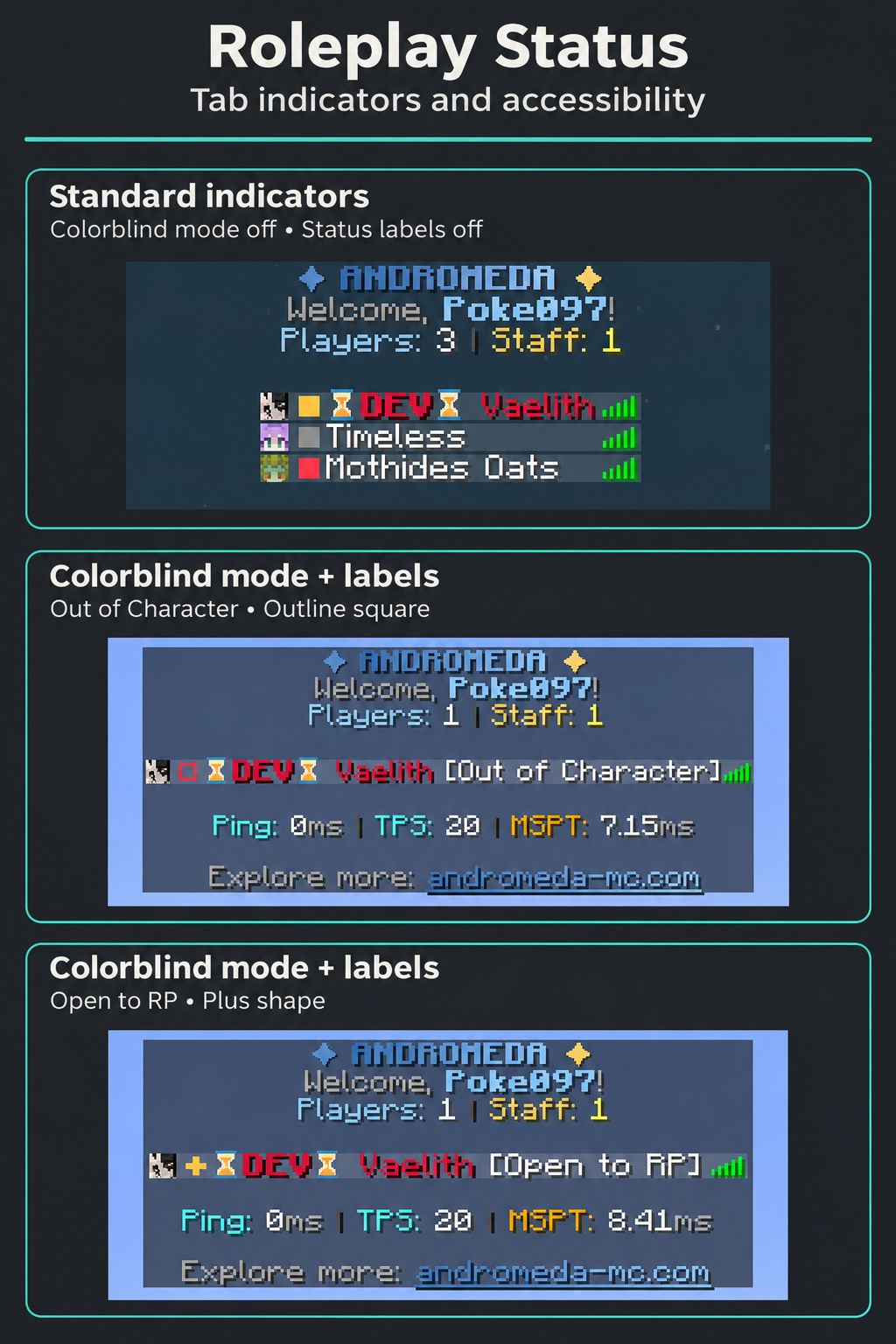
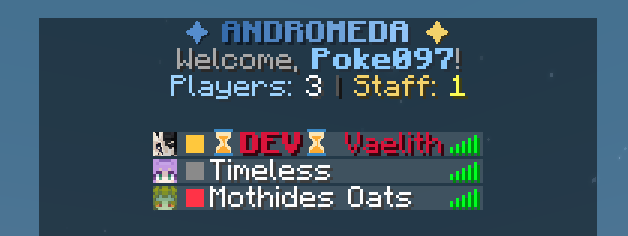
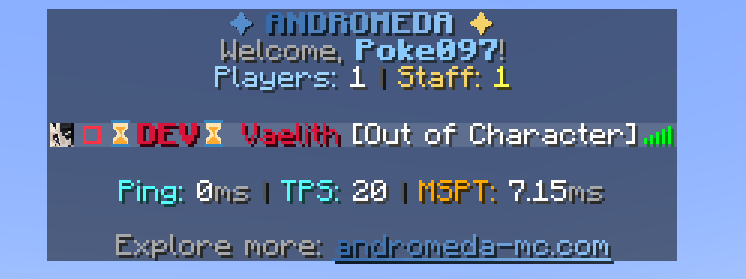
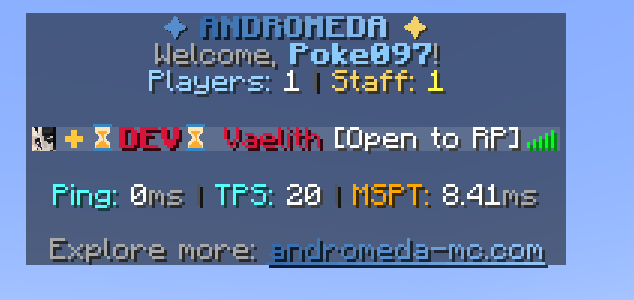
基于用户提供 Minecraft 截图设计的对比图:标准指示器、Out of Character 空心方块、Open to RP 加号形状。两个色盲示例均启用了可选的状态标签。
未经修改的游戏内截图:Standard indicators(标准指示器) · Colorblind: Out of Character(色盲:角色外) · Colorblind: Open to RP(色盲:欢迎 RP)
配置
打开 U → Configure(配置) 以访问 Fzzy Config。拥有权限等级 2 的服务端操作员可以:
- 重命名八个状态。
- 使用颜色选择器、预设或十六进制输入更改颜色。
- 启用或禁用掷骰子功能。
- 设置共享范围为 1–256 格。
- 调整掷骰冷却时间,默认值为 一秒。
接受的游戏内更改会实时生效。更新时保留已保存的颜色。
每位玩家均可自行调整色盲模式、状态标签、骰子动画以及骰子面板的位置和大小。
| 文件 | 设置 |
|---|---|
config/roleplay_status/statuses.json |
状态标签与颜色 |
config/roleplay_status/dice.json |
服务器骰子设置 |
config/roleplay_status/accessibility.json |
个人显示偏好,包括骰子位置和大小 |
在手动编辑 JSON 文件前请停止服务器,然后重启以加载更改。
安装
请使用 Minecraft 1.21.1 和 Java 21。在服务器及所有参与客户端上安装对应版本及其依赖项。
- Fabric: Fabric Loader 0.19.5+、Fabric API、Fabric Language Kotlin 1.13.7+kotlin.2.2.21+ 以及 Fzzy Config 0.7.7+1.21。
- NeoForge: NeoForge 21.1.266+、Kotlin for Forge 5.11.0+ 以及 Fzzy Config 0.7.7+fix1+1.21+neoforge。
请确保客户端与服务器的加载器版本匹配。不支持跨加载器连接。
若从旧版插件升级,请移除 Status、Andromeda Status 以及旧版 Roleplay Status 的 JAR 文件。请保留您的配置文件。旧的 Status 玩家选择将重新开始;独立选择在此之后保持不变。
鸣谢与许可
Roleplay Status 最初是作为 Status by Max Henkel 的附加组件开发的。2.0 版本采用独立实现,不再捆绑也不需要 Status。
Fzzy Config 提供配置编辑器与同步功能。
代码与美术作品采用 Bare Minimum License v1.0。各依赖项保留其原有许可证。
赞助商
使用优惠码 bareminimum 可享 首月立减 25%。
Minecraft 1.21.1 · Fabric & NeoForge · Java 21 · Client & Server
Source ·
Issues ·
Configuration ·
Discord
Roleplay Status
Let other players know whether you are in character, available for roleplay, or taking a break. Choose your status, customize its appearance, and roll dice with nearby players.
Created by pokesmells / Bare Minimum Studios. Previously named Andromeda Status.
Version 2 is standalone. Status by Max Henkel is no longer required.
Choose your status
Press U by default (rebindable) to open the status screen. Your selection appears beside your name in the Tab player list.
| Status | Default indicator |
|---|---|
| In Character | Green square |
| Out of Character | Red square |
| Open to RP | Gold square |
| Busy / AFK | Gray square |
| Event | Purple square |
| New | Cyan square |
| Recording | Orange half-square |
| Streaming | Blue half-square |
Selections persist across server restarts. Out of Character is the default until you choose another status. A join reminder highlights your bound status key in green.
The No Sleep toggle excludes you from the players required to skip the night, respecting the server’s sleeping percentage rule.
Nearby dice rolls
Roll directly in chat, with an optional reason:
| Command | What it does |
|---|---|
/roll or /roll d20 |
Roll a twenty-sided die |
/roll 2d6 |
Roll two six-sided dice |
/roll 1d20+3 Stealth check |
Add a modifier and a reason |
Supported dice: d2, d4, d6, d8, d10, d12, d20, and d100. Roll up to 20 dice at once, with modifiers from −1000 to +1000.
The server generates every result and shares the total, individual rolls, modifier, and optional reason in chat. Results reach players within 25 blocks, including the roller, in the same dimension. Operators can change the range through Fzzy Config.
Renderer preview, not an in-game screenshot. A d2 is a coin; d100 uses two percentile d10s.
Optional dice animations
Nearby rolls can display a short animated dice panel on your HUD, using the matching polyhedral shapes.
Disable it through U → Configure → Accessibility → Dice animations. Animations are enabled by default, never affect the result, and can be turned off without hiding chat results.
For larger rolls, the overlay previews a limited number of dice; chat includes every individual result.
Animation preview generated from the renderer geometry, not a recording of Minecraft. Position and size are customizable.
Move and resize the dice panel
Keep the dice panel clear of your minimap and other HUD elements:
- Open U → Position dice.
- Drag the preview to your preferred position.
- Adjust the Dice size slider from 50% to 150%.
- Choose Save.
Cancel or Escape discards your edits. Reset restores the preview to the top-left corner at 100% size; choose Save to keep it.
Position and size are personal settings, also available under Configure → Accessibility. They save locally and adapt to resolution and GUI scale changes. The panel automatically fits within your screen.
The default position is top-left to avoid common top-right minimaps. Moving or resizing the panel does not change chat results or anyone else’s HUD.
Colorblind-friendly indicators
Enable Colorblind mode on the U screen or through Configure → Accessibility. Each status gets a distinct shape, so color is not the only way to identify it.
| Status | Colorblind shape |
|---|---|
| In Character | Solid square |
| Out of Character | Outline square |
| Open to RP | Plus |
| Busy / AFK | Dash |
| Event | Diamond |
| New | Triangle |
| Recording | Right half-square |
| Streaming | Left half-square |
Show status labels adds a gray status name beside players in Tab. It works independently of colorblind mode and is off by default.
These display preferences apply immediately, save locally, and are available to every player. They do not change other players’ settings.
Designed comparison based on user-provided Minecraft screenshots: standard indicators, an Out of Character outline, and an Open to RP plus shape. Both colorblind examples also have optional status labels enabled.
Unedited in-game captures: Standard indicators · Colorblind: Out of Character · Colorblind: Open to RP
Configure
Open U → Configure to access Fzzy Config. Server operators with permission level 2 can:
- Rename the eight statuses.
- Change colors with the color picker, presets, or hex entry.
- Enable or disable dice rolling.
- Set the sharing range from 1–256 blocks.
- Adjust the roll cooldown, which defaults to one second.
Accepted in-game changes apply live. Existing saved colors are preserved when updating.
Every player can adjust their own colorblind mode, status labels, dice animations, and dice panel position and size.
| File | Settings |
|---|---|
config/roleplay_status/statuses.json |
Status labels and colors |
config/roleplay_status/dice.json |
Server dice settings |
config/roleplay_status/accessibility.json |
Personal display preferences, including dice position and size |
Stop the server before manually editing its JSON files, then restart to load your changes.
Install
Use Minecraft 1.21.1 and Java 21. Install the matching build and dependencies on the server and every participating client.
- Fabric: Fabric Loader 0.19.5+, Fabric API, Fabric Language Kotlin 1.13.7+kotlin.2.2.21+, and Fzzy Config 0.7.7+1.21.
- NeoForge: NeoForge 21.1.266+, Kotlin for Forge 5.11.0+, and Fzzy Config 0.7.7+fix1+1.21+neoforge.
Use matching client and server loaders. Cross-loader connections are not supported.
When upgrading from the old addon, remove Status, Andromeda Status, and older Roleplay Status JARs. Keep your configuration files. Old Status player selections start fresh; standalone selections persist afterward.
Credits and license
Roleplay Status began as an addon for Status by Max Henkel. Version 2 uses its own implementation and does not bundle or require Status.
Fzzy Config provides the configuration editor and synchronization.
Code and artwork use the Bare Minimum License v1.0. Dependencies retain their own licenses.
Sponsor
Use code bareminimum for 25% off your first month.

下载 Roleplay Status
下载 Roleplay Status
下载 Roleplay Status
下载 Roleplay Status
下载 Roleplay Status
下载 Roleplay Status
下载 Roleplay Status
下载 Roleplay Status
下载 Roleplay Status
下载 Roleplay Status
- 添加一个可拖动的骰子 HUD 定位界面,支持实时预览、50–150% 缩放滑块、保存/取消和重置功能。按 U 键打开「定位骰子」界面。
- 在 Fzzy Config 中为每个客户端单独保存位置和大小;当 GUI 缩放或分辨率更改时,自动缩放并限制面板尺寸以适配屏幕。默认设置为左上角,以避免与右上角的小地图冲突。
-
将内嵌指示器调整为 6x6 大小,增加垂直内边距,同时保留其 Tab 栏位间距,并包含色盲模式形状。
-
添加仅客户端的色盲模式,提供八种独特形状、可读的 Tab 状态标签、状态屏幕切换选项以及本地 Fzzy Accessibility(无障碍)配置。
-
使 8 像素高的 Tab 指示器与玩家头像对齐,并将其居中于 10 像素宽的槽位中。
-
恢复录制和直播状态的右半方形活动指示器,采用新的橙色和蓝色默认值;保留已保存的颜色设置。
-
在所有玩家名称替换钩子(包括 Figura)之后应用指示器,防止后续钩子将其丢弃。
-
为在线玩家启用默认指示器,无需手动选择状态;加入服务器时同步所有在线玩家的状态。
-
自动显示加入提醒,并将绑定的状态按键高亮显示为绿色。
-
以彩色块形式绘制 Tab 指示器并预留空间,防止资源包字体隐藏它们。
-
保留 TAB 格式和自定义字体;通过明确的账号名称解决更改后的 UUID 问题。
-
重试客户端握手,并使限速的服务器快照可重复执行。
-
在同步中包含有界账号名称;将服务器和客户端均更新至 2.0.1 版本。
-
修复错误编码的选中状态复选标记、分页箭头、省略号和配置文本;验证发布版 JAR 中的所有 UI 符号。
-
成为独立模组;移除 Status 作为运行时和构建依赖项。
-
添加共享 Kotlin 实现的原生 Fabric 和 NeoForge 构建版本。
-
实现服务器托管的玩家状态、带边界/版本控制的包、请求验证、速率限制、加入同步以及断开连接清理功能。
-
在每个世界的
data/roleplay_status.dat中按 UUID 保存状态和无睡眠偏好设置。 -
使用可重新绑定的 U 键直接打开状态屏幕,并显示原始的彩色 Tab 列表徽章。
-
基于世界内的睡眠百分比实现无睡眠功能,并在更改后立即刷新睡眠计算。
-
保留现有的 Fzzy JSON 模式、管理员编辑器、颜色选择器、实时配置同步以及非破坏性的 Andromeda 配置迁移功能。
-
添加独立的加载器构建版本、测试、工件验证、本地构建辅助工具,以及仅上传至 Modrinth 并包含特定加载器依赖的功能。
-
保持 Gradle 9.8.0 和 Java 21;使用 NeoForge 21.1.266、ModDevGradle 2.0.148 以及兼容的 NeoForge Fzzy Config 构建版本。
-
升级时移除 Status 及旧版插件 JAR 文件。旧的 Status 玩家选择将重新开始;现有标签/颜色将被保留。
Roleplay Status 1.0.6+1.21.1
1.0.7+1.21.1
-
使用 Kotlin 重写模组初始化、状态目录、客户端运行时、屏幕界面及配置模块。
-
保留现有的 JSON 设置、操作者权限、实时同步功能以及 Andromeda 迁移支持。
-
需要 Fabric Language Kotlin 1.13.7+kotlin.2.2.21 或更高版本。
-
使用链接至主分支工作流的 GitHub 原生构建徽章。
-
将元数据、命名空间、用户界面、制品文件及品牌标识中的 "Andromeda Status" 统一重命名为 "Roleplay Status"。
-
添加扁平化对话气泡风格 Logo,并配套更新项目页面素材。
-
替换初始化前的原始 Status 屏幕;新增响应式布局、选择标记、完整标签提示框、“Configure”(配置)和“Done”(完成)按钮。
-
采用 Fzzy Config 0.7.7+1.21,支持服务器端可编辑标签、RGB 颜色拾取、权限控制、JSON 存储及实时同步功能。
-
保留“No Sleep”(禁止睡眠)开关,并迁移旧版标签、颜色及角色扮演状态 ID。
-
清理显示标签,避免不必要的纹理重建,并在配置或玩家状态变更时更新已打开的屏幕界面。
-
升级 Gradle 至 9.8.0,Fabric Loader 至 0.19.5,Fabric API 至 0.116.17+1.21.1,并锁定兼容 Java 21 的 Loom 1.17.21。
-
添加 Mixin MCP 1.5.0,实现自动化构建,并仅向 Modrinth 提交手动 MC Publish 发布版本。
关于这个资源的讨论、问题反馈与使用心得
还没有讨论,来发第一帖吧
你是这个资源的作者?登录后可认领此资源。
相似资源
 模组

显示你正在注视的方块的信息。(适用于 Minecraft 1.16+ 的 Hwyla/Waila 分支)
 模组
在游戏画面角落显示附近世界地形、玩家、生物和实体的地图。可创建路径点,帮助你找到标记过的位置。
 模组

查看物品与配方
 模组
使用 JavaScript 编辑配方、添加自定义物品、编写世界事件!
 模组
AE2:一款流行的自动化与存储模组
 模组
那是什么?一个 Waila/Hwyla 的分支。
评论 0
登录后参与评分
还没有评论,来抢沙发吧