Salt's Inventory Update
Salt's Inventory Update 将 Minecraft 的容器界面转变为可移动窗口的桌面。同时打开多个容器,比较其内容并在它们之间移动物品,而无需反复替换整个屏幕。
Core 0.1.5 可独立运行。 选择适用于你的 Minecraft 版本和加载器的文件。所有当前版本均为 Alpha 测试版。
桌面式容器窗口
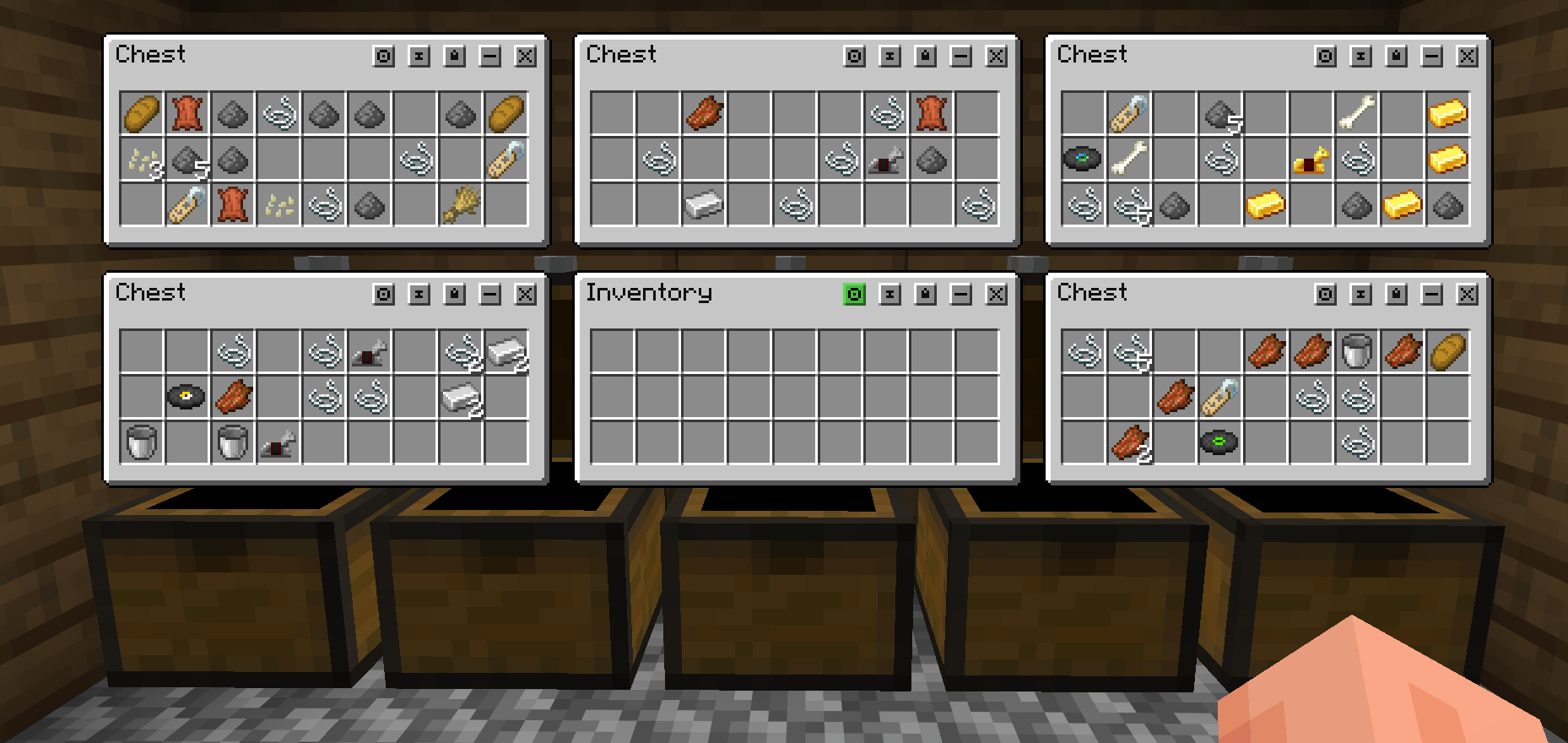
玩家背包、角色栏、创造模式物品栏以及受支持的容器均以独立窗口形式打开。你可以移动、聚焦、固定、锁定这些窗口,并在支持的情况下调整大小。窗口始终完全保持在屏幕四个边缘之内,即使更改分辨率或 GUI 缩放比例也是如此。
使用普通图钉(Pins)和持久化窗口(Persistent Windows)可返回已保存的布局。窗口位置、大小和锁定状态按世界或服务器分别保存。最小化(Minimize)和幽灵图钉(Ghost Pins)功能已不再包含。
物品整理
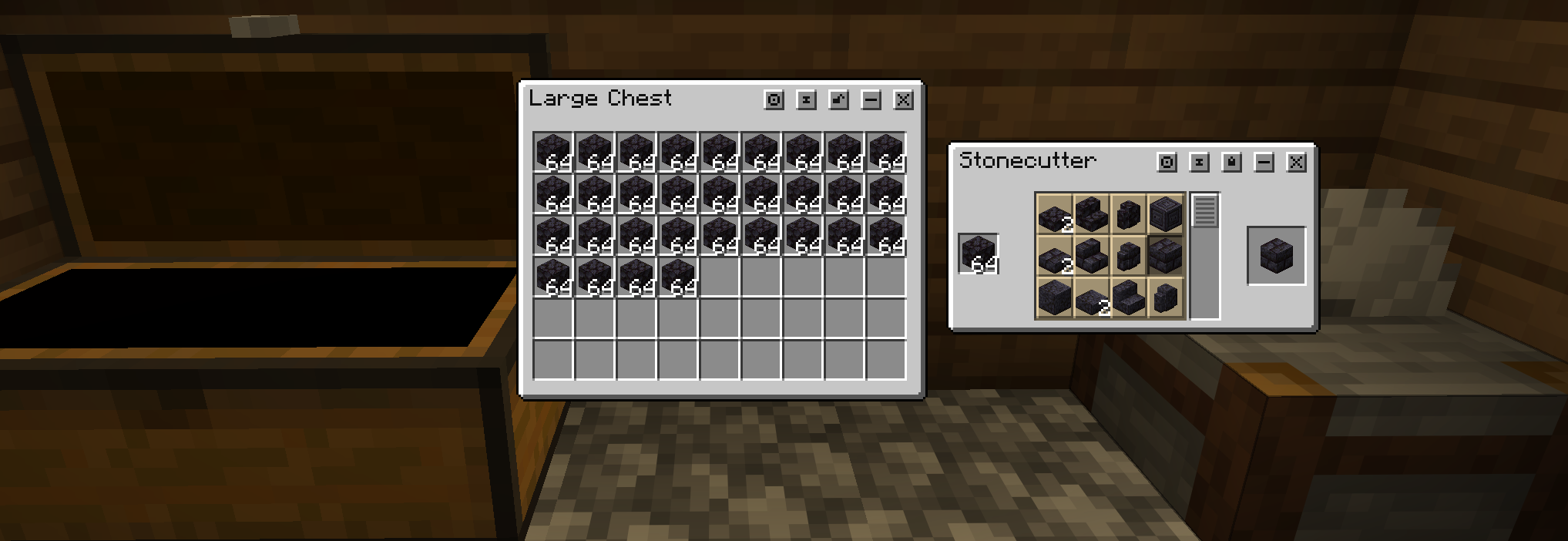
Sort this inventory 在当前容器内整理物品,而不会将其移动到其他容器中。它会合并兼容的物品堆叠,将贵重物品置于顶部,归类相关资源与补给品,并将大量地形方块放置在末尾。单独的 Sort into open containers 按钮则用于处理向其他已打开容器的转移操作。
角色栏与合成
默认按 C 键打开角色栏,以紧凑的原版风格排列盔甲、玩家预览图和 2x2 合成网格。其副手槽位遵循 Return Hotbar to Inventory 设置。你的主背包保持为一个独立的存储窗口。
交互式快捷栏与移动控制
在桌面界面开启时,直接使用真实的快捷栏和副手槽。Window Movement Control 将鼠标控制权交还给视角控制,使你在保持窗口打开的同时可以环顾四周并移动。默认按键为 Left Alt,可在 Minecraft 键位绑定中的 Salt's Inventory Update 下进行重新绑定。在模组设置或 Minecraft 控制选项中可选择 Hold(按住)或 Toggle(切换)。
启用 Return Hotbar to Inventory 后,快捷栏槽位会显示在背包窗口中,而普通的快捷栏指示器在管理窗口时保持隐藏。移动控制功能会临时恢复原生快捷栏及指示器,以便正常选中手持物品。当该快捷栏被隐藏且移动控制未激活时,滚轮和数字键将无法切换手持物品。
按住关闭功能遵循原版“库存”绑定设置,包括自定义键盘和鼠标绑定。
可选扩展存储
在设置中启用可扩展背包,可通过消耗经验等级解锁额外的存储槽位。额外槽位随玩家数据保存,在多人游戏中同步,并表现为真实的背包存储空间。
配置
通过游戏内配置命令、加载器的模组配置界面,或在可用情况下通过键位绑定快捷键打开设置。可配置背包扩展、放置、调整大小、吸附、快捷栏位置、移动控制和按住关闭计时等功能。
可选配套模组
- Salt's Inventory Compatibility 将受支持的模组容器、配件面板和配方浏览器整合进窗口系统。Compatibility 0.1.2 需要匹配的 Core 0.1.5。
- Salt's Inventory Controlify 提供控制器工作区、配方轮盘和屏幕打字功能。Companion 0.1.1 需要匹配的 Core 0.1.5 及其自身的依赖项。
这两个配套模组均为可选下载,需单独安装。请确保已安装的文件对应相同的 Minecraft 版本和加载器。
公共 API
开发者可使用公共 API 创建自定义窗口、渲染自有界面、处理输入事件、暴露真实或虚拟的物品网格、同步背包状态、添加角色栏附件和拼接面板,并协调自定义 HUD 布局。
API documentation · Source code
安装与多人游戏
为你的 Minecraft 版本和加载器安装 Core。Fabric 还需安装对应的 Fabric API。若要在多人游戏中使用桌面功能,请在客户端和服务端均安装匹配的 Core。不支持桌面功能的服务器仍保留原版背包行为。
受支持的目标平台为 Fabric/Forge 1.20.1 以及 Fabric/NeoForge 1.21.1, 1.21.11, 26.1.2, 26.2 和 26.3。
Report an issue 报告问题时,请提供你的 Minecraft 版本、加载器、模组版本及复现步骤。对于视觉问题,请附带截图。
Salt's Inventory Update
Salt's Inventory Update turns Minecraft's inventories into a desktop of movable windows. Open several containers at once, compare their contents and move items between them without repeatedly replacing the whole screen.
Core 0.1.5 works on its own. Choose the file for your Minecraft version and loader. All current releases are Alpha.
Desktop inventory windows
Player inventory, Character, creative inventory and supported containers open as separate windows. Move, focus, pin, lock and, where supported, resize them. Windows stay fully inside all four screen edges, including after changing resolution or GUI scale.
Use normal pins and Persistent Windows to return to saved layouts. Window positions, sizes and lock states are saved per world or server. Minimize and Ghost Pins are no longer included.
Inventory sorting
Sort this inventory arranges items inside the current inventory without moving them to another container. It merges compatible stacks, puts valuables near the top, groups related resources and supplies, and places bulk terrain near the end. The separate Sort into open containers button handles transfers to other open inventories.
Character and crafting
Open Character with C by default for armor, the player preview and the 2x2 crafting grid in a compact vanilla-style arrangement. Its offhand slot follows the Return Hotbar to Inventory setting. Your main inventory remains a separate storage window.
Interactive hotbar and movement
Use the real hotbar and offhand directly while the desktop is open. Window Movement Control gives the mouse back to camera control so you can look around and move while keeping windows open. Its default is Left Alt, and it can be rebound in Minecraft Key Binds under Salt's Inventory Update. Choose Hold or Toggle in the mod settings or Minecraft Controls.
With Return Hotbar to Inventory enabled, the hotbar's slots appear in the inventory window and the ordinary hotbar indicators stay hidden while managing windows. Movement control temporarily restores the native hotbar and indicators so held-item selection works normally. When that hotbar is hidden and movement control is inactive, scrolling and number keys cannot switch your held item.
Hold-to-close follows your vanilla Inventory binding, including custom keyboard and mouse bindings.
Optional expanded storage
Enable expandable inventory in the settings to unlock extra storage slots by spending XP levels. Extra slots save with the player, synchronize in multiplayer and behave as real inventory storage.
Configuration
Open settings with the in-game configuration command, the loader's mod configuration screen, or the Key Binds shortcut where available. Configure inventory expansion, placement, resizing, snapping, hotbar placement, movement control and hold-to-close timing.
Optional companion mods
- Salt's Inventory Compatibility brings supported modded inventories, accessory panels and recipe browsers into the window system. Compatibility 0.1.2 requires matching Core 0.1.5.
- Salt's Inventory Controlify provides the controller workspace, recipe wheels and on-screen typing. Companion 0.1.1 requires matching Core 0.1.5 and its own dependencies.
Both companions are optional, separate downloads. Match the Minecraft version and loader across installed files.
Public API
Developers can use the public API to create custom windows, render their own interfaces, handle input, expose real or virtual item grids, synchronize inventory state, add Character attachments and joined panels, and coordinate custom HUD layouts.
API documentation · Source code
Installation and multiplayer
Install Core for your Minecraft version and loader. Fabric also requires the matching Fabric API. For multiplayer desktop features, install matching Core on both client and server. Servers without desktop support retain ordinary inventory behavior.
The supported targets are Fabric/Forge 1.20.1 and Fabric/NeoForge 1.21.1, 1.21.11, 26.1.2, 26.2 and 26.3.
Report an issue with your Minecraft version, loader, mod versions and reproduction steps. Include a screenshot for visual problems.
下载 Salt's Inventory Update
下载 Salt's Inventory Update
下载 Salt's Inventory Update
下载 Salt's Inventory Update
下载 Salt's Inventory Update
下载 Salt's Inventory Update
下载 Salt's Inventory Update
下载 Salt's Inventory Update
下载 Salt's Inventory Update
下载 Salt's Inventory Update
桌面窗口
- 将快速移动修饰键悬停在容器的关闭按钮上以显示最大化。它会以玩家背包的形式打开原始容器。点击返回或点击背包以恢复你的窗口和携带的物品组。
- 在顶部中央悬停可触发关闭全部。按住背包键会打开选项卡并显示按钮周围的进度。显示顶部下拉菜单可以在保持按住关闭和返回功能可用的同时隐藏桌面悬停选项卡。Controlify 工作区使用其自己的后退操作。
- 兼容的模组容器可以自动作为窗口打开。它们的原始槽位、 artwork(艺术图)、控件和动画位于标题栏和底部空白栏之间。超大的原生布局可以滚动。专用集成可以通过公共 API 和游戏内原生 UI 检查器适应原生布局。
- 细化原版交易,提供四个可见的交易选项,最后一个交易下方留有空间,并更好地对齐等级、经验条以及支付和结果槽位。
修复与集成支持
- 保留携带的物品组,并按顺序保持原生点击、搜索和重命名编辑以及槽位更新有效。服务器验证继续检查物品所有权、会话身份和背包修订。
- 修复重新打开后的原生配方书切换、标题区域槽位启动窗口拖动以及在有效的空原生槽位中排序的问题。按菜单类型保存容器大小。
- 在角色集成中保持装备可见性、副手访问和配方控件可用。为附加面板、嵌入式菜单、命中测试和控制放置添加公共钩子。
- 修复 Forge 和 NeoForge 上的原生菜单打开数据、较新的 Fabric 菜单同步问题、1.21.1 版本中的深色原生窗口和透明选项卡、26.2 和 26.3 版本中的片段裁剪崩溃,以及最大化玩家背包中的周期性同步崩溃。
Core 和可选的 Compatibility 0.1.3 及 Controlify 0.1.2 伴侣模块请使用相同的 Minecraft 版本和加载器。Fabric 需要 Fabric API。
库存窗口与控制
- 在库存界面中,除了现有的转移排序按钮外,增加了智能排序功能。兼容堆叠的物品会自动合并,贵重物品优先显示,相关物品保持在一起,而大量地形方块则排在最后。支持模组物品和可选的排序类别覆盖。
- 确保所有窗口都保持在四个屏幕边缘内,包括调整大小或更改 GUI 比例后。
- 更新了角色(Character)的槽位和玩家预览位置以符合原版风格,移除了生命值/饥饿值/经验值的文字说明,增加了底部间距并优化了合成箭头的大小。
- 修复了重新打开配方书时需要点击两次的问题,以及隐藏持久化窗口时箱子盖子仍然保持打开状态的问题。
- 移除了最小化和幽灵图钉功能。普通图钉、保存的位置和持久化窗口功能仍然可用。
- 添加了可重新绑定的窗口移动控制功能,支持按住/切换设置。按住关闭功能遵循原版库存的按键绑定,包括鼠标绑定。
- 当启用“返回快捷栏到库存”时,在移动控制期间恢复快捷栏和指示器。隐藏的快捷栏无法通过滚动或数字键更改手持物品。
可选集成与配置
- 在所有库存窗口中添加了 Mouse Tweaks 拖拽和滚轮支持,包括支持的自定义窗口。修复了在合成结果耗尽后滚轮传输继续存在的问题。
- 添加了可选的空间图形用户界面(Spatial GUI)支持:相同的桌面显示为一个有边界的 3D 面板,具有平滑的打开、关闭和移动控制过渡效果,工作正常的摄像机控制和对齐的快捷栏反馈。
- 修复了 Fabric Mod Menu 配置按钮无需兼容性扩展即可使用的问题,同时解决了 NeoForge 启动和普通移动问题。
- 防止在使用替代工作区(如 Controlify)时自动出现常规窗口教程。手动帮助仍然可用。
- 扩展了用于自定义 HUD 布局、角色附件、装备和加入库存面板的公共 API。
- 添加了跨版本和加载器的共享可编辑艺术资源,并修复了 Minecraft 1.21.11 上资源包加载的问题。
Core 独立运行。匹配的可选版本为 Compatibility 0.1.2 和 Controlify 0.1.1。
关于这个资源的讨论、问题反馈与使用心得
还没有讨论,来发第一帖吧
你是这个资源的作者?登录后可认领此资源。
相似资源
 模组

显示你正在注视的方块的信息。(适用于 Minecraft 1.16+ 的 Hwyla/Waila 分支)
 模组
在游戏画面角落显示附近世界地形、玩家、生物和实体的地图。可创建路径点,帮助你找到标记过的位置。
 模组

查看物品与配方
 模组
使用 JavaScript 编辑配方、添加自定义物品、编写世界事件!
 模组
AE2:一款流行的自动化与存储模组
 模组
那是什么?一个 Waila/Hwyla 的分支。
评论 0
登录后参与评分
还没有评论,来抢沙发吧