
 Scatha-Pro
一款旨在让 Hypixel SkyBlock 中的 Scatha 农场玩法变得更轻松、更有趣的模组,通过添加多种警报、UI 覆盖层、与 Scatha 相关的成就等功能来实现!
要求:
- Fabric Loader
- Fabric API
- Hypixel Mod API(已包含在此模组的 jar 文件中)
从 MC 1.8.9 导入设置和数据
v2 版本的模组使用新的保存文件格式来存储设置和持久化数据(即追踪器数量等),但应能自动从旧文件中导入所有数据!
如果你为 Fabric 使用的安装目录与之前为 Forge 1.8.9 使用的不同,只需将 <Forge installation>/config/scathapro 中的 保存文件夹 复制到 <Fabric installation>/config/scathapro,一切设置即可迁移(请确保没有 [...]v2 文件已存在,如果有的话,请删除它们以便用旧数据重新生成)。
功能
强烈建议你在首次安装模组后浏览所有设置,根据自己的喜好进行自定义!(此外,许多选项/功能默认处于禁用状态,以防止游戏界面过于杂乱)
-> 参见“设置”部分
Scatha 农场 UI 覆盖层
在水晶空洞(Crystal Hollows)中召唤蠕虫后出现 (也可设置为立即显示或完全禁用)。
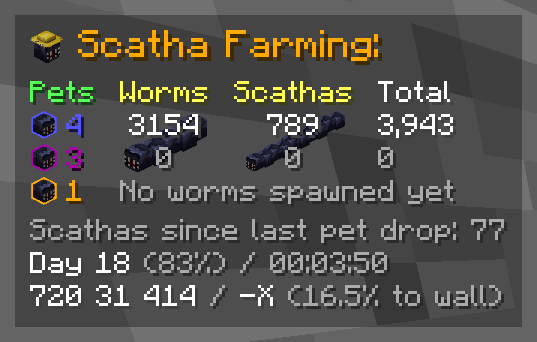
覆盖层的位置和缩放比例可在设置中调整!
组件:
每个组件均可单独启用/禁用
- 深色背景
- 标题 (= 图标和“Scatha Farming:”文本)
- Scatha 宠物掉落计数器
你可以使用/scathapro setPetDrops <rare> <epic> <legendary>将安装模组前掉落的宠物添加到计数器中(注意: 相应的成将在下次启动游戏或掉落 Scatha 宠物时解锁) - 蠕虫统计数据
- 普通蠕虫、Scatha 以及总蠕虫击杀数
Scatha 击杀数会在击杀数量和占总蠕虫击杀数的百分比之间周期性切换——切换频率可在设置中更改,也可以将百分比移到总击杀数后面以保持始终可见 - 次要击杀计数器
可在设置中设置为追踪大厅内、游戏会话内或每日的击杀数(默认:按大厅统计) - 蠕虫/Scatha 连续刷新次数
- 蠕虫刷新冷却条 (在蠕虫刷新后出现在击杀计数器后方)
- 异常渴望效果条 (在技能激活期间出现在击杀计数器后方)
- 普通蠕虫、Scatha 以及总蠕虫击杀数
- 普通蠕虫或 Scatha 连续刷新次数
- 自上次掉落宠物以来的 Scatha 击杀数
- 异常渴望状态 (默认禁用)
- 距离上次蠕虫刷新的时间 (默认禁用)
- 大厅时间
- 天数
- 在大厅停留的时间
- 坐标 / 朝向
- 坐标
- 视角方向轴
- 距离基岩墙的距离百分比
- Scatha 农场个人档案统计 (默认禁用)
显示你的 Scatha 农场魔法发现率、宠物运气值及其产生的有效魔法发现率(即前两者的总和) - 实时时钟 (默认禁用)
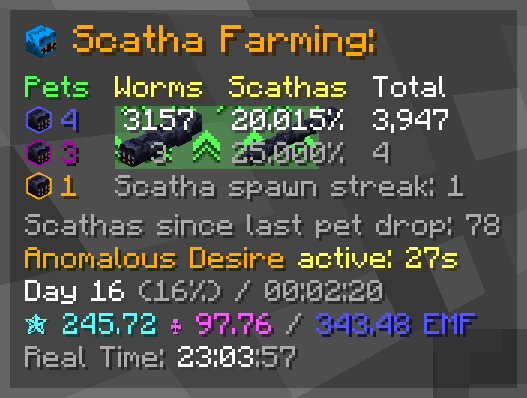
警报
当特定事件发生时,警报会在屏幕中央弹出文字并播放声音

所有警报:
- 基岩墙警报 (可配置触发距离;0-50 格,默认:15)
- 蠕虫预刷新警报
- 蠕虫刷新警报 (仅限普通蠕虫)
- Scatha 刷新警报
- 蠕虫刷新冷却警报 (冷却结束时触发)
- Scatha 宠物掉落警报 (显示掉落宠物的稀有度)
- 高温警报 (可配置触发值;90-100,默认:98)
- 异常渴望就绪警报
- 哥布林刷新警报 (金色和钻石哥布林)
- Jerry 刷新警报 (市长加成中的隐藏 Jerry)
模式:
警报模式会播放不同的警报声音 (+ 覆盖层中的 Scatha 头像也会变为所选模式的代表形象)
- 原版 (Minecraft 内置声音)
- 梗模式
- 动漫模式
- 自定义模式
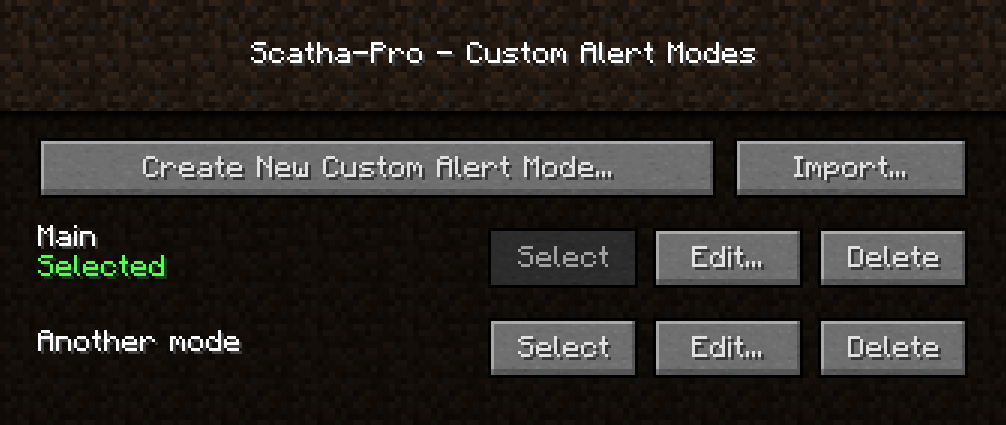
自定义模式
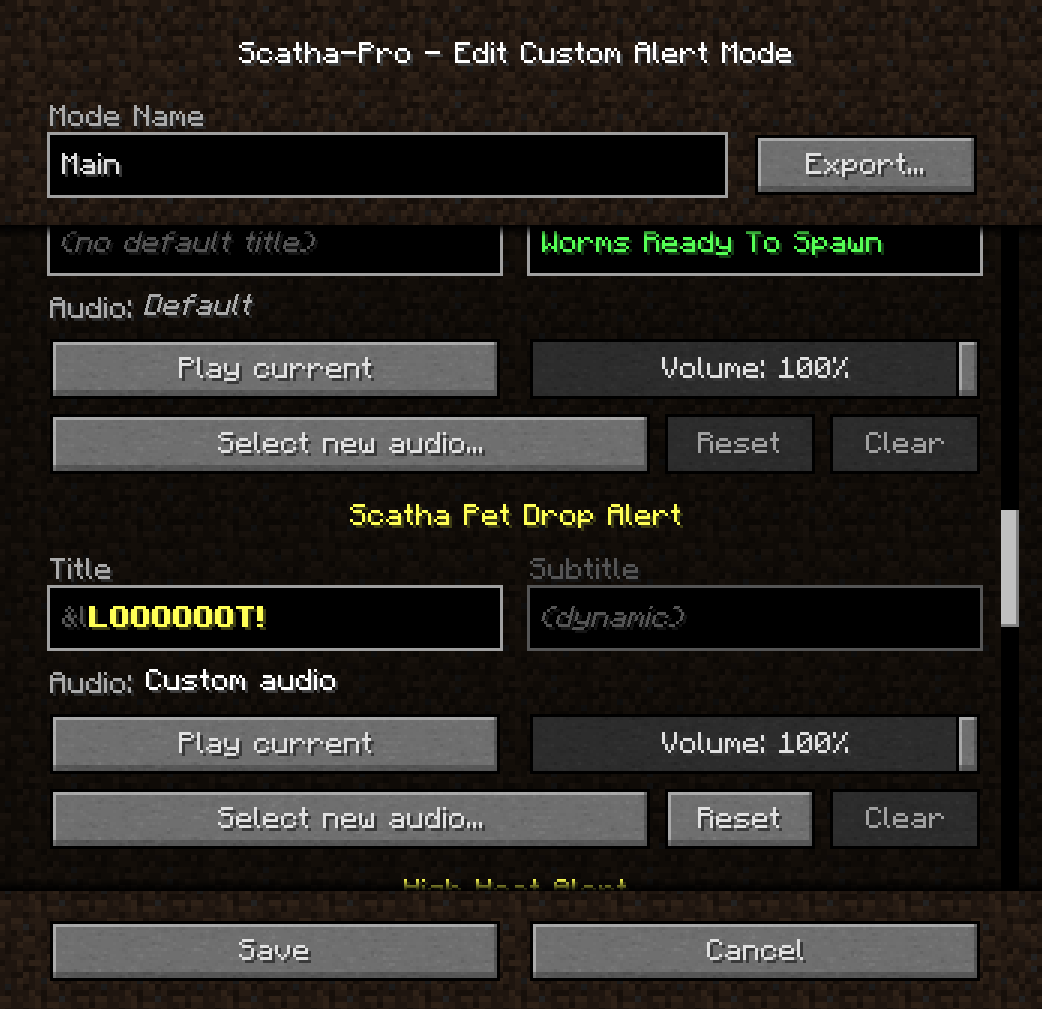
允许你创建任意数量的自定义模式,并为它们设置自定义警报音频和标题文本(标题支持 Minecraft 的颜色/格式化代码,使用 "&" 代替 "§")
注意: 由于 Minecraft 的声音引擎限制,使用的音频文件必须为 *.ogg 格式,但该模组支持安装 FFmpeg 以自动将 mp3 和 wav 文件转换为 ogg。它会在模组文件夹中查找名为 "scathapro-ffmpeg[.exe]" 的 FFmpeg 安装程序,或在环境变量的 PATH 中查找 ".../ffmpeg[.exe]"。所使用的安装程序必须包含 libvorbis 编码器才能正常工作!
你还可以将自定义模式导出和导入为 .zip 文件。
(提醒不要下载你不信任的文件!)
成就
成就菜单可以通过原版 Minecraft 成就菜单按钮旁边的按钮访问,或者使用命令 /scathapro achievements
成就分类:
- 普通
- 秘密:若未解锁,描述与计数将被混淆
- 奖励:用于更难成就的分类,可从列表隐藏
- 隐藏:除非已解锁,否则在列表和成就计数器中完全隐藏
- 遗留:与隐藏相同,但无法再解锁
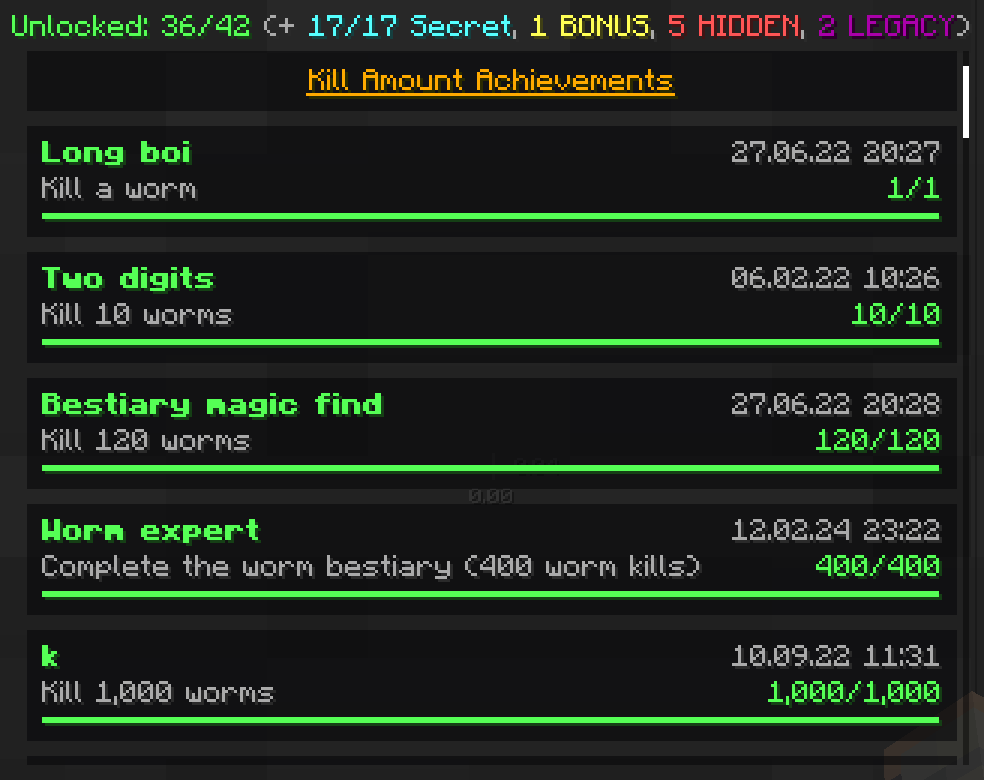
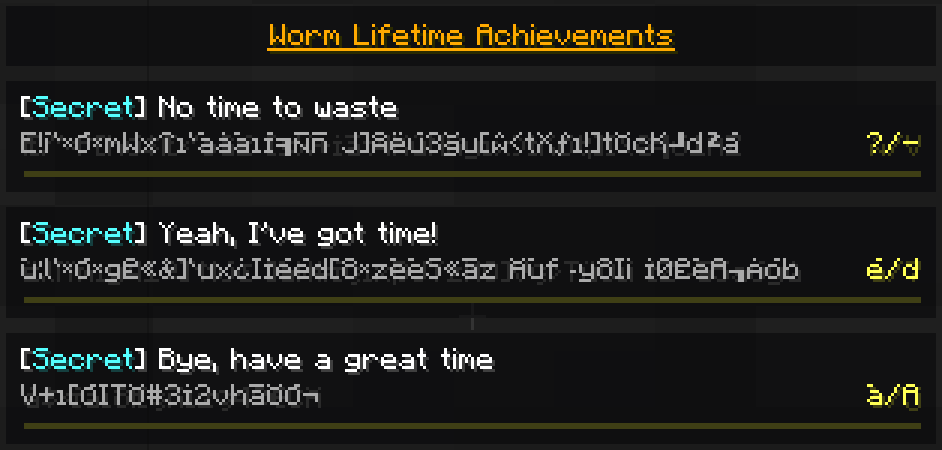
部分成就可以重复获取,并显示解锁次数:

玩家旋转工具
- 在准星旁显示俯仰角/偏航角 (默认禁用)
- 锁定视角 (按键绑定,默认未分配)
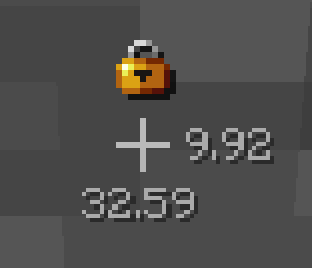
每日斯凯萨刷怪连胜记录
记录你连续刷斯卡莎的天数——同时会保存最高分。
你可以使用 /scathapro dailyStreak 查看当前的连续天数。
你能坚持多少天?


(当你增加或打破连续记录时,相关通知可以禁用!)
聊天复制按钮

(红色方块仅用于在截图中突出显示图标,实际游戏内并非如此显示)
(默认禁用)
在所有聊天消息后方添加一个可点击的符号,将其文本复制到聊天输入框中,方便你复制并粘贴这些斯卡莎掉落信息。
命令
使用 /scathapro help 查看所有可用命令列表
主命令:
/scathapro <子命令> (<参数...>) (快捷方式: /sp)
包含多个子命令,请查看 /scathapro help
Scatha 宠物掉落概率计算器:
/scathachances (<EMF/Magic Find>) (<Pet Luck>) (<Scatha kills>)(快捷命令:/scacha ...)
如果不输入参数,则显示基础概率;否则计算特定条件下的掉落概率。
如果输入了击杀数量,将计算在击杀指定数量的 Scatha 过程中至少获得 1 只 Scatha 宠物的概率。
Scatha 刷钱计算器:
/scathamoney
打开一个图形界面,可根据你的属性计算从掉落的 Scatha 宠物中获得的平均金钱。
设置
可通过 <暂停菜单> -> “选项...” -> “Scatha-Pro 设置...”,Forge 模组列表中的“配置”按钮,或使用 /scathapro settings 命令访问。
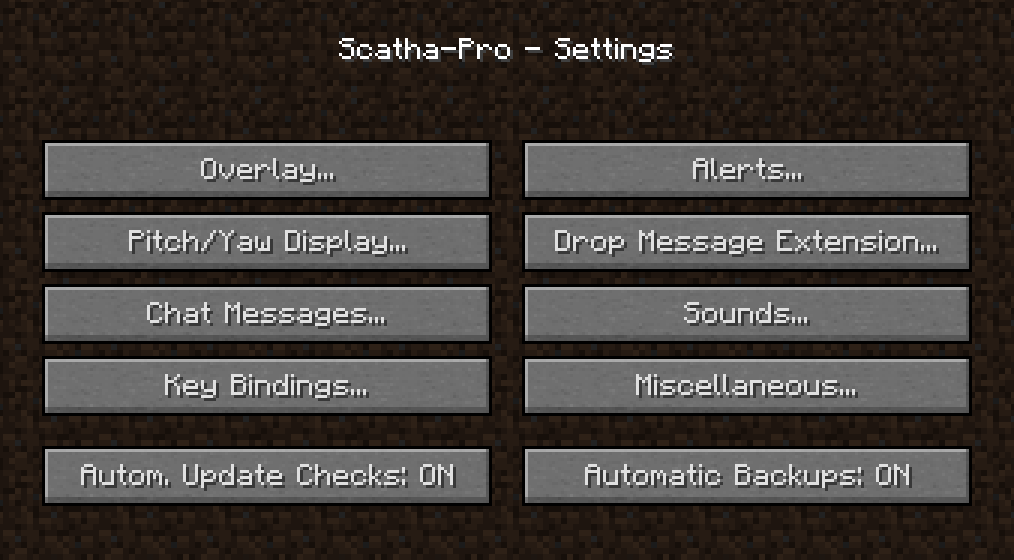
备份
安装新的模组版本时,该模组会自动为其整个存档文件夹创建备份(可在设置中关闭“自动备份”)。
你也可以使用 /scathapro backup 或 /scathapro backupPersistentData 命令手动创建备份(前者会将文件夹压缩为 zip 文件;后者仅备份持久化数据文件——即模组如何记住你的蠕虫击杀数量、已解锁成就等信息,但不包括设置或自定义警报模式)。
备份文件存储在 %appdata%/.minecraft/config/scathapro_backups 中。若要还原某个备份,请将 .../scathapro/ 或 .../scathapro/persistentData.json(具体取决于备份类型)替换为对应的文件夹或文件。
……更多功能
你可以在 /scathapro help 命令或游戏内设置中找到所有功能的说明。
反馈
你可以在 Scatha Farmers Discord 服务器 的 #scatha-pro-feedback 频道留下任何反馈(如错误报告、功能建议等),或者在 GitHub 上提交 Issue。
在 Discord 服务器上,你还可以在新版本发布时收到通知。
源代码
本模组的代码在 GitHub 上公开可用:
请勿单独重新分发本模组,无论是否经过修改!
但您可以将模组文件(未经编辑)包含在整合包中。
Scatha-Pro
A mod that aims to make Scatha farming on Hypixel SkyBlock both easier and more enjoyable by adding several alerts, a UI overlay, Scatha related achievements and more!
Requirements:
- Fabric Loader
- Fabric API
- Hypixel Mod API (is included in this mod's jar file)
Import settings & data from MC 1.8.9
The v2 mod versions use new save file formats for the settings and the persistent data (= tracker number etc.) but should automatically import all the data from the old files!
If you're using a different installation directory for Fabric than you used for Forge 1.8.9 you can just copy the save folder from <Forge installation>/config/scathapro to <Fabric installation>/config/scathapro and everything should carry over (make sure no [...]v2 files already exist, if they do, delete them so they can regenerate with the old data!).
Features
I heavily suggest going through all the settings after first installing the mod to customize it to your liking! (also because bunch of options/features are disabled by default to prevent cluttering the game)
-> See section "Settings"
Scatha farming UI overlay
Shows up after spawning a worm in the Crystal Hollows (can be set to show immediately or be entirely disabled as well).
The overlay can be repositioned and scaled in the settings!
Components:
Each component can be individually enabled/disabled
- Darkened background
- Title (= the icon and the "Scatha Farming:" text)
- Scatha pet drops counters
You can use/scathapro setPetDrops <rare> <epic> <legendary>to add pets you dropped before installing the mod to the counters (NOTE: the according achievements get unlocked on either the next game start or Scatha pet drop) - Worm stats
- Regular worm, Scatha and total worm kills
Scatha kills periodically cycle between the kills amount and the percentage that is of the total worm kills - the cycling timings can be changed in the settings, along with moving the percentage behind the total kills for constant visibility - Secondary kill counters
Can be set to track either lobby, game session or daily kills in the settings (default: per lobby) - Worm/Scatha spawn streak
- Worm spawn cooldown bar (shows up behind kill counters once a worm is spawned)
- Anomalous Desire effect bar (shows up behind kill counters while the ability is active)
- Regular worm, Scatha and total worm kills
- Regular worm or Scatha spawn streak
- Scatha kills since last pet drop
- Anomalous Desire status (disabled by default)
- Time since last worm spawn (disabled by default)
- Lobby time
- Day number
- Time spent in lobby
- Coordinates / orientation
- Coords
- View direction axis
- Percentage to bedrock wall
- Scatha farming profile stats (disabled by default)
Displays your Scatha farming Magic Find, Pet Luck and their resulting Effective Magic Find (= sum of the former two) - Real time clock (disabled by default)
Alerts
Alerts pop up some text in the center of the screen and play a sound when certain things happen
All alerts:
- Bedrock wall alert (configurable trigger distance; 0-50 blocks, default: 15)
- Worm pre-spawn alert
- Worm spawn alert (regular worms only)
- Scatha spawn alert
- Worm spawn cooldown alert (triggers when cooldown ends)
- Scatha pet drop alert (shows rarity of dropped pet)
- High heat alert (configurable trigger value; 90-100, default: 98)
- Anomalous Desire ready alert
- Goblin spawn alert (golden and diamond goblins)
- Jerry spawn alert (hidden Jerrys from mayor perk)
Modes:
Alert modes play different alert sounds (+ the Scatha head in the overlay changes to represent the selected mode)
- Vanilla (Minecraft inbuilt sounds)
- Meme mode
- Anime mode
- Custom mode
Custom Mode
Lets you create as many custom modes as you want which you can set custom alert audios and title texts in (the titles support Minecraft's color/formatting codes, using "&" instead of "§")
NOTE: Audio files used have to be in *.ogg format due to Minecraft's sound engine, but the mod supports installing FFmpeg to automatically convert mp3 and wav files to ogg. It looks for an FFmpeg installation either in the mod folder with the name "scathapro-ffmpeg[.exe]" or in your environment's PATH variable (".../ffmpeg[.exe]"). The installation you use has to include the libvorbis encoder to work!
You can also export and import custom modes as .zip files.
(Reminder not to download files you don't trust!)
Achievements
The achievements menu is accessible through a button next to the vanilla Minecraft achievements menu button or by using /scathapro achievements
Achievement categories:
- Regular
- Secret: Description and count obfuscated if not unlocked
- BONUS: Category for harder achievements that can be hidden from the list
- HIDDEN: Completely hidden from the list and achievement counters unless unlocked
- LEGACY: Same as HIDDEN but can't be unlocked anymore
Some achievements are repeatable, with a counter showing how many times you have unlocked them:
Player rotation utilities
- Display pitch/yaw next to crosshair (disabled by default)
- Lock rotation (key binding, unassigned by default)
Daily Scatha farming streak
Tracks how many days in a row you've farmed Scathas for - also saves a highscore.
You can check your current streak using /scathapro dailyStreak
How many days can you reach?
(The notifications when you increase/break your streak can be disabled!)
Chat copy button
(The red square is just to highlight the icon on the screenshot, this is not how it looks in-game)
(disabled by default)
Adds a clickable symbol behind all chat messages that copies their text into the chat input field so you can copy and paste those Scatha drop messages
Commands
Use /scathapro help for a list of all commands
Main command:
/scathapro <sub-command> (<arguments...>) (shortcut: /sp)
Has several sub-commands, see /scathapro help
Scatha pet drop chances calculator:
/scathachances (<EMF/Magic Find>) (<Pet Luck>) (<Scatha kills>) (shortcut: /scacha ...)
If no arguments are entered, shows the base chances, otherwise calculates the specific drop chances.
When a kills value is entered, calculates the chances for dropping at least 1 Scatha pet during the process of killing that many Scathas.
Scatha farming money calculator:
/scathamoney
Opens a GUI that lets you calculate the average money you can make from dropped Scatha pets depending on your stats.
Settings
Accessible either via <Pause Menu> -> "Options..." -> "Scatha-Pro Settings...", the Forge mod list "Config" button, or using /scathapro settings
Backups
The mod automatically creates a backup for it's whole save folder when you install a new mod version (can be disabled in the settings -> "Automatic Backups").
You can also manually create backups using /scathapro backup or /scathapro backupPersistentData (the former compresses the folder as a zip; the latter only backups the persistent data file = how the mod remembers your worm kill amounts, unlocked achievements, etc. but not settings or custom alert modes).
Backups are stored in %appdata%/.minecraft/config/scathapro_backups, to load one replace .../scathapro/ or .../scathapro/persistentData.json (depending on the backup type) with the folder/file.
...and more
You can find all features in either /scathapro help or the settings
Feedback
You can leave any feedback (bug reports, feature suggestions, ...) on the Scatha Farmers Discord server in the #scatha-pro-feedback channel or create a GitHub issue.
On the Discord server you can also get pinged when new versions release.
Source Code
This mod's code is publicly available on GitHub:
Please do not redistribute the mod on it's own, modified or not!
You may however include the mod files (unedited) in mod packs.
下载 Scatha-Pro
下载 Scatha-Pro
下载 Scatha-Pro
下载 Scatha-Pro
下载 Scatha-Pro
下载 Scatha-Pro
下载 Scatha-Pro
下载 Scatha-Pro
下载 Scatha-Pro
下载 Scatha-Pro
修复
- 修复了偶尔在加入服务器/世界时崩溃的问题
- 修复了金/钻石哥布林警报无法正常工作的情况
- 修复了在加入大厅或切换个人资料时某些可重复成就错误解锁的问题
- 修复了当备份文件夹缺失时启动过程中可能出现的崩溃问题
更新日志
- 模组现已修正石虫 bestiary(怪物图鉴)中 Scatha 宠物掉落条目,显示实际正确的统计掉落概率
- 新增命令
/scathachances_alpha(简写:/scacha_alpha),用于启用即将推出的 Magic Find 更新中的提升掉落概率 - 新增可在 Alpha 网络中重复完成的成就:掉落一只宠物
(该成就会在所有同一账号的档案间同步) - 改进备份系统
- 新增备份菜单,可查看、创建、删除和加载备份
- 新增设置项:自动删除旧的完整备份文件
- 在
/sp profileStats中添加了应用了手里剑后的(有效)Magic Find 数值 - 沿 Z 轴挖掘时增加通知提示,旨在推广沿 X 轴挖掘的共识,以防止出现正交隧道
修复内容
- 修复模组兼容性问题:
- SkyHanni 的档案 ID 消息过滤器不再阻止 Scatha-Pro 正确检测 SkyBlock 档案并保存数据
- 本模组的宠物掉落消息扩展现在应优先于所有其他模组生效
- 调整计算中所用的 Scatha 宠物掉落概率,以匹配 Hypixel 特殊的掷骰机制
- 修复虫子在远离玩家后又靠近时被误识别为新刷新的问题
- 修复若禁用哥布林警报则 Jerry 警报失效的问题
关于这个资源的讨论、问题反馈与使用心得
还没有讨论,来发第一帖吧
你是这个资源的作者?登录后可认领此资源。
相似资源
 模组

显示你正在注视的方块的信息。(适用于 Minecraft 1.16+ 的 Hwyla/Waila 分支)
 模组
在游戏画面角落显示附近世界地形、玩家、生物和实体的地图。可创建路径点,帮助你找到标记过的位置。
 模组
使用 JavaScript 编辑配方、添加自定义物品、编写世界事件!
 模组

查看物品与配方
 模组
AE2:一款流行的自动化与存储模组
 模组
那是什么?一个 Waila/Hwyla 的分支。
评论 0
登录后参与评分
还没有评论,来抢沙发吧