Screenshot Pro
Screenshot Pro 是一款精致的 Minecraft 客户端截图管理器,内置于游戏之中。无需切换至文件资源管理器,即可浏览、搜索、整理和查看你的截图。
它专为 Fabric 加载器上的 Minecraft 26.1、26.1.2 和 26.2 打造,体验宛如游戏原生的一部分。
在游戏中按 M 打开管理器,或使用暂停菜单中添加的按钮。
Screenshots
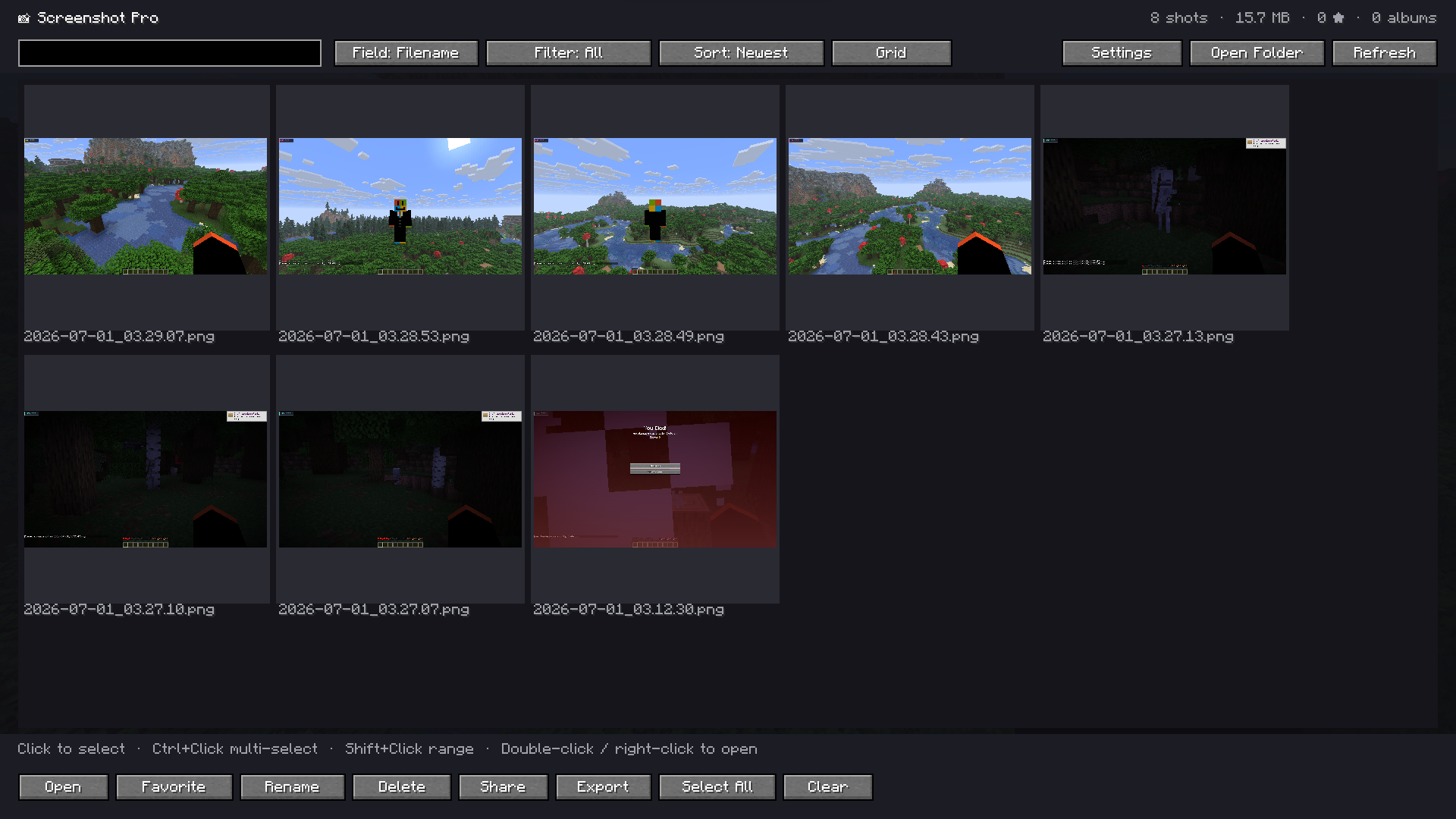 The Gallery:一个可滚动的缩略图网格,带有实时仪表板,显示总截图数、已用存储空间、收藏数和相册。
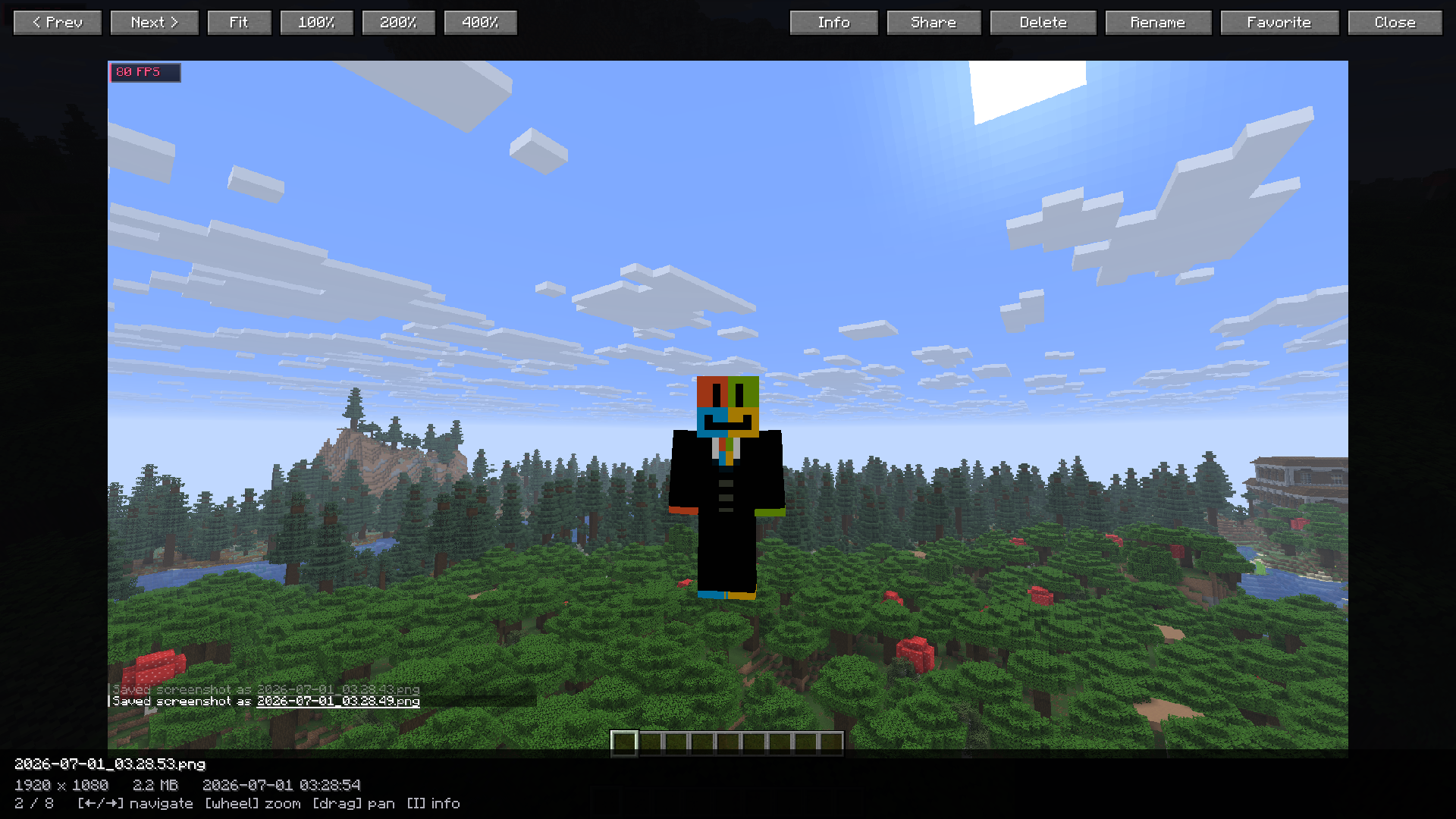 Fullscreen Viewer:支持鼠标滚轮缩放、拖拽平移、上下导航以及信息叠加层。
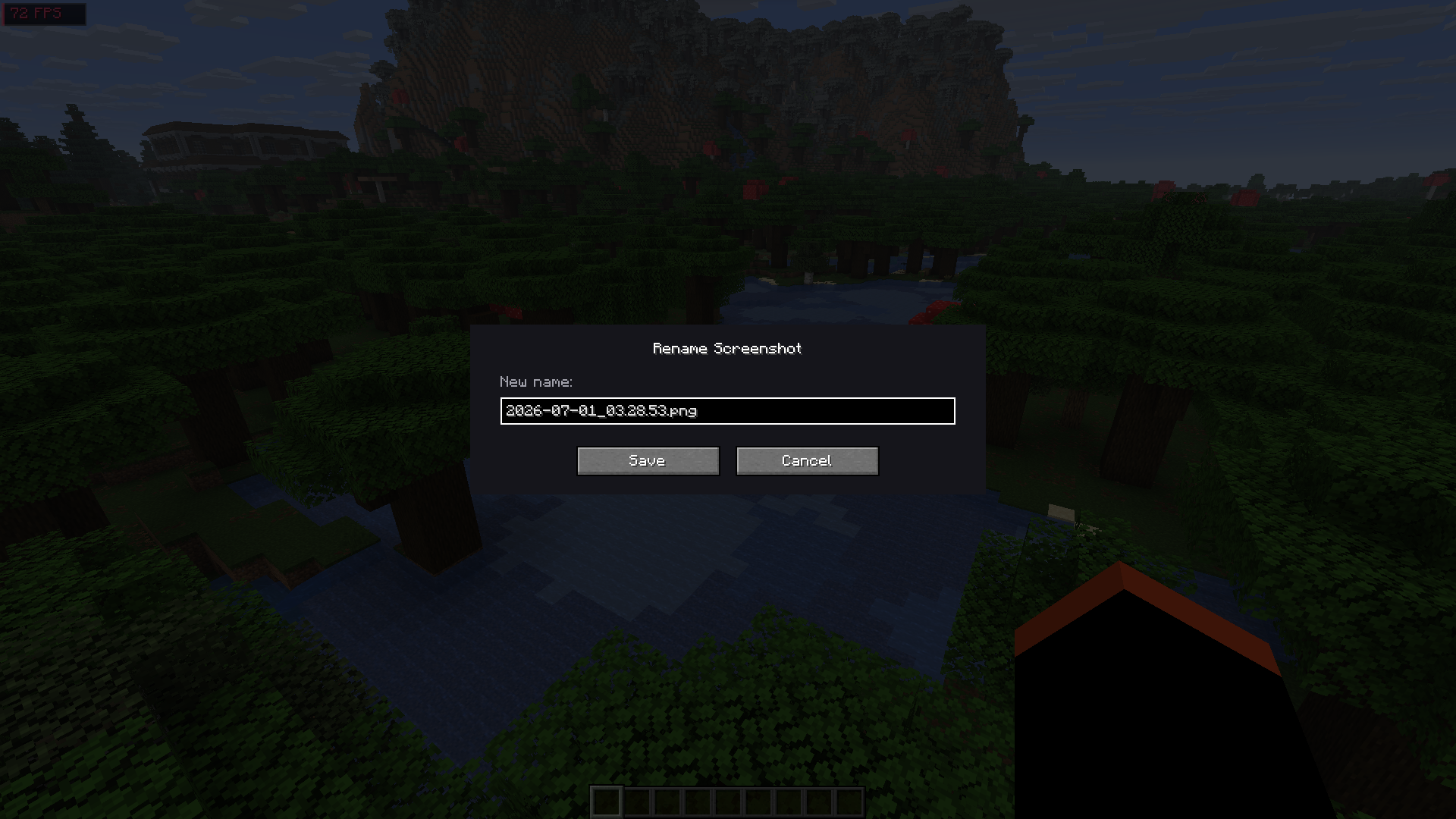 Rename:通过简单的游戏内对话框就地更改截图名称。
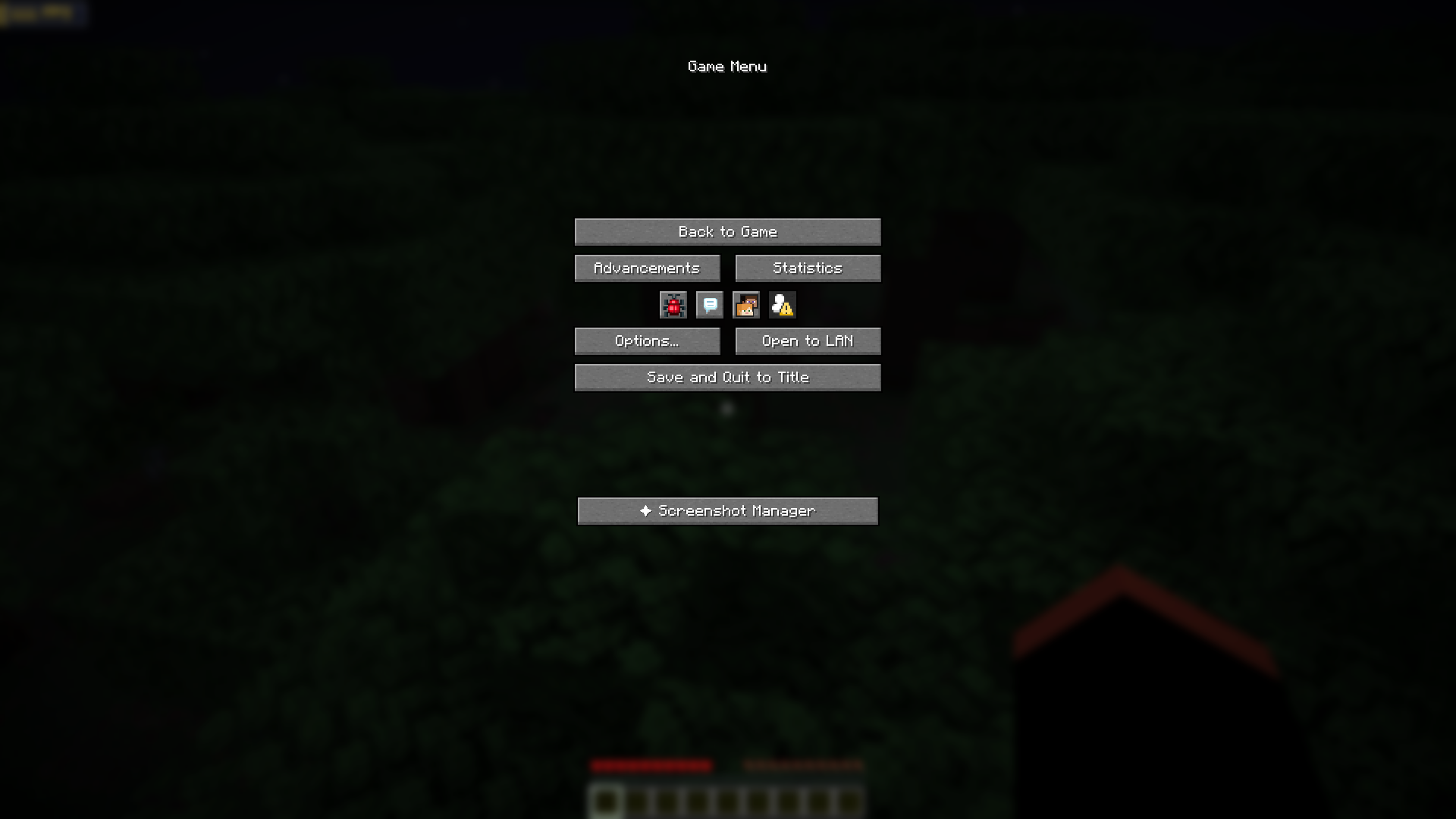 Pause Menu Access:直接从游戏内暂停菜单打开管理器。
Overview
Screenshot Pro 读取你现有的 screenshots 文件夹,并将其呈现为一个快速、有条理的画廊。除非你要求操作,否则不会移动或修改任何内容。所有元数据(如收藏、标签和相册)均与截图一起存储,并且默认通过内置回收站实现非破坏性删除。
Features
Gallery
- 支持平滑滚动的网格视图和列表视图
- 异步缩略图加载,保持游戏响应速度
- 仪表板显示总截图数、已用存储空间、收藏数量和相册
- 按 最新、最旧、名称 或 文件大小 排序
Search and Filters
- 通过文件名、日期、标签或相册进行搜索,并即时过滤
- 快速日期过滤器:今天、昨天、过去 7 天、本月、今年
- 收藏夹过滤器和专用的回收站视图
Organization
- 一键收藏
- 每张截图的标签和自定义相册
- 回收站系统,支持恢复和配置自动清空,防止误触导致永久丢失
Fullscreen Viewer
- 上一张/下一张导航
- 鼠标滚轮缩放和拖拽平移
- 适应屏幕、100%、200% 和 400% 预设
- 包含分辨率、文件大小和日期的信息叠加层
- 完整的键盘控制
Bulk Tools
- 使用 Ctrl+点击 多选,使用 Shift+点击 范围选择,以及全选和清除
- 删除、收藏、分享和导出均可对当前选定项进行操作
- 将任意选择或你的收藏导出为 ZIP 归档
- 复制文件路径到剪贴板
- 就地重命名截图
- 在操作系统文件浏览器中打开截图文件夹
Settings
缩略图大小、网格列数、缓存大小、背景和懒加载、自定义截图和回收站目录、主题以及回收站自动清空等设置均可在游戏内设置界面中调整。
Controls
- 打开截图管理器 —
M(可在“选项”>“控制”中重新绑定)
- 选择项目 — 点击
- 多选 —
Ctrl + 点击
- 范围选择 —
Shift + 点击
- 在查看器中打开 — 双击或右键点击
- 查看器:导航 — 左右方向键
- 查看器:缩放 — 鼠标滚轮
- 查看器:平移 — 拖拽
- 查看器:适应屏幕 —
F
- 查看器:切换信息 —
I
- 查看器:重命名 —
R
- 查看器:放入回收站 —
Delete
- 查看器:关闭 —
Escape
Requirements
- Minecraft 26.1 或更高版本(已在 26.1.2 和 26.2 上测试)
- Fabric Loader 0.19.3 或更高版本
- Fabric API
- Java 25 或更高版本
这是一个 客户端 模组。服务器端不需要安装。
Links
License
All Rights Reserved, Copyright 2026 devxkamlesh.
本模组未由 Mojang Studios 或 Microsoft 关联或认可。Minecraft 是 Mojang Studios 的商标。
Screenshot Pro
Screenshot Pro is a polished, client-side screenshot manager for Minecraft that lives inside the game. Browse, search, organize, and view your screenshots without ever alt-tabbing to a file explorer.
It is built for Minecraft 26.1, 26.1.2, and 26.2 on the Fabric loader and feels like a native part of the game.
Press M in game to open the manager, or use the button added to the pause menu.
Screenshots
The Gallery: a scrollable grid of thumbnails with a live dashboard showing total screenshots, storage used, favorites, and albums.
Fullscreen Viewer: mouse-wheel zoom, drag-to-pan, next and previous navigation, and an information overlay.
Rename: change a screenshot's name in place from a simple in-game dialog.
Pause Menu Access: open the manager straight from the in-game pause menu.
Overview
Screenshot Pro reads your existing screenshots folder and presents it as a fast, organized gallery. Nothing is moved or modified until you ask for it. All metadata such as favorites, tags, and albums is stored alongside your screenshots, and deleting is non-destructive by default through a built-in trash.
Features
Gallery
- Grid and list views with smooth scrolling
- Asynchronous thumbnail loading that keeps the game responsive
- A dashboard showing total screenshots, storage used, favorite count, and albums
- Sorting by newest, oldest, name, or file size
Search and Filters
- Search by filename, date, tags, or album with instant filtering
- Quick date filters: Today, Yesterday, Last 7 Days, This Month, This Year
- A Favorites filter and a dedicated Trash view
Organization
- One-click favorites
- Tags and custom albums per screenshot
- A trash system with restore and configurable auto-empty, so a misclick never means a permanent loss
Fullscreen Viewer
- Next and previous navigation
- Mouse-wheel zoom and drag to pan
- Fit, 100 percent, 200 percent, and 400 percent presets
- An information overlay with resolution, file size, and date
- Full keyboard control
Bulk Tools
- Multi-select with Ctrl+Click, range select with Shift+Click, plus Select All and Clear
- Delete, favorite, share, and export all operate on the current selection
- Export any selection, or your favorites, to a ZIP archive
- Copy file paths to the clipboard
- Rename screenshots in place
- Open the screenshots folder in your operating system file browser
Settings
Thumbnail size, grid columns, cache size, background and lazy loading, custom screenshot and trash directories, theme, and trash auto-empty are all adjustable from an in-game settings screen.
Controls
- Open the Screenshot Manager —
M (rebindable in Options, then Controls)
- Select an item — Click
- Multi-select —
Ctrl + Click
- Range select —
Shift + Click
- Open in viewer — Double-click or right-click
- Viewer: navigate — Left and right arrow keys
- Viewer: zoom — Mouse wheel
- Viewer: pan — Drag
- Viewer: fit to screen —
F
- Viewer: toggle info —
I
- Viewer: rename —
R
- Viewer: trash —
Delete
- Viewer: close —
Escape
Requirements
- Minecraft 26.1 or newer (tested on 26.1.2 and 26.2)
- Fabric Loader 0.19.3 or newer
- Fabric API
- Java 25 or newer
This is a client-side mod. It is not required on servers.
Links
License
All Rights Reserved, Copyright 2026 devxkamlesh.
This mod is not affiliated with or endorsed by Mojang Studios or Microsoft. Minecraft is a trademark of Mojang Studios.


 模组

 模组
 模组

 模组
 模组
 模组
评论 0
登录后参与评分
还没有评论,来抢沙发吧