截图功能特性
功能依赖/围绕 IRIS 构建
专为具备一定技术背景或热衷于制作光影截图的用户设计
如果你有某种特殊需求,认为这可能有助于你的截图工作,请在 github 上提交 issue!
模组功能概览
- 手动调整景深(Depth of Field)
- 客户端时间与天气控制
- 将元数据保存至截图文件中
- 光影包设置
- 光影包哈希值及 Git 状态
- 位置、时间、视野角度(FOV)等
- 拖放带有适当标签的截图到 Iris 的光影包列表菜单中以加载(即显示所有光影包的菜单,而非光影设置界面!)
与 Fabrishot 兼容的元数据保存 等待 Fabrishot 26.2 版本- 投影矩阵编辑器(类似使用正交投影)
- 自定义光影 Uniforms(需要编辑光影文件才能使用,更多信息见下文)
- 实验性运行时更改光影选项(实验性功能,详见下文)
旧的截图文件夹和文件管理功能将在某个时间点重新实现,但目前已被移除。
演示视频(中文):
游戏内工具
Dof Lock(景深锁定) 允许你锁定当前的对焦距离(旨在配合自动对焦使用,以便轻松设置景深)。
天气/时间设置 可能 会影响你在单人模式下的本地世界(至少,我记得我有过这样的印象),
因此这些设置被隐藏在页面底部的另一个设置项中以防万一。
游戏内数值编辑
本模组中的大多数数值旁边都有一个按键绑定选项,这就是它的“修饰键”(Modifier Key)。
按住此修饰键后,你可以按下增加数值/减少数值的按键绑定来逐步改变数值,
并且还可以结合另一个修饰键来放大/缩小你的数值调整幅度。
(对于我的按键绑定,我按住 Shift 进行 0.1 倍调整,按住 Ctrl 进行 10 倍调整)
还支持使用鼠标滚轮进行调整,而不是使用两个独立的增加/减少按键绑定。
(数值编辑设置位于“游戏内工具”下)
元数据嵌入
元数据以 EXIF 数据的形式嵌入在 PNG 文件的 screenshotfeatures 键下,格式为 JSON。
通过将截图拖放到“截图查看”选项卡中,可以按参数查看它。
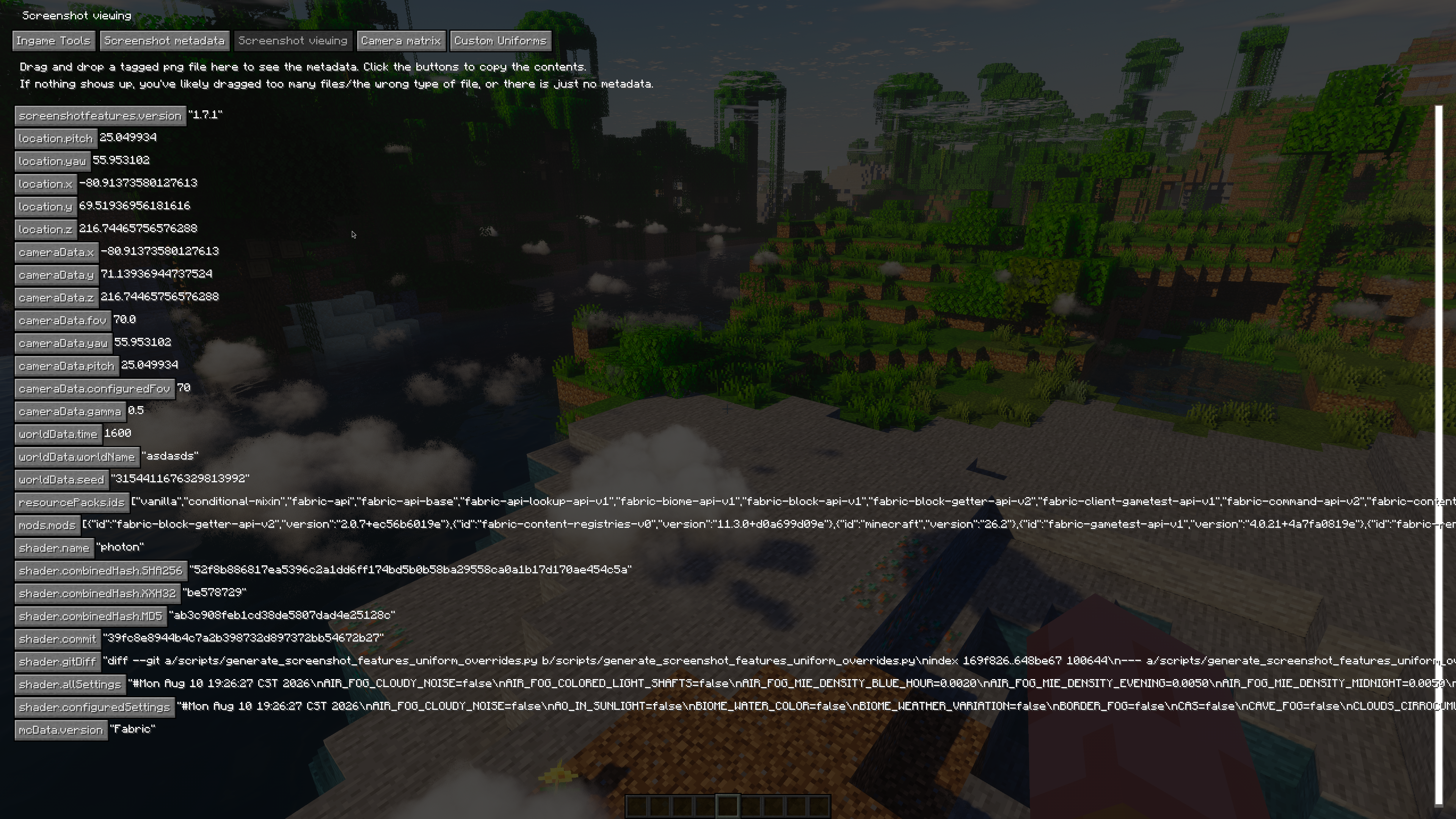
哈希计算方法
保存启用光影的 MD5、SHA256 和 XXH32 哈希值,如果是 Git 仓库,还保存 git commit 和 diff 的哈希值。
Bash 中文件夹的等效哈希计算命令如下:
cat $(find shaders -type f | sort) | xxh32sum
ZIP 哈希仅仅是为了方便而计算的 ZIP 文件本身的哈希值。
投影矩阵编辑器
此功能处于非常早期的阶段,勉强能够正常使用。
控制面板说实话很糟糕,但如果你知道自己在做什么,它可能会很有趣/有帮助。
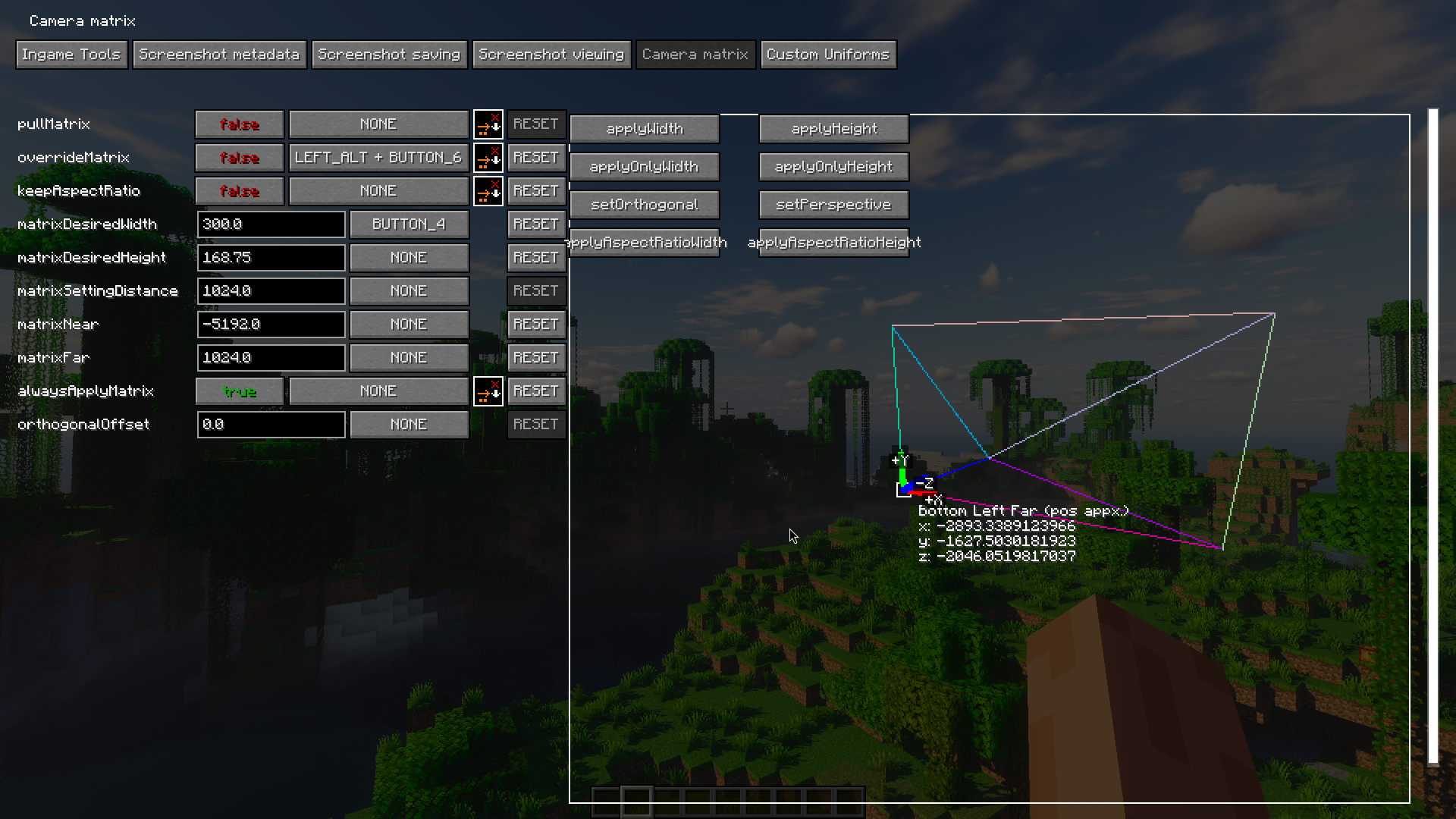
启用 Pull Matrix(拉取矩阵) 会将当前投影矩阵的值拉取到编辑器中(拉取的值为覆盖前的值),
但不会更改左侧的实际配置值。
启用 Keeping Aspect Ratio(保持纵横比) 会在你更改其中一个值时尝试相应地缩放宽度/高度。
(例如,如果原始宽度和高度分别为 16 和 9,当你将宽度设置为 32 时,高度将被设置为 18)。
启用 Always Apply Matrix(始终应用矩阵) 会持续将配置中设置的值应用到矩阵中,(尽管仅在你在文本框中按下回车键/失去焦点时才更新,而不是逐字符实时更新)。
点击矩阵查看器区域中的按钮才是实际将你配置中设置的值应用到矩阵的操作!(除非启用了“始终应用矩阵”)
Override Matrix(覆盖矩阵) 实际上是将矩阵应用到玩家摄像机。
Orthogonal Offset(正交偏移) 是当你使用正交矩阵时摄像机的前后偏移量。
矩阵技巧
鼓励通过调整近/远平面数值以及正交偏移量来处理光影问题,
(并记住某些光影在使用正交投影时可能会无法修复地损坏(除非付出巨大努力))
我通常使用 Photon,它在正交模式下表现 尚可 (我在 GitHub 上的个人 Photon 分支中包含了一些用于此模组的正交投影错误修复)。
通常,对于正交光影截图,我使用 0 偏移量、-2048 的近平面和 1024 的远平面,或者类似的比率/符号。
请注意,如果你的宽度和高度相对于窗口大小不成比例,画面将会出现挤压变形!
光影集成与自定义 Uniforms
当本模组激活时,它会定义 SCREENSHOT_FEATURES,并提供一个名为 isOrthogonalProjection 的布尔型 uniform,
当覆盖矩阵启用且矩阵为正交时,该值设置为 true。
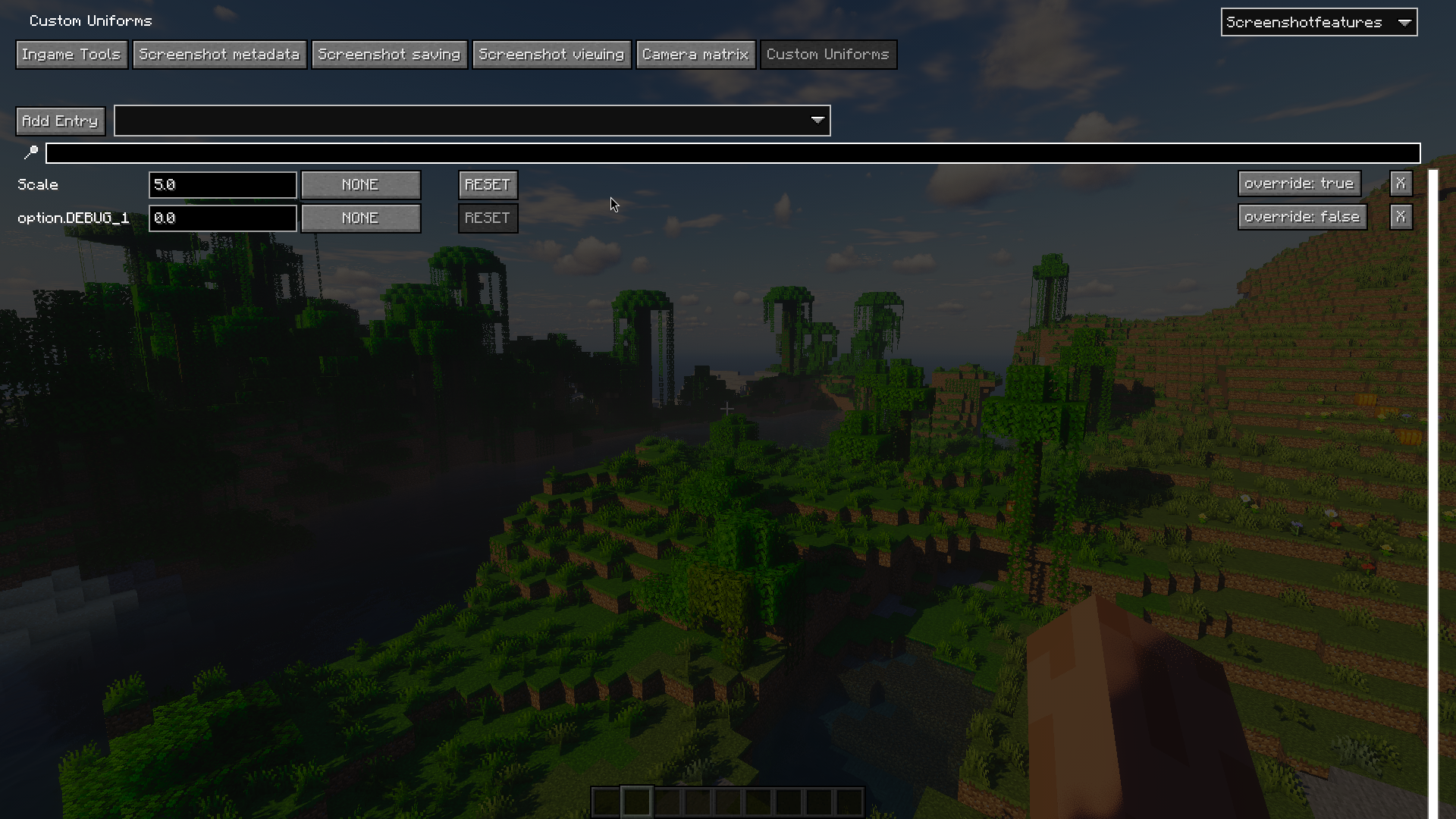
当在自定义 Uniforms GUI 中定义了一个 uniform 时,它会被添加为光影中的一个 float 类型 uniform,
并添加一个 SCREENSHOT_FEATURES_CUSTOM_UNIFORM_{name} 定义,从而实现类似以下的用法:
#ifdef SCREENSHOT_FEATURES

#ifdef DOF_INTENSITY
#ifdef SCREENSHOT_FEATURES_CUSTOM_UNIFORM_DOF_INTENSITY
#undef DOF_INTENSITY
uniform float DOF_INTENSITY;
#endif
#endif

#endif
这样你就可以用 uniform “掩盖”(shadow)光影设置。
此外还有一个实验性的“覆盖”功能,试图基本上自动执行此操作。
在内部,该覆盖功能会在着色器的预处理阶段之前和之后进行注入,并移除与 uniform 同名的 #define,同时尝试将依赖于它的任何 const 变量内联(这是最棘手的部分)。
启用 override 的 uniform 会减缓着色器的编译速度。
计划支持 bool 类型的 uniform
计划中的功能
(至少是我个人感兴趣的部分)
- 对区块卸载/裁剪提供更多控制(用于正交截图或在远距离处的相机视角)
- 某种自动化系统,用于在不同位置/角度拍摄一系列截图,以实现精确对比
- 支持 Aperture(尽管我尚未向 ims 索取构建版本)
- 可选地保存截图的深度图,以增强后期处理功能
本模组并非旨在通过提供更多的 uniform/纹理/世界数据来扩展普通着色器的功能;
如果将来我做了这类事情,很可能会在另一个模组中实现。
致谢
本模组的旧版本基于 fmbellomy 的 ScreenshotSettings。
Screenshot Features
FEATURES DEPEND ON/CENTERED AROUND IRIS
built for a somewhat technical/enthusiast shader screenshot taking audience
if you have a niche need for something you think might help in your screenshot endeavors, make an issue on the github!
mod features overview
- manually adjustable depth of field
- clientside time and weather
- saves metadata to screenshots
-
-
- shaderpack hash and git status
-
- drag and drop appropriately tagged screenshots into the iris shaderpack list menu to load (the menu where you can see all your shaderpacks, not in the shaderpack settings!)
metadata saving compatible with fabrishot waiting on fabrishot 26.2- projection matrix editor (like using an orthographic projection)
- custom shader uniforms (requires editing shader files to use, more information down below)
- experimental runtime shader option changing (experimental, read more below)
the old features for screenshot folder and file managing will be reimplemented at some point, but have been left out for now
demo video (chinese):
ingame tools
dof lock lets you lock whatever your current focus distance is (made for using with autofocus, for easy dof setting)
the weather/time settings may affect your local world when on singleplayer (at least, i remember i had this impression from somewhere),
so these are locked behind another setting at the bottom of the page just in case
ingame value editing
most numerical values in this mod have a keybind option next to them, which is its "modifier" key
when this modifier key is held, you can then press the increase value/decrease value keybinds to change the value incrementally
and optionally with another modifier as well, to scale up/down your change of value
(for my keybinds, I hold shift to make 0.1x adjustments, and ctrl to make 10x adjustments)
using the mouse scroll wheel for adjustments instead of the two separate increase/decrease keybinds is supported as well
(value editing settings are under Ingame Tools)
metadata embedding
metadata is embedded as exif data on the png under the key screenshotfeatures, formatted in json
it can be viewed by parameter in the Screenshot Viewing tab by dragging a screenshot over it
method of hashing
saves md5, sha256 and xxh32 hashes for enabled shader, git commit and diffs if it's a git repo
equivalent hashing of the folders in bash
cat $(find shaders -type f | sort) | xxh32sum
zip hashes are just hashes of the zip file for convenience
projection matrix editor
this feature is in a pretty early stage, and is just barely working well enough to use
the controls are frankly terrible, but it may be interesting/helpful if you know what you're doing
enabling pull matrix pulls the values of the current projection matrix into the editor (the pulled value is pulled before the override),
but will not change the actual config values on the left
enabling keeping aspect ratio tries to scale the width/height respectively when you change the value of the other one
(i.e. if you had a width and height of 16 and 9 originally, and you set width to 32, height would be set to 18)
enabling always apply matrix constantly applies the values set in the configuration values to the matrix, (though only updates when you press enter in the text box/unfocus, not live per character)
clicking the buttons in the matrix viewer area is what actually applies the values you set in your config to the matrix! (unless always apply matrix is on)
override matrix actually applies the matrix to your player camera
orthogonal offset is a back and forth offset for the camera when you're using an orthogonal matrix,
matrix tips
fiddling with the near/far plane numbers and the orthogonal offset is encouraged for dealing with shaders,
(and remember that some shaders may just be irreparably (without great effort) broken when used with an orthogonal projection)
I use photon typically, which works okay with orthogonal (i have a few bugfixes for orthogonal projections for use with this mod in my personal fork of photon on my github)
typically, for orthogonal shader screenshotting, i use a 0 offset, -2048 near plane, and 1024 far plane, or something along these ratios/signs
note that if your width and your height fall out of ratio with each other relative to your window's size, things will appear squished!
shader integration and custom uniforms
this mod defines SCREENSHOT_FEATURES when active, and provides a bool uniform named isOrthogonalProjection,
which is set to true when the override matrix is enabled and the matrix is orthogonal
when a uniform is defined in the Custom Uniforms gui, it's added as a float uniform into the shader
and a SCREENSHOT_FEATURES_CUSTOM_UNIFORM_{name} define is added, enabling uses like:
#ifdef SCREENSHOT_FEATURES

#ifdef DOF_INTENSITY
#ifdef SCREENSHOT_FEATURES_CUSTOM_UNIFORM_DOF_INTENSITY
#undef DOF_INTENSITY
uniform float DOF_INTENSITY;
#endif
#endif

#endif
where you can sort of "shadow" a shader setting with a uniform instead
theres an experimental "override" feature for this as well, which tries to basically do this automatically
internally, the override injects before and after the preprocessing stage for the shader, and removes the #define sharing the same
name as the uniform, and attempts to inline any const variables depending on it (which is the most sketchy part)
having override enabled uniforms will slow down shader compilation times
bool uniform types are planned
planned features
(ones that i'm personally interested in at least)
- more control over chunk unloading/culling (for orthogonal screenshots/cameras at a far distance)
- some sort of system to automate taking a series of screenshots at different locations/angles for accurate comparisons
- supporting aperture (though I haven't asked ims for a build yet)
- optionally saving a depthmap of screenshots for better post processing capabilities
this mod isn't really meant to extend normal shader capability by providing more uniforms/textures/world data,
if I ever did that it would likely be in another mod
credits
older versions of this mod were based on ScreenshotSettings by fmbellomy
 模组

 模组
 模组

 模组
 模组
 模组
评论 0
登录后参与评分
还没有评论,来抢沙发吧