
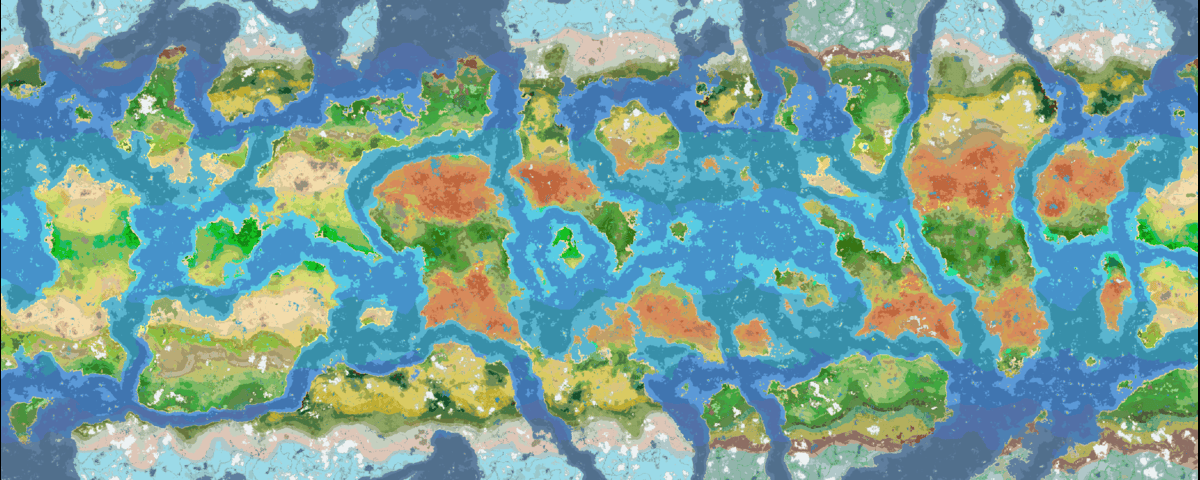
使用 Seed Viewer 生成的 Still Life 1.0 地图预览
使用方法
有两种方式可以打开预览:
- 创建世界界面: 在“游戏”、“世界”和“更多”旁边会出现一个新的“Seed Viewer”标签页。打开它,你的种子地图将立即开始加载。在标签页顶部的字段中输入种子值并回车,即可开始加载该种子。
- 游戏中: 按下 Seed Viewer 的快捷键(默认:o,26.2+ 版本中为 i)以打开 Seed Viewer。地图将以你当前的位置为中心打开。
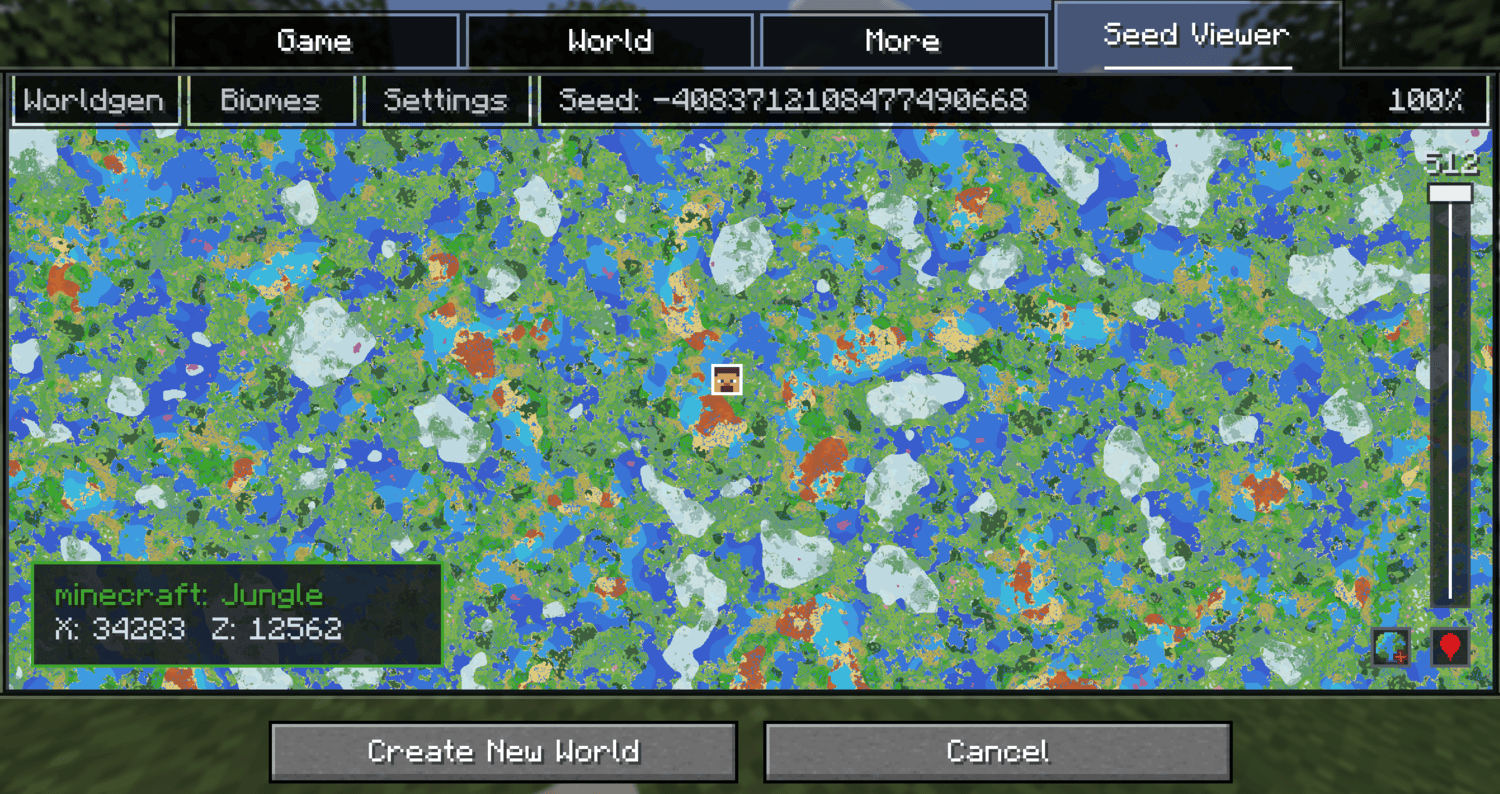
在预览中移动
- 左键点击 + 拖拽 平移视角。
- 滚轮 缩放。
- 使用右侧的高度滑块更改 Y 轴层级。
- 点击右下角的定位按钮,在游戏内将视图居中于玩家,或在创建世界界面中将视图居中于世界出生点。
- 右键点击 游戏内地图上的任意位置,可复制一条传送至该位置的指令。
其他功能
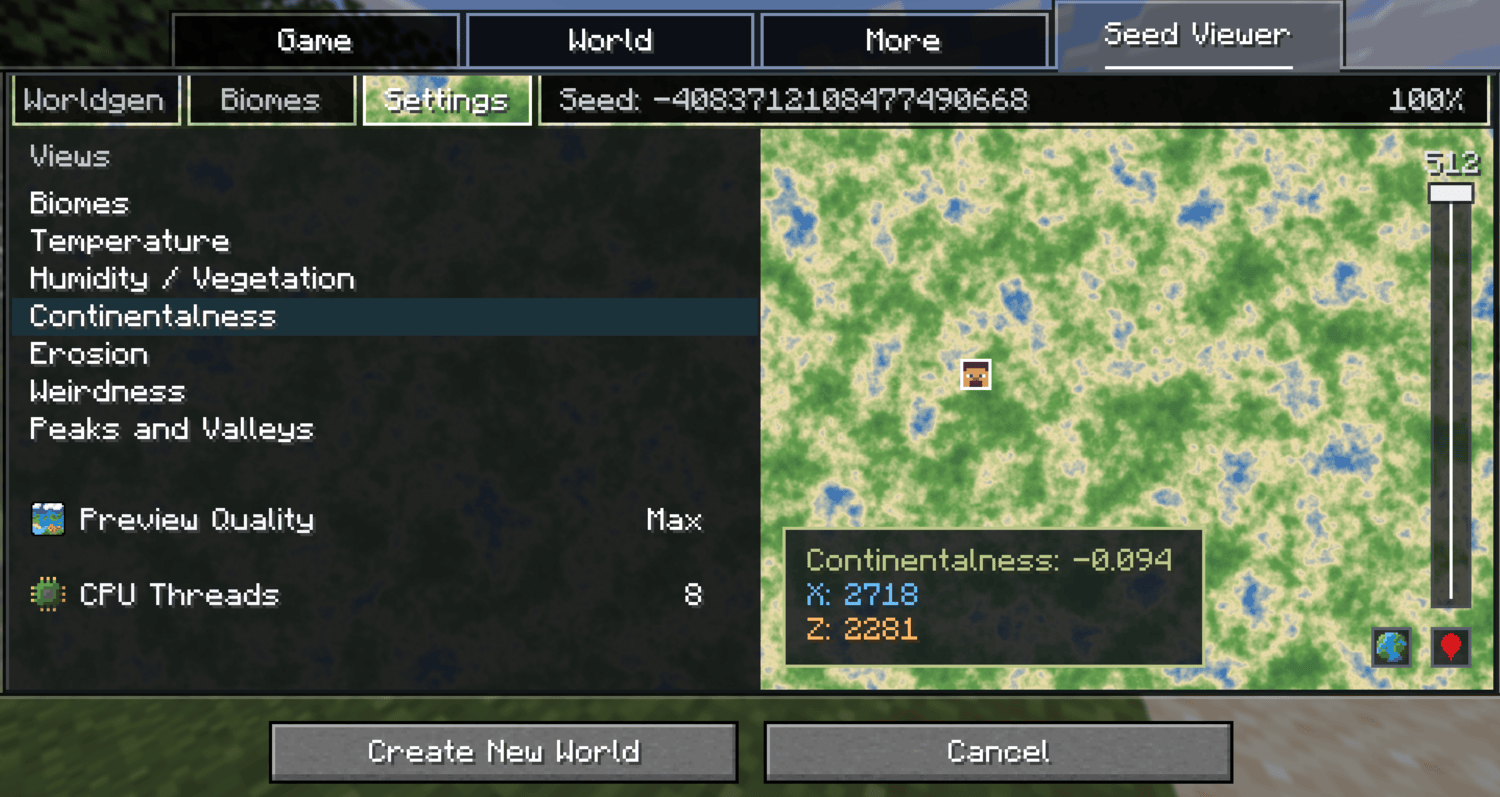
- 地图模式: 除了生物群系视图外,“设置”标签页还提供了温度、湿度、大陆性、侵蚀度、怪异度以及山峰与山谷的噪声视图。悬停时会显示生物群系名称或带有坐标的精确噪声值。
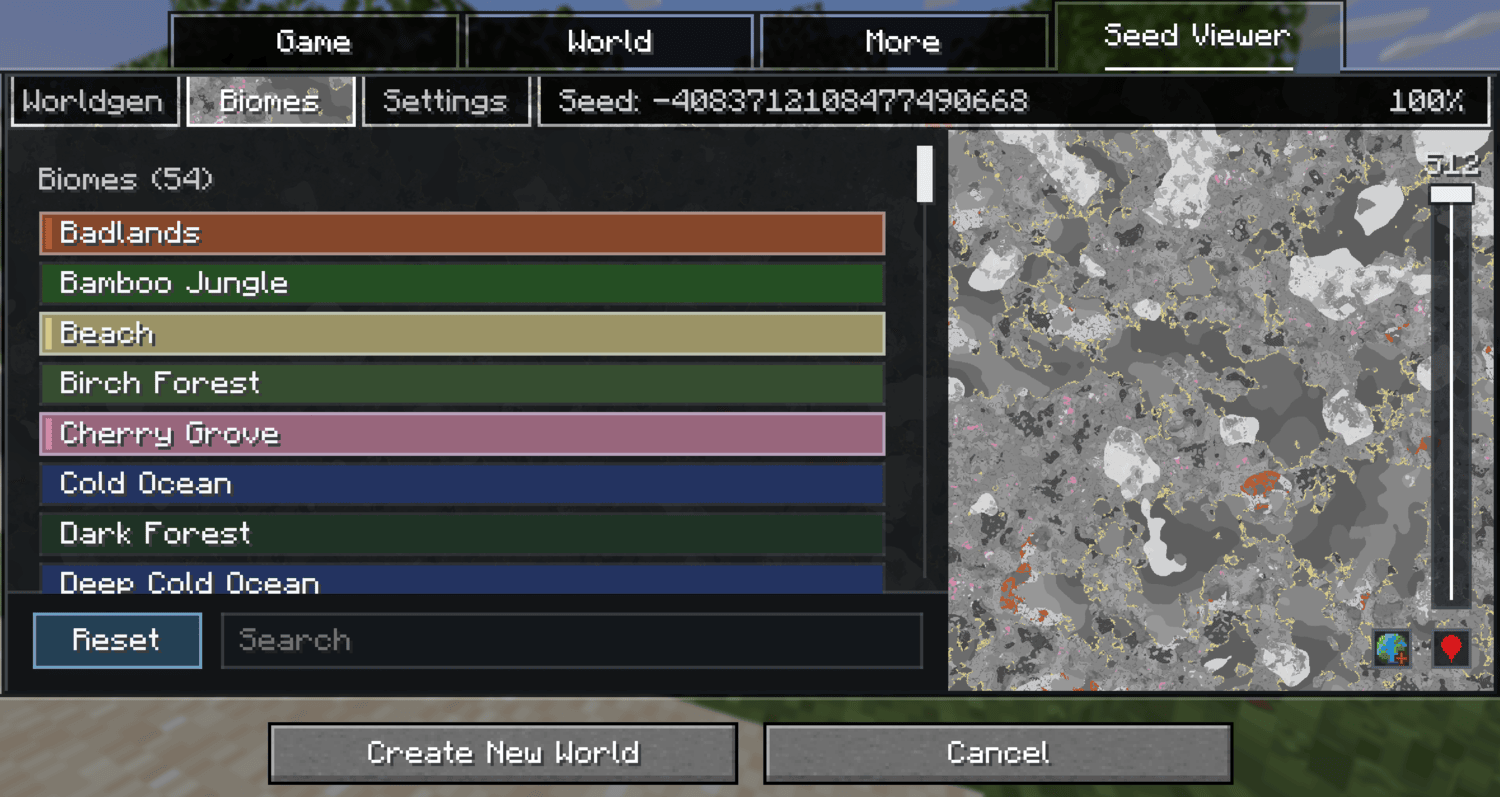
- 生物群系高亮: “生物群系”标签页列出了所有当前能在主世界(或你所在的任何维度)生成或无法生成的生物群系。搜索并点击生物群系可在地图上将其高亮显示;其余部分变为灰度。
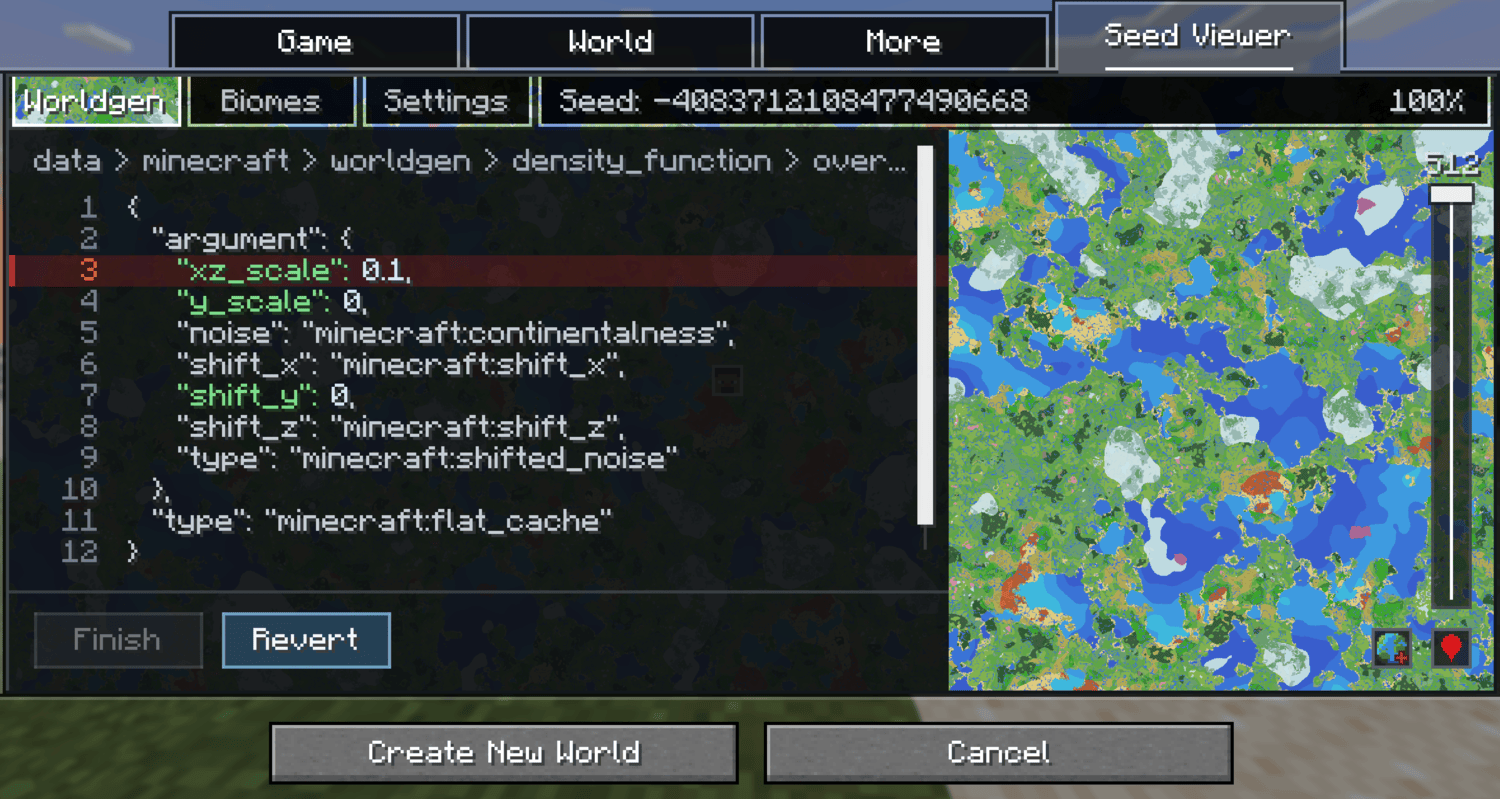
- 世界生成编辑器: (仅限创建世界界面) “世界生成”标签页允许你编辑世界数据包中的数值,以查看数值变化对世界的影响。有一个对比按钮用于切换原始地形和编辑后的地形。这仅为预览功能,不会实际修改你的世界。
- 性能控制: “设置”标签页中包含五种预览质量等级(从“性能”到“最大”)以及一个 CPU 线程滑块。对于像 Still Life 或 JJThunder To The Max 这样较重的世界生成数据包,建议降低质量等级。
注意: 游戏内地图仅适用于单人游戏。它无法在多玩家服务器上运行。
✅ 支持版本
| Minecraft | 状态 |
|---|---|
| 1.21.1 | 已支持 |
| 1.21.5 | 已支持 |
| 1.21.6 | 已支持 |
| 1.21.9 | 已支持 |
| 1.21.11 | 已支持 |
| 26.1 | 已支持 |
| 26.2 | 已支持 |
❓ 常见问题
这对模组生物群系有效吗?
游戏内查看器支持所有生物群系,但创建世界界面的预览目前仅支持世界生成数据包。计划更新以在创建世界界面中兼容模组。
有计划添加结构查看功能的更新吗?
是的,我计划最终添加一个切换开关,让你能够看到结构的位置。世界生成编辑器会破坏我的世界吗?
不会。编辑器的更改仅为预览性质,永远不会写入创建的世界中。你可以使用它来查看更改某些数值会对数据包产生何种影响。若要让实际更改出现在世界中,你必须手动更改数据包的数值。
加载时预览占用大量 CPU,这是正常的吗?
如果遇到卡顿或高 CPU 负载的情况,请在配置文件或设置标签页中降低 CPU 线程数。如果地图加载缓慢,请降低预览质量,这也可以在配置文件或设置标签页中找到。模组兼容性
在创建世界界面中,所有世界生成数据包应均可正常运行。修改世界生成的模组可能直到世界存在才会反映出来,若要获取模组化世界的精确地图,请打开游戏内预览。游戏内查看器应与大多数甚至全部世界生成模组兼容。
自定义生物群系颜色
自定义生物群系的地图颜色会自动生成,但你可以覆盖它们:在数据包中添加 data/<namespace>/worldgen/biome_colors.json,将生物群系 ID 映射到自定义颜色的 r / g / b 值。
A map of Still Life 1.0 using Seed Viewer
Usage
There are two ways to open the preview:
- World creation screen: a new Seed Viewer tab appears next to Game, World, and More. Open it and the map of your seed starts loading immediately. Type a seed into the field at the top of the tab and hit enter to start loading that seed instead.
- In-game: press the Seed Viewer keybind (default: o, keybind is i on 26.2+) to open the Seed Viewer. The map opens centered on your position.
Moving on the preview
- Left Click + Drag to pan.
- Scroll to zoom.
- Use the height slider on the right to change the Y level.
- Click the location button in the bottom right to center on your player in game or on world spawn during the world creation screen.
- Right Click anywhere on the in game map to copy a tp command to that position.
Other features
- Map modes: Besides biomes, the Settings tab also has noise views for temperature, humidity, continentalness, erosion, weirdness, and peaks & valleys. Hovering shows the biome name or exact noise value with its coordinates.
- Biome highlighting: The Biomes tab lists every biome that can or cannot currently generate in the overworld (or whatever dimension you are currently in). Search and click biomes to highlight them on the map; everything else turns grayscale.
- Worldgen editor: (world creation only) The Worldgen tab lets you edit numeric values of your worlds worldgen datapacks to see how the change in values would affect the world. A compare button toggles between original and edited terrain. This is preview only and does not actually modify your world.
- Performance controls: Five preview quality levels (Performance to Max) and a CPU thread slider, both in the Settings tab. In heavier worldgen datapacks like Still Life or JJThunder To The Max it is recommended to lower the quality level.
Note: The in game map works in singleplayer only. It does not work on multiplayer servers.
✅ Supported Versions
| Minecraft | Status |
|---|---|
| 1.21.1 | Supported |
| 1.21.5 | Supported |
| 1.21.6 | Supported |
| 1.21.9 | Supported |
| 1.21.11 | Supported |
| 26.1 | Supported |
| 26.2 | Supported |
❓ FAQ
Does this work with modded biomes?
The in game viewer works with all biomes, however the preview on the create world screen currently only works with worldgen datapacks. An update to bring compatibility for mods in the create world screen is planned.
Is an update planned for viewing structures?
Yes, I plan to eventually add a toggle that lets you see the location of structures.Can the worldgen editor break my world?
No. Editor changes are preview only and are never written to the created world. Use it to see how changing certain values would affect the datapack. To have the actual changes show up in your world you must change the datapack values manually.
The preview uses a lot of CPU while loading, is that normal?
If you are experiencing freezing or high cpu loads, lower the CPU threads in either the config or the settings tab. If loading the map is slow, lower the preview quality which is also found in the config or settings tab.Mod Compatibility
On the create world screen, all worldgen datapacks should be functional. Mods that modify worldgen may not be reflected until the world exists, open the in game preview for an exact map for modded worlds. The in game viewer should work with most if not all worldgen mods.
Custom Biome Colors
Map colors for custom biomes are generated automatically, but you can override them: add data/<namespace>/worldgen/biome_colors.json to a datapack, mapping biome IDs to r / g / b values for custom colors.

下载 Seed Viewer
下载 Seed Viewer
下载 Seed Viewer
下载 Seed Viewer
下载 Seed Viewer
下载 Seed Viewer
下载 Seed Viewer
下载 Seed Viewer
下载 Seed Viewer
下载 Seed Viewer
暂无更新日志
关于这个资源的讨论、问题反馈与使用心得
还没有讨论,来发第一帖吧
你是这个资源的作者?登录后可认领此资源。
相似资源
 模组

显示你正在注视的方块的信息。(适用于 Minecraft 1.16+ 的 Hwyla/Waila 分支)
 模组

原版世界生成优化模组
 模组
在游戏画面角落显示附近世界地形、玩家、生物和实体的地图。可创建路径点,帮助你找到标记过的位置。
 模组
使用 JavaScript 编辑配方、添加自定义物品、编写世界事件!
 模组

查看物品与配方
 模组
AE2:一款流行的自动化与存储模组
评论 0
登录后参与评分
还没有评论,来抢沙发吧