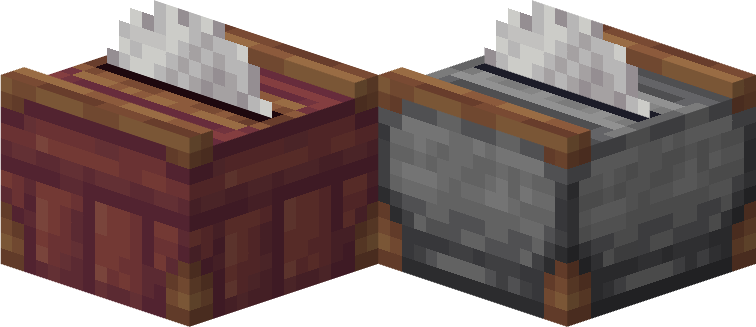
Serrated 仅向游戏中添加了两个方块:切石机(Stonecutter)和锯子(Saw)。默认情况下,它们的行为与原版 1.14 的切石机几乎完全相同,但可以面向任意方向放置。
没有默认配方,所有配方均由用户或整合包自定义。支持使用 CraftTweaker 配置一个输入对应多个输出的情况。
本模组中切割器的一个重要特性是配置文件中的“沉浸式”(immersive)切换选项,这会彻底改变玩家与切割器的交互方式。它不再通过 GUI 处理物品,而是仅用于选择输出结果,并显示输入的幽灵预览,允许你将输入物品实际放置在现实世界中的锯片上来手动加工。切割器还可以接住被扔在锯面上的物品,从而方便地通过发射器/投放器实现自动化。
沉浸式模式下的配方可以定义为仅对掉落物生效,或者根据你的偏好,对已放置的方块生效。如果你希望像 BWM 那样,使所有方块配方都要求将方块物理放置在世界中,这将非常有用。
你可以额外启用 BWM 动力兼容性,这使得切割器需要从其正面、背面或底面连接旋转轴才能处理配方。
当两个选项同时启用时,切割器实际上表现得像是 BWM 锯方块的改进版,允许在其前方放置方块以获得多种输出结果。
CraftTweaker 方法:
Spoiler
完整 API 请查看 此处
首先在脚本中导入该模组:
import mods.serrated.CuttingSawRecipeBuilder;
import mods.serrated.CuttingSawOutputBuilder;
Serrated 拥有一个配方构建器和一个输出构建器:
使用 newRecipe() 打开配方构建器
inputItem: 用于合成和 GUI 显示的槽位输入物品。inputBlock: 锯子所需的物理世界方块状态目标。如果省略,默认为无。blockOnly: 如果为 true,配方将忽略物品形式,仅通过物理方块触发
CuttingSawRecipeBuilder.newRecipe(IIngredient inputItem, @Optional @Nullable IBlockStateMatcher inputBlock, @Optional(valueBoolean = false) boolean blockOnly);
随后使用 addOutput 跟随输出构建器。你可以为每个 newRecipe 添加任意数量的输出条目。这些是在放置输入物品时在 GUI 中显示的条目。
outputItem: 主要物品堆栈输出。duration: 可选。沉浸式模式下的合成处理时间。如果省略,默认为 0 刻。outputBlock: 可选。在沉浸式模式下合成时放置在世界的方块。如果省略,默认为 null,导致物品作为常规实体掉落。
.addOutput(IItemStack outputItem, @Optional(valueLong = 0) int duration, @Optional @Nullable IBlockState outputBlock);
你可以向任何输出添加 addExtra 额外输出。这些将在 JEI 中渲染,并在悬停 addOutput 方法中的主输出物品时显示。
.addExtra(IItemStack stack);
最后使用 addToSaw 或 addToStonecutter 完成你的配方:
.addToSaw(String id);
.addToStonecutter(String id);
示例
默认配置的简单配方,允许将石砖合成为 1 个楼梯、2 个台阶或 1 个錾制石砖。
import mods.serrated.CuttingSawOutputBuilder;
import mods.serrated.CuttingSawRecipeBuilder;

CuttingSawRecipeBuilder.newRecipe(<minecraft:stonebrick:0>)
  .addOutput(<minecraft:stone_brick_stairs> * 1)
  .addOutput(<minecraft:stone_slab:5> * 2)
  .addOutput(<minecraft:stonebrick:3> * 1)
  .addToStonecutter("stone_brick_variants");
沉浸式模式的完整配方,包含两种可能的输出和额外物品。
第一个变量涵盖了原木方块状态的所有旋转。
它要求(注意 .newRecipe 中的布尔值)橡木原木必须被放置。第一个输出(除非更改,否则为默认)耗时 20 刻,输出 4 个橡木木板、1 个橡木树皮和 2 个木屑;第二个输出耗时 30 刻,掉落 8 根木棍。
import crafttweaker.block.IBlockStateMatcher;
import mods.serrated.CuttingSawOutputBuilder;
import mods.serrated.CuttingSawRecipeBuilder;

var oakLog as IBlockStateMatcher = <blockstate:minecraft:log:variant=oak,axis=x>
  | <blockstate:minecraft:log:variant=oak,axis=y>
  | <blockstate:minecraft:log:variant=oak,axis=z>;

CuttingSawRecipeBuilder.newRecipe(<minecraft:log:0>, oakLog, true)
  .addOutput(CuttingSawOutputBuilder.newOutput(<minecraft:planks:0> * 4, 20)
    .addExtra(<betterwithmods:bark:0>)
    .addExtra(<betterwithmods:material:22> * 2))
  .addOutput(<minecraft:stick> * 8, 30)
  .addToSaw("log_oak");
感谢 Phantamanta 接受委托开发此模组
资产和创意由 Foreck 提供
特效 credits
Spoiler
machine hum1.wav by kiefspoon -- -- License: Creative Commons 0
Body_impact_wood.aiff by MaxDemianAGL -- -- License: Attribution 3.0
saw wood 2.wav by Pagey1969 -- -- License: Creative Commons 0
Dropping Rocks by iwanPlays -- -- License: Creative Commons 0
Serrated adds only two blocks to the game, the Stonecutter and the Saw. By default, they behave pretty much exactly like the vanilla 1.14 stonecutter, but can be placed facing any direction.
There are no default recipes, they are all up to the user/modpack. More than 1 output per input is allowed, using CraftTweaker to configure them.
An important feature of the cutters in this mod is the "immersive" toggle in the configuration, which completely changes how players interact with the cutters. Instead of processing items in the GUI, it can only be used to select the output with a ghost representation of the input, allowing you to physically place inputs on the sawblade in-world to process them manually. The cutters can also catch items thrown on the saw face, allowing easy automation with dispensers/droppers.
Recipes in immersive mode can be defined to work as dropped items only or, if you prefer, as placed blocks. This is useful if you want to make all block recipes require the blocks to be physically placed in-world, like how it works in BWM, for example.
You can additionally enable BWM power compatibility, which makes the cutters require a rotating axle from either their front, back, or bottom faces in order to process recipes.
When both options are enabled, the cutters effectively behave like an improved version of the BWM saw block, allowing to place blocks in front of them to get variout outputs.
CraftTweaker methods:
Spoiler
For the full API, go here
Start by importing the mod into your script:
import mods.serrated.CuttingSawRecipeBuilder;
import mods.serrated.CuttingSawOutputBuilder;
Serrated has a recipe builder and an output builder:
Open the recipe builder with newRecipe()
inputItem: item slot input used for crafting and GUI display.inputBlock: physical world block state target required for the saw. Defaults to nothing if omitted.blockOnly: If true, the recipe ignores the item form and only triggers via the physical block
CuttingSawRecipeBuilder.newRecipe(IIngredient inputItem, @Optional @Nullable IBlockStateMatcher inputBlock, @Optional(valueBoolean = false) boolean blockOnly);
Follow with with the output builder with addOutput. You can add as many output entries per newRecipe as you want. These are the entries in the GUI when placing an input item.
outputItem: Primary item stack output.duration: Optional. Crafting processing time in immersive mode. Defaults to 0 ticks if omitted.outputBlock: Optional. The block placed in the world when crafted in immersive mode. Defaults to null if omitted, causing the item to drop as a regular entity instead.
.addOutput(IItemStack outputItem, @Optional(valueLong = 0) int duration, @Optional @Nullable IBlockState outputBlock);
You can addExtra outputs to any output. These will be rendered in JEI and when hovering the primary output item in the addOutput method.
.addExtra(IItemStack stack);
Finalize your recipe with either addToSaw or addToStonecutter:
.addToSaw(String id);
.addToStonecutter(String id);
Examples
Simple recipe for the default configuration, allows to craft stone bricks into 1 stairs, 2 slabs, or 1 chiseled stone bricks.
import mods.serrated.CuttingSawOutputBuilder;
import mods.serrated.CuttingSawRecipeBuilder;

CuttingSawRecipeBuilder.newRecipe(<minecraft:stonebrick:0>)
  .addOutput(<minecraft:stone_brick_stairs> * 1)
  .addOutput(<minecraft:stone_slab:5> * 2)
  .addOutput(<minecraft:stonebrick:3> * 1)
  .addToStonecutter("stone_brick_variants");
Full recipe for immersirve mode, with two possible outputs and extra items.
All the rotations of the log blockstate are accounted for in the first variable.
It requires (note the boolean in .newRecipe) that an oak log is placed. First output (and default, unless changed) takes 20 ticks and outputs 4 oak planks, 1 oak bark and 2 sawdust; second output takes 30 ticks and drops 8 sticks.
import crafttweaker.block.IBlockStateMatcher;
import mods.serrated.CuttingSawOutputBuilder;
import mods.serrated.CuttingSawRecipeBuilder;

var oakLog as IBlockStateMatcher = <blockstate:minecraft:log:variant=oak,axis=x>
  | <blockstate:minecraft:log:variant=oak,axis=y>
  | <blockstate:minecraft:log:variant=oak,axis=z>;

CuttingSawRecipeBuilder.newRecipe(<minecraft:log:0>, oakLog, true)
  .addOutput(CuttingSawOutputBuilder.newOutput(<minecraft:planks:0> * 4, 20)
    .addExtra(<betterwithmods:bark:0>)
    .addExtra(<betterwithmods:material:22> * 2))
  .addOutput(<minecraft:stick> * 8, 30)
  .addToSaw("log_oak");
Thanks to Phantamanta for taking on the commission to program this mod
Assets and idea by Foreck
FX credits
Spoiler
machine hum1.wav by kiefspoon -- -- License: Creative Commons 0
Body_impact_wood.aiff by MaxDemianAGL -- -- License: Attribution 3.0
saw wood 2.wav by Pagey1969 -- -- License: Creative Commons 0
Dropping Rocks by iwanPlays -- -- License: Creative Commons 0

 模组

 模组

 模组
 模组

 模组
 模组
评论 0
登录后参与评分
还没有评论,来抢沙发吧