服务器密码
适用于离线模式服务器(online-mode=false)的按玩家密码功能。在离线模式下,用户名毫无意义,任何人都可以冒充他人。
NeoForge 1.21.1。需要在客户端和服务器端都安装。
为什么你需要这个模组
在 online-mode=false 的服务器上,没有任何机制能验证你的身份。用户名只是客户端在加入时发送的一个字符串,服务器会无条件接受。任何人都可以自称是你的名字并加入游戏:你的物品栏、你的基地、你的管理员权限都将暴露无遗。原版 Minecraft 对此无能为力——白名单只能阻止陌生人进入,但无法阻止已获准入的玩家使用他人的名字登录。
此模组填补了这一空白:将密码与用户名绑定。首次登录时,玩家将在客户端设置一个密码,该密码即被该用户名“认领”。此后,若不使用相同的密码尝试以该用户名加入,服务器会在玩家进入世界之前断开连接。
密码永远不会通过网络传输,也不会存储在服务器上:服务器仅保存其派生值,这足以用于登录,但无法反向推导出原始密码(详见工作原理)。
玩家所见内容
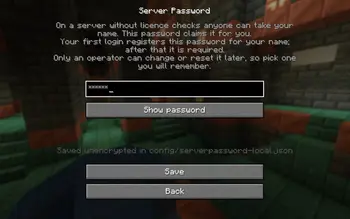
- 在未设置密码的情况下,多人游戏界面会直接打开密码输入屏幕,而不是服务器列表——每次都会如此,而不仅仅是首次访问时。点击保存可进入服务器列表,返回则回到主菜单。一旦设置了密码,列表将正常打开,右上角的密码按钮允许玩家设置新密码。
- 密码只需输入一次,即可用于所有运行此模组的服务器。
- 在服务器上的首次登录会为该用户名注册密码。
- 此后,该用户名只能使用该相同密码加入——否则玩家将在进入世界前被断开连接。
工作原理
离线模式服务器从不启用数据包加密(这是 Mojang 认证流程的一部分),因此密码绝不会通过网络传输:
|
|
| 客户端 |
使用 PBKDF2-HMAC-SHA256 算法,迭代 210,000 次,从服务器获取盐值,将密码拉伸为 32 字节密钥 |
| 服务器 |
将该密钥存储为验证器,并在每次登录时发送一个新的单次使用 nonce |
| 客户端 |
回复 HMAC-SHA256(key, nonce) |
密钥仅在注册用户名时发送一次。此后每次登录都通过单次使用的响应进行证明,因此窃听的登录信息无法重放。
检查过程在连接的配置阶段运行,即在玩家在世界中创建之前完成。载荷按需注册,因此服务器会拒绝没有安装此模组的原版客户端——不安装模组无法绕过密码保护。
文件说明
| 文件 |
内容 |
<world>/serverpassword/passwords.json |
用户名 → 盐值、迭代次数、验证器。不包含密码 |
config/serverpassword-local.json (客户端) |
玩家的密码,未加密 |
config/serverpassword-server.toml |
allowNewRegistrations —— 是否允许未知用户名注册 |
可以在 <world>/serverconfig/serverpassword-server.toml 中放置针对特定世界的配置覆盖。
客户端文件是纯文本:密码在每次登录时作为 KDF 的输入,对于已经能够读取游戏文件夹的人来说,无法隐藏它。这与启动器保存会话的信任模型相同。
服务器的 passwords.json 不会泄露密码(PBKDF2 是单向的),但仅凭验证器就足以登录——请像保护 ops.json 一样小心保管它。
如果无法读取 passwords.json,服务器将拒绝所有玩家,并且不会覆盖该文件。否则,损坏的文件会静默禁用检查,导致任何用户名都可以重新认领。
命令(操作员,权限等级 3)
/serverpassword list
/serverpassword reset <name>
reset 会清除用户名的密码——如果该玩家在线,还会将其踢出——以便他们的下一次登录注册新密码。故意不提供通过命令设置或读取密码的方式:服务器不知道密码,而在聊天中输入密码会将它记录在日志中。
重置密码
重要部分:玩家无法自行更改密码。 “密码”按钮仅更改客户端存储的内容,而服务器仍然期望旧的密码——经过这样的“更改”后,玩家只会收到“密码错误”的拒绝提示。更改和恢复始终需要通过操作员进行。
玩家忘记了密码,或者想要更改
- 操作员在服务器上执行:
/serverpassword reset <name> —— 清除条目(如果在线则将其踢出)。
- 玩家:点击密码按钮 → 输入新密码 → 保存 → 加入服务器。
- 这次登录会为新密码注册用户名,就像第一次那样。
顺序很重要:如果玩家在重置之前设置了新密码,服务器将拒绝他们。
无法访问服务器控制台
在服务器停止的情况下,打开 <world folder>/serverpassword/passwords.json 并删除 "players" 内对应那个用户名的对象。若要重置所有人,请删除该文件——它会被重新创建。
仅在服务器停止时编辑它:运行的服务器会将内容保留在内存中,并在下次注册时重写文件。
在自己的客户端上清除密码
删除游戏文件夹中的 config/serverpassword-local.json。这只会让客户端忘记它;服务器的条目仍然存在,因此加入时仍需再次输入相同的密码。
此模组不做的事情
- 无暴力破解保护:尝试次数不受限,仅记录日志。
- 无自助式密码更改——需要操作员使用
/serverpassword reset。
- 首次输入时的拼写错误会被注册为正确的密码。同样的
reset 命令是解决方法。
Server Password
Per-player passwords for offline-mode servers (online-mode=false), where a name proves nothing and
anyone can take someone else's.
NeoForge 1.21.1. Required on both the client and the server.
Why you'd want this
On a server with online-mode=false, nothing verifies who you are. The name is just a string the
client sends when joining, and the server takes its word for it. Anyone can call themselves by your
name and join as you: your inventory, your base, your operator rights. Vanilla has no answer for
this — a whitelist keeps strangers out, but does not stop an already-admitted player from joining
under someone else's name.
This mod adds the missing piece: a password bound to the name. The first login claims the name for
whatever password the player set in their client; after that, joining under that name without the
same password is impossible — the server drops the connection before the player reaches the world.
The password never travels over the network and is not stored on the server: the server keeps only a
derivation of it, which is enough to log in but cannot be turned back into the password itself (see
How it works).
What the player sees
- Until a password is set, Multiplayer opens the password screen instead of the server list —
every time, not just on the first visit. Save leads on to the server list, Back returns to the
main menu. Once a password is set the list opens as usual, and the Password button in its
top-right corner lets the player set a new one.
- The password is entered once and used for every server running this mod.
- The first login on a server registers it for that name.
- From then on, that name can only join with that same password — otherwise the player is
disconnected before entering the world.
How it works
An offline-mode server never enables packet encryption (that is part of the Mojang auth flow), so the
password is never sent over the wire:
|
|
| Client |
stretches the password into a 32-byte key: PBKDF2-HMAC-SHA256, 210,000 iterations, salt from the server |
| Server |
stores that key as a verifier and sends a fresh single-use nonce on every login |
| Client |
answers with HMAC-SHA256(key, nonce) |
The key itself is sent only once, when the name is registered. Every login after that is proved with
a single-use answer, so a sniffed login cannot be replayed.
The check runs during the connection's configuration phase, before the player is created in the
world. The payloads are registered as required, so the server refuses a vanilla client without the
mod — the password cannot be bypassed by simply not installing it.
Files
| File |
Contents |
<world>/serverpassword/passwords.json |
name → salt, iteration count, verifier. No passwords |
config/serverpassword-local.json (client) |
the player's password, unencrypted |
config/serverpassword-server.toml |
allowNewRegistrations — whether unknown names may register |
A per-world override of that config can be placed in <world>/serverconfig/serverpassword-server.toml.
The client file is plain text: the password is the input to the KDF on every login, and there is no
way to hide it from someone who can already read the game folder. Same trust model as a launcher's
saved session.
The server's passwords.json does not reveal passwords (PBKDF2 is one-way), but the verifier alone
is enough to log in — guard it as carefully as ops.json.
If passwords.json cannot be read, the server turns everyone away and does not overwrite the
file. Otherwise a corrupt file would silently disable the check and let any name be claimed afresh.
Commands (operator, permission level 3)
/serverpassword list
/serverpassword reset <name>
reset clears a name's password — and disconnects that player if they are online — so their next
login registers a new one. There is deliberately no way to set or read a password from a command: the
server does not know it, and typing it into chat would put it in the logs.
Resetting a password
The important part: a player cannot change their password on their own. The Password button only
changes what the client stores, while the server still expects the old one — after such a "change"
the player is simply refused with Wrong password. Changes and recovery always go through an
operator.
A player forgot their password, or wants to change it
- Operator, on the server:
/serverpassword reset <name> — clears the entry (and kicks them if online).
- Player: Password button → enter the new one → Save → join the server.
- That login registers the new password for the name, exactly like the very first time.
Order matters: if the player sets a new password before the reset, the server will refuse them.
No access to the server console
With the server stopped, open <world folder>/serverpassword/passwords.json and delete the
object for that name inside "players". To reset everyone, delete the file — it is recreated.
Only edit it while the server is stopped: a running server holds the contents in memory and will
rewrite the file on the next registration.
Clearing the password on your own client
Delete config/serverpassword-local.json in the game folder. This only makes the client forget it;
the server's entry stays, so joining still requires entering that same password again.
What this mod does not do
- No brute-force protection: attempts are not rate-limited, only logged.
- No self-service password change — it takes
/serverpassword reset from an operator.
- A typo on first entry registers the typo. Same
reset is the cure.


 模组

 模组
 模组

 模组
 模组

 模组

评论 0
登录后参与评分
还没有评论,来抢沙发吧